Updated August 4, 2026 — 5 days left. ChatGPT Atlas stops working August 9, 2026, and OpenAI permanently deletes anything left on its sync servers on August 23 — a second, easy-to-miss deadline that means even a late export doesn’t save data you never pulled out. If Atlas was your pick from this guide, jump to what to move to, and how to get your data out now, not next week. One thing to be clear about, because a lot of coverage has muddled it: AI browsing is not going away. OpenAI moved it inside ChatGPT. Comet, Edge, Brave and Gemini-in-Chrome are all still running. The recommendations below have been rewritten around what’s actually alive.
If you search “best AI browser” right now, you get a wall of listicles benchmarking token speeds, extension APIs, and “developer workflows.” One person on X put the frustration perfectly: every comparison is “written for developers — not for you.” So here’s the version for normal people — someone who wants to plan a trip, compare prices, or clear out a pile of tabs, and does not care which Chromium build is faster.
For most of 2026 there were three names worth knowing: Perplexity Comet, ChatGPT Atlas, and Google Chrome’s Auto Browse. Atlas is now on its way out, which actually simplifies the decision. (New here? Start with What Is an AI Browser? — it explains what “Agent Mode” even means.) I’ll give you a straight winner, then the honest “actually, just stay on Chrome” answer, because for a lot of people that’s still the right call.
What happened to ChatGPT Atlas
On July 9, OpenAI said it is deprecating Atlas and moving browser-based agentic work into ChatGPT and Codex. Atlas is scheduled to stop working on August 9, 2026 — roughly a 30-day wind-down.
The framing that matters: OpenAI didn’t decide AI browsing was a bad idea. It decided a separate browser was the wrong container for it, and folded the capability into the ChatGPT desktop app (which now has its own in-app browser with multiple tabs, downloads and account logins) plus a Chrome extension. Switching browsers was always a bigger ask than shipping an extension.
If you used Atlas, do this before August 9 — not after, because there is no separate grace period for exports:
- Bookmarks won’t transfer. Export them from Atlas and import them into Chrome or whichever browser you land on.
- Browsing history won’t transfer. If there are pages you’ll want later, bookmark them or paste the URLs into a document now.
- Open tabs may not transfer. Same drill — save anything you’d miss.
- Cookies and passwords can be exported to the ChatGPT desktop app. Treat those files as sensitive; they’re effectively keys to your logged-in sessions, so don’t email them to yourself or hand them to anyone.
- Your ChatGPT conversations are safe. Chat history is separate from browser data and stays in ChatGPT.
The second deadline almost nobody’s covering: anything you leave sitting on OpenAI’s sync servers — rather than actively exported to a file on your own machine — gets permanently deleted on August 23. Exporting before August 9 gets Atlas off your device; it doesn’t automatically mean everything is safe until you’ve actually saved those export files somewhere outside OpenAI’s systems. Treat August 9 as “stop using it” and August 23 as the real hard stop for data recovery.
If you’re a ChatGPT person who liked Atlas, your replacement isn’t another browser — it’s the ChatGPT desktop app, which is where OpenAI put the agentic browsing, plus the Chrome extension for help while you browse normally. Worth setting expectations honestly: reaction from people already using the replacement has been mixed. “This Chrome sidebar is not a replacement & is a different product,” one longtime Atlas user put it — it’s a Codex-based sidebar without access to your ChatGPT memory and projects, which is a real step down if you built workflows around those. Don’t expect a drop-in swap; expect an adjustment period.
The short answer
For most normal people, start with Perplexity Comet. It’s free, it runs on your phone and your laptop (Windows, Mac, iPhone), and the assistant is always sitting right next to the page, so you never copy-paste anything. There’s nothing to subscribe to and nothing to switch — you just open it and ask.
One honest caveat that most “best AI browser” listicles leave out: Perplexity has been reported to use browsing and search history from Comet to build ad-targeting profiles. It’s free, and that’s a large part of how. If that bothers you, Brave Leo is the privacy-first pick — free tier, and it doesn’t train on what you type into it by default.
You’d pick something else if (a) your whole life runs on Gmail and Google Calendar and you’re in the US → Chrome Auto Browse, (b) you’re a ChatGPT person → the ChatGPT desktop app, which is where Atlas’s agentic browsing went, or (c) you’re already an Edge user → Copilot Mode is free and right there.
But the winner depends on the task, so let’s do this by what you actually do all day.
How they compare on real tasks
Forget benchmarks. Here’s how the three handle the things normal people actually open a browser for.
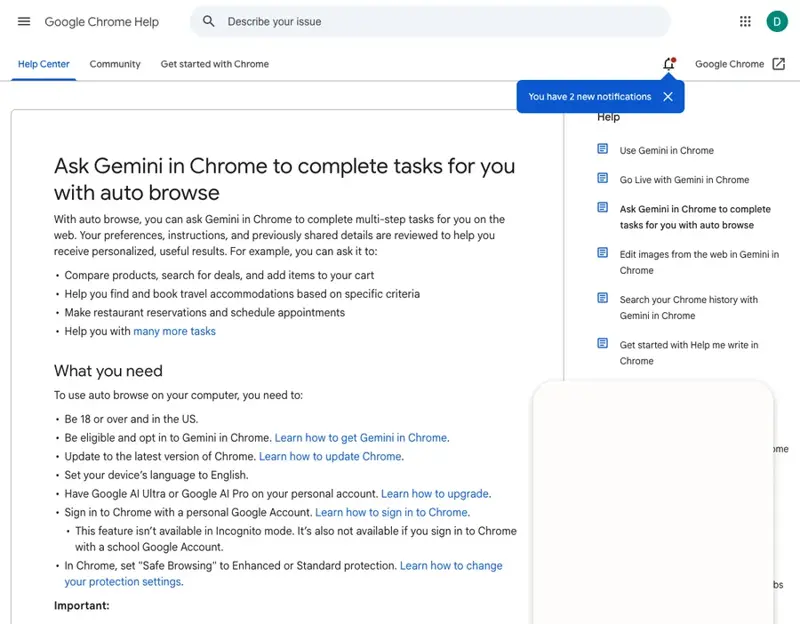
Clearing a pile of open tabs. This is the single best “first try” for a skeptic. Comet’s sidecar reads whatever page you’re on instantly. Chrome can “compare and summarize” up to about 10 tabs, but you have to turn on sharing first. Edge’s Copilot Mode does the same job for free if Edge is already your browser. Winner for beginners: Comet — zero setup, just ask “summarize these.”
Research. This is Perplexity’s home turf — its whole product is cited, source-linked answers, so Comet shines when you want to trust where an answer came from. Chrome is fine but more of a generalist. If you’re a ChatGPT subscriber, the desktop app’s built-in browser now does the deep-research-while-browsing job that Atlas used to. Winner: Comet, narrowly, for the citations.
Shopping and price comparison. Here it gets interesting. All three can browse product pages and compare. Chrome has a real edge because Google built a “commerce protocol” with retailers like Shopify, Etsy, Wayfair, and Target, so checkout flows are smoother — but it still makes you confirm the actual purchase. A nice real-world example someone shared: “Hey, find me a winter coat under $200 across REI, Patagonia, and Backcountry.” That’s the sweet spot. Winner: Chrome Auto Browse, if you’re in the US and paying for it; otherwise Comet does the job.
Trip planning and booking. This is where you should lower your expectations. Chrome’s Gemini demo specifically showed booking a trip using your Gmail schedule, and it works well with Google Flights. But TechCrunch’s hands-on test of Comet’s agent is the cautionary tale: asked to find airport parking with a price limit, it entered the wrong dates, repeated the mistake after being corrected, and still tried to push an incorrect itinerary to checkout. Winner: Chrome for Google-flavored trips — but check every detail before you confirm anything.
Email and calendar. No contest. Comet can connect to Gmail and Calendar but asks for unusually broad account access to do it. Chrome’s whole pitch is built-in Gmail + Calendar through its “Personal Intelligence.” Winner: Chrome Auto Browse, clearly.
Doing things in the background. Want it working while you do something else? Comet’s top “Max” tier ($200/month) has a background assistant that juggles several tasks. Chrome’s agent runs in its own tab so you can keep browsing. Winner: Comet Max — but that’s a power-user price, and honestly not where a beginner should start.
So which one wins for you?
Here’s the full board as it actually stands today, after the Atlas news:
- You’re curious, on a budget, and don’t want to install anything weird: Perplexity Comet. Free, cross-platform, gentlest learning curve. Still the default recommendation.
- You care about privacy and don’t want your browsing feeding an ad profile: Brave Leo. Free tier, and the data stance is genuinely the best of this group.
- You already use Edge at work: Copilot Mode. It’s free and it’s already there. Zero-friction way to find out whether you like any of this.
- You’re in the US, pay for Google AI, and live in Gmail/Calendar: Chrome Auto Browse. It’s the browser you already have, plus an agent that knows your schedule.
- You’re a ChatGPT person and you’re here because Atlas is going away: the ChatGPT desktop app, not another browser. That’s where OpenAI moved the whole thing.
- You mostly want a clean, fast, private browser and the AI stuff sounds like a hassle: honestly? Stay on Chrome, Safari, or Brave with the AI features off. More on that next.
What none of them can fix
A new browser won’t fix these, so go in clear-eyed:
- They confidently get things wrong. The booking-dates failure above isn’t a one-off — agents hallucinate on multi-step tasks. Always review before you confirm a purchase, a booking, or anything you’d be upset to get wrong.
- They can be turned off from under you. Atlas is the proof: a browser thousands of people made their daily driver is being switched off nine months after launch. Don’t build a workflow you can’t walk away from, and don’t put anything in one of these that you don’t have a copy of somewhere else.
- The best features cost money or aren’t available to you. Chrome Auto Browse is US-only and needs a paid Google AI plan. The free, everywhere options (Comet, Brave Leo, Edge Copilot Mode) are genuinely the most accessible — which is most of why they win for “normal people.”
- They want a lot of access. To be useful with your email and calendar, they need to see your email and calendar. That’s a real privacy trade you should make on purpose, not by clicking “Allow” on autopilot — see Are AI Browsers Safe?.
- They don’t make the decision for you. An agent can line up three rentals; it can’t tell you which one your family will actually like. The judgment is still yours.
- A faster browser won’t make you faster. The win comes from handing off repetitive tasks. If you don’t have repetitive browser chores, you won’t feel the magic — and that’s fine.
The bottom line
For most people, the best AI browser in 2026 is the free one that runs everywhere: Perplexity Comet. Try it on one real task — “summarize these tabs” or “compare this product across three stores” — before you let it touch anything important. If privacy is the thing you care about, Brave Leo. If you live in Google’s world, Chrome Auto Browse. If you’re a ChatGPT person, the desktop app is now the answer rather than a separate browser. And if none of this excites you, a normal browser is still a perfectly good answer.
The Atlas shutdown is worth one closing thought, because it’s the most useful thing that’s happened in this category all year: a well-funded, heavily-marketed AI browser lasted nine months. The capability survived; the product didn’t. That’s a good reason to hold these tools loosely — use them for the repetitive chores, keep your bookmarks somewhere you control, and don’t move your whole life into anything that could be switched off on a Tuesday.
The thing that actually separates people who get value from these tools from people who get burned isn’t which browser they pick — it’s whether they understand what the AI is doing well enough to know when to trust it. If you want that foundation, AI Fundamentals is the plain-English place to start, and ChatGPT vs Claude helps you pick the right assistant to pair with whatever browser you land on.
Sources
- As the browser wars heat up: the hottest Chrome/Safari alternatives in 2026 — TechCrunch
- ChatGPT Atlas vs Perplexity Comet: how agentic browsers work — HUMAN Security
- The 5 best AI browsers in 2026 — Zapier
- Ask Gemini in Chrome to complete tasks with Auto Browse — Google Chrome Help
- 5 Things to Know Before Using an AI Browser — TIME
