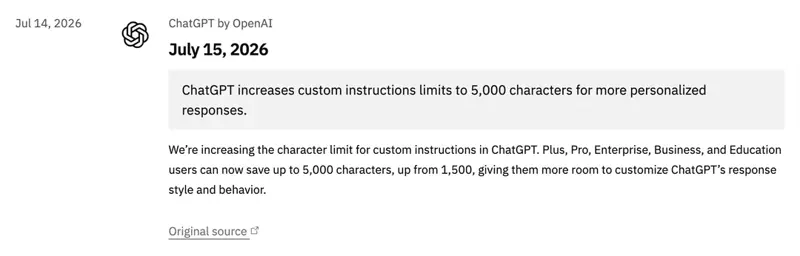
On July 15, OpenAI more than tripled the size of ChatGPT’s custom instructions — from 1,500 characters to 5,000. If you’ve ever hit the wall halfway through telling ChatGPT how you want it to write, you just got three times the room to finish the sentence.
But before you rush to fill all 5,000 characters: more room is not automatically better. The research on this is surprisingly clear, and so is the crowd of power users who’ve been living inside custom instructions for two years. The extra space is a real gift — if you spend it on structure instead of volume. Here’s exactly what to add, and what to leave out.
What actually changed
The old limit was 1,500 characters — roughly the length of a long text message. The new limit is 5,000, which is closer to a one-page briefing document. The change applies to your custom instructions: the settings that tell ChatGPT who you are and how you want it to respond, on every chat, without you re-typing it each time.
Three details matter:
- It’s paid-tiers only. Plus, Pro, Business, Enterprise, and Education plans get the 5,000-character limit. Free and Go plans stay at 1,500. If you’re on the free tier, this upgrade didn’t reach you — skip to the “If you’re on the free tier” section below, because there’s still a move for you.
- It applies to chats you’ve already started. Custom instructions became “live across all your conversations” back in November 2025, and this change is retroactive too — you don’t need to open a fresh chat for it to take effect.
- It’s the same two boxes as before, just bigger. Nothing new to learn; you simply have more space in the fields you may already use.
What custom instructions actually are (30-second version)
If you’ve never touched them: custom instructions are two text boxes in ChatGPT’s settings (Settings → Personalization → Custom instructions). One asks “What would you like ChatGPT to know about you?” The other asks “How would you like ChatGPT to respond?” Whatever you write there is quietly attached to every chat you start, so you stop re-explaining “I’m a nurse,” “keep it short,” “no jargon” ten times a day.
If you want the full walkthrough for ChatGPT, Claude, and Gemini, our complete custom instructions guide is the place to start. This post is about one thing: what to do now that the ChatGPT box just got three times bigger.
What to add with your new 5,000 characters
The mistake people make with a bigger box is treating it like a diary — dumping every preference they’ve ever had. The move that actually works is treating it like a brief: four labeled blocks, each short and specific. Here’s the structure.
Here’s a copy-paste skeleton you can drop into the “How would you like ChatGPT to respond?” box and fill in. It’s deliberately short — you’ll likely use 1,500 to 2,500 characters, not the full 5,000, and that’s the point.
WHO I AM
- I'm a [role] who [what you do] for [who you serve].
- My level: [beginner / experienced] — so pitch answers accordingly.

HOW TO RESPOND
- Tone: [plain and direct / warm / formal]. Pick one.
- Length: under [200] words unless I ask for more.
- Format: put the answer first, then the reasoning. Use short lists.

RULES & GUARDRAILS
- If you're not sure, tell me — don't invent facts or sources.
- Always [your must]: e.g., show the steps, not just the result.
- Never [your must-not]: e.g., use buzzwords without explaining them.

WHAT GOOD LOOKS LIKE
- When I ask you to draft an email, a good answer is 5 sentences,
  no filler opener, ready to send. Not three paragraphs I have to cut.
The extra room is what finally makes blocks 3 and 4 fit. Under the old 1,500-character cap, a real guardrails list plus a worked example got squeezed out. Now they don’t — and those two blocks are where custom instructions go from “nice” to “actually changes the output.”
A few concrete ways different people are spending the new space:
- A marketer bakes in the brand voice, a short banned-words list, and one example of an on-brand vs off-brand sentence — so every draft lands closer to house style on the first try.
- A bookkeeper adds a standing rule: “You are not giving tax advice; when a question needs a professional, say so and add my disclaimer line.” That guardrail now runs on every client email automatically.
- A support rep pastes the three-step format their team uses for replies, plus a “match the customer’s urgency” note — turning a blank box into a consistent house style.
The counterintuitive part: a bigger box is a trap if you fill it wrong
This is the section nobody on page one of Google is writing, and it’s the most important one. Peer-reviewed and practitioner evidence both point the same way: detailed, well-targeted instructions improve output — but the gains plateau and then reverse when instructions get long, conflicting, or contradictory.
Researchers who tested richly-configured ChatGPT setups in 2026 (for example, a Cyberpsychology study on structured case analysis, and a quasi-experimental “WriteMate” writing tutor that lifted student scores from 6.8 to 8.2) found the same shape every time: structure and specificity help; sprawl and contradiction don’t. Prompt-engineering practitioners have a name for what goes wrong in an overstuffed instruction set — “prompt drift,” where the model quietly follows whichever rule came first or loudest and ignores the rest.
Three rules keep you on the right side of that line:
- Pick one primary tone. “Friendly, formal, technical, and playful” cancels out. Choose one and note when to switch (“technical only when I ask”).
- Don’t let rules contradict. “Be concise” and “explain everything in detail” can’t both win. Decide which matters more.
- Leave the box half-empty on purpose. If you can’t read your custom instructions out loud in about 90 seconds, they’re too long. Compact and structured beats full and sprawling — every study and every seasoned user agrees.
What this means for you
- If you’re on the free tier: you’re still capped at 1,500 characters — but that’s plenty if you spend it well. Skip the “who you are” essay and put almost everything into the how to respond box: one tone, one length limit, one format rule, one “if unsure, say so.” Those four lines fix 80% of what annoys people about default ChatGPT.
- If you’re a writer or marketer: this is your biggest win. Use the new room for a real voice guide plus a good-vs-bad example. That example is worth more than ten adjectives.
- If you work in a regulated or sensitive field (finance, legal, healthcare-adjacent): the extra space finally fits a proper guardrail block — disclaimers, “don’t give advice, flag for a professional,” “never state a number you can’t source.” Add it once, benefit on every draft. (See the limits section for the one thing to never put in there.)
- If you manage a team: write one shared “how we write” block and have everyone paste it. It’s the cheapest way to get consistent AI output across a group without training anyone.
- If you switch between ChatGPT and other AI tools: keep your instructions portable and short. A tight, structured block travels to Claude Projects or Gemini Gems; a sprawling ChatGPT-specific essay doesn’t.
What the extra room won’t fix
Be honest with yourself about what 5,000 characters can and can’t do. It’s more space, not a smarter model.
- It won’t make ChatGPT follow a rule it was already ignoring. As one power user put it after the announcement: “What good is that if it won’t listen to the custom prompt?” If a instruction gets ignored at 1,500 characters, repeating it louder at 5,000 rarely helps — rephrase it or move it to the top instead.
- More characters can mean worse output. Past a point, every extra rule is another thing that can conflict or get dropped. Long, exception-heavy instructions increase variance and make it harder to tell why an answer went sideways.
- Order matters, and later rules lose. Instructions buried at the bottom of a long block get underweighted. Put your non-negotiables near the top.
- It doesn’t make answers true. Guardrails like “don’t invent sources” reduce hallucination; they don’t remove it. Keep checking anything that matters.
- Never put private or client data in it. Custom instructions are stored personalization, not a secure vault — don’t paste client names, account numbers, or confidential details. Describe your context (“I handle bookkeeping for small retail clients”), never the specifics.
The bottom line
The headline is “3× bigger.” The real story is subtler: for two years, the useful parts of a custom-instruction setup — a guardrails list and a worked example — didn’t fit. Now they do. That’s the upgrade. Not “write more,” but “finally have room to be specific about the things that actually change the output.”
So don’t fill the box. Structure it. Four short blocks, one primary tone, rules that don’t fight, and one example of what good looks like. Leave the rest empty. You’ll get more out of a well-built 2,000 characters than a sprawling 5,000 — and you’ll actually be able to tell why ChatGPT does what it does.
Want to go from a decent setup to a genuinely reliable one? Our Prompt Engineering course covers the structure-over-volume principle in depth, and Advanced Prompts shows the patterns power users lean on — the first two lessons of each are free. New to all of this? Start with AI Fundamentals, then come back and build your instructions.
