

If you opened ChatGPT this week and it suddenly seemed to know you a little too well — or, for a noisy handful of people, suddenly seemed to forget everything — you’re not imagining it. On June 4, OpenAI rebuilt the part of ChatGPT that remembers you. The new system has an odd name, “dreaming,” and it quietly changes the single most useful thing about a daily AI assistant: whether it actually holds on to what you told it last time, or makes you start from scratch every chat.
Here’s the plain-English version of what changed, what ChatGPT now remembers about you, and — the part most coverage skips — exactly how to control it.
What “dreaming” actually means
Start with the old way, because the contrast is the whole story.
Since 2024, ChatGPT’s memory worked off a list of saved memories. It only wrote something down when you gave it a clear nudge — “remember that I’m vegetarian,” “remember I’m planning a trip to Singapore in July.” OpenAI’s own description of that system is brutally honest: it was “like talking to someone who took a few notes, but still forgot everything that wasn’t written down.” And those notes went stale. Tell it about a July trip and, come September, it still thinks you’re packing.
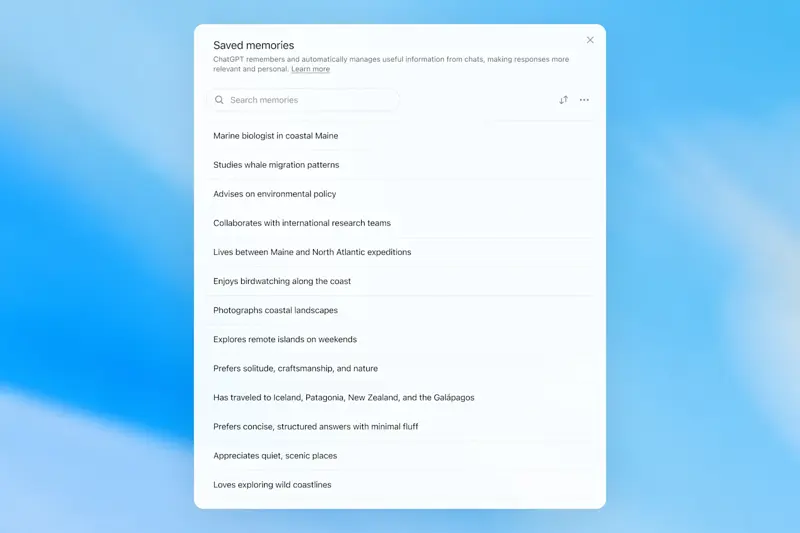
“Dreaming” is the upgrade. Instead of waiting for you to say “remember this,” ChatGPT now runs a background process that reads across your past conversations and quietly synthesizes a picture of who you are and what you care about — no explicit command needed. OpenAI calls the new version Dreaming V3, and frames it as a fix for three problems: memories going stale, memories being wrong, and the whole thing not scaling to hundreds of millions of people over years of chats.
OpenAI measures “good memory” against three jobs, and they’re a useful way to think about it:
- Carry context forward. Mention your camera setup once, and weeks later when you ask about compatible gear, you get an answer tailored to your kit instead of generic advice.
- Follow your preferences. If you’ve made clear across chats that you’re vegetarian, travel on a budget, and hate long preamble, a good memory applies all of that without being reminded.
- Stay current. This is the new trick. After your July trip, dreaming is meant to revise “you’re going to Singapore in July” into “you went to Singapore in July 2026” — so it stops treating old plans as live.
What actually changed on June 4
Three concrete things, in order of who they affect.
Free users get real memory for the first time. Until now, the smart background memory was locked to paying subscribers. OpenAI says it cut the compute needed to run dreaming for free accounts by roughly 5×, which is what finally made a free-tier rollout practical. If you’ve only ever used the free ChatGPT, this is the headline: it’s coming to you over the next few weeks.
Plus and Pro get twice the memory. Paid users keep more in their heads — OpenAI’s words: “twice as much memory capacity.” They didn’t publish a number in megabytes; it’s simply double whatever the old ceiling was.
It remembers more accurately. OpenAI published a benchmark comparing three generations of its memory on factual recall — how often it correctly remembers something you told it. The jump is real: 41.5% in 2024, 67.9% in 2025, and 82.8% with the new Dreaming V3. (OpenAI also showed improvements in following preferences and staying current, but those came as before/after examples rather than hard numbers, so treat the recall figure as the one solid stat.)
The rollout started June 4 for Plus and Pro users in the US. Free and Go users, and other countries, follow “over the coming weeks.” So if you don’t see anything different yet, that’s expected — it’s arriving in waves, not all at once.
“It wiped my memories” — what happened, and the fix
The loudest reaction online this week wasn’t excitement. It was a small group of long-time users opening their memory and finding it… rearranged. One described the update turning a year of carefully built notes into “a generic user biography sheet.” Another said the new summary kept “a tiny fraction of what I actually need remembered.”
Here’s the honest read. Moving from an explicit list to an auto-synthesized summary genuinely changes how your memories are stored — granular entries get merged and described at a higher level. OpenAI hasn’t said exactly how old saved memories were carried over, so some people are seeing their detailed list condensed into a tidy paragraph, and they don’t love it.
If that’s you, there’s a direct fix: you can switch back. Go to Settings → Memory → Saved memories to revert to the old explicit-list system. And before any big memory change in the future, the safe habit is to back up what matters — open your memory list and copy it somewhere first.
How to see and control what ChatGPT knows about you
This is the part worth bookmarking. The path is consistent across desktop and mobile: your profile icon → Settings → Personalization → Memory.
- See everything it knows: Settings → Personalization → Memory → Manage. Or just ask in any chat: “What do you remember about me?” — it’ll list it out.
- Read the new summary: look for the Memory Summary page in that same Personalization → Memory section. You can edit it directly, add facts, or tell it which topics to bring up and when (“don’t mention my gym routine unless I ask”).
- Edit or delete one thing: click the three-dot icon (⋮) next to any entry. Mid-conversation, you can also say “Forget that I mentioned X.”
- Wipe it all: Manage → three-dot menu (top right) → Delete all memories → confirm. Clean slate.
- Turn memory off entirely: toggle it off in the same Memory settings, or use Temporary Chat for one-off conversations that don’t get remembered at all.
One catch that trips people up: choosing “Don’t mention this again” on the summary page only hides a reference — it doesn’t delete the underlying information. To truly remove something, you have to delete it from every place it lives (saved memories, chats, archived chats, uploaded files, connected apps). More on that below.
Updated June 2026: the new memory controls
OpenAI just added three new controls to the Memory Summary page that make this much easier — rolling out on the web now, with mobile following:
- “Delete and turn off memory” in one step. There’s now a single option in the three-dot (⋮) menu that wipes your saved memories and switches memory off together — so you don’t have to do it in two separate places. Note it does not delete your past chats; if you turn memory back on later, ChatGPT may build new memories from chats still in your history.
- Edit the summary by just typing. Instead of hunting for the right entry, you can type what you want changed into a text box at the bottom of the summary page — e.g., “stop assuming I’m a beginner” — and it updates the summary accordingly.
- Highlight to correct. You can now select any text in the memory summary and make a specific correction to that exact part, like editing a document.
If privacy is your main concern, the cleanest combo is still the same: use Temporary Chat for anything you don’t want remembered at all, and run the “delete and turn off” option if you want a full reset.
What this means for you
If you use the free version: This is genuinely new for you. Soon ChatGPT will start carrying context between chats without you doing anything. Worth a one-time check of your memory settings when it lands, so you decide what it keeps — not the other way around.
If you pay for Plus or Pro: You’ve got double the memory and the most accurate version. The payoff shows up in long-running stuff — a project, a job search, an ongoing plan — where it stops asking you to re-explain the basics. Spend five minutes seeding it with the essentials.
If you’re privacy-minded: Read the next section before you get comfortable. The controls are real and worth using, but “remembers more about you” is exactly as double-edged as it sounds.
If you’re in the EU or UK: You’re waiting. Memory features, including this one, aren’t available in the EU, UK, Switzerland, Norway, Iceland, and Liechtenstein, for now — a regulatory hold, not a bug. Don’t go hunting for a setting that isn’t there yet.
If you’ve never opened memory settings: Do it once this week. You’ll likely find ChatGPT already remembers more than you expected. Five minutes of pruning turns it from slightly unsettling into genuinely useful.
What it can’t do (yet)
A few honest limits before you lean on it:
- It’s region-locked. No memory at all in the EU, UK, Switzerland, Norway, Iceland, or Liechtenstein right now. Files and Gmail sources are off there too.
- “Hide” isn’t “delete.” Suppressing a reference leaves the data in place. Real deletion means clearing it from every source it touches — there’s no single “forget all of this everywhere” button.
- It can still be confidently wrong. A better memory is still an AI memory. It can misremember, merge two facts into a wrong one, or surface something out of context. Check anything that matters.
- Free is the lighter version, and it’s gradual. Don’t expect the full paid experience on a free account, and don’t expect it overnight — it’s rolling out in waves.
- It’s not private by default. If the “Improve the model for everyone” setting is on, your chats and memories can be used to train OpenAI’s models. You can turn that off under Settings → Data Controls.
The bottom line
Strip away the odd name and this is a real shift: ChatGPT is moving from a tool you re-introduce yourself to every morning into one that actually knows you — and, for the first time, that’s coming to everyone, not just subscribers. The upside is less repeating yourself. The cost is that “knows you” and “stores a lot about you” are the same sentence, so the controls aren’t optional.
The good news is that getting value out of an AI that remembers you is a skill, and a quick one to learn. Our AI Fundamentals course walks you through exactly this kind of back-and-forth — how to set up an assistant that works for you, what to tell it, and what to keep to yourself — so the new memory makes ChatGPT genuinely more useful instead of just more nosy.
Open your settings. See what it already knows. Then decide what stays.
Sources
- Dreaming: Better memory for a more helpful ChatGPT (OpenAI)
- OpenAI says ChatGPT’s memory feature is getting smarter and coming to free users (9to5Mac)
- ChatGPT’s memory is getting better, especially if you’re on the free tier (Engadget)
- ChatGPT rolls out memory upgrade for free users (BleepingComputer)
- Memory FAQ (OpenAI Help Center)