Around 60,000 people a month search for “Grok Imagine,” and this week that curiosity spiked: Grok’s big model update landed July 8, the demo clips flooded X, and one creator summed up why it matters better than any press release — he now produces a daily video series entirely solo with it. “The unlock is not that it makes beautiful art. It is that one person can now run a daily video brand.”
Here’s what Imagine actually is, how to use it step by step, what the free tier really gives you, and where it falls short — so you can decide in ten minutes whether it belongs in your toolkit.
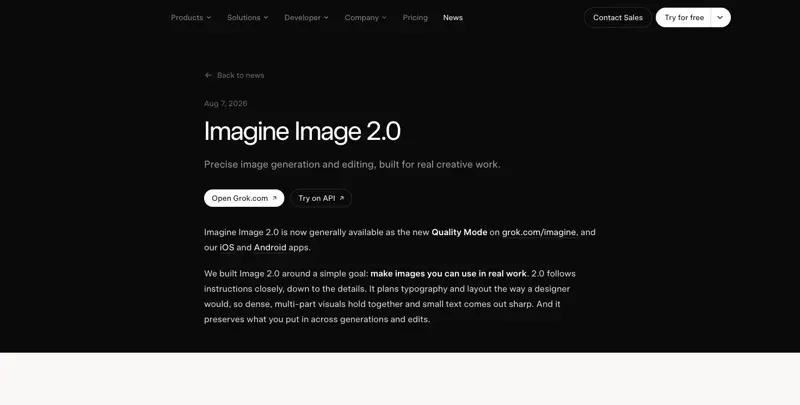
Updated August 12, 2026: xAI shipped a real upgrade on August 7 — Imagine Image 2.0. It changes two things this guide originally got right about the old version and now needs to correct: it adds real point-and-click editing (no more re-prompting from scratch to fix one detail), and it’s now noticeably better at rendering text in images, which used to be a hard no. The new editing tools and templates are covered below, right after the original step-by-step.
What Grok Imagine is
Imagine is the image and video generator built into Grok, xAI’s chatbot. You describe a picture in plain English, it makes the picture — and then, the part that hooks people, you can tap once more and it animates that picture into a short video clip with motion and sound.
Two things make it different from the image tools you may have tried:
- The image-to-video step is built in. Most free image generators stop at the image. Imagine treats the image as a starting frame.
- It lives where you already are. If you use X, it’s already in your app. There’s also the standalone Grok app and grok.com — no X account needed there; Google or email sign-in works.
Step by step: your first image
- Open Imagine. In the Grok app or on grok.com, it’s the Imagine tab in the sidebar. Inside X, open Grok and look for the image/Imagine option.
- Describe the picture. Plain sentences work; specifics help. Instead of “a dog,” try: “A golden retriever in a red bandana sitting in the back of a pickup truck, golden-hour light, shallow depth of field.”
- Wait a few seconds. You’ll usually get a small set of variations.
- Pick one and refine. Ask for changes in words: “same image, but overcast light” or “make it a wide shot.”
- Download — or move to video.
Step by step: turn it into a short video
- With your image open, choose animate / make video.
- Optionally describe the motion: “slow push-in, the dog turns its head.” Without direction it picks something sensible.
- Clips are short — think seconds, not minutes. Long enough for a social post, an intro, a product tease.
- Note the gate: on the free tier you generally get images only — video generation sits behind the paid plans. If the button politely declines, that’s why.
New as of August 7: real editing, not just re-prompting
Before Image 2.0, “editing” an Imagine picture meant describing the change in words and hoping the regenerated image kept everything else the same — it usually didn’t. That’s the specific thing this update fixes.
Magic wand / segmentation editing. You can now select just the part of an image you want to change — a jacket, a background object, one word on a sign — and modify only that region. The rest of the composition holds steady, which is the actual point: no more losing a good result because you wanted to tweak one small thing.
One-click background removal. Generate an image, strip the background to transparent, and drop the subject onto something else — useful for product shots and mockups without a separate tool.
Multi-reference editing (up to 5 images). Feed Imagine up to five reference images at once — a product photo, a brand color palette, a pose reference — and it blends the direction across all of them rather than forcing you to describe everything in text.
Ready-made templates. xAI shipped one-tap templates for the jobs people were already trying to force Imagine into: product color changes, e-commerce photos, professional headshots, icon and mascot design, emoji creation, and game asset props. Open a template, drop in your source image, and it applies the right editing steps automatically instead of you reverse-engineering the prompt yourself.
Smart resize across nine aspect ratios. Generate once, then resize intelligently for Instagram square, Story/Reel vertical, a banner, or a thumbnail — without the cropping guesswork of a manual resize.
One correction to the original version of this guide: we listed “reliable text in images” as something Imagine couldn’t do. That’s no longer accurate for 2.0. xAI specifically built this version to plan typography and layout the way a designer would, and independent testing since the August 7 launch has it ranked #2 in the Arena leaderboard for image quality, just behind gpt-image-2 — small text and dense, multi-part visuals genuinely hold together now in a way the July version couldn’t manage.
What the free tier actually includes
xAI doesn’t publish official caps, so treat these as the commonly reported figures (July 2026), not promises:
| Tier | Images | Video | Reported reset |
|---|---|---|---|
| Free | ~5/day | No | midnight UTC |
| SuperGrok Lite ($10/mo) | ~20/day | ~3/day | midnight UTC |
| SuperGrok ($30/mo) and up | ~50/day | ~10/day | midnight UTC |
Generated content is labeled as AI-made — expect a watermark on what you export, especially for posting on X. And one user’s warning worth passing on: the usage meter moves faster than you think. He measured roughly 12–20 images eating about a quarter of his allowance. Make the first images count.
Prompt patterns that work
The difference between a muddy result and a striking one is usually one of these:
- Name the style. “flat vector illustration,” “35mm film photo,” “watercolor,” “product shot on white.”
- Name the light. “golden hour,” “soft studio lighting,” “neon night.” Light is the single highest-leverage word in image prompts.
- One subject, one setting. Crowded prompts produce crowded images. Two sentences beat six clauses.
- For video: describe the camera, not the plot. “Slow zoom out,” “handheld follow shot.” Simple motion reads as professional; complex action reads as glitchy.
What this means for you
If you make social content (for yourself or a small business): this is the fastest free way to test whether AI visuals fit your feed. The image → short clip combo is exactly the shape of a scroll-stopping post.
If you run a small business: product-adjacent scenes, seasonal posts, quick promo images — the free tier covers a real weekly posting habit if you’re deliberate about your ~5 shots.
If you’re a marketer: treat it as a mood-board and concept machine. Generate ten directions in the time a brief takes to write. Final assets may still come from your designer — but the “no, more like this” conversation gets dramatically shorter.
If you’re just curious: it’s the most instantly gratifying free AI tool of the moment. Describe something absurd, watch it move eight seconds later.
What it can’t do
- Long videos. Clips run seconds, not minutes. This is a social-clip machine, not a video editor — for actual editing you’ll still want real tools (our AI Video Creation course covers that stack).
- Reliable text in every scenario. Image 2.0 (Aug 7 update) made a real leap on this — small text and layout now hold together far better than before — but it’s not flawless for dense, long-form text. For anything mission-critical (a logo, a menu, packaging copy), still proof the output carefully before you ship it.
- Unlimited free experimentation. ~5 images a day disappears fast once you start refining. Plan your prompts before you spend them.
- Work-safe by default in every corner. Grok also has an 18+ “spicy” side. Imagine’s standard mode enforces content rules, but if the account is a work account, stay out of that corner entirely.
- Guaranteed rights clarity. AI-image usage rights are still a moving legal area everywhere. For a logo or anything trademark-adjacent, talk to a designer; use Imagine for content, not identity.
The bottom line
Grok Imagine is the rare AI feature where the free tier is genuinely enough to evaluate it: five images is five real attempts at something you’d actually post. If the results fit your brand’s look, the $10 tier turns it into a daily tool — and if they don’t, you’ve lost nothing but a coffee break.
Want to get properly good at this — prompts, styles, consistency across a whole brand feed? Our AI Image Generation course goes from first prompt to a repeatable visual system, and it pairs well with AI Video Creation once your images start moving.
Sources
- Introducing Grok 4.5 — xAI (July 8, 2026)
- Imagine Image 2.0 — xAI (Aug 7, 2026)
- Grok FAQ — xAI docs
- Grok Imagine limit trackers (user-reported caps) (2026)
- TestingCatalog — xAI launches Imagine Image 2.0 in Grok Quality Mode
- The Next Web — Grok’s image tools get a professional upgrade with templates, precise editing, and an Arena #2 ranking
- Creator and user reports on X (July 8–11, 2026; Aug 7–11, 2026)