The client inquiry is the most important email you write — and the one you put off the longest. You know the drill: a “Hi, are you available for…?” lands at 9 p.m., you’re tired, you’ll “reply properly tomorrow,” and by tomorrow they’ve booked the photographer who answered in an hour.
Speed wins bookings. And this is exactly the kind of repetitive, high-stakes writing ChatGPT is genuinely good at — if you set it up so it sounds like you and not like a form letter. Here’s the whole system, plus five reusable templates for the inquiries that come up over and over.
The 5-minute setup that makes this work
The reason most photographers try ChatGPT once and quit: the default replies sound like a corporate chatbot. Warm-but-generic. And couples planning a wedding can absolutely tell.
The fix is to teach it your voice first. Start one chat you’ll reuse for all client emails, and paste this:
“You help me reply to photography inquiries. I’m a [wedding] photographer in [city]. My voice is warm, personal, and unhurried — I write like a real person, not a brochure. My packages start at [$X]. I never sound desperate or pushy; I move gently toward booking a quick call. When I paste an inquiry, write a reply that sounds exactly like me. Confirm you understand and I’ll paste the first one.”
Then — and this is the step that changes everything — paste two or three of your own past replies as examples. Say: “Match this tone.” ChatGPT is a mimic; give it something real to mimic and the output stops sounding like AI.
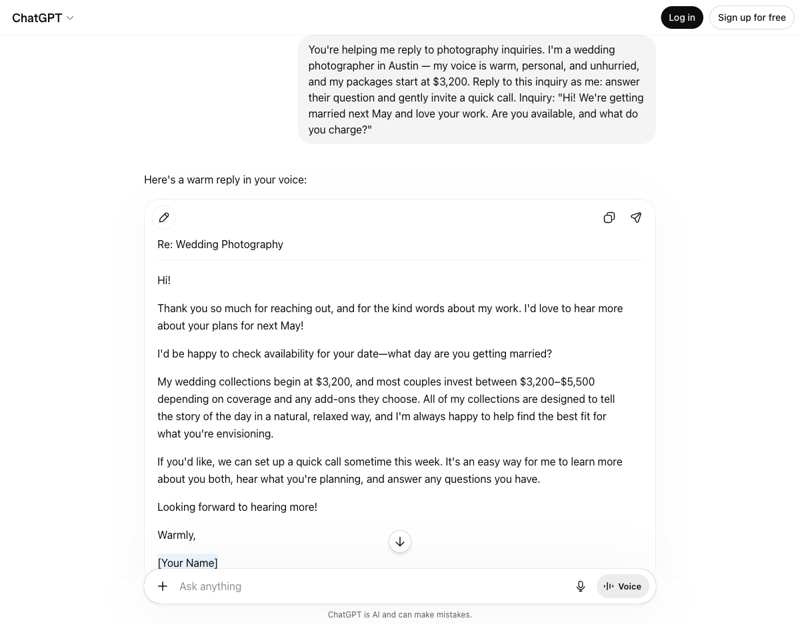
The core move
With that chat set up, your daily workflow is two steps:
- Paste the incoming inquiry.
- Type: “Reply as me — answer their question, and gently move toward a call.”
Read it, tweak one line so it’s truly yours, send. Two minutes, not twenty. Multiply that across every inquiry this month and you’ve bought back an evening.
The 5 templates worth saving
These are the inquiries that repeat. Build each one once and reuse it forever — just paste the new details each time.
1. The pricing-only inquiry. “They asked only for prices. Write a reply that gives a clear starting price, leads with what makes the experience worth it, and invites a quick call to talk through their date.” (The goal is to answer the price and shift the conversation to value.)
2. The date you can’t do. “I’m booked on their date. Write a warm reply that says so without making them feel rejected, and offers a nearby date or a referral.” Turning a “no” into goodwill (and sometimes a referral) is pure brand-building.
3. The “can you do it for less?” “They love my work but want a smaller/cheaper package. Write a reply that holds my pricing kindly, offers a genuinely smaller option if I have one, and never sounds defensive.”
4. The ghosted follow-up. “They inquired, I replied, then silence for a week. Write a light, friendly nudge that doesn’t sound needy and gives them an easy way to say yes or ’not this time.’” The follow-up nobody enjoys writing — so it never gets sent.
5. The post-delivery review request. “I just delivered their gallery. Write a warm thank-you that asks for a review with a direct link, and makes leaving one feel easy.” Reviews are your best marketing, and asking well is a skill ChatGPT genuinely helps with.
Save these five as saved prompts or keep them in your business chat. That’s your inquiry system — built in an evening.
What this means for you
If you’re a wedding photographer: Templates 1, 2, and 4 are your bread and butter. High-stakes, emotional inquiries where tone matters most and a slow reply costs the most.
If you shoot portraits, families, or seniors: Higher volume, more repetitive. Templates 1 and 5 (pricing and reviews) give you the biggest return because you send them constantly.
If you’re a commercial or brand photographer: Reframe the brand brief as “polished and professional,” and lean on a proposal-style version of Template 1 for project inquiries.
If you’re just starting out: Set up all five tonight. You’ll respond like a seasoned pro from your very first inquiry, which is exactly when fast, confident replies matter most.
What it can’t do
- It can’t know your real availability or prices. It will happily invent a date or a number. You supply the facts; it supplies the wording. Always check both before you hit send.
- It can’t keep your voice without examples. Skip the “paste your past replies” step and it drifts back to generic. The examples are non-negotiable.
- It can’t read the room on sensitive situations. A grieving family, a complicated divorce, a delicate vendor issue — handle those personally. AI is for the routine, not the tender.
- It shouldn’t send anything unread. Never wire it up to auto-reply. A two-minute human read is the whole point; it catches the one weird sentence before your client does.
- It won’t fix a weak offer. If your pricing or packages confuse people, better-worded emails only go so far. Sometimes the inquiry isn’t the problem.
The bottom line
A fast, warm, on-brand inquiry reply is one of the highest-leverage things in your business — and it’s the thing you most often let slide. Teach ChatGPT your voice once, build your five templates, and you’ll answer every inquiry in two minutes flat, sounding more like yourself than the replies you used to dash off at midnight.
This is just one slice of the business side. If you want the whole system — inquiries, pricing guides, questionnaires, captions, and a reusable prompt library — our AI for Photographers (Business) course builds it with you step by step. And once you’ve nailed inquiries, AI-Powered Content Creation helps you turn each shoot into a week of marketing without the late nights.
