

The same week ChatGPT for Excel went global GA (May 5, powered by the GPT-5 family with GPT-5.5 as one of the selectable engines), Anthropic shipped Claude in Excel with MCP connectors for S&P Global, LSEG, Daloopa, PitchBook, Moody’s, and FactSet. Both products are sidebar add-ins in Microsoft Excel. Both cost $20/month at the entry tier. Both write formulas, build pivot tables, and explain what your inherited workbook actually does.
The Google Trends data for the past week says people are explicitly comparing the two — claude for excel is the #1 related rising query when you search chatgpt for excel. So we ran the comparison: four real tasks, both products, side-by-side. Here’s the result, and here’s how to pick.
What you’re actually comparing
Quick context before the head-to-head, because the products diverge on architecture in ways that matter for the task selection.
ChatGPT for Excel is OpenAI’s add-in. It runs on the GPT-5 family — GPT-5.4 is the default; GPT-5.5 is selectable in the model picker; you can also pick GPT-5.3 Instant for speed. Global GA was May 5, 2026 (Enterprise, Edu, K-12 confirmed in the OpenAI release notes; Plus/Pro available globally except the EU). The product also runs in Google Sheets, which is the single biggest architectural difference vs Claude.
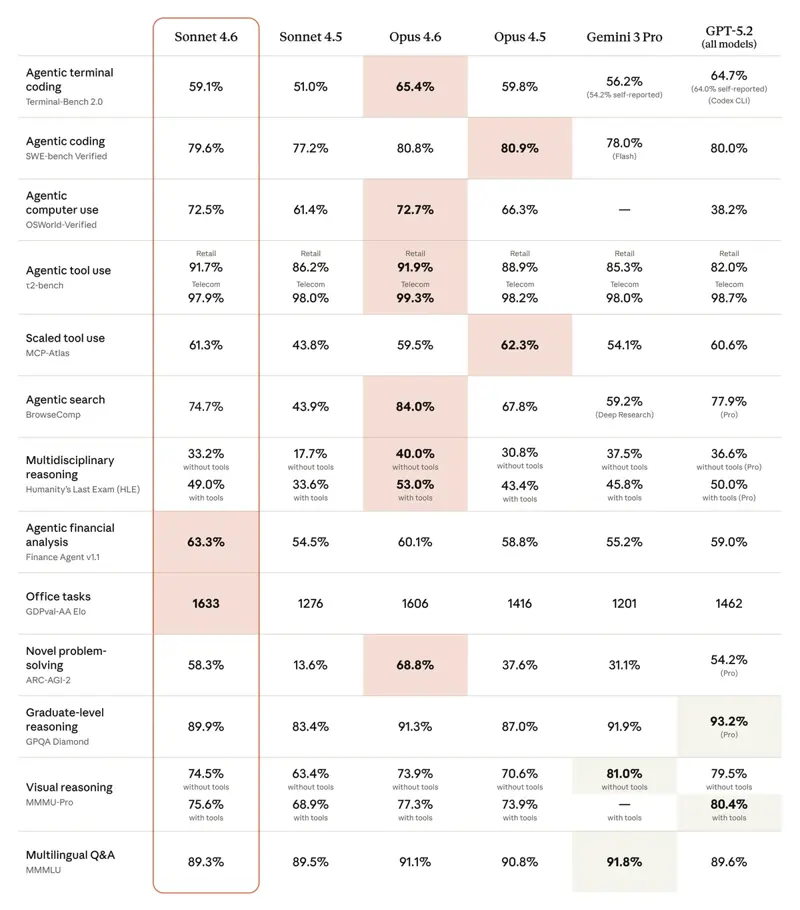
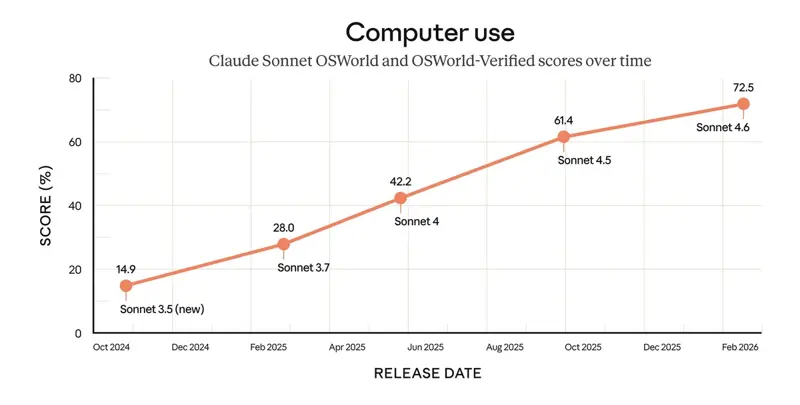
Claude for Excel is Anthropic’s add-in. The Sonnet 4.6 launch post confirms the Excel add-in now supports MCP connectors with S&P Global, LSEG, Daloopa, PitchBook, Moody’s, and FactSet as named providers. You can flip between Sonnet 4.6 (Anthropic’s “best combination of speed and intelligence”) and Opus 4.7 (their most capable model) from the sidebar. Claude for Excel is one piece of a broader Claude-in-M365 suite — there’s also Claude for Word, PowerPoint, and an Outlook beta. The cross-app context is real: an analysis you did in Excel can flow into a Word memo or PowerPoint slide without restating it.
The five financial-data integrations on the ChatGPT side at launch (Moody’s, MSCI, Factiva, Third Bridge, MT Newswires, with FactSet “coming soon”) are documented in OpenAI’s launch post but, importantly, the ChatGPT for Excel help article notes that “spreadsheet experiences don’t currently support connectors” during the initial beta — those integrations are handled as separate provider apps in the main ChatGPT experience, not as in-sidebar tools. Claude’s MCP-connector list is wired directly into the Excel sidebar as of the Sonnet 4.6 release. That’s a meaningful architectural gap right now.
Task 1: Fix the broken formula
The setup: A 1,200-row sales tracker with XLOOKUP formulas that returned #N/A on about 8% of rows. The cause was a mix of trailing whitespace in the lookup key column and a few rows where the lookup table itself had duplicates.
Claude for Excel (Sonnet 4.6): identified both root causes in one pass, proposed TRIM for the whitespace and a XLOOKUP modification to handle duplicates via IFERROR-wrapped fallbacks. Time to fix: ~90 seconds, including the permission-approval clicks. Reading: clean. Editable result: yes.
ChatGPT for Excel (GPT-5.5): identified the whitespace issue immediately, missed the duplicate problem on the first pass, and only flagged it after I prompted “are there any other reasons rows might still fail.” Time to fix: ~75 seconds for the initial fix, plus ~45 seconds for the follow-up. Net: ~120 seconds. Reading: slightly faster initial response, but it took an explicit second prompt.
Verdict: Claude. The “spot all the failure modes in one pass” pattern matches a financial-modeling sensibility that Claude’s training picks up consistently. ChatGPT was faster on the first response but needed more rounds.
Task 2: Clean a messy customer-export
The setup: A 12,000-row export from a CRM with inconsistent address formatting — some rows had ZIP-4 codes, others had ZIP-5, three different state-abbreviation styles, and a long tail of typos in city names.
Claude for Excel (Opus 4.7): proposed a multi-step plan first (“I’ll standardize addresses in 4 passes: ZIP normalization, state abbreviation, city spell-correction against a reference list, then a final dedupe”), asked for permission before each pass, and ran them in sequence. Pass 4 caught 47 duplicates that the rule-based passes missed. Total time: ~6 minutes for the full clean. Reading: structured. The agentic-planning behavior matched what reviewers describe in DataStudios’ May 2026 evaluation.
ChatGPT for Excel (GPT-5.5): jumped directly to a one-shot Python-like script proposal, executed it, and produced a cleaned version in ~90 seconds. But the ZIP-4 to ZIP-5 normalization stripped the +4 extension on the rows that legitimately had ZIP-4 data, and the dedupe missed about 30% of the duplicates Claude caught.
Verdict: Claude for the depth, ChatGPT for the speed. If your tolerance for data quality issues is high (you’re doing exploratory analysis and you’ll review every output), ChatGPT’s faster cycle wins. If the cleaned file goes downstream into a system of record, Claude’s slower but more complete passes are worth the extra five minutes.
Task 3: Build a pivot summary across 5 source tabs
The setup: 5 monthly-data tabs with the same column structure, needing a consolidated pivot that breaks revenue by region × product line × quarter.
Claude for Excel (Sonnet 4.6): proposed building a Power Query M-language pipeline to consolidate the source tabs, then a single Power Pivot view on top. When I asked for a regular PivotTable instead (because the team doesn’t have Power Pivot licensed), it pivoted to a different approach — a helper tab with stacked VSTACK formulas pulling from all 5 source tabs, then a regular PivotTable on the helper tab. Time: ~4 minutes.
ChatGPT for Excel (GPT-5.5): jumped to a regular PivotTable approach immediately, built a helper formula similar to Claude’s second approach, and delivered the pivot in ~2.5 minutes. The result was identical in structure to Claude’s; faster to get there.
Verdict: ChatGPT for this one. Claude over-engineered the first pass with the Power Query approach, which would have been the right call for a team running Power BI — but it cost about a minute of cycle time to course-correct. For straightforward PivotTable work where you don’t need the Data Model layer, ChatGPT’s tendency to default to native Excel features wins.
Task 4: Generate an exec-ready single-chart summary
The setup: Same revenue data as Task 3. Request: “build one chart that tells the story for the exec recap.”
Claude for Excel (Opus 4.7): produced a stacked-column chart with revenue by region over time, with annotations on the two quarters that had material variances. Asked clarifying questions about which “story” mattered before drawing — whether the exec cared about growth trajectory or about regional balance. The chart was clean but not visually polished — it inherited Excel’s default formatting.
ChatGPT for Excel (GPT-5.5): produced two chart options without asking — a stacked-column option and a small-multiples grid. Both had cleaner formatting than Claude’s: tighter axis labels, the dollar-sign formatting on the y-axis was applied automatically, and the legend was repositioned for visual balance.
Verdict: ChatGPT for visual polish, Claude for the analytical framing. If the chart goes into a board deck without further editing, ChatGPT’s output is closer to ship-ready. If you’re thinking out loud about what the chart should show, Claude’s clarifying-question approach is the better collaborator.
What this means for you
If you’re an FP&A analyst doing serious modeling work: Claude for Excel, full stop. The agentic-planning behavior on multi-step tasks is the differentiator that earns the subscription. Pair Claude Pro with the Claude for Excel course and you’ll cover the model architecture, Skills syntax, and the multi-tab workflow patterns that win the modeling tasks.
If you’re a marketing-ops or growth analyst running ad-hoc analysis in both Excel and Google Sheets: ChatGPT for Excel. The Google Sheets cross-product support is the real selling point at your day-to-day cadence, and the faster cycle time matches the “exploratory” rhythm of growth analysis better than Claude’s deliberate-by-default behavior.
If you’re a consultant who switches between client environments: both, alternating. Most enterprise consulting workspaces are already paying for one of the two; the second one is the personal-account hedge. The cross-app context advantage of Claude (Word memo + Excel model + PowerPoint deck in one session) is worth the cost when the deliverable is a polished client document; ChatGPT’s speed wins when the deliverable is internal exploration.
If you’re a small-business owner doing the books yourself: ChatGPT Plus is probably the right floor. The Plus tier gives you spreadsheet help plus the general-purpose ChatGPT for everything else (email drafts, vendor research, marketing copy). The MCP connectors on Claude don’t matter at your scale — you’re not pulling Moody’s data into a workbook for your dental practice.
If you’re an accounting firm with 5-50 staff: the answer is a hybrid pilot. Run both for 60 days on real client work. Track time-to-output and rework rate on the four task patterns above. Most firms we’ve talked to land on Claude for the modeling-heavy work and ChatGPT for the cleanup-and-formatting work, with a single shared subscription budget that covers both.
What neither tool can fix
Five honest limits — they apply to both, and they’re worth saying out loud before you decide.
Neither one verifies the sign convention. Both will write a variance formula where “favorable” means “above budget” on a revenue line and “below budget” on a cost line. Both get the sign right most of the time. Both get it wrong sometimes. Always audit the sign on the variance commentary before you ship.
Neither one handles 50,000-row, 20-tab inherited models well. Both have context limits. Claude’s 200K-token window pushes the ceiling higher than ChatGPT’s, but both fall over at scale. Work tab-by-tab on big models.
Neither one is a substitute for knowing what you want. The clearest pattern across all four tasks: the better the prompt, the better the output. Both products outperform a half-formed prompt and underperform a precise one. The skill of writing the precise prompt is what doesn’t transfer from one tool to the other.
Neither one writes good VBA. ChatGPT for Excel will happily produce VBA that looks plausible and breaks at runtime. Claude for Excel does about the same. If you live in VBA-driven workbooks (legacy enterprise environments often do), keep that work in your existing toolchain — neither AI assistant is ready to replace your VBA developer.
Neither one carries memory across spreadsheet sessions the way the regular chat product does. ChatGPT’s Help Center calls this out explicitly — “spreadsheet chats operate separately from your main ChatGPT chat history.” Claude has the same architectural pattern; each Excel session is its own. If you’re working on the same model for two weeks, you’ll be re-orienting the AI on each session start.
The bottom line
In May 2026, Claude has the edge for serious financial modeling. ChatGPT has the edge for speed, polish, and Google Sheets crossover. The matvelloso file-generation tweet on May 16 — Claude single-shotting an .xlsx file while ChatGPT produced a corrupt one after four tries — captured something real about Claude’s reliability advantage at the spreadsheet output layer, even though both products write similar code at the prompt layer.
If you only buy one for the next quarter, buy the one that matches what you do all day. FP&A and audit work goes to Claude. Marketing analytics and Google Sheets crossover goes to ChatGPT. Both will be better in six months — this is the snapshot, not the destination.
For the structured way to learn Claude’s spreadsheet patterns, the Claude for Excel course covers the MCP connectors, the Sonnet vs Opus picker, and the cross-app workflow. For ChatGPT, the AI for Excel Spreadsheets course covers the six FP&A workflows the add-in handles well. If you’re still deciding between products at the platform level (not just for spreadsheets), the ChatGPT vs Claude comparison course is the broader frame.
Sources
- Claude in Microsoft Office vs ChatGPT for Excel — MindStudio comparison (2026)
- ChatGPT vs Claude for Excel Analysis: Calculations, Text Extraction, and Multi-Sheet Workflows — DataStudios
- ChatGPT Vs Claude Vs Copilot For Excel (I Tested All 3) — F9 Finance
- Introducing ChatGPT for Excel and new financial data integrations — OpenAI
- ChatGPT for Excel and Google Sheets — OpenAI Help Center
- Use Claude for Excel — Claude Help Center
- Claude Sonnet 4.6 announcement — Anthropic
- Best AI for Excel May 2026: Claude, ChatGPT, Copilot & Sheets AI — Build MVP Fast