Anthropic dropped Claude Design at 3pm this afternoon, Pacific time. By midnight I’d let it read findskill.ai, watched it rebuild our whole marketing homepage from scratch, and filed my first bug report.
This is a hands-on review from inside the research preview — what the tool actually does on day one, what surprised us, and the one thing it refuses to do.
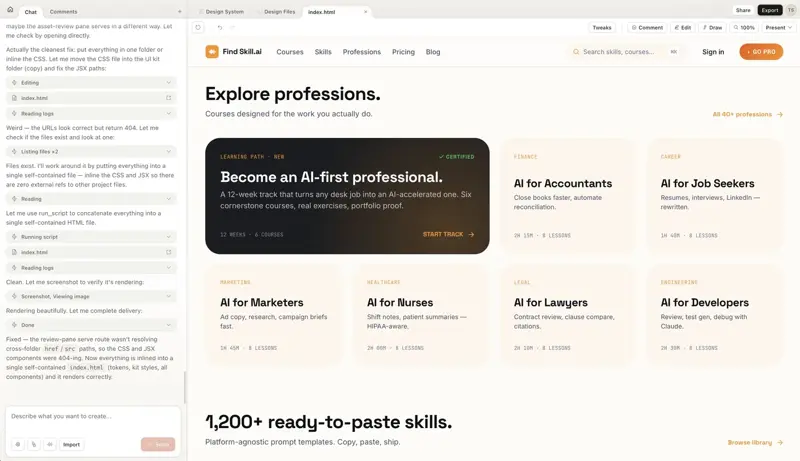
That screenshot above? It’s not findskill.ai. It’s what Claude Design produced after a 10-minute onboarding where it read the files that build our site, learned our brand colors and fonts, and generated a brand-new marketing homepage in our voice. First try.
What Claude Design Actually Is
Claude Design is Anthropic’s new tool for turning a text prompt into a real visual thing — a prototype, a pitch deck, a landing page, a one-pager — without opening Figma or Canva first. You describe what you want. It builds it. You refine it by typing, dragging sliders, or commenting on specific pieces. When you’re done, you export to PDF, PPTX, Canva, standalone HTML, or hand it off to Claude Code.
It’s powered by Claude Opus 4.7, the vision model Anthropic shipped the day before. And it’s built by Anthropic Labs — a new sub-brand the company stood up in January 2026 to ship products, not just models. Mike Krieger (Instagram co-founder, now Anthropic’s CPO) runs Labs alongside Ben Mann. For context on how serious this is: Krieger resigned from Figma’s board three days before Claude Design launched. Figma stock went up 5% on the news.
Availability: Research preview, rolling out through April 17 for Claude Pro, Max, Team, and Enterprise subscribers. Free-tier users are out. Enterprise admins have to flip it on in Organization settings.
Now — the eight things.
1. It Reads Your Site and Builds a Design System
This is the sleeper feature and it’s the first thing Claude Design asks you to do. Before you make any actual design, you run through an onboarding where it reads your company’s design files, the code that builds your site or app, and any brand assets. Then it builds a shared design system (your colors, fonts, button styles — all the reusable bits) that the rest of your team can branch from.
We pointed ours at findskill.ai. It spent about a minute browsing, then produced a ten-step task list and asked us to wait ten minutes.
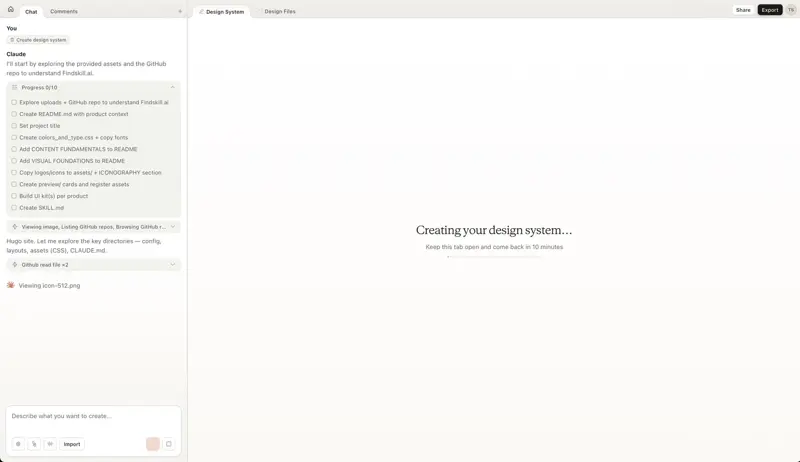
The progress tracker showed it doing things like “Explore uploads + GitHub repo,” “Set project title,” “Create colors_and_type.css + copy fonts,” “Build UI kit(s) per product.” Then a loading screen: Creating your design system… Keep this tab open and come back in 10 minutes.
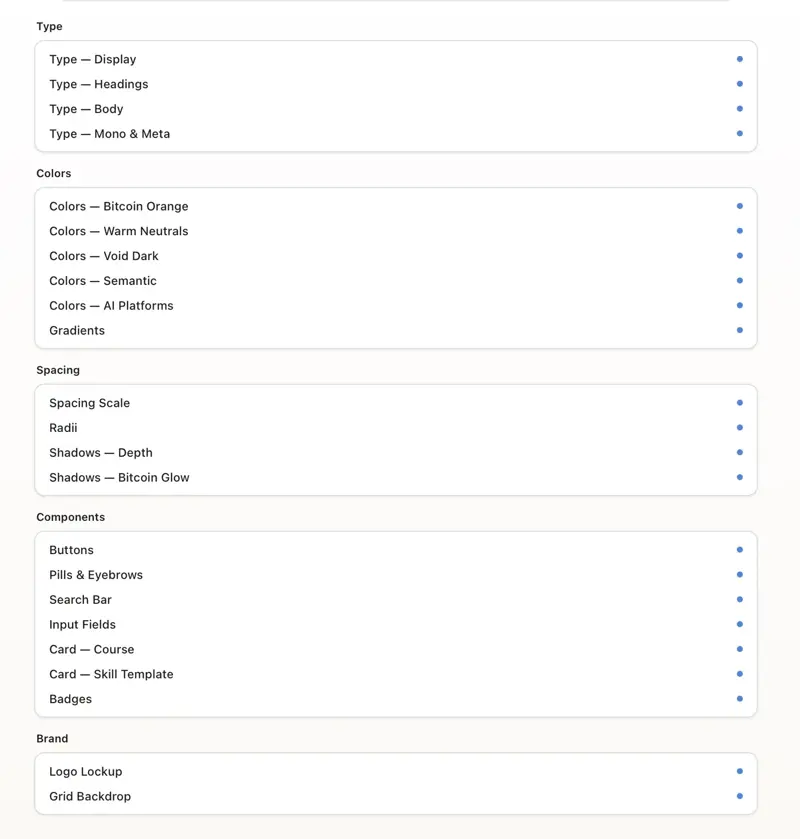
Ten minutes later it had the full design system organized into Type, Colors, Spacing, Components, and Brand — 24 cards for us to review.
The colors alone are worth calling out. Claude correctly identified #F7931A as our primary brand color (“Bitcoin Orange”), then derived a full 11-step scale from 950 to 50 with actual hex values. It named the swatch --orange-500, marked it as PRIMARY, GRADIENT ANCHOR, and GLOW — which is exactly how it’s tagged in our real tokens file. Nobody told it to do that. It read the CSS and figured it out.
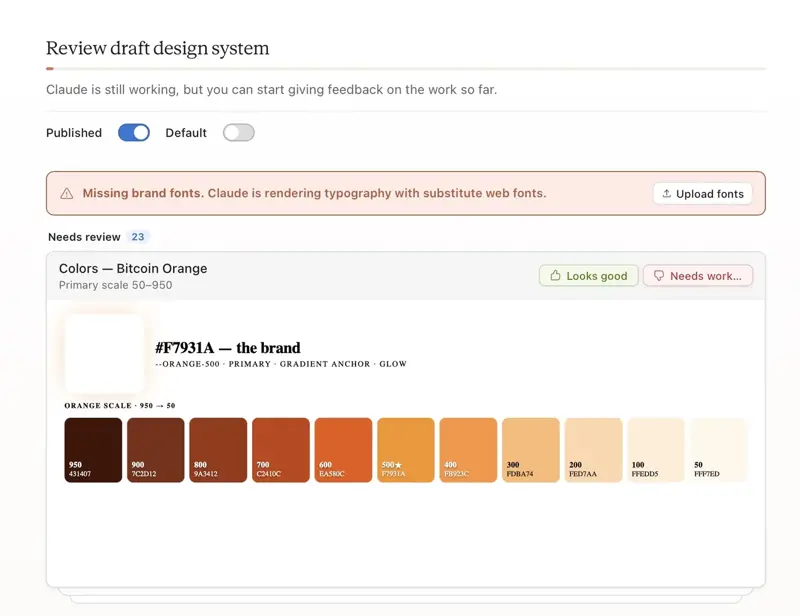
One honest caveat from the Anthropic UI itself: “Missing brand fonts. Claude is rendering typography with substitute web fonts.” Our brand font files weren’t in the public source, so Claude fell back to free-to-use versions of Inter, Space Grotesk, and JetBrains Mono. It flagged this. There’s a one-click Upload fonts button to fix it. That’s the kind of self-aware error reporting you’d want from a real designer.
As one person on X put it bluntly: “That’s not a Canva competitor. That’s an internal design ops tool that knows your brand better than your new hire does.” Hard to argue once you see it work.
2. It Builds Prototypes You Can Actually Click
“Prototype” in Figma means a wireframe with some click-throughs. “Prototype” in Claude Design means a real working webpage you can scroll, type into, hover buttons on, and watch animations play. Same stuff a real product is built from.
One Anthropic designer posted a weather app generated from the prompt “design a not boring weather app.” It runs. It has state. It responds to taps.
The caveat: the output leans on its training data. That same weather app reviewer noted the result was “still strongly-influenced by Apple Weather.” Which makes sense — if you ask for “not boring” without specifics, Claude pattern-matches to the most beautiful weather app in its training set. You get better output when you describe your brand constraints up front.
For founders, the meaningful upgrade is this: the thing you hand investors is no longer a slide that says “we’ll build X.” It’s a clickable X. Cost to make one: roughly one Claude Max conversation.
3. It Generates Real Marketing Pages
After the design system finished, we clicked “New design using this system” and asked Claude to build a marketing homepage. One sentence. No templates picked.
What came back wasn’t a wireframe. It was a full marketing homepage — header, hero, ticker, popular courses, “how it works,” bento grid, skill library, pricing, final CTA, footer. With our actual brand colors, our actual hero tagline (“Learn AI for Your Job.”), and our actual profession lineup (AI for Accountants, Marketers, Nurses, Lawyers, Developers, Teachers).
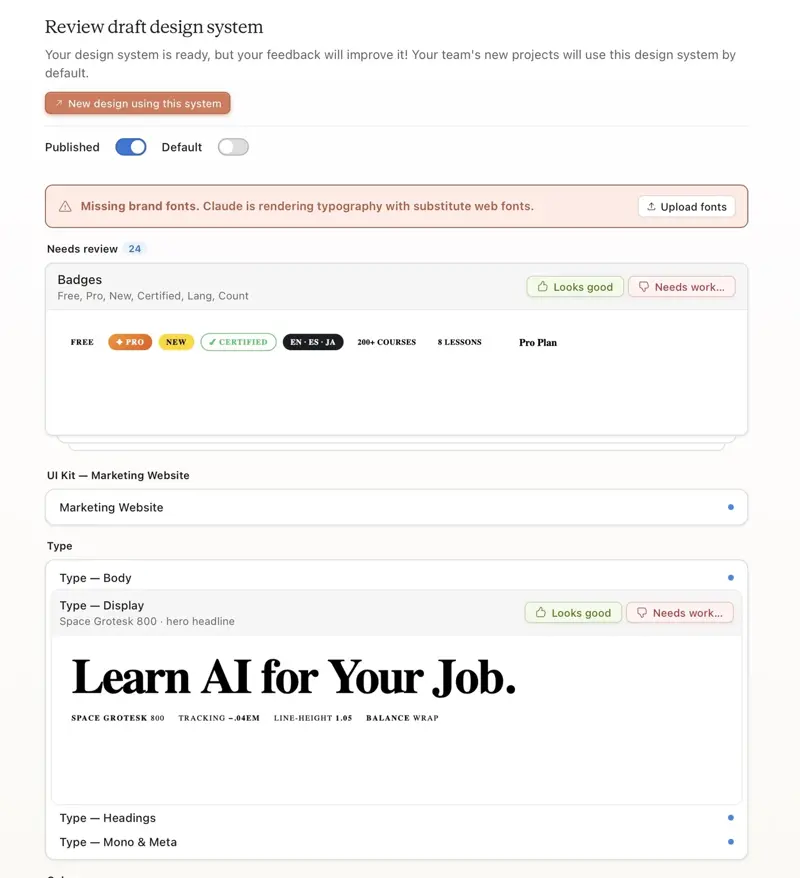
It even got the badges right: FREE, PRO, NEW, CERTIFIED, EN · ES · JA language pills. It picked the exact same font, weight, and letter-spacing we use on the real headline — pulled straight from our live site’s design rules.
One Brazilian designer put it in a way that stuck: “a barreira do design morreu” — the design barrier is dead. Not for every job. But for the founder who used to pay R$3,000 for a 10-slide pitch deck, the barrier’s definitely lower today than it was on Thursday.
4. Custom Sliders — Generated On the Fly
When you’re refining a design, Claude doesn’t just give you a chat box. It spins up sliders on the fly for whatever knobs make sense that session — theme, typography, spacing, glow intensity, density, whatever.
This is a different interaction pattern than Figma’s property panel (fixed controls for every object) or Canva’s AI (type a sentence and hope). You get contextual controls Claude thinks you’d want to adjust.
One user summed up the reaction well: “there’s a panel with sliders for themes, typography, and spacing. You don’t have to prompt for every minor CSS change.” The sliders are ad-hoc per project. No two design sessions give you the same panel. Which sounds weird until you try it, and then it feels obvious.
5. It Takes Localized Feedback
Every card in the design system has two buttons: Looks good / Needs work. Click “Needs work” and you get a text box asking what you’d prefer.
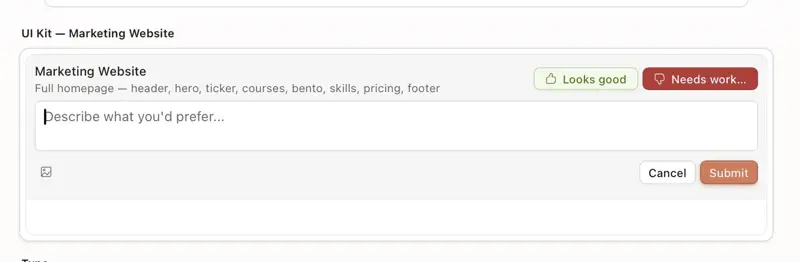
Here’s what matters: Claude doesn’t regenerate the whole design when you comment on one piece. It edits just that piece.
When our first input-field draft came back looking like raw browser defaults (ugly), we typed: “Too ugly. Check current style on live website and apply.”
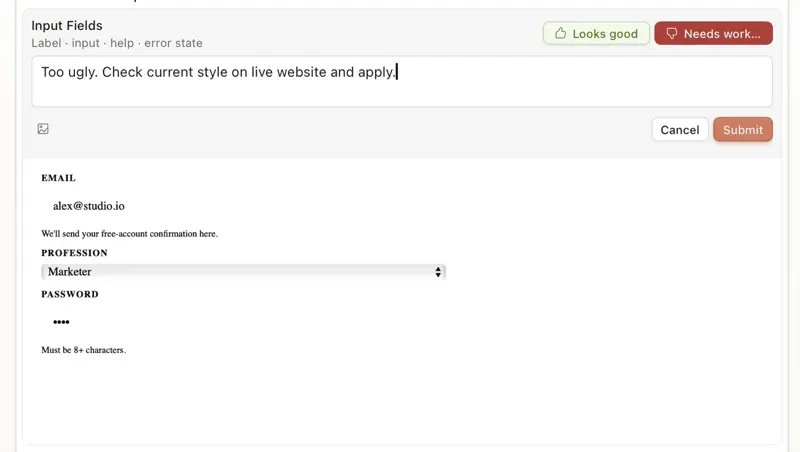
What happened next was the best part of the entire test. Claude went back to our site’s files, searched our stylesheet for input styles, read the actual rules, and rebuilt the preview card:
“Found it. The site uses a distinctive bottom-border only, no full border, muted background input style with orange glow on focus.”
Then it shipped an updated card — bottom-border underline inputs, a pill-shaped search bar with a ⌘K hint (matching our real header search), and correctly-mapped hover/focus/error/success states.
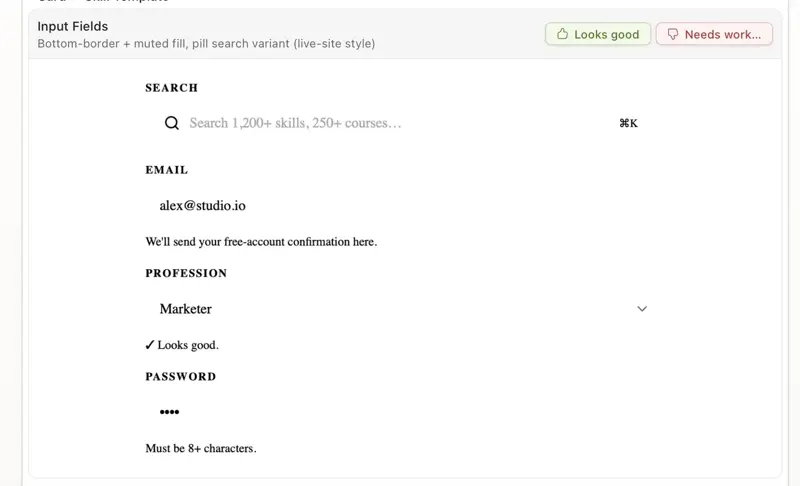
That’s not regeneration. That’s research, diagnosis, and targeted replacement. The rest of the design system didn’t move a pixel.
6. It Debugs Its Own Mistakes
About twenty minutes in, we asked Claude to regenerate the marketing site after some edits. The preview came back blank. We typed: “Regenerate ‘Marketing Website’: don’t see anything.”
What Claude did next was honestly a little uncanny. Instead of re-rolling the design, it started investigating:
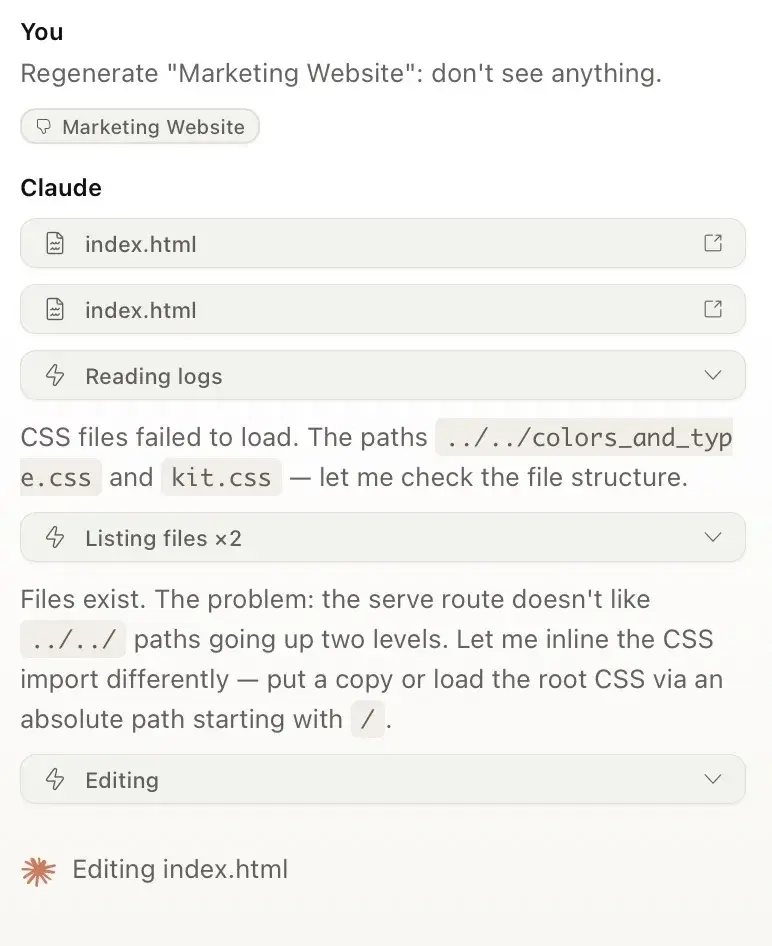
“CSS files failed to load. The paths
../../colors_and_type.cssandkit.css— let me check the file structure.”
It ran a file listing. Confirmed the files existed. Then:
“Files exist. The problem: the serve route doesn’t like
../../paths going up two levels. Let me inline the CSS import differently — put a copy or load the root CSS via an absolute path starting with/.”
Then it rewrote the page, ran its own build script, took a screenshot of the result, and confirmed: “Rendering beautifully.”
That’s the loop you’d pay a junior engineer for. And it happened inside a design tool, on launch day.
7. Export Anywhere — Including Straight to Canva
The Export button is where Claude Design’s ambitions get concrete. You can push your design to:
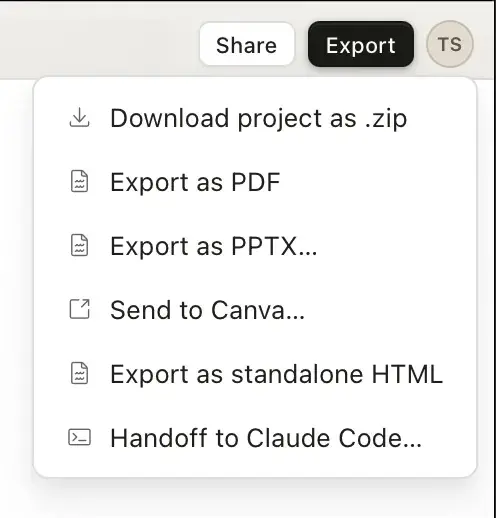
- PDF — for anything you’d share as a static doc
- PPTX — native PowerPoint, fully editable (this is the pitch-deck killer feature)
- Send to Canva — where your team can collab-edit with the full Canva Brand Kit applied
- Standalone HTML — a zip you can host anywhere
- Handoff to Claude Code — packages the design with assets and instructions for implementation
- Download project as .zip — the raw source files
Canva and Anthropic co-announced the integration. From Canva’s side: “Generate ideas in Claude. Edit in Canva. No friction. No starting from scratch.” When your design lands in Canva, it shows up as a real editable design, not a flattened image. Your team’s Brand Kit applies automatically.
The Claude Code handoff is the one that makes designers nervous and engineers hopeful. Your design isn’t “inspiration” anymore — it’s a ready-to-build package (layouts, images, notes for the developer) that an AI coding agent can turn into real working software. One Korean user called this “the real killer feature” and honestly, they’re right.
8. Org-Wide Shared Design Systems
When you publish a design system in Claude Design, it becomes available to your whole organization by default. Anyone on your team starting a new design project picks it from a dropdown. Brand consistency without a docs site.
Our share dialog showed: “Anyone at son.ngtung@gmail.com’s Organization with the link can edit any files in this design and see past chats.” Access levels include private, view-only, and edit. You can duplicate a project as a template — so your team’s “pitch deck starter” or “landing page starter” becomes a living thing, not a stale Figma file.
Datadog is quoted in the Anthropic announcement saying: “We’ve gone from a rough idea to a working prototype before anyone leaves the room. What used to take a week of back-and-forth between briefs, mockups, and review rounds now happens in a single conversation.” That’s the design-ops pitch. For a 10-person startup the savings are mostly in your own hours. For a company with 30 designers and a brand team, it’s potentially headcount.
The One Thing It Can’t: Generate Images
Here’s the limitation that matters most, the one nobody’s talking about yet.
Claude Design doesn’t have a built-in image generator. When it needs an image in a layout — a hero photo, a product shot, an illustration — it draws an SVG instead. (SVG is a kind of image built from code rather than pixels. Think: the crisp icons in a good app, or the diagrams in a textbook.) It’s surprisingly good at SVGs. Icons, charts, custom diagrams — one user got it to generate a disc-golf scoring diagram from a paragraph description, complete with inner-ring and outer-ring disc positions, and it nailed a niche sport visual.
But it can’t make a photorealistic product render. It can’t produce the kind of illustrated hero art you’d get from Midjourney or Firefly. If your pitch deck needs a photo of your founding team or a rendered 3D product shot, you bring those. Claude will place them, style them, and crop them. It won’t create them.
One early tester summed it up: “it doesn’t have a native image generator (as far as I can tell), so when it needs images it will create SVGs. It’s pretty good with SVGs, but this of course limits the types of images it can create.” That’s the cleanest honest take we’ve seen.
Anthropic has been deliberate about not shipping an image generator. They flagged this as a trust and safety position in earlier communications. Whether it’s a temporary gap or a permanent stance, for now it means Claude Design is a layout and structure tool. Not a make-me-art tool.
Other early friction worth knowing:
- Pro plan users run out fast. One person on X posted after one afternoon: “Claude Design is unusable on Pro plan. I only made a design system. That’s all for this week.” The 3x vision resolution of Opus 4.7 plus the new tokenizer means sessions burn tokens quickly. Max ($100/$200) is the realistic tier if you’re going to use this daily.
- GitHub integration hiccupped on launch day — even Anthropic’s own designers asked each other in public: “is GH integration broken on claude design or claude code for you?”
- Previews aren’t resizable. Multiple early users complained they couldn’t enlarge the preview panes.
- Alignment glitches show up in early output. Easily fixed with a “fix the alignment” prompt, but not always perfect on first try.
- Can’t run locally. Unlike Claude Cowork, Claude Design only runs in the hosted research preview. If your workflow involves a lot of local files, you’ll hit friction.
Claude Design vs Figma vs Canva vs Gamma
This is the comparison people are actually searching for. Quick table:
| Claude Design | Figma | Canva | Gamma | |
|---|---|---|---|---|
| Primary input | Natural language chat | Point-and-click canvas | Templates + drag | Text prompt |
| Output | Interactive prototypes, decks, sites, one-pagers | Any design artifact | Static images, decks | Slide decks |
| Reads your site’s code | ✓ | ✗ | ✗ | ✗ |
| Applies your design system | ✓ (auto-extracted) | ✓ (if designer sets up) | ✓ (Brand Kit) | Limited |
| Exports to code | ✓ (Claude Code handoff) | Via plugins | ✗ | ✗ |
| Free tier | ✗ | ✓ | ✓ | ✓ |
| Entry price | $20/mo (Claude Pro) | $15/mo (Figma Pro) | $15/mo (Canva Pro) | $10/mo (Gamma Plus) |
| Best at | Brand-consistent prototypes from scratch | Collaborative detail work | On-brand social + decks | AI-generated decks |
| Where it struggles | Image generation, daily usage limits | Cold starts, speed | Prompt-to-novel-layout | Design consistency |
Short version:
- Figma stays king for serious design collaboration, component libraries, and pixel-perfect work. Claude Design is not threatening senior designers’ day jobs.
- Canva is now complementary — Claude is literally Canva’s upstream input partner on paid plans.
- Gamma is the most directly threatened. Claude Design does Gamma’s core job (AI-generated decks) with better visual quality and more export options.
- Claude Design owns a new category: brand-consistent visual work from a conversation, for people who don’t live in design tools.
As one designer on X wrote: “Not a full replacement for Figma or Canva, but could be a game-changer for ‘quickly drafting’ use cases. PMs drawing wireframes, planners making one-pagers.” That’s the right read.
What This Means for You
If you’re a founder or solo operator: This is the biggest single-day workflow upgrade in the AI-for-design space in a year. Your pitch deck, your landing page mockup, your investor one-pager — all of those can come out of one Claude conversation now. You still need real copy, real numbers, and real product photos. But the visual assembly step is gone.
If you’re a PM or startup ops lead: The wireframe-to-handoff loop is the one that matters. You draft the UI in Claude Design, hand it to Claude Code, and your engineer gets a spec with actual markup instead of a Figma link and a prayer. Your design review meetings shrink. The “can you tweak this one thing” ping on your designer goes down.
If you’re a professional designer: Don’t panic. Do try it. This tool isn’t replacing your taste, your brand judgment, or your ability to push back on bad product decisions. It is replacing the twentieth rebuild of the same onboarding screen and the “can we get four variants by tomorrow” request. Learn to direct it well and you get three hours of your day back.
If you’re on Claude’s free tier: This one hurts — you’re locked out. The minimum entry is Claude Pro at $20/mo. Before you upgrade just for this, note that Pro users are already hitting their weekly limits on design work. If you’re serious about building with it, Max at $100/mo is the realistic tier.
The bottom line: Claude Design is the first AI design tool where the word “design” isn’t doing too much work. It doesn’t make generic slop, it doesn’t ignore your brand, and it doesn’t stop when the pretty picture is done. It builds things you can click, edit, ship, and hand off.
The SERP is empty right now — this is a good week to learn it before the tutorials flood in.
Want to get better at the kind of work Claude Design speeds up? We cover the presentation and prototype side in AI for Presentations, and the founder-facing product design workflow in Startup Launch. For designers thinking about the broader AI-in-design shift, Figma AI Agents is the one to take.
Sources:
- Introducing Claude Design by Anthropic Labs — Anthropic
- Introducing Labs — Anthropic
- Anthropic launches Claude Design, a new product for creating quick visuals — TechCrunch
- Anthropic CPO leaves Figma’s board after reports he will offer a competing product — TechCrunch
- Anthropic now has a design assistant too — Engadget
- Introducing Canva in Claude Design by Anthropic Labs — Canva Newsroom
- Anthropic Debuts Claude Design for Building Marketing Assets, Decks, and UIs — Yahoo Tech
- Anthropic launches Claude Design for visual work — Investing.com
- Anthropic Labs Expansion Signals New Product Velocity — StartupHub.ai
- Anthropic switches to usage-based billing for enterprise customers — PYMNTS
