

Two months ago, the answer for most teams sizing up Claude was “start on Team, upgrade when you outgrow it.” This Monday changed the math. Anthropic’s May 25 drop of 28 security and compliance integrations — Okta, Wiz, CrowdStrike, Microsoft Purview, Datadog, the full IT-vendor list — is gated to Enterprise via the Compliance API. If your security team already runs any of those products, the upgrade question moved up the priority list.
This is the 7-question decision tree to resolve it. Read top to bottom. Stop at the first “yes” — that’s your tier.
What changed and why now
Claude has three commercial tiers: Pro (individual), Team (5-150 seats), and Enterprise (large org). The pricing page lists Pro at $20/month, Team Standard at $20/seat/month annual ($25 monthly), Team Premium with Claude Code at $100/seat/month annual ($125 monthly), and Enterprise at $20/seat plus metered usage at API rates.
The May 25 announcement layered something new on top: a Compliance API that exposes Claude conversation content and activity events to 28 named partners. Per Anthropic’s own help-center documentation, the Compliance API is “generally available for Enterprise plans” and “Audit logs are available for Enterprise organizations only.” Team plans don’t have it. So if a question that used to be “do we need SCIM at our scale” is now “do we want our SOC pulling Claude into Datadog, CrowdStrike, and Wiz next quarter,” that question only resolves to yes on Enterprise.
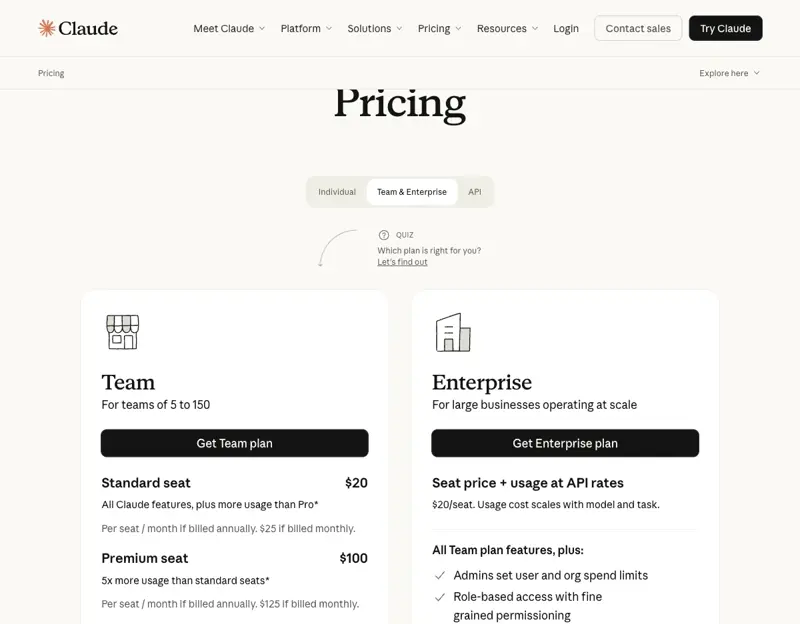
The decision tree below walks the seven questions that actually determine the answer.
Question 1: How many seats?
The cleanest math first. Anthropic’s pricing page says Team is “for teams of 5 to 150.” That’s a hard ceiling. If your org already has 200 people who’d use Claude — or you’re projecting past 150 in the next 12 months — Team isn’t on the table.
Below 5 seats → stay on individual Pro plans for each user. No team tier exists below 5.
5-150 seats → Team is in scope. Don’t disqualify it yet; keep reading the next 6 questions to see if a non-seat-count consideration pushes you off Team.
Over 150 seats → Enterprise. No further questions needed on this dimension.
Question 2: Do you need SCIM-based user provisioning?
SCIM (System for Cross-domain Identity Management) is the standard for automated user lifecycle — your Okta or Entra ID instance pushes user creates, updates, and deactivations into Claude automatically. Without SCIM, you’re manually adding and removing users in the Claude admin console every time a hire or termination happens.
Anthropic’s pricing page lists SCIM under the Enterprise-only features (“System for Cross-domain Identity Management (SCIM)”). Team gives you SSO + Domain Capture — meaning your users can sign in with your identity provider — but you still manage their lifecycle by hand.
If your IT team requires automated provisioning → Enterprise. The cutover trigger here is operational: at roughly 50-75 active users, manual lifecycle management starts to leak (former employees who still have access, contractors who finished their engagement, etc.). If the security review board has flagged manual provisioning as a risk, this is the question that resolves the decision regardless of seat count.
If you can do manual provisioning → keep going. The next questions may still push you to Enterprise for different reasons.
Question 3: Does your security team need the Compliance API?
This is the question the May 25 announcement made urgent. The Compliance API is what feeds the 28 partner integrations — Okta ISPM, Wiz Security Graph, CrowdStrike Falcon, Cloudflare CASB, Datadog, Microsoft Purview, SailPoint, Snyk, Tenable, Smarsh, and the rest.
If your security or IT team:
- Pulls SaaS app telemetry into a SIEM (Datadog, Sumo Logic, Splunk)
- Runs a CASB (Cloudflare, Netskope, Zscaler) over your SaaS apps
- Operates an Identity Security Posture Management tool (Okta ISPM, SailPoint, Microsoft Purview)
- Runs an endpoint/XDR platform (CrowdStrike Falcon, Trellix)
- Has a records-management requirement (Smarsh, Theta Lake, Mimecast)
…then they will, before long, ask “what does Claude usage look like in [that tool]?” The answer is the Compliance API. Per Anthropic’s docs: “Compliance API is generally available for Enterprise plans, excluding Public Sector organizations.” It’s not on Team.
If your security team’s request is “yes, plug Claude into our SIEM/CASB/ISPM” → Enterprise. This is now the most common pivot reason in May 2026, post-announcement.
If your security team hasn’t asked → keep going. They may ask in the next two quarters; consider raising it now so you’re not surprised.
Question 4: Are you processing PHI (or otherwise need a HIPAA BAA)?
HIPAA-regulated organizations (healthcare providers, health insurers, business associates handling Protected Health Information) need a Business Associate Agreement (BAA) with any vendor that processes PHI. Anthropic’s HIPAA-ready Enterprise offering has the BAA built in.
Per the Claude Help Center: “HIPAA-ready Enterprise offering… is available for Enterprise plans only” and “Self-serve Enterprise plans, Team plans, and individual plans can’t enable HIPAA through this flow.” The HIPAA-ready path is sales-assisted Enterprise. There’s no shortcut.
If you process PHI in any form → sales-assisted Enterprise. Talk to Anthropic’s healthcare AE before you commit to anything else. Note that Claude Code is included in your Enterprise seat but is not covered under the HIPAA-ready offering — that’s a sentence worth understanding before you roll Claude Code out to clinical engineers.
If no PHI involvement → keep going.
Question 5: Do you need custom data-retention controls?
Default retention on Claude conversations is around 30 days for activity logs. If your compliance posture, internal records-management policy, or industry regulator requires a different retention duration — either longer (some financial-services rules require 7-year records preservation) or shorter (GDPR right-to-erasure considerations) — you need configurable retention.
The Enterprise feature list explicitly includes “Custom data retention controls.” Team does not.
If you need custom retention (longer than default for records, shorter for privacy) → Enterprise.
If default retention is fine → keep going.
Question 6: Do you need network-level access controls (IP allowlisting, tenant restrictions)?
Some org security policies require that SaaS access be locked down by network — only requests from your corporate VPN, your office IP ranges, or your zero-trust network access (ZTNA) gateway are accepted. Tenant restrictions (preventing users from logging into a personal Claude account on a corporate device) is the related control.
Both are explicit Enterprise-only features per the pricing page: “Network-level access control” and “IP allowlisting.”
If your security posture requires these → Enterprise.
If not → one question left.
Question 7: Do you need very large context windows for projects?
Claude’s standard context is 200K tokens on consumer tiers. Enterprise marketing copy mentions an “enhanced context window,” and Anthropic’s Claude for Government documentation explicitly lists “projects (500K context)” as part of the Enterprise-grade environment. For most general business work, 200K is plenty — that’s roughly 150,000 words, or about 30 financial statements concatenated. But specific workloads (giant codebases, massive document review, multi-hundred-page contract analysis) hit the ceiling.
If your workload regularly produces “context limit exceeded” errors on Team-tier projects → Enterprise. The 500K window opens up cases that 200K can’t.
If 200K has been enough so far → Team is your answer.
What this means for you
After the 7 questions, you’ve resolved to one of three answers:
Stayed on Team: You’re 5-150 seats, don’t need SCIM, your security team isn’t asking for Compliance API integration, you don’t process PHI, default retention is fine, no network-level controls needed, 200K context is enough. Most small businesses, most agencies, most professional-services firms under 100 staff land here. The Standard seat at $20/seat/month annual covers most use cases; the Premium seat at $100/seat/month adds full Claude Code access, which is worth it for engineering teams but probably overkill for marketing or sales teams.
Moved to self-serve Enterprise: You hit a non-HIPAA Enterprise trigger — SCIM, Compliance API, custom retention, IP allowlisting, or 500K context. You don’t yet need the white-glove treatment of sales-assisted Enterprise. The pricing page says “20 USD/seat plus usage at API rates.” Practical commercial pattern (not stated in Anthropic docs, but widely reported): minimum 20-ish seats for self-serve, annual billing. Budget for usage as a separate line — it can run 2-5× the seat cost depending on workload.
Moved to sales-assisted Enterprise: You hit HIPAA, or your seat count is north of 100, or you want custom DPA terms / volume discounts / specific data-residency clauses. The Anthropic AE will quote based on your shape. Practical commercial pattern: minimum 50-ish seats and a 12-month commitment, but these specifics are not documented on Anthropic’s public pricing page — confirm them in writing during your quote.
The decision tree by org shape:
If you’re a 20-person SaaS startup: almost certainly Team. The 28-integration announcement doesn’t change that for you yet because your team isn’t running CrowdStrike or Wiz. Standard seats for everyone, maybe two Premium seats for the engineers who use Claude Code daily.
If you’re a 75-person SaaS scale-up with a security hire who runs Okta + Datadog: maybe Enterprise now, definitely Enterprise in two quarters. The trigger will be your security hire saying “I need to see Claude usage in Datadog.” When that conversation happens, the decision is made. Get ahead of it.
If you’re a 200-person mid-market services firm: Enterprise. Above the 150-seat Team ceiling means there’s no other option. Sales-assisted, with 12-month commitment. Budget the usage as a separate line item; it dominates the seat cost at this scale.
If you’re a 50-clinician medical group: sales-assisted Enterprise with HIPAA BAA. The BAA is the only path for PHI; nothing else applies until that’s signed.
If you’re a 500-person financial-services firm: Enterprise, with custom retention to match your records-keeping rule, IP allowlisting to match your network policy, and the Compliance API wired into your SIEM and the records-management vendor (Smarsh, Theta Lake) you already pay for. The 28-integration announcement is the news hook that justifies the budget request.
What this can’t fix
Five honest limits the decision tree doesn’t resolve:
The 20-seat-minimum / 50-seat-minimum numbers for Enterprise are commercial practice, not public docs. Anthropic’s pricing page doesn’t state these. Confirm in writing during your sales conversation if they matter to your sizing decision. If a smaller deal makes sense for your org, ask — quotas often flex.
Enterprise usage billing is a budget surprise. “Usage at API rates” sounds simple until you realize a heavy Claude Code user can burn $100-$250/month in usage on top of the seat fee. Build a usage forecast before signing. Anthropic provides per-user spend caps; use them from day one.
Team Premium covers most of Claude Code’s value at lower cost than Enterprise. If the only reason you’re considering Enterprise is “we want our engineers to have full Claude Code,” Team Premium at $100/seat/month is probably enough. Enterprise only wins on the security-and-compliance side.
Public Sector Claude Enterprise has different availability. Federal and state-government tenants need to confirm Compliance API and BAA availability with their AE; don’t assume the standard Enterprise SKU applies. Same for AWS Marketplace-purchased Enterprise — that’s a separate SKU with different feature gating.
The right answer changes when Anthropic ships features. This decision tree reflects May 2026 docs. Watch for changes in: SCIM availability on Team (if Anthropic eventually adds it as a Team paid add-on), audit-log availability on Team (currently Enterprise-only), and HIPAA availability outside sales-assisted Enterprise. The right answer for your org could change in three months.
The bottom line
The 28-integration announcement on May 25 turned what used to be a seat-count decision into a security-tooling decision. Before May 25, the right Team-vs-Enterprise default was “Team unless you’re 150+ seats or processing PHI.” After May 25, the right default for any org running a real SIEM/CASB/ISPM stack is “Enterprise, even at 30-50 seats, because the Compliance API is now the actual product spec.”
The 7 questions above resolve cleanly to one of three tiers, regardless of how you got to the question. Run them top to bottom; stop at the first yes; ignore the rest.
If you’re rolling out Claude to the broader organization for the first time and want the full implementation playbook — license sizing, role design, the policy document, the change-management story — the Enterprise AI Rollout Playbook course walks the whole arc. For team-level daily-use patterns once you’re on Team or Enterprise, the Claude Cowork Essentials course is the practitioner-facing piece. And if you’re a solo or sub-5-person team thinking “Team is overkill,” Claude for Small Business is the right starting point.
Sources
- Claude pricing — anthropic.com
- What is the Enterprise plan? — Claude Help Center
- Access the Compliance API — Claude Help Center
- Access audit logs — Claude Help Center
- The HIPAA-ready Enterprise offering — Claude Help Center
- Claude Team vs. Enterprise: the actual differences, for IT and legal — AI Codex
- Anthropic adds 28 security and compliance integrations for Claude — Help Net Security (May 25, 2026)
- What Is Claude Enterprise? Features, Pricing, and Plans — Tactiq