On May 12, Anthropic shipped Agent View — a single-list dashboard inside Claude Code that lets you run, monitor, and switch between many parallel sessions without spinning up a tmux grid. The launch tweet hit 28,947 likes. The first YouTube videos went up the same day, with one of them titled “Anthropic Just Killed Your tmux Grid.”
It did not kill your tmux grid. It killed part of it.
This is an honest comparison of what Agent View actually replaces, what it does not, and the three scenarios where you should switch tomorrow versus the four scenarios where you should stay on tmux. Written for developers who have a working tmux setup and want to know whether they need a new one.
What Agent View actually is
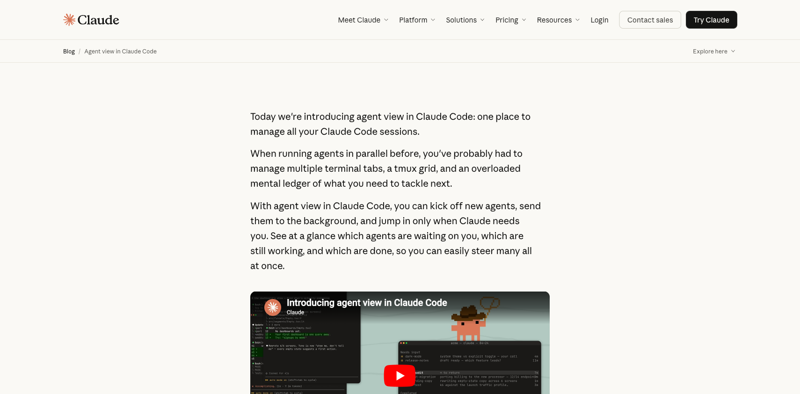
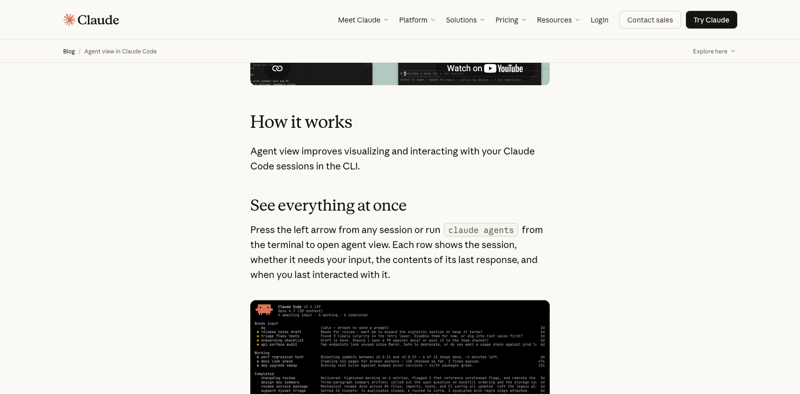
Agent View is a single command — claude agents — that opens a list of every Claude Code session running on your machine. Each row shows:
- Session state:
waiting(idle, expecting input),working(mid-task), ordone(task complete) - A one-line summary of the agent’s last response
- Time since last interaction
- Keyboard shortcuts to switch focus (Enter), rename (Ctrl+R), or kill (Ctrl+X twice)
It ships in Claude Code 2.1.139 as a research preview — Anthropic’s term for “we built it, we’re happy with it, but it might change shape before it becomes stable.” Three companion features landed the same day:
/bg— promote your current session to a background session that keeps running when you switch awayclaude --bg [task]— launch a new background session for[task]directly from the shell/goal— set an objective and let the agent loop on it autonomously, with status visible in Agent View
The combination is the actual story. Agent View is the dashboard; /bg is the runtime mode; /goal is the loop driver. Together they handle the “many parallel Claude Code sessions on one machine” use case that previously required you to build the dashboard yourself in tmux.
How developers were running parallel Claude Code sessions before
Before May 12, the pattern looked like this for almost everyone running more than two Claude Code sessions at once:
- The tmux grid: one Claude Code instance per pane, four to nine panes per window, manual pane focus to check which agent needed input next. The blanplan setup (“4–6 parallel Claude Code sessions through tmux + workspace folders for the last month”) was the median power-user configuration.
- The Ghostty + tmux combo: for developers who wanted a faster terminal underneath; same tmux multiplexing on top.
- Zellij or Cmux for the keyboard-shortcut-allergic: same idea, friendlier defaults.
- AgentsRoom and similar companion apps: purpose-built GUI for Claude Code parallel sessions, which by April was already converting tmux users who didn’t want to manage a multiplexer for AI work.
Across all of these, the common workflow tax was the same: a human had to remember which pane was running what, scan the screen for the agent that just finished, and Ctrl-b + arrow-key around the grid. The mustafaergisi quote on launch day captured it perfectly: “Juggling four tmux panes for parallel Claude sessions has been my workflow tax.”
That tax is exactly what Agent View removes.
Three scenarios where Agent View replaces tmux outright
If your tmux usage matches any of these patterns, switch and never look back.
1. You run 3+ Claude Code sessions in a grid on a single machine, all in the same repo
This is the headline use case. A grid of Claude sessions in a single tab is exactly what Agent View was designed to replace. The state column tells you which agent is waiting on you without scanning panes. The one-line response summary tells you what each one just did without switching focus. The Enter key drops you into the session you want.
You can keep using tmux for other things (your editor, your dev server, your htop), but the Claude Code panes themselves can move into Agent View. Most users in this category report they end up with a much smaller tmux footprint — sometimes a single window with no splits — and Agent View handling the AI side.
2. You run “fire-and-forget” agents that you only check on occasionally
The pre-Agent-View pattern for long-running agents was: a dedicated tmux pane, claude running in it, an instruction like “refactor the entire monorepo’s lint config and report when done,” then you minimize the window and remember to check back in an hour.
With /bg (or starting with claude --bg), the same agent goes into background mode, runs without holding a pane, and shows up in Agent View as a working row that flips to done when it finishes. You don’t need a dedicated pane. You don’t need to remember anything. The dashboard is the reminder.
This pattern stacks. Running five claude --bg jobs at once is now trivial. The combination of /bg + Agent View + /goal is what makes the “swarm of independent Claude agents on my laptop” workflow feel sane for the first time.
3. You use tmux primarily as a “dashboard” for AI workflows
Some developers adopted tmux not because they love it but because they needed a multi-pane layout for Claude Code work and tmux was the only tool that could produce it. If your tmux config is mostly bind-key shortcuts for splitting panes around claude instances, you bought a multiplexer to get a dashboard. Agent View is now a better dashboard for that specific job, and it ships with Claude Code for free.
The honest test: open your ~/.tmux.conf. If 80%+ of your custom bindings are about navigating between Claude panes, your tmux setup was a workaround. Switch.
Four scenarios where tmux still wins
The “Anthropic killed tmux” framing oversells what Agent View does. There are four cases where the older tool wins and Agent View doesn’t even compete.
1. You SSH into a remote box to run Claude Code
This is the killer limitation that the yashiro tweet caught within 24 hours of launch: “What does this add that tmux/zellij doesn’t have? Can I detach/attach agent view without closing it? I use Code mainly via SSH.”
tmux’s foundational feature is session persistence across SSH disconnects. You SSH to a remote box, start a tmux session, run claude inside it, get disconnected (Wi-Fi drops, you close your laptop, the train enters a tunnel), and the session keeps running on the server. When you reattach, your conversation, your running processes, and your build output are all exactly where you left them.
Agent View runs on top of the local Claude Code binary inside a single terminal. It does not provide a server-side persistent supervisor. If your terminal closes, the Agent View interface goes away. If you SSH’d in, your SSH session has to keep alive — and if it doesn’t, the dashboard is gone.
The right pattern for SSH workflows is tmux on the server + Claude Code inside it + Agent View inside that. Use tmux to keep the session alive across disconnects, then run claude agents inside the tmux session to get the multi-session dashboard. tmux owns the persistence layer; Agent View owns the multi-agent layer. They stack.
2. You run non-Claude processes in the same multiplexer
Real developer workflows are not just Claude sessions. They are also: a database REPL, a tail -f on a log file, a Vim with a project open, an htop, a long test run in another pane. tmux multiplexes all of those equally well. Agent View only manages Claude Code sessions.
If your multi-pane setup is “two Claude agents + Postgres REPL + log tail + editor + test runner,” tmux is the only tool that can hold the whole picture. Agent View handles the two Claude agents better than tmux does; it doesn’t touch the other three. The integrated dashboard for your whole dev environment is still tmux.
3. You rely on custom keybinds, layouts, or scripted session setup
Years of .tmux.conf tuning produces keybinds that are wired into your muscle memory: split panes vertically with Ctrl-b |, switch panes with Ctrl-b h/j/k/l (vim-style), pop a scratch pane with a custom binding, restore a saved layout on boot. None of that exists in Agent View.
Agent View’s keybinds are minimal and unconfigurable. Enter, Ctrl+R (rename), Ctrl+X twice (kill). That is the whole vocabulary. If you have a tmuxinator or teamocil config that boots a 6-pane layout with specific working directories and pre-run commands, Agent View has no equivalent. You are giving up automation for simplicity, and for some workflows that trade is bad.
4. You work across multiple machines and need portable session state
tmux runs on every Unix-flavored OS, ships with dotfiles managers, and your config travels with you to any machine via a git clone of your dotfiles repo. Set up a new dev box, install tmux, drop your .tmux.conf in place, and you have the same keybinds and layout as your laptop.
Agent View is a Claude Code feature. It exists on whatever machine has Claude Code 2.1.139+ installed, and only there. There is no .agent-view.conf to commit. There is no shared layout. The dashboard is the same on every machine, which is good for consistency but bad for power users who customize.
If your dotfiles repo is part of your identity as a developer, Agent View is the wrong primary tool. Use it inside your tmux setup, not instead of it.
The hybrid pattern: how working developers are actually configuring this
The non-zero-sum read of all the above is the hybrid pattern that’s emerging in real workflows during the first week of Agent View’s life:
- tmux as the outer shell — owns the session, owns SSH persistence, owns the non-Claude panes (editor, REPL, log tail, test runner)
- Agent View as the AI sub-dashboard inside one tmux window — manages the Claude Code sessions
/bgandclaude --bgfor long-running jobs — replaces the “dedicated pane for a slow agent” pattern entirely/goalfor the objective-driven loops — replaces the “babysit the agent for 20 minutes” pattern with a status row in Agent View
The PandaTalk8 take from May 13 captures the mature read perfectly: “I’m already using it — convenient. I just need a few tmux windows, each one managing a chain of claude agents tasks.” Reduced tmux footprint, not eliminated tmux. The grids collapse from nine panes to two; the panes that survive each manage a chain of Claude agents through Agent View.
The “tmux is dead” headline is wrong. The “tmux as the dashboard for Claude Code sessions” pattern is dead. The “tmux as the persistent multiplexer for your whole dev environment with Agent View handling the AI sub-dashboard” pattern is what survives.
Direct feature comparison
| Capability | tmux | Agent View |
|---|---|---|
| Multi-pane Claude Code grid | ✅ (manual) | ✅ (native with state, summary, timestamps) |
| Session state at a glance (waiting/working/done) | ❌ (you scan panes) | ✅ |
| Last-response summary per agent | ❌ | ✅ |
| Background agents (no dedicated pane) | ❌ | ✅ (/bg, --bg) |
| Autonomous goal loops with status | ❌ | ✅ (/goal) |
| SSH session persistence | ✅ | ❌ |
| Survives terminal close | ✅ | ❌ (sessions persist via --bg, but UI does not) |
| Non-Claude processes in the same dashboard | ✅ | ❌ |
| Custom keybinds | ✅ | ❌ (fixed) |
Saved layouts (tmuxinator, etc.) | ✅ | ❌ |
| Cross-machine portable config | ✅ (dotfiles) | ❌ |
| Multi-machine session sharing | ✅ (with extensions) | ❌ |
| Used by non-AI workflows | ✅ | ❌ |
| First-class support inside Claude Code | ❌ | ✅ |
| Anthropic ships updates for it | ❌ | ✅ |
What this means for you
If you’re a solo developer running mostly Claude Code on your laptop: install Claude Code 2.1.139, run claude agents, and shrink your tmux setup. You’ll likely end up with one tmux window for your editor and another for whatever non-Claude processes you have, with Agent View doing the AI work in a third. The workflow tax of pane-juggling disappears overnight.
If you SSH into remote dev boxes: keep tmux as your outermost layer for SSH persistence, then run Agent View inside a tmux session on the server. You get both: tmux’s “won’t die when my Wi-Fi drops” guarantee, and Agent View’s “I can see what every Claude is doing.” Don’t try to use Agent View as your only layer — the first time your laptop sleeps you’ll lose everything.
If you’re a tmux power user with a tuned .tmux.conf: your tmux investment is safe. Agent View is a sub-dashboard inside the multiplexer you already love, not a replacement for it. Add claude agents to your bindings as a one-key shortcut and treat Agent View as another tool in the multiplexer.
If you’re an engineering manager standardizing tooling on a team: the answer depends on whether your developers SSH into shared dev boxes or work locally. Local-only teams can standardize on Agent View and drop the tmux training requirement. Remote-dev teams should stay on tmux as the base layer and add Agent View on top. Either pattern is defensible; mixed teams should default to the hybrid pattern because it generalizes.
If you’re considering one of the competing tools (AgentsRoom, Cmux, Nimbalyst): Agent View pulls a lot of the air out of their value proposition for the “Claude Code parallel sessions” use case. Those tools survive on what they do beyond that — visual editors, kanban boards, integrated diffs (Nimbalyst), specialized session managers (AgentsRoom). If you only adopted them for parallel-session management, Agent View now does that for free. If you adopted them for the broader workflow features, they’re still differentiated.
The bottom line
Agent View is a real upgrade to the daily Claude Code workflow, and the launch-day hyperbole — that it kills tmux — is wrong but not crazy. It kills one specific tmux use case: the “manual grid of Claude Code panes” pattern that most multi-session users had landed on. That pattern was a workaround anyway; the right primitive was always a dashboard with session state baked in.
What it does not touch is the rest of what tmux is good at: SSH persistence, mixed-process multiplexing, custom keybinds, portable layouts, multi-machine workflows. Those reasons to use tmux still hold. The right reading of the May 12 launch is that Anthropic has reduced your tmux dependency to its core competencies — and your tmux config can shrink accordingly without disappearing.
The honest install order for someone setting up a new dev box today: install tmux first (for SSH persistence and your editor/REPL/log layout), then install Claude Code 2.1.139+ (for the AI sub-dashboard), then learn claude agents, /bg, and /goal. Two tools, complementary roles, neither replaces the other.
If you want the full Claude Code workflow — Skills, sub-agents, hooks, MCP, and the new Agent View patterns together — our Claude Code Mastery course covers it end to end. The Claude Code Session Mastery course drills into the long-running and background session patterns that pair with /bg. And if you want the broader multi-agent design lens — when to use sub-agents vs. Agent Teams vs. Managed Agents — the Multi-Agent AI Systems course is the map.
Two days from now, the next Claude Code release will land. Whatever it ships, Agent View is the surface where you’ll see it.
Sources
- Anthropic — Agent view in Claude Code (May 12, 2026)
- Claude Code 2.1.139 release notes —
/bg,claude --bg,/goal - How to Use Claude Code’s /bg Command to Run Background Agent Sessions
- Agent View Brings Parallel Task Orchestration to Claude Code — Getaibook
- AgentsRoom vs tmux Splits for Claude Code
- Claude Code + tmux: The Ultimate Terminal Workflow for AI Development
- How I Use 4 Terminal Setups with Claude Code Agent Teams — dev.to
- tmux vs cmux — Battle-Tested Terminal Multiplexer vs the AI Agent Terminal
- r/ClaudeCode — Agent View launch thread (May 12)
