Anthropic just solved the biggest complaint about Cowork.
Since January, Cowork has been desktop-only. Your Mac or PC had to be open, and you had to be sitting in front of it. Great for focused work sessions. Terrible for everything else.
Dispatch changes that. It’s a new feature — launched today as a research preview — that lets you message your Cowork session from your phone. Fire off a task while you’re on the couch. Check progress from the grocery store. Come back to finished work.
One persistent conversation. Two devices. No sync headaches.
Here’s what it actually does, how to set it up, and whether it’s ready for real work.
What Dispatch Is (And Isn’t)
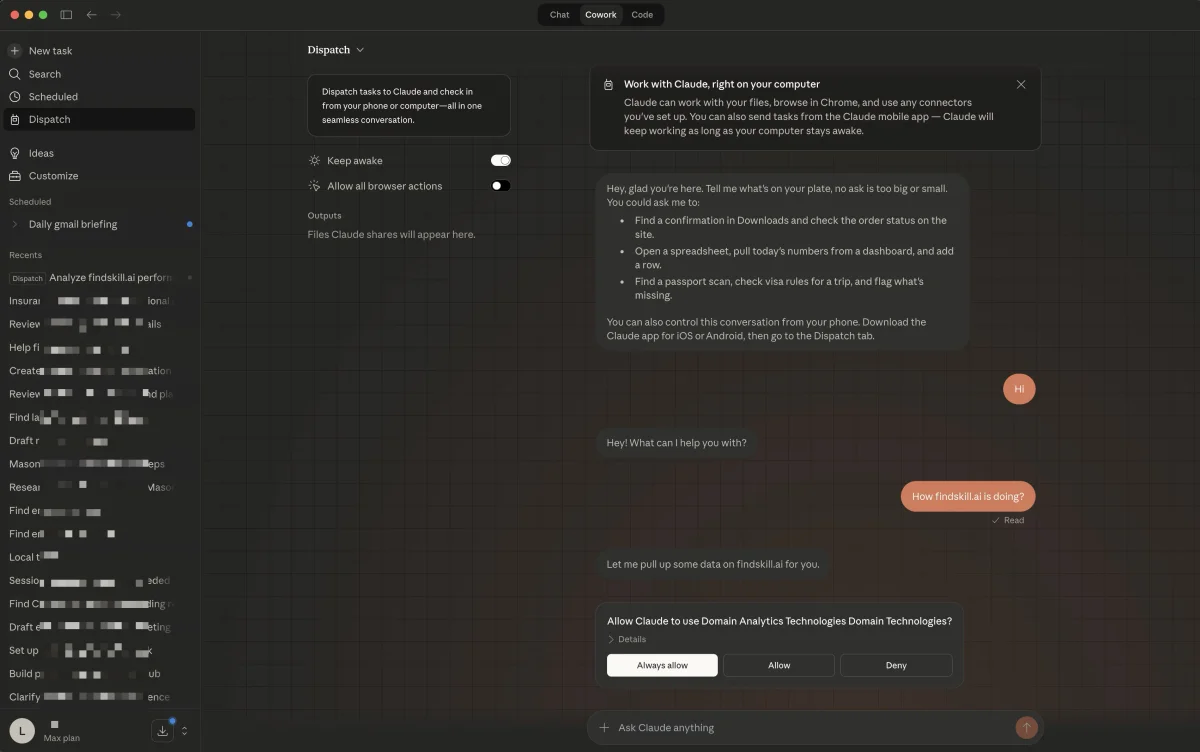
Dispatch creates a single, persistent conversation thread between the Claude mobile app on your phone and the Claude Desktop app on your computer. Think of it as a remote control for Cowork.
Your computer does the actual work — reading files, running connectors, executing tasks in the sandbox. Your phone is just the messaging interface.
So when you text “compile a report from last quarter’s sales data,” Claude doesn’t process that on your phone. It sends the instruction to your desktop, where Cowork has full access to your local files, connected apps, and configured plugins. The results flow back to your phone as a notification.
It’s not a mobile version of Cowork. It’s a walkie-talkie to the Cowork session already running on your desktop.
What it isn’t: An independent mobile agent. Your Mac has to be awake with the Claude app open. Close the lid, Dispatch goes dark. This is a remote control, not cloud computing.
How to Set It Up
Setup takes about two minutes. Seriously.
Requirements:
- Claude Desktop app (macOS or Windows) — updated to the latest version
- Claude mobile app (iPhone or Android)
- Claude Max subscription ($100-200/month) — Pro access coming within days
Steps:
- Open Claude Desktop and go to the Cowork tab
- Look for the new Dispatch option (it appeared with today’s update)
- Click it — a QR code pops up on screen
- Open the Claude app on your phone
- Scan the QR code to pair your devices
- A “Dispatch” entry appears in your mobile app’s sidebar
That’s it. No API keys. No configuration files. No OAuth dance. Scan and go.
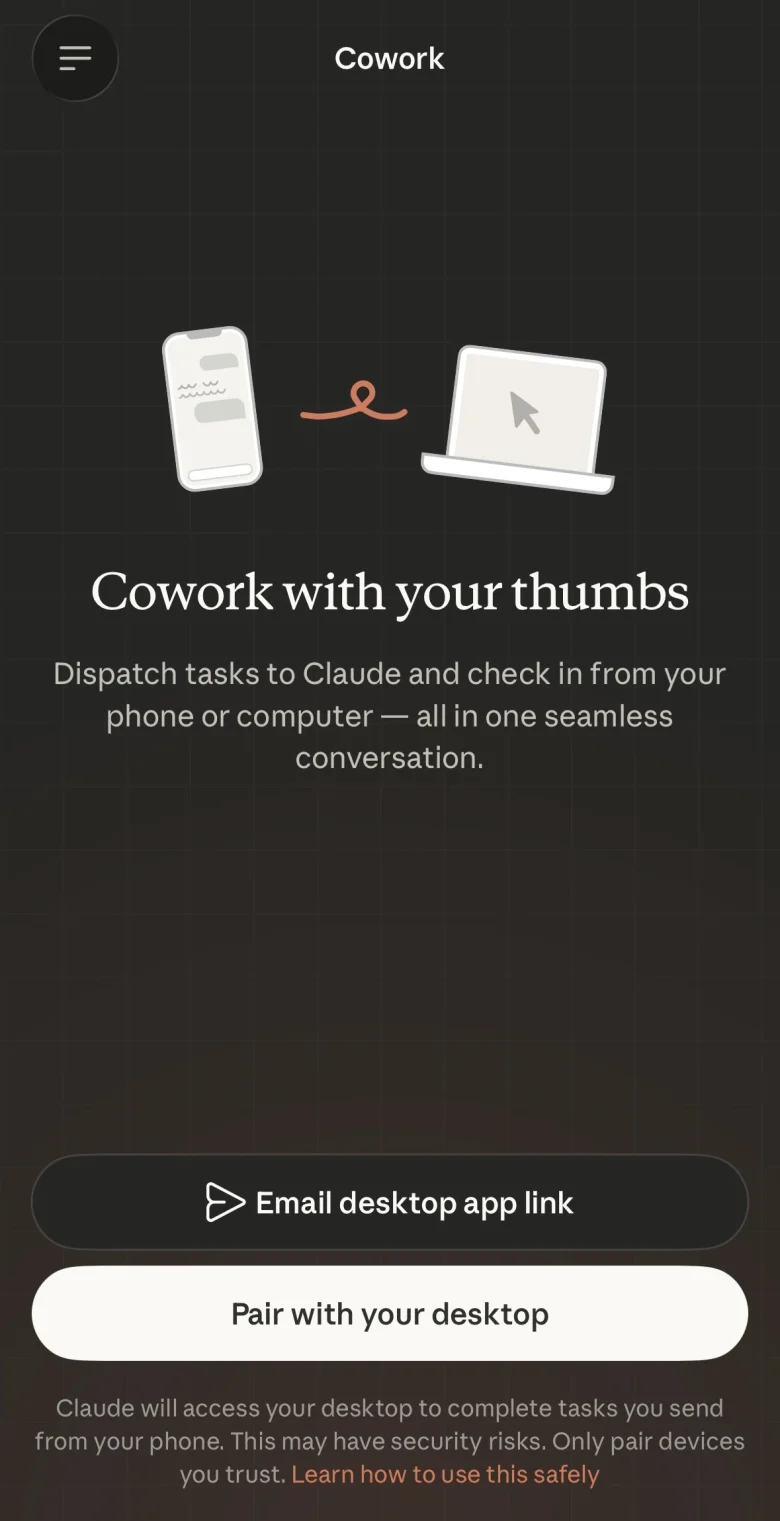
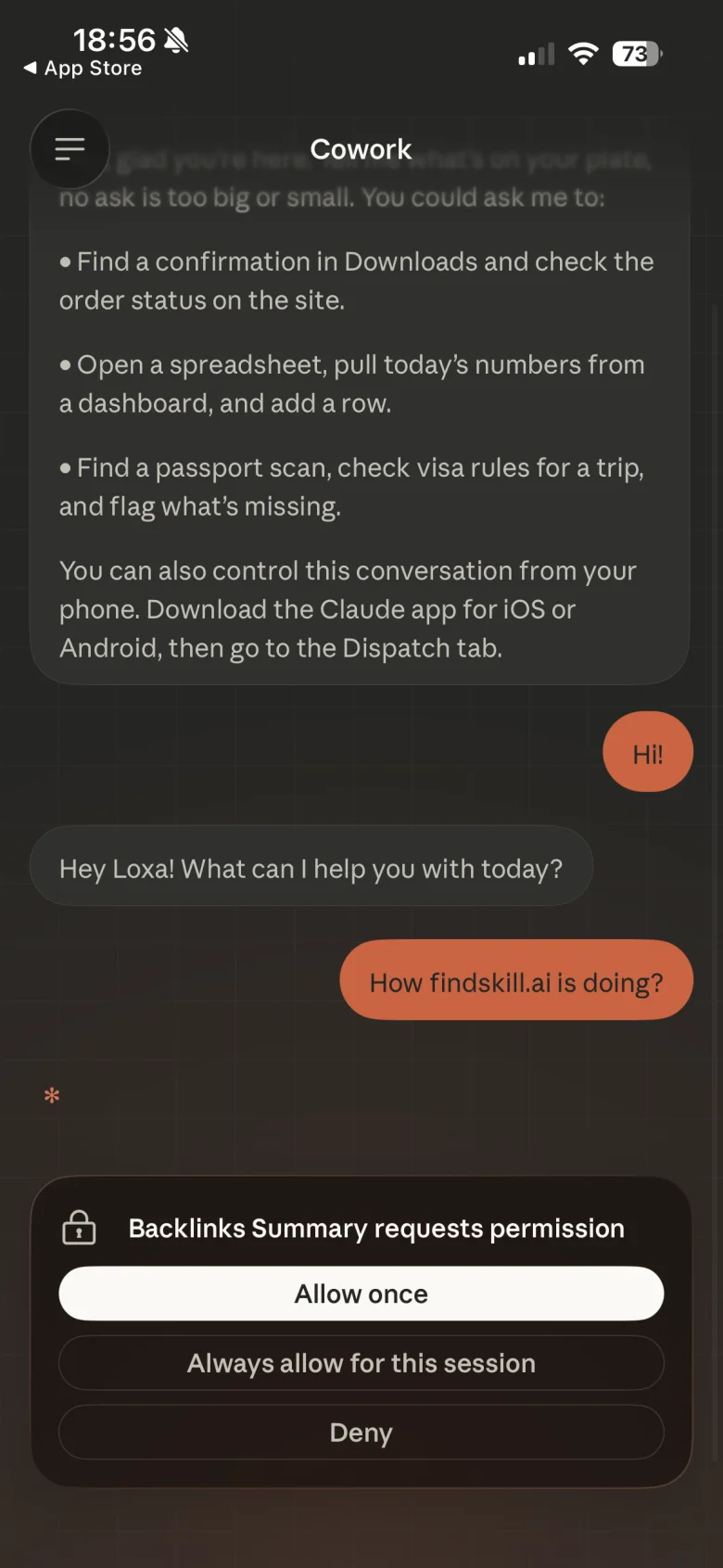
Once paired, you’ll see the same conversation on both devices. Send a message from your phone, it shows up on your desktop. Claude’s responses appear on both.
What You Can Actually Do With It
The pitch is “text Claude from your phone, come back to finished work.” But pitches are marketing. Here’s what I actually tested.
What Worked
Finding files and information on my Mac. Asked Dispatch to locate screenshots containing specific words. It found them by searching filenames and metadata. Quick and reliable.
Summarizing Notion notes. “Summarize my recent Notion notes” worked smoothly — Dispatch pulled data through the Notion connector and sent back a clean summary to my phone.
Adding content to connected apps. Told it to add a URL to my Notion database. Done. No issues.
Email summaries. “Summarize my most recent emails” came back accurate and fast. Useful when you’re out and want a quick inbox scan without opening your laptop.
Retrieving earlier screenshots. I asked for screenshots I’d referenced in a previous message. Dispatch found them again without me re-explaining the context. The persistent conversation actually matters here.
What Didn’t
Opening apps on my Mac. Asked it to open Shortcuts. Failed. Dispatch can work with your files but can’t reliably launch applications.
Sending files via iMessage. Asked it to text a screenshot to someone. Nope. Inter-app communication beyond connectors isn’t there yet.
Accessing Safari content. Tried to get the URL of my active Safari tab. Failed. AppleScript-based workarounds also failed.
Some connector authorizations. Todoist threw an authorization error even though it was set up in Cowork. Not all connectors seem fully Dispatch-compatible yet.
Terminal access. Asked it to list my Terminal sessions. Nothing.
The Honest Success Rate
MacStories tested it and landed at about a 50/50 shot on whether a given task would work. That tracks with my experience. Summarizing and retrieving information? Solid. Anything involving cross-app actions or system-level access? Coin flip.
It’s a research preview. That label is doing real work here.
Why It Matters (Even at 50/50)
The 50% success rate sounds bad. But think about what that 50% actually covers.
Before Dispatch, checking on a Cowork task meant walking to your computer. Starting a new task meant sitting down and typing it out. If you were commuting, at dinner, or just on the couch — Cowork was unreachable.
Now the stuff that does work — file searches, email summaries, database queries, note retrieval — happens from wherever you are. These aren’t edge cases. These are the “quick check” tasks you do dozens of times a day.
And there’s a deeper architecture play here. Dispatch processes everything locally on your machine. Your files never leave your computer. Your data doesn’t route through external servers for processing. For anyone with compliance concerns or just basic privacy preferences, that’s a meaningful design choice.
Privacy and Security
Anthropic designed Dispatch to keep your data local. Here’s how that works:
- Processing happens on your desktop. Your phone sends text instructions. Your Mac does the work. Files stay on your machine.
- No third-party data transfer. Dispatch doesn’t route your files through external services to reach your phone.
- Approval gates still work. If a task requires confirmation — deleting files, modifying documents — Dispatch sends the approval request to your phone. You confirm before it executes. This is the same safety model as regular Cowork, just extended to mobile.
- Your Mac must be awake. This is actually a security feature in disguise. No always-on cloud server means no always-on attack surface.
If you’ve already set up global instructions in Cowork like “never delete files without confirmation,” those rules carry over to Dispatch sessions too.
Who Gets Access
Update (March 22): Dispatch is now available to both Max ($100-200/month) and Pro ($20/month) subscribers. If you’re on Pro, update both your desktop and mobile apps — it should appear in the Cowork tab.
Enterprise and Team plans haven’t been announced yet for Dispatch, but given that Cowork already supports those tiers, it’s a matter of when, not if.
Dispatch vs. Claude Code Remote Control
If you’re a developer, this might sound familiar. Claude Code already has a remote control feature that lets you monitor and interact with coding sessions remotely.
Dispatch is essentially the same idea, adapted for Cowork’s non-technical audience.
| Feature | Claude Code Remote | Dispatch (Cowork) |
|---|---|---|
| Target user | Developers | Everyone |
| Interface | Terminal / web | Mobile app |
| Local file access | Yes | Yes |
| Connectors | MCP servers | 38+ app connectors |
| Setup | SSH / API config | QR code scan |
| Requires desktop running | Yes (or server) | Yes |
If you’re already using Claude Code, you probably don’t need Dispatch. But if you’ve been using Cowork for file organization, research, or document workflows, Dispatch extends that workflow to your pocket.
Real Use Cases That Make Sense Right Now
Based on what actually works today, here are the Dispatch workflows worth trying:
Morning inbox triage from bed. Before you even get up, text Dispatch: “Summarize my top 10 unread emails and flag anything urgent.” By the time you’re brushing your teeth, you know what your day looks like.
Meeting prep on the commute. “Check my calendar for today and prepare briefing docs for each meeting using files from /projects.” You walk into the office with prep already done.
Quick file lookups. “Find the PDF I downloaded last week about the Q1 budget.” Instead of remoting into your computer, Dispatch searches your files and sends back what it finds.
Database queries while away. “What were the action items from my last Notion meeting notes?” Useful when someone asks you a question at lunch and the answer is on your desktop.
Delegating tasks you forgot. Sitting on the train and remember you need that expense report? “Process all receipt images from /receipts and create a categorized spreadsheet in /outputs.” It’s waiting when you get home.
Related skill: The Expense Categorizer gives Claude a structured prompt for processing receipts — works great as a Dispatch task.
Tips for Getting Better Results
Since Dispatch is still rough, a few things help:
Keep tasks information-focused. Summarize, find, list, retrieve, compile. These work. “Open this app” or “send this via iMessage” doesn’t.
Use connectors you’ve already tested. If Gmail works in regular Cowork, it’ll work through Dispatch. Don’t try setting up new connectors remotely — do that at your desk first.
Be specific about file locations. “Check /projects/Q1/budget.xlsx” works better than “find my budget somewhere.” The less guessing Dispatch has to do, the better.
Set your Mac to stay awake. System Settings > Energy > Turn off “Put hard disks to sleep when possible.” Or just adjust your sleep timer. Dispatch dies when your Mac sleeps — there’s no workaround for this right now.
Don’t chain complex multi-step tasks yet. “Summarize my emails” works. “Summarize my emails, then create a Notion page from the summary, then share it with my team” is asking for trouble at this stage.
What the Community Is Actually Doing With It
Updated March 22 — one week after launch.
The announcement tweet from Anthropic engineer Felix Rieseberg hit 17,000+ likes and 6 million views. But the interesting stuff is what happened after the hype.
The SEO guy who cancelled his $200 ChatGPT sub. @bloggersarvesh shared a thread claiming Dispatch ran his SEO workflows for 30 days and added $25K in revenue. His prompt stack: extract competitor data, find content gaps, generate local keywords, audit schema markup, create Google Business Profile posts. His verdict: “Claude Cowork doesn’t replace your expertise. It replaces the 40 hours of busywork.” (Some replies questioned the 30-day timeline since Dispatch just launched — take with appropriate salt.)
The ad creator. @NotZainAgain demoed making a winning static ad from his phone in under 2 minutes: told Dispatch to find his winning video ad in a desktop folder, extract a prompt from it, then used that prompt with Gemini to create a static version. Now running it at profitable CPA.
The async productivity crowd. @JulianGoldieSEO nailed the pitch better than Anthropic did: “Write content while you’re outside. Fix presentations during your commute. Organize files while you sleep. You’re assigning work.” Multiple users described it as “replacing the 9-to-5 with a text message.”
The honest critics. @cocktailpeanut pushed back: “Too many restrictions. Flexibility-wise: OpenClaw > Codex Desktop »»> Claude Desktop.” And even @nabeelqu, who called Dispatch “insanely cool” (287 likes), admitted the browser integration is rough: “Claude for Chrome is like watching a drunk 4-year-old try to use a web browser.”
The vibe: Huge excitement for async workflows and solopreneur use cases. Real complaints about browser control, restrictions vs OpenClaw’s flexibility, and the “desktop must stay awake” requirement. Some creators ran entire tweet threads via Dispatch itself, which is either deeply impressive or deeply meta.
March 24-28 Update: Computer Use Changed Everything
A week later, the community’s use of Dispatch shifted dramatically. Computer Use launched on March 23 — and suddenly the tasks you can send from your phone got a lot more powerful.
Dispatch + Computer Use workflows people are actually running:
- Send “go to Meta Ads Library, search viral ads about [topic] in [country], create a Google Sheet with 50 links” from your phone while commuting. Claude opens Chrome, navigates the site, scrapes the data, and builds the spreadsheet.
- Send “go to my Fiverr account, post this job offer, message the best 10 freelancers, follow up on any unanswered DMs” — full hiring workflow from a text message.
- A content creator sent “write a script from my desktop notes” at lunch. The script was finished before he was done eating.
- Morning briefing automation: text “run my morning briefing” → Claude opens email, calendar, Slack, summarizes everything, saves to a file you read over coffee.
Dispatch is now on Teams plans. Announced March 25 by Anthropic engineer Felix Rieseberg. It’s off by default — if you don’t see it in your sidebar, ask your team admin to enable it in settings. This is the first enterprise rollout.
New frustrations surfaced this week:
The 50/50 reliability from launch hasn’t changed much. But the failure modes are clearer now:
- Dispatch sometimes stops responding entirely — prompts show “seen” but nothing happens, and usage still ticks up
- Long-running tasks frequently fail silently — Claude works for 20 minutes then drops the thread without delivering results
- Scheduled tasks occasionally “forget” their instructions after a few runs
- If you have two Macs, Computer Use might run the task on the wrong one
- Rate limits are shared across all Claude surfaces (chat, Cowork, Dispatch, Code) — heavy Dispatch use can eat your regular chat quota
The honest assessment: Dispatch + Computer Use is genuinely powerful for simple send-and-forget tasks. But complex multi-step workflows that span multiple apps still break more often than they succeed. Start simple, build trust, then scale up.
What’s Coming Next
Dispatch is clearly a foundation, not a finished product. Based on what Anthropic has shipped and what the community is asking for, here’s what to watch:
Pro plan access— Done! Now live for Pro subscribers.Computer Use— Done! March 23. Claude controls your mouse, browser, and apps. Full details in our Cowork guide.Teams plan access— Done! March 25. Off by default, admin must enable.- Fix silent failures — The #1 complaint right now: Dispatch says “seen” but never responds. Long tasks drop without notice.
- Notification improvements — Progress updates and task completion alerts on your phone
- Better scheduled task reliability — Tasks occasionally forget instructions after a few runs
- Rate limit separation — Dispatch shares quota with chat/Cowork/Code. Heavy Dispatch use eats your regular limits.
- Cross-platform support — iPad and web access would make Dispatch significantly more useful
- Windows Computer Use — Computer Use is macOS only. Windows users can’t use the Dispatch + Computer Use combo yet.
The persistent conversation model is the real bet here. Dispatch lets you control Cowork remotely. Computer Use lets Cowork control your desktop directly. Put them together and you’ve got an AI that works on your computer while you’re away from it — and you manage it from your phone. That’s a different product entirely.
The Bottom Line
Dispatch is an early-stage feature that solves a real problem. Cowork was powerful but chained to your desk. Now it’s in your pocket — sort of.
The 50/50 reliability means you can’t depend on it for anything critical. Not yet. But for the tasks it handles well — finding information, summarizing content, querying connected apps — it’s already useful. And it’ll get better fast.
If you’re a Max subscriber, try it today. If you’re on Pro, check for the update this week.
And if you’ve been on the fence about Cowork altogether, our complete Cowork guide covers everything from first setup to scheduled tasks and custom skills. Dispatch is one more reason the $20/month might be worth keeping.
Just keep your laptop open.
Related Articles
- Claude Cowork Guide 2026: Skills, Plugins, Connectors & Setup Tips — The complete Cowork tutorial, now updated with Dispatch.
- Free Course: Claude Cowork Essentials — 8 lessons from setup to real projects, with certificate.
- Free Course: Claude Dispatch — Structured guide to mastering Dispatch workflows.
- Claude Cowork Review: Is the $20 Pro Plan Worth It? — Two months with Cowork, the honest math on value.
- Copilot Cowork Explained: Microsoft + Claude in Your Office Apps — The enterprise version of Cowork inside Microsoft 365.
- Claude Ultrathink: The Secret Thinking Levels Most Users Don’t Know Exist — How Claude’s extended thinking works, and when to turn it on.
- OpenClaw vs Claude Code vs Copilot: The Honest Comparison — How Dispatch fits into the bigger AI agent landscape.
- AI Agents Explained: How They Work and Why They Matter — The technology behind Cowork, Dispatch, and the next wave of AI tools.
Sources:
- Hands-On with Claude Dispatch for Cowork | MacStories
- Anthropic Dispatch Turns Claude Into Your Always-On Creative Coworker | COEY
- Claude Cowork Dispatch Launch | Blockchain News
- Anthropic Launches Claude Dispatch for Remote Desktop AI Control | MLQ
- Claude Dispatch: pilotez votre Mac depuis votre iPhone | iPhoneSoft
- AINews: Claude Cowork Dispatch | Latent Space
- TestingCatalog on Dispatch Rollout | X
