Short answer: no. Claude Cowork is not free, and it never has been.
Longer answer, which is the one you actually need: it’s included with the $20 plan you might already be paying for, the shiny new features announced this week are not on that plan yet, and the way Cowork eats your usage allowance is strange enough that the sticker price barely tells you anything.
I’ve been through Anthropic’s pricing page, the help docs, and what people are reporting about real bills. Here’s what it costs.
Which plans include Cowork
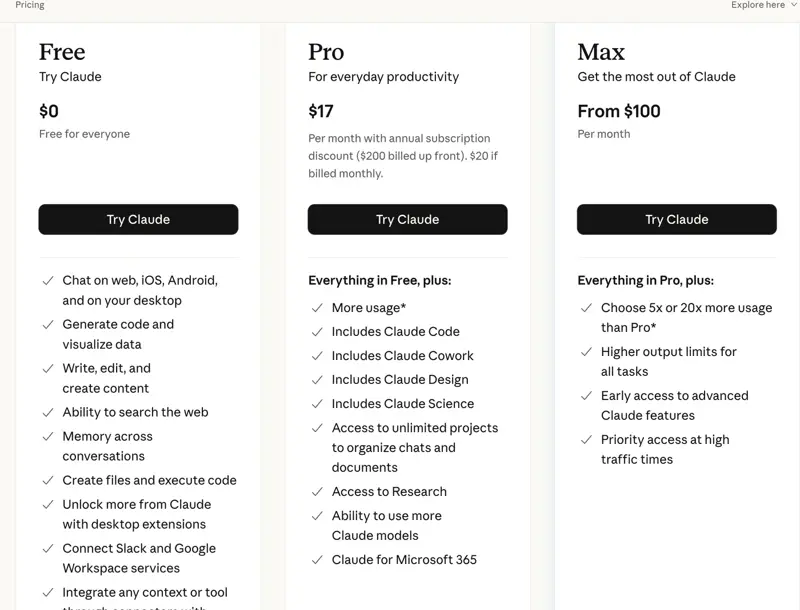
Anthropic’s help centre puts it in one line: “Claude Cowork is available for paid plans (Pro, Max, Team, Enterprise).”
So the Free plan is out. If you’re on Free today, there’s no version of Cowork you can try. You get chat.
| Plan | Price | Cowork? |
|---|---|---|
| Free | $0 | No |
| Pro | $20/mo billed monthly, or $17/mo if you pay $200 up front for the year | Yes |
| Max 5× | from $100/mo | Yes |
| Max 20× | $200/mo | Yes |
| Team | $25/seat/mo monthly, $20 billed annually | Yes |
| Enterprise | seat price + usage at API rates | Yes |
One thing worth flagging, because half the internet gets it wrong: that $17 is not the Pro price. It’s the annual price divided by twelve. If you pay month to month, Pro is $20. Anthropic’s own page says so in the small print under the big number, which is exactly where small print goes to be ignored.
And Max doesn’t unlock different features. It buys you more usage — 5× or 20× Pro’s allowance. That distinction matters more than it sounds, and we’ll get to why.
The catch: the new stuff isn’t on Pro yet
This is the bit people are actually confused about, and it’s the reason “is Cowork free” is trending at all.
On July 7, 2026, Anthropic brought Cowork to the web and to phones, and made sessions keep running in the cloud after you close your laptop. You can now schedule a task — Anthropic’s example is a 6am Monday client prep — and it runs with no device switched on.
That rollout is beta, and it starts on Max. Anthropic’s wording is “rolling out over the next several weeks starting with the Max plan, with more plans to follow.” No date for Pro.
So today, in July 2026:
- Pro ($20) gets Cowork on the desktop app. Which is, to be fair, the full version — desktop Cowork can reach your local files and your browser. The mobile and web versions can’t.
- Max ($100+) gets Cowork on the desktop app plus the phone, the web, and the background/scheduled tasks.
If what tempted you was “Claude works while I sleep,” that’s a $100/month feature right now. It probably won’t stay that way. But that’s what it is today, and no amount of clicking around your Pro account will find it.
Why the sticker price is the wrong number
Here’s the part that surprises people.
Cowork doesn’t bill per task. It draws from your plan’s usage allowance — the same pool your normal chats use. And Anthropic says plainly that Cowork “consumes more of your usage allocation than chatting with Claude,” because it’s running many steps, reading many files, and thinking for a long time.
How much more? Anthropic doesn’t publish a multiplier. So the honest evidence is what users report, and it’s sobering.
One person on the Pro plan found a five-hour Cowork session ate about 15% of their weekly usage. A Max 20× subscriber — the $200 tier — reported burning 4% of a weekly quota just 12% of the way into a single session. And someone ran the numbers on a single Cowork task that built a presentation and put the underlying cost at roughly $45, about a fifth of a whole month of Max.
Treat those as anecdotes, not benchmarks. Nobody has audited them. But they point the same direction, and it’s a direction the pricing page doesn’t prepare you for: on the $20 plan, Cowork is not something you leave running all day. It’s something you spend.
The “doubled limits” promotion, honestly explained
You’ll see this advertised. It’s real, and it’s more limited than it sounds.
From June 5 through August 5, 2026, Anthropic doubled the usage limit for Cowork. Specifically, the five-hour rolling session limit — the cap on how much you can run in any five-hour stretch before Claude makes you pause.
Your weekly limit did not change.
Which means the promotion lets you burn through your allowance faster, in bigger bursts, without hitting the short-term brake. It does not give you more allowance. One user called this misleading advertising, and while I think that’s harsh — Anthropic states it accurately in the terms — I understand exactly how someone reads “2× usage” and concludes something that isn’t true.
If you’re on Pro and hoping the promo means you can now try the big overnight task, read that paragraph again.
What this means for you
If you’re curious and on Free: there’s nothing to try. Spend a month on Pro at $20 before you commit to the annual $200 — Cowork changes fast, and this month is a bad month to lock in twelve.
If you’re already paying $20 for Pro: you have Cowork right now, on your desktop, and you may not have noticed. Open the desktop app. That’s the whole cost story for you — no extra charge, just a usage budget you didn’t know you were spending.
If you want the phone / background / scheduled version: that’s Max, $100/month, today. Before you upgrade, ask whether you’d actually schedule anything. Most people who think they want an agent running overnight discover they want a good template and twenty minutes on Monday.
If you’re a heavy user hitting limits on Pro: the upgrade to Max buys usage, not features. Work out whether you’re limited by capability (upgrade won’t help) or by allowance (it will).
If you’re running a small team: Team is $25/seat monthly, $20 annually, and includes Cowork. But note the new mobile beta is tied to Max, so a Team seat doesn’t get you the background tasks either.
What the price doesn’t cover
- It doesn’t cover attachments. Cowork’s Microsoft 365 write tools can send email — but not with a file attached. Ever.
- It doesn’t cover admin permission. On a work account, connecting Microsoft 365 with write access needs your IT administrator to consent. No plan upgrade changes that.
- It doesn’t cover mobile parity. Desktop Cowork sees your local files. The phone version doesn’t. Same subscription, different reach.
- It doesn’t buy predictability. Usage-based allowances mean a task that cost you nothing last week can lock you out on Thursday. There’s no meter showing you the cost before you commit.
- It doesn’t cover Free-tier curiosity. No trial of Cowork exists. The cheapest look is $20.
The bottom line
Cowork is free in the way a gym is free once you’ve paid the membership. It’s bundled into Pro, so if you’re paying $20 a month you already own it — but the “AI that works while your laptop is closed” that everyone’s posting about is on the $100 plan, and it will be for at least a few more weeks.
The number to watch isn’t $20 or $100. It’s your usage allowance, because that’s what Cowork actually spends. Start with one real task on Pro, check what it does to your limits, and decide from there.
Don’t buy Max because a demo video looked good. Buy it when you’ve hit a wall you can name.
New to all this? Our Claude Cowork Essentials course covers what Cowork is and how to hand it a task without wasting half your week’s allowance on it, and Cowork Skills & Plugins goes deeper once you’re comfortable.
Related reading: Claude Can Now Send Your Email in Microsoft 365, How to Use Claude Cowork: 12 Workflows You Can Steal, and Is Claude Cowork Worth $20?.
