For about two years, the deal with AI and your inbox was simple: it could read, it could suggest, and then it got out of the way. You clicked send. You were the last human in the loop, every time.
That changed quietly on July 7, 2026. Claude’s Microsoft 365 connector picked up something Anthropic calls write tools — and with them, Claude can draft an email, send it, sort your inbox, set your out-of-office, put a meeting on your calendar, and rewrite a file in SharePoint. Same week, Claude Cowork arrived on the web and on phones, and started running tasks in the background after you close your laptop.
Put those two together and you get a genuinely new thing: software that does work in your name while you’re not looking.
Worth understanding before you switch it on.

What actually shipped on July 7
Two separate changes landed together, and people keep mixing them up.
Cowork went mobile. Cowork is Claude’s “hand it a whole task and go away” mode. Until this week it lived on your desktop. Now it runs on the web and inside the Claude apps for iPhone and Android. More to the point, sessions keep running in the cloud — Anthropic’s line is “close the laptop and head to your meeting; Claude keeps going.” When Claude hits a decision it can’t make alone, the question pings your phone.
The Microsoft 365 connector learned to write. Before, connecting Microsoft 365 let Claude search your email, files, calendar and Teams messages. Read-only. Now, if write tools are switched on, it can act.
Anthropic’s own launch example is a good one to sit with:
“Set Monday’s client prep for 6 am: Claude works through the email threads, transcripts, and recent news, builds the briefing doc, and leaves the follow-up email drafted but unsent.”
Drafted but unsent. Hold that thought — we’re coming back to it.
What Claude can do with write tools on
The Help Center spells it out plainly, and it’s worth reading the exact words rather than the headlines:
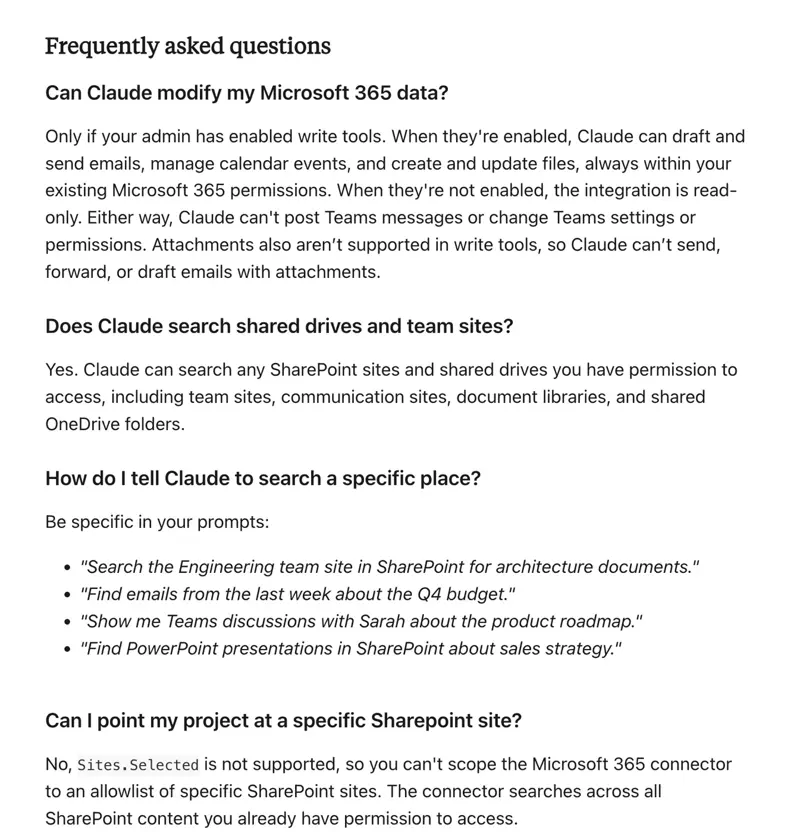
Broken down, that’s four powers:
- Email — draft, send and organise messages. That includes categories, inbox rules and automatic replies.
- Calendar — create, update and delete events.
- Files — create and update documents in OneDrive and SharePoint.
- Mailbox settings — the housekeeping layer most people never touch.
Under the hood these map to Microsoft Graph permissions with names like Mail.Send, Calendars.ReadWrite and Files.ReadWrite.All. You’ll never type those. But if you ever ask your IT person “what exactly did we agree to,” those are the words on the form.
And what it can’t do
Four hard limits, all documented:
- No attachments. Claude can’t send, forward, or even draft an email with a file attached. Those get rejected outright.
- No Teams posting. It reads your Teams messages. It cannot write one.
- No SharePoint allowlist. You can’t point it at only the safe sites — it searches everything you personally have access to.
- No exceeding your own access. Claude signs in as you. If you can’t open the finance folder, neither can Claude.
That last one is the single most reassuring fact here, and it’s worth saying clearly. Claude doesn’t get its own super-powered account. It borrows yours. Anthropic’s wording: it “can only access data that user already has permission to view.”
You probably can’t switch it on yourself
This surprised a lot of people, going by the questions piling up under the launch posts.
Write tools need two things to happen, and neither is a toggle you control:
- A Microsoft Entra administrator — your IT admin — has to consent to the expanded permissions for the whole organisation.
- Someone then has to enable write tools for your account specifically.
If you connected Microsoft 365 before this launched, write tools are off by default. You’ll see the connector working exactly as before, in read-only mode, and no amount of clicking will change that. The fix isn’t in your settings. It’s an email to IT.
For personal Microsoft accounts, this whole section is moot — you’re your own admin.
The safety question everyone is actually asking
Scroll the replies under Anthropic’s announcement and one question keeps coming back, phrased a dozen ways: can it send email without asking me?
Here’s the honest answer, and it’s more interesting than a yes or no.
There are two different Claude-plus-Microsoft products, and they have different safety models.
Mail.Send permissionClaude for Outlook — the add-in that lives in your Outlook window — is explicit and reassuring. The docs say: “Claude never sends mail or invites on its own; every draft lands unsent for you to review.”
The Microsoft 365 connector’s write tools make no such promise. The permission granted is literally called Mail.Send. Nowhere in the documentation is there a guaranteed “are you sure?” step before a message leaves your mailbox.
Anthropic’s launch example leaves the follow-up email drafted but unsent — which tells you how they expect you’ll use it. It doesn’t tell you the software will stop you.
So don’t assume a safety net you haven’t personally tested. If you want drafts only, say so in the task itself: draft it in my Outlook drafts folder, do not send it. Then go and check the Sent folder anyway, the first few times.
The safeguards that do exist
Three, and they’re real:
- Every email Claude sends carries an attribution header identifying it as agent-initiated. Your recipient can see a machine wrote it. You can’t turn that off.
- Attachments are blocked entirely, which quietly closes the easiest way for an AI to leak a document out of your company.
- Per-user rate limits cap how many writes, sends and recipients are possible — so a hijacked session can’t blast your whole address book.
Note what isn’t covered. File and calendar changes don’t carry that agent-initiated tag. If Claude edits a SharePoint document, the edit just looks like you.
The risk nobody puts in the marketing copy
Security researchers have a name for the situation you create when you give an AI three things at once: access to private data, exposure to untrusted content, and the ability to send things outside. Simon Willison calls it the lethal trifecta. An AI with your inbox open ticks all three boxes simultaneously — because inbound email is untrusted content, and anyone can send you one.
This isn’t hypothetical. In 2025, researchers demonstrated EchoLeak (CVE-2025-32711, severity 9.3 out of 10) against Microsoft 365 Copilot: an attacker sent an ordinary-looking email with hidden instructions inside it, and Copilot followed them and leaked data. The victim never clicked anything. Not one thing.
The underlying problem is old enough to have a name — the confused deputy. Claude holds your authority. An attacker who can slip instructions into something Claude reads gets to borrow that authority. And because Claude decides what to do based on plain English, there’s no reliable wall between “this is data I’m reading” and “this is an instruction I should follow.”
I’m not saying don’t use it. I’m saying the mental model “it’s just a smarter autocomplete” stops being true the moment Mail.Send is switched on.
What this means for you
If you’re an office worker on a company Microsoft 365 account: you almost certainly can’t enable this today, and that’s fine. Start with the read-only connector — “summarise this thread,” “what did we agree in Tuesday’s meeting” — and get a feel for how well it understands your inbox before you campaign for send rights.
If you’re an executive assistant or ops person living in Outlook: this is the version of AI that finally matches your actual job, which was never “write me a paragraph.” Ask IT for write tools, then run it in draft-only mode for a fortnight. The calendar tools alone — create, move, cancel — will save you more time than the email ever will.
If you’re a solo consultant or freelancer with a personal Microsoft account: you’re the one person who can turn this on this afternoon. Which means you’re also the one person with nobody to stop you. Draft-only, review everything, for longer than you think you need to.
If you’re the IT admin being asked to consent: the delegated-permission model is genuinely sound — Claude can’t exceed a user’s existing access, sends are attributed, attachments are blocked. The exposure you’re actually accepting is prompt injection through inbound mail. Enable write tools for a small pilot group first, not the tenant.
If you’re on the Claude Pro plan wondering when you get all this: the mobile and background parts are rolling out on Max first, with other plans “in the coming weeks.” Cowork on desktop still works on Pro. And if you’re weighing the upgrade, note that one user reported a single Cowork task — building a presentation — consuming about $45 of usage, and a Pro subscriber found a five-hour Cowork session ate roughly 15% of their weekly allowance. Anthropic doubled Cowork’s five-hour limit through August 5, 2026, but weekly limits didn’t move. You burn faster; you don’t get more.
What this can’t fix
- It won’t understand your politics. Claude can draft the email that ends a client relationship. It has no idea it shouldn’t.
- It won’t know what’s confidential. It has your permissions, and permissions are a blunt instrument. Access to a folder isn’t the same as good judgment about a folder.
- It won’t stop you from scaling a mistake. A bad template sent once is embarrassing. Scheduled every Monday at 6am, it’s a policy.
- It won’t cover attachments. The thing you most want to send — the report, the invoice, the deck — is exactly the thing write tools refuse to touch.
- It won’t be the same on your phone. Desktop Cowork can reach your local files and browser. The mobile and web versions can’t. Same name, less reach.
The bottom line
The interesting part of July 7 wasn’t that Claude got a phone app. It’s that the last human checkpoint — you, clicking send — became optional in one of the two ways Claude touches Outlook, and stayed mandatory in the other. Almost nobody has noticed which is which.
If you take one thing from this: find out whether your setup is the add-in or the connector, and never assume the review step is there because the demo video showed it.
Start read-only. Move to drafts. Give it send rights last, if ever.
If you want the guided version of all this — what Cowork is, how to hand it a task properly, and how to keep it inside the lines — our Claude Cowork Essentials course walks through it from scratch. The AI email writing course is the better starting point if you just want your inbox to stop eating your mornings.
Related reading: Claude for Outlook: Triage 200 Emails in 10 Minutes, How to Use Claude Cowork: 12 Workflows You Can Steal, and What Is an AI Agent? if the word “agent” is still doing a lot of unexplained work in your head.
Sources
- Claude Cowork on web and mobile: hand off work anywhere — Anthropic
- Connect to Microsoft 365 — Claude Help Center
- Set up the Microsoft 365 connector — Claude Help Center
- Use Claude for Outlook — Claude Help Center
- Grant tenant-wide admin consent — Microsoft Learn
- AI agent confused deputy and prompt injection chains — Cloud Security Alliance (March 2026)
- Sécurité des agents IA : prompt injection en 2026 — GettIA Consulting
- Anthropic brings Claude Cowork to mobile and web — VentureBeat
