If you’re a K-12 teacher who quietly built a Workspace Agent during OpenAI’s free preview — the one that drafts your Friday family newsletter, or the one that turns Wednesday’s grade-team meeting recording into action items — tonight is the night you decide whether to keep it on.
At midnight Pacific (3am Eastern, May 6), the free preview ends. Credit-based pricing kicks in. OpenAI hasn’t published the rate card. Your free ChatGPT for Teachers subscription, the one that runs through 2027, may or may not cover agent runs — the company hasn’t said either way.
That’s the situation. Here’s the 10-minute audit you can run before you go to bed.
What Just Changed
OpenAI launched Workspace Agents on April 22, 2026, calling them “an evolution of GPTs” — agents that “handle complex tasks and long-running workflows” and “keep working even when you’re not.” (OpenAI announcement)
In plain English: a Workspace Agent isn’t a single answer to a single prompt. It’s a small worker that can read a Google Doc, write to a Microsoft 365 file, post to a Slack channel, and run on a schedule. You define the steps once. It runs the steps every Friday at 2pm. You approve before anything sensitive ships.
Agents launched in research preview on four plans:
| Plan | Workspace Agents access |
|---|---|
| Business | ✅ Research preview |
| Enterprise | ✅ Research preview |
| Edu | ✅ Research preview |
| Teachers | ✅ Research preview |
| Plus / Pro / Free | ❌ Not included |
Free during the preview. Credit-based after May 6. (source)
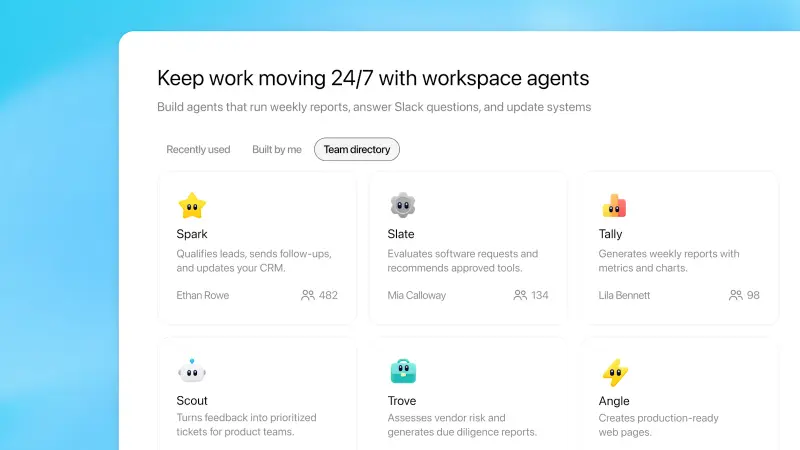
The teacher use cases OpenAI itself called out, in its own announcement and the OpenAI Academy K-12 page:
- A Friday family update drafter that pulls from your classroom notes
- An advising question summarizer that answers student queries and links to school resources
- A research or grant briefing assistant for grant writing
- A meeting-notes-to-next-steps tool for grade teams and PLCs
- A tech support router for IT tickets (OpenAI Academy K-12) (EdTech Innovation Hub coverage)
If you built any of those, this audit is for you.
The 10-Minute Audit
Open a notebook. Open ChatGPT. Set a 10-minute timer. Walk through your active agents one at a time.
For each agent, write down four things:
1. How often does it run? Daily, weekly, on-demand, or “I built it once and I’m not sure I’ve used it since.” Be honest. The agent that hasn’t run in three weeks is the easiest to switch off tonight.
2. What does it actually replace? A 30-minute Friday newsletter you used to write by hand? A two-hour grant summary? A 10-minute script you used to copy-paste into ChatGPT yourself? Estimate the time it saves you per run, then multiply by how many times it actually runs in a month.
3. Could a Custom GPT or a saved prompt do the same job? Workspace Agents are powerful because they run unattended and connect to outside tools. If your agent is really just “summarize this document the same way every time,” that’s a saved prompt — not an agent. Saved prompts cost nothing to run after May 6.
4. Does the agent touch student data, IEP language, grading, or discipline? If yes, NYC’s new “traffic light” AI policy (see our guide) and most district AI guidelines flag those as red light or yellow light uses. Switch it off regardless of cost. The legal and FERPA exposure isn’t worth the convenience.
Now sort your agents into three buckets.
Bucket A: Keep on, eat the credits
These are the agents that save you real time and don’t touch student PII. The Friday family-update drafter that pulls from your weekly classroom notes. The grade-team meeting-notes summarizer. The grant briefing assistant.
For these, you’re betting that OpenAI keeps the Teachers plan free-through-2027 promise generous enough to absorb agent credits — or that the credits cost less than the time the agent saves you. Watch your usage dashboard for the first two weeks of May. If credits start showing up against your account, you’ll see it before the bill does.
Bucket B: Convert to a saved prompt
Agents that just transform text the same way every time? Strip them down. Save the system prompt as a Custom GPT or paste it into your prompt library. You give up the “runs while you’re not there” magic, but you keep the productivity for free.
Examples that usually belong here:
- “Translate this letter to Spanish in a parent-friendly tone”
- “Rewrite this learning objective in student-facing language”
- “Turn these vocabulary terms into a 10-question matching quiz”
None of those need an agent. They need a good prompt.
Bucket C: Switch off tonight
Anything that hasn’t run in 30 days. Anything that touches grading, IEPs, discipline notes, or counseling decisions (per emerging district policy). Anything you built to test the feature and never adopted.
Switch them off in your workspace settings. You can always rebuild — your prompts and configs stay saved.
What This Means for You
If you’re a verified U.S. K-12 teacher on the free Teachers plan: OpenAI’s Help Center says the program is free through June 2027. EdTech Innovation Hub reports that some sources cite June 2028. The discrepancy matters less than the unanswered question: does that free tier include Workspace Agent credits? OpenAI hasn’t said. Check your account settings tomorrow morning for the actual end-date. If credits start ticking down, you’ll know within a week.
If you’re an instructional coach or curriculum coordinator: Your district CTO needs to hear this today. EdTech Innovation Hub flagged the open question directly: “whether free agent access for schools survives the May 2026 switch, or whether credits become the point at which edtech buyers have to start paying to automate.” Forward the OpenAI announcement to procurement before the weekend.
If you’re a principal or AP: Run a 15-minute faculty-meeting agenda item next week titled “Which AI agents are we actually using.” Most principals don’t know. Most teachers haven’t told them. The cliff is the right reason to find out.
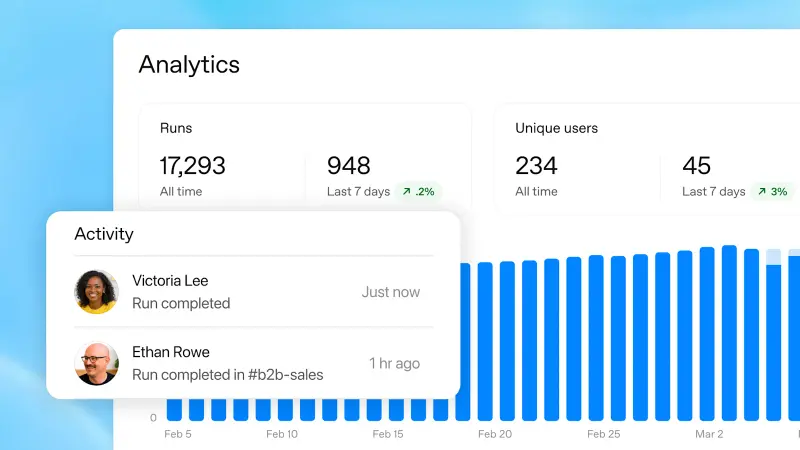
If you’re a district IT lead: Audit who in your domain has Workspace Agents enabled. Pull the analytics dashboard. Decide whether to throttle by role-based access control before bills arrive. Microsoft’s comparison number — 25,000 Copilot Credits for $200 — is the closest published yardstick we have for what unmetered agent automation costs at scale. (source)
If you’re a parent reading this because your kid’s teacher mentioned it: The actual concern isn’t the cost. It’s whether teachers stop using a tool that helps them turn around grant work, parent newsletters, and grade-team minutes faster — because the price became unpredictable overnight. That’s worth raising at your next school board meeting.
What This Doesn’t Fix
A few honest limits.
No published rate card. OpenAI has not released per-credit pricing as of May 5. Anyone telling you “your agent will cost $X per month” is guessing. One independent estimate ran a single agent at 100 invocations per day at GPT-5 rates and got roughly $300/month — but that’s a heavy enterprise workload, not a teacher’s Friday newsletter. (source)
No district-level guidance yet. No major teachers’ association — NEA, AFT, NSBA, SETDA — has issued formal guidance on the May 6 transition as of today. If your district has an AI policy committee, you’re on your own until June. Run the audit anyway.
Custom GPTs are not Workspace Agents. OpenAI is positioning Agents as the successor to Custom GPTs, but Custom GPTs still work on Plus and Pro plans. If you don’t have Business / Enterprise / Edu / Teachers, you don’t have agents to worry about — you have Custom GPTs, and they’re not changing tonight.
The free-through-2027 promise has a footnote. OpenAI says: “After that, we may adjust pricing, but our goal is to keep ChatGPT for Teachers affordable for educators. If anything changes, we’ll give advance notice.” That’s the company’s intent. It’s not a contract. (source)
Google moves the other way. At BETT 2026, Google announced that Gemini for Education Plus subscribers get premium AI features bundled at no extra cost — drafting, summarizing, rubric conversion. (source) If your district is Workspace-heavy, that may shift platform decisions over the next year. It doesn’t change your audit tonight.
The Bottom Line
The Workspace Agent that drafts your Friday family newsletter probably stays. The agent you built one Sunday in March and forgot about probably goes. The agent that touches student grades or IEP language goes regardless of price.
The 10 minutes you spend tonight is worth it because the cost of a wrong assumption — that your free Teachers tier covers everything, or that credits won’t add up — could land in your district’s budget meeting before anyone explains it to you.
If you want a deeper walkthrough on building Workspace Agents the right way (and avoiding the credit traps that enterprise teams are already hitting), our ChatGPT Workspace Agents for Non-Engineers course is built for exactly this audience — small teams, no Codex experience required, focused on the agents that actually pay back the cost.
Sleep on it. Check your account in the morning. Adjust before Monday.
Sources
- Introducing Workspace Agents in ChatGPT — OpenAI
- OpenAI brings workspace agents to ChatGPT Edu and Teachers plans — EdTech Innovation Hub
- Flexible pricing for the Enterprise, Edu, and Business plans — OpenAI Help Center
- ChatGPT for Teachers — OpenAI
- OpenAI unveils Workspace Agents — VentureBeat
- Premium Google AI for more educators and students — Google Blog (BETT 2026)
- OpenAI Academy: Workspace Agents
