Anthropic shipped Claude Code Agent View on May 11. The promise is what every developer running parallel agents has wanted for a year — one screen, every session, no more juggling tmux panes and notebook tabs. The dashboard is genuinely good. The supervisor process is real and it actually keeps your work running after you close the terminal.
But a week is enough time for the cracks to show. The official docs include one line that nobody is repeating loudly enough: running ten agents in parallel uses your quota roughly ten times as fast as running one. The community is finding the other cracks — supervisor crashes when you mix /bg and the desktop app, agents that get stuck in long thinking loops and burn budget without finishing, a “thread limit reached” wall that hits earlier than you’d think, and the worktree behavior that fixes file conflicts but breaks your dev environment awareness.
This is the honest field report. What works, what breaks, and the cost math you need to do before you dispatch six tasks and walk away.
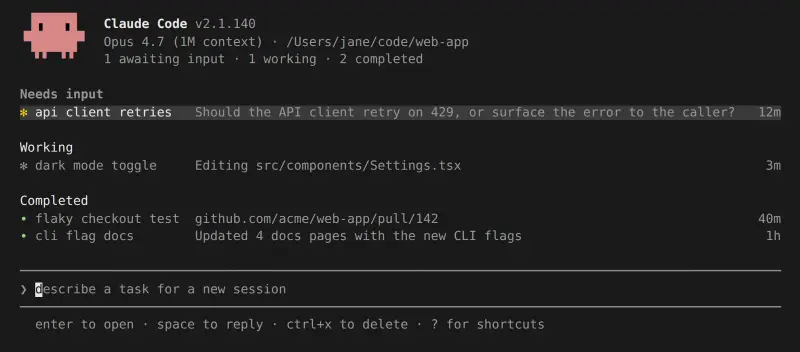
What Agent View Actually Is
Agent View is a CLI dashboard you open by running claude agents in any terminal. It lists every Claude Code background session you have running — across every project, regardless of which directory you opened it from — and lets you peek into each session’s latest output, send a reply without attaching, or take over the full conversation with the right arrow key. Sessions are grouped by state: pinned at the top, then Ready for review, Needs input, Working, and Completed.
The CLI surface is small. Three commands cover most of the use:
claude agents— opens the dashboard/bg— moves the current foreground session into the background (and into agent view)claude --bg "<task>"— launches a fresh background session directly from the shell, skipping the foreground entirely
You can also pass --name "flaky-test-fix" to give a session a recognizable label in the list, or --agent code-reviewer to dispatch a specific subagent as the main agent. The shell management commands round it out — claude attach <id>, claude logs <id>, claude stop <id>, claude respawn --all. None of this is hard to learn.
The dashboard requires Claude Code v2.1.139 or later. Run claude --version first; if you’re on an older build, claude update brings you current.
The Supervisor Process and Why It Matters
The thing that makes Agent View work is the per-user supervisor process — a separate process from your terminal and from agent view itself. It starts automatically the first time you background a session, hosts every background session you dispatch, and survives terminal close, agent view close, and Claude Code auto-updates. You don’t manage it directly. You don’t need to.
This is the architecture detail that changes the mental model. Before Agent View, a Claude Code session lived inside the terminal that started it. Close the terminal, kill the session. After Agent View, a backgrounded session lives inside the supervisor, which is a separate detached process. Close the terminal, the session keeps going. Reboot the supervisor binary mid-task because the auto-updater replaces it, and the supervisor reconnects to your in-flight sessions on its way back up.
State lives in three places on disk:
~/.claude/daemon.log— supervisor log; check this when something goes wrong~/.claude/daemon/roster.json— the list of running background sessions, used to reconnect after a supervisor restart~/.claude/jobs/<id>/state.json— per-session state, one file per session, used to render each row in agent view
A few honest limits the docs spell out: background sessions are local, so they stop if your machine sleeps or shuts down. After a session has been idle and unattached for about an hour, the supervisor stops the underlying process to free resources — peek or attach and Claude restarts it from where it left off, but the first message after that one-hour idle takes a moment longer to come back. And bypassPermissions and auto permission modes are refused on dispatch until you’ve accepted them once interactively in that directory. Anthropic doesn’t want a session you aren’t watching auto-approving file writes.
The Cost Math Everyone Is Skipping
Here is the quote from the official Agent View limitations section, verbatim: “Rate limits apply: background sessions consume your subscription usage the same as interactive sessions, so running ten agents in parallel uses quota roughly ten times as fast as running one.”
That sentence is doing a lot of work. It means the Max plan’s 5-hour usage window does not stretch when you dispatch parallel work. It compresses. If a single interactive session burns through your Max budget in five hours, ten parallel sessions burn through the same budget in roughly thirty minutes. The supervisor doesn’t share token spend across sessions. Each session is its own conversation hitting the model API independently, and your quota is a single pool draining from all of them.
Three numbers that put this in context. A developer documented running 781,000 tokens in a single Claude Code Max session this week — that’s one session, one terminal, one project. A separate report from this week cited Uber blowing through its entire 2026 enterprise AI budget on Claude Code in four months. And one of the most-shared takes from a frustrated Claude Code user described “wasting 80,000 to 200,000 tokens to fix tiny bugs” — that’s the cost of one feature on one session before you ever dispatch parallel work.
The implication: Agent View is not a free productivity multiplier. It’s a quota multiplier. If you were comfortable burning your Pro plan’s daily limit on one session at a time, dispatching three parallel sessions hits that limit in a third of the time. The mental model isn’t “I’m getting more done.” It’s “I’m spending budget faster, and getting more done in proportion.”
What this means in practice: Pro plan users should treat Agent View as an overflow mechanism for one short-running task while their main session is mid-edit, not as a “fire-and-forget five agents and walk away” pattern. Max plan users get more headroom but should still budget by dispatch count, not by clock time. Team and Enterprise plan users have negotiated quotas — check with whoever runs your contract before you ship a workflow that quietly 5x’s daily spend.
Week One Failure Modes
A pattern emerges from the first week of public reports. Failures cluster into five categories, and only one of them (file conflicts) is addressed by Anthropic’s default architecture. The others are still raw edges.
1. The /bg + agent view + desktop interaction crash
A user posting screenshots on May 16 caught Claude Code throwing Claude Code process exited with code 1 when they opened a background session with /bg, switched to agent view, and had the desktop app still running on the same session. That specific overlap — backgrounding a session while the desktop is attached to the same conversation — is fragile. The cleanest workaround is to detach the desktop first, then /bg from the terminal, then open agent view. If you’re not using the desktop, you won’t hit this.
2. Hung sessions and deadlocks on switching
A user on May 12 reported the supervisor hanging on startup and inter-session switching — “switching between agents (bg agents) also hang for like a minute… seems like a deadlock.” The pattern: dispatch three or four sessions, watch the first one finish, try to arrow over to the second one, and the dashboard freezes for thirty to sixty seconds before it responds. This appears to be a supervisor-process bottleneck — not a session-level bug. Anecdotally it loosens up if you let the dashboard breathe for a minute after dispatch instead of immediately attempting to switch.
3. The “thread limit reached” wall
The most useful failure mode to know about. A user pushing parallel agents on May 17 hit One QA/accessibility reviewer did not spawn because the thread limit is reached — and noted in the same post that “parallel agents are really, really never used properly.” This is a soft ceiling, not the rate-limit quota. It’s a concurrency cap on session dispatch itself. The official docs don’t name a specific number, but community reports consistently surface this around 5–7 simultaneous active sessions on consumer plans, with Enterprise users hitting it later. If you see this error, stop dispatching, wait for in-flight sessions to either complete or move to Needs input, then resume.
4. The “fly away and burn tokens” pattern
Multiple reports in week 1 surfaced sessions that go off-rails and silently consume budget. The Chinese developer community posted a particularly clean version: “When I run 4 parallel subs, often 1 flies away — the list just lets you watch it burn tokens.” A separate report this week documented five silent-failure issues over nine days, including a SQL DELETE agent that wiped 24,000 rows in production. The mechanism is consistent — a session enters a long thinking step, exits to a tool call that produces a destructive or wasteful action, and the supervisor has no judgment to interrupt it because that’s what you dispatched. Agent View shows you the row. It doesn’t gate the action.
The mitigation: don’t dispatch destructive work in auto or bypassPermissions mode. The default defaultMode requires you to approve risky edits, which is the entire point. If you’ve set a session to skip approvals, you’re trading safety for speed and you should expect to lose some of those trades.
5. The 2-agent host limit (rare, real)
One user on May 13 reported “can’t run more than 2 claude agents on the same host without them breaking each other.” This appears tied to specific local environments — likely Mac-side resource limits on file watchers or process counts, since most users running 4–6 parallel sessions don’t see it. Worth flagging because if you hit it at 2 agents you’re not “doing it wrong”; you’re hitting an environment-specific cap. Check ulimit -n and Mac kern.maxproc if you see breakage in this range.
The Worktree Default — Solving File Conflicts Anthropic’s Way
The interesting architectural choice in Agent View is what happens when two sessions touch the same file. The answer is in this docs paragraph, slightly compressed: “Before editing files, Claude moves the session into an isolated git worktree under .claude/worktrees/, so parallel sessions can read the same checkout but each writes to its own.”
Translation: every background session that touches files in a git repository gets its own worktree under .claude/worktrees/<session-id>/. Reads come from the shared repo state. Writes are isolated. When you delete a session, the worktree is cleaned up — but uncommitted changes in it are gone too, so you push or commit anything you want to keep before you press Ctrl+X Ctrl+X to delete the session.
This solves the “two agents editing the same file” problem cleanly for any session running inside a git repo. It does have two real-world consequences worth knowing.
First, sessions outside a git repository fall back to writing the working directory directly, with no isolation. If you dispatch parallel work on a non-git project, you can absolutely produce file collisions. Initialize a repo before you parallelize. It costs nothing and removes a class of bug.
Second, a session in its own worktree loses some awareness of your active dev environment. A developer flagged this on May 13: “Agent View dispatches sessions into isolated git worktrees. That’s great for avoiding file collisions but there’s a tradeoff — the agent loses awareness of your actual dev environment.” If your local dev server is bound to the main checkout, the worktree session doesn’t see your in-flight uncommitted changes. The fix is to commit (or stash, in the main checkout) before dispatching work that needs to see current state.
For what it’s worth, the developer who built much of this internally is reportedly running ten to fifteen parallel sessions himself, all in git worktrees. The architecture scales — if you commit cleanly and respect the dispatch rhythm.
What This Means for You
Different setups, different ceilings.
If you’re a solo developer on the Pro plan. Don’t think about Agent View as a 10-parallel-agent feature. Think about it as a “one quick task in the background while I finish this” feature. Dispatch one quick task — a flaky test investigation, a doc generation pass — let it run while you stay focused on the current edit, peek when you switch context. You’ll burn budget faster than running purely interactive, but the productivity bump is real because you stop blocking on the long-running task. Two parallel sessions is the realistic ceiling on the Pro tier.
If you’re on the Max plan or a small dev team. Three to five parallel sessions is the realistic working ceiling. Above that you start hitting the thread limit, the dashboard switching deadlock, and the supervisor pause windows. Keep each session scoped to one concern — “fix flaky test X” not “investigate the test suite.” Dispatch with --name so you can find it in the list later. Commit before dispatching anything that touches your dev branch. Always run in defaultMode for the dispatch, not auto.
If you’re at a larger team or running on Enterprise. This is where Agent View earns its keep. Your quota tolerates 5–10 parallel sessions. PR babysitters, dashboard updaters, and looping /loop-based jobs sit in the dashboard and let one developer triage what would have been a dozen separate context switches. Treat the dashboard as the inbox. Use --cwd to scope agent view to one project per terminal so a backend dev’s view doesn’t fill with the frontend team’s runs. And get your platform team to set CLAUDE_CODE_DISABLE_AGENT_VIEW=true in any CI environment where you don’t want background sessions silently accumulating cost.
If you’re using the desktop app heavily. Detach desktop from a session before backgrounding it with /bg. The crash pattern reported this week is specifically the overlap between desktop attachment and the supervisor handing off the session. Avoid it and you avoid the bug.
What Agent View Can’t Do
The honest limits, none of which are deal-breakers, all of which are worth knowing.
- It doesn’t survive machine sleep. Background sessions stop when your Mac sleeps or your Linux box shuts down. They show up as Failed in agent view when you wake. Run
claude respawn --allto bring them back; they pick up where they stopped. But if you were counting on a session to keep working overnight while your laptop is closed, it won’t. - It doesn’t share quota across sessions. Ten sessions equals ten times the burn rate. There’s no parallel-discount, no shared context cache that makes the second session cheaper. Plan accordingly.
- It doesn’t gate destructive actions for you. If you dispatch a session in
autoorbypassPermissionsmode and it deletes 24,000 database rows, agent view shows you that row going green. The supervisor doesn’t interrupt destructive tool calls. The permission model is the gate, and you’re the one who configures it. - It doesn’t unify session list across machines. Agent view is local. If you dispatch from your work laptop and want to peek from your home Mac, you can’t. There’s no cloud sync of supervisor state. Use the web version of Claude Code for cloud-managed parallel sessions if that’s what you need.
- It’s still research preview. The flag
disableAgentViewexists for a reason. The interface and shortcuts may change. Don’t build production CI workflows around exact keyboard shortcuts that aren’t documented as stable yet.
The Bottom Line
Agent View is a real productivity unlock for parallel work, and the supervisor architecture is the right answer to “what happens when I close the terminal.” The 10-parallel-agents headline is technically possible, occasionally useful, and a quota disaster if you reach for it as a default. Three to five parallel sessions is the sweet spot for most users. Commit before you dispatch. Stay in defaultMode. Treat each session as a scoped task with one clear concern. And read your ~/.claude/daemon.log once a week to see what the supervisor is actually doing under the hood — it’s surprisingly readable.
If parallel sessions are the part of Claude Code you want to push hardest on, our Claude Code Session Mastery course walks through the dispatch patterns, worktree management, and quota-budgeting habits that turn Agent View into the productivity multiplier it’s meant to be. For the broader workflow — when to dispatch parallel vs. when to stay interactive, how to scope tasks to fit the supervisor model — our Claude Code Mastery course covers it end to end.
Sources
- Manage multiple agents with agent view — Claude Code Docs
- Agent view in Claude Code — Anthropic Blog
- Run agents in parallel — Claude Code Docs
- How to Use Claude Code’s /bg Command to Run Background Agent Sessions — MindStudio
- Claude Code Agent View Guide — BuildFastWithAI
- Anthropic’s Claude Code agent view is a better dashboard — The New Stack
- Thoughts on Claude Code 2.1.139 Agent View and Background Sessions — Hacker News
