

You’re a paralegal at a 6-attorney firm. There’s a 60-page discovery response on your desk that needs to be issues-tagged before Monday. There’s an NDA your senior wants redlined against opposing counsel’s edits by end of day. There’s a privilege log waiting on the Bates set from last week. And on May 12, 2026, Anthropic shipped a tool — Claude for Legal — that handles all three workflows, installs in 5 minutes, and costs $20/month. Not $89/month like Spellbook. Not $200+/month like Harvey. $20.
This post walks you through the install (no IT ticket required for individual subscribers), the connector you actually need to wire up, and the four first-day prompts that save 4-6 hours.
What Claude for Legal actually is (in plain language)
On May 12, Anthropic released Claude for Legal — a bundle of 12 practice-area plugins plus 20+ connectors that link Claude into the software your firm already runs on. The plugins are open-sourced under Apache 2.0 on GitHub at anthropics/claude-for-legal, which matters mostly because it means the plugins are readable, hackable, and not going to disappear in a vendor pivot.
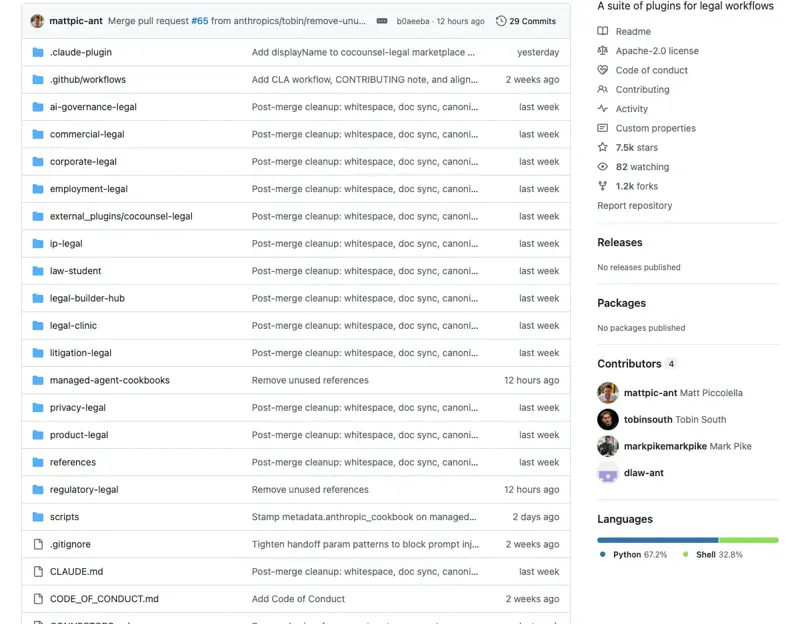
Source: GitHub — anthropics/claude-for-legal (Apache 2.0) The whole thing works inside your existing Claude Pro or Claude Max subscription.
Source: Anthropic Blog — Claude for the legal industry (May 12, 2026)
The 12 plugins, per Anthropic’s official launch post:
| Plugin | What it does |
|---|---|
| Litigation Legal | Matter intake, holds, demand letters, subpoena triage, chronologies, deposition prep, privilege logs, briefs |
| Corporate Legal | M&A diligence, disclosure schedules, board consents, closing checklists |
| Commercial Legal | Vendor agreements + NDAs against your playbook, escalation routing |
| Employment Legal | Hires, terminations, classification, leave deadlines, investigations, state-specific policies |
| Privacy Legal | DPAs, PIAs/DPIAs, DSAR responses, policy-vs-practice gap reports |
| IP Legal | Trademark clearance, FTO triage, C&Ds, DMCA, OSS compliance |
| Regulatory Legal | Regulatory monitoring filtered to your materiality threshold |
| Product Legal | Launch reviews, marketing-claims substantiation, product risk Q&A |
| AI Governance Legal | AI use-case triage, vendor AI terms, draft AI policies |
| Law Student | Socratic drilling, IRAC grading, bar prep |
| Legal Clinic | Intake, deadline tracking, supervisor review queue |
| Legal Builder Hub | Install community-built legal skills with security + license check |
For most paralegals at small-to-mid firms, Litigation Legal is the plugin you’ll install first. It covers the day-to-day work: discovery summarization, privilege logs, deposition prep, demand letters.
The 20+ connectors include the ones you already use: iManage, NetDocuments, Clio, Box, Relativity, Everlaw, Consilio, Ironclad, DocuSign, Datasite, Trellis, Midpage, Legal Data Hunter, and Thomson Reuters CoCounsel — plus Harvey, Solve Intelligence, BoardWise, Courtroom5, Descrybe, Definely, Lawve AI, and Free Law Project (CourtListener). The CoCounsel integration is the headline one: Thomson Reuters now has 1 million legal professionals across 107 countries using CoCounsel, and the MCP connector lets you switch between general-purpose Claude and citation-grounded CoCounsel queries from the same chat.
The community reaction on X this week is honest about what works and what doesn’t. Box CEO Aaron Levie (@levie, May 12) endorsed the Box connector as “headless” workflow integration — 256 likes. @helloparalegal — a small-firm paralegal ops account — posted on May 17 that the most important architectural decision in the launch is the cold-start “CLAUDE.md” profiling step, not the headline plugins (“Most coverage this week has been about the ‘free Harvey clone.’ The architectural decision underneath is what actually shipped”). And @alanrosca posted on May 22 that “Claude is better than Lexis Protege… which is pretty wild because Protege is made specifically for legal research.” Mixed signals at the enterprise level — some firms call the plugins “lacklustre” without deep DMS integration — but the small-firm paralegal verdict is consistently: it works, it’s cheap, and the connectors are the actual value-add.
The 5-minute install (no IT ticket if you’re an individual subscriber)
Two paths, depending on your firm’s setup.
Path A — You have your own Claude Pro or Max subscription on a personal device. Open Claude on web or desktop, go to the plugins menu, search “Litigation Legal,” click install. The plugin appears in your chat sidebar. Total time: under 2 minutes.
Path B — Your firm is on Claude Team or Enterprise. Your firm’s IT admin has to enable plugins at the workspace level first. Send your managing partner / IT contact the Anthropic blog post URL and one sentence: “I’d like to test the Litigation Legal plugin on non-client matters this week — what’s the approval path?” Then, while you wait, do the work on Path A using your personal Pro subscription with only de-identified test data (see the privacy section below).
After installing the plugin, install one connector that matches what your firm uses. The honest order of operations for most paralegals:
- Box first if your firm stores docs in Box (most common at firms under 50 attorneys). Box’s own integration handles permissions and audit logs cleanly.
- NetDocuments or iManage if your firm is on a real DMS. Both work; both gate on your existing permissions.
- Clio if you’re at a small firm using Clio for everything. The Clio connector lets Claude reach into matter records, dockets, and billable-time logs.
The connector install is a click + an OAuth confirmation. Five minutes total for plugin + one connector.
The 4 first-day prompts (copy-paste, no editing required)
Run these in the order shown. Each builds context the next one uses.
Prompt 1 — Discovery response → issues memo
I'm going to paste a discovery response below. Read it as a paralegal at a small-firm civil litigation practice would.

Output: a 1-page issues memo with the following structure:

1. Summary (3 sentences max — what the producing party is producing, what they're objecting to, what's missing)
2. Top 5 issues by importance — each issue gets one paragraph: (a) what the document says, (b) why it matters for our case, (c) what follow-up is needed, (d) citation back to the specific Bates range
3. Privilege flags — any docs where the producing party claimed privilege; list Bates ranges + privilege type + whether we should challenge
4. Missing-document red flags — categories of docs we'd expect to see but didn't (in plain English, not legalese)

Cite specific Bates ranges throughout. If you're not sure about a citation, say "needs verification" — do not guess.

[paste discovery response here]
What you get back: a 1-page memo your associate can read in 3 minutes and act on. Typical time saved: 90 minutes per discovery response. The honest caveat: always re-read the source document for anything that touches a deadline, a citation, or a privileged communication. Claude is your second pair of eyes, not your sign-off.
Prompt 2 — NDA redline comparison against your firm’s playbook
I'll paste two documents below: (1) our firm's standard NDA template, and (2) opposing counsel's redlined version.

Compare them. Output:

1. Deal-breakers — changes that violate our standard playbook (term length over 3 years, no carve-out for residuals, broad indemnity, etc. — apply standard NDA review principles unless I give you specific firm-playbook items)
2. Negotiable — changes we'd typically push back on but can concede if the deal is otherwise good
3. Trivial — formatting / style changes that aren't worth fighting over
4. Suggested response — for each deal-breaker, draft one sentence we could send back to opposing counsel

Format as a clean table with one row per change. If a clause is unchanged, do not include it in the output.

[paste firm NDA template]
---
[paste opposing counsel's redline]
What you get back: a redline comparison table your senior can scan in 5 minutes. Typical time saved: 45-60 minutes per NDA. If your firm has a real playbook document (a 1-page list of “never accept X” rules), paste it into the prompt above the templates — Claude will apply it to the comparison.
Prompt 3 — Privilege log builder from a Bates-stamped doc set
I have a document set in [iManage / NetDocuments / Clio / Box]. I need a privilege log for matter [MATTER ID].

For each document in /matters/[MATTER ID]/disc-set-3, output a row in a privilege log table with these columns:

1. Bates#
2. Date (from document metadata or from the document body)
3. Author
4. Recipient(s)
5. Privilege claim (attorney-client / work product / both / no claim)
6. Basis (one sentence: who's the attorney, who's the client, what's the legal advice context)

Skip documents that are clearly not privileged (e.g., publicly filed pleadings, news articles, public filings).

For any doc where you can't determine privilege from metadata alone, output the row with privilege claim = "needs paralegal review" so I can flag it.

Confirm the matter folder you're reading before you start. Do not invent metadata.
What you get back: a privilege log spreadsheet your supervising attorney reviews before producing. Typical time saved: 2-3 hours per doc set. The “needs paralegal review” fallback is the load-bearing part — it forces Claude to surface uncertainty instead of fabricating an answer.
Prompt 4 — Deposition prep outline from the case file
I'm preparing for a deposition of [WITNESS NAME] in matter [MATTER ID]. We're representing [our client's role]. The deposition is on [date].

Reading the case file in [DMS folder], output a deposition prep outline with:

1. Witness background — 1 paragraph summary of who they are, role in events, why they matter
2. Key documents to bring — 10-15 documents with Bates#, why each matters, what we want the witness to authenticate or be confronted with
3. Likely 12-question cross-examination outline organized by topic (background → timeline → specific events → impeachment opportunities)
4. Risks — 3 things this witness might say that hurt our case, and how we'd respond
5. Open questions for me — things you need confirmed before the dep that I haven't given you yet

Plain language. No "may I direct your attention to..." legalese — that's for the actual dep, not the prep outline.
What you get back: a structured prep outline your senior can sharpen in 30 minutes instead of building from scratch in 3 hours. Typical time saved: 2-3 hours per witness.
What this means for you
If you’re a paralegal at a 2-10 person firm: start with Litigation Legal + Box (or whatever DMS your firm uses) on your personal Claude Pro subscription. Test the four prompts above this week on non-client matters or on closed files. By Friday, you’ll know whether the time savings are real for your specific workflow.
If you’re at a mid-size firm (10-50 attorneys): the gating question is whether IT will enable plugins at the workspace level. Send your IT director the Anthropic Help Center privacy article — Anthropic does not train on Claude Pro / Max / Team / Enterprise inputs by default; only Free-tier inputs are used for training. That fact alone usually moves the IT conversation.
If you’re at a BigLaw firm: your IT will require enterprise-grade controls, audit logs, and possibly a custom data-processing addendum. Your move this week is not to install — it’s to bookmark this post, share it with your knowledge-management group, and ask whether the firm is on Anthropic’s enterprise roadmap.
If you’re a solo attorney without a paralegal: this tool gives you a paralegal at $20/month. Set up Litigation Legal + Clio (or whatever you use), and the four prompts above replace the work you’d otherwise pay $40-$60/hour to outsource.
What Claude for Legal can’t do
It can’t make a binding privilege call. Privilege determination is a lawyer judgment. The “needs paralegal review” fallback in Prompt 3 is the right behavior — surface uncertainty, escalate to the attorney.
It doesn’t know your state’s specific rules of professional conduct. ABA Model Rule 1.6 (confidentiality) treats information related to the representation broadly, and your state’s version may be more or less strict. ABA Model Rule 5.3 (supervision of non-lawyer assistance) is increasingly being read by state bars to include AI tools — the supervising attorney is responsible for paralegal AI use. Don’t let an AI output go into a filing without a lawyer’s signature on the substance.
It won’t survive a contested factual dispute without your verification. The Mata v. Avianca line of cases — where attorneys submitted briefs with AI-fabricated citations — exists because the lawyers in those cases trusted the AI output without checking the underlying authorities. Claude for Legal is connected to real sources (CourtListener, Westlaw via CoCounsel, your DMS), but the connector connection doesn’t replace verification of the underlying citation.
It’s not yet a replacement for Lexis+ AI or Westlaw CoCounsel for citation-grounded research. The Anthropic-Thomson Reuters partnership is the right architectural answer here: use Claude for general-purpose work, switch to CoCounsel inside the same chat for citation-grounded research where verifiability matters. The MCP connector makes that switch one click.
The privacy gotcha to know. Even on Claude Pro, certain data should never go in: unredacted client SSNs, trust-account numbers, settlement-confidential terms before you’ve confirmed the opt-out setting, and anything covered by a sealed protective order. The default Pro behavior is good; the edge cases are still on you.
The bottom line
Claude for Legal isn’t a magic upgrade. It’s a $20/month tool that does the work a junior associate or paralegal was already doing — but faster, and with the connectors that make it actually useful in your DMS. The four prompts above are the floor, not the ceiling. By month two, you’ll have your own prompts that handle your specific firm’s workflows better than these defaults.
If you want to go deeper — how to build the firm-specific CLAUDE.md profile, which connectors to install in what order, how to handle the ABA-rule conversation with your supervising attorney — our AI for Paralegals course is the next stop. For the full Claude for Legal walk-through specifically, including the iManage + NetDocuments + Clio + Box setups end-to-end, Claude for Legal covers each connector in depth.
The bigger question to put on your week: which of the four prompts above would have saved you the most hours last month? Start there. Install the plugin, run that prompt on a closed file, and watch what happens.
Sources
- Anthropic Blog — Claude for the legal industry (May 12, 2026)
- GitHub — anthropics/claude-for-legal (Apache 2.0)
- LawSites — Anthropic Goes All-In on Legal, Releasing More Than 20 Connectors and 12 Practice-Area Plugins for Claude
- Artificial Lawyer — Claude For Legal Launches, May Reshape the Legal Tech World
- Thomson Reuters PRNewswire — Thomson Reuters and Anthropic Expand Partnership to Connect Claude with CoCounsel Legal
- ChatForest — Claude for Legal: Anthropic’s 20+ Connectors and 12 Practice-Area Plugins Explained
- Beginners in AI — Claude for Legal: 12 Plugins, 20+ Connectors (May 2026)
- MindStudio — How to Use Claude for Legal Work: MCP Connectors
- Anthropic Help Center — Data input and model training
- ABA — Model Rule 1.6 (Confidentiality)
- ABA — Model Rule 5.3 (Responsibilities Regarding Nonlawyer Assistance)
- Reddit r/legaltech — Anthropic Legal Plugin reality check thread