You’ve felt it. A photo scrolls past — a celebrity somewhere they’ve never been, a “news” image that’s a little too perfect, a puppy that’s somehow too cute — and your brain stalls on one question: is this real, or is it AI? A year ago you could usually tell. In 2026, mostly, you can’t. The good news is that the answer is no longer just “squint harder.” There’s now an actual layer of tools built to tell you, and a couple of them live right in the apps you already use.
Here’s the catch: if you Google “how to tell if an image is AI,” almost every result is a detector tool trying to sell you a subscription, and not one of them walks you through the new built-in checks that shipped this year. So here’s the real guide — the manual tells that still work, plus the official 2026 methods, in the order you should actually use them.
Updated August 4, 2026 — the labeling rules are now legally live. As of August 2, 2026, the EU AI Act’s Article 50 transparency rules and California’s SB 942 (the AI Transparency Act) are both operative — meaning large AI providers now have a legal obligation to label AI-generated content and, under SB 942, to offer a free public tool for checking it. The tools below (Gemini’s watermark check, the C2PA extension, OpenAI’s Verify) are that free public option in practice. The honest catch stays the same: a label being legally required doesn’t mean every image online has one yet, or that the label can’t be stripped — so the manual tells later in this guide still matter.
What changed in 2026: images now carry a “receipt”
The big shift is that AI images increasingly come with an invisible label baked in. Two systems do this, and it helps to know both by name because you’ll start seeing them everywhere.
C2PA Content Credentials are like a tamper-proof receipt attached to a file. They record where an image came from — a real camera, or a generative AI tool — and what edited it along the way. The record is cryptographically signed, so if someone messes with it, the signature breaks.
SynthID is Google DeepMind’s invisible watermark, woven directly into the pixels. You can’t see it, but a detector can — and it survives the everyday stuff that used to strip metadata: cropping, filters, brightness changes, even screenshotting and re-compressing.
The reason this matters now is that at Google I/O in May 2026, the walls between companies came down. Google announced that OpenAI, ElevenLabs, Kakao, and NVIDIA are all adopting SynthID for their AI content — so an image made in ChatGPT can now carry the same watermark Google can read. Google says it has already watermarked over 100 billion images and videos. And crucially, the checking moved out of the lab and into consumer apps: Gemini, Google Search, and Chrome can now answer “is this made with AI?” directly.
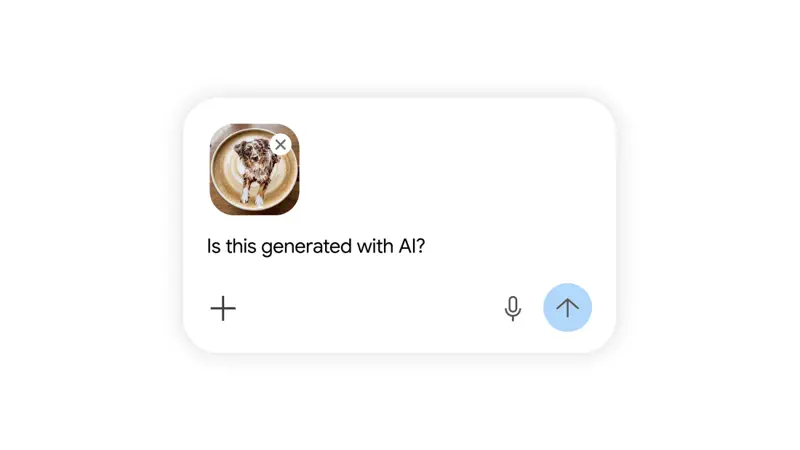
The fastest check: just ask
If you take one thing from this article, take this. The quickest way to check an image in 2026 is to ask an AI assistant that can read the watermark.
- In the Gemini app: upload the image and type “Was this made or edited with AI?” Gemini checks for a SynthID watermark and tells you whether Google AI created or edited it. Google says this has already been used more than 50 million times.
- In Google Search / Lens / Circle to Search: point Lens at an image, or use “Circle to Search” on Android, and ask “Is this made with AI?” The system reads the SynthID signal and reports back AI-generated, AI-edited, or no signal found.
- In Chrome: Google is rolling out a right-click option that scans the current image for both SynthID and C2PA and shows you a quick verdict — real, AI-generated, or AI-edited.
Two more official tools worth knowing: OpenAI’s Verify tool lets you upload an image and checks it for C2PA credentials and a SynthID watermark, and the free C2PA “Content Credentials” Chrome extension adds a right-click “Verify Content Credentials” option that shows a little “CR” pin and the image’s origin and edit history when a receipt is present.
That’s the 30-second version: ask Gemini, or check the credentials. If you get a clear “yes, AI” — you’re done.
When the receipt is blank: the manual tells
Here’s the honest part nobody selling a detector will tell you: a blank result doesn’t mean the image is real. Watermarks only exist if the image was made by a tool that adds them, and social media platforms frequently strip the credentials when you upload. So when the automatic check comes back empty, you fall back to your eyes — and the old tells still catch a surprising amount.
The single most reliable manual move is a reverse image search. Drop the picture into Google Lens or TinEye and see where else it appears. A genuine news photo shows up on real news sites with dates. A fake often traces back to a meme account, an AI-art forum, or nowhere at all. Context is the tell that watermarks can’t strip.
One more trick power users like: open the image in any basic editor and crank the brightness or “levels” way up. AI images often hide a faint scatter of random artifacts and noise patterns in the shadows that a real photo won’t have.
What this means for you
If you’re a parent or just someone who scrolls a lot: you don’t need to become a forensics expert. Build one habit — when an image makes you feel something strong (outrage, shock, “no way”), pause and ask Gemini or do a reverse image search before you share it. Strong feelings are exactly what fake images are designed to trigger.
If you’re a teacher or librarian: this is teachable in ten minutes, and it’s quickly becoming a core media-literacy skill. Show students the “ask Gemini” step and the hands/text/background tells. The goal isn’t paranoia — it’s a calm, repeatable checking routine.
If you’re a journalist, creator, or run a brand account: make “verify before publish” a rule, not a vibe. Reverse-search every user-submitted image, check credentials on anything you didn’t shoot yourself, and when you do publish your own real photos, leaving the Content Credentials intact is becoming a quiet mark of trust.
If you shop or date online: product photos and profile pictures are now trivially faked. A reverse image search on a “too good to be true” listing or profile takes ten seconds and saves a lot of grief.
What this can’t do (the honest limits)
No method here is a magic truth-detector, and anyone who tells you otherwise is selling something. Keep five things in mind:
- A “no AI found” result is not proof an image is real. It often just means there’s no watermark to read — because the tool that made it didn’t add one, or a platform stripped it on upload.
- Standalone AI detectors are unreliable. Independent studies keep finding they flag real human content as fake and miss actual fakes — sometimes performing barely better than a coin flip. Treat any single detector’s score as one weak clue, never a verdict.
- Watermarks can be attacked or degraded. Extreme edits can weaken a SynthID signal, and security researchers have shown determined bad actors can scrub watermarks. The system is built for honest labeling, not for stopping a motivated forger.
- Coverage is still partial. Many open-source image generators ship with no watermark at all, so a fake from one of those carries no signal to detect.
- Provenance isn’t truth. Credentials tell you how an image was made, not whether what it shows is honest. A real photo can still be captioned to lie.
The takeaway isn’t “give up.” It’s: stack the checks. Any one signal can fail, but ask-Gemini plus reverse-search plus a quick look at the hands and the source is a routine that catches the overwhelming majority of fakes in under a minute.
The bottom line
In 2026, “is this real?” finally has a real answer — you just have to know where to look. Ask Gemini or Google to read the watermark, check the Content Credentials, reverse-search for context, and fall back to the visual tells when the automatic checks come up blank. None of it is hard, and none of it requires a subscription. The skill that actually matters underneath all of it is the same one librarians have taught for a century: slow down, consider the source, and verify before you trust.
If you want to get genuinely comfortable with how these AI tools work — what they’re good at, where they make things up, and how to use them without getting fooled — our free AI Fundamentals course is the place to start. The first two lessons are free, no signup needed.
Sources
- Identifying AI-generated media online (SynthID + C2PA in Search, Chrome, Gemini) — Google
- Verify AI-generated images (C2PA / SynthID) — OpenAI
- Google expands SynthID watermarking to OpenAI, Kakao, and ElevenLabs — CryptoBriefing
- C2PA Content Credentials — official Chrome extension
- Why AI image detectors are unreliable (research roundup) — PsyPost / academic studies
- European Commission — AI Act Article 50 transparency obligations (applicable Aug 2, 2026)
- California Legislature — SB 942, California AI Transparency Act (operative Aug 2, 2026)
