

“We installed Claude Tag and now someone on the team needs to tell it to shut up every 30 minutes.” That complaint got 3,800 likes on X within a day of someone posting it — and it’s honestly the most useful review I’ve read of Anthropic’s Claude Tag, because it captures both halves of the story at once. The thing works well enough that people are actually using it daily. And it talked too much, until Anthropic fixed that too.
Claude Tag launched back on June 23, 2026, and got a proactivity update on August 13 that’s driving fresh attention this week — “Claude Tag now reads even more of the room,” in Anthropic’s own words. If you’ve seen your team’s Slack mention it and wondered whether it’s worth setting up, here’s what it actually does, what breaks, and what it costs.
What Claude Tag actually is
Most AI-in-Slack tools give you a private chatbot session — you talk to it, nobody else sees the conversation. Claude Tag does something different: it puts one shared @Claude identity into a channel that anyone in that channel can tag. When someone types @Claude, it breaks the request into steps and posts its progress back into the thread where the whole team can see it.
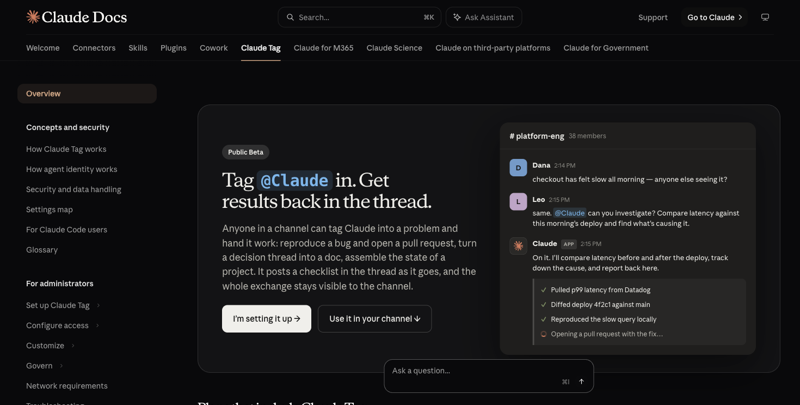
That screenshot above is Anthropic’s own example, and it’s a good one: someone flags that checkout feels slow, a teammate tags @Claude and asks it to compare latency against the morning’s deploy, and Claude posts back a checklist — pulled p99 latency, diffed the deploy, reproduced the slow query, now opening a pull request. Four things happened in public, in the thread, without anyone leaving Slack.
Anthropic frames this as an evolution of Claude Code — internally, they say 65% of their own product team’s code already gets generated through their internal version of this same pattern.
Four things make Claude Tag different from a normal chatbot bolted onto Slack:
- It’s multiplayer. One shared Claude per channel, not a private session per person.
- It remembers. Claude Tag keeps persistent memory of what’s happened in that channel — you can literally ask “@Claude what do you remember about this channel?” to check.
- It works asynchronously. Assign it something, close your laptop, come back later to a finished result.
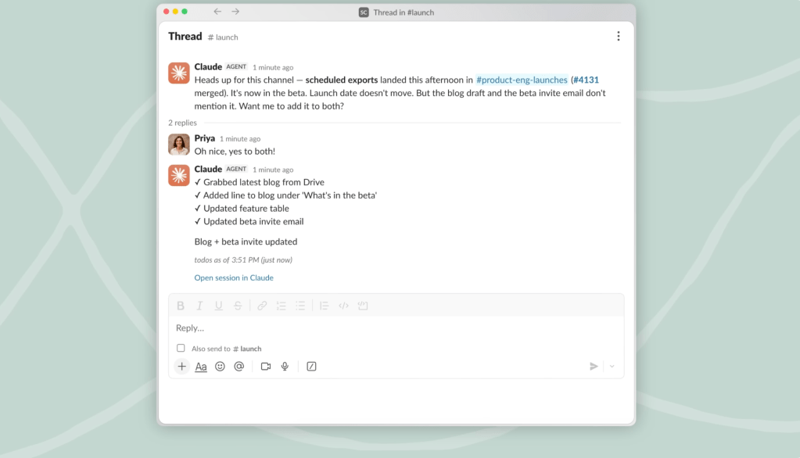
- It can be proactive. An optional “ambient” mode lets it flag things or follow up on stalled threads without being tagged first.
How the request actually works, step by step
Anthropic’s docs lay out a five-stage lifecycle for every Claude Tag interaction, and understanding it explains a lot about both what it’s good at and where it breaks:
- A session starts. Either someone types
@Claudein a channel, or a scheduled routine fires on its own. - Anthropic spins up an isolated sandbox for that specific thread — this runs in Anthropic’s cloud, not on your machine or inside your company’s network.
- Claude works the task, using only the tools and data that channel was explicitly granted access to, and posts a live checklist as it goes.
- The result lands in the thread — a reply, a file, a chart, a pull request, whatever the task called for.
- The sandbox gets released during a quiet period, until a new reply rebuilds it fresh.
That per-channel sandboxing is the part worth remembering: a Claude identity configured for your sales channel genuinely cannot see sales data if it gets tagged in an engineering channel. Access and memory are scoped to the channel, not to the organization as a whole.
A worked example: the daily-maintenance channel
The single most-cited real usage example right now comes from Anthropic’s own team. Boris Cherny, who works on Claude Code, set up a dedicated channel called proj-claude-maintains-apps and gave Claude Tag a list of named daily routines:
- Crash fuzzer — opens the app in a simulator, taps around looking for ways to crash it, then root-causes and fixes what it finds
- Dup unifier — scans the codebase for near-duplicate abstractions and opens PRs to merge them
- Dead-code remover — flags statically unreachable code, logs it for a day to confirm it’s really dead, then removes it
- Abstraction police — fixes leaky abstractions
Over a few weeks, those routines opened 388 pull requests. 180 got merged, after both Claude’s own code review and a human sign-off. That’s a 46% merge rate — which, as one commenter pointed out, actually reads as healthy specifically because none of those routines write new features. Every one of them answers a mechanical yes/no question: did it crash, is this line reachable, can this test fail. That’s exactly the kind of work where “did it work” doesn’t require judgment, just verification — the ideal shape of task to hand to an autonomous agent.
The lesson buried in there, according to people who dug into it afterward: don’t hand Claude Tag something vague like “maintain the app.” Name specific, narrow routines. Each one should be a single, checkable job.
Setup: who can do it, and how
This isn’t a self-serve, individual-user feature. Setup requires someone with the Primary Owner or Owner role on your Claude organization — the lower Admin role can’t do it. Four steps, all admin-driven:
- Pair Claude Tag with your Slack workspace
- Grant Claude access to specific tools, data sources, and repositories, scoped per channel
- Set a monthly spend limit for the org, and optionally per channel
- Test it in a private channel before rolling it out wider
Once that’s done, nobody else needs to configure anything. Anyone in an authorized channel can start tagging @Claude immediately.
Pricing — what it actually costs
Claude Tag launched in public beta exclusively for Claude Enterprise and Claude Team plan customers. If you’re on an individual Claude Pro subscription, you don’t have access — this is a team-plan feature only.
There’s no separate line-item price for Claude Tag itself. It bills against your existing Team or Enterprise subscription, with usage metered against Claude Opus 4.8 token rates and admin-configurable spend caps per channel and per org.
| Plan | Typical per-seat cost | Claude Tag access |
|---|---|---|
| Claude Team | ~$25-30/user/month (annual) | ✅ Included |
| Claude Enterprise | ~$50-150/user/month (custom) | ✅ Included |
| Claude Pro (individual) | $20/month | ❌ Not available |
Anthropic is also handing out one-time launch credit to eligible organizations to offset trial usage — reported at roughly $25,000 for Enterprise orgs and $2,500 for Team orgs, though Anthropic’s own announcement doesn’t publish the exact figure, so treat that number as secondhand.
One more thing worth knowing if your team already had the older Claude-in-Slack app: Claude Tag replaces it. Admins get a 30-day window from launch to migrate, and the older app is scheduled for retirement.
What this means for you
If you’re evaluating this for a small support or ops team. This is a genuinely strong fit — internal helpdesk channels are exactly the use case Anthropic’s own docs highlight. First action: set it up in a low-stakes internal channel first (like general IT questions), not a customer-facing one, and watch how it behaves for a week.
If your team is mostly non-technical (marketing, HR, agency work). You’re not the primary audience yet — most of the loud early adoption is developers and ops teams. That doesn’t mean it won’t work for you, but go in expecting to spend real time tuning standing instructions before it feels genuinely useful rather than “annoying and slightly worse than doing it myself.”
If you’re a solo founder or small agency owner. The Enterprise/Team-only pricing is the real gate here — you need at least a Team plan, and per-seat costs stack up fast on a tiny team. Do the math on whether the time saved actually clears the monthly cost before committing.
If you manage a dev or platform engineering team. This is squarely where Claude Tag is proven right now. First action: don’t hand it “maintain the codebase” — copy the named-routine pattern from Anthropic’s own team (specific, narrow, checkable tasks) rather than a vague standing mandate.
If privacy and data governance are a top concern for your org. Read the data-handling section below carefully before granting broad access. First action: start every new channel access grant as narrow as possible, and expand only after you’ve reviewed the audit log for a week.
If you already tried the old “Claude in Slack” app and found it too passive. This is a meaningfully different product, not a rebrand — the persistent memory and proactive ambient mode are new. Worth a second look, especially post-August-13 with the reduced over-talking.
If you’re worried about it interrupting every conversation. That fear was valid a few weeks ago and is less valid now — see the tuning history below. But it’s still worth testing in a low-traffic channel first rather than your busiest one.
Edge cases and troubleshooting
It talks too much — or it used to. This was the single biggest early complaint, and it’s well-documented, not just anecdotal. One user: “claude tag is a great example of the problem: it understands the thread, but replies too often, which gets annoying fast.” Another, more bluntly: “this was @ claude tag initially. super annoying and made me hate it from the get go.” Anthropic has actually responded to this in public, twice. First round of tuning cut unprompted messages by roughly 30% and fixed a bug where Sonnet-model responses were posting in the main channel instead of staying in a thread (90% reduction). The August 13 update went further: Claude now reads full channel context, memory, and your standing instructions together to decide when to speak, and Anthropic reports unprompted messages are down about 45% since. If you set this up months ago and turned it off because it was chatty, it’s worth reconsidering now.
It genuinely helps with internal support. One EVP of Generative AI at a healthcare marketing firm put it plainly: “There is ridiculous alpha in just dropping an agent like Claude Tag into internal support Slack channels and having it take a first pass at solving employee’s challenges like common IT issues. Most questions have answers, usually in prior threads, and agents can find them.” That same person noted they’d tried Workspace Agents too, but “Claude Tag is way easier to just drop in a channel, so it’s getting more traction” — including one case where a Workspace Agent’s Slack connection broke and switching the channel over to Claude Tag just worked.
Emoji overuse is a real, if minor, complaint. One tester: “it’s impossible to get work done with claude in slack because everybody in the channel just jumps in to make fun of claude’s ridiculous use of emojis between prompts.” Not a dealbreaker, but if your team is emoji-sensitive, know that it’s a thing people notice.
“Is this just for developers?” People are asking this directly in the replies to Anthropic’s own launch posts — a fair question, since the loudest usage examples right now are all engineering-flavored. The honest answer, based on current public examples: yes, developer and ops use cases are the most proven right now. Non-technical team adoption is real but earlier-stage and less documented.
Privacy concerns are being raised in public, not just in fine print. One widely-shared post about an open-source alternative to Claude Tag put it starkly: “Claude Tag will suck in your company’s information.” That’s a blunt way of saying what’s true of any agent with broad channel access — the more tools and data sources you grant, the more Claude Tag can see, act on, and remember. It’s not a hidden risk, but it’s one worth taking seriously before granting org-wide access.
Channel-scoped memory means you can’t just copy a working setup blindly. Because access and memory are isolated per channel, a beautifully-tuned support-channel Claude won’t transfer its context to a new marketing channel automatically — you’re starting from scratch on standing instructions each time, which is by design (for privacy) but catches people off guard.
What Claude Tag can’t do
- No individual Pro access. If you’re not on a Team or Enterprise Claude plan, you can’t use it at all — no personal, single-user version exists.
- No cross-channel memory by default. What Claude learns in one channel doesn’t carry to another, which protects privacy but means duplicate setup work.
- No Microsoft Teams presence. It’s Slack-only — Microsoft-365-centric organizations don’t get this at all; that’s Copilot’s territory.
- Not self-serve for end users. Every access grant, tool connection, and spend limit requires an Owner-level admin — individual employees can’t configure their own scope.
- Doesn’t eliminate the need for human review. Even in the best-documented example (the 388-PR maintenance channel), every merged change still went through human sign-off after Claude’s own code review.
How it compares to Microsoft Copilot and generic Slack AI
| Claude Tag | Microsoft Copilot (Teams) | ChatGPT / generic Slack AI | |
|---|---|---|---|
| Native platform | Slack (persistent @Claude per channel) | Microsoft Teams / M365 | Slack, but as a third-party bot |
| Context persistence | Days to weeks, cross-conversation memory | Session-based, strong within M365 | Per-message, minimal memory |
| Proactive/ambient behavior | Yes — optional ambient mode | Limited — meeting recaps only | No, request-response only |
| Async multi-day tasks | Yes | Limited | No |
| Shared/multiplayer identity | One Claude per channel, shared | Per-user assistant | Per-user |
| Underlying model | Claude Opus 4.8 | GPT-5.5/5.6 | Varies |
| Rough pricing | Included in Team (~$25-30/user/mo) or Enterprise | M365 license + $30/user/mo add-on | ~$60/user/mo (Enterprise est.) |
The clean way to think about it: Microsoft Copilot doesn’t have a Slack presence at all, so if your org runs on Teams, this comparison is moot — Copilot’s your option. If you’re Slack-based, the real choice is between Claude Tag’s autonomous, persistent-memory agent model and a lighter-weight bot that just summarizes and searches message history without the ability to take real action.
FAQ
Is Claude Tag new, or is this an update to something that already existed? Both, depending what you read. The core product launched June 23, 2026, replacing the older “Claude in Slack” app. The August 13 update is a proactivity improvement — better judgment about when to speak up — not a brand-new launch.
Can I use Claude Tag on an individual Claude Pro account? No. It’s Team and Enterprise plan only at launch.
Does Claude Tag see everything in our Slack workspace? No — access is granted per channel by an admin. A channel Claude wasn’t explicitly added to and granted access in has no visibility into that channel’s content or memory.
Will it stop interrupting every conversation? Significantly better than at launch. Anthropic reports a roughly 45% drop in unprompted messages since the August 13 tuning update, on top of an earlier 30% reduction. Still worth testing in a quiet channel first.
What happens to the data Claude Tag processes? Sessions run in an ephemeral cloud sandbox that gets released after a quiet period. Memory is stored per-channel; private-channel memory isn’t shared to public channels, and vice versa.
Do I need a developer to set this up? No coding required, but you do need Owner-level admin access on your Claude organization — it’s not something an individual team member can self-configure.
How is this different from just using Claude or ChatGPT normally in a private chat? The shared, multiplayer identity is the core difference — everyone in the channel sees the same Claude, the same memory, and the same running work, instead of each person having a private, disconnected conversation.
Is the old “Claude in Slack” app still available? It’s being retired. Admins had a 30-day migration window from the June 23 launch; if your org hasn’t switched yet, it’s worth doing soon.
What’s the single best first channel to try this in? Based on the most-repeated real-world example, an internal IT/support-style channel with a narrow, well-defined scope — not your busiest, highest-stakes channel.
The bottom line
Claude Tag is a genuinely different shape of AI tool than what most teams have tried — not a private chatbot, but a shared, memory-holding, sometimes-proactive teammate that lives inside one channel. The complaints are real (it did talk too much, for a while), but so is Anthropic’s response to them, and the strongest use cases — internal support, narrow daily-maintenance routines — are already proven with real numbers behind them, not just marketing claims.
If your team is Slack-based, on a Team or Enterprise Claude plan, and you have one well-scoped, repetitive channel where a shared AI teammate could plausibly help — that’s the place to test it, not your busiest channel on day one.
Want a broader foundation before you bring an AI agent into your team’s daily communication? Our Workplace Communication course covers how to set expectations and guardrails for any AI tool joining your team’s workflow — worth a look before you flip the switch on something your whole channel will see.
Sources
- Claude Docs — Work with Claude Tag
- Claude by Anthropic — Claude Tag now reads even more of the room
- Claude by Anthropic — Claude in Slack: Tag @Claude in any thread
- TechCrunch — Anthropic’s Claude Tag is learning your company, one Slack message at a time (June 23, 2026)
- VentureBeat — Anthropic launches Claude Tag, replacing its Slack app with a persistent AI teammate
- @bcherny — the daily-maintenance channel breakdown (Aug 13, 2026)
- @noahzweben — Claude Code PM, tuning updates
- @_simonsmith — internal IT support use case
- @philipliao_ — “shut up every 30 minutes” complaint
- @svpino — privacy framing / Open Tag alternative
- Claude by Anthropic — Plans & Pricing