The cooking was never the hard part. The Tuesday-night admin is.
If you run a private-chef business, you know the drill: a new client sends over their preferences and restrictions, and now you owe them a custom menu, a tasting proposal, a prep plan, and a shopping list — none of which pays you, all of which eats your evening. One chef documented cutting that exact menu-writing process from about four hours down to thirty minutes using a ChatGPT workflow. Still reviewing and editing everything, just not building it from a blank page.
That’s the move worth stealing. Here’s how working chefs actually use AI for the paperwork — and the one place you should never hand it the keys.
Pro chefs vs. the “ChatGPT is my personal chef” hype
First, clear something up, because the internet muddies it. Search “ChatGPT chef” and you’ll drown in consumer apps promising gourmet dinners from whatever’s in your fridge. That’s not this. That’s home cooks.
What professional private chefs do is different and far more boring: they use AI to kill admin time. The consensus among working chefs is that AI gives you an “80% draft” — a solid starting point that still needs your hands all over it. It doesn’t know seasonality, real-time market availability, your client’s actual kitchen, or how a dish executes. Even high-end names treat it this way: Grant Achatz has talked about using ChatGPT as a creative collaborator for tasting concepts — the chef curates and executes; the AI just sparks. Adoption is climbing too, with roughly 65–72% of food-service operators planning to bring AI into their workflows.
So: not a robot chef. A very fast assistant for the parts of the job that aren’t cooking.
The 4 documents ChatGPT can draft for you
Open ChatGPT. Feed it the client’s preference sheet (skip anything medical — more on that in a second). Then run these. Edit every output before it goes out; your taste is the product.
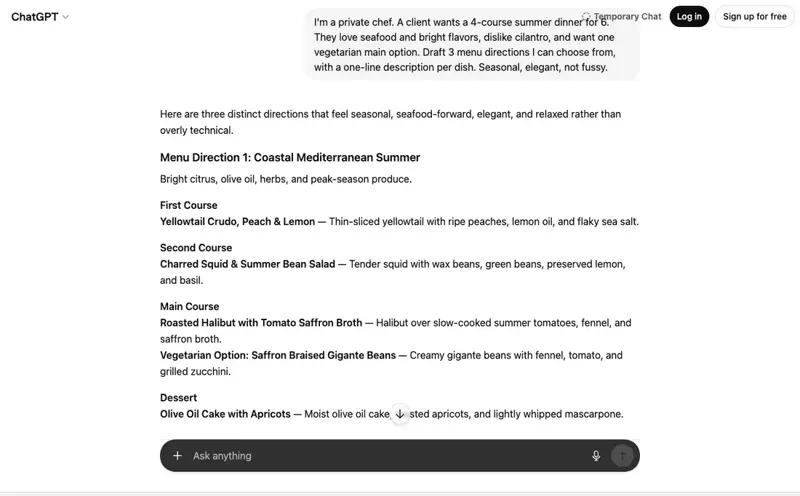
1. The first-draft client menu. Turn a preference list into something to react to.
“I’m a private chef. A client wants a 4-course summer dinner for 6. They love seafood and bright flavors, dislike cilantro, and want one vegetarian main option. Draft 3 menu directions I can choose from, with a one-line description per dish. Seasonal, elegant, not fussy.”
2. The dietary-intake summary. Turn a rambling client email into a clean brief you can actually cook from.
“Summarize this client’s food preferences and restrictions into a clear one-page brief: likes, dislikes, hard restrictions, and open questions I should confirm before finalizing. Here’s what they sent: [paste].”
3. The tasting proposal. The thing that wins the gig — written like you, not like a template.
“Write a warm, professional proposal for a private tasting dinner based on this menu [paste]. Include the concept, what makes it special, and a friendly note on next steps. Confident but not stuffy, about 200 words.”
4. The prep + shopping list. The least glamorous, most time-saving one.
“From this finalized menu [paste], build a prep timeline for the day-of and a categorized shopping list (produce, protein, pantry, dairy) with rough quantities for 6 guests. I’ll adjust amounts.”
One client onboarding, four documents, well under an hour. You spend the saved time cooking — or landing the next client.
What this means for you
If you’re a solo private chef — this is pure time back. The admin that piles up between gigs is exactly what AI is good at. Draft, edit, send, cook.
If you’re scaling to multiple clients — AI lets you keep menus feeling bespoke without writing each one from scratch. Some chefs use it to draft client updates in their own “brand voice” and just check before sending.
If you do events and catering volume — the proposal and prep-list drafting compounds fast across many inquiries. (Different game from one-off private dinners, but the same prompts adapt.)
The line you never cross: allergen sign-off
Here’s the rule that isn’t optional, and every serious chef draws it in the same place: the final allergen and dietary-safety call is yours. Always. AI never decides it.
This matters because AI confidently gets food-safety details wrong, and the stakes are a hospital, not a bad Yelp review. It doesn’t reliably handle layered conditions — one person flagged how badly a model fumbled “no gallbladder and diabetic.” It doesn’t know your kitchen’s cross-contamination reality. And legally, you are accountable for what reaches the plate — that can’t be delegated to a chatbot.
So use it for the words. Use it to research substitution ideas (“what are alternatives to sesame that keep a nutty note?”) — then you decide what’s actually safe for this client in your kitchen. Brainstorm with AI; verify with your training. The Gradito chefs who use AI for menus are explicit that it’s a tool used with client consent, never the decider. Keep it that way and you get the speed without the risk.
The bottom line
The paperwork side of a private-chef business — menus, proposals, intake, prep lists — is exactly the kind of repetitive writing AI was built to speed up. Let it give you the 80% draft, bring your taste and judgment to the other 20%, and take back your evenings. Just keep every allergen and safety decision firmly in your own trained hands. AI is a sharp knife: powerful in an expert’s grip, dangerous left to decide on its own.
Want to turn these prompts into a saved workflow for your business — menus, proposals, and client comms, with the safety line built in? Our AI for Restaurants & Food Pros course walks through it. First two lessons free, no signup, 30 seconds to start.
