

It’s 6:40 PM. You saw your last client at 4:15. You’re still at your desk, and you have four more case notes to write before you can go home — SOAP note, contact log entry, a service-plan update, and a summary for tomorrow’s team meeting. This is not a bad day. This is Tuesday.
Social workers spend somewhere between a quarter and half of every working day on documentation, not client contact — the studies land anywhere from 25% to 50% depending on setting, but they all point the same direction. And 75% of social workers report burnout symptoms weekly. Nurses got ambient AI scribes years ago. Therapists got Mentalyc and Upheal. Dentists got note-generating software built into their practice-management systems. Social work — arguably the profession carrying the heaviest documentation load of all of them — got left out of that wave almost entirely. This is the plain, paste-and-use version built for you.
What this actually is
Here’s the thing nobody selling you a $40/month “AI case notes” subscription wants to say out loud: you don’t need to buy anything to get most of the benefit. ChatGPT or Claude, used correctly, will turn a page of scrawled field notes into a structured SOAP, DAP, BIRP, or GIRP note in under two minutes. That’s not a controversial claim anymore — it’s the same underlying trick every purpose-built “AI scribe” for nurses, therapists, and now social workers is selling you, minus the monthly fee.
What’s actually new is the scale of adoption in exactly this field. Anthropic partnered directly with Binti — the case-management platform used by agencies serving somewhere between 46% and 49% of all child welfare cases in the US — to build Claude into the documentation workflow for over 12,000 social workers across 550+ government agencies. That launched August 21, 2025 (a year ago to the day, as it happens). In the UK, a tool called Magic Notes, built by a company called Beam, is now used by social workers across more than 100 local authorities; Somerset County reported staff saving roughly 11 hours a week each, and one Shropshire team manager reported saving 19 hours of admin time in two weeks.
So this isn’t speculative. It’s already happening, at scale, inside real government agencies. What’s missing is the plain workflow for the caseworker who hasn’t been handed an enterprise tool by their agency — who’s sitting there with ChatGPT open on a personal account, wondering if it’s even okay to type a client’s name into it.
Short answer: no, it isn’t. And that’s exactly where this guide starts.
Why social work specifically got skipped. Therapists have licensing boards and HIPAA giving them a reasonably clear (if imperfect) compliance framework, and a mature vendor market (Mentalyc, Upheal, Blueprint) built around it. Nurses have hospital IT departments procuring ambient scribes as enterprise software with a Business Associate Agreement already signed. Social workers, by contrast, work across an enormous range of settings — child welfare agencies, hospitals, schools, private practice, adult protective services — each with different confidentiality statutes, different funders, and often no IT department dedicated to vetting AI tools at all. Nobody built the simple, general playbook. This is that playbook.
The de-identify-first rule (read this before you type anything)
This is the one rule that makes everything else in this guide safe. Skip it, and you’re one of the roughly 900 Victorian Department of Families, Fairness and Housing staff who accessed ChatGPT on the job in a six-month window in 2024 — one of whom used it to draft a Protection Application Report for a children’s court that included the child’s actual name and identifying details. The Office of the Victorian Information Commissioner investigated, found a serious privacy breach, and the department was hit with a compliance notice: a full technical ban (IP and DNS blocking) on ChatGPT, Claude, Gemini, and Copilot for child protection staff, running two years. The worker in question had reportedly done this in roughly 100 cases before it was caught.
That’s not a hypothetical scare story. That’s what happens when “de-identify first” gets skipped.
What counts as identifying information — the full list, not just the obvious stuff:
- Full names (client, family members, partners, roommates, coworkers)
- Exact addresses (street address, apartment number, even cross-streets in a small town)
- Dates of birth, Social Security numbers, case/file numbers tied to a specific person
- School names, employer names, specific clinic or hospital names if the setting is small enough to identify someone
- Names of caseworkers, teachers, or other professionals who could indirectly identify the client
- Highly specific circumstances — a rare medical diagnosis, an unusual family configuration, a very small town where “the client on Maple Street with three kids and a service dog” is identifying even without a name
How to strip it, in practice. Before you paste anything into an AI tool, do a find-and-replace pass over your rough notes:
- Replace full names with role labels: “Client,” “Client’s mother,” “Client’s partner,” “the 8-year-old,” “the teacher”
- Replace addresses with general descriptors: “the client’s apartment,” “the client’s workplace” — drop the street name entirely
- Replace exact dates of birth with age ranges if age matters to the note (“client, mid-30s”)
- Replace agency/school/employer names with generic descriptors: “the client’s school,” “the client’s employer”
- Leave the clinically relevant facts intact — behaviors, statements, observations, dates of contact (not birth), service details. Stripping too much guts the note’s usefulness; stripping too little defeats the purpose
This takes maybe 90 seconds once you’re used to it. It is the single most important habit in this entire workflow, and it is non-negotiable — the rest of this guide assumes you’re doing it every time, without exception.
The walkthrough: rough notes to a filed SOAP note
Let’s carry one example all the way through, start to finish. Everything below is fictional — a composite built for teaching purposes. No identifying detail belongs to a real person.
Step 1: The rough field notes (before de-identifying)
Here’s what a caseworker might actually scribble in a car after a home visit, in whatever shorthand makes sense to them in the moment:
Home visit w/ Sarah Chen, 4521 Willow Creek Dr Apt 3B, 45 min. She’s been couch surfing at her friend Marcus’s place since losing her apartment last week. Says she applied for ERAP (emergency rental assistance) last Tues, still waiting to hear back. Looked tired, talked slow, but made good eye contact, cooperative, answered everything I asked. No signs of drug/alcohol use. Says she’s job hunting, has 2 interviews next week (one at the Kroger on 5th, one temp agency downtown). Went over the emergency shelter list w/ her, gave her the number for Rapid Rehousing. She said she’ll call by Friday. Follow up Fri by phone to confirm she called RR; check ERAP status at next visit.
Step 2: De-identify it
Now strip the identifying details, keeping everything clinically relevant:
Home visit, adult client (housing case management), 45 min. Client has been staying with a friend since losing her apartment last week. States she applied for emergency rental assistance (ERAP) last Tuesday, still waiting to hear back. Client appeared tired, spoke slowly, but made good eye contact, was cooperative, and answered all questions. No signs of substance use observed. Client states she is job hunting, has two interviews scheduled next week. Reviewed emergency shelter list with client; provided Rapid Rehousing program number. Client agreed to call by Friday. Plan: follow up by phone Friday to confirm client called Rapid Rehousing; check ERAP status at next visit.
Notice what stayed and what went. The client’s name, exact address, friend’s name, and specific employer names (Kroger, the temp agency) are gone. The behavioral observations, the timeline, the services offered, and the plan — the parts that actually matter for the case record — are all still there.
Step 3: The prompt that turns it into a SOAP note
Paste the de-identified notes into ChatGPT or Claude with a prompt like this:
I'm a caseworker. Turn these de-identified field notes into a structured
SOAP note (Subjective / Objective / Assessment / Plan). Do not add any
information that isn't in the notes below — if something is unclear or
missing, leave it out rather than guessing. Use professional, factual
case-management language.

Field notes:
[paste your de-identified notes here]
That instruction — “do not add any information that isn’t in the notes” — is doing more work than it looks like. It’s the single line standing between you and an AI-invented detail making it into an official record. Say it every time.
Here’s what Claude generated from those exact notes:
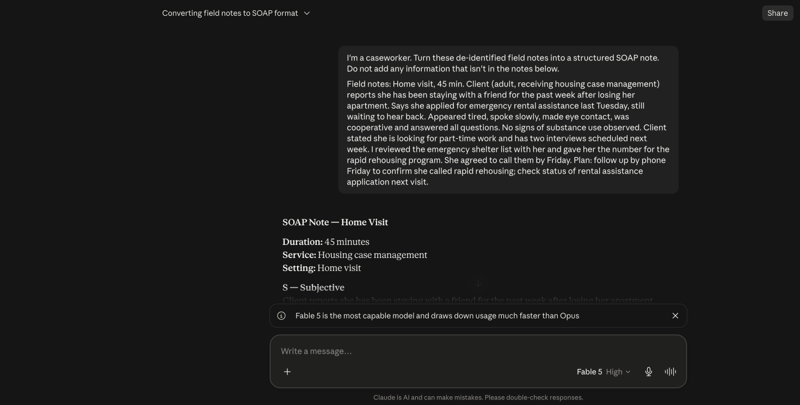
The output split cleanly into sections:
S — Subjective: Client reports she has been staying with a friend for the past week after losing her apartment. States she applied for emergency rental assistance last Tuesday and is still waiting to hear back.
O — Objective: Client appeared tired and spoke slowly. Made eye contact, was cooperative, and answered all questions. No signs of substance use observed.
A — Assessment: Client is currently without stable housing, temporarily staying with a friend. Emergency rental assistance application is pending. Client is engaged in job search with two interviews scheduled. Client was cooperative and engaged during the visit.
P — Plan:
- Reviewed emergency shelter list with client.
- Provided client with the phone number for the Rapid Rehousing program; client agreed to call them by Friday.
- Caseworker to follow up by phone Friday to confirm client called Rapid Rehousing.
- Check status of emergency rental assistance application at next visit.
That’s a filed-ready SOAP note, generated in about 20 seconds, from notes that took maybe two minutes to jot down. For comparison, most social workers report a note like this taking somewhere between 15 and 40 minutes to write from scratch, longer if it’s a complex case.
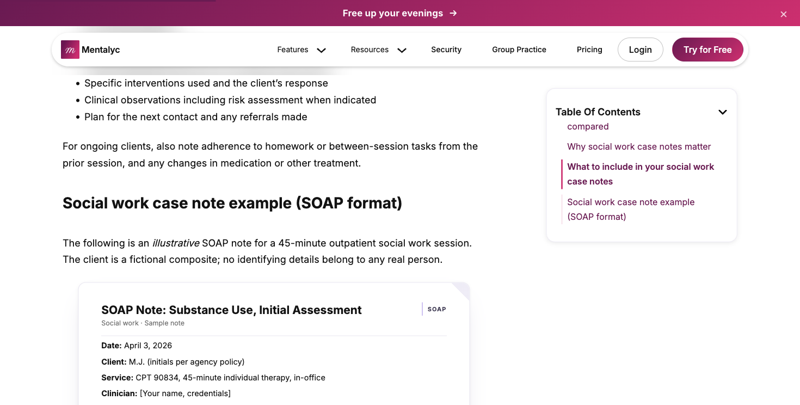
For a look at what a fully worked, clean SOAP note example looks like on the page (useful as a sanity check against your own output), here’s how one popular clinical documentation site formats theirs:
Step 4: Drafting a service-plan first pass
Service plans need to name a goal, not just describe a problem. Once you have a handful of de-identified contact notes for a client, you can ask AI to draft a first-pass service plan:
Based on these de-identified case notes from the last three contacts,
draft a first-pass service plan. Include: 1) the primary goal in the
client's own words where possible, 2) 2-3 concrete objectives that
support that goal, 3) specific action steps with rough timeframes,
4) barriers already identified in the notes. Flag anything where you
had to infer rather than pull directly from the notes.

Notes:
[paste de-identified notes]
The output is a draft, not a finished plan — you’ll still bring your professional judgment to naming the actual goal, setting real timeframes, and making sure it reflects what the client actually wants (not just what the notes happened to capture). But going from a blank page to a structured first draft in one pass saves the part of service-plan writing that eats the most time: staring at an empty template trying to remember exactly what was discussed across three visits.
Step 5: Summarizing a contact log
If you need a rolled-up summary of multiple contacts for a supervision review or a court report, paste several de-identified contact notes at once:
Summarize these de-identified contact log entries into a chronological
narrative summary suitable for a supervision review. Note any pattern
changes (housing status, engagement level, service utilization) across
the entries. Do not add interpretation beyond what's directly supported
by the notes — flag anything that looks like a gap in documentation.
That last instruction — asking it to flag documentation gaps — is genuinely useful. AI is decent at noticing “there’s no note between March 3 and April 20” in a way that’s easy to miss when you’re the one who wrote all forty entries.
Step 6: Verify before you file — every single time
This is not optional, and it’s not a formality. Read the AI output against your original notes, line by line, before it goes anywhere near a client file. Specifically check for:
- Invented details. Did it add a diagnosis, a risk factor, or a specific behavior that wasn’t in your notes? This happens more than vendors admit — a 2026 study from the UK’s Ada Lovelace Institute, based on interviews with 39 practitioners across 17 councils, found AI notes describing suicidal ideation a client never mentioned, and — in a genuinely strange but revealing example — one transcription tool that turned a child describing their parents fighting into a note about “fishfingers or flies or trees.”
- Tone drift. Person-centered language matters in this field. AI sometimes flattens a client’s stated preference into clinical distance it didn’t have in your original note.
- Missing risk indicators. If your rough notes mentioned something concerning in passing, confirm the AI didn’t drop it while restructuring.
- Formatting match. Does it match your agency’s required template? (More on this below.)
Budget real time for this — not a 30-second skim. The practitioners in that UK study who caught the worst errors were the ones spending real minutes on this step, not the ones who gave it two minutes and moved on.
DIY AI vs. purpose-built tools vs. writing it yourself
There’s no single right answer here — it depends on your setting, your agency’s tech policy, and how many notes you’re writing a week. Here’s the honest comparison, built from what these tools actually claim and what’s been reported by agencies using them.
| DIY ChatGPT/Claude | Purpose-built (Mentalyc, CasenotePRO) | Manual (no AI) | |
|---|---|---|---|
| Cost | Free (or $20/mo for a paid tier) | ~$30–$50+/month typically | Free (your time) |
| Setup time | Minutes — no account needed beyond the AI tool itself | Account setup, template configuration, sometimes EHR integration | None |
| Data handling | You control what goes in — but you’re relying entirely on your own de-identification discipline. Consumer accounts are generally not HIPAA-covered (no Business Associate Agreement) | Vendors like Mentalyc and CasenotePRO market BAAs and HIPAA-aligned handling designed for clinical/therapy use — verify this applies to your specific setting before trusting it | No third-party data exposure at all |
| Format flexibility | Full — describe any format (SOAP, DAP, BIRP, GIRP, or your agency’s custom template) in plain language | Usually supports the major formats out of the box; less flexible for unusual agency-specific templates | Full — you write exactly what’s needed |
| Time saved per note | Similar time savings to purpose-built tools once you have a good prompt — vendors and real-world deployments report roughly 50–75% reductions in write-up time | Vendors claim ~70% time savings (CasenotePRO); real deployments of similar tools report 50–75% reductions in specific documentation tasks | Baseline — 15–40+ minutes per note is typical |
| Best fit | Practitioners in settings without an approved enterprise tool, comfortable owning the de-identification step themselves | Agencies with budget for a dedicated tool, clinical settings wanting built-in compliance messaging and audio transcription | Settings where agency policy prohibits any external AI tool entirely |
| Biggest risk | Human error in de-identification, since there’s no vendor safety net | Vendor lock-in, ongoing subscription cost, plus you still need to verify their compliance claims match your legal requirements | Time — this is the slowest option by a wide margin |
One thing worth knowing before you assume a paid tool is automatically “safer”: in 2025, an investigation by The Lever found that some AI note-taking vendors marketed to therapists had included fine print permitting patient records to be used to train other AI systems. Paying for a tool doesn’t automatically mean your data is handled the way you’d assume — read the terms, ask for the BAA, and don’t take a sales page’s word for it.
What this means for you
Child-welfare caseworker. You have the least room for error and the most to gain from time savings — Binti’s data suggests home-visit and home-study report writing can drop from 3–4 hours to under 2. Start here: de-identify one home-visit note today using the method above, and compare the AI draft against a note you wrote from scratch last week. Don’t touch anything going to a children’s court without your supervisor’s sign-off on the workflow first — the Victoria case above happened at exactly this intersection.
Adult protective services. Your notes often carry sensitive medical and financial details on top of the usual identifying info — bank account references, specific medication names tied to a person, next-of-kin details. Add a specific pass for financial identifiers to your de-identification checklist before you paste anything.
School social worker. FERPA governs your records, not HIPAA — a different (though related) set of rules. Strip student names, ID numbers, and school-specific identifiers with extra care, since a small school can make even a first name identifying. Start with a low-stakes note type, like a routine check-in log, before using this for anything IEP-adjacent.
Medical social worker. You’re often documenting inside a hospital’s EHR system already, which may have its own AI features under an existing BAA — check there first before reaching for a consumer AI tool. If your hospital hasn’t rolled out anything, this workflow is a solid stopgap for narrative discharge-planning notes specifically.
Private-practice clinical social worker. You’re closest to the therapist use case, and honestly you should look hard at purpose-built tools like Mentalyc or Upheal, since they’re built around exactly your documentation format and typically offer a signed BAA — worth the monthly fee if you’re billing insurance and your note volume is high. If you’re low-volume, the DIY method with strict de-identification works fine too.
Agency supervisor. Your job here isn’t personal productivity, it’s policy. Before any caseworker on your team starts using ChatGPT or Claude for case notes, get a written answer to two questions: does your agency’s tech policy explicitly allow or prohibit external AI tools, and does your state’s confidentiality statute (child welfare records are protected differently state to state — Florida’s 39.202 and Oregon’s ORS 409.225 are two examples with real teeth) create any additional restriction. Write the answer down and share it with your team. Silence is not the same as permission.
New to AI. Start smaller than you think you need to. Take one already-written note from last week, de-identify it, and run it through the SOAP-note prompt above. Compare the output to what you actually wrote. That fifteen-minute exercise will tell you more about whether this workflow fits your notes than reading ten more paragraphs of this guide.
Already using AI informally. If you’ve been pasting notes into ChatGPT without a consistent de-identification pass, stop today and adopt the checklist above — retroactively, this is the highest-leverage five minutes you’ll spend this week. Also check: are you on a free/personal account? If so, assume nothing you type is private by default, regardless of what you’re pasting.
Edge cases and troubleshooting
The AI invents a detail that wasn’t in your notes. This is the most common failure, and it’s well-documented — the Ada Lovelace Institute study found practitioners describing AI notes with fabricated clinical content, including one instance of invented suicidal ideation. Fix: always include “do not add information that isn’t in the notes” in your prompt, and read the output against your original line by line before filing. If it happens twice with the same tool, that’s a signal to slow down your review process, not a sign you did the prompt wrong.
The output doesn’t match your agency’s required template. Agencies often have a specific field order, required headers, or mandated language (“client denies” instead of “client says no to”). Fix: paste your agency’s blank template into the prompt and ask the AI to match it exactly, field by field, rather than defaulting to generic SOAP structure.
The notes include a disclosure of abuse, neglect, or suicidality. Do not run these through a general-purpose AI tool for structuring, even de-identified. Mandated-reporter disclosures need to go through your agency’s reporting protocol first, and the documentation of that disclosure should follow your agency’s specific required language — not an AI’s paraphrase of it. Write these notes yourself, or use a tool your agency has specifically vetted for this exact scenario.
Your agency prohibits external AI tools entirely. Some agencies — including, per BASW’s March 2025 guidance to UK social workers, an explicit instruction that members “must never use off the shelf generic AI tools to process any personal information” — have decided the risk isn’t worth it, full stop. Respect that. If you think the policy is outdated, raise it with your supervisor rather than working around it; using a prohibited tool on client data can end a career, not just get you a warning.
A client’s information got typed in before you caught it. If you realize partway through pasting that you missed a name or address, stop, close the chat, and don’t submit the query. If you already submitted it, most consumer AI accounts let you delete the conversation from your history — do that immediately, and separately, tell your supervisor. Don’t try to quietly fix it after the fact; agencies handle this far better when it’s reported early.
The AI’s tone doesn’t sound like you or fit “person-centered” language. AI defaults toward slightly clinical, distant phrasing. If your agency (or your own practice standards) calls for person-first, strengths-based language, say so explicitly in the prompt: “use person-first language throughout, and note client strengths where the notes support it.” You’ll need to do this every time — it doesn’t stick as a default.
You’re spending as much time editing the AI output as you would have spent writing from scratch. This usually means your rough field notes were too sparse for the AI to work with, not that the tool failed. Fix: write slightly more complete rough notes in the moment (even three extra sentences), or accept that some visits — complex, high-conflict, or unusually nuanced ones — are faster to write by hand.
Your supervisor or auditor asks whether AI was used to draft a note. Answer honestly, every time. Some agencies now require a disclosure flag on AI-assisted documentation; even where it isn’t required, transparency protects you if a note is ever challenged. Keep your own log of which notes had AI-assisted drafting, even informally.
What it can’t do
It can’t make the clinical judgment call. Structuring your observations into a SOAP format is a formatting task. Deciding what those observations mean — risk level, next steps, whether a referral is warranted — is still entirely your professional judgment, informed by training the AI doesn’t have.
It can’t replace mandated-reporter judgment. If something in a session raises reporting obligations, that decision and the reporting process itself happen through your agency’s protocol, full stop — never through an AI tool, and never delegated to one.
It can’t guarantee HIPAA or agency-policy compliance on its own. Even with rigorous de-identification, whether a specific tool and workflow satisfies your specific agency’s policy, your state’s confidentiality statute, and (where applicable) HIPAA is a question your supervisor or agency counsel needs to answer for your setting — not something a blog post, or an AI tool’s marketing page, can certify for you.
It can’t verify itself. AI has no way to know if it invented a detail — it will state a fabricated fact with exactly the same confident tone as an accurate one. The verify-before-you-file step in this guide isn’t a suggestion; it’s the entire safety mechanism.
It can’t replace supervision. A well-structured note is not the same as a well-considered case plan. Use the time you save on writing to spend more time in supervision discussing the case, not less.
FAQ
Is this HIPAA compliant? It depends entirely on the tool and the setting, not on the workflow alone. A free consumer ChatGPT or Claude account generally does not come with a Business Associate Agreement, which means it’s not something you should treat as HIPAA-covered even with de-identified data — HIPAA compliance is a property of the whole system (tool, contract, and process), not just what you type. If your work involves HIPAA-covered information, talk to your agency about a BAA-covered option before relying on a consumer account for anything beyond fully de-identified drafting practice.
Will my agency allow this? Maybe, maybe not — and you need to find out before you start, not after. Some agencies (see BASW’s explicit March 2025 guidance) prohibit generic AI tools outright. Others are silent on the question, which is not the same as permission. Ask your supervisor directly, in writing if you can, before adopting this for real casework.
What if the AI gets something wrong? This is common enough that it should be an expected part of your workflow, not a rare surprise — the Ada Lovelace Institute’s 2026 study found real, sometimes serious errors across dozens of practitioner interviews. That’s exactly why the verify-before-you-file step exists. Read every AI-drafted note against your original before it goes in a client’s file, every time, no exceptions.
Does this replace supervision or clinical judgment? No, and it isn’t designed to. This workflow handles the mechanical part of documentation — turning notes into a structured format faster. It has no opinion on whether a case needs escalation, what a service plan should prioritize, or how to handle a disclosure. That’s still entirely on you and your supervisor.
What’s the difference between SOAP, DAP, BIRP, and GIRP, and which one should I use? SOAP (Subjective, Objective, Assessment, Plan) separates the client’s report from your direct observations — common in medical social work and integrated care settings where that distinction matters for audits. DAP (Data, Assessment, Plan) combines subjective and objective into one “Data” section — faster to write, common for brief contacts and outreach. BIRP (Behavior, Intervention, Response, Plan) makes the link between what you did and how the client responded explicit — common in behavioral health and substance-use settings. GIRP (Goal, Intervention, Response, Plan) leads with the specific service-plan goal the contact addressed — common in goal-driven case management like housing or employment services. Use whichever your agency requires; if you have a choice, GIRP is usually the best fit for pure case management work.
Can I use this on my phone right after a home visit? Yes — that’s arguably the best use case. Voice-to-text your de-identified summary into your phone’s notes app in the car, then paste it into the AI tool once you’re back at a screen. Just make sure the voice-to-text step itself doesn’t capture identifying details you’ll forget to strip later.
What about audio recording and transcription instead of typing notes? Some purpose-built tools (Mentalyc, Beam’s Magic Notes) transcribe session audio directly. That’s powerful, but it raises consent requirements you don’t have with manual notes — clients need to know they’re being recorded and that a transcript will be processed, typically through AI. If you go this route, update your informed-consent paperwork first; don’t just start recording.
Is there a state or association standard I should check before starting? Yes — check three things specifically: your state’s confidentiality statute for the records you handle (child welfare records, for instance, are protected under state-specific laws — Florida Statute 39.202 and Oregon’s ORS 409.225 are two real examples), the NASW Code of Ethics section on technology (Standard 1.07m covers electronic communications and confidentiality safeguards directly), and your own agency’s written tech policy. None of these are optional background reading — they’re the actual rules you’re operating under.
The bottom line
The documentation burden in social work is real, well-documented, and genuinely burning people out — 75% of social workers report burnout symptoms weekly, and a huge share of that time isn’t spent with clients at all, it’s spent writing about them. AI can give a meaningful chunk of that time back. But in this profession specifically, the tool is the easy part. The discipline — de-identify first, verify before you file, know your agency’s policy before you start — is what makes it safe to use at all.
Want the full workflow in one place, with a certificate at the end? Our AI Case Notes for Social Workers: De-Identify, Draft, Verify course walks through everything in this guide — the de-identify-first habit, the reusable case-note prompt for SOAP/DAP/BIRP/GIRP, service plans, contact logs, and the verify-before-file checklist — as five short, hands-on lessons with a practice case at the end. If you want a deeper, HIPAA-aware version of this exact workflow built for a clinical setting, AI Therapy Notes: The HIPAA-Safe Workflow walks through the Business Associate Agreement framework and a tool-by-tool decision tree in more depth than a blog post can. If you’re doing session-based work outside a strict clinical framework — coaching-adjacent case management, for instance — AI for Coaches: Session Notes & Client Follow-Up covers the consent-first protocol in more detail.
Start with one note. De-identify it, run it through the prompt above, and read it against what you actually wrote. See what it gets right — and what it doesn’t.
Sources
- Mentalyc — Social Work Case Notes: SOAP Templates & Examples
- NASW Job Board — Documentation and SOAP Notes: A Practical Guide for Social Workers
- NASW Code of Ethics — Social Workers’ Ethical Responsibilities in Practice Settings
- NASW — Standards for Technology in Social Work Practice
- HHS.gov — Summary of the HIPAA Security Rule
- HHS.gov — HIPAA Privacy Rule and Sharing Information Related to Mental Health
- Child Welfare Information Gateway — Disclosure of Confidential Child Abuse and Neglect Records
- Florida Statute 39.202 — Confidentiality of Child Abuse/Neglect Records
- Oregon ORS 409.225 — Confidentiality of Child Welfare Records
- Forbes — Anthropic Is Letting Social Workers From Hundreds of Government Agencies Use Its AI For Paperwork
- PR Newswire — Binti Launches First-of-Its-Kind AI for Social Services Offering With Anthropic
- Somerset Council — Somerset Social Workers Save Time on Admin Thanks to AI Tool Magic Notes
- The Guardian — AI Tools’ Potentially Harmful Errors in Social Work (Ada Lovelace Institute study)
- The Guardian — Victoria Child Protection ChatGPT Ban (OVIC Report)
- BASW — Artificial Intelligence (AI) and Social Work
- CasenotePRO — AI-Powered Case Notes for Social Workers
- The Lever — Your Therapy Session Just Became Fodder for AI
- FRED (St. Louis Fed) — Generative AI Adoption Rate, Community and Social Service Occupations