

Zillow announced a connector for Claude on October 19, 2026, and the first read most agents will have is “great, now my clients can price their own house in a chat.” That part is true. Zillow’s own help page says the connector can check a Zestimate, show the estimated sale range and name the comparable homes behind the number, for anyone with a free Claude account and no Zillow login.
The more useful read is the second one. The connector is a consumer tool. It is free, read-only, and built around what a home shopper or a curious owner wants to ask. It is not a comps engine for you, it doesn’t see your MLS, and the one thing agents are tempted to do next (paste MLS records into Claude to get a real CMA) is now explicitly restricted by at least one large MLS.
So this guide does four jobs. It shows what the Zillow connector actually does, using Zillow’s own documentation. It walks through one listing-appointment prep from start to finish, with the hand-off to your real CMA. It lays out the routes that do connect Claude to MLS data legitimately. And it covers the rules you should know before you paste anything: NAR’s position, CRMLS’s new section 12.11.1, fair housing, and what your brokerage should have in writing.
How I researched this. I haven’t connected the Zillow connector to a Claude account myself, so nothing below describes my own test runs. The product facts come from Zillow’s help page and press release, Anthropic’s connector directory, and the trade press. The rule text comes from the documents themselves (I read the CRMLS rulebook PDF and Zillow’s help page directly). Where a source is a secondary report or a vendor page, I say so. Where I couldn’t verify something, I say that too.
What just changed
On October 19, Zillow announced that “housing intelligence” is now available inside Claude. Zillow’s SVP of AI, Josh Weisberg, put the pitch this way: “This connector helps Claude users take the next step through Zillow: a tour, an agent, a loan officer.” Zillow also says it doesn’t send listing data to Anthropic. Instead, its own MLS-approved listing display appears inside Claude, with the same broker and MLS attribution you see on Zillow.com.
This is the third place Zillow has put itself inside someone else’s chatbot. The ChatGPT app launched October 6, 2025, and a Zillow Rentals integration came to Google’s Gemini on July 9, 2026. Zillow’s help page now treats Claude and ChatGPT together as one product: the same six kinds of requests, the same free access, the same limits.
One oddity worth knowing about. Anthropic’s connector directory lists the Zillow connector as “Added August 2026,” while Zillow’s announcement is dated October 19. The sources don’t explain the gap. My guess is that the listing existed quietly before the launch announcement, but that’s a guess, so I’d write “announced October 19, 2026” if you quote the date to a client.
What it does, in Zillow’s words
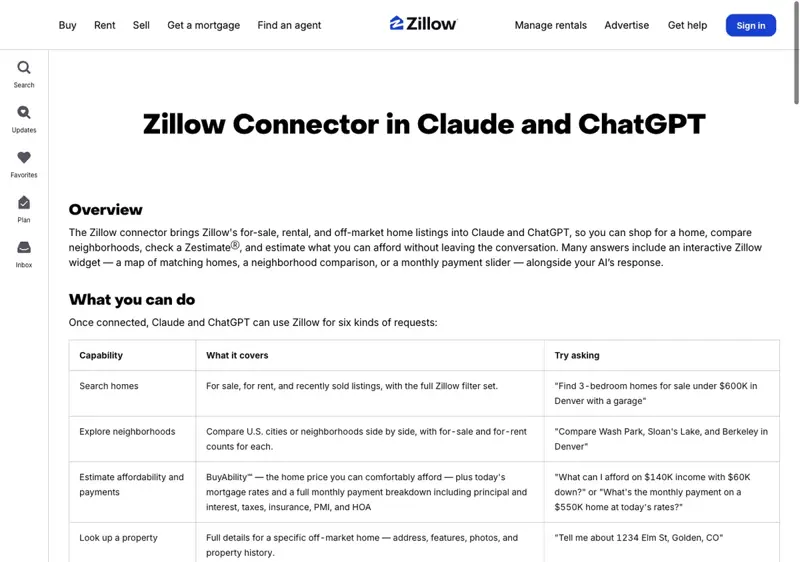
Zillow’s help page lists six kinds of request. Here they are with what each gives you, the agent, rather than the home shopper they were written for.
| What you can ask for | What Zillow says it covers | What it’s good for in your day | The catch |
|---|---|---|---|
| Search homes | For sale, for rent and recently sold listings, with the full Zillow filter set | Seeing what a client sees when they search Zillow, in plain language | Zillow’s data, not your MLS. Zillow.com is “the source of record” for prices and availability |
| Explore neighborhoods | Side-by-side comparison of U.S. cities or neighborhoods, with for-sale and for-rent counts | A quick framing of two areas before a buyer consult | Counts and Zillow’s framing. It won’t know the block-level story you do |
| Estimate affordability and payments | BuyAbility (the price a buyer can comfortably afford), today’s mortgage rates, and a monthly payment breakdown with principal, interest, taxes, insurance, PMI and HOA | A first conversation with a buyer about what a payment looks like | Estimates only, not a loan offer. Rates come from Zillow Home Loans |
| Look up a property | Full details for an off-market home: address, features, photos, history | Pre-listing homework on an address | Off-market homes only. A currently listed home has to be found through search |
| Check a Zestimate | The current Zestimate, its estimated sale range, the comparable homes behind it and the features that drive the difference | Knowing what number the owner already has in their head | Zillow’s model, not an appraisal |
| Rent Zestimate and Zestimate history | Estimated monthly rent and how a home’s Zestimate has changed over time | Explaining to a seller why the number moved | History of an estimate, not of sales |
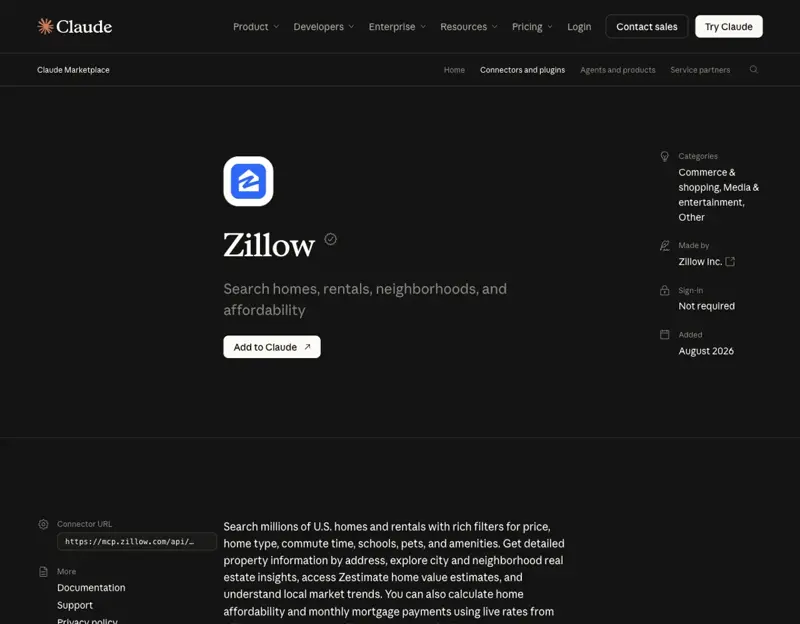
Anthropic’s directory page for the connector lists nine tools behind those six requests: property search, property details by address or name, city and neighborhood information, three Zestimate tools (the estimate, its history and an “info” tool about how it works), a rent estimate, an affordability calculator and a mortgage payment simulator. It’s labeled “Anthropic verified,” made by Zillow Inc., and sign-in is listed as “Not required.”
How to turn it on
You don’t need a Zillow account, a login or a subscription. On the Claude side, Zillow says it works on Free, Pro, Max, Team and Enterprise accounts, on web, desktop and mobile. On Team and Enterprise plans, your organization’s admin may need to enable it first.
- In Claude, open Settings → Connectors, search for Zillow and select Connect. (Or press the + in a chat, choose Connectors → Manage connectors, and do the same.)
- Open a new chat and check that Zillow is toggled on in that chat’s connector settings.
- Ask a question and say “Zillow” in it. Zillow’s own tip: Claude decides when to call a connector, and naming Zillow makes it more likely to reach for it.
- The first time Claude uses the connector it asks permission to run a Zillow tool. Allow once approves that single request. Always allow approves future ones automatically. For a read-only connector that only searches and estimates, either is defensible. I’d still pick “Allow once” for the first few sessions so you see what it does.
Many answers come with an interactive Zillow widget: a map of matching homes, a neighborhood comparison or a payment slider. Follow-ups work in plain language (“add a bedroom,” “swap neighborhoods,” “change the down payment”) and Claude re-runs the search.
What the connector does not do
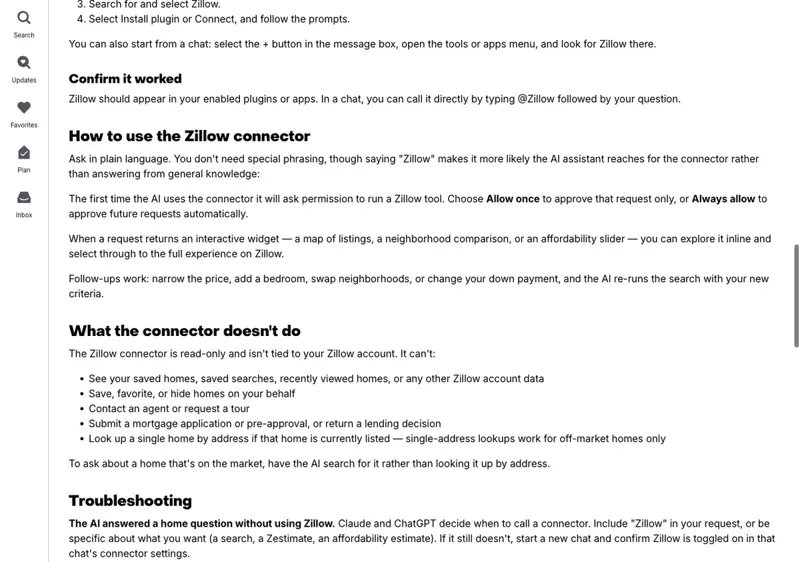
This list matters more to agents than the capabilities list, because it’s where the marketing and the product diverge. The press release talks about taking “the next step through Zillow: a tour, an agent, a loan officer.” Zillow’s help page is stricter about what the connector itself does. It says the connector is read-only and isn’t tied to a Zillow account, and that it can’t:
- see saved homes, saved searches, recently viewed homes or any other Zillow account data;
- save, favorite or hide homes for you;
- contact an agent or request a tour;
- submit a mortgage application or pre-approval, or return a lending decision;
- look up a single home by address if that home is currently listed (single-address lookups work for off-market homes only).
Read those two together and the honest summary is: the connector surfaces listings and numbers inside Claude, and the hand-off to a tour, an agent or a loan officer happens through Zillow’s own experience (the widgets and links), not by Claude placing a request for the client. I couldn’t find a source that spells out exactly how a tour request is completed from inside a Claude chat. Don’t promise a client that “Claude will book it.”
That distinction is also your opening. If the hand-off runs through Zillow’s agent and lender network, then a client who arrives in your office after a Claude session has already seen Zillow’s version of the market, Zillow’s Zestimate and Zillow’s payment math. Your job is to be the person who can say which of those are right for this house.
The listing-appointment prep, step by step
Here’s one workflow where the connector earns its place. It’s a prep routine for a listing appointment, built so the connector does what it’s good at (showing you the number and the story the owner already has) and your own tools do the part that gets you hired (a defensible price).
The property in the example is Zillow’s own sample address from its help page, “1234 Elm St, Golden, CO.” It’s a placeholder, and every figure below is arithmetic on published numbers, not output I got from the connector.
Step 1: Connect Zillow and open a fresh chat
Follow the setup above. Start a new chat so the connector is available from the first message, since Zillow notes connectors enabled mid-conversation sometimes need a fresh chat.
What you should see: Zillow in your connected list under Settings → Connectors, and toggled on in the chat’s connector settings.
Step 2: Look up the address
Prompt:
Using Zillow, tell me about 1234 Elm St, Golden, CO. Give me the
address details, features and property history. If it's currently
listed, tell me that instead of guessing.
If the home is off the market, you should get the property details Zillow holds: features, photos and history. If it’s listed, Zillow says single-address lookup won’t work, and you should use a search instead (“find homes for sale on Elm St in Golden, CO”). That nuance saves you a confusing first minute.
The expected result is a one-screen picture of what Zillow believes about the house. Compare it to what you know. Wrong bedroom count, missing finished basement, a remodel Zillow has never heard of: those are your notes for the appointment, because they feed straight into why the Zestimate may be off.
Step 3: Ask for the Zestimate and the comps behind it
Prompt:
Using Zillow, what's the Zestimate on 1234 Elm St, Golden, CO?
Show me the estimated sale range, the comparable homes behind it,
and the features driving the difference. Then show me how that
Zestimate has changed over the past three years.
This is the most agent-relevant thing the connector does. Zillow’s help page says a Zestimate check returns “the comparable homes behind it” and the features that drive the difference, and a separate request returns how it has changed over time. You’re getting the owner’s anchor and the evidence Zillow’s model used to build it.
Here’s the arithmetic that makes the conversation concrete. Say the Zestimate comes back at $620,000 (a made-up number for this example). Using the nationwide medians a Zillow spokesperson gave Straight Arrow News on October 17, 2026:
| Zillow’s median error | What it means on a $620,000 Zestimate |
|---|---|
| 1.77% (on-market homes) | about $10,974 either way |
| 7.2% (off-market homes) | about $44,640 either way |
Two cautions about those figures. First, a median is the middle of the distribution, not a ceiling: half of off-market Zestimates miss by more than the median. Zillow’s own numbers shift a little across 2026 pages (I saw 1.74% to 1.94% on-market and 7.0% to 7.2% off-market), so quote the one you pulled and date it. Second, the on-market figure looks better partly because once a home is listed, the model can use the list price and other listing signals. A seller who is about to list isn’t an on-market home yet.
Step 4: Frame the neighborhood
Prompt:
Using Zillow, compare Wash Park, Sloan's Lake and Berkeley in Denver
with for-sale and for-rent counts for each. Keep it to a short table.
That’s Zillow’s own sample request from its help page, which is why I’m using it. Replace it with the two or three areas your owner is comparing. Treat the output as a starting frame. It won’t tell you which street has the noisy intersection or which school boundary changed this year, and those are exactly the things a client pays you to know.
Step 5: Build the CMA from your own data
This is the step the connector can’t do for you, and the step where you can get into trouble if you try to make Claude do it. A proper CMA picks comparables that actually compete, adjusts them for differences, accounts for condition and weighs active, pending and sold homes. Zillow’s model draws on a much broader dataset, and Zillow’s documentation says its geographic analysis can extend as far as a county. The differences between the two are summarized below.
| Zestimate | Agent CMA | |
|---|---|---|
| Comparable selection | A proprietary model on broad datasets | You choose the comps that truly compete and explain why |
| Adjustments | Statistical, model-based | Explicit adjustments for each difference, backed by local evidence |
| Condition and renovations | Only what’s in the records and what the owner submitted. Unreported remodels may not show | Your firsthand observations and verified renovation details |
| Active and pending competition | Used by the model when a home is listed, but you don’t see the competing set | Reviewed directly, so you know who the buyer will compare you to |
| Output | An estimate and a sale range. Zillow says it’s “not an appraisal” | A likely selling-price range with a rationale. Also not an appraisal |
One thing not to say: that the difference is “I have MLS data and Zillow doesn’t.” Zillow’s own Zestimate page says the model incorporates public records, MLS data and user-submitted home details. The stronger line is the one in the last row of that table: your CMA names the homes that really compete and shows the work.
So how do you get Claude’s help with the CMA without breaking your MLS’s rules? That’s the next section, and it’s the heart of the matter.
Step 6: Walk in with both numbers
Bring the Zestimate, its range and Zillow’s comps, and bring your CMA beside it. A sentence like this works: “Zillow’s number is a model’s starting point, and it’s about what an app would say. Here’s which homes actually compete with yours, how condition changes things, and where I’d price it.” You’ve neutralized the anchor without arguing with it, because you showed the owner you already looked at it.
If you’d like a helper for the surrounding steps, FindSkill’s free Neighborhood Research Analyst skill and the Property Listing Copywriter skill both fit the prep and the marketing copy parts of this routine.
Getting real comps out of Claude without breaking your MLS’s rules
Many agents will read the section above and think the obvious next thing: “I’ll export my comps from the MLS and paste them into Claude.” Before you do that, read what at least one MLS now says about it.
What NAR has said
NAR’s position, in its October 21, 2025 statement on Zillow’s ChatGPT app, is neither a ban nor a blessing. NAR said it supports new technology “provided the use of technology is in accordance with MLS rules and data license agreements,” and that “each MLS is individually responsible for conducting its own assessment of technologies that use and display MLS data.” The questions it said an MLS should assess include whether data goes to an unauthorized party, whether the displaying participant keeps control over its display, and whether the display meets the disclosure and display requirements in local IDX rules.
NAR’s March 24, 2026 brokerage guidance adds the practical layer. It recommends a written AI-use policy covering approved and prohibited tools, data protection limits, human oversight, and fair housing review. It says plainly that “AI-generated content should not go straight from prompt to publication,” and it warns that many consumer AI tools store prompts or use them to improve their models. Client and transaction data shouldn’t go into unapproved tools.
What CRMLS now says
California Regional MLS is the first place where I found the rule written down, and it’s worth reading in full. In CRMLS’s Rules and Policies effective July 10, 2026, section 12.11.1, “Use of MLS Data in AI/Machine Learning,” says participants and subscribers “shall not provide, submit, transmit, upload, or otherwise make available any MLS Listing Records, or any portion, derivative, or compilation thereof, to any Artificial Intelligence (AI) platform, machine learning system, large language model, generative AI tool, or automated data training environment, except for” a limited permitted use.
That exception is narrow. You may submit listing records “solely for the purpose of conducting a specific, defined real estate transaction or project on behalf of a client,” and only if all of these hold:
- the AI platform doesn’t retain, store, index, copy or incorporate the records into a training dataset, a model or a persistent data store beyond the session or defined project;
- you’ve verified that the platform’s terms of service, privacy policy or data use agreement prohibit retention or use of submitted data for model training or improvement;
- the records are used only for that client engagement and aren’t repurposed or shared with a third party through the platform; and
- you’re not submitting bulk, aggregated or systematically compiled sets of records for anything beyond that transaction or project.
I read that from CRMLS’s own PDF, so I’m confident the language is real. What I can’t tell you is which rule your MLS has. Other MLSs are moving. HousingWire has reported that Bright MLS is restricting downloading MLS data to train AI models and planning licensed access, that Northwest MLS’s chief legal officer has said AI tools that use its data need a licensed feed, and that NorthstarMLS is working on a governance layer with CRMLS’s tech arm. Those are reports of plans and statements. I did not find final rule text for them, so check yours.
Does the Zillow connector put you in violation?
I can’t give you a legal answer, and your MLS can. But here’s the reading from the documents. The rules above are about what you submit to an AI platform. In the Zillow connector, you’re typing a question and Zillow’s own data comes back, shown through Zillow’s own MLS-approved display. You aren’t uploading listing records. Zillow also says it doesn’t send listing data to Anthropic.
That’s a reason the connector is the lowest-risk way to use Claude on market questions. It’s not a reason to assume it’s blessed. NAR’s own statement said each MLS must assess technologies that use and display MLS data, and I found no statement from NAR or an MLS about this specific connector in the first two days. If your MLS has an AI policy, read it. If it doesn’t, ask.
Routes that connect Claude to MLS data on purpose
The industry’s answer to “agents will use AI whether we like it or not” is licensed, authenticated access, usually through the Model Context Protocol (MCP), the standard that Claude connectors are built on. (Our plain-language guide to MCP covers the basics.) Here’s what I could verify as of October 21, 2026.
| Route | Who can use it | What it gives you | Cost and limits I could verify |
|---|---|---|---|
| Zillow connector | Anyone with Claude (Free through Enterprise) | Zillow’s listings, Zestimates, neighborhood and affordability data | Free. Read-only. Consumer data, not your MLS |
| Flexmls MCP Server (FBS) | Active subscribers of MLSs that use Flexmls and enable it | Live market statistics, listing search with any MLS field, open houses, photos, your own listings | Announced April 23, 2026. Doorify MLS says there’s no separate fee. Your MLS must enable it (some individually, some not at all). You still pay for your AI client |
| Cotality Trestle MCP | MLS organizations on Trestle, for approved AI applications | Governed, real-time access to authorized listing data under the MLS’s permissions and licensing | No additional cost to MLS organizations. Not an unrestricted national feed. No end-agent price published |
| Cotality Connector for Claude | Authorized Cotality enterprise customers | Property characteristics, market trends, valuation and climate-risk data | Announced October 12, 2026. Enterprise licensing. Not a subscriber-level feed of every MLS listing |
| RealPlus AI Connector (New York) | RealPlus users | 69 tools across 12 areas, market data back to 2003, reports and client follow-up under your own RealPlus login | Rolling out through October after a pilot. NYC and RealPlus inventory only |
| Pasting MLS records into a chatbot | Anyone who can export them | Whatever you paste | Restricted by CRMLS section 12.11.1 to a narrow, documented exception. Check your MLS |
If your MLS runs Flexmls, the setup from Doorify MLS’s support page is concrete. In Flexmls, go to Preferences → AI Settings, switch the MCP server on and accept the Terms of Use. Then in your AI client, add a server at https://mcp.flexmls.com/mcp and sign in with your normal Flexmls username and password. Doorify’s example first prompt is a plain one: “Find active 3-bed, 2-bath single-family listings in [city] under [$price].” You can switch it off at any time from the same settings page.
Two details from that documentation matter for your risk. FBS says that when you use third-party AI clients, it “does not store chat content or data responses,” but the AI platform’s own privacy policy governs what it receives. And both Doorify and FBS warn you to verify the AI’s output against Flexmls directly, especially for anything used in client-facing materials or a transaction, because the AI client’s interpretation can contain errors.
A real warning about the whole category. HousingWire’s coverage of MLS AI governance quotes MLS leaders who say a fully open approach risks broker intellectual property and outdated or hallucinated data, and a fully closed one limits what agents can do. Those are the two ends of an argument still being settled, and your MLS is somewhere on that line.
Fair housing: the part that doesn’t change with the tool
The Zillow connector builds in a guardrail. Zillow says the connector searches on objective criteria (location, price, size, features, schools, commute) and won’t steer results by protected characteristics. If a request relies on one of those, Claude is supposed to ask the user to restate it with objective criteria. Zillow released its Fair Housing Classifier as open source in May 2024 and announced a multiclass upgrade on April 29, 2026.
Useful, and not your compliance. A few things to keep straight:
- A correction to a common claim. Many articles and trainings cite HUD’s 2024 guidance as the rule for AI-written listing language. The relevant document, HUD’s April 29, 2024 guidance on advertising housing through digital platforms, was withdrawn, effective September 17, 2025, and the withdrawal was published in the Federal Register on April 6, 2026. The same notice says that “any actions that do not comply with the text of the Fair Housing Act continue to be subject to enforcement by the Department.” The law didn’t change. One piece of guidance did. Don’t cite the withdrawn document as current.
- NAR’s practical rules still apply. Article 12 of the Code of Ethics requires advertising that presents a “true picture,” and NAR’s fair-housing education steers you away from describing who a home is “perfect for.” HousingWire’s checklist for AI-written listing remarks says the same thing in plain terms: describe the property, not the buyer. “Next to a jogging trail” is a fact. “Perfect for joggers” is a steer.
- Neighborhood prompts are where it goes wrong. Asking an AI “what kind of people live here” or “is this a safe neighborhood” invites exactly the proxy language that gets remarks flagged. Ask for objective things: schools by name and rating source, commute times, parks, noise sources, flood zones.
- AI-staged photos have their own rule. If you’re using AI to change listing photos, see our guide to the 2026 listing-photo disclosure rules.
What clients are about to bring you
Whether or not you use the connector, your clients will. The data on how many do depends heavily on who was asked, so here are the figures with their denominators attached.
| Source and date | Finding | How to read it |
|---|---|---|
| Zillow Consumer Housing Trends, October 14, 2026 (as reported; Zillow’s page blocked my access) | 82% of buyers use AI generally; 61% of those AI users used it while buying | The 61% is of AI users. It isn’t 61% of all buyers (the rounded figures imply roughly half) |
| Realtor.com, October 9, 2025 | 82% of 1,000 U.S. adults interested in buying or selling used AI for real estate insights; ChatGPT 67%, Gemini 54% | A sample already interested in a purchase or sale, fielded August 7 to 8, 2025 |
| Bank of America, June 23, 2026 | 20% used AI or chatbots for homebuying research in the past year (28% of millennials, 32% of Gen Z) | 2,000 adults (1,000 homeowners, 1,000 renters), surveyed April 13 to May 10, 2026 |
| NAR 2025 Technology Survey, September 18, 2025 | 20% of agents use AI daily, 22% weekly | Agents, not clients. 1,241 usable responses |
Those numbers disagree by a factor of four, and none of them is wrong. They measure different things. What they agree on is the direction: a meaningful share of buyers and sellers already use a chatbot somewhere in the process, and Zillow’s connector puts a Zillow-shaped version of the market in front of the ones who use Claude.
I’d be careful about one thing here. I found no published numbers on how many people use the Zillow connector in Claude, and it’s two days old. Anyone quoting that figure is guessing.
What this means for you
If you’re a solo listing agent. The Zestimate check is your best use of it. Before every listing appointment, ask for the Zestimate, its range and Zillow’s comps for the address, and write down where it’s wrong (bedroom count, a remodel Zillow doesn’t know about). First action this week: run it on your next three listing leads and see how often the owner’s number matches Zillow’s.
If you’re a buyer’s agent. Use the neighborhood and affordability tools to start the first consult, not to replace it. Ask Claude to compare two neighborhoods side by side and to run the payment breakdown with the client’s own down payment, then spend your time on what a model can’t tell them: condition, the street, the school boundary. First action: build one reusable “first consult” prompt from Zillow’s own sample requests and save it.
If you’re new (under two years). The connector is a free way to get fluent on how Zillow frames a market, which your clients already believe. It’s not a way to skip learning to build a CMA. First action: pull the Zillow comps for five recent sales you know, then build your own comps for the same five and note every difference.
If you’re a team leader or broker-owner. The urgent task isn’t the connector. It’s a written AI policy. NAR’s March 2026 guidance lists what it should cover: approved and prohibited tools, data limits, human review, fair housing review and enforcement. Decide now what your agents may paste into which AI, and check your MLS’s rules before they invent a policy of their own. First action: read your MLS’s current rules on AI and data use, then write the one-page “what you may paste” rule.
If you’re a loan officer working with agents. The connector’s payment breakdown uses rates from Zillow Home Loans, so a borrower who ran the numbers in Claude may arrive with a payment figure that differs from yours. Zillow’s disclosure says the figures are estimates, “not financial advice, a loan offer, or a lending commitment.” First action: have a one-line answer ready for “Zillow in Claude showed me a different payment.” For deeper workflows see our AI for Loan Officers course (first 2 lessons free).
If your MLS bans AI uploads (or might soon). Don’t treat that as a reason to avoid AI. Treat it as a reason to choose routes carefully: the Zillow connector for consumer-level framing, a licensed MLS connector where your MLS offers one, and your own judgment for the CMA. First action: ask your MLS directly whether it offers an MCP connector and what it says about pasting records into AI.
Edge cases and troubleshooting
Most of these come from Zillow’s own troubleshooting section and Anthropic’s connector documentation. Community reports about this connector were thin in its first two days, so none of these is a crowd-sourced bug list.
- Claude answered without using Zillow. Claude decides when to call a connector. Put “Zillow” in the request, or be specific (a search, a Zestimate, an affordability estimate). If it still doesn’t, start a new chat and confirm Zillow is toggled on in that chat’s connector settings.
- Zillow isn’t in the connector list. Zillow says the connector is rolling out gradually and may not be available on every plan or in every region yet. On Team and Enterprise, your organization’s admin may need to enable it first. Anthropic’s help page notes that each person on those plans then signs in individually.
- It says the home can’t be looked up. Single-address lookup works for off-market homes only. For a listed home, ask Claude to search for it (“find the listing at 1234 Elm St”) instead of looking it up by address.
- No Zestimate came back. Not every home has one. It depends on how much data Zillow has for that property and market. Ask Claude why one might be missing and it will explain the specific reasons.
- The numbers differ from Zillow.com. Zillow says data refreshes at different times across surfaces, and Claude may summarize or round. Zillow.com remains “the source of record for listing prices and availability.” Never quote a client a price from the chat without checking the listing.
- The connector shows “connected,” but calls fail. Any connector can look connected while its tools fail, usually because of a sign-in or network problem on the service’s side. Anthropic’s troubleshooting docs cover sign-in loops and “couldn’t reach the server” errors. After connecting, run one real request before you rely on it in front of a client.
- You enabled it mid-conversation and nothing happens. Zillow notes connectors enabled mid-conversation sometimes need a fresh chat.
- Every request asks for approval. That’s the first-use permission. “Allow once” approves one request, “Always allow” approves future ones. On Team and Enterprise plans, an owner can set a connector’s tools to “Always allow,” “Needs approval” or “Blocked,” and users can’t override it.
- The date doesn’t match. Anthropic’s listing says “Added August 2026”; Zillow’s announcement says October 19. Both are in the sources. Quote the announcement date.
What it can’t do
- It can’t build your CMA. It has no access to your MLS, your showing feedback, pending sales or the condition of the home. The Zestimate’s “comparable homes” are Zillow’s model’s comps, not the ones a buyer’s agent would negotiate against.
- It isn’t an appraisal. Zillow says so itself: the Zestimate and Rent Zestimate “are Zillow’s estimated market values, not appraisals.” I also found no study that compares Zestimates, agent CMAs and appraisals on the same homes, so don’t claim your CMA is “X percent more accurate.”
- It can’t contact an agent, request a tour or start a mortgage application. The connector is read-only. Any hand-off happens through Zillow’s own experience.
- It doesn’t cover everything outside the U.S. The connector’s listing is for U.S. homes and rentals.
- It doesn’t clear you with your MLS. Using a Zillow-controlled display isn’t the same as having your MLS sign off on how you use AI with listing data. If you also use other tools, each has its own rules.
FAQ
Is Zillow’s Claude connector free? Yes. Zillow’s help page says you don’t need a Zillow account, login or subscription for either Claude or ChatGPT, and the connector is free. You do need a Claude account. Free, Pro, Max, Team and Enterprise are all listed.
Does it work on Claude’s free plan? Zillow’s page lists Free among the supported Claude plans. Anthropic’s own help page says custom connectors are available on Free with a limit of one custom connector. The Zillow connector is a directory connector rather than a custom one, and I couldn’t confirm any per-plan limit for it beyond what Zillow states.
Does Zillow send my data to Anthropic? Zillow says it doesn’t send listing data to Anthropic, and that its own MLS-approved listing display appears inside Claude. What you type into Claude is governed by Anthropic’s privacy policy. Zillow’s page says Zillow’s own handling of data is governed by the Zillow Privacy Policy.
Can I paste my MLS export into Claude to get a CMA? It depends on your MLS. CRMLS’s section 12.11.1 prohibits it except for a narrow, documented client-specific use. Other MLSs are issuing their own rules or offering licensed connectors. Check yours before you try.
How accurate is the Zestimate? A Zillow spokesperson put the nationwide median error at 1.77% for on-market homes and 7.2% for off-market homes, in a report dated October 17, 2026. Other 2026 pages give slightly different figures, and a median is not a maximum. Zillow’s own Zestimate page is the place to check the current number.
Is a Zestimate the same as a CMA? No. A Zestimate is an automated estimate from a proprietary model. A CMA is your analysis of competing homes, with explicit adjustments for differences and condition. Neither is an appraisal.
Can Claude write my listing description with this? The Zillow connector isn’t built for that. If you use any AI for listing copy, NAR’s guidance is to describe verified features, avoid buyer-type language (“perfect for young professionals”), and review before it goes to the MLS. Fair housing risk and false features are the two things that get listings flagged.
What about ChatGPT? Zillow’s help page says the same connector works in ChatGPT on Free, Go, Plus, Business and Enterprise plans, with the same six kinds of requests.
Will my clients really use this? Some will. The best survey numbers depend on who was asked (see the table above), and I found no data on how many people use the Zillow connector in Claude specifically. Assume some clients arrive with Zillow’s numbers and be ready to explain them.
The bottom line
Zillow’s connector is a useful free tool with a narrower job than the headlines suggest. For agents, the sweet spot is knowing what number the owner already has, what comps Zillow used to get it, and where the data is wrong. That’s prep, and it takes a few minutes.
The CMA, the price and the judgment stay yours. And if you want Claude’s help with them, use a route your MLS has licensed, or read its AI rule before you paste anything. The rule that’s already in print at CRMLS is probably a preview of what other MLSs write next.
If you’d like a structured way to build the habits around this (an MLS AI audit, a CMA workflow with a spot-check protocol, and fair-housing-safe listing copy), see AI for Real Estate Agents (first 2 lessons free).
Start lesson 1 free →
Sources
- Zillow, “Zillow Connector in Claude and ChatGPT” (help page; capabilities, limits, disclosures)
- Zillow Group, “Zillow brings specialized housing intelligence to Claude, with a path to tours, agents and financing” (October 19, 2026)
- Claude Marketplace, Zillow connector (tools, authentication, “Added August 2026”)
- RealEstateNews, “Zillow’s home search tools now available in Claude” (October 20, 2026; also covers RealPlus and Cotality Trestle MCP)
- Unite.AI, “Zillow Launches Claude Connector for Listings, Tours, and Financing”
- Anthropic, “Use connectors to extend Claude’s capabilities”
- NAR, “Listing app on AI platform can help clients but must comply with MLS policy” (October 21, 2025)
- NAR, “Why every brokerage needs an AI use policy” (March 24, 2026)
- CRMLS Rules and Policies, effective July 10, 2026 (section 12.11.1)
- HousingWire, MLS data and AI governance coverage
- Doorify MLS, “Flexmls MCP Server: Connect Your AI Assistant to Doorify MLS”
- Flexmls, “AI Settings / MCP Server FAQs”
- Cotality, “Cotality launches Claude connector” (October 12, 2026)
- Federal Register, HUD Notice of Withdrawal of Guidance Documents (April 6, 2026)
- Zillow, Fair Housing Classifier and multiclass upgrade
- Straight Arrow News, “Your home value increased! Or did it?” (October 17, 2026; Zestimate median error attributed to a Zillow spokesperson)
- Zillow Research, Consumer Housing Trends reports 2026
- Realtor.com, AI and housing survey (October 9, 2025)
- Bank of America, homebuying study (June 23, 2026)
- NAR, 2025 Realtors Technology Survey (September 18, 2025)