

This week Zillow added a connector to Claude, and if you’re not a developer you may have wondered what that even means. A connector is a plug. It lets Claude look things up in an app you already use, and sometimes do things there, without you copying and pasting between tabs.
Plenty of people search for exactly this. The guides that rank are mostly Anthropic’s own help pages and listicles aimed at people who work in Slack, Notion and GitHub all day. What’s missing is a plain explanation for someone who wants Claude to check their calendar, find a restaurant, plan a grocery run or look at a house, and who would like to know what they’re agreeing to first.
This guide is that explanation. It covers what a connector is, how to turn one on, which everyday ones are worth setting up first, what each one can and can’t do (several of them hand the final step back to the app), and the one setting that decides whether Claude only looks or actually acts for you. It also covers the security question honestly, including a mismatch between two of Anthropic’s own help pages.
How I researched this. I haven’t connected all of these apps to a Claude account and run them myself, so I don’t claim personal test results. The details below come from Anthropic’s announcement and help pages, the directory listings of each connector, the providers’ own announcements, and security researchers’ write-ups. Where two sources disagree, I say so. Where something is only a “designed to” statement from a company, I quote it as that.
What a connector actually is
Without a connector, Claude knows what you tell it. It can write you a packing list, but it can’t see your calendar to tell you which weekend you’re free. With a connector, it can ask the other app. You sign in once, grant some permissions, and then in any chat where that connector is switched on, Claude can pull the information it needs (or take an action) in that service.
Anthropic’s help page puts it in one line: connectors “let Claude access your apps and services, retrieve your data, and take actions in them.” Two parts of that sentence are doing different jobs, and the difference is the most important idea in this guide.
Almost every connector has some of each, which is why “is it safe to connect?” doesn’t have one answer. A search-only connector like the Zillow one (which Zillow describes as read-only) is a different animal from a connector that can send mail from your Gmail.
The words that get mixed up
You’ll see several terms used as if they meant the same thing. They don’t.
- Connector. Claude’s name for a link to an app or service. Some are pre-built and listed in Anthropic’s directory. Others are custom ones people add by URL.
- MCP (Model Context Protocol). The open standard connectors are built on. Our plain-language guide to MCP explains it. You don’t need to know it to use a connector.
- Apps (in ChatGPT). OpenAI’s name for a similar idea. See our explainer on ChatGPT connectors.
- Plugin. A package that can bundle connectors with instructions into a workflow. The directory counts plugins separately from connectors.
- Skill. A reusable set of instructions for how to do a recurring task. A connector gives Claude access; a skill tells it what to do with it.
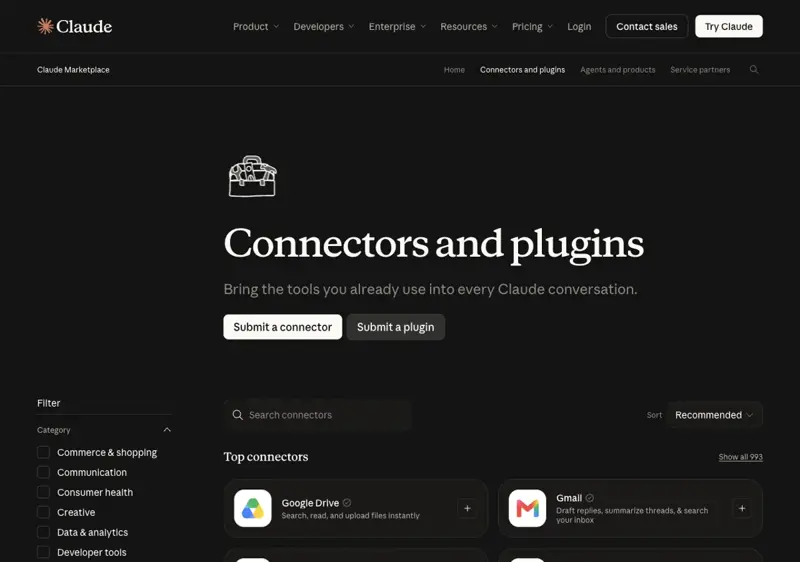
Anthropic’s directory showed 993 connectors when I looked on October 21, 2026 (another Anthropic page summarizing the marketplace says “over 2,000 connectors and plugins” combined, and the counts aren’t fully consistent across pages, so treat any single number loosely). In April, Anthropic said the directory had passed 200. Most of them are work tools. The ones this guide cares about are the everyday ones.
How to turn one on, in about two minutes
The steps below come from Anthropic’s help page. The labels in the app can shift slightly between web, desktop and mobile.
- In Claude, open Customize → Connectors and click the + next to Connectors.
- Choose a connector, read its description, and click Connect (or Install).
- Sign in to that service when asked and review the permissions it requests.
- In a chat, click + (or type
/), hover over Connectors, and switch on the services you want for that conversation.
That last step matters. Connecting an app and switching it on in a chat are separate. If you connect Spotify in settings but it isn’t toggled on in the chat you’re using, Claude may not reach for it.
Plans. For the everyday apps, Anthropic’s April 23 announcement says “connectors are available on all plans, with mobile in beta.” On Team and Enterprise plans, an Owner or Primary Owner has to enable a connector for the organization first, and then each person signs in with their own account. Free accounts are limited to one custom connector (a server you add yourself by URL), which is a different thing from the directory connectors.
The “tool access” setting. In a chat, under + → Connectors → Tool access, you can pick how Claude loads your connectors: Auto (Claude decides, the default), Always available (everything loads at the start, which uses more of the conversation’s space) or On demand (Claude finds and loads one when needed). Anthropic suggests Auto for most people, Always available if you have fewer than 10 you use constantly, and On demand if you have a large collection. This setting is about loading, not about permission. “Always available” does not mean Claude can act without asking.
To turn one off. Switch it off for a single chat from the same Connectors menu, or go to Customize → Connectors, select the service and disconnect. Disconnecting stops future access. It doesn’t delete anything already pulled into an existing chat. For Google services, Anthropic also points you to your Google account’s connections page to remove the link on Google’s side.
The everyday connectors, and what each one really does
On April 23, 2026, Anthropic announced a batch of consumer connectors “for everyday life.” It named 15 services: AllTrails, Audible, Booking.com, Instacart, Intuit Credit Karma, Intuit TurboTax, Resy, Spotify, StubHub, Taskrabbit, Thumbtack, Tripadvisor, Uber, Uber Eats and Viator. More have been added since, including Expedia, Zillow, eDreams and Shop.
The headline promise was that Claude can suggest the right app for what you’re doing and show you the options if more than one could help. The part that matters for safety is this sentence from the announcement: before it books or purchases something on your behalf, it’s “designed to check with you first.” Notice the words designed to. It describes how the product is meant to behave, and it’s not a guarantee.
The harder question is what each connector’s tools actually let Claude do. Many marketing descriptions say “discover and book,” while the tools listed in the directory only search. I went through the directory listings and providers’ own announcements (which Perplexity’s research also pulled together), and sorted them by what the published tools support.
| Connector | What the listing says it does | Does Claude finish the job in the chat? |
|---|---|---|
| AllTrails | Finds trails by location or name, with details and weather overviews | Search only |
| Audible | Recommends audiobooks and gives previews by genre or mood | Search only. Doesn’t promise access to your personal library |
| Booking.com | Searches and compares hotels, homes and other stays | Search and compare. The listing doesn’t establish in-chat booking |
| Instacart | Finds nearby stores and products, checks availability, turns recipes into a grocery list. Sign-in required | Builds the list. Anthropic’s guidance mentions carts, but the listing’s tool list shows product search, so don’t assume a full checkout |
| Credit Karma | Explains credit-score factors, walks through scenarios like paying down a balance, and looks at spending when your accounts are linked | Reads your financial data once linked. Intuit announced it |
| TurboTax | Estimates a federal refund or amount owed, shows filing options, finds tax experts | Estimates. Not a promise to file your return |
| Resy | Discovers U.S. restaurants, checks real-time availability and books tables. Sign-in required | Can book. The one everyday connector here that acts on your behalf |
| Spotify | Finds music, podcasts and audiobooks, recommends, supports library actions and playlist creation | Acts inside Spotify (playlists). Some features are for Premium listeners |
| StubHub | Finds events and compares ticket prices and seating | StubHub’s announcement says you go to StubHub to complete the purchase |
| Taskrabbit | Checks local service availability and prices, scopes the job, generates a booking link | You complete the booking via the link |
| Thumbtack | Finds and compares home-service pros and their reviews | You continue on Thumbtack to hire. U.S. only |
| Tripadvisor | Hotel research: reviews, ratings, photos, prices, availability, nearby places | Research only |
| Uber | Real-time U.S. ride price and arrival estimates, and ride-type comparison | Estimates. The actual ride request is handed off to the Uber app |
| Uber Eats | Searches nearby restaurants and dishes | Search. No in-chat order submission is established |
| Viator | Searches tours and experiences by destination, dates and budget | Search and details, even though the marketing says “discover and book” |
| Expedia | Searches flights and hotels with live pricing | You click through to Expedia to book (U.S.) |
| Zillow | Searches U.S. homes and rentals, Zestimates, neighborhoods, affordability. No Zillow account needed | Read-only (Zillow says so) |
| eDreams | Searches and compares flights and hotels | Search |
| Shop | Product discovery, carts, checkout, orders and spending requests | Has a checkout tool. The broadest action surface on this list |
Two things jump out. First, the headline “Claude can book your Uber” is wrong without a caveat: it gives you the price and the wait, and the actual request goes through the Uber app. Second, only a few of these can really finish something inside the chat (Resy booking a table, Spotify building a playlist, Shop with its checkout tool). Everything else searches, compares and then hands you back to the provider. That’s a good design for most people. It means a wrong guess costs you a click and not a charge.
The table comes from directory listings, which change. Anthropic itself notes the list was current at publication and says more are coming. If a detail matters to you (say, whether a connector can complete a purchase), look at the tools shown on that connector’s page before you rely on it.
Eight to set up first, and why
“Worth connecting” is a judgment call, so here is how I picked. I looked for connectors that solve a daily annoyance, are published by the service itself and carry Anthropic’s “verified” badge where the directory shows one, and either only read information or ask before changing anything. I left out the financial ones (Credit Karma, TurboTax) as first picks. They’re useful, but they pull sensitive data, and that deserves a separate decision.
1. Google Calendar. The best first connector for most people because the payoff is immediate. Claude can view events, find mutual availability, create, update and delete events, and respond to invitations. Anthropic’s help page says each action Claude takes on your behalf needs your explicit approval by default. Start with read-only questions (“what’s free on Thursday afternoon?”) and approve edits one by one.
2. Gmail. Great for finding things (“what did Sarah say about the deadline?”) and summarizing long threads. It’s also where you need to read the next two sections carefully, because the documentation about sending is inconsistent.
3. Google Drive. Search and read your documents, then ask questions about them. Anthropic’s help page says sharing, moving and trashing files need your approval by default. Live editing of Docs, Sheets and Slides uses separate connectors.
4. Resy. For “find us a table for four near the hotel on Friday around 7.” It’s the one everyday connector that can actually book, so it’s a good first lesson in how approvals feel. Sign-in is required.
5. Instacart. Turn a recipe or a meal idea into a grocery list and check what’s available at nearby stores. Sign-in is required. Treat checkout as something to verify yourself.
6. Spotify. Low stakes, high fun, and a good way to see a connector that acts (it can build playlists) without touching anything important. Some features, such as personalized “describe a vibe” playlists, are for Premium listeners.
7. A travel connector (Booking.com, Expedia or Tripadvisor). Pick one for planning, since they mostly search and compare and then hand you off to book. Claude is good at turning “two nights somewhere quiet near trains, under $180 a night” into a comparison you can read in a minute.
8. Zillow. If you’re looking at homes or rentals, it’s read-only, needs no Zillow account and lets you ask for homes, neighborhoods, a Zestimate and a payment breakdown in plain language. If you’re a real estate agent rather than a shopper, we wrote a separate guide to what it does and doesn’t do for agents.
A worked example: planning one Saturday
Here is how these fit together. Everything below is a prompt you can paste and the approval points to watch for. I’m not showing invented outputs, because I haven’t run this sequence myself. What I can tell you is which step is read-only, which can change something, and where Anthropic and the providers say you stay in control.
Step 1: Ask what’s free (read-only). Switch on Google Calendar for the chat and ask:
Look at my calendar for this Saturday and tell me the longest
stretch where nothing is booked between 4 pm and 10 pm.
Don't change anything.
You should get a plain answer. “Don’t change anything” is worth including: it costs nothing and makes your intent explicit.
Step 2: Search for dinner (read-only). Switch on Resy and ask:
Using Resy, find restaurants for 4 people that have a table
within that window on Saturday, within 15 minutes of downtown.
List 3 options with the available times. Don't book anything yet.
You should get options and times. Check them against the restaurant before you act, because availability can change in the minute between asking and booking.
Step 3: Book one (this can change something). Now pick:
Book the 7:30 pm table at the second place for 4 people.
Show me exactly what you're about to book and wait for my yes.
This is where Anthropic’s “designed to check with you first” wording is supposed to matter. Read the confirmation before approving: the restaurant, the time, the party size and the name on the reservation. If a permission prompt appears, choosing Allow once approves just that request. Always allow would approve future ones without asking, and I’d skip that for anything that books or buys.
Step 4: Plan the groceries (you check out). If you’re cooking Sunday, switch on Instacart:
I'm cooking for 4 on Sunday. Suggest a simple menu using
what's available at nearby stores and build the grocery list.
Don't place an order.
Look at the list before anything goes in a cart. Anthropic’s own description covers building carts, while the directory’s listed tools show product search, so treat the final order step as yours.
What this example shows is the routine that keeps you safe: read first, act second, state your limits in the prompt, and read each confirmation before you click Allow.
The one setting to check first
If you only do one thing after reading this guide, do this: open Customize → Connectors, click each service you’ve connected, and look at what it’s allowed to do. Keep anything that sends, books, shares, deletes or buys on “ask me first.”
Three facts from Anthropic’s help pages explain why that single check matters:
- Claude inherits your permissions. Anthropic says Claude gets the same access you have in the connected service. If you can’t open a file there, Claude can’t either. That’s reassuring, and it also means that if you have broad access (a shared drive, an admin account), so does Claude.
- Approval is on by default for the risky actions, but it’s a setting. Anthropic’s Google Workspace page says that for Gmail, “by default, Claude asks for your approval before each of these actions,” and that on Team and Enterprise plans owners decide whether members can skip the prompt. Turning prompts off is the choice that raises your risk.
- The labels are “Always allow,” “Needs approval” and “Blocked.” Anthropic documents these most fully for Team and Enterprise owners. For individual users, its custom-connector guidance says to review approval requests, use “Always allow” only for trusted servers and block tools you don’t need. The exact menu can differ by connector and by app, so look at what your own settings show.
The Gmail contradiction
Here’s the inconsistency I mentioned. On October 21, Anthropic’s Google Workspace help page says Claude can search and read Gmail, draft emails, and “send, reply to, and forward emails,” asking for approval by default, and that the Workspace connectors are “available for all users on Claude and Claude Desktop.” A separate Anthropic documentation page for the Gmail connector, fetched the same day, says the connector “reads and searches email only; it can’t create, send, or modify messages” and is available on Pro, Max, Team and Enterprise plans.
Those two can’t both be current. My guess is that one page is out of date, but I don’t know which. What to do: open the Gmail connector in your own account and look at the tools it actually lists, and don’t assume either page. Our earlier walkthrough, Claude Can Now Send Gmail: Safe 10-Min Setup, covers the send feature when you decide to use it.

Is it safe? What’s documented, and what isn’t
Most of the fear around connectors comes from one real idea: prompt injection. It means a message, a web page or a document contains hidden instructions meant for the AI rather than for you. If Claude treats that text as a command and not as content to summarize, it might do something you never asked for.
Security researcher Simon Willison has a useful way to think about when this gets dangerous, in a June 2025 essay he calls the “lethal trifecta”: an AI that has (1) access to your private data, (2) exposure to untrusted content, and (3) the ability to communicate externally in a way that could leak your data. Any two are manageable. All three together are risky. His advice is to avoid that combination entirely. A connector setup that can read your inbox (private data), process emails from strangers (untrusted content) and send mail (external communication) has all three, which is exactly why the approval step matters.
What has actually been shown, with the caveats the sources include:
- Anthropic says the problem isn’t solved. In a November 24, 2025 research post, Anthropic wrote that “prompt injection is far from a solved problem, particularly as models take more real-world actions” and that “no browser agent is immune.” It reported its safeguards cut a measured attack success rate to roughly 1.4% to 2.4% in internal tests of browser-using agents (down from about 8% to 14% with the model alone), and said that even a 1% success rate is still a meaningful risk.
- A researcher demonstration, not a connector breach. Zenity Labs published a post on August 5, 2026 describing an attack chain against Claude in Chrome, the browser-control product: hidden instructions in an email, read while Claude summarized an inbox, led to code running in the browser. That is not the same product as a Gmail connector, and it was a demonstration, not an observed campaign against real users. Zenity’s own account of its disclosure to Anthropic is the source for how that was handled, and I haven’t seen a separate Anthropic statement on it.
- The send feature raised the stakes for Gmail. Engadget’s September 6 coverage of Claude’s Gmail send ability notes the risk of hidden white-on-white text in emails and quotes Willison: “we still don’t know how to 100% reliably prevent this from happening.” The suggested defense in that piece is simply to keep the default approval mode on.
Put together, the sensible reading is calm, not alarmed. Read-only connectors (search a trail, compare a hotel, estimate a payment) don’t expose you to this in any serious way. The connectors to be careful with are the ones that read your private inbox and can send, share or buy. For those, keep approvals on and consider whether you want that connector at all.
What about my data?
Anthropic’s April announcement says that data from a connected app “isn’t used to train our models” and that the app “doesn’t see your other conversations with Claude.” For Gmail, Calendar and Drive specifically, the help page says retrieved data is stored on Anthropic’s servers with the associated chat (deleting the chat deletes that data) and that Anthropic doesn’t train on your connector data. There’s a caveat in the same page: if you’ve opted into model improvement, content you copy from those services, or Claude responses containing connector information, may be used to improve models. And the connected service handles data on its own terms. Anthropic notes that connected services process data on their own infrastructure, which may be outside the U.S.
What this means for you
If you’re a busy parent. Start with Calendar and one planning connector. Ask Claude to find the free window, then compare options, and keep every booking step manual until you trust the flow. First action: ask Claude “what’s free this weekend?” with Calendar on and nothing else.
If you’re a student. Drive is the useful one, for finding that one document and summarizing it. Spotify is the fun one. Skip anything that checks out or books until you’ve read a confirmation once. First action: connect Drive and ask for a summary of a single document you own.
If you run a small business. Gmail, Calendar and Drive save the most time, and the risk is also highest because customer email is untrusted content. Keep sending on approval. For tools like QuickBooks or Shopify, treat each as its own decision. First action: connect Calendar only, then add the others one a week.
If you travel a lot. Pick one of Booking.com, Expedia or Tripadvisor for research, and use Uber for price estimates only. Remember most of these hand the booking back to the provider, which is the safe design. First action: ask for a two-night comparison with your budget and read each option on the provider’s page before you book.
If you hate email. Gmail is made for you, and it’s the connector where you should be most careful. Searching and summarizing carry little risk. Letting Claude reply on its own carries the most. First action: connect Gmail and ask Claude to summarize the last week of messages from one sender. Leave “send” on approval.
If you’re privacy-cautious. You can use connectors selectively: only read-only ones, switched on only in the chats that need them, disconnected afterward. That’s a legitimate way to use them. Our AI Privacy 101 course (first 2 lessons free) covers what happens to your chats and the settings that matter. First action: open Customize → Connectors and disconnect anything you aren’t using.
Edge cases and troubleshooting
- Claude ignored the connector. Claude decides when to call one. Name the app in your request (“using Resy, find…”), and make sure it’s toggled on in this chat. Zillow gives the same advice for its connector.
- It’s connected, but not available in this conversation. Connectors enabled mid-conversation sometimes need a fresh chat. Start a new one with the connector already on.
- The connector doesn’t appear in the list. On Team and Enterprise, an owner has to enable it first. Zillow also says its connector is rolling out gradually and may not be on every plan or in every region yet.
- The Gmail send option is missing, or it’s read-only. See the contradiction above. Check the tools shown in your account.
- Scheduled or recurring tasks are touching more than you meant. Anthropic’s Claude Code documentation for routines and scheduled tasks says scheduled tasks include all of your currently connected connectors by default, and that Claude can use every tool of an included connector, writes too, without asking during a run. If you schedule anything, remove the connectors it doesn’t need first.
- Approvals pile up. Some people find constant prompts exhausting, particularly in workplace setups where an admin requires approval for every action. The fix is a narrower set of connected tools, not switching every prompt to “Always allow.”
- You have a lot of connectors and Claude gets slower or loses track. Anthropic’s guidance suggests switching Tool access to On demand once you have around 10 or more active.
- A booking, ride or purchase didn’t happen. For Uber, StubHub, Taskrabbit, Thumbtack and Expedia, the final step is in the provider’s app or site by design. Look for the link or hand-off Claude gave you.
- Your phone and your laptop disagree. Web connectors work on the mobile apps, but installing connectors on mobile is still labeled beta by Anthropic. Set them up on the web or desktop first.
What connectors can’t do
- They can’t see everything in an app. Anthropic says Claude can only reach what you could reach yourself. Some connectors also can’t see attachments’ contents or images embedded in email.
- They aren’t an autopilot for purchases. Several well-known ones are search or hand-off tools, and even the ones that can act are “designed to check with you first.”
- They don’t make Claude immune to bad instructions. Anthropic says prompt injection isn’t solved, so the safeguard is your approval step, not the model’s judgment.
- They don’t replace your subscriptions. Spotify’s personalized features need Premium, and other services have their own accounts, fees and regional limits.
- They can’t be trusted just because they’re listed. The directory page for each connector reminds you to use connectors only from developers you trust, and Anthropic says it can’t verify that tools will work as intended or won’t change.
Claude connectors vs ChatGPT apps, honestly
OpenAI launched “apps” inside ChatGPT on October 6, 2025, with Booking.com, Expedia, Spotify, Zillow, Canva, Figma and Coursera among the first, and later renamed its directory connectors as apps. Both ecosystems now include Booking.com, Spotify, Zillow, Expedia and Instacart according to the first-party sources I found. Beyond that overlap I wouldn’t claim parity either way. A “coming soon” list from last year isn’t proof an app shipped, and I couldn’t confirm that each of Claude’s 15 April connectors has a ChatGPT equivalent today. If you use both assistants, check each app’s current listing instead of assuming.
Two differences are worth knowing. The privacy defaults differ: OpenAI’s help page says information accessed through apps may be used for training on Free, Go, Plus and Pro when “Improve the model for everyone” is enabled, while Anthropic says connector data isn’t used to train its models (with the opt-in caveat above). And the controls are named differently, so the steps in this guide won’t map one-to-one.
FAQ
What is a Claude connector in simple terms? A link between Claude and another app you use. Once connected, Claude can look things up in that app (and sometimes take actions there) while you chat, so you don’t have to copy and paste between tabs.
Are Claude connectors free? Anthropic’s April announcement says the everyday connectors are available on all plans. Individual services have their own rules: Spotify’s personalized features are for Premium listeners, Instacart and Resy require you to sign in to those services, and some features are U.S. only. Gmail’s plan availability is described inconsistently across Anthropic’s pages, as covered above.
Is it safe to connect Gmail to Claude? Reading and summarizing carries little risk compared with sending. The risk grows when Claude can read untrusted emails and send mail without asking. Keep sending on approval, and read what the confirmation says before you click Allow.
Can Claude book things for me? Sometimes. Resy can book a table. Uber, StubHub, Taskrabbit, Thumbtack and Expedia hand the final step to the provider. Anthropic says Claude is designed to check with you before it books or buys.
How do I turn a connector off? For one chat, use + → Connectors and switch it off. To remove it, go to Customize → Connectors, select the service and disconnect. For Google services you can also remove the connection from your Google account’s connections page.
Does Anthropic use my connector data to train Claude? Anthropic says data from connected apps isn’t used to train its models, and for Gmail, Calendar and Drive it says it doesn’t train on your connector data. If you opted into model improvement, content you copy from those services may be used. The service you connect has its own policies too.
What’s the difference between a connector and a skill? A connector gives Claude access to an app. A skill is a set of instructions for how to do a recurring job. People often use both: the connector pulls the data, and the skill says what to do with it.
How many connectors are there? Anthropic’s directory showed 993 connectors on October 21, 2026, with plugins counted separately. Most are work tools. Anthropic’s April post named 15 consumer ones, and a few more have been added since.
Does ChatGPT have the same thing? Yes. OpenAI calls them apps, and several overlap (Booking.com, Spotify, Zillow, Expedia, Instacart). The privacy and permission details differ, so check the current settings in each product.
The bottom line
Connectors are worth trying, in a specific order: start with read-only ones, add a calendar or a planning tool, and only then consider the ones that send, share, book or buy. The single habit that matters is keeping “ask me first” on for anything that changes something.
The honest summary of the everyday apps is a little less exciting than the headlines. Most of them search and hand you back to the provider, which is exactly why they’re a reasonable place to start. A handful can act. Treat those as you would a new assistant on their first week: useful, and worth supervising.
If you want a structured way to learn what AI tools do with your information and which settings to change, take AI Privacy 101 (first 2 lessons free), or start with AI Fundamentals (first 2 lessons free).
Start lesson 1 free →
Sources
- Anthropic, “New connectors in Claude for everyday life” (April 23, 2026)
- Anthropic Help Center, “Use connectors to extend Claude’s capabilities”
- Anthropic Help Center, “Use Google Workspace connectors”
- Anthropic Docs, Gmail connector
- Anthropic Help Center, “Manage Claude’s tool access”
- Claude Marketplace, Connectors and plugins
- Claude Marketplace, Zillow connector
- Zillow, “Zillow Connector in Claude and ChatGPT”
- Intuit, “Intuit apps now available in Claude”
- StubHub, “StubHub brings live event discovery to Anthropic’s Claude”
- Engadget, “Claude can now connect to lifestyle apps like Spotify, Instacart and AllTrails”
- Engadget via AI Weekly, Claude gains Gmail send powers (September 6, 2026)
- Anthropic, “Mitigating the risk of prompt injections in browser use” (November 24, 2025)
- Zenity Labs, “Claude in Chrome: breaking down the injection” (August 5, 2026)
- Simon Willison, “The lethal trifecta for AI agents” (June 16, 2025)
- OpenAI Help Center, “Connected apps in ChatGPT”