Anyone who’s done family-history research knows the feeling. You finally track down the 1843 baptism record, you zoom in, and… it’s a wall of looping, faded, gone-brown cursive. You can make out a first name. Maybe. You squint at it for twenty minutes and give up.
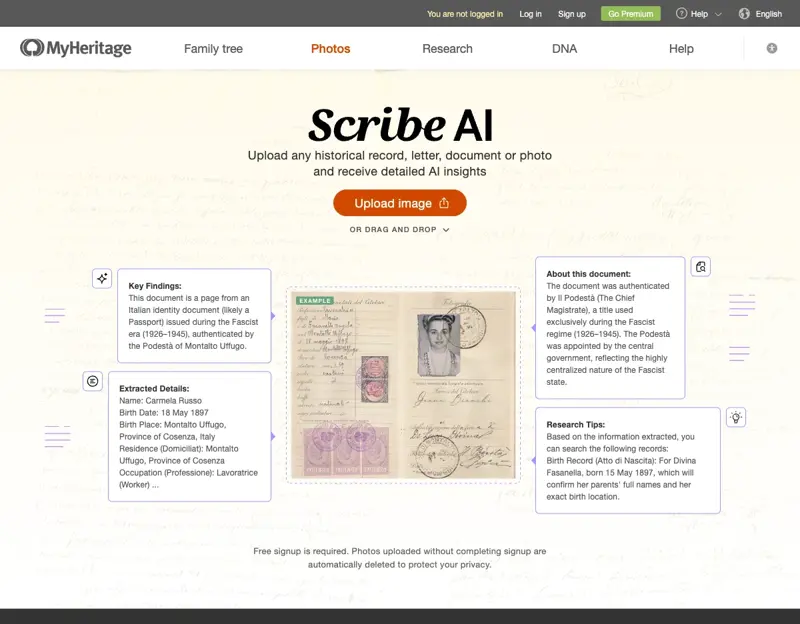
That twenty minutes is now thirty seconds. At RootsTech 2026 this spring, MyHeritage launched Scribe AI, and Ancestry kept building out its Transcribe button — tools that read a handwritten record and hand you clean, typed text almost instantly. Genealogists on X are calling it the biggest practical change to the hobby in years; one put it bluntly, saying research that used to mean a $20,000 professional bill is now a $50 subscription plus a few evenings of your own time.
It really is that good. But there’s one catch that decides whether these tools help you or quietly wreck your tree, and almost every excited “look what AI did!” post skips right past it. We’ll get to it. First, what actually changed.
What just changed
For about three years, the how-to advice for AI and genealogy basically froze. Search “ChatGPT for genealogy” and you still mostly get cautious 2023 blog posts and forum threads arguing about whether you should use it at all. Meanwhile the tools moved on completely.
Here’s the current lineup, in plain terms:
- MyHeritage Scribe AI (launched March 2026) — upload a photo of a handwritten or printed record and it transcribes it, translates it if it’s in another language, and writes up the historical context, the key people, places, and events, plus suggested next steps. It handles multi-page documents as one connected piece, and it’ll even read a gravestone or a coat of arms.
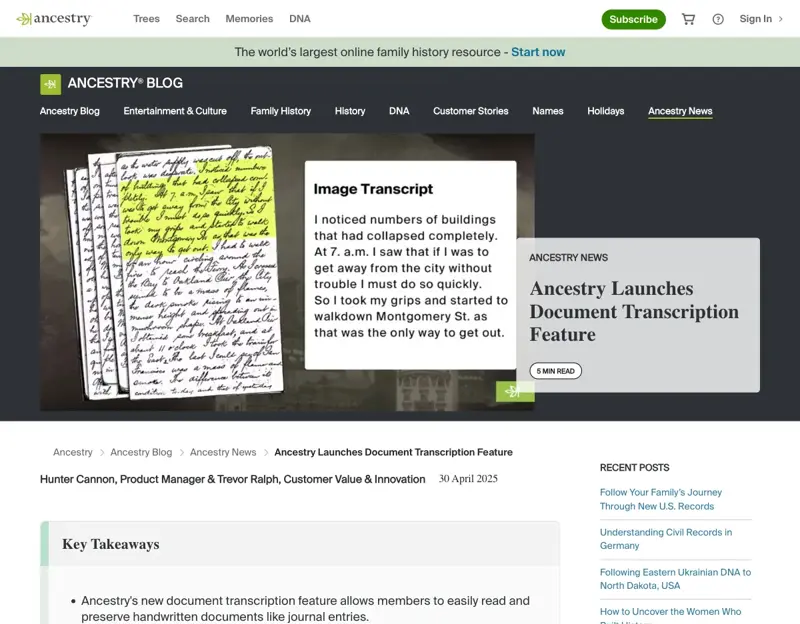
- Ancestry’s Transcribe button (in beta since April 2025) — on any image you upload to a public tree, a Transcribe button turns the handwriting into text you can copy. Ancestry calls itself “the global leader in handwriting recognition,” and in walkthroughs it reads marriage certificates and court records cleanly.
- The free route: ChatGPT, Gemini, and Claude. You can paste a record photo straight into any of the big chatbots and ask it to transcribe. No genealogy subscription required.
- Transkribus — the specialist tool, trained on millions of historical documents, still the strongest option for tricky scripts like German Kurrent.
So which one should you actually reach for? That depends on the record — and that’s the first thing nobody tells beginners.
The 30-second version that actually works
Think of it as a three-step loop: read it, check it, then plan your next move. Skip the middle step and you’ll eventually paste a confident-sounding mistake into your family tree and spend a year researching the wrong person.
Step 1 — Read it with the right tool
For most English-language records from the 1700s to the 1900s, you have a real choice now. Recent tests are striking: in one 2026 experiment on 18th–19th-century cursive, Google’s Gemini 3 Pro got only about 4% of words wrong (and just 1% in ways that actually mattered). Claude is the strongest on Latin. MyHeritage’s own Scribe AI scored around 97% accurate on a 322-word test document. Transkribus, trained on a specific collection, can beat all of them on its home turf — especially German records.
The practical rule:
- English cursive, 1700s–1900s? Any of Gemini, Claude, ChatGPT, Scribe AI, or Ancestry Transcribe will get you a strong first draft.
- German, Latin, or other old European scripts? Reach for Transkribus or Scribe AI first — and keep an LLM as a second opinion.
- A whole stack of records? Scribe AI’s “read the whole document as one thing” approach saves the most time.
Step 2 — Check it against the original (this is the catch)
This is the step that separates a useful draft from a future disaster, and it’s the one the hype skips. Here’s the uncomfortable truth: even 97% accuracy can hide a fatal error. A 3% miss rate sounds tiny until the 3% is a swapped surname or a date shifted by a decade — exactly the kind of mistake that sends you down the wrong branch for months.
And these tools don’t just misread. They over-help. Faced with a smudge, an AI will often fill it in with a plausible, confident, completely invented guess. The Board for Certification of Genealogists, the National Genealogical Society, FamilySearch, and smaller societies have all landed on the same line. As the Puerto Rican Genealogy Society puts it in its AI best-practices guide: “Use AI as a starting point, not an endpoint.” Or FamilySearch’s older but timeless version: “the best help for deciphering difficult handwriting is the document itself.”
So the verification routine, every time:
- Read the AI’s text line by line against the image, paying closest attention to names, dates, places, and relationships — the things that move your research.
- Mark anything you’re only half-sure of as uncertain, not fact.
- If the AI supplied a word that isn’t clearly in the document — a parent’s name, a town — treat it as a hypothesis to confirm, never a reading.
A real example of how this goes wrong: say a baptism register clearly shows “Johann Müller” with a smudged surname after it. The AI confidently outputs “Johann Müller, son of Heinrich Müller and Anna Schmidt, baptized 14 May 1872 in Leipzig.” But the parents’ names were only half-legible and the town was never written down. “Heinrich,” “Anna,” and “Leipzig” are the AI being helpful — they’re guesses dressed up as facts. A good researcher flags all three and goes looking for independent confirmation.
Step 3 — Turn the record into your next research plan
This is where AI shines and almost nobody uses it. Once you’ve got verified text, paste your known facts into ChatGPT or Gemini and ask the question that actually unsticks a brick wall:
“Here’s what I know about this person and family. What logical gaps and contradictions do you see, and which record types should I check next?”
It’ll come back with a checklist — civil registration, church registers, census, land, probate, tax lists — and often spot a contradiction you’d stopped noticing. The one rule: ChatGPT cannot see Ancestry or FamilySearch, and it will happily invent record citations that don’t exist. Use it to plan your search. Never to find a source.
What this means for you
If you’re just starting your family tree: Start free. Paste a record into ChatGPT or Gemini, or use Scribe AI’s free image allowance. You’ll read documents this week that would have stopped you cold a year ago. Just build the verify-against-the-original habit from day one — it’s much harder to add later.
If you’ve hit a brick wall: The research-plan prompt in Step 3 is your best new tool, not the transcription. Feed it everything you know and let it map the records you haven’t checked. It’s a tireless research partner that never gets bored of your one stubborn ancestor.
If you’re a professional or credentialed researcher: The speed-up is real, but your standard doesn’t move. The NGS’s 2025 Guiding Principles for Responsible AI in Genealogy ask you to verify AI output against other records and to document when and how you used AI, so your conclusions stay reproducible under the Genealogical Proof Standard. Keep both the raw AI output and your corrected version. Your edge was never reading speed — it was judgment, and that’s the part AI can’t do.
If you’re writing a family book: The transcribe-then-summarize flow can turn a pile of census, military, and immigration records into a warm, readable ancestor profile in minutes. Wonderful for a first draft. Every name, date, and source still has to be checked against the primary record before it goes in the book — a printed family history is forever.
If your records are German, Polish, or Scandinavian: You may have the best deal of anyone. Scripts like German Kurrent are unreadable to most modern Germans, let alone foreign researchers — which makes AI transcription a genuine unlock, not a convenience. Lead with Transkribus or Scribe AI, and confirm tricky names against indexes.
What it can’t do
Be honest with yourself about the limits, because confidence is exactly how these mistakes spread:
- It invents things with total confidence. Smudged words become full names; missing parents get filled in. The New Zealand Society of Genealogists flatly warns that AI “can generate false, biased, or incorrect content” and that you must compare every result with the original.
- High accuracy is not the same as safe. 97% still means a name or date is wrong somewhere on the page. You have to find which one.
- It can’t access the record sets. ChatGPT and friends can’t open Ancestry, FamilySearch, or an archive. Ask it to “find a record” and it’ll fabricate a citation. It plans; it doesn’t locate.
- It doesn’t meet your proof standard for you. AI gives you a draft and a to-do list. Establishing a fact still takes correlated evidence and your reasoning.
- It is not private by default. This is the hard line every genealogy authority draws: never upload raw DNA files (from Ancestry, 23andMe, anywhere) to a chatbot, and never paste a living relative’s private details — full name, address, DNA kit ID. The BCG’s standards are built on a tester’s “inalienable right to their own DNA data.” When you discuss living people, anonymize them (“a living cousin”) and turn off chat history and training where you can.
The bottom line
AI just gave family-history research the best first draft it’s ever had. A record that used to be a dead end is now thirty seconds of typed text and a ready-made list of where to look next. That’s not hype — it’s a real, this-week change, and it’s mostly free to try.
But the tool reads the handwriting; you’re still the genealogist. The researchers getting burned right now are the ones who trusted a confident transcription and skipped the check. The ones getting ahead are running the same loop every time: read it, check it against the original, plan the next move. Do that, and AI becomes the most patient research assistant you’ve ever had.
Want the whole workflow in one place? Our AI for Family History course (first 2 lessons free) walks you through the full loop — reading a record, verifying it against the original, planning your next records, and writing an ancestor’s story — in about an hour, with the exact prompts and the privacy guardrails. Brand new to AI tools generally? Start with AI Fundamentals instead.
Sources
- MyHeritage — Scribe AI and the Scribe AI launch announcement
- Ancestry — Document transcription feature
- National Genealogical Society — Guiding Principles for Responsible AI in Genealogy (2025)
- FamilySearch — AI developments in genealogy
- Transcribing Handwritten Documents with AI — National Genealogical Society
- Transkribus for genealogy
- Practical AI Toolkit for Genealogy 2026 — Chronicle Makers