
A client sends you a screenshot of the Italy trip they planned in ChatGPT and asks if it looks right. Or you open a chatbot yourself on a quiet Sunday and ask it for a ten-day draft, because your inbox is full. Either way you are holding the same thing: a fast first draft that reads well and that nobody has checked.
This guide is for travel advisors, agents and independent trip designers who want to use that draft without sending it to a client unchecked. It covers what advisors are doing with AI, the kinds of mistakes that keep turning up, a routine for drafting and then verifying, two prompts you can copy, one small check I ran myself, and a table of the six checks clients are really paying you for.
One honest note first. I did not test a chatbot on a real client trip for this guide. The numbers and stories come from pages I opened on 1 November 2026, and each one says who measured it and how. The one thing I ran myself is a distance calculation on four cities, described in the walkthrough. The sample client and the sample draft in the walkthrough are ours, written to show the shape of the work, and are not output from any model.
TL;DR. Use ChatGPT, Claude or Gemini for the first draft and the boring structure, and treat everything in it as a claim to verify. The mistakes that recur in the sources are closed or nonexistent places, wrong opening days, impossible transfers, outdated prices and wrong entry rules. Put every day on a map, check hours, hotels and prices at the supplier, and check entry rules at the official government source for the actual passport. Keep client names, passport details and payment details out of the chat. The checking is the part a client pays you for.
What advisors are doing with AI
Start with what advisors say about their own use, because the data is thinner than the headlines suggest.
The figure to start with is 59%. It comes from the 2025 Travel Industry Survey by Travel Weekly and Phocuswright, where 59% of respondents said they had used AI platforms and tools, up from 41% the year before. Read the method before you repeat it. The survey page says the answers came from 1,562 U.S. travel advisors who completed an online questionnaire between 8 August and 3 September (2025), recruited through Travel Weekly and TravelAge West subscribers and members of consortia and host agencies. It adds that the sample is not representative of all U.S. travel agencies and that the data is not statistically weighted. PhocusWire was still quoting the 59% on 14 July 2026, when it said an updated study was expected later in the year. So it is a 2025 reading from a self-selected group, not a 2026 measurement of the whole trade.
Two more things from the same survey are worth knowing. Travel Weekly’s editor wrote that, of the advisors hoping to use AI in their business, just under half were very or extremely interested in using it to create custom itineraries for clients, but 63% had reservations about the accuracy and the lack of a personal touch in what AI produces. The survey’s technology page makes the same point in other words: more than one-third of respondents cite privacy concerns, and well over half are more concerned about accuracy and the lack of a personal touch.
The second source is usage data from platforms. In the PhocusWire piece of 14 July 2026, Tern, a company that builds AI tools for advisors, said it had reviewed 90 days of usage by 6,900 advisors. It found that the number of advisors using AI each month had nearly tripled in a year, and that a typical advisor now uses AI 50 times a month, compared with 12 a year earlier. PhocusWire quotes Tern’s CEO, David Shull, estimating that 80% to 90% of an advisor’s day goes on administrative tasks. That figure is his estimate, not a measurement. Both Tern and Fora told PhocusWire that itinerary creation, destination research and content creation are among the most popular uses.
Tern also said that advisors accept nearly nine in ten routine suggestions from its AI, such as updating trips or adding contacts, but are less likely to accept email drafts without editing them: six in ten. Fora, which builds a platform for advisors, said its advisors who use AI daily had booked 4.3 times more commissionable booking value and made 3.5 times more bookings over the last year than non-users. That is Fora’s own data, and PhocusWire adds that the gains are “likely due in part to improved productivity”. It does not show that AI caused the difference, since more active advisors may simply use more of everything.
What none of these sources give you is the share of advisors who draft client itineraries in ChatGPT, Claude or Gemini specifically. I looked, and so did the research tool I used. It is not there.
One useful detail on the human side. PhocusWire says Phocuswright’s research found advisors were most interested in using generative AI to create emails, marketing material and website content, followed by customized itineraries, curated packages and routine admin such as scheduling and client communications. If you came to AI for the itinerary, you are in the second group, not the first.
Where AI itineraries go wrong
The same kinds of mistakes show up in the sources that list errors, from an official government page to a newspaper story to a marketing agency’s test. That sameness is more useful than any single percentage.
Australia’s Department of Foreign Affairs and Trade runs the Smartraveller site. Its page on travel planning with AI, last updated 15 July 2026, says AI tools can be a good starting point and then lists what has gone wrong in many instances.
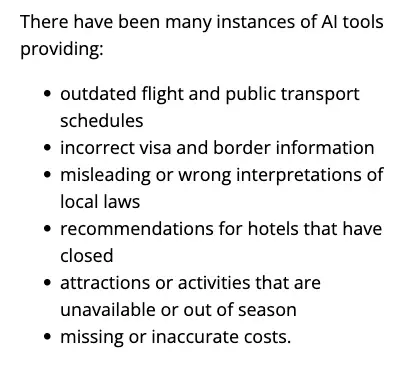
The page also says AI “gets information from many sources and doesn’t verify it before giving you an answer”, and that the answer “might be inaccurate, incomplete or out of date”. It reports DFAT’s own research on Gen Z travellers: 30% use AI tools to plan overseas trips, 28% used AI for information about visas and entry requirements, 27% for safety advice and 19% for advice about local laws and customs. Those are the areas the page calls especially important to verify through official sources. That research is about Gen Z travellers, not advisors, but the list of failure types applies to anyone.
What advisors told the press
A story by Kyra Breslin in the NY Post, republished on Yahoo Travel in early October 2026, collects cases and quotes advisors. These are the ones I would put in a team meeting, with who said what.
- Entry rules. Vladislav Guzey planned a trip to Taiwan and used AI for visa advice as well as the itinerary. It told him Russian passport holders did not need a visa. He found out at the airport, and had to turn back. “I relied on that information,” he told the paper.
- A hotel’s history. Robyn Levin, a luxury travel author, was told by ChatGPT that a hotel on the Baltic coast had been renovated in 2024. It had not been renovated since 2008. She said the chatbot “apologized, as it frequently does, and said, ‘I should have been more careful with the research.’”
- Geography. Levin then asked for a luxury Lake Como hotel near a train station. ChatGPT recommended one it said was a two-minute walk away. There was no train station, and getting to the hotel meant taking a ferry across the lake.
- A restaurant’s closing day. Andrew Hickey asked ChatGPT for a restaurant near his hotel in Italy and asked it to confirm it was open. It was closed on Mondays, “and they have always been closed on Mondays.”
- A place that doesn’t exist. Hadis Hesabi, co-founder and CTO of an AI trip-planning company, was recommended a scenic waterfall near Banff. The description was detailed enough to seem plausible. “We only caught it when we tried to verify the location before going.”
- A local procedure. Rob DelliBovi of RDB Hospitality Group said a client relied on AI for how to claim a tax refund at Milan’s airport. The AI said the refund stop was after security. It was before security, and the client was not allowed to go back: “They lost thousands.”
The advisors in the story also make a second point that has nothing to do with errors. Amy Norman, founder and CEO of the agency Nellie, described a client’s AI-generated Tokyo itinerary full of legitimate suggestions: Shibuya, Meiji Shrine, other familiar landmarks. “It was the equivalent of telling a first-time visitor to New York to see Times Square and Central Park.” A correct itinerary can still be a generic one.
Stacy Fischer Rosenthal, president of Fischer Unlimited, described a client who used ChatGPT to build his own day-by-day Spain itinerary and shared it with her team. “When we looked through it, we found several issues, including restaurants that had long since closed and exhibitions that would not be open during his stay.” She said AI can be useful but cannot replace “personal knowledge, trusted relationships, judgment and accountability.”
These are stories, not a measurement. They tell you what kinds of errors to look for, not how often they happen.
One agency’s count of the errors
For a measurement, the closest I found is a test by First Page Sage, a marketing agency, published on 19 October 2026. It sent 440 travel requests to seven AI platforms, producing 3,080 answers. Eight kinds of travel task got 55 requests each, covering destinations in the United States, Europe, Asia and Latin America. The tests ran from 24 September to 13 October 2026, each platform on its best available model with web search on. A panel of four professional travel advisors scored the answers, and the researchers checked that every recommended restaurant, attraction and hotel was open and compared quoted flight and hotel prices with live prices. That covered more than 12,000 recommended stops. Errors fell into four kinds: closed or nonexistent venues, wrong opening hours, impossible timing and outdated prices.
Do not read this as “Gemini is the safe one”. Even its 8.3 is about one error for every twelve stops, and it is one agency’s test, with a scoring panel of four. Look at what the errors were instead. The study says outdated prices were the most common error on every platform, with museum tickets, tours and transit passes most often quoted at old prices, and wrong opening hours ranked second on every platform. The tools differed on timing: Claude had 0.9 impossible-timing errors per 100 stops, ChatGPT 1.4 and Gemini 1.6. The ordering may change as the models do. The error types are the ones to watch.
An older audit points the same way. SEO Travel, a travel marketing company, had ChatGPT plan 100 two-day weekend itineraries for ten big cities. A May 2024 report of it says 90% were “deemed inaccurate” and one in four lacked logical planning. Its examples include a Rome café the report calls fictional and a Tokyo café suggested for an 8 AM breakfast that opens at noon. I would not quote that 90%. The model version is not stated, the report does not explain how inaccuracy was judged, and it is dated May 2024. I include it because its examples are the same kinds of error.
The workflow, in six steps
Here is the routine. It is a way of working I am putting together from the sources above, and I have not run it with clients.
Step 1: write the brief without personal data
Describe the trip, not the person. “Two travelers, ten days, arriving in Rome and leaving from Venice, relaxed pace, mid-range hotels, interested in food and small museums” is enough for a first draft. Leave out names, passport numbers, birth dates, contact details, card numbers and medical details. You can add them in your own documents later.
I have not read any chatbot vendor’s data terms for this guide, so I cannot tell you what a given plan does with what you type. What I can say is that more than one-third of advisors in the Travel Weekly survey cited privacy concerns about AI, and that the cheapest answer to a privacy question is not to put the data in. Check your host agency’s rules before you paste anything about a client.
Step 2: ask for a draft that marks what to check
This is the first prompt. Fill in the brackets and keep the brackets you are not sure of. Paste it into the chatbot you normally use.
You are helping a travel advisor write a first draft of a client itinerary. A human will verify everything before it goes to the client.
Trip: [number] days, [number] travelers, [destination], arriving in [city] and leaving from [city], travel dates [dates].
Interests: [for example food, small museums, walking].
Pace: [for example relaxed, no more than two main things a day].
Hotel level: [for example mid-range].
Do not use any real names, passport details or contact details.
For every day, give the morning, the afternoon and the evening, and how we get between places, with the mode of transport and a rough duration.
Put [CHECK] after every fact I must verify: opening days and hours, hotel names, prices, transfer times and entry rules.
If you are not sure a place exists or is open on that date, say so instead of guessing.
For each hotel and attraction, give the official website or booking page, or say that you cannot.
End with a list of the assumptions you made.
One of those lines comes from the Smartraveller advice. It tells travellers to treat AI as a starting point and to ask the AI tool to show its sources and relevant booking links. A source is not proof, so you still have to open it and read it, but a chatbot that cannot name a page for a hotel has told you something.
Step 3: put every day on a map
Take the draft and, for each day, look at the places in order on a map. Look at the distance between each pair and the way you would travel. This catches the cheap errors: a day trip that cannot be done in a day, a hotel that needs a ferry, a “two-minute walk” that is not.
Hesabi’s advice in the NY Post story is exactly this: verify the itinerary against a map or an authoritative source. Her company built a knowledge graph of real places and geographic relationships so its planner is not left to invent geography. You do not need that. You need a map and some attention for each day.
A second pass with the chatbot can help here, as a colleague who is allowed to be rude. This is the second prompt.
Here is a draft client itinerary. Act as a sceptical colleague and review it. Do not rewrite it.
For each day, list anything that cannot realistically be done in the time given.
List any place that might be closed on that weekday or at that time of year.
List any transfer that looks too short or that I should look up.
List any hotel or attraction I should confirm exists as described.
Say clearly when you are guessing.
Use this to find things to check, never to confirm things. In the NY Post story, both Levin and Hickey went back to the chatbot with the error, and got an apology. The chatbot that made the mistake is not a witness to it.
Step 4: verify the things that change
Open the supplier’s own page, or your booking platform, for every hotel and attraction in the draft. Check that it exists as described, that it is open on the dates and the weekdays involved, and what it costs today. Opening hours and prices are the facts the First Page Sage study found wrong most often, and Smartraveller’s list includes closed hotels, unavailable or out-of-season attractions, and missing or inaccurate costs. A chatbot can only repeat what it found, and what it found may be old.
Step 5: check entry rules at the official source, for this passport
Do not take a visa or entry answer from a chatbot, or from this guide. Look up the rule on the destination government’s official site and on the relevant government travel advice, for the traveler’s actual passport and the actual route, including any connections. Smartraveller’s page picks out visas and local laws as the places where “getting these wrong can have serious consequences”, and Guzey’s story is what that looks like at an airport. If your agency has a standard check for documents, this is where it goes.
Step 6: rewrite it and keep a record
Now do the part the chatbot could not. Replace the generic with the specific, add the access and the local knowledge that only you have, and put it into your own proposal. Norman’s point about the Tokyo itinerary applies here: the draft gave the first-time-visitor list, and what clients pay for is the opposite of that.
Then keep a record of what you checked, and when. A simple line in your proposal file will do: “Hotels and hours checked at supplier sites on [date]. Entry rules checked at [government site] on [date].” It is useful for you, and it is a good habit if a client ever asks where a statement came from. It also stops the next person at your agency from assuming someone else did it.
One trip carried through
Here is the routine on one sample trip. The client and the draft are ours, written to show the shape of the work. The draft is not the output of any model, and the places are real only so that the distances mean something.
The sample client brief: a couple in their fifties, ten days in Italy in May, landing in Rome and flying home from Venice, who like food, small museums and walking, at a relaxed pace.
A sample draft day, written by us as a typical first-draft slip:
Day 4, sample draft. Morning: walk the old town of Florence and see the cathedral. Afternoon: train to the Cinque Terre for a coastal walk. Evening: dinner in Rome.
Nothing in that day sounds odd, which is the point. Step 3 is to look at the legs. On 1 November 2026 I ran a short Python 3.14.6 script on approximate city-centre coordinates that I typed in myself, and it gave these straight-line distances.
| Leg | Straight-line distance |
|---|---|
| Florence to Monterosso al Mare (Cinque Terre) | 136 km |
| Monterosso al Mare to Rome | 341 km |
| Florence to Rome, directly | 231 km |
| Florence to Venice | 204 km |
A straight line is the shortest the trip can possibly be. It is not a road or rail distance and it is not a travel time, and my coordinates are rough, so treat the numbers as a floor. Even so, the draft sends the couple 136 km from Florence to the coast and then 341 km from the coast to Rome: 477 km of straight line in one day, against 231 km from Florence to Rome directly. That is a long way for one day, and the map shows it at a glance. A chatbot can write it in one confident paragraph, and a map shows the problem at a glance.
Step 4 then turns the survivors into questions. If you keep Florence and move the coast to its own day, which cathedral and museum hours apply on a Monday? Which tickets are timed? What does each cost today? Step 5 asks whether this couple’s passports need anything for the route. The draft gave you the shape, and the checks turned it into a plan you can stand behind.
For the sample’s Day 4, the reworked version is two lighter days, with Florence kept for one and the coast given its own with a base nearby. That is a judgement call about pacing, and it is yours. The chatbot offered one version of the day. You decide which version your client gets.
The checks clients pay you for
The table below is a summary of the checks in this guide, each tied to the error it is meant to catch. Use it as the review step before a proposal goes out.
| Check | What goes wrong | Where to verify |
|---|---|---|
| Entry rules and visas | Wrong visa or border information (Smartraveller’s list; the Taiwan case) | The destination government’s official site, for the traveler’s passport and route |
| Opening days and hours | A restaurant “open” that is closed on Mondays; restaurants and exhibitions closed (Rosenthal); wrong hours second most common in First Page Sage | The venue’s own website or booking page |
| Hotels | Hotels that have closed (Smartraveller); a renovation date that was wrong (Levin) | The hotel’s own site, and your booking platform |
| Geography and transfers | A hotel near a station that does not exist (Lake Como); impractical routings (DelliBovi) | A map, and the transport operator’s timetable |
| Prices | Outdated prices, the most common error on every platform in First Page Sage | A live quote from the supplier |
| Local procedures | A tax-refund stop in the wrong place (Milan) | The airport’s or operator’s own instructions |
That last row is the odd one out, because it is not a fact about a place but a procedure. It is also the case where the advisor puts the cost at “thousands”, and a chatbot can sound just as sure about a procedure as it does about a hotel.
What this means for you
Not every reader is in the same position. Here are six, each with a first action. These are suggestions from me, not findings.
If you are a new, home-based advisor with a host agency. You have the most to gain from a fast draft and the least experience of what a wrong one looks like. First action: take a trip you have already planned by hand, ask a chatbot for the same trip, and run the table above on its version. What it gets wrong is your training set.
If you are an experienced advisor with a loyal book. You know the places already, so the draft saves you the typing and the structure. First action: write down the five things you would catch in your own best destination, and turn them into destination-specific lines on your checklist.
If you run an agency with staff. The risk is that everyone assumes someone else checked. First action: add a “checked by, date” line to your proposal template, and make it a rule that nothing leaves without it.
If you design bespoke, high-end trips. Your clients may arrive with an AI itinerary, as Rosenthal’s did, and Norman and Rosenthal put the value in access, originality, vetted partners and judgment, which a chatbot cannot supply. First action: when a client brings an AI itinerary, use it as the brief, and mark each closed place or timing problem you find on it.
If you plan groups and multi-city trips. More legs mean more places where a transfer can be impossible. First action: run the map check on every leg before you price anything.
If you advise part-time or alongside another job. You have the least slack for a late correction. First action: choose your client-data rule today, in writing, and use the same brief template every time.
Edge cases and troubleshooting
These are problems that come up in the sources, with what I would do about each.
The chatbot apologises and gives you a new answer. In the NY Post story, Levin got “I should have been more careful with the research” and Hickey got a “my bad” with a laughing emoji. Apologies are not corrections. Do not ask the chatbot to confirm itself, and go to the supplier or the official source.
The description sounds convincing. Hesabi’s Banff waterfall was convincing enough to visit. Convincing detail is not evidence. Any named place that you cannot find on a map or on its operator’s own site comes out of the draft.
The sources it gives you do not open, or do not say what it claims. Smartraveller says to ask for sources and booking links, so ask. Then open them. A link that leads nowhere, or a page that does not mention the claim, is the same as no source.
The itinerary is correct but generic. This is Norman’s Tokyo case. Nothing is wrong, and nothing is worth paying for. Treat it as a brief and add what only you know.
The client brings their own AI itinerary. Rosenthal’s team went through one and found closed restaurants and exhibitions that would not be open during the stay. Go through the client’s version with the table, mark what you find, and show them what the checking caught. It makes your work visible without a word about the AI.
Two chatbots disagree. Neither is a source. A disagreement tells you what to look up, and nothing more.
The hours look right but the date is wrong. Smartraveller lists attractions that are “unavailable or out of season” among the problems. Check the exact dates of travel, not just the weekday.
What this can’t fix
It cannot know today’s prices and availability. The First Page Sage study found outdated prices the most common error on every platform, and a draft is only as current as what the model found. A live quote is the only answer.
It cannot take responsibility. Rosenthal’s phrase, “accountability”, is the point. The client has hired you, not the chatbot, and what goes out under your name is yours.
It cannot know your traveler. A chatbot does not know the passport, the connection, the health condition or the client’s history with a supplier unless you tell it, and several of those you should not tell it.
It cannot replace supplier relationships. The advisors in the NY Post story keep returning to access, vetted partners and anticipating problems. A first draft has none of those.
This guide cannot tell you how much time it saves. I did not measure it, and none of the sources measure it for itinerary drafting. Fora’s figures for daily AI users are an association from its own data, and Tern’s 50-uses-a-month figure counts uses, not hours. Time your own first few trips and decide for yourself.
FAQ
Can I use ChatGPT, Claude or Gemini to draft client itineraries? Advisors are using AI tools: 59% of respondents in the 2025 Travel Weekly and Phocuswright survey said they had, and Tern and Fora both put itinerary creation among the most popular uses. What the sources agree on is the condition. Treat the output as a draft and verify it before it reaches a client.
Which is most accurate, ChatGPT, Claude or Gemini? In First Page Sage’s test of 24 September to 13 October 2026, Gemini made 8.3 errors per 100 recommended stops, ChatGPT 10.2 and Claude 11.2. That is one agency’s test, scored by a panel of four advisors, and the ranking will change as the models do. All three made errors in the same four categories, so the checks are the same whichever you use.
What do I do when a client arrives with an AI itinerary? Treat it as a brief. Check each place, hour, transfer and price the way you would your own draft, and keep a list of what you found. The advisors in the NY Post story describe clients arriving with both closed places and generic lists.
Is it safe to paste client details into a chatbot? I have not read any vendor’s data terms for this guide, so I cannot say what a given plan does with what you type. The simple rule is to leave names, passport numbers, birth dates, contact details, card numbers and health details out, and to check your host agency’s policy. More than one-third of advisors in the 2025 survey cited privacy concerns.
Will AI replace travel advisors? I can only tell you what the sources I read say. Avoya’s Mickey McBride told PhocusWire, “I think, generally speaking, we’re past the freak-out phase,” and said AI is seen more as a complement than a competitor. Norman says her clients look for access, originality and a trip that feels deeply personal, and Rosenthal says AI cannot replace personal knowledge, trusted relationships, judgment and accountability. None of that is a forecast.
What about the AI tools built into Tern or Fora? PhocusWire describes them. Tern’s AI can draft email replies, build itineraries, process confirmations and run a trip audit for missing hotel nights or absent confirmation numbers, and advisors can approve any critical action it suggests before changes are made. Fora started with cleaning global distribution system data, reconciling commission payments and turning supplier proposals into itineraries, and, at the time of PhocusWire’s piece, was beta testing an AI agent called Via. PhocusWire also reports an advisor’s account of a Tern review that flagged an unpaid hotel reservation on a luxury Italy trip before the travelers arrived. I have not tested either tool, and a trip audit that looks for missing confirmations is not the same as a check that a restaurant is open.
Should I tell clients I used AI? That is your agency’s decision, and none of the sources I read settle it. A safe rule of my own: never imply a check you did not do.
The bottom line
The draft is cheap now. The checking is not, and it is the part that keeps you from the kind of mistake the trade press loves to print. The sources agree on the pattern, whether they come from an Australian government page, a marketing agency’s test or an advisor describing a client’s lost tax refund: the draft is fast, confident and sometimes wrong about exactly the things that cost money.
So build the routine, and make the checks visible. Brief without personal data, draft with the facts marked, map every day, verify the things that change, check the entry rules at the official source, rewrite with your own judgement, and write down what you checked. If you want a structured way to practise the prompting side, Plan Your Perfect Trip with AI (first 2 lessons free) covers destination research, day-by-day itineraries and logistics with AI, though it is written for travellers rather than advisors. For the privacy side, AI Privacy 101 (first 2 lessons free) is the place to start, and Professional Email Writing (first 2 lessons free) helps with the client emails around the itinerary.
Your first step this week is small. Take one itinerary you already sent, open a map, and look at every leg. If you find one you would now change, you have found your first line for the checklist.
Sources
- Smartraveller (Australian Government, DFAT): Travel planning with AI, last updated 15 July 2026
- NY Post via Yahoo Travel: AI vacation planning disasters are fueling boom in pricey IRL travel agents, by Kyra Breslin, October 2026
- PhocusWire: AI is pushing travel advisors toward their next evolution, by Cathy Walsh, 14 July 2026
- Travel Weekly, Travel Industry Survey 2025: Attitudes toward technology
- Travel Weekly, Travel Industry Survey 2025: Introduction, by Arnie Weissmann
- Travel Weekly, Travel Industry Survey 2025: About the survey (1,562 advisors, 8 August to 3 September)
- First Page Sage: Which AI is best for travel planning, 19 October 2026
- Rus Tourism News: 90% of AI travel itineraries are inaccurate (report of the SEO Travel audit, 10 May 2024)