You have forty photos of handwritten notes on your phone, an exam in two weeks, and a vague plan to “make a study guide” that has survived three weekends. The photos are the problem. Typing them up is an evening you don’t have.
On 29 October 2026, Google added something that goes straight at that evening. Gemini can now generate a file in the chat, show it to you right there, and let you fix it without leaving: expand it to full screen and type, or highlight a passage and tell Gemini what to change. Google’s own example is the one above. Its blog post says you can “ask Gemini to create a PDF study guide from your uploaded handwritten lecture notes.”
This guide covers the steps, in order, on a laptop and on a phone, and what to check before you trust the result. It also says where Google’s posts stop. One honest note first. I haven’t run this in my own Gemini account for this guide, so I show no Gemini output. Everything below comes from pages I read on 30 October 2026: Google’s posts and Help pages, the launch coverage and the studying research. The one exception is a search of X, which I describe where it comes up. The one worked example is a sample we wrote to show the shape, and it says so.
TL;DR. Gemini can now preview and edit files inside the chat. PDF works on the web and on phones; Docs, Sheets, slide decks, Markdown, TXT and code are web only. Upload clear photos, ask for a word-for-word transcription first and fix its mistakes, then ask for the guide, then ask for practice questions with the answers kept separate. The PDF is a draft to study from, not a thing to learn by rereading. And think about the account before you upload: on a personal account, Google says a subset of chats are read by human reviewers.
What changed on 29 October
There are two launches here, six months apart.
The first came on 29 April 2026. Google’s product manager for the Gemini app wrote that “With just a prompt, Gemini can now create PDFs, Microsoft Word and Excel, Google Docs, Sheets, Slides and more,” and that it was available “to all Gemini app users globally.” You could already ask for a file and download it, or send it to Drive. What you couldn’t do was work on it where it was made.
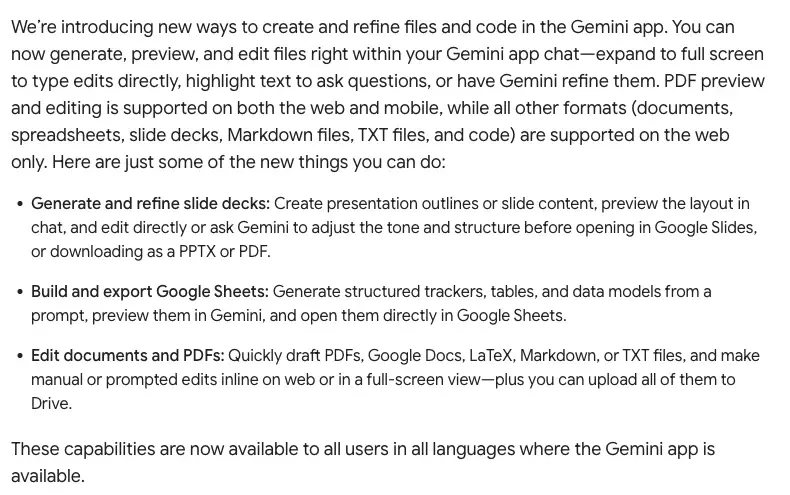
The second is the one from this week. Google’s Workspace Updates post of 29 October puts it in one sentence: “You can now generate, preview, and edit files right within your Gemini app chat—expand to full screen to type edits directly, highlight text to ask questions, or have Gemini refine them.”
So the new part is the working surface, not the making. Three things you can do there:
- Type into the file yourself. Expand it to full screen and edit it like a document.
- Highlight and ask. Select a passage and ask a question about it, or ask Gemini to rewrite it. Digital Trends adds that you can ask for changes to the visuals too.
- Keep asking follow-ups. Google’s demo has you edit by hand, highlight sections for Gemini to revise, and ask follow-up questions about the file.
Google’s blog post for the launch also links a short video. Per Chrome Unboxed’s description, it shows handwritten lecture notes turned into a multi-page PDF study guide, then a highlighted summary table with the request “show this as a graph instead.”
Which formats, and where
Here is Google’s platform split, as the post words it: “PDF preview and editing is supported on both the web and mobile, while all other formats (documents, spreadsheets, slide decks, Markdown files, TXT files, and code) are supported on the web only.”
| Format | On the web | On the phone app |
|---|---|---|
| Preview and edit in the chat | Preview and edit in the chat | |
| Google Docs | Preview and edit in the chat | Web only |
| Google Sheets | Preview and edit in the chat | Web only |
| Slide decks | Preview and edit, then open in Slides or download as PPTX or PDF | Web only |
| Markdown, TXT, code | Preview and edit in the chat | Web only |
The same post says slide decks can be opened in Google Slides or downloaded as PPTX or PDF, and Sheets files opened in Google Sheets. LaTeX is named in its list of files you can draft. Word and Excel files are on the April list of things Gemini can make, but the October posts don’t say whether they get the new editor, so I wouldn’t plan around it.
Who can use it
Google says “all users in all languages where the Gemini app is available.” The Workspace post is more specific: it’s available to “all Google Workspace customers, Workspace Individual subscribers, and users with personal Google accounts,” and “users of all ages who have access to the Gemini app can generate files.”
Two details are easy to miss:
- There’s no admin switch for this feature. The post says “There is no admin control for this feature.” But a school or company can still turn the whole Gemini app off, and a school Google account needs its administrator to enable Gemini first, per the Help page.
- Paid plans have higher limits. Google’s page on uploads says a Google AI plan raises usage limits, including how many files you can upload and how many chats can refer to uploaded files. The launch posts I read publish no separate cap for creating or editing files, so I can’t tell you how many guides you get in a day.
The steps: photos to a study guide PDF
This sequence is built from Google’s example, Digital Trends, Chrome Unboxed and iPhone in Canada, which all describe the same flow, plus the habits I’d add from the research further down. I haven’t run it, so treat the exact button labels as theirs, not mine.
Step 1: Upload the photos
Open Gemini on the web or in the app and attach your photos to a new chat. Google’s upload page says up to 10 files (“subject to availability”) can go in the same prompt, and each non-video file can be up to 100 MB. The ten-file limit is the one to plan around.
What I’d do: one chat per topic, and ten pages or fewer. Google’s upload page warns that oversized files can produce answers that skip over connections and specifics, which is one more reason to batch. Photograph each page flat, in daylight, with the whole page in frame, and keep shadows off the writing.
Step 2: Ask for a transcription, not a guide
This is the step the launch posts skip. The demo goes straight from notes to study guide. I’d put a stop in between, because a guide built on a misread note looks just as polished as one built on a right note.
Paste this with your photos:
First, transcribe these notes page by page. Keep every equation, unit, abbreviation and negation exactly as written.
If you can't read a word, write [UNCERTAIN] and your best guess in brackets. Don't fill gaps from what you know.
Don't write a study guide yet. Wait for me to approve the transcription.
What you’re asking for is plain text, page by page, with the unclear spots flagged. If nothing is flagged on a page of messy handwriting, that’s a reason to look harder, not a good sign.
Step 3: Fix the reading
Put the transcription beside your photos and check it. This takes a few minutes and it’s the part that protects you. Correct the wrong words in the chat: “Page 2, line 4 says NADPH, not NADH. Use NADPH everywhere.”
Google publishes no figure for how accurately Gemini reads handwriting in this feature. Its posts, as I read them, give a demo and no test results. So the check is yours.
Step 4: Ask for the PDF
Now ask for the file, and be specific about its structure. Build Fast with AI’s write-up of the April launch gives the author’s view that explicit structure in the prompt produces better output.
Using only the approved transcription, make a one-page-per-topic PDF study guide.
For each topic: the key ideas in two or three short lines, the terms I must define, and one thing that's easy to confuse with it.
Don't add facts that aren't in my notes. If you think something is missing, list it at the end under "Not in my notes".
The guide appears in the chat as a preview. Now you’re in the new part of the feature.
Step 5: Edit it in place
Chrome Unboxed describes two ways to change the file:
- Type directly. Expand the preview to full screen and edit the text like a document.
- Highlight and ask. Select text or a table, and use the “Describe changes” bar to say what you want.
Good highlight requests are small and specific:
Rewrite this paragraph in plain words, same facts.
Turn this table into a short list.
Add a one-line example under this definition, using only my notes.
Show this as a graph instead.
The last one is Google’s demo request. It only makes sense if the table holds numbers.
Step 6: Export
Per Chrome Unboxed, the export menu is in the top navigation bar of the file view, and it offers a PDF on your device or a copy in Google Drive. Google’s Help page says that for most file formats you can download the file or export it to Drive.
Step 7: Turn it into practice
This step is the one that decides whether the PDF helps you or only feels like help. It gets its own section below.
A worked example (a sample we wrote)
Here is the whole routine on a small page of notes. Everything in this section is a sample written by us to show the shape. It isn’t Gemini’s output, because I didn’t run it.
Say the photo shows these notes, which I’ll type out as the handwriting says:
Photosynthesis, ch. 8
2 stages: light reactions (thylakoid membranes), Calvin cycle (stroma)
LR: light + H2O -> O2 + ATP + NADPH
Calvin: CO2 + ATP + NADPH -> sugar (G3P), enzyme = rubisco
Calvin doesn't use light directly BUT needs ATP/NADPH from LR
Prof said: know WHERE each stage happens!!
A sample transcription, as a careful tool would return it:
Page 1
Photosynthesis, ch. 8
2 stages: light reactions (thylakoid membranes), Calvin cycle (stroma [UNCERTAIN: could be "stoma"])
LR: light + H2O -> O2 + ATP + NADH [UNCERTAIN: could be NADPH]
Calvin: CO2 + ATP + NADH -> sugar (G3P), enzyme = rubisco
Calvin doesn't use light directly BUT needs ATP/NADPH from LR
Prof said: know WHERE each stage happens!!
Look at what happened in our made-up sample. It reads “NADPH” as “NADH” on two lines and flags only the first. That’s a plausible failure: one letter is easy to drop or misread, and a misread at that spot would carry into every question you later write from it. You catch it because your own last line says “ATP/NADPH”. You also catch “stoma” versus “stroma”. OpenStax’s biology textbook calls the stroma of the chloroplast “the site of light-independent reactions of photosynthesis”, so a guide built without this check would have told you, fluently, that the Calvin cycle happens in the wrong place.
Your correction:
Two fixes. The molecule is NADPH on every line. The Calvin cycle happens in the stroma, not the stoma.
Approved. Now make the study guide.
A sample of the guide’s opening, again our own writing:
Photosynthesis: where and what
Light reactions: in the thylakoid membranes. Light and water go in; O2, ATP and NADPH come out.
Calvin cycle: in the stroma. Uses CO2, ATP and NADPH to build sugar (G3P). The enzyme is rubisco.
Easy to confuse: the Calvin cycle doesn't use light directly, but it can't run without the ATP and NADPH the light reactions make.
Not in my notes: what happens to the G3P next.
That last line is the useful kind of behaviour to ask for, because it separates what your notes said from what the tool noticed was missing. You then decide whether to look it up and add it to your notes yourself.
Practice beats reading the guide
The guide is a draft. What helps you remember is what you do next, and there’s decent evidence on that.
The cleanest piece is a 2011 experiment by Karpicke and Blunt, which the What Works Clearinghouse reviewed and rated a well-implemented randomized controlled trial. Eighty undergraduates at Purdue read a 276-word passage about sea otters for five minutes. Then they studied it one of four ways, and a week later took a test of factual and conceptual questions.
Retrieval practice meant writing down what they remembered, rereading, and writing down what they remembered again. Repeated study meant three more readings. Concept mapping meant 25 minutes drawing the passage’s main ideas.
A study guide is closer to the repeated-study and concept-mapping groups than to the retrieval group: it’s a tidy rearrangement of material you can read again. The retrieval group is the one who closed the page and tried to produce the answers.
Two cautions, because this is one small study. The WWC notes that retrieval practice and concept mapping had equal study time, but both had more than the study-once and repeated-study groups, so the unequal time, rather than the method, could have caused the differences. And it was a short science passage and a one-week test, not a semester of lectures.
The wider picture agrees. A 2013 review by John Dunlosky and colleagues, published in Psychological Science in the Public Interest, rated popular study techniques. According to the Association for Psychological Science’s release, practice testing and distributed practice received the highest overall utility rating, while five techniques received a low one, with summarization, highlighting and underlining, and rereading among the commonly used ones.
Notice what’s on the low list: summarizing, highlighting and rereading. A Gemini study guide is, at heart, a summary you’ll be tempted to reread. I’m not claiming the review tested AI guides, because it didn’t. But the techniques it rated well, testing yourself and spreading that testing out over days, are the ones this routine is built around.
The routine I’d use
Ask for questions, with answers kept apart. In the same chat, once the guide is approved:
From the approved guide, write 12 practice questions: four recall, four "explain why", two compare-and-contrast, two applying the idea to a new case.
Put the answers in a separate section at the very end, and for each answer say which line of my notes it comes from.
Close the file. Answer the questions on paper or from memory, then open the answers.
Check the misses against your notes, not against Gemini’s confidence. That “which line of my notes” request is there so you can.
Come back in a day or two and do the missed ones again. Spreading it out is the second half of what the review rated highly.
Highlight-to-edit is for fixing the document. It isn’t the studying. Selecting a passage in the editor and asking about it is useful, but recalling something with the page closed is where the learning happens.
If you want a tutor-style version of this loop inside Gemini, we wrote about a separate feature, Gemini’s study notebooks, which builds a diagnostic quiz from your notes. And The Best Free AI for Studying in 2026 compares it with ChatGPT’s study mode and NotebookLM.
What happens to your notes and photos
Class notes feel harmless. But a photo of a notebook page can hold names, student numbers, grades, a classmate’s work and sometimes a face. Which Google account you’re signed into changes what happens to it.
On a personal Google account, from the Gemini Apps Privacy Hub (the privacy questions section was updated 26 October 2026):
- With Keep Activity on, “Your chats and what you share with Gemini (like uploads and screens) will be saved in your Activity.”
- “A subset of chats are reviewed by human reviewers.” Google says reviewed chats are kept for up to three years and are disconnected from your account before going to service providers.
- Saved activity auto-deletes after 18 months by default. You can change it to 3 or 36 months, or turn auto-delete off.
- Temporary chats, and chats you have with Keep Activity off, are kept with your account for 72 hours, and aren’t used to train AI models unless you send feedback.
- The page’s own warning: “Please don’t enter confidential information that you wouldn’t want a reviewer to see.”
On a school account, Google’s Workspace for Education FAQ says that for education editions with the Gemini app, “Their chats and uploaded files won’t be reviewed by human reviewers or otherwise used to improve generative AI models.” That’s a promise about the school account, not about you as a student. The Privacy Hub says use of Gemini on a work or school account “may be subject to different data handling terms,” and your school decides whether Gemini is on at all.
What I’d do with class notes:
- Use the school account if your school provides Gemini, and check what your school allows first.
- Otherwise, use a Temporary Chat for anything you’d rather not have saved, knowing the 72-hour retention still applies.
- Cover names and numbers before you photograph the page. A sticky note over a header takes five seconds.
- Skip other people’s work. A classmate’s essay isn’t yours to upload.
What this means for you
If you take notes by hand and live on your phone. PDF is the one format that works for you on mobile, and it’s also the study-guide format, so this works on your phone. Start with one topic and five photos. First action: send the transcription prompt and check the first page against your notebook.
If you’re on a laptop with typed notes or lecture slides. You have more options on the web, including Docs, where you can edit the guide as a document. The Help page’s own example prompt shows what to type: ask for a doc or a spreadsheet by name. First action: paste your notes and ask for a Google Doc study guide with the “Not in my notes” section.
If your exam is in two weeks. Don’t make guides for everything. Pick the three chapters you’re weakest on, and spend your time on the question routine, not on formatting the PDF. First action: ask for 12 practice questions on one chapter and do them tomorrow with the file closed.
If you’re a parent helping a teenager. Sit with them for the first one, and look at the account. If their school gave them a Google account with Gemini, check what the school says about it: Google’s education FAQ makes its no-human-review promise for education editions, and the Privacy Hub says work or school accounts may have different terms. First action: check which account the teen is signed into before the first upload.
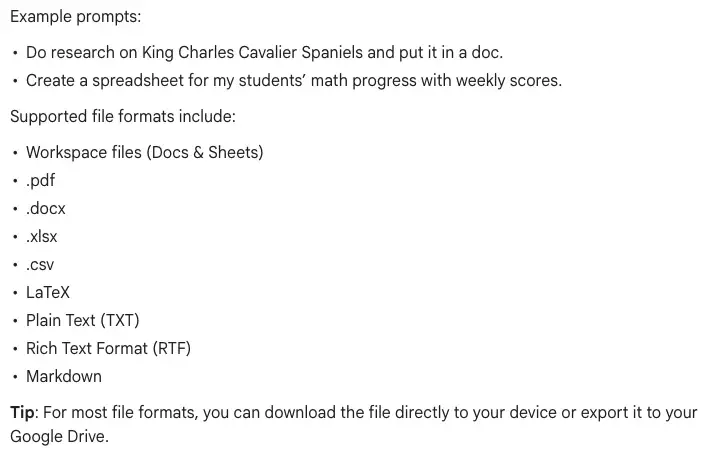
If you’re a teacher. Google’s Help page gives a teacher-flavoured example prompt for file generation (“Create a spreadsheet for my students’ math progress with weekly scores”). Put the structure in the prompt and the names out of it. We have a short data-safety check for free AI tools and a walkthrough on turning a paper rubric into a Gemini Classroom rubric. First action: generate a blank-template version of your handout with fictional example students.
If you’re studying for a certification after work. You may have a long document of exam objectives rather than handwriting. Upload it (within the ten-file limit), and ask for a guide organized by objective with a “Not in the material” line. First action: ask for a table of objectives against your own confidence, then fill the confidence column yourself.
If your notes already live in a notebook app. Our post on NotebookLM’s rename to Gemini Notebook explains what changed there. The feature in this guide is for when you want a file to edit, export and keep.
Edge cases and what to do
These come from Google’s posts, the launch coverage and, for the community side, a search of X on the morning of 30 October 2026 (run through Grok, and I didn’t open the posts), which was thin. It found mostly summaries of the announcement and a few short reactions, and no detailed first-hand reports of misreads or formatting problems. So most of this list is what the sources say could go wrong, not a list of failures people have reported.
The option isn’t there. Google says the capabilities are available to all users in all languages where the Gemini app is available. The Workspace post lists “Rapid Release and Scheduled Release domains: Available now.” If you don’t see it on a school or work account, ask your administrator whether Gemini is on, since the post says admins can’t turn off this feature alone but can turn the app off.
You’re on your phone and the Doc won’t open. Docs, Sheets, slide decks, Markdown, TXT and code are web only. Ask for a PDF instead, or finish on a laptop.
The transcription is a mess. Retake the photos flat, in better light, one page per photo, and try again in a new chat. If the handwriting is truly rough, type the unclear lines yourself.
The guide includes things your notes don’t say. The prompts above ask for “Not in my notes” to separate them. If it adds facts without labelling them, ask: “Which line of my notes supports each sentence in this guide? List any sentence with no line.”
The numbers or citations look off. The explainx write-up of the launch warns that generated PDFs and spreadsheets can contain confident errors, especially in numbers and citations, and that editing in place doesn’t fix that. Google’s Help page says “Gemini Apps can make mistakes.” Check every figure and date against the source.
You have more than ten photos. Google’s upload page says up to ten files (“subject to availability”) per prompt. Split by topic into separate chats, and make a guide for each. If you want one combined document, ask in a new chat for a short index built from the guides’ headings.
You want to edit a PDF you already have. Google’s posts describe files Gemini generates in the chat, and “make manual or prompted edits inline.” They don’t say you can open any existing PDF or Office file and edit it. If you need that, test it with a copy first.
Large files and phones. In April, when file generation launched, one write-up relayed early Reddit reports, via Android Authority, of mobile crashes on some devices when generating larger files. That was the earlier feature, and I found no equivalent report for the October editor, but it’s a reason to keep the first attempt small.
What it can’t do
- It can’t tell you your notes are right. If your notes contain an error, the guide will state it fluently.
- It can’t read your handwriting with a published accuracy. Google’s posts give no figure, so the transcription check is part of the method.
- It can’t edit Docs, Sheets or slides on a phone. Only PDF has that, today.
- It can’t make the studying happen. Rereading a guide is on the 2013 review’s low-utility list.
- It can’t give you a number of guides per day. The posts I read publish no cap on creating or editing files, and Google’s upload page says paid Google AI plans raise the upload limits.
FAQ
Is Gemini’s file editing free? Google says the capabilities are available to all users in all languages where the Gemini app is available, and its Workspace post lists personal Google accounts, Workspace Individual subscribers and all Workspace customers. It announces no paid plan for the feature. Google’s upload page says paid Google AI plans raise the upload limits.
Does it work on my phone? For PDF, yes: preview and editing work on web and mobile. Everything else is web only.
Is this new, or did Gemini already make files? Both. Making files from a prompt came on 29 April 2026. Previewing and editing them in the chat came on 29 October 2026.
Can Gemini read my handwriting? Google’s example says it can turn uploaded handwritten lecture notes into a PDF study guide. Its posts give no accuracy figure, so check the reading yourself before you build on it.
Can I export the PDF? Per Chrome Unboxed, the file view has an export menu in the top navigation bar, with PDF to your device or Google Drive. Google’s Help page says most formats can be downloaded or exported to Drive.
Will a human at Google read my notes? On a personal account, Google’s Privacy Hub says a subset of chats are reviewed by human reviewers. For school accounts on education editions, Google’s FAQ says chats and uploaded files won’t be reviewed by human reviewers. Use Temporary Chat or Keep Activity off for things you’d rather not have saved, and remember the 72-hour retention.
How many photos can I upload at once? Up to 10 files in a prompt (“subject to availability”), each up to 100 MB for non-video files, per Google’s upload page.
Is a study guide enough to pass? The research suggests it isn’t, on its own. In the Karpicke and Blunt trial, students who practised retrieving the passage did better a week later than those who reread it. Use the guide to make questions and answer them with the file closed.
Should I use this instead of Gemini’s study notebooks or NotebookLM? This feature’s job is a file you can edit and export. Our free-AI-for-students comparison covers what each tool includes.
What about the slide-deck side of the update? Google says you can preview a deck in the chat and open it in Google Slides or download it as PPTX or PDF. For the deck workflow itself, see our Gemini Canvas slides walkthrough.
The bottom line
The new part of Gemini’s update is small but handy: a file you can read, fix and export without leaving the conversation, and for PDFs that includes your phone. For a student with a camera roll full of notes, that removes the typing evening.
It doesn’t remove the work that makes studying pay off. Do the transcription check, label what the tool added, close the file and answer the questions yourself, and come back to the ones you missed. If you want a structured version of those habits, Study Smarter with AI (first 2 lessons free) includes exam prep with active recall and spaced repetition, and Study Techniques with AI (first 2 lessons free) goes deeper on the methods. For Gemini itself, there’s Google Gemini Mastery (first 2 lessons free).
What to try first: take one page of your notes, send the transcription prompt, and see whether the tool flags the same words you’d have worried about.
Sources
- Google, You can now generate, preview, and edit documents, PDFs, presentations, spreadsheets, and more directly in Gemini (29 October 2026)
- Google Workspace Updates, Create, preview, and edit files directly in the Gemini app (29 October 2026)
- Google, You can now easily generate files in Gemini (29 April 2026)
- Gemini Apps Help, Use Gemini Apps: Generate files from your chats
- Gemini Apps Help, Upload and analyze files in Gemini Apps
- Gemini Apps Privacy Hub
- Google Workspace with Gemini FAQ for Education
- Digital Trends, Google Gemini can now create and edit PDFs, documents, and more right inside your chat (29 October 2026)
- Chrome Unboxed, Google Gemini upgrades your workflow with direct in-chat doc and PDF editing
- iPhone in Canada, Gemini can now edit your docs, PDFs and spreadsheets right in chat (29 October 2026)
- explainx.ai, Gemini file editing in chat: what works on web and mobile
- Unite.ai, Gemini app now lets users edit documents and PDFs in chat
- Build Fast with AI, Gemini now generates files in chat: formats, prompts and limits (April 2026 launch)
- What Works Clearinghouse, Quick Review of Karpicke and Blunt (2011), Retrieval practice produces more learning than elaborative studying with concept mapping
- Association for Psychological Science, Which study strategies make the grade? (on Dunlosky and colleagues, 2013)