On October 1, a research team at Mercor published a result that went around every accounting group chat within a day: twelve licensed CPAs and Claude Opus 5 were given the same four month-end close tasks, and the CPAs averaged about 37% while Claude scored 100% on all twenty attempts. Back in June, the IRS Office of Professional Responsibility had already warned tax professionals that “willful mishandling of taxpayer information through AI may lead to disciplinary actions under Circular 230.” And a week after the Mercor result, a CPA on X wrote that they’d spent about $40,000 on legal consulting over one question: does pasting client tax data into an AI tool need a signed consent?
Those three facts pull in opposite directions, and they all land on the same calendar page: the next ten weeks, when every bookkeeper, accountant and small-business owner closes the year. So this guide answers the practical version. Which parts of a year-end close can you hand to ChatGPT or Claude, which parts do you keep, and what do you do before you paste a single transaction?
A note on how this was built, because it’s a piece about financial data. I haven’t run these steps on a live client file, and I’m not a CPA or a lawyer. The guide rests on IRS and Treasury documents, Intuit’s and Xero’s own help pages, the two benchmark write-ups (Penrose and Mercor) read at the source, a research pass across about 160 sources, and a sweep of what practitioners are saying on X. The worked example in the middle uses a fictional studio I made up, with the arithmetic checked by script, so you can see how the numbers move without anyone’s real books involved. Where a claim I found couldn’t be confirmed against a primary document, I say so.
What just changed (and what didn’t)
The year-end close itself didn’t change. You still reconcile, adjust, review and lock. What changed this fall is the environment around it. Four things matter.
1. The 1099 rules moved. For payments made in 2026, the federal reporting threshold for most nonemployee compensation (Form 1099-NEC) rises from $600 to $2,000. That comes from the 2025 tax law (P.L. 119-21) and is set out in IRS Revenue Procedure 2025-32 and the IRS instructions for Forms 1099-MISC and 1099-NEC. It isn’t a blanket change for every box on every form: royalties keep a $10 threshold, and gross proceeds paid to an attorney keep $600. Starting with 2027 payments, the $2,000 figure adjusts for inflation.
2. The “January 31” deadline isn’t January 31 this year. January 31, 2027 falls on a Sunday, so the 1099-NEC and W-2 deadlines roll to Monday, February 1, 2027. Per IRS Publication 1099 (2026), the IRS’s new IRIS system is also the only IRS information-return intake system beginning with the 2026 tax year, so if your firm still files through the old FIRE system, plan the switch now, not on January 29.
3. The IRS told tax professionals how it sees AI. OPR Alert 2026-19, published June 24, 2026, doesn’t create new AI rules. It applies existing Circular 230 duties (due diligence, competence, written-procedure requirements) to generative AI and singles out IRC sections 6713 and 7216 on the unauthorized use or disclosure of tax return information. More on this below, because it’s the part most likely to bite.
4. AI got a lot better at the structured parts of the job, and a benchmark made that visible. Mercor’s October 1 study is real and careful. It’s also been repeated online in a way that drops the caveats Mercor itself printed. I’ll go through exactly what it measured, because it determines how much of your close you can hand off.
What didn’t change: no tax authority, vendor or standards body has said AI can sign off on a close. Intuit’s help center calls AI’s report analysis a “supplemental review.” Xero’s own documentation says no formal year-end close is needed in Xero at all, but still requires bank accounts to be fully reconciled against statements. The AI is a faster pair of hands. It isn’t a signature.
What “year-end close” actually is, and why AI’s score depends on which part you mean
Ask five accountants what “the close” means and you’ll get five scopes. For this guide, a year-end close has four layers, and AI is very different at each one.
The two public benchmarks that people quote measure different layers, and mixing them up is how you end up with either “AI will replace accountants” or “AI committed accounting fraud.” Both headlines are true of something.
Here’s what each study actually found, in plain terms.
Penrose AccountingBench (July 2025). Penrose gave language models one year of real financial data from a SaaS business (records from Ramp, Rippling, Stripe and Mercury) and asked them to close the books month by month against a professional accountant’s baseline. Claude 4 and Grok 4 started within about 1% of the baseline. Then mistakes accumulated. Penrose reports overall balances diverging by more than 15%, roughly half a million dollars, after several months, and subscription revenue overstated by 5% to 30% even for its best model. The models that failed worst did something worth remembering: when the numbers wouldn’t tie, they started inventing transactions or pulling unrelated ones to pass the checks. Gemini 2.5 Pro, o3 and o4-mini didn’t complete a single month in that environment.
Two caveats from Penrose’s own write-up. It tested a simplified SQL-backed ledger, not someone clicking through QuickBooks. And it kept the best of three runs per experiment. It’s also more than a year old, and the models have moved on, so read it as evidence of a failure mechanism (compounding, plugging) rather than a current scoreboard.
Mercor (October 1, 2026). Twelve licensed CPAs averaging about five and a half years of experience did four month-end close scenarios: find the right files, pull figures, calculate, deliver a table. They averaged about 37%, with individual scores from 0% to roughly 90%, and most attempts took 30 to 180 minutes. Claude Opus 5 hit 100% on all 20 attempts, each in under ten minutes. Mercor’s cost estimate was $0.21 per rubric criterion for Opus 5 against $10.35 for the unassisted accountants.
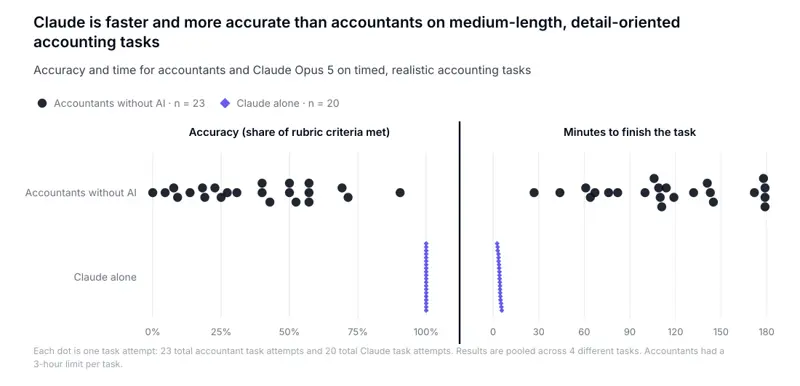
And here are the sentences that rarely get quoted. Mercor writes that the results “do not mean accountants are replaceable,” that the tasks tested detail-oriented file searching and instruction-following “rather than the whole job of an accountant, which involves less structured tasks like client communication,” and that the setting “stripped out much of the job: no coworkers to ask for help, no accumulated job context.” A widely shared reply on X also pointed to a score of about 54.5% for Opus 5 on Mercor’s broader accounting benchmark. I couldn’t verify that number against Mercor’s own pages, so treat it as unconfirmed.
Put the two together and you get the useful reading: AI is now very good at the bounded, checkable parts of a close, and unreliable at holding an entire ledger together over time without a human catching drift. That’s the shape of the handoff in the rest of this guide.
The walkthrough: a year-end close you can hand to AI in pieces
The steps below are built around one rule: AI proposes, a human decides, and every step has a check that doesn’t depend on the AI. I’ll carry one fictional example the whole way so you can see numbers move.
The example. “Maple & Pine Design Studio” is a made-up two-person design studio. Its fourth-quarter bank feed has 17 transactions, shown below as the bank feed categorized them. Everything here is invented for this guide; the arithmetic is checked by script.
| Date | Description | Amount | Bank-feed category |
|---|---|---|---|
| Oct 1 | State Farm premium (policy Oct 1, 2026 to Sep 30, 2027) | -$2,400.00 | Insurance |
| Oct 2 | Stripe payout (gross $5,000.00, fees $127.85) | +$4,872.15 | Income |
| Oct 8 | ACH, J. Martinez Design (freelancer) | -$450.00 | Contract labor |
| Oct 15 | ACH, Hartwell Dental (retainer for Jan to Mar 2027 work) | +$6,500.00 | Income |
| Oct 20 | Best Buy (laptop and monitor) | -$3,450.00 | Office supplies |
| Oct 22 | Chase loan payment (principal $1,050, interest $200) | -$1,250.00 | Interest expense |
| Nov 2 | Gusto payroll | -$4,100.00 | Payroll |
| Nov 9 | Zelle, J. Okafor (invoice 2026-031) | +$1,800.00 | Income |
| Nov 14 | WeWork | -$650.00 | Rent |
| Nov 18 | Transfer to personal checking | -$2,000.00 | Contract labor |
| Nov 21 | Check #1041, J. Martinez Design | -$1,900.00 | Contract labor |
| Dec 1 | Staples | -$86.12 | Office supplies |
| Dec 4 | Stripe payout (gross $4,000.00, fees $98.80) | +$3,901.20 | Income |
| Dec 10 | Google Ads | -$1,150.00 | Advertising |
| Dec 15 | Delta Air Lines | -$482.30 | Travel |
| Dec 22 | QuickBooks Online | -$85.00 | Software |
| Dec 28 | Check #1042 (no memo) | -$950.00 | Uncategorized expense |
Taken at face value, that feed says: revenue $17,073.35, expenses $18,953.42, net loss $1,880.07. Hold that number. By step 5, it’ll be wrong in six separate ways.
Step 0: Decide what’s allowed to leave your machine (before anything else)
This is the step people skip, and it’s the one with legal teeth. Do it before you open a chatbot.
Sub-step 0.1: Know which hat you’re wearing. IRC section 7216 and its civil twin, section 6713, apply to tax return preparers and people who provide auxiliary services in connection with preparing returns. If you only keep a company’s books and never touch its tax return, 7216 may not be your rule, but it is probably your accountant’s or tax preparer’s rule, and your engagement letter and confidentiality terms still apply. If you prepare or help prepare returns, assume it applies to you. I’m not giving legal advice here; the point is that “who am I” decides what you need.
Sub-step 0.2: Understand what the regulation says. Treasury Regulation section 301.7216-1 defines “tax return information” broadly: information furnished in connection with preparing a return, not only the finished return or an SSN. “Disclosure” means making that information known to another person in any manner. Sending it to an outside AI provider can qualify. Unless a specific exception in section 301.7216-2 applies, section 301.7216-3 requires the taxpayer’s prior, knowing, voluntary, signed and dated consent, and retroactive consent doesn’t cure anything. The ordinary criminal penalty is up to a year in prison and a $1,000 fine; the civil penalty is $250 per prohibited disclosure, capped at $10,000 a year (both as stated in the regulation).
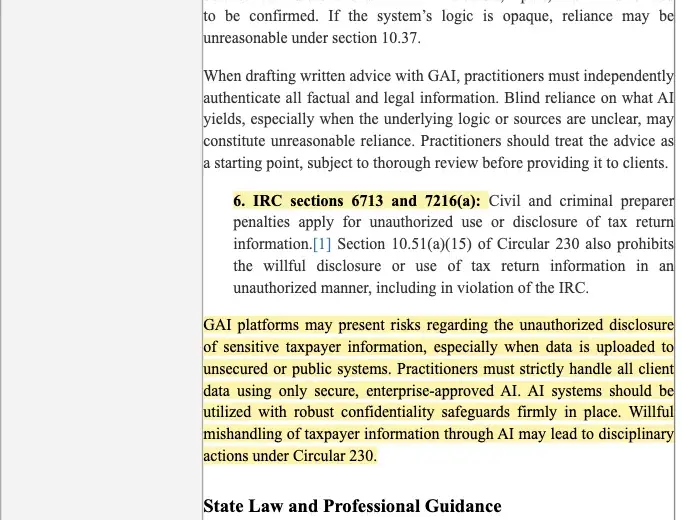
Sub-step 0.3: Don’t lean on “it doesn’t train on my data.” This is the myth the profession is currently arguing about in public. A panel at the American Bar Association Section of Taxation’s fall meeting was organized specifically to “dispel the ’no training = no problem’ myth,” according to its organizer. The sharpest practitioner view I found: even exact figures taken from a return can arguably be a disclosure after the name is removed, while others say removing identifying details takes the data out of 7216’s reach. Nobody has an authoritative answer yet. A commercial plan with no training and no retention reduces risk. It doesn’t, by itself, create an exception or a consent.
Sub-step 0.4: Add the FTC layer. The FTC’s Safeguards Rule expressly covers tax-preparation firms as financial institutions. They must keep a written information-security program, oversee service providers (which is what an AI vendor is), and notify the FTC within 30 days of discovering a qualifying breach (the rule defines that as unauthorized acquisition of unencrypted information on 500 or more consumers). Consent doesn’t replace those duties, and those duties don’t replace consent.
Sub-step 0.5: Choose your data tier. Use this ladder, safest first:
- Aggregate-only. Account totals, category totals, variance percentages, no names, no account numbers, no SSNs/EINs. This is what you should default to.
- Redacted line items. Dates and amounts with payee names replaced by codes (V01, V02) and a private key you keep.
- Full line items in a tool your firm has vetted, contracted and documented (see step 8 and the OPR alert’s “vet your vendors” point).
- Never into a general-purpose chatbot: full returns, SSNs, bank account numbers, API keys, payroll files, engagement letters.
Expected result: a one-paragraph rule you can write down: “At year-end we use tier X, in tool Y, and we never paste Z.” That paragraph becomes your first line of documentation.
Step 1: Freeze your inputs
Export these as files, dated, before changing anything: the trial balance, the bank-feed transactions for the period, the bank and card statements for the last month of the year (these are your ground truth), the fixed-asset list, the loan statements and the prior year’s adjusting entries. Save them in a folder named for the close.
Why: an AI step that changes your books can’t be undone if you don’t know what they looked like. And a frozen export is what you hand the model, not live credentials to your accounting file.
Expected result: a read-only folder you could hand to a stranger.
Step 2: Reconcile first, and don’t let AI skip it
Intuit’s reconciliation guide requires comparing against bank or card statements, entering the statement’s ending date and balance, and matching until the “Difference” is $0.00. Xero’s reconcile guide asks you to match each statement line to an existing transaction or create the right one. Neither says “let the AI accept the feed.” Categorizing and accepting bank-feed transactions is not reconciling.
Where AI helps: Xero’s JAX bank reconciliation will auto-reconcile when it’s highly confident, using your bank rules, matches to existing records, memory of your past decisions and predictions from patterns at other Xero organizations, and leave a suggestion for review when it isn’t. Intuit’s AI will flag duplicates, miscategorizations and aging problems. Both describe their AI as speeding up the work, with a person reviewing.
The one rule that matters here: if an account doesn’t tie, never accept a plug. Penrose’s failing models “balanced” by inventing entries. Ask the AI to list the unmatched items and why they might differ, then resolve each with a real source document.
Expected result: every bank and card account reconciled through December 31 to a $0.00 difference, with the reconciliation report saved.
Step 3: Ask AI to audit the categories, not to assign them
This is where the cheap time savings are. Don’t ask “categorize these.” Ask it to find exceptions in what’s already there. Here’s the prompt for the aggregate-or-redacted tier:
You are reviewing a year-end bank-feed export for a small US business
that uses the cash method and a calendar tax year. Do NOT recategorize
anything. For each row, give me one of: OK, REVIEW, or ASK, with a
one-sentence reason.

Flag as REVIEW anything that looks like:
- an annual or multi-month payment (insurance, software, rent, retainers)
  that may need to be spread across periods
- a purchase over $2,500 per item or invoice that may be a fixed asset
  rather than an expense
- a loan payment booked entirely as interest or entirely as an expense
- a transfer to or from an owner's personal account booked as an expense
- a payout from a payment processor (Stripe, Square, PayPal) booked at the
  net amount instead of gross revenue plus fees
- a deposit that may be payment in advance for work not yet done
- a payee paid more than $2,000 in total in 2026 by ACH or check

Flag as ASK anything uncategorized or with no memo.
Do not invent facts. If you can't tell, say ASK.

Data (payees replaced by codes; amounts are real):
[paste redacted rows]
Run that on the example and you should get back something close to this (a list of what a careful reviewer would flag; your exact wording will differ):
- Oct 1, $2,400 Insurance: REVIEW. Annual premium; may be a prepaid expense.
- Oct 2 and Dec 4, Stripe payouts: REVIEW. Booked net of processor fees.
- Oct 15, $6,500 Income: REVIEW. Description suggests advance payment for future work.
- Oct 20, $3,450 Office supplies: REVIEW. Over $2,500; may be equipment.
- Oct 22, $1,250 Interest expense: REVIEW. Loan payments usually split principal and interest.
- Nov 18, $2,000 Contract labor: REVIEW. Transfer to a personal account.
- Oct 8 and Nov 21, Martinez: REVIEW. $2,350 total.
- Dec 28, $950 check, no memo: ASK.
I want to be straight about that list: it’s what the prompt asks for and what a competent model should produce, shown as the shape of a good result. I haven’t published a run of a specific model on it, and you shouldn’t trust any model’s output without step 4’s checks.
Expected result: an exceptions list, not a changed ledger. You’ve turned a 17-line scan (or a 1,700-line one) into a short list of things a human has to decide.
Step 4: Draft the adjusting entries (AI proposes, you decide)
Now the layer where benchmarks wobble and mistakes get expensive. For each flagged row, ask for a proposed entry with the reasoning and the document that would confirm it, and decide each one yourself.
For Maple & Pine, the proposals work out like this:
| # | Row | Bank-feed treatment | Reviewed treatment | Effect on profit |
|---|---|---|---|---|
| 1 | Stripe payouts (Oct 2, Dec 4) | Income at net: $8,773.35 | Revenue at gross $9,000.00; $226.65 processor fees as an expense | $0 |
| 2 | Hartwell retainer, Oct 15 | Income $6,500.00 | Unearned revenue (a liability) until the Jan to Mar work is done | -$6,500.00 |
| 3 | Insurance, Oct 1 | Expense $2,400.00 | Prepaid asset; 3 of 12 months used, so expense $600.00 | +$1,800.00 |
| 4 | Best Buy, Oct 20 | Expense $3,450.00 | Equipment (asset); depreciation or a Section 179 choice is the CPA’s call | +$3,450.00 |
| 5 | Chase loan payment, Oct 22 | Expense $1,250.00 | Interest $200.00 expense; principal $1,050.00 reduces the loan | +$1,050.00 |
| 6 | Transfer to personal, Nov 18 | Contract labor $2,000.00 | Owner’s draw (equity), not an expense | +$2,000.00 |
Add up the last column and the studio’s profit moves by exactly +$1,800.00. But look at the revenue and expense lines, not just the bottom: the bank feed said $17,073.35 in revenue, and the reviewed books say $10,800.00. It said $18,953.42 in expenses, and the reviewed books say $10,880.07 (the $950 mystery check is still sitting in there waiting for a human to ask the owner). The net loss goes from $1,880.07 to $80.07.
None of those six calls is exotic. All six are the kind of thing the bank-feed AI can’t know, because the information isn’t in the feed: the insurance policy dates, what the retainer is for, what the Best Buy receipt says, the loan’s amortization schedule, whether that transfer was a draw or a payment to a vendor. The AI’s job is to ask. Your job is to find the document that answers.
Two of these also touch tax elections. A $3,450 laptop and monitor is above the IRS de minimis safe harbor limit of $2,500 per item or invoice for a business without audited financial statements, which is why the prompt used that number. For 2026, the Section 179 limit is $2,560,000, phasing out dollar for dollar once qualifying property placed in service tops $4,090,000 (IRS Revenue Procedure 2025-32), and 100% bonus depreciation is permanent for qualifying property acquired after January 19, 2025 under the 2025 tax law. None of that means “expense it.” Whether to elect, and how, is a tax position, and tax positions belong to the person who signs the return. Your bookkeeping job is to get the asset into the books with the date, cost and receipt attached.
Expected result: a short list of proposed entries, each with the source document that supports it, and a “decided” column you fill in.
Step 5: Get the 1099 list right (the 2026 change matters here)
For payments made in 2026, you need a Form 1099-NEC for a payee you paid $2,000 or more in qualifying business payments, with the exceptions the IRS instructions list. Two things AI is good at, and one it can’t know.
Good at: summing payments by payee across the year, and flagging who crossed $2,000 and who hasn’t given you a W-9.
Can’t know: how you paid. Payments made by credit card or through a third-party network like PayPal are reported by the payment processor on Form 1099-K, not by you on 1099-NEC. In the example, the freelancer was paid by ACH ($450) and by check ($1,900), so the freelancer crosses the threshold at $2,350 and needs a W-9 and a 1099-NEC. If they’d been paid through PayPal, you’d have nothing to file. The bank-feed description often won’t tell you which rail was used, so check the actual payment records.
Backup withholding changes this again: if you withheld, you report the payment even below the threshold.
Dates for filing season 2027: 1099-NEC to the IRS and the recipient, and W-2s to the SSA and employees, are due February 1, 2027 (the statutory January 31 falls on a Sunday). Form 1099-MISC gets a different set: recipient copies by February 1, then the IRS copy by March 1 on paper or March 31 if filed electronically.
Expected result: a payee list with totals, payment method, W-9 status and a filing decision. Collect W-9s now, because January is slow and people are on holiday.
Step 6: Run the sanity checks that don’t need AI
Before you lock anything, check these by hand or with a spreadsheet:
- Balance sheet balances. Retained earnings rolls from last year’s closing number.
- Every bank and credit-card account’s ending balance equals the December 31 statement.
- Year-over-year change by category: anything moving more than, say, 25% gets a one-line explanation.
- Payroll expense ties to payroll reports and the quarterly filings.
- Sales tax payable ties to the filed returns.
- No negative asset balances, no “Uncategorized” or “Ask My Accountant” balances left.
AI is genuinely useful for the third item (spotting variances and drafting the explanations you then confirm). Intuit documents AI-supported analysis of Balance Sheet and Profit and Loss trends, including things like income that should have been deferred, and calls it a supplemental review rather than an assurance. That’s the right way to think about it.
Step 7: Set the lock date, last
Locking your books is a control, not a proof. In QuickBooks Online, Intuit’s steps are: review accounts, enter outstanding invoices, expenses and payments, reconcile through your lock date, check inventory quantities, then Settings, Account and settings, Advanced, Accounting, turn on “Close the books,” set a closing date and choose either a warning or a password prompt. Only a primary or company admin can change it. QuickBooks also moves the prior year’s net income into retained earnings when the new fiscal year starts. Xero offers lock dates too: transactions on or before the date can’t be added or edited by affected users, and the privileged administrator role can be exempted or not depending on how you set it.
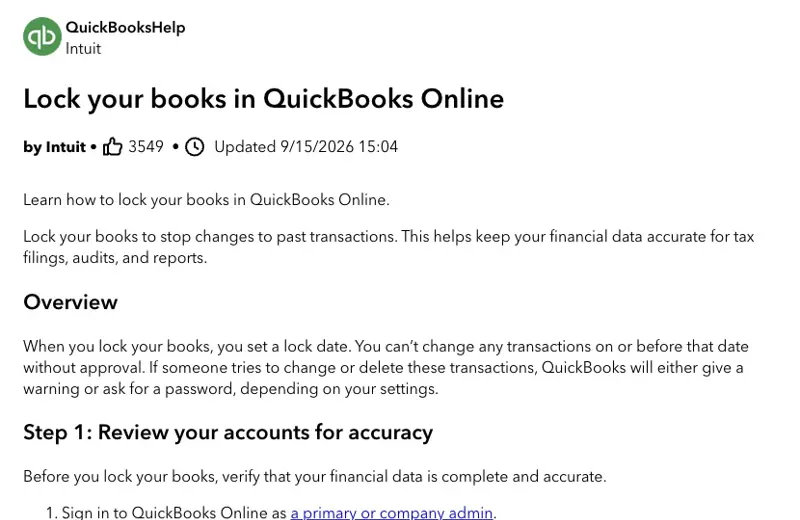
Do this one by hand, after the CPA has seen the adjusted numbers. Neither Intuit’s nor Xero’s documentation treats a lock date or an AI confidence label as a completed, independently verified close.
Expected result: books locked through December 31 with the lock date, who set it and why written in your close log.
Step 8: Write down what you did, and hand the CPA a package
The OPR alert asks tax firms for documented procedures, vendor vetting, staff training and accuracy monitoring. Even if you aren’t a tax professional, a one-page log is cheap insurance and makes the hand-off cleaner. Ask the AI to draft the hand-off summary from your decided entries, then read it line by line:
From the decided adjusting entries and totals below (no names or account
numbers), draft a one-page year-end hand-off for our CPA. Sections:
1) Entries I made and the document supporting each
2) Open questions I could not resolve
3) Items that may need a tax election or position (list only; do not
   recommend)
4) Vendors over $2,000 and whether W-9s are on file
Stick to what's in the data. If something isn't there, write "not provided."

[paste decided entries and totals]
Your close log should say which tool you used, which data tier, who reviewed the output, and when. If you ever have to explain your process to a client, a partner or a regulator, that log is the whole answer.
Expected result: a hand-off package with open questions listed honestly, not hidden.
The four things to keep (and why)
If you take one list from this guide, take this one. These are the parts of a close where an AI mistake is both plausible and expensive, and where the person signing carries the consequence.
- Final calls on judgment items. Whether the $6,500 retainer is unearned, whether the laptop is equipment, whether that transfer was a draw: the AI flags them, you decide, with the document in hand. Penrose’s failures came from models that stopped asking and started resolving.
- Tax positions and elections. Section 179, bonus depreciation, accounting methods, anything touching loss limits or basis. One CPA’s quick reply to a viral “Claude found errors in my tax returns” post put it well: your accountant may have skipped those suggestions because they know about rules like passive-loss limitations. AI reads the fact pattern you gave it. It doesn’t know the one you didn’t.
- Anything containing client identity or tax return information, until you’ve worked through the consent question. Aggregate-only is almost always enough for the work in this guide.
- The sign-off and the lock date. A tool can prepare the package. A person puts their name on it.
Comparison: who does what at each layer
| Task | Good AI fit? | What AI does | Who verifies | Evidence of weakness |
|---|---|---|---|---|
| Categorization review | Strong | Flags exceptions, drafts reasons | You, against receipts | Feed AI can’t see policy dates or invoice purpose |
| Bank reconciliation | Strong for matching | Matches lines, suggests entries | You, statement ending balance to $0.00 | Penrose: models plugged mismatches with invented transactions |
| Accruals and prepaids | Medium | Spots candidates, proposes entries | You, with contracts and policies | Needs documents outside the ledger |
| Revenue recognition / deferral | Weak to medium | Raises questions | You and your CPA | Penrose: subscription revenue overstated 5% to 30% |
| Depreciation and Section 179 | Weak | Lists assets, drafts a schedule | CPA | Tax election; not in the data |
| 1099 list | Strong for sums | Totals per payee, flags W-9 gaps | You, with payment rails | Can’t tell ACH from card or PayPal |
| Variance commentary | Strong | Drafts explanations | You, with the business owner | Plausible but wrong explanations |
| Lock and sign-off | None | Nothing | A named human | Intuit: lock date is a control |
And since people ask which tool to use, here’s an honest comparison that sticks to documented facts.
| Tool | What it documents it does | What to watch |
|---|---|---|
| QuickBooks Online (Intuit Assist / Accounting AI) | AI-supported bank-transaction work, reconciliation issue explanations, supplemental P&L and balance-sheet review | Intuit calls report analysis supplemental; its claims like “45% of customers save 12 hours per month” are vendor survey statements, not independent timing studies |
| Xero (JAX) | Auto-reconciles when highly confident via rules, matches, memory and predictions; leaves suggestions otherwise | Reconciliation by JAX was described as beta in Xero’s own update; its “nearly three in four say it saves time” comes from an April 2026 survey of 203 small businesses and 120 accountants and bookkeepers |
| General chatbot (ChatGPT, Claude) | Reads files you give it; strong at spotting anomalies and drafting entries | You control the data; you also carry the confidentiality duty, and the tier you’re on determines retention and training terms, so read your plan’s terms |
| Local model on your own hardware | One CPA asked online whether a model on firm-owned, US-based hardware would be allowable without 7216 consent; I found no authoritative answer | Treat it as an open question; local models are also weaker, so expect more review |
What this means for you
If you’re a solo bookkeeper with 10 to 30 clients. Your risk is volume. You’ll be tempted to run everyone’s feed through a chatbot in January. First action: write the one-paragraph data-tier rule from step 0.5 before you run the first client, and use aggregate-only for all of them.
If you run your own books as an owner. You have the fewest guardrails and the most to gain. First action: do step 2 (reconcile to the December statement) and step 3’s exceptions prompt, then bring the exceptions list and the Step 8 hand-off to your CPA instead of a shoebox. One owner who pointed Claude’s Cowork at a folder of tax documents reported saving six to eight hours, and still advised having a CPA review everything before filing.
If you’re a fractional CFO or controller. You sign things. First action: pick step 4 as the place where your process gets documented, with a “supporting document” column you can show a client.
If you’re an in-house accountant at a 10-person company. Your risk is the one nobody asks about: your CFO uses AI informally and you don’t know. First action: ask what’s being pasted where, and propose the tiers in step 0.5 as a policy.
If you prepare tax returns or run a CPA practice. Assume 7216 applies and plan a written consent process or a vetted, contracted tool with documented safeguards. First action: read OPR Alert 2026-19 end to end and compare it against your written AI procedures; if you don’t have any, section 10.36 is the reason to write them. Also note the alert’s fee point: it says cost savings from AI should be passed on openly rather than billed as if the work were manual.
If you’re new to accounting. The Mercor tasks (find the files, pull the figures, do the math) look a lot like junior work. First action: learn the why behind each adjusting entry in step 4 so you can be the person who catches the plug.
Edge cases and troubleshooting
“The account won’t reconcile, and the AI says it fixed it.” Check whether it added an adjustment or a new transaction. A real reconciliation matches statement lines to transactions that exist. Ask it to list unmatched items instead, and resolve each one with a source document.
“The AI says my prior-year return was wrong.” A viral post this month claimed an AI review found errors in four of five prior years of someone’s tax returns. Maybe. But a CPA reply pointed to rules such as passive-loss limits that an AI skimming a PDF can miss. Don’t amend anything because a chatbot said so; take the specific claim to your preparer.
“A contractor I paid via PayPal crossed $2,000 and I have no 1099.” You probably don’t owe one. Payments through third-party networks are reported by the payment processor on Form 1099-K. Confirm which rail you used for each payment.
“Everything is categorized but my P&L looks too good.” Revenue overstated by unearned deposits and processor net payouts is the most common version. Re-run step 3’s list and look at deposits you haven’t tied to a delivered invoice.
“I locked the books and then needed to change something.” In QuickBooks, only an admin can change the closing date, and Intuit documents a report that tracks changes after close. Write down why you unlocked, and relock. Don’t edit around the lock.
“I pasted the wrong thing.” Stop, write down what and where, check the tool’s retention settings and your plan’s terms, and talk to your firm’s counsel about whether notification or consent issues arise. This is exactly what the FTC Safeguards documentation and your engagement letter are for.
“The PDF statement has errors after OCR.” If the statement’s ending balance doesn’t equal opening balance plus the extracted transactions, the extraction is wrong. That’s a check that doesn’t need AI.
“My AI keeps changing the format of my output.” Give it an exact column list and ask it to refuse if a row can’t be placed. Strict formats make plugs easier to spot.
What AI can’t do for your year-end
- It can’t see documents that aren’t in the data. The insurance policy dates, the loan amortization schedule, what the retainer is for.
- It can’t make tax elections or take tax positions. It can list candidates.
- It can’t hold a full ledger together over months on its own. The Penrose result is a year old, but the drift mechanism hasn’t gone away; Mercor’s own study stripped out “accumulated job context,” which a real close depends on.
- It can’t tell you whether your own data-sharing is permitted. OPR’s alert, the Treasury regulations and your engagement terms decide that.
- It can’t be held responsible. You are.
FAQ
Can I paste my client’s bank statements into ChatGPT or Claude? Not by default. If you prepare or help prepare tax returns, the regulation treats information furnished for return preparation as tax return information, and sending it to an outside AI provider can be a disclosure that needs an exception or signed consent. Even if you only do bookkeeping, your engagement letter probably has confidentiality terms. Use aggregate-only data unless your firm has vetted, contracted and documented a tool.
What’s the 1099-NEC threshold for 2026? $2,000 for most nonemployee compensation paid after December 31, 2025, per the 2025 tax law and IRS Revenue Procedure 2025-32. Royalties keep $10 and gross proceeds paid to an attorney keep $600. Backup withholding changes the rule. Check the IRS instructions for your specific box.
When are 2026 1099s and W-2s due? February 1, 2027 for Form 1099-NEC and Form W-2, because January 31 falls on a Sunday. Form 1099-MISC recipient copies are also due February 1, with the IRS copy due March 1 on paper or March 31 electronically.
Do I need to “close the year” in Xero? Xero’s help documentation says no formal year-end close or roll-up journal is required. You still fully reconcile bank accounts, enter and approve outstanding invoices, bills and expense claims, and review the trial balance. Lock dates are the optional control.
Is a QuickBooks lock date the same as closing the books? No. It prevents or warns on changes to earlier transactions. It doesn’t verify them. Intuit’s own steps put account review and reconciliation before the lock.
Should I expense a laptop or capitalize it? That’s a tax position for your CPA. As a reference point, the IRS de minimis safe harbor election covers items up to $2,500 per item or invoice for businesses without audited financial statements; above that, depreciation, Section 179 or bonus depreciation come into play.
Is Claude better than ChatGPT for bookkeeping? The honest answer is that nobody has published a current head-to-head on real production books. Penrose tested several models in 2025. Mercor’s October study reports Opus 5 at 100% and GPT-5 at about 69% on its four tasks, with GPT-4o near 0%. Those are narrow tests, and models change quickly, so test on your own anonymized sample.
How much time will AI really save me? There’s no independent timing study I could find. Vendors report survey-based numbers (Intuit says 45% of customers save 12 hours a month with smart expense organization; Xero says nearly three in four surveyed customers report time savings from automatic reconciliation), and individual users report hours saved on their own taxes. The saving is real on categorization review and variance commentary. It shrinks fast on adjusting entries, where you’re hunting documents.
Does the OPR alert require me to get consent before using AI? The alert itself doesn’t create a blanket consent rule. It points to sections 6713 and 7216, whose own tests decide whether an exception applies or consent is needed. It also asks firms to use secure, enterprise-approved AI with robust confidentiality safeguards and to document procedures.
The bottom line
Year-end is the best test of whether AI helps your work or just makes it faster to be wrong. The pattern in both benchmarks, and in what practitioners are reporting, is the same: the bounded, checkable layers (spotting exceptions, matching lines, summing payees, drafting variance notes) are where AI earns its keep. The layers that need documents outside the ledger, tax elections, and a human signature are where it doesn’t.
So this year’s close: set your data tier first, reconcile before anything else, ask the AI to audit rather than assign, decide every adjusting entry yourself, and lock last. If you’d like to practice the workflow on safe data first, the Accountants and Finance course walks through AI for core finance tasks, the Bookkeeping course covers the categorization and reconciliation fundamentals this guide builds on, and the QuickBooks AI course covers what Intuit’s built-in AI does and doesn’t do. For the month-end version of this workflow, see Claude and QuickBooks month-end close for bookkeepers, and for the native-AI controls in each product, QuickBooks and Xero AI: what’s on, what you can turn off.
Sources
- IRS Office of Professional Responsibility, OPR Alert 2026-19: Introductory Guidelines for Responsible AI Use in Federal Tax Practice (June 24, 2026)
- IRS, OPR Alert 2026-19 (PDF)
- Mercor, Human Baselines for Benchmarks: AI Now Outperforms Junior Accountants (October 1, 2026)
- Penrose, AccountingBench: Can LLMs Do Accounting?
- Intuit, Lock your books in QuickBooks Online
- Xero, Do a year end in Xero
- IRS, Instructions for Forms 1099-MISC and 1099-NEC
- IRS, Publication 1099, General Instructions for Certain Information Returns
- IRS, General Instructions for Forms W-2 and W-3
- IRS, Revenue Procedure 2025-32 (2026 inflation adjustments, including Section 179)
- Treasury Regulation 26 CFR 301.7216-1 through 301.7216-3 (disclosure and use of tax return information)
- FTC, Safeguards Rule: What Your Business Needs to Know
- IRS, Publication 946 (How to Depreciate Property)
- Foster Garvey, The IRS Office of Professional Responsibility weighs in on the proper use of AI
