Thanksgiving is on Thursday, November 26, six weeks from now, and the Metropolitan Museum of Art is closed that day. So is the American Museum of Natural History. If you ask a free AI assistant for a “perfect Thanksgiving weekend in New York” and it hands you a Thursday with both museums on it, the itinerary looks fine, reads beautifully and is wrong in a way you’ll only discover standing outside a locked door.
That one example is the whole question of this guide. The free AI you already have, Gemini or ChatGPT, is genuinely good at the part of trip planning most people dread: turning a pile of wants into a day-by-day shape. It’s not good at the part that makes holiday trips fail: knowing what’s open on the 26th, what has stopped running for the season, and how long the walk really takes. So the practical question isn’t “is AI good enough to plan my trip?” It’s “which parts do I give to the free assistant, which parts do I check somewhere else, and do I need a dedicated travel app on top?”
A note on how this was built. I haven’t taken a trip with this workflow, and I’m not going to pretend I have. The guide is built from Google’s own help pages and blog posts (read at the source on October 13, 2026), 9to5Google’s report on the new Gemini Map tool, the opening-hours and holiday policies published by the museums and Christmas markets I use as examples, an audit of 100 AI itineraries, a peer-reviewed study of travel hallucinations, reporting by BBC Travel and Which?, and a sweep of what travelers are actually posting on X. One honest gap: when I looked for ordinary travelers writing about Thanksgiving, Christmas or New Year planning with free AI tools, there was almost nothing. The holiday section therefore rests on official calendars and published hours, not on crowd wisdom, and I’ll say so where it matters.
What just changed (and what didn’t)
Three things changed in the last two months, and one big thing didn’t.
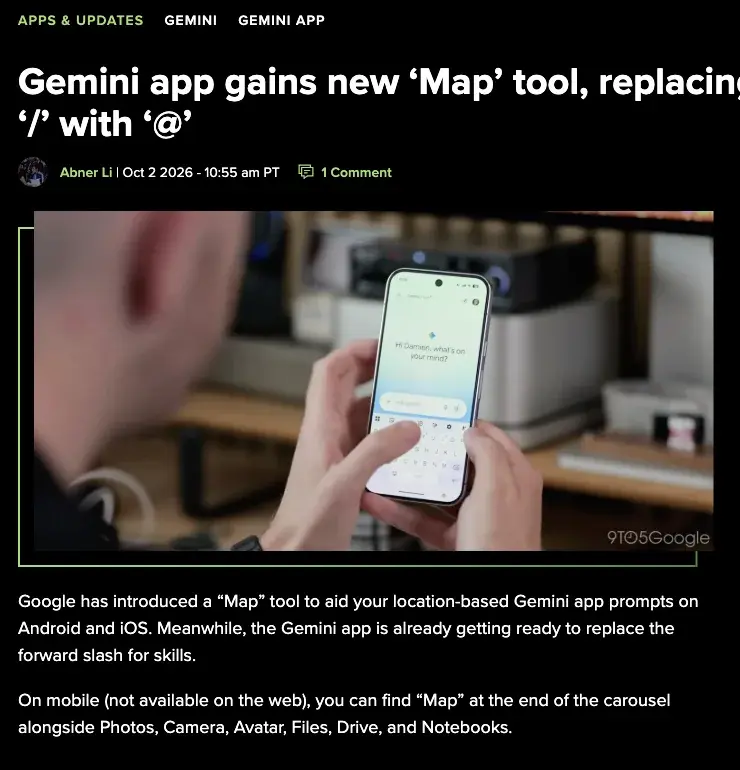
1. Gemini got a Map tool on October 2. 9to5Google reported on October 2 that the Gemini app on Android and iOS now has a “Map” tool at the end of the attachment carousel. It opens a live map with a circular focus area. You pan and zoom to the neighborhood you care about, tap “Explore this area,” and a “Map Area” chip is added to your prompt, so your questions are scoped to that spot instead of being a guess at an address. It’s mobile only, not on the web. 9to5Google’s article doesn’t say whether it costs anything.
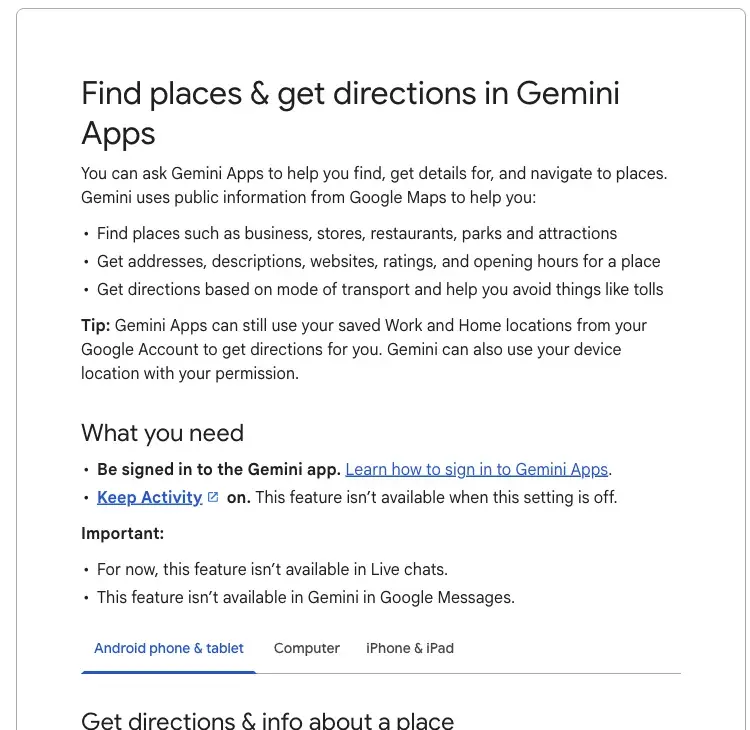
2. The Gemini app can hand your pinned places to Google Maps. Google’s own help page says Gemini can find places, show addresses, ratings and opening hours, and give directions by mode of transport. For the extra Maps features it lists conditions: you must be signed in, Keep Activity must be on, the features are rolling out gradually, you need to be 18 or over using a personal Google Account, and you must ask in English. On Android, “To save all pinned places on a map to a custom Google Maps list, tap Export to Google Maps.” The same page lists what Gemini can’t do: use saved places other than Work or Home, provide live traffic updates, save your location history or add a review. It’s also unavailable in Live chats and in Gemini in Google Messages.
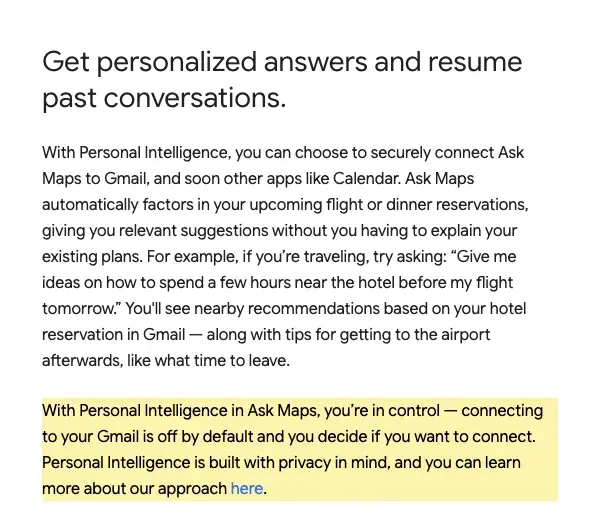
3. Ask Maps, the Gemini-powered chat inside Google Maps, expanded in August. Google’s August 6 post says the transit widget (live delays) and more personalized answers are rolling out everywhere Ask Maps is available, and that Ask Maps is also rolling out in Australia, Brazil, Canada, Indonesia, Japan and Mexico. Food ordering, hotel and event discovery are rolling out in the US first. If you choose to connect Gmail, Ask Maps can factor in your flight and dinner reservations, and Google states that “connecting to your Gmail is off by default and you decide if you want to connect.”
Also worth knowing: on October 9, Google limited the free Gemini app to Flash-Lite. I covered the details in Is Gemini Still Free? What Changes Oct 9. Google describes free-tier limits as compute-based (they depend on how complex your prompt is, which model and features you use, and how long the chat gets) rather than a fixed message count. The Maps help page I read didn’t name a plan requirement for the Maps features, but it did name the conditions above. On the ChatGPT side, I’m not going to tell you which model free users get, because OpenAI’s own pricing page and its help center, as I read them via a research tool, appear to disagree about it. Check what your account shows.
What didn’t change: every one of Google’s own pages carries a version of “check the responses.” The page for Google’s August 6 post about how Gemini plans trips carries the notice “Generative AI is experimental.” The tool getting better at pulling data from Maps, Flights and Hotels doesn’t turn an itinerary into a guarantee.
What it actually is: three jobs, three different tools
“AI trip planning” sounds like one thing. It’s three jobs, and mixing them up is where holiday trips go wrong.
That division is also what travelers who like the free tools tend to describe. One traveler on X put the pattern in a sentence: Gemini is great for the “nuts and bolts aspect” of planning a road trip with Google Maps as the data set, “still screws up tho and you have to check it.” A Thai traveler described building a Japan itinerary draft with Gemini, calling it “inaccurate a lot” in places, then cross-checking it against Google Maps and a hand-made spreadsheet. Another said to ask Gemini for a rough itinerary, have it pin the places in Google Maps, then use the Maps data rather than the chat’s. Use the assistant for ideas and structure; use Maps for pins, hours, transit and lists.
How reliable is it? The honest evidence
Before the workflow, a look at what goes wrong, because the failure patterns decide what to verify.
A 2024 audit of 100 ChatGPT itineraries. The travel-marketing agency north9 manually checked 100 two-day itineraries (ten each for ten cities) and published its results on April 8, 2024. It found at least one error in 90% of them, a venue scheduled outside its opening hours in 52%, a permanently closed venue or one closed until further notice in 24%, and illogical routing or unnecessary detours in 25%. Examples included a made-up Rome café, breakfast scheduled four hours before a Tokyo café opened, and two hours allocated to three major attractions in Dubai.
The number to be careful with. That audit is two years old, was manual, and doesn’t say which model version it used. It doesn’t prove today’s error rate for Gemini or ChatGPT. What it’s good for is the types of error, and they match what people report now: opening hours and closures are the most common, routing is next.
A peer-reviewed finding about trust. A study in the Journal of Consumer Behaviour (published January 16, 2026), with two experiments of 1,004 and 241 participants, named fabricated opening hours, nonexistent restaurants and misleading routes as typical travel hallucinations and found that errors reduced perceived accuracy and recommendation acceptance. That’s about how people react to bad AI advice, not a benchmark of how often assistants produce it.
The famous cautionary tale, with a caveat. BBC Travel reported in September 2025 that a Peruvian guide, Miguel Ángel Gongora Meza, said he overheard two tourists who had paid about $160 to reach a rural road near Mollepata, looking for a “Sacred Canyon of Humantay” that an AI itinerary had suggested. The name appears to blend real place names into a place that doesn’t exist. His warning was about altitude: a traveler could end up at 4,000 metres without oxygen or phone signal. That’s his reported account of one incident, secondary coverage and the OECD AI incidents database repeated it, and at least one skeptical commentator has questioned details of the story. The lesson doesn’t depend on that one case being perfect: a name that exists nowhere on a map is a red flag.
Dated but useful. The UK consumer group Which? tested five AI interfaces on a hypothetical Greece holiday in September 2023 and found a nonexistent insurance recommendation, wrong flight information and a bot claiming it could book a flight when it couldn’t. Today’s tools are different, but the “claims it did something it can’t” pattern is worth remembering.
What travelers say now. Over October 2026 on X, the clearest complaint was still hours: one person wrote that an AI itinerary “had nt taken the opening hours of the place into consideration! A day of my trip was totally wasted.” A hospitality worker said people regularly show up with ChatGPT itineraries full of bad recommendations for the area. Another traveler, in the opposite spirit, said the AI warned that a temple closed on Tuesdays and rerouted a nine-day Japan loop. Both happen. The difference is whether you asked the assistant to surface what it didn’t know.
Put together: treat the assistant as a fast drafter with a known weakness for hours, closures, prices and travel times. Everything in the walkthrough below is built around that weakness.
The walkthrough: plan a holiday trip with free tools in nine steps
I’ll carry two real holiday checks through the walkthrough so you can see what verification catches. The closure facts are from the venues’ own pages. The “draft” itineraries are my illustrations of a typical error pattern, written by me, not pasted from a model.
The two examples.
- Example A, a US Thanksgiving weekend: four days in New York, Wednesday November 25 to Sunday November 29, 2026, two adults.
- Example B, a post-Christmas Europe trip: you land in Germany on December 27 for “the Christmas markets.”
Step 1: Set up the free accounts (and know what you’re agreeing to)
- Gemini: sign in with a personal Google account on the mobile app. For Maps features, Keep Activity must be on, so your planning chats are saved to your Google activity. Decide if you’re comfortable with that for trip planning. If you’re not, plan in a plain chat and do the Maps steps by hand.
- Gmail connection (Ask Maps): optional and off by default. Connecting it lets Ask Maps see flight, hotel and dinner reservations. It’s convenient; you can leave it off and paste your confirmations in manually.
- ChatGPT: a free account is enough to draft. I couldn’t find a documented Google Maps list export in ChatGPT, so pins happen in Maps.
Expected result: both apps work on your phone, and you know which data you’ve allowed.
Step 2: Write a brief before you ask for an itinerary
Most bad itineraries come from bad briefs. Open a notes app and write down: dates (exact, including weekdays), who’s going (ages if kids), where you’re staying or arriving, pace (how many things per day), budget, mobility or food needs, must-do’s and which days are holidays. For Example A: Wed Nov 25 to Sun Nov 29, two adults, staying on the Upper West Side, two things a day, Thursday is Thanksgiving.
Expected result: a half-page brief you can paste into any assistant. It’s also your fact sheet for later.
Step 3: Ask for a draft with a built-in “I’m unsure” list
This is the single most useful change you can make. Instead of “plan my trip,” ask the assistant to separate what it knows from what you must check:
I'm planning a trip. Brief:
- Dates: Wednesday Nov 25 to Sunday Nov 29, 2026 (Thursday Nov 26 is
  US Thanksgiving)
- Who: two adults
- Staying: Upper West Side, Manhattan
- Pace: two main things per day, plus meals
- Budget: moderate; no tour packages
- Must-do: one big museum, one long walk, one good dinner on Thanksgiving

Please give me:
1) A day-by-day draft itinerary, grouped by neighborhood.
2) A table of every claim I must verify before relying on it, with
   columns: Place | What you assumed (hours, price, transit time) |
   Why it might be wrong on these dates.
3) A list of days or places affected by the holiday (closures, reduced
   hours, reservations needed).
Do not invent places. If you are not sure a place exists or is open on
these dates, say "UNSURE" next to it.
Expected result: a draft plus a verification table. If the assistant won’t produce the second part, push once: “Redo the table and mark every item with hours or prices.”
Here’s the kind of draft that creates the Thanksgiving problem, so you can recognize it:
| Day | Draft (illustrative) | The risk |
|---|---|---|
| Wed Nov 25 | Arrive; American Museum of Natural History late afternoon | Closing time and last entry |
| Thu Nov 26 | Metropolitan Museum of Art in the morning; Natural History in the afternoon | Both museums are closed on Thanksgiving Day |
| Fri Nov 27 | Walk, shopping, dinner | Crowds and booking |
Step 4: Use the Map tool to scope neighborhoods (mobile)
On Android or iOS in the Gemini app, open the attachment carousel (the + menu), scroll to the end, tap Map, move the circle over the area (say, a few blocks around your hotel, or the museum district), tap Explore this area, then ask your question: “Where’s good to eat near here that’s open on Thanksgiving evening?” The area is attached to your question, so Gemini doesn’t have to guess what “near the hotel” means.
Be realistic about what this buys you. It reduces ambiguity. It doesn’t make “open on Thanksgiving evening” reliable. That’s the next step’s job.
Expected result: neighborhood-scoped suggestions you can pin.
Step 5: Pin the places and export them to a Google Maps list
When Gemini’s answer shows places on a map, use Export to Google Maps (on Android, per Google’s help page) to save all the pinned places as a custom list. If Gemini didn’t offer an Export button, check the conditions from the help page: English, 18+, personal account, Keep Activity on, and not in a Live chat.
Two limits matter here. Google says Gemini can’t use your saved places other than Work and Home, so it can’t read your existing lists. One traveler on X wrote that when they last tried, Gemini, Claude and Codex “couldn’t even access the maps list even though it was a public list.” Plan to build a new list per trip. And if a place the assistant suggested doesn’t show up as a pin, that’s your first red flag. That’s how the Humantay “canyon” would have been caught.
Expected result: a Maps list named for the trip, containing only places that exist.
Step 6: Check every place against your dates, not “in general”
Open each pin in Google Maps and look at the hours for your date (Maps lets you pick a day). Then, for anything on a holiday, open the venue’s own page. Here’s what that catches in Example A:
| Place | What the venue’s own page says (checked October 13, 2026) | What it means for the draft |
|---|---|---|
| Metropolitan Museum of Art | Closed Thanksgiving Day, December 25 and January 1 | Move to Friday Nov 27 |
| American Museum of Natural History | Open daily 10 am to 5:30 pm; closed Thanksgiving and Christmas Day | Fine on Wed Nov 25 and Fri Nov 27; closed Thu Nov 26 |
| Smithsonian museums | Open every day except December 25; Cooper Hewitt also closes on Thanksgiving | Check the specific museum |
| San Francisco Zoo (a different city, for contrast) | Open every day, including holidays, 10 am to 5 pm | Some venues stay open, so check each |
So for Example A the fix is: both museums move off Thursday, and the Thursday plan becomes whatever you have confirmed as open or booked (a long walk, a reservation you’ve confirmed, a plan you’ve made on purpose). The point isn’t that museums close; it’s that the closures vary by venue, and an AI draft treats them as the same.
Now Example B. Here are the 2026 dates from the organizers and city pages:
| Market | Official 2026 dates | Source |
|---|---|---|
| Nuremberg Christkindlesmarkt | November 27 to December 24 (opening ceremony Nov 27, 5:30 pm; generally 10 am to 9 pm) | Organizer site |
| Dresden Striezelmarkt | November 25 to December 24 | City of Dresden |
| Vienna, Rathausplatz | November 13 to December 26 (daily 10 am to 10 pm; December 24 10 am to 6:30 pm) | Organizer site |
| Vienna Ice Dream (skating) | November 13 to January 6, 2027; closed December 31 | Organizer site |
If you land on December 27, you’ve missed the Nuremberg and Dresden markets entirely and the Vienna Rathausplatz market by a day. Two cautions from my reading: Dresden’s homepage shows a 2026 date heading but an opening-hours block saying “26 November (opening),” which doesn’t match the city’s November 25 start, so when official pages disagree, call or check the organizer’s social account. And Nuremberg’s separate Kinderweihnacht children’s market has different dates (to December 30, closed December 25, 10 am to 2 pm on December 24), so don’t swap one schedule for the other. “European Christmas markets” is not one season.
Expected result: every pinned place has a verified status for your actual dates, and the draft is edited.
Step 7: Pressure-test the logistics
Ask Maps (or Google Maps itself) is the better judge of transit times than the chat. Google says Ask Maps’ transit widget shows up-to-the-minute delays (where Ask Maps is available), and Google’s Gemini app help page says the app itself can’t provide live traffic. So: copy your route into Maps, set the real departure time, and compare. In the north9 audit, a quarter of itineraries had illogical routing, and a Dubai itinerary allotted two hours to three major attractions. If the chat says “20 minutes between stops” and Maps says 55, believe Maps and rebuild the day.
A useful habit: add 30 percent to every transfer on a holiday weekend. That’s my rule of thumb, not a sourced figure.
Expected result: each day fits inside the hours you actually have.
Step 8: Treat prices as estimates until you’re at checkout
Google says Gemini pulls locations, reviews and prices from Maps, Flights and Hotels, and that Ask Maps compares real-time hotel prices (a US rollout at the time of Google’s August post). That’s useful for comparison. It’s still not a booking. Prices move, rooms sell out, and an assistant can claim it can book when it can’t (the Which? finding). Use the assistant to compare options and keep the final number for the booking page.
For AAA’s holiday advice, the one 2026-specific item I found is a September 15 post from AAA’s regional Via blog flagging November 24 and 25 as crowded and expensive outbound flying days and suggesting November 23 or Thanksgiving Day as alternatives. I couldn’t find a national AAA or TSA forecast for Thanksgiving 2026 yet; AAA’s last national figure, 81.8 million travelers over its 2025 window, is a 2025 number. Don’t let a chatbot quote you a 2026 forecast that doesn’t exist.
Expected result: a short list of “book now” items, with the real prices you saw.
Step 9: Save the plan somewhere that works offline
Put confirmations, addresses, opening hours for your dates and your fallback plan in one shared note or document. Keep a screenshot of each confirmation. Download offline maps for the area if your phone allows it. Then ask the assistant for a one-page version: “Turn this verified plan into a one-page day-by-day with addresses and opening hours for the specific dates; don’t add anything that isn’t in my notes.”
Expected result: a plan that works when you have no signal, and one that doesn’t depend on an assistant’s memory.
Which free tool for which job
| Job | Gemini (free) | ChatGPT (free) | Google Maps / Ask Maps |
|---|---|---|---|
| Brainstorm a day-by-day shape | Good | Good (often praised for creative itinerary writing) | Weaker (it’s a search and map tool) |
| Neighborhood-scoped questions | Map tool (mobile) | Describe the area in words | Native |
| Pins and exportable lists | Export to Google Maps (Android, per Google’s help) | No Maps export documented | Native lists |
| Opening hours for a specific date | Shows hours, but check | Weak: can’t verify | Best for date-specific hours; venue page is final |
| Live transit delays | Not provided by the Gemini app | Not provided | Transit widget in Ask Maps where available |
| Booking | Suggests; you finish | Suggests; you finish | Reservations and some ordering, US-first |
| Privacy cost | Keep Activity on for Maps features | Chat history setting, your choice | Gmail connection off by default |
The honest ranking from travelers who prefer Gemini is that it comes down to Maps grounding: hours, pins, export, area scoping. Travelers who prefer ChatGPT mention itinerary writing and flexible prompts. One travel-visibility study mentioned on X put ChatGPT at about 47% of self-reported AI trip planning, Gemini at 22% and Google AI Mode at 20%. I couldn’t check that study’s method, so treat it as one data point, not the market.
Free assistants vs. dedicated travel apps: what you actually give up
You asked whether you need Mindtrip, Layla or Wanderlog. Here’s what I could verify from their own pages, with the gaps stated.
| App | What its own pages say | What I couldn’t confirm |
|---|---|---|
| Mindtrip | Calls itself a free AI travel-assistant app; itineraries, maps, photos and reviews, favorites, group invitations and group-chat itinerary building | A published price or numeric chat limit |
| Layla | Its FAQ says planning, personalization, live options and human-advisor help are free, “no subscription fee,” with payment for booked travel | A numeric free cap; older material mentioned a roughly $49 to $50 yearly premium, so check the upgrade screen |
| Wanderlog | Free plan with itinerary, map, budgeting and group planning; a vendor blog from November 2024 said five free AI messages, then Pro at $39.99 a year, with Pro adding offline access, Maps export and route optimization | A current checkout price; that figure is dated |
What apps add isn’t accuracy. BBC also reported earlier errors by a dedicated planner (an Eiffel Tower in Beijing, an unworkable northern Italy route), so branding doesn’t prove the plan is feasible. What they add is structure: a single place the whole group edits, a persistent itinerary, offline access and booking integrations.
When a free assistant is enough: a trip of up to about a week, one or two cities, one planner, no complex bookings. When an app earns its keep: four or more people editing, multi-city routes with many transfers, a need for offline access, or a trip you’ll be revising for months.
What this means for you
If you’re planning your first big trip. Don’t start with the assistant; start with the brief in step 2. First action: write dates, who, pace and budget in a notes app, and paste it into Gemini or ChatGPT with the “UNSURE” prompt.
If you’re traveling with kids. Pace and nap windows break itineraries more than closures do. First action: put “kids aged X and Y; need a break every two hours; one indoor backup per day” in the brief, and ask for a rain plan.
If you’re driving to family for Thanksgiving. Your risk isn’t attractions, it’s timing. First action: use Maps for the real drive time with your departure hour, and take AAA’s advice on avoiding the heaviest travel days.
If you’re going to Europe for Christmas markets. Dates are everything. First action: put each market’s official dates into your brief (use the table above) and ask the assistant to build around them, not to “find markets.”
If you’re coordinating a group of four or more. This is where an app can justify itself. First action: build the plan in Gemini and Maps first, then move the verified version into a shared tool if people need to edit it.
If you’d rather not leave a trail. Keep Activity must be on for Gemini’s Maps features, and Gmail connection for Ask Maps is optional. First action: plan in a plain chat without personal details, and do pins and verification in Maps by hand.
Edge cases and troubleshooting
“I don’t see the Map tool.” It’s mobile only (Android and iOS) and rolling out; 9to5Google says it’s widely rolled out, but you may not have it yet. Update the app, then check the end of the + carousel.
“There’s no Export to Google Maps button.” Check the conditions: English, 18 or older, a personal Google Account, Keep Activity on, not in Live chat or Gemini in Messages. Google’s help page documents the button on Android; if you’re on iPhone, look at the iPhone tab of the same page.
“Gemini can’t see my saved list.” That’s documented: it can’t use saved places other than Work and Home. Make a new list for the trip.
“It recommended a place I can’t find on the map.” Treat it as invented until proven otherwise. Search the exact name in Maps, then on the venue’s own site. If neither exists, delete it.
“Maps says it’s open but the venue’s site says it’s closed.” The venue wins. Ask Maps can pull an old review: one user noticed an Ask Maps answer saying a business took emergency calls based on an old review while its listed hours said otherwise. Check the date-specific hours on the venue’s page and call if it matters.
“Two official pages disagree.” Dresden’s homepage did on opening day. Use the city’s or organizer’s date page, and ask on their social account if it matters.
“I ran out of messages mid-plan.” Free limits are compute-based and change. Split the work: draft in one chat, move verification to Maps, and come back after the allowance refreshes. Don’t paste your whole trip into one endless chat.
“The plan is too packed.” Say “I want two main things per day, plus meals” in the brief, and ask for the slack time to be shown explicitly.
What this can’t fix
- It can’t tell you what’s open on your dates. Only the venue can; the assistant can only remind you to check.
- It can’t read your existing Maps lists. New list per trip.
- It can’t give live traffic from the Gemini app (Google’s own list of limits), and Ask Maps’ transit widget isn’t in every country.
- It can’t make safety judgments. The Humantay story is about altitude and remoteness, not typos. If a suggestion involves a hike, a remote road or a border, check a local operator.
- It can’t book for you with confidence. Google’s own booking features still leave the final decision to you.
FAQ
What’s the best AI for travel planning that’s free? There isn’t a single winner. Gemini has the tightest Google Maps connection (hours, pins, list export, area scoping), and ChatGPT is often praised for itinerary writing. A reasonable setup is Gemini for pins and neighborhoods, either assistant for the draft, and Maps for verification.
Can ChatGPT export to Google Maps? I couldn’t find a documented Google Maps list export in ChatGPT. You can paste place names into Maps and save them to a list by hand.
Is Gemini’s Map tool free? 9to5Google’s article doesn’t say, and Google’s help page for the Maps features lists conditions (age, account, language, Keep Activity) without naming a plan requirement. Check what your own app shows.
Do I need a travel app like Mindtrip or Layla? Not for a simple trip. Apps add collaboration, persistence and offline access, not accuracy. Mindtrip and Layla describe free access; check what’s free in the app itself.
What’s open on Thanksgiving and Christmas? It varies by venue. The Met is closed on Thanksgiving, December 25 and January 1. The American Museum of Natural History is closed on Thanksgiving and Christmas Day. The Smithsonian says most museums are open every day except December 25. The San Francisco Zoo is open every day. Always check the venue’s own date-specific page.
When do the 2026 German Christmas markets run? Nuremberg’s Christkindlesmarkt runs November 27 to December 24, and Dresden’s Striezelmarkt November 25 to December 24. Vienna’s Rathausplatz market runs November 13 to December 26. Dates for other markets differ, so check each organizer.
Will AI really send me to places that don’t exist? It has happened. The reported Humantay case, a reported Eiffel Tower in Beijing and a made-up Rome café in the north9 audit are examples. Today’s tools are more grounded in Maps data, but that’s why the pin check in step 5 matters.
Can I trust prices the AI gives me? Use them for comparison, and confirm at the booking page. I found no controlled estimate of how often AI price quotes are stale.
Is it safe to turn on Keep Activity or connect Gmail? Those are your call. Keep Activity is required for Gemini’s Maps features, and Gmail connection for Ask Maps is off by default and optional. If you don’t want a trail, plan without personal details and verify in Maps manually.
The bottom line
The free assistant is a good drafter and a poor fact-checker, and holiday weeks are when fact-checking matters most. Use Gemini or ChatGPT for the shape of the trip, Google Maps for whether places exist and where they are, the venue’s own page for whether they’re open on your dates, and the booking page for the price. Add an app only when a group needs one shared, editable plan.
If you’d like to practice the full workflow before a real trip, the Plan Your Perfect Trip with AI course walks through destination research, itineraries and logistics, and the Google Gemini course covers the Gemini features used here. For the ChatGPT-first version of this workflow, see How to Plan a Trip with ChatGPT in 2026.
Sources
- Google Gemini Apps Help, Find places & get directions in Gemini Apps
- Google Blog, Ask Maps gets more helpful with food ordering and more (August 6, 2026)
- Google Blog, How we’re reimagining Maps with Gemini (March 12, 2026)
- Google Blog, How Gemini plans such detailed vacation itineraries for you (August 6, 2026)
- 9to5Google, Gemini app gains new ‘Map’ tool (October 2, 2026)
- north9, 90% of AI Travel Itineraries Are Inaccurate (April 8, 2024)
- Journal of Consumer Behaviour, AI Hallucinations in Tourism: How Errors Impact Consumer Trust and Recommendation Acceptance (January 2026)
- BBC Travel, The perils of letting AI plan your next trip (September 2025)
- OECD.AI incident record, AI-generated travel advice sends tourists to nonexistent destinations in Peru
- Which?, Can a robot book your holiday? (September 2023)
- The Metropolitan Museum of Art, Plan your visit
- American Museum of Natural History, Hours
- Smithsonian, Museums and Zoo
- San Francisco Zoo, Tickets and hours
- Nuremberg Christkindlesmarkt
- Vienna Christmas Market, Rathausplatz
- US Office of Personnel Management, Federal holidays
- AAA Via, Best days for holiday travel this year (September 15, 2026)
- AAA, Thanksgiving travel forecast 2025
- Layla FAQ
- Mindtrip
- Wanderlog, Wanderlog vs TripIt (November 26, 2024)
