Sometime this week, your Fire TV quietly got smarter — and nobody asked you first. On August 19, 2026, Amazon started rolling Alexa+, its generative-AI voice assistant, out to every compatible Fire TV device in the US for free, no Prime membership required. The $19.99-a-month fee that non-Prime households used to pay for it is gone. There’s no app to install, no button to press, no account setting to flip. If your TV supports it, it’s already updating.
That’s the kind of sentence that should make you a little suspicious, and honestly, it should. A free upgrade that installs itself without asking is exactly the pattern that got Amazon in trouble with Echo owners earlier this year — more on that below. But this specific rollout is genuinely narrower and less alarming than that one, and if you own a Fire TV, it’s worth five minutes to understand exactly what changed, what still costs money, and what the thing can actually do once it’s on your screen.
What Actually Changed on August 19
Before this week, Alexa+ on Fire TV worked like most premium Amazon features: free if you had Prime, $19.99 a month if you didn’t. Amazon’s new policy removes that fee entirely for Fire TV, specifically. The Verge confirmed the change is rolling out automatically to eligible hardware — Fire TV Sticks, the Fire TV Cube, Amazon’s Ember smart TVs, and select Hisense and Panasonic sets with Fire TV built in — starting this week in the US.
“Automatic” is doing real work in that sentence. Amazon isn’t sending an email with a toggle. It’s pushing the update the same way it pushes any other Fire TV software update, and by the time you notice, Alexa+ is already the voice assistant answering when you press the mic button on your remote. TechCrunch’s reporting frames this plainly as a distribution move: Amazon has reportedly sold more than 600 million Alexa-capable devices over the years, and Fire TV is the single screen in your house you look at every day. Getting a next-generation assistant onto that screen — for free — is a faster way to make Alexa+ a habit than hoping people pay $19.99 a month to try it.
What is Alexa+, actually?
If you’ve been ignoring Alexa news for the past year and a half, here’s the short version. Alexa+ is Amazon’s rebuild of its decade-old voice assistant, first announced in February 2025. The old Alexa executed single commands — “turn off the lights,” “what’s the weather” — and then forgot everything about the exchange the instant it answered. Alexa+ is built to hold a conversation: you can ask a follow-up without repeating context, it remembers what you were just talking about, and it can chain together multi-step requests instead of making you spell out each one.
One detail worth correcting, because even some of the initial coverage gets it slightly wrong: Alexa+ isn’t “powered by Anthropic’s Claude,” full stop, and it isn’t “powered by Amazon’s own Nova models,” full stop, either. Amazon has described the system as “model agnostic” — it draws on a mix of its in-house Nova models and Anthropic’s Claude (accessed through Amazon’s Bedrock platform, per Anthropic’s own announcement), routing each request to whichever model handles it best. So Claude is genuinely part of the stack, but it’s not the only thing running under the hood.

What You Actually Get on Fire TV, Free
On the television specifically, the free tier gets you a genuinely useful, if narrow, set of upgrades over the old Alexa voice remote. Based on Amazon’s own rollout notes and reporting from The Verge and Android Authority, here’s what’s included:
- Conversational recommendations. Instead of “show me comedies,” you can say something closer to how you’d actually talk: “find me something funny but not dumb,” or follow up on a suggestion with “something newer” or “with a female lead” — without restarting the request from scratch.
- Scene navigation. Ask Alexa+ to jump to a specific moment in something you’re watching (assuming the platform supports it), instead of scrubbing the timeline by hand.
- On-screen questions. You can ask what’s currently playing, who an actor is, or other context about the content on your screen right now.
- Basic smart-home control from the couch. Lights, locks, and other connected devices, plus — if you own Ring cameras — pulling up a live feed on the TV itself.
That’s it. It’s a better remote, not a home operating system. And that’s the honest cap on this whole story: the “free” part is scoped tightly to what a TV needs, not to what Alexa+ can do everywhere else.
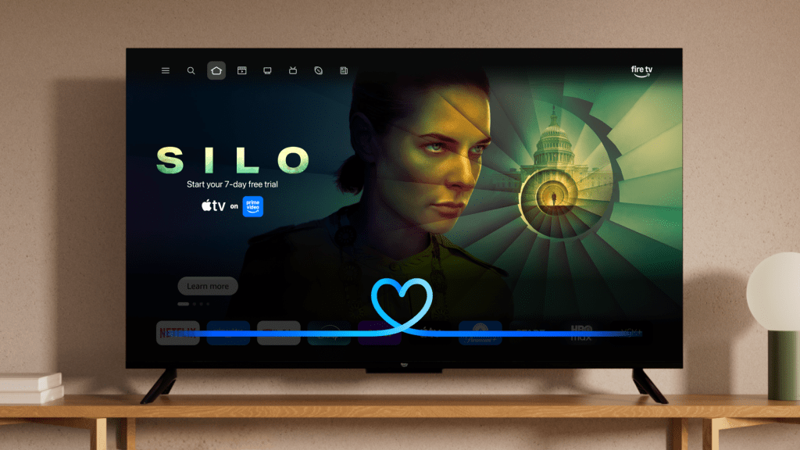
The Catch: What Still Requires Prime or a Paid Plan
Here’s the part every headline this week is glossing over. “Free on Fire TV” does not mean “Alexa+ is now free, period.” Amazon still gates a meaningful chunk of the product behind Prime membership ($139/year in the US) or a standalone Alexa+ Standard Plan subscription. Specifically, you still need one of those to get:
- Alexa+ on Echo speakers and smart displays. If you want the upgraded assistant answering you in the kitchen or bedroom, not just on the living room TV, that’s a separate, paid unlock.
- Alexa Routines. The automated “when X happens, do Y” sequences that a lot of smart-home users build their setups around.
- Specific Ring camera moments. You can view a live Ring feed on the TV for free, but asking Alexa+ to find or review a particular recorded moment — “show me who rang the doorbell at 3pm” — needs Prime or the paid plan.
- Advanced Home Modes. More elaborate automation scenarios beyond basic device control.
In other words: Amazon gave away the entertainment interface and kept the automation platform behind the paywall. That’s a coherent business decision — the TV is where usage habits form, the smart-home layer is where the recurring revenue lives — but it means “Alexa+ is free now” is technically true and meaningfully incomplete as a headline.
A Worked Example: What Your First Five Minutes Actually Looks Like
Say your Fire TV Stick just got the update and you want to see what’s different. Here’s a realistic walkthrough, not a marketing demo:
You press and hold the mic button and say: “Find me something to watch tonight, kind of a thriller, but not too dark.”
Old Alexa would have either searched literally for “thriller not too dark” (returning nothing useful) or ignored the qualifier entirely and shown you a generic thriller list.
Alexa+ interprets the request more like a person would — it should surface a shortlist that leans suspenseful without being grim, and it holds the context if you follow up.
You say: “Actually, something newer.”
Alexa+ should filter that same shortlist by release date without you having to repeat “thriller, not too dark” — that’s the “conversational” part actually mattering, instead of being a marketing word.
You then say: “Turn the living room lights down a bit.”
If you have compatible smart lights connected, this works on the free Fire TV tier — no Prime needed, since it’s a direct device command, not a saved Routine.
But if you say: “Run my movie night scene” (a saved Routine that dims lights, closes blinds, and mutes your phone notifications all at once) — that request needs Prime or the Alexa+ Standard Plan, because Routines sit behind the paywall regardless of which device triggered them.
That distinction — direct commands work free on Fire TV, saved automations don’t — is the single most useful thing to understand before you start testing this yourself, because it’s exactly where people get confused and frustrated.
Why “Free and Automatic” Makes Some People Nervous
If your first reaction to “it updates itself, no action needed” was mild suspicion, you’re not being paranoid — you’re pattern-matching on something that already happened once this year. Earlier in 2026, Amazon began automatically upgrading Prime-linked Echo speakers to Alexa+ the same way it’s now upgrading Fire TVs: no opt-in, no warning beyond a notification, just a silent swap. The reaction wasn’t universally positive.
TechRadar documented a wave of complaints from Prime members who felt the upgrade was forced on them — slower response times in some cases, a noticeably different voice tone, and in the Echo rollout specifically, some users reported new audio ads appearing that hadn’t been there before. Amazon’s answer wasn’t a way to prevent the upgrade in advance; it was a spoken command to undo it after the fact — “Alexa, exit Alexa+.” That’s a real option, but it’s reactive, not preventive, and plenty of people don’t find out it exists until they’ve already been annoyed for a week.
There’s a second thread worth being straight about: The New York Times’ own coverage of Alexa has pointed out for years that Amazon’s smart speakers are, by design, always listening for a wake word, and a more conversational, memory-holding assistant necessarily means more of what you say sticks around longer to preserve context across a conversation. None of that is unique to this week’s Fire TV announcement — it’s the underlying trade-off of every AI assistant built to “remember” what you just said. But it’s a fair reason some people are treating a free, automatic upgrade with more skepticism than the “isn’t this nice” framing in most of this week’s coverage suggests.
To be clear about what this specific announcement is and isn’t: the Fire TV rollout is narrower than the Echo backlash that preceded it. It’s adding a capability to a screen you already look at, not silently changing the audio character of a speaker sitting in your bedroom. But the “automatic, no consent step” pattern is the same one that generated real frustration a few months ago, and it’s worth knowing that history exists before you decide how much you trust this week’s version of “free.”
Is Amazon Actually Telling the Truth About Adoption?
Amazon has been fairly aggressive about sharing usage numbers for Alexa+, and it’s worth being clear-eyed about what those numbers do and don’t prove. According to Amazon’s own disclosures, reported by TechCrunch:
- More than 1 million people had Alexa+ access by June 2025, up from just over 100,000 the month before.
- By CES in January 2026, Amazon said 97% of the Alexa devices it had ever shipped could technically support Alexa+, and tens of millions of customers could opt in.
- Amazon claims Alexa+ users engage with the assistant two to three times more than they did with old Alexa, connect to integrated third-party services six times more, and create Routines at twice the rate.
- Music streaming reportedly rose 25% after users upgraded, and recipe-related engagement grew fivefold.
None of those are independently audited figures — they’re company-reported metrics from a company with an obvious incentive to make the product look like it’s working. Treat them the way you’d treat any vendor’s own press-release stats: probably directionally true, definitely not neutral. Separately, Amazon has said Alexa+ users join Prime at nearly 25% higher rates than non-users — which, combined with the free Fire TV rollout, tells you plainly what the real business goal is here. Alexa+ isn’t a product Amazon expects to make money on directly. It’s a funnel into Prime.
Comparison: How Alexa+ on TV Stacks Up Against Google and Apple
If you’re trying to decide whether this actually matters — or you’re comparing streaming boxes — here’s how the three major TV voice-AI pushes compare as of this week, based on public reporting and each company’s own documentation.
| Platform | What it does on TV | Cost on TV | Its real strength | Its real limitation |
|---|---|---|---|---|
| Amazon Fire TV / Alexa+ | Conversational show discovery, scene navigation, on-screen Q&A, basic smart-home control | Free (as of Aug 19, 2026), no Prime required | Deep ties to Ring, Echo, and Amazon Shopping — if you’re already in the Amazon ecosystem, this compounds | The free tier stops at the TV; Echo, Routines, and Ring-moment search stay behind Prime or the Standard Plan |
| Google TV / Gemini | Context-aware, multi-turn voice control replacing the old Google Assistant; app navigation, recommendations, settings | Free, bundled with Google TV hardware | Broadest Android/Google-service integration; strongest for households already inside Google’s ecosystem | Rollout and feature depth vary a lot by hardware generation — an older Google TV box may not get the full experience |
| Apple TV / Siri | Media control, search, app actions, smart-home access via HomeKit; a more conversational Siri is rolling out at the platform level | Included with Apple TV hardware | Best fit if your household already runs on iPhones, HomeKit, and Apple services | The more ambitious generative-AI version of Siri is still mid-rollout across Apple’s ecosystem — the TV experience isn’t yet the flagship showcase |
The short version: Amazon just made the cheapest entry point into “AI voice assistant on your TV” free, on hardware a lot of US households already own. Google’s version is arguably more capable in isolation, but it’s gated by which specific Google TV hardware generation you have. Apple’s is the most tightly integrated if you’re already all-in on iPhones, but the generative layer is still catching up on TV specifically.
What This Means for You
If you own a Fire TV Stick and don’t have Prime: You just got a free upgrade with no action required. Try the conversational search first — it’s the single most noticeable difference from old Alexa, and it costs you nothing to test.
If you’re a Prime member who already used old Alexa on your TV: Your experience is upgrading automatically too. The main thing to watch for is whether your existing Routines (which were already a Prime feature) behave any differently — a few Wirecutter testers reported Routines occasionally not carrying over cleanly during the switch.
If you’re privacy-conscious about voice assistants in general: This is genuinely the moment to pay attention, not to panic. A more conversational, context-holding assistant necessarily processes more of what you say to build that context. Our AI privacy fundamentals course walks through what “the assistant remembers things” actually means for your data, in plain language, regardless of which company’s assistant you’re using.
If you’re shopping for a new streaming device right now: Alexa+’s free Fire TV tier is a genuine point in Amazon’s favor if you’re comparing a Fire TV Stick against a Chromecast/Google TV or an Apple TV box on price. Factor in what you actually want long-term — if smart-home Routines matter to you, remember those aren’t included free on any of the three platforms without some paid layer.
If you’re a smart-home enthusiast with lots of Routines already set up: Don’t expect this rollout to unlock anything new for you specifically — Routines were already gated behind Prime, and they still are. The free tier mostly benefits people who weren’t already deep into Alexa’s ecosystem.
If you manage a household account for family members, including kids or older relatives: The automatic nature of this rollout means someone in your house may start getting different responses from “Alexa” without understanding why. It’s worth a two-minute conversation explaining that the TV’s assistant got smarter, especially if anyone in the house relies on voice commands for accessibility reasons — the interaction patterns have genuinely changed, not just gotten faster.
If you’re weighing whether to add Prime or the Alexa+ Standard Plan now that you’ve tried the free tier: Be honest about what you’d actually use. If your interest is purely “make the TV understand me better,” the free tier already delivers that. Routines, Echo access, and Ring-moment search are worth paying for only if you were already planning to use them — don’t upgrade just because the free tier felt good.
Edge Cases and Things People Are Already Running Into
Based on early reporting and user reactions in the days since rollout, here’s what’s actually tripping people up:
- “Why do I need Prime for Echo if the TV is free?” Because Amazon scoped this specific announcement to Fire TV only. It’s confusing phrasing on Amazon’s part, and multiple outlets have had to clarify it explicitly.
- The upgrade feels forced, and some people are annoyed about that. This isn’t a new complaint specific to this rollout — TechRadar reported on Prime members being auto-upgraded to Alexa+ earlier this year with similar frustration about lack of consent. If you genuinely don’t want the new assistant, Amazon has provided a spoken rollback command: say “Alexa, exit Alexa+” to revert. It’s not a preventive opt-out, just a post-hoc undo.
- Existing Routines occasionally disappearing or behaving oddly after the switch. The New York Times’ Wirecutter reported an editor experiencing inconsistent alarm behavior — alarms being added or deleted unexpectedly — during the Alexa+ transition on Echo devices. If you rely on Routines, check them after the update lands rather than assuming they carried over cleanly.
- “Does this include Fire TV apps I side-loaded, or only official content?” Alexa+’s conversational search works best with content indexed by Amazon’s own systems — expect it to be strongest with major streaming apps and weaker with niche or side-loaded content sources.
- Confusion about whether this is the same Alexa+ that launched over a year ago. Yes — Alexa+ first launched in February 2025 as an early-access Prime benefit and became broadly available to everyone in the US on February 4, 2026. This week’s change is specifically about removing the Fire TV fee for non-Prime households, not a new product.
- The Fire TV mobile companion app being buggy. Multiple reviewers, including Wirecutter, have noted the companion app experience lags behind the on-TV experience in polish. If your first Alexa+ interaction is through the app rather than the remote, don’t judge the whole product by that.
- Households with older, non-eligible Fire TV hardware getting left out. If your device isn’t on Amazon’s compatible list (Fire TV Sticks, Fire TV Cube, Ember TVs, and specific Hisense/Panasonic sets), you won’t see the update regardless of how long you wait. There’s no manual “check for Alexa+” toggle to force it.
- People asking whether older content requests get “smarter” answers or if this only applies to voice search. The conversational and follow-up capabilities apply specifically to voice interactions through the remote’s mic button — it doesn’t change how the Fire TV home screen’s algorithmic recommendations work.
What Alexa+ on Fire TV Still Can’t Do
Being straight about the limits matters more than the marketing copy:
- It can’t unlock Echo-level features without a subscription. No matter how good the TV experience gets, Amazon has drawn a hard line at Prime or the Standard Plan for cross-device use.
- It can’t guarantee Routines migrate perfectly. As noted above, there’s documented evidence of Routine reliability issues during the Alexa+ transition on other device types — treat any automated sequence as worth double-checking post-update.
- It doesn’t give you a local-only, offline mode. Every voice request still goes to Amazon’s cloud for processing. If on-device, no-cloud voice processing matters to you, Alexa+ isn’t built for that — our local AI privacy course covers alternatives that keep more processing on your own hardware.
- It can’t fix a fundamentally unreliable smart-home setup. If your lights or locks already have flaky connectivity, a smarter assistant asking them to do things won’t make the hardware itself more responsive.
- It isn’t available outside the US yet on this free Fire TV tier. This specific announcement is scoped to US customers; Amazon has previously expanded Alexa+ to other markets on a slower, separate timeline.
FAQ
Is Alexa+ actually free now, or is there a catch? It’s genuinely free on eligible Fire TV devices, with no Prime required — that part is real. The catch is that Echo speakers, Routines, specific Ring camera moments, and advanced Home Modes still require Prime or a paid Alexa+ Standard Plan.
Do I need to do anything to get the update? No. If your device is on Amazon’s compatible list, the update installs automatically. There’s no button to press or setting to enable.
Which Fire TV devices are eligible? Fire TV Sticks, the Fire TV Cube, Amazon’s Ember smart TVs, and select Hisense and Panasonic television models with Fire TV built in, based on Amazon’s own rollout details.
Can I turn Alexa+ off and go back to old Alexa? You can say “Alexa, exit Alexa+” to revert, according to Amazon’s own guidance reported by multiple outlets. There isn’t a preventive way to decline the upgrade in advance.
Is Alexa+ powered by ChatGPT, Claude, or Amazon’s own AI? Neither exclusively. Amazon describes the system as “model agnostic,” using a mix of its own Nova models and Anthropic’s Claude, depending on the request.
Does this affect my privacy any differently than old Alexa? A more conversational assistant that holds context across a conversation is, by design, processing and briefly retaining more of what you say than a stateless command-response system did. That’s not unique to Amazon — it’s true of every AI assistant built this way. If that concerns you, review Amazon’s voice-history settings in the Alexa app, where past interactions are listed and deletable.
Is this the same as the Alexa+ that launched last year? Yes, same product. This week’s news is specifically about the Fire TV fee being removed, not a new version launching.
Will this come to other countries? Amazon’s August 19 announcement is scoped to the US. The company has previously rolled Alexa+ out to other markets on separate timelines, so international expansion of the free Fire TV tier is plausible but not yet announced.
What if I don’t have any smart-home devices — is there still a reason to care? Yes, mainly for the conversational show-search feature. Even without a single smart bulb, the ability to say “something newer” instead of restarting your search from scratch is the most immediately noticeable, useful part of the whole rollout.
Is my existing Fire TV Alexa remote button going to work differently? The same mic button triggers Alexa+ once your device updates — you don’t need a new remote. The button just now routes to a more capable assistant.
The Bottom Line
Amazon just handed millions of US households a meaningfully better voice assistant on the TV they already own, for free, with an honest asterisk: the free part stops at the living room, and the automation layer that power users actually want still costs money. If you own a Fire TV, there’s no real downside to trying the conversational search this week — it costs nothing and takes thirty seconds to test. If you’re evaluating whether to add Prime or a paid Alexa+ plan on top of it, be clear-eyed about whether you actually want Routines and cross-device access, or whether the free TV experience already answers the question you had.
If you want a deeper, plain-language understanding of how AI assistants like this one actually handle your data — not just Alexa, but the whole category — our AI privacy fundamentals course is a genuinely useful next step, built for people who aren’t developers and just want to know what they’re agreeing to.
Sources
- TechCrunch — Amazon makes its AI-powered Alexa+ free on Fire TV, no Prime required (Aug 19, 2026)
- The Verge — Amazon Fire TV devices are getting a free Alexa Plus upgrade (Aug 19, 2026)
- Android Authority — Amazon is giving Fire TV owners Alexa Plus for free, no Prime membership required (Aug 19, 2026)
- HowToGeek — Fire TV devices now get Alexa+ for free, no Amazon Prime required
- Reuters (via TechCrunch) — Amazon debuts new Alexa voice assistant with AI overhaul (Feb 26, 2025)
- TechCrunch — Amazon says Alexa+ is ‘model agnostic’ (Feb 26, 2025)
- Anthropic — Claude and Alexa+
- CNBC — Amazon makes Alexa+ AI assistant available to everyone in the US (Feb 4, 2026)
- TechCrunch — Amazon says 97% of its devices can support Alexa+ (Jan 12, 2026)
- TechRadar — ‘I don’t want an assistant with attitude’: some Prime members are railing against their auto-upgrade to Alexa+
- The New York Times Wirecutter — Amazon’s Alexa+ Keeps Evolving, but Maybe Not Improving
- 9to5Google — How the new Siri AI compares to Gemini on Android
