

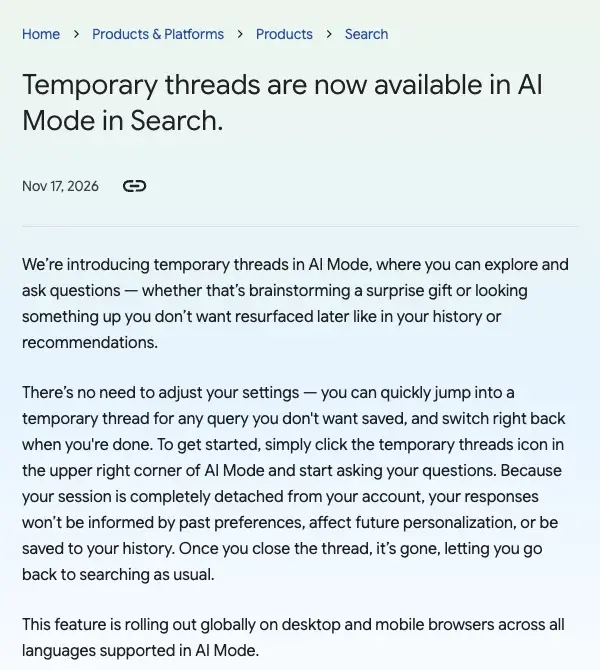
On November 17, Google gave AI Mode in Search a way to ask a question without it landing in your history. Google calls it a temporary thread. Tap an icon in the top-right corner of AI Mode, ask what you like, and when you close the thread it is gone.
The news is easy to understand. The part people are arguing about is the word “temporary”. In the days since, people on X have been writing that temporary does not mean zero data retention, and some are mixing it up with the “three years” figure from Google’s Gemini privacy page. Those are two different products with two different rules, and the difference matters if you are about to type something you care about.
This guide goes through what Google’s own pages say, line by line. I read Google’s announcement, its Help page for the feature, its AI Mode help page and its Gemini Apps privacy page on November 19, 2026. I did not run a temporary thread myself, so everything below about how it behaves is what Google has published, not something I measured. Where Google’s pages say nothing, I say so.
The short answer
TL;DR. A temporary thread keeps your question out of your Search and AI Mode history, and out of your personalization. Google’s Help page says the thread is not saved to your Google account and disappears after 24 hours, and that it will not be used to train Google’s generative AI models unless you submit feedback or it is needed for safety. It does not make you anonymous: Google says it still collects data that is not tied to your account, your browser may still save history, and the sites you click through to may collect data too. Use it for things you would rather not see resurface, not for things that must stay confidential.
Five facts to hold on to:
- It is global. Google’s post says it is rolling out globally on desktop and mobile browsers across all languages supported in AI Mode.
- There is no setting to change. Google says you can quickly jump into a temporary thread for any query you don’t want saved, and switch right back when you’re done.
- “Temporary” means 24 hours on Google’s side. The Help page says threads disappear after 24 hours. Closing the thread ends your own access to it at once.
- Training is off, with two exceptions. The Help page says threads won’t be used to train Google’s generative AI models “unless you submit feedback or it’s necessary for safety purposes”.
- The “three years” figure is about Gemini, not AI Mode. It comes from Google’s Gemini Apps privacy page and concerns reviewed chats in the Gemini app. Google has not published the same number for AI Mode temporary threads.
What a temporary thread is
AI Mode is the AI feature inside Google Search. Google’s AI Mode help page says that if you are signed in to a Google Account with Incognito mode turned off, you can turn history on and pick up where you left off. A temporary thread is the opposite choice, made one question at a time.
Google’s announcement describes it in one paragraph. You click the temporary threads icon in the upper right corner of AI Mode and start asking. Because the session is “completely detached from your account”, Google says responses won’t be informed by your past preferences, do not affect future personalization and are not saved to your history. Close the thread and it is gone, and you are back to searching as usual.
Google’s own examples are modest: brainstorming a surprise gift, or looking something up you don’t want resurfaced later in your history or recommendations. That is the intended use. It is a way to keep a private errand from leaking into the profile Google builds about your tastes, not a shield against everyone who could possibly see the traffic.
The feature was spotted before it was announced. Search Engine Roundtable reported on November 16 that Gagan Ghotra had posted a screenshot on X on November 14, showing a “start temporary thread” tooltip on an icon at the top right of AI Mode, and a first screen that opened with “Welcome, stranger”. Google’s announcement followed on November 17, and TechCrunch covered it on November 18. If you read a date of November 18 somewhere, that is the news coverage; the date on Google’s post is the 17th.
How to start one
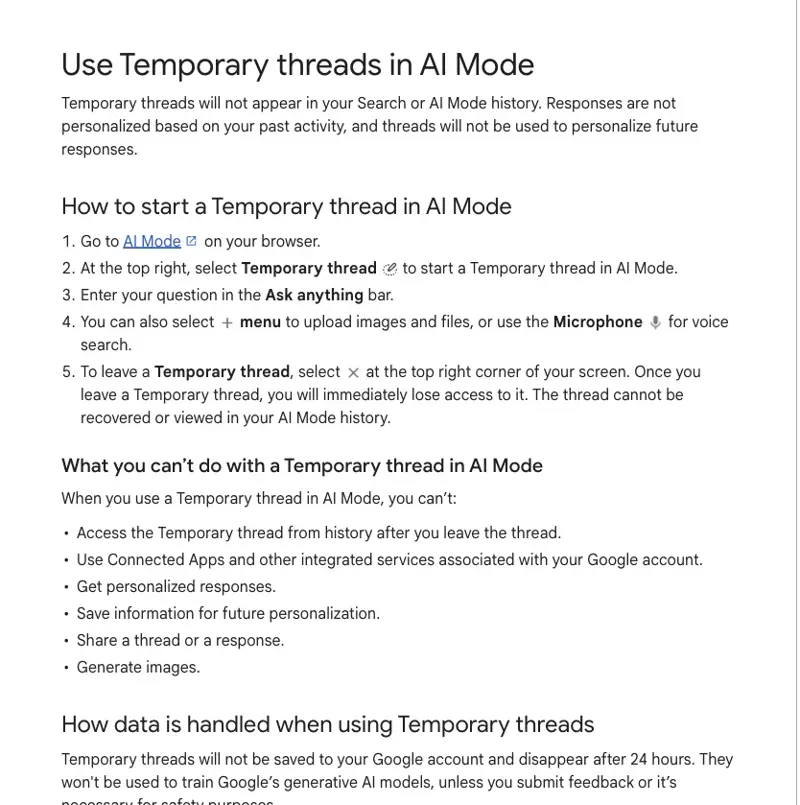
Google’s Help page gives the steps:
- Go to AI Mode on your browser.
- At the top right, select the Temporary thread icon.
- Enter your question in the Ask anything bar.
- Optionally, use the plus menu to upload images and files, or the microphone for voice search.
- To leave, select the close icon at the top right of your screen.
The fifth step matters. The Help page says that once you leave a temporary thread, “you will immediately lose access to it”, and that the thread “cannot be recovered or viewed in your AI Mode history”. If the answer contained something you need, copy it out before you close the thread.
If you do not see the icon, it may not have reached you yet. The Help page does not say whether you need to be signed in, so I would not assume either way.
Four promises that people blur together
The most useful way I have found to think about any “private” mode is to split it into four separate promises. Marketing language treats them as one. Google’s pages treat them as different, and so should you.
| Promise | What it means | What Google’s Help page says for temporary threads |
|---|---|---|
| Not in my history | You cannot scroll back to it | “Temporary threads will not appear in your Search or AI Mode history.” |
| Not used to personalize | It does not shape your future results | Responses “are not personalized based on your past activity”, and threads “will not be used to personalize future responses” |
| Not used to train | It does not teach the model | Not used to train Google’s generative AI models “unless you submit feedback or it’s necessary for safety purposes” |
| Not retained or reviewed | Nobody keeps it or reads it | Not promised in those words. The page says threads disappear after 24 hours, and does not mention human review |
The first three are written down. The fourth is where the questions are. The Help page says threads disappear after 24 hours. It does not say who or what can see a thread before then, and it does not mention human review of temporary threads at all. I would not read the silence as a yes or a no.
What Google says it still collects
Under “How data is handled when using Temporary threads”, the Help page says that Google “will still collect data and use data that is not associated with your account” to keep its services running, keep them safe and support its business operations. It also says:
- Your browser may still save browsing history.
- Websites you visit from a thread, and the services those sites use, may still collect data. The page names Google Analytics as an example.
Read those two lines together and the picture is clear. A temporary thread protects the record that lives in your account. It does not turn your browser into a blank slate, and it does not change what a website you click through to does with your visit. If the answer cites a page and you open it, you are a visitor to that page like any other.
On a work or school network, assume the network’s own rules still apply. That is my advice, not something Google’s page says.
Where the “three years” number comes from
The number people keep quoting is “up to three years, even after you delete”. It is real, and it is on Google’s Gemini Apps privacy page, not on the AI Mode page. This is what that page says, as I read it on November 19:
- A subset of chats in the Gemini app are reviewed by human reviewers.
- Reviewed chats are retained for up to three years, and that holds after you delete your history.
- Chats are disconnected from your account before outside service providers receive them.
- Temporary Chats in the Gemini app are kept with your account for about two months and are not used to train Google’s AI models.
TechCrunch’s headline on November 17 says Google will keep Gemini chats for two months, up from 72 hours, even with history off. That is a separate change in a separate product.
So there are two Google “temporary” modes in the news this week with different numbers: AI Mode temporary threads (disappear after 24 hours, per the Help page) and Gemini Temporary Chats (kept about two months, per the privacy page). They are described in similar words and sit in different places. If you care about the three-year figure, it applies to Gemini chats that get picked for review. A Perplexity search noted that the Gemini page does not publish the odds that a Temporary Chat is selected for review, and I found nothing that says it for AI Mode either.
What I could not find is any statement that AI Mode temporary threads are or are not subject to the same human review. The honest position is: the figure does not appear on the AI Mode Help page, and the Help page does not rule review out either.
Temporary thread versus Gemini Temporary Chat
Here is how the two compare, using only what each of Google’s pages says:
| Question | AI Mode temporary thread | Gemini app Temporary Chat |
|---|---|---|
| Where it lives | Google Search, in AI Mode | The Gemini app |
| How long Google keeps it | “Disappear after 24 hours” (Help page) | About two months (Gemini privacy page) |
| Used to train models | No, unless you submit feedback or safety needs it | “Not used to train Google’s AI models” |
| Connected Apps such as Gmail | Not available | Not covered on the pages I read |
| Human review | Not mentioned on the Help page | The privacy page says a subset of Gemini chats are reviewed |
Two further notes. Deleting items from your normal AI Mode history is a different thing: the AI Mode help page says they may still appear in My Activity for some time and are auto-deleted in less than 24 hours. And that page says AI Mode history needs you to be signed in with Incognito off, so a browser Incognito window does not give you a normal AI Mode history at all. A temporary thread is not that; it is a Google feature you choose inside AI Mode.
What you cannot do in one
Google lists six limits. In a temporary thread you cannot:
- Access the thread from history after you leave it.
- Use Connected Apps and other integrated services associated with your Google account.
- Get personalized responses.
- Save information for future personalization.
- Share a thread or a response.
- Generate images.
Number two is easy to miss. If you have connected apps to AI Mode, a temporary thread will not use them. We covered one such connection in Google AI Mode Now Reads Your Gmail and Adds Calendar Events; the temporary thread is the mode that leaves that kind of connection out.
Number five matters for teams: you cannot share a temporary thread with a colleague. If the answer is something to pass along, copy it out first.
What the research says about “private” modes
Nothing I found measures how people understand Google’s new feature, and I want to be clear about that. What does exist is older research on the browser version, and it is not flattering. Perplexity’s search through EBSCOhost turned up a 2018 study by Wu and colleagues, published by ACM. It tested 13 disclosures across 20 scenarios with 460 participants, and found that the disclosures failed to correct most of the misconceptions it tested, including beliefs that private browsing prevented location inference or tracking by websites and network providers. That is a browser study, not a chatbot study.
A 2025 ACM experiment looked at chatbots. Participants were more comfortable sharing emotional information with a chatbot framed as a “stranger” that would not remember them across sessions, but only when emotional disclosure came first. That measured comfort, not understanding of what a provider could keep.
The two studies together support a cautious reading. Framing can change how comfortable people feel, and neither study measured whether people understood which promises were being made. The “Welcome, stranger” screen that Search Engine Roundtable saw in the test is similar in spirit to the “stranger” framing in the 2025 experiment, though that study did not look at Google.
What people on X are saying
I asked Grok on November 19 to summarize reactions on X. Treat this as a mood reading rather than data: Grok said the volume was modest, mostly news aggregation and tech accounts, and mostly neutral to positive. It said users called it a “privacy upgrade” and “incognito for AI search”. I could not check its quotes one by one, so I do not name accounts here.
Three themes recurred in its summary:
- Welcome, with a shrug. Grok described light praise for a long-overdue privacy option.
- “Temporary” is not “zero retention”. Grok named two accounts saying so. One said temporary doesn’t necessarily mean zero data retention; the other warned that no search history is not a blanket promise of anonymity, and not to treat it as permission to paste confidential client information.
- Confusion with Gemini. Grok said many accounts and articles describe temporary threads as the same as Gemini’s Temporary Chats, which fuels the assumption that the Gemini retention numbers carry over. They may or may not. Google has not said.
The second point is the one to take seriously, and it matches what the Help page says.
A worked example: three questions, three decisions
This is a sample I wrote to show how to apply the four promises. It is not output from a Google product, and I have not tested the feature with these questions.
Say you are about to ask AI Mode three things:
| Question | Which promise do I need? | Use a temporary thread? |
|---|---|---|
| “Gift ideas for my partner’s birthday, around $80, they love ceramics” | Not in history, not in recommendations, so the surprise is not spoiled | Yes. This is Google’s own example |
| “What are the symptoms of a thyroid problem?” | Not in history, not personalized: I do not want health topics shaping my ads and results | Yes, and I would also keep the question general, with no names or dates |
| “Summarize the termination terms in this client’s contract” (with the contract text pasted in) | Not retained and not reviewed, which the Help page does not promise | No. Use a tool your organization has approved, or do not paste the contract |
The third row is the useful one. The question is not whether the thread is saved in your history. It is whether you are allowed to put that text in front of Google at all. A temporary thread answers the first question and does not answer the second.
The first rule I would use: type into a temporary thread only what you would be comfortable with Google holding for a day, plus whatever non-account data it collects. That is my rough translation of the Help page. If that sentence makes you uncomfortable, the thread is the wrong tool.
What this means for you
If you are a parent shopping for a surprise. Use a temporary thread for the gift research, as Google intends. Your family’s shared device will not show it in history and your recommendations will not suddenly feature the gift. First action: open AI Mode, tap the icon and ask for gift ideas.
If you are a freelancer or consultant. The word that matters is “confidential”. A temporary thread is not a confidentiality control. Do not paste client names, numbers or documents. First action: write a one-line rule for yourself about what can be typed into any consumer AI tool, and put it where you will see it.
If you work in health, law or finance. Your professional duties are the ruling constraint, not Google’s settings. The Help page does not mention human review of temporary threads, and it says Google still collects data not tied to your account. First action: check your employer’s policy on consumer AI tools before using any mode of any chatbot with work material.
If you are a student. A temporary thread keeps a sensitive question, such as health or a personal situation, out of your history and personalization. It is not a way to hide work from a school that checks what you did. First action: use it for personal questions and keep schoolwork in a normal thread you can cite.
If you run a small business. AI Mode may be a place where customers find you, but a temporary thread is a customer’s tool, not yours. For your own planning queries, the same rule as the freelancer applies. First action: decide what staff may paste into a consumer AI tool and write it down.
If you share a computer. Temporary threads keep questions out of your history, and Google says closing the thread ends access at once. Your browser may still save browsing history, so a visited link may appear. First action: if you need a clean slate on a shared machine, use a separate browser profile as well.
If you are curious but nervous about AI privacy. Treat the four promises as a checklist for any tool. First action: for the AI tools you use, find the page that says what is saved, what trains, how long it stays and whether people can read it.
Edge cases and troubleshooting
The icon is not there. The feature is rolling out. Google’s post says desktop and mobile browsers across all languages supported in AI Mode. If you cannot see it, it may not have reached you yet: try a desktop browser, make sure you are on AI Mode, and check again later. The Help page does not say whether you need to be signed in.
You closed the thread and need the answer. It is gone. Google’s Help page says you cannot recover it or view it in your AI Mode history. Copy anything you need before you close.
You want to share the answer. You cannot share a temporary thread or a response. Copy the text out, or ask the same question in a normal thread.
It will not use your connected apps. Connected Apps and other integrated services associated with your Google account are not available in a temporary thread. Switch to a normal thread for tasks that need your own data.
You asked for an image. You cannot generate images in a temporary thread, per the Help page. Use a normal thread, and weigh that against the privacy you wanted.
You gave feedback on an answer. AI Mode’s help page says that feedback you submit includes your most recent search query and its search results. The temporary threads Help page says threads are not used for training unless you submit feedback. So submitting feedback sends your question to Google, even from a temporary thread. If the question was sensitive, do not send feedback on it.
A website you opened still knows you visited. Google’s Help page says websites you visit and the services they use, including Google Analytics, may still collect data. The thread does not change what the site does.
Your browser history shows the page you clicked. The Help page says your browser may still save browsing history. Clear it as you normally would, or use a separate profile.
You confused it with Gemini’s Temporary Chat. The two have different rules. AI Mode temporary threads disappear after 24 hours per the Help page. Gemini Temporary Chats are kept about two months per the Gemini privacy page. If you use both, remember which is which.
What this can’t fix
It cannot make you anonymous. Google says it still collects data that is not associated with your account. A session “detached from your account” is not the same as a session nobody can learn anything from.
It cannot make confidential material safe to paste. The Help page does not mention human review of temporary threads, and it names safety purposes as an exception to the no-training rule. Neither of those is a statement that the thread is confidential.
It cannot protect you from the sites you open. Those sites run their own analytics and the Help page says so.
It cannot undo what you already typed in a normal thread. A temporary thread affects only the thread. Earlier history stays under the controls you already have: the AI Mode history panel and My Activity.
It cannot tell you how long review copies are kept. The three-year figure is documented for reviewed Gemini chats. For AI Mode temporary threads, no equivalent number has been published that I could find.
FAQ
What is a temporary thread in AI Mode? It is a separate session in Google’s AI Mode that does not appear in your Search or AI Mode history and is not personalized from your past activity. Google announced it on November 17, 2026.
Is it the same as incognito mode? Not exactly. Browser Incognito is a browser setting. A temporary thread is a Google feature inside AI Mode. Google’s Help page says your browser may still save browsing history, so using both together does not change that line.
Does Google keep temporary threads? Google’s Help page says threads are not saved to your Google account and disappear after 24 hours. It also says Google still collects data that is not associated with your account.
Are temporary threads used to train Google’s AI? Google’s Help page says they won’t be used to train Google’s generative AI models unless you submit feedback or it is necessary for safety purposes. Google’s announcement post does not mention training.
Can people at Google read my temporary threads? The Help page does not mention human review of temporary threads, so I cannot say yes or no. For the Gemini app, Google’s privacy page says a subset of chats are reviewed by human reviewers.
Where does the “three years” figure come from? From Google’s Gemini Apps privacy page, which says reviewed chats are retained for up to three years even after you delete your history. It is about the Gemini app. It is not on the AI Mode Help page.
Can I use a temporary thread with Gmail or my Google apps? No. Google lists Connected Apps and other integrated services associated with your Google account among the things you cannot use in a temporary thread.
How do I turn it on? There is no setting. Open AI Mode, select the Temporary thread icon at the top right and ask your question. Select the close icon to leave.
Is it available in my country and language? Google says it is rolling out globally on desktop and mobile browsers across all languages supported in AI Mode. Rollouts take time, so it may not have reached you yet.
Should I put client or patient information in one? No. Even a thread that is not saved is still a conversation with a service you do not control, and the Help page does not promise that nobody can see it.
The bottom line
Google added a useful control. It keeps a question out of your history and out of the profile that shapes your future results, and it does so without a settings trip. For a surprise gift, a private health question or a one-off curiosity, it is exactly the right tool.
It is a privacy-of-record feature, not a confidentiality feature. Google says threads disappear after 24 hours, are not used for training unless you submit feedback or safety needs it, and that it still collects data not tied to your account. The Help page is silent on human review. The scary “three years” number belongs to the Gemini app, but until Google says more about AI Mode, the safe rule is to type nothing you could not accept Google holding for a day.
To go deeper on what AI tools do with what you type, try AI Privacy 101 (first 2 lessons free): Start lesson 1 free →
Your first step today: open AI Mode, find the Temporary thread icon, and decide which one question you were about to type into a normal thread that belongs in this one.
Sources
- Google, “Temporary threads are now available in AI Mode in Search”, November 17, 2026
- Google Search Help, “Use Temporary threads in AI Mode”
- Google Search Help, “AI Mode in Search Labs”
- Gemini Apps Help, “Gemini Apps Privacy Hub”
- TechCrunch, “Google’s AI feature in Search gets its own incognito mode”, November 18, 2026
- TechCrunch, “Google to keep Gemini chats for 2 months, up from 72 hours, even with history off”, November 17, 2026
- Search Engine Roundtable, “Google AI Mode Start Temporary Thread”, November 16, 2026
- Wu et al., “Your Secrets Are Safe: How Browsers’ Explanations Impact Misconceptions …”, ACM, 2018
- ACM, “The Impact of a Chatbot’s Ephemerality-Framing on Self …”, 2025
- Reactions on X, summarized by Grok on November 19, 2026 (the posts were not opened individually)