

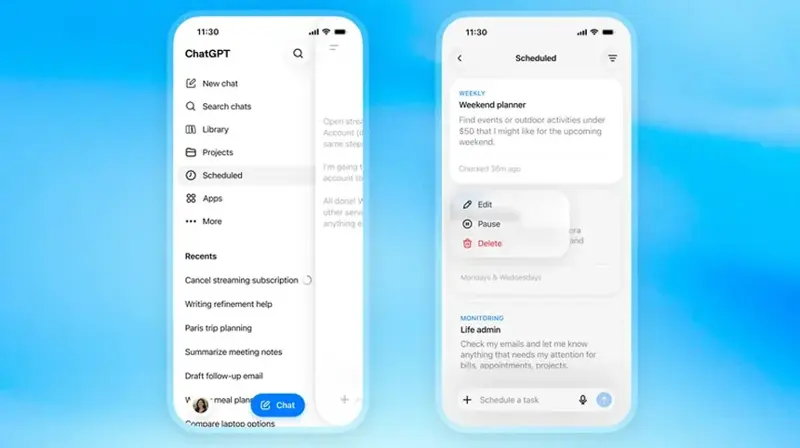
The hard part of ChatGPT’s relaunched Scheduled Tasks isn’t setting one up. It’s the blank-page problem: you open it, you can schedule anything, and your mind goes empty. So here are nine that actually earn their slot — each one a recurring chore you can hand off, with the exact words to type to set it up.
New to the feature? Start with our how-to walkthrough for the basics — where the Scheduled page lives, which plans have it, the limits. This piece is the part-two: the copy-paste examples. Just paste a prompt below into ChatGPT, tweak the time to your life, and you’re done.
Update, September 5, 2026: it’s free now (up to 3 tasks), and you can share one. OpenAI opened Scheduled Tasks to free accounts in late August — free users get up to 3 active tasks, no card required. OpenAI also added sharing: open a task’s settings and you can send a copy to a coworker or friend, so if you land on a briefing format that works, you don’t have to describe it to them, you can just hand it over.
One note before the list. A few of these are monitoring tasks — ChatGPT watches something and only pings you when it changes. Those run at most once an hour, so think “tell me today,” not “alert me this second.” Everything else runs on a clock you set.
1. The weekday morning briefing
The classic, and still the best. Instead of opening six tabs before coffee, get the day handed to you.
“Every weekday at 7:30 a.m., give me a 5-bullet briefing: top 3 headlines in [marketing / nursing / real estate], one notable AI update, and one short productivity tip. Keep it under 150 words.”
Swap the bracket for your field. The “keep it under 150 words” matters — without a length cap, briefings balloon.
2. The Monday week-planner
Mondays go better when something asks you the right questions before you’ve fully woken up.
“Every Monday at 8:00 a.m., ask me these three questions one at a time: What are my top 3 priorities this week? What’s one thing I’m avoiding? What’s one thing I can say no to?”
It’s a tiny ritual. But a planning prompt that shows up on its own beats a planning habit you keep meaning to start.
3. Recurring reminders that don’t need an app
You’ve got a reminders app you ignore. The difference here is ChatGPT can fold context into the nudge.
“Every day at 9:00 p.m., remind me to take my evening medication, and ask if I drank enough water today.”
Bills, stretch breaks, “call Mom,” water the plants. Boring. Boringly effective.
4. The price watch (monitoring)
This is the one that pays for the subscription if you shop with any patience.
“Once a day, check this product page [paste link] and notify me only if the price drops below $90.”
Same trick works for flights, a used car listing, or “tell me when this game goes on sale.” You stop manually checking. It checks.
5. The quiet news monitor (monitoring)
Most news alerts are noise. A monitoring task can be picky on your behalf.
“Watch for official news about [the iPhone 18 / a specific company / a policy]. Only message me if there’s a confirmed announcement — skip rumors and speculation.”
The “skip rumors” instruction does real work. It’s the difference between staying informed and getting buried.
6. The daily language drill
Habits die from friction. A task that shows up removes the friction.
“Every day at 6:00 p.m., give me five short Spanish sentences to translate, ranging from beginner to intermediate. Don’t show the answers until I reply.”
Works for vocabulary, a coding concept a day, interview-question practice — any “five minutes a day” skill you keep dropping.
7. The Friday loose-ends sweep
Fridays are where the week’s dropped balls hide.
“Every Friday at 4:00 p.m., ask me: What did I forget to follow up on this week? Anything I need to invoice? Anyone I owe a reply? Then help me draft whatever I name.”
It catches the unglamorous stuff that turns into Monday’s fire.
8. The weekly meal plan + grocery list
A small one that quietly removes a recurring decision.
“Every Saturday at 10:00 a.m., suggest 5 simple weeknight dinners (30 minutes or less, not too much red meat) and turn them into one combined grocery list grouped by aisle.”
Tell it your constraints once. Get a usable plan every week without re-explaining your life.
9. The end-of-day work log
If you ever scramble to remember what you did (for standups, reviews, or invoices), automate the capture.
“Every weekday at 5:30 p.m., ask me ‘What did you get done today?’ and save my answer as a short, dated bullet. On Fridays, compile the week into a summary I can paste into my status update.”
Two minutes a day. A clean record when you need it.
A few honest caveats
These are genuinely useful, but keep your expectations honest:
- Free accounts get up to 3 tasks now — no paid plan required to start. Paid plans still get a higher cap (Go and Plus go higher, Pro tops out around 15), so if 3 isn’t enough, that’s the reason to upgrade.
- Sharing is new — check the task’s own settings for exactly how it behaves before you rely on it for something a coworker needs to see updated in real time.
- Monitoring is hourly, not instant. Great for “let me know today.” Wrong tool for “alert me the second it happens.”
- Verify anything that matters. A scheduled briefing is still an AI answer. If it tells you a price or a fact you’re about to act on, double-check it.
- Start with one or two. Nine at once is a recipe for nine notifications you’ll mute by Thursday. Pick the one chore that annoys you most and start there.
The bottom line
The best scheduled task is the one that replaces a thing you keep forgetting or keep checking. Don’t build a fancy system. Steal one prompt above, set the time, and let it run for a week. If it sticks, add another.
Want the setup basics first? The full Scheduled Tasks how-to covers the Scheduled page and the limits. And to get genuinely fast across all of ChatGPT — not just this feature — the ChatGPT for Business course is built for exactly that.