

There’s a specific kind of business owner who’s been putting off a website for three years. The designer quote was $3,000. The Wix trial is still sitting at “choose a template.” Meanwhile the business runs fine on word of mouth and an Instagram page — but every referral who Googles the name finds nothing.
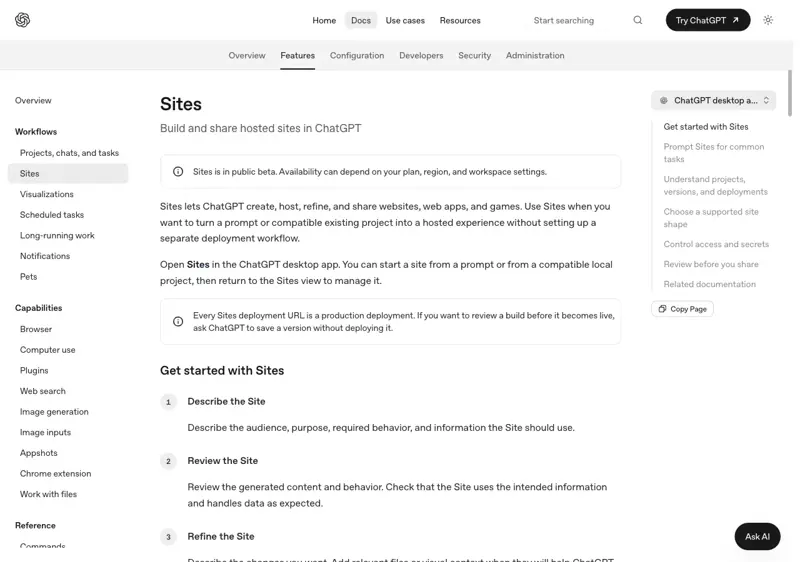
This week that calculation changed. OpenAI rolled out ChatGPT Sites: you describe the website you want, ChatGPT builds it, shows you a preview, publishes it, and — this is the new part — hosts it, custom domain and all. No designer, no template maze, no separate hosting bill.
It’s a public beta with real limits and one big geographic catch, so before you cancel anything, here’s exactly what it does and doesn’t do.
What just changed
ChatGPT could already write website code — but then you had to figure out where to put it. Sites closes that gap: build, preview, publish, and host, all inside ChatGPT. Sites went live as part of the ChatGPT Work launch wave, with public publishing switched on July 9–10.
The facts that matter, straight from OpenAI’s help docs:
- Who gets it: paid plans only — public beta on everything except Free and Go. Pro, Pro Lite, Enterprise, and Edu got it first; Plus and Business are rolling out “over the coming days.”
- Where it doesn’t work: not available in the EEA, Switzerland, or the UK at launch. If that’s you, this one’s a watch-and-wait.
- What it makes: real hosted websites and lightweight apps — OpenAI’s own examples include dashboards, project trackers, launch calendars, portals, and reports. Your site publishes to a
.chatgpt.siteaddress, or your own domain. - Custom domains: supported (where available) if you already own the domain — you add DNS records it gives you. Not available for Enterprise workspaces at launch.
Build it: the actual steps
You’ll need a paid ChatGPT plan with access (check by looking for Sites in the sidebar, or just try step 2).
- Open ChatGPT Work on the web, or Work/Codex mode in the desktop app. (Sites doesn’t run in the classic chat view.)
- Describe the site — include the word “website” or tag
@Sites. The more real content you give it, the less placeholder junk you get back. A prompt that works:
Build me a website for my one-person dog grooming business,
"Suds & Scissors" in Portland. Pages: Home, Services with prices
(bath $45, full groom $85, nail trim $15), About me, and a contact
section with my phone number and a booking request form.
Tone: warm and simple. Mobile-first. Here's my logo and three photos.
- Review the preview. It generates the site and shows it to you privately first.
- Refine in plain English. “Make the header green,” “swap the About photo,” “add a FAQ section.” No code, just requests.
- Publish. Set sharing to Anyone on the internet, hit Publish, and you’re live on a
.chatgpt.siteURL. - Connect your domain (optional): Site settings → Add domain → enter your domain or subdomain → copy the DNS records into your registrar (GoDaddy, Namecheap, wherever you bought it) → wait a few minutes and refresh. ChatGPT can even walk you through your registrar’s screens if you get lost.
One genuinely important habit from the docs: every deployment URL is a production URL. When you deploy a change, it’s live immediately. If you want to review first, ask ChatGPT to save a version without deploying, look it over, then deploy. Do that from day one and you’ll never accidentally publish a half-finished pricing page.
The honest cost comparison
| Option | Cost | What you get |
|---|---|---|
| ChatGPT Sites | included in your paid plan (Plus $20/mo and up) | Fastest description-to-live-site path; hosting included; beta limits |
| Wix / Squarespace | roughly $16–$99/mo | Mature builders: templates, e-commerce, SEO tools, years of stability |
| Hire a designer | ~$2,500–$8,000 one-time | Custom brand, conversion thinking, someone accountable — and the slowest path |
If you already pay for ChatGPT, the marginal cost of trying Sites is zero. That’s the disruptive part — not that it beats Squarespace at Squarespace’s game, but that “good enough, today, for nothing extra” beats “perfect, someday, for $4,000” for a lot of one-person businesses.
What this means for you
If you have no website at all: this is your afternoon project. A clean three-page site with your services, prices, and phone number beats the Instagram-only setup every referral search. Set it up on the .chatgpt.site address first; buy the domain once you’re happy.
If you’re mid-Wix-procrastination: try Sites first — describing what you want turns out to be much easier than assembling it from template blocks. If you outgrow it, you’ll at least know exactly what you want from the bigger tool.
If you already have a real website: don’t migrate. Sites is a beta; your established site has SEO history a .chatgpt.site page doesn’t. Use Sites for the side projects — a landing page for one service, an event page, a client portal.
If you sell products online: hold off. There’s no documented e-commerce or payment support in the beta. This is for service businesses, portfolios, and lead generation — “call me or fill the form” businesses.
If you’re in the EU, Switzerland, or the UK: not yet available — OpenAI says “at launch,” which usually means a compliance-review delay rather than never (the same pattern played out with other OpenAI features). The steps above will be identical when it arrives.
What it can’t do (and the risks)
- It’s a beta with usage caps. Limits are plan-specific and apply across all your sites; hit one and you can’t create new sites or add storage until usage drops. OpenAI says limits “may change during the public beta” — which cuts both ways.
- No documented SEO controls. Sitemaps, robots rules, meta-tag control — none of it is documented yet, and early testers are blunt that a fresh
.chatgpt.sitesubdomain starts with zero search authority. Fine for “site to send people to”; weak for “site people find on Google.” (Your own domain helps long-term.) - No store, no payments. Booking requests via a form, yes. Taking money, no.
- Lock-in is real. Sites are managed inside ChatGPT — there’s no documented export-and-move path, and the docs don’t say what happens to your site if you cancel the subscription. Keep your content (text, images, prices) in your own files so you can rebuild anywhere.
- Deletion is forever. Deleting a site permanently removes it — no restore. And remember the flip side: what’s published is live on the open internet, so proofread like it matters.
The bottom line
For twenty years, the honest answer to “how do I get a website?” involved either money, weekends, or both. ChatGPT Sites collapses that to a conversation — with beta caveats attached. If you’re a service business without a site, the cost of finding out is one afternoon and $0 on top of a plan you may already have. Write the description, publish to the free address, and see if what comes back is better than nothing. It almost certainly is — because right now, nothing is what your referrals are finding.
Once the site is up, the next question is whether AI tools can run more of the business around it — our ChatGPT for Business course covers that end to end, and AI Visibility for Local Businesses covers how customers find you now that AI answers half their searches.
Sources
- Creating and managing ChatGPT Sites — OpenAI Help Center (accessed July 11, 2026)
- ChatGPT Sites — OpenAI developer docs
- OpenAI launches ChatGPT Sites — NewsBytes (July 2026)
- Squarespace 2026 pricing guides; small-business web design cost surveys (2026)
- Early builder reactions on X (July 10–11, 2026)