On September 14, 2026, Anthropic put out a press release that got the headline wrong before anyone even read the product. Half the trade coverage said “5 skills.” The actual GitHub repo — public, Apache-2.0 licensed, sitting right there for anyone to clone — ships 8. If you’re going to spend $70-120 a month on this thing, you should probably know what you’re buying before the marketing copy tells you.

So let’s look at what actually shipped, what it costs, and — because three of the eight skills are things you can rebuild yourself in a free ChatGPT or Claude account this afternoon — where the free version ends and the $120/mo version starts earning its keep.
What just changed
Claude for Financial Advisors is a plugin for Claude Cowork (Anthropic’s agent workspace) built specifically for the daily grind of running an advisory practice: prepping for client meetings, checking portfolio drift, writing up estate discrepancies, turning meeting notes into CRM entries. It’s not a new model. It’s not “Claude, but smarter at finance.” It’s a set of instruction folders — Anthropic calls them “skills,” and the industry has settled on that word for this pattern — plus a batch of MCP connectors that let Claude actually reach into the tools an advisor’s practice already runs on.
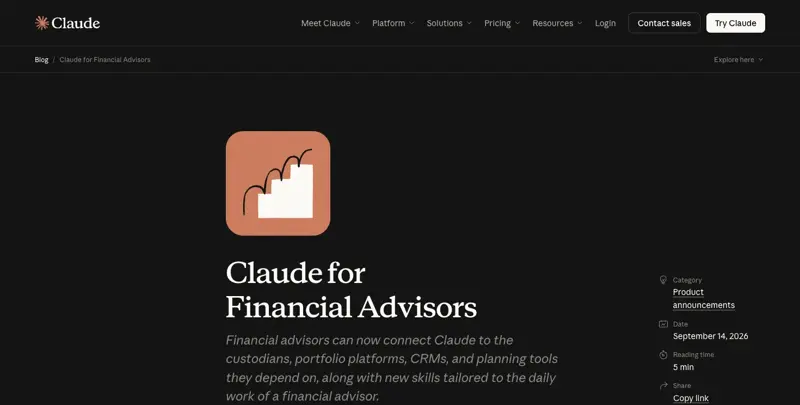
The connector list is long: BlackRock, Addepar, Orion, Wealthbox, Wealth.com, Envestnet/Tamarac, iCapital, Vanguard, Zocks, and SS&C Black Diamond, stacked on top of the integrations Claude already had with Microsoft 365, Salesforce, DocuSign, Box, FactSet, S&P Global, and Morningstar. That’s the actual product — a hub that talks to the CRM, the portfolio platform, the estate-planning tool, and the compliance archive all at once, so an advisor isn’t tab-switching between six systems to build one client brief.
The custodian angle is the one getting the press attention, and it’s worth being precise about it. Charles Schwab Advisor Services — the custodial arm serving over 16,000 independent RIAs — is the first named custodian partner. But I pulled the actual README from the GitHub repo, and here’s the exact line: “Schwab (coming soon) | Custodial account, titling, and beneficiary data for the estate and rebalance reviews. The connector is not yet available.” The press release says “partnership.” The repo says “not yet available.” Both are true — this is what a launch-day announcement with a phased rollout actually looks like — but if you’re an advisor deciding whether to sign up this week specifically for Schwab data pulling into your rebalance reviews, that feature isn’t live yet.
Pricing sits in the $70-120 per user per month range, usage-based rather than flat, and Anthropic is steering RIAs toward Enterprise plans specifically because that’s the tier with audit logs — a detail that matters more than it sounds like it should, and I’ll come back to why. Anyone requesting an Enterprise license before the end of September 2026 gets a one-time usage credit, which is the kind of “sign up now” nudge every SaaS launch runs, so don’t read too much urgency into it beyond that.
Peter Nolan, Anthropic’s Head of Asset & Wealth Management, put the pricing philosophy about as plainly as an exec quote gets: “If they use it a lot they will pay a lot, but they’ll be getting a lot of value for it.” Translation: this isn’t a $20/mo seat license. It’s metered, and a busy advisor running pre-meeting briefs on 40 households a week will land closer to $120 than $70.
And this didn’t happen in a vacuum. Google shipped Gemini Enterprise for Financial Services on August 25. OpenAI followed with ChatGPT for Financial Services on September 10, aimed mostly at junior bankers doing deal work. Anthropic landed September 14, aimed squarely at the RIA and advisor desk instead of the banking side. Three labs, three weeks, three different corners of finance — which tells you this is a land-grab quarter, not a coincidence.
What advisors are actually saying about it
I went looking for real-time reaction on X before writing this, and the honest answer is: advisor voices are scarce right now. The conversation is dominated by trade press — InvestmentNews, WealthManagement, ThinkAdvisor, Barron’s — and by the partner companies themselves. Addepar founder Joe Lonsdale posted about the integration, and a finance-data account called unusual_whales picked it up and pulled over 4,500 likes, which tells you more about that account’s reach than about advisor sentiment specifically.
The skepticism that does exist is pointed and worth sitting with. One commenter, @websterweby, put it bluntly: “Advisors don’t need another chatbot. They need audit trails… Who owns the liability when the model is wrong?” That’s not a throwaway complaint — it’s the exact question the “model-enforced, not runtime-enforced” guardrail detail above should make you ask too. Another thread of reaction, paraphrased rather than quoted verbatim here because the original language doesn’t belong in a professional publication, amounted to a flat “why would anyone hand a chatbot their clients’ sensitive financial data.” Fair question. The answer this post keeps circling back to: because the practice already generates that data risk the moment anyone pastes a client’s numbers into any AI tool, paid or free — the $120/mo version doesn’t eliminate that risk, it just adds an audit trail on top of it. Whether that trail is worth the price is a real business decision, not a marketing slogan.
The quiet-advisor-reaction pattern is itself a data point. When Copilot Cowork launched inside Microsoft 365 earlier this year, RIA Twitter/X lit up within days. Three weeks after this launch, it hasn’t, at least not yet — which either means advisors are still evaluating quietly before they post, or the RIA channel doesn’t live on X the way the wirehouse and fintech crowd does. Worth watching over the next month rather than reading as a verdict either way.
The 8 skills — and the 3 you can build for free today
Here’s the repo, straight from GitHub, showing the actual folder structure:
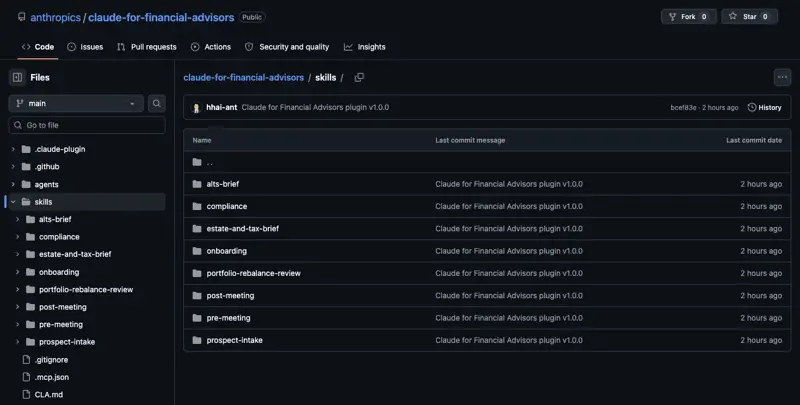
That’s alts-brief, compliance, estate-and-tax-brief, onboarding, portfolio-rebalance-review, post-meeting, pre-meeting, and prospect-intake. Eight. Count them yourself.
Three of the eight genuinely need paid connectors and can’t be honestly replicated for free:
- Onboarding interviews the advisor about their stack, tests each connector, and runs a demo pre-meeting workflow. There’s nothing to DIY here — it’s a setup wizard for a system you don’t have.
- Prospect intake extracts data from statements, exports, and screenshots in parallel, then produces three separate documents (a prospect summary, an internal analyst handoff, and a “what to expect” client memo). The parallel-extraction pipeline is the actual value; a free chatbot processes one document at a time.
- Alts brief pulls IRR, TVPI, DPI, and RVPI figures live from iCapital, plus NAV, commitments, and capital calls. Without the iCapital connector, you’re retyping numbers from a PDF, which defeats the point.
The other five — pre-meeting, portfolio-rebalance-review, estate-and-tax-brief, post-meeting, and (with an asterisk I’ll explain) compliance — are workflows you can rebuild with a well-written prompt and some copy-pasted data. Not identically. But close enough that most solo and small-team advisors don’t need to pay $120/mo for them on day one.
Let’s walk through the one that matters most: portfolio rebalance review.
The walkthrough: rebuilding portfolio rebalance review for free
The paid skill pulls holdings, values, cost basis, and performance straight from Orion, Addepar, or Envestnet, runs a sanity check on the data, compares it against a model or IPS target, flags anything outside a ±5% band, and — this is the part that matters — generates tax-aware alternatives: harvest a loss here, use a tax-advantaged account there, coordinate wash sales, respect RMD timing. It never picks trades for you. It never estimates a cost basis it wasn’t given. It writes “— pending [connector]” instead of guessing at missing data.
You can replicate the drift math and the discipline of “never guess” with a free tool. You can’t replicate the live data pull or the wash-sale coordination across accounts you didn’t manually gather. Here’s the prompt pattern and a full worked example, so you can see exactly where the line sits.
Step 1 — Write the prompt with explicit guardrails. The instructions that matter aren’t “calculate drift.” They’re the constraints: use only the values you’re given, verify the market values actually sum to the stated AUM, verify the targets sum to 100%, calculate drift in percentage points and dollars, never recommend specific trades, never estimate taxes, and label any rebalance math as “a mechanical amount before tax, suitability, and implementation review” — not a recommendation.
Step 2 — Feed it real numbers. Here’s a household with $1,250,000 in AUM across five asset classes:
| Asset class | Market value | Actual % | Target % |
|---|---|---|---|
| US equity | $500,000 | 40.0% | 35% |
| Intl equity | $187,500 | 15.0% | 15% |
| Fixed income | $375,000 | 30.0% | 35% |
| Alternatives | $125,000 | 10.0% | 10% |
| Cash | $62,500 | 5.0% | 5% |
| Total | $1,250,000 | 100% | 100% |
YTD performance: 6.2% against a 6.8% benchmark.
Step 3 — Check what the model should catch before it calculates anything. A correctly-prompted model verifies $500,000 + $187,500 + $375,000 + $125,000 + $62,500 = $1,250,000 (it does) and that 35 + 15 + 35 + 10 + 5 = 100 (it does). If either check fails, the right behavior is to stop and flag it, not silently rebalance against numbers that don’t add up. This is the step most people skip when they hand-roll a prompt, and it’s exactly the step the paid skill’s SKILL.md calls out as mandatory.
Step 4 — Read the drift output. Three of the five positions are sitting exactly on target — no action needed there. Two are meaningfully off:
- US equity is +5.0 percentage points over target — $62,500 over.
- Fixed income is −5.0 percentage points under target — $62,500 under.
Step 5 — Get the caveat, not a trade order. A properly constrained output reads something like: “US equity is $62,500 over its 35% target; fixed income is $62,500 under its 35% target. This is the mechanical rebalance amount only — it does not account for tax-lot dates, account registration, wash-sale exposure, or the client’s stated risk tolerance. Review tax lots and account type before recommending any transaction.” Notice the portfolio is also underperforming its benchmark by 0.6 percentage points YTD while running overweight equity — that’s a conversation starter for the actual advisor, not something the AI should editorialize on.
That’s the whole loop: real numbers in, disciplined math out, a hard stop before it turns into investment advice. It took about four sentences of prompt engineering to get there. What it can’t do is pull those five numbers out of Orion automatically, and it can’t check wash-sale exposure across accounts you didn’t think to paste in — which is exactly the gap the $120/mo version is selling.
Pre-meeting prep, briefly, works the same way in miniature: paste in whatever you can export from your CRM and portfolio system — last meeting’s notes, current holdings, any open follow-ups — and prompt for an executive snapshot, a “what’s changed since last time” section, an agenda, and a list of things to verify with the client before the meeting starts. You lose the automatic pull from six systems at once. You keep the structured output.
Post-meeting notes is the easiest of the three to DIY, and worth calling out because the paid version has a real gap here too: paste a meeting transcript (recorded with the client’s consent, obviously) and ask for a structured summary — decisions made, action items, anything that needs a CRM note versus a CRM task. Notably, even the paid skill doesn’t send a client follow-up email natively — it writes CRM entries. So on this one specific point, free and paid land in the same place: you’re still the one hitting send.
Estate and tax briefing is the least clean DIY replication of the three. The paid version reads Wealth.com’s actual estate-document analysis and cross-checks it against live account titling and beneficiary data. You can approximate a simplified version by manually summarizing a client’s estate documents yourself and asking the model to flag discrepancies against account titles you type in — but you’re doing the document analysis Wealth.com automates, by hand, first.
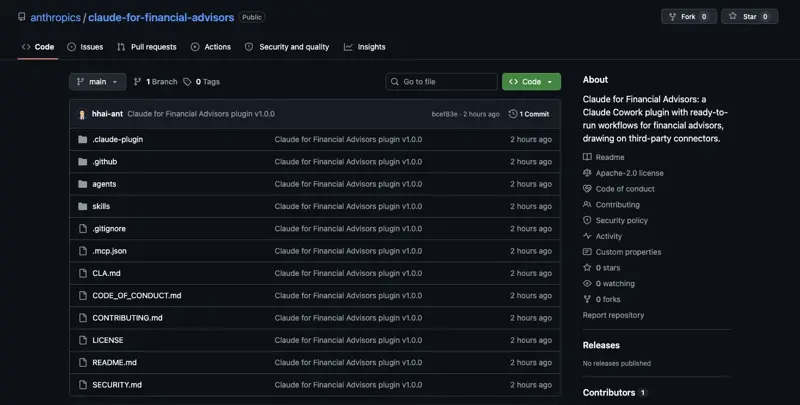
One more thing worth knowing before you trust either version with anything sensitive: the approval gates and read-only guardrails aren’t hard-coded. Anthropic’s own README says it outright — “The rest (advisor approval before any write, connector-reading subagents never calling a connector’s write or send tools, arithmetic in a shell that never sees document text) are enforced by the model following them, not by the runtime.” Read that twice. Even the $120/mo version relies on the model behaving itself, not a technical wall that physically prevents a write action. That’s not a knock on the product — it’s how most agent tooling works in 2026 — but it means “the AI can’t write to my CRM without asking” is a promise, not a guarantee, in both the paid and the free version.
$120/mo skill vs. free DIY vs. what you genuinely can’t replicate
| Skill | Paid (Claude for Financial Advisors) | Free DIY (ChatGPT/Claude) | What you can’t replicate free |
|---|---|---|---|
| Onboarding | Interviews you, tests live connectors, runs a demo | Not applicable | The connectors themselves |
| Pre-meeting prep | Auto-pulls CRM/portfolio/estate/email into one brief | Paste exports manually, prompt for the same structure | Live multi-system pull |
| Portfolio rebalance review | Live Orion/Addepar/Envestnet data, drift + tax-aware options | Manual data entry, same drift math and guardrails | Live data pull, cross-account wash-sale coordination |
| Estate & tax brief | Reads Wealth.com’s document analysis vs. live titling | Manually summarize documents, prompt for discrepancy flags | Automated document parsing, live titling data |
| Post-meeting notes | Zocks/Wealthbox transcript → CRM writes | Paste transcript, get a structured summary | Direct CRM write access (note: doesn’t send client emails either way) |
| Prospect intake | Parallel extraction from statements/screenshots, 3 documents | One document at a time, one output at a time | Parallel-pipeline extraction |
| Alts brief | Live iCapital IRR/TVPI/DPI/RVPI, concentration flags | Retype numbers from a PDF | Live iCapital connector |
| Compliance | Marketing-rule pre-check with firm audit trail | Free version of the same SEC-rule checklist (see below) | Audit logging, firm-wide archive integration |
Tables like this win featured snippets, and this one’s honest about where the paid product earns its price: connectors, live data, and cross-account coordination. Five of eight skills, though, are really “a well-organized prompt plus your own copy-paste discipline” — which is most of what this post is trying to hand you for free.
What this means for you
If you’re a solo RIA on Schwab, Fidelity, or Altruist custody: start with the free DIY versions of pre-meeting prep and portfolio-rebalance-review this week — no signup, no budget approval needed. Your first action: pick your next three client meetings, export what you can from your CRM, and run the pre-meeting prep prompt. If it saves you 20 minutes per meeting, the math on $70-120/mo writes itself in about six weeks.
If you’re an advisor at a wirehouse (Merrill, Morgan Stanley, UBS): you almost certainly can’t sign up for this individually — enterprise AI tools go through your firm’s IT and compliance function, full stop. Your first action: forward the compliance-skill screenshot below to your CCO and ask whether the firm is evaluating any of the three (Gemini, ChatGPT, Claude) financial-services products, because the decision isn’t yours to make solo.
If you’re a fee-only planner running a lean practice: the estate-and-tax-brief DIY version is your highest-leverage starting point, since discrepancy-catching between a stale estate plan and current account titling is exactly the kind of tedious cross-check planners under-do. First action: pull your last five clients’ beneficiary designations and estate summaries, and run them through the DIY discrepancy prompt this afternoon.
If you’re part of a 10-person advisor team: you’re in the sweet spot where the paid connectors start paying for themselves — one Enterprise seat with audit logs covering pre-meeting prep for the whole team beats five people manually copy-pasting into ChatGPT. First action: run a 30-day trial with two advisors before committing the whole team, and track hours saved per week.
If you’re just starting as an advisor: don’t buy anything yet. Learn the free DIY prompts first — you’ll understand what “good” output looks like, which makes you a much sharper buyer of the paid tool later, and you won’t be dependent on a $120/mo subscription before you have recurring AUM to justify it. First action: build the portfolio-rebalance-review prompt from this post and run it against a test household using made-up numbers.
If you’re a CCO or compliance officer: the model-enforced-not-runtime-enforced guardrail line above is your headline concern, not a footnote. Your first action: before anyone at your firm touches Claude for Financial Advisors or a free consumer AI tool for client work, get a written risk-based policy in place covering what data can be pasted where, per the DIY compliance controls checklist further down.
If you’re a client wondering whether your advisor is using AI on your account: ask them directly whether client-identifying information — your name, account number, SSN — ever gets typed into a consumer AI tool, and whether their firm has a written policy on it. A good advisor will have an immediate, specific answer. A vague one is a red flag regardless of which AI product they use.
Edge cases and troubleshooting
Your market values don’t sum to the stated AUM. This happens constantly with manually-typed data — a missing account, a stale valuation date, a typo. A well-built prompt should refuse to proceed and ask you to reconcile the totals first. If your prompt just calculates drift against mismatched numbers anyway, your prompt is missing the verification step from Step 3 above. Fix it before you trust any output.
You lose your working session and have to start over. Free-tier ChatGPT and Claude conversations aren’t a system of record — they can be cleared, they age out, and they’re not backed up the way a CRM is. Treat every chat as scratch paper. Copy the final output into your actual CRM or file system the moment you’re done, every time.
The wash-sale check only covers what you pasted in. Both the paid skill and any free DIY version can only coordinate wash-sale exposure across accounts whose holdings you actually gave it. If a client has a held-away 401(k) you didn’t mention, neither version knows it exists. State explicitly, in every output, which accounts were actually checked.
You catch yourself pasting a client’s full name and account number into a consumer AI tool. Stop. Use a fictitious household ID instead — “Household 4471” — and strip names, account numbers, SSNs, and dates of birth before anything goes into a free-tier tool. This is the single most common way advisors accidentally create a books-and-records problem for themselves.
The rebalance output starts sounding like a recommendation (“You should sell $62,500 of US equity”), even though you told it not to. Models drift toward actionable-sounding language under pressure. Re-prompt explicitly: “Restate this as a mechanical drift amount only, with no trade recommendation,” and check the output again before it goes anywhere near a client.
An estate-and-tax brief fills in a detail you never gave it. This is a hallucination, and it’s the scariest failure mode in this whole workflow because a plausible-sounding wrong beneficiary designation is worse than an obvious error. Every prompt in this post should include an explicit instruction to flag missing data rather than infer it — and you should spot-check that instruction is actually being followed on the first few runs.
You assume the paid /compliance skill is a full AI-governance review. It isn’t — more on this below. If your firm needs a policy audit of how AI tools are used firm-wide, this skill doesn’t do that job, paid or free.
A long meeting transcript gets truncated and the summary misses the back half of the conversation. Break transcripts over roughly 45-60 minutes into two chunks and summarize each separately, then merge — cheaper than re-running the whole thing and hoping it caught everything the second time.
Your firm hasn’t actually approved any of this. The most common failure isn’t a bad prompt — it’s an advisor who built a great DIY workflow and never got sign-off from their CCO to use it on real client data. Fix the approval gap before you fix the prompt.
What it can’t do
Three skills are genuinely paid-only, and no amount of clever prompting closes the gap:
Onboarding, prospect intake, and the alts brief all depend on live, parallel, or specialized data connections — testing your actual connector stack, extracting multiple documents simultaneously, or pulling real-time iCapital fund metrics. A free chatbot processes one thing at a time and has no live pipe into your systems. That’s a real, structural limitation, not a prompting problem.
There’s a fourth honest limit, and it’s the one most coverage of this launch missed entirely:
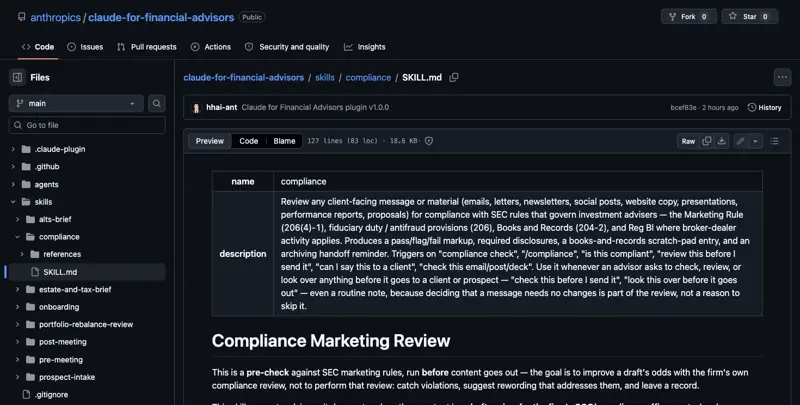
/compliance skill, straight from its SKILL.md file. Source: github.com/anthropics/claude-for-financial-advisors.
The /compliance skill is a client-communication pre-check, not a full AI-governance workflow. Read the file yourself: it reviews emails, letters, newsletters, social posts, and presentations against the SEC Marketing Rule, antifraud provisions, books-and-records rules, and Reg BI — before content goes to a client. That’s genuinely useful. It is not a vendor-risk audit, not an AI-usage policy review, not an assessment of whether your firm’s overall AI governance is sound. If your headline expectation walking in was “Claude checks whether our AI practices are compliant,” that’s a gap between the marketing framing and what actually shipped, and it’s worth knowing before you budget for it as a compliance solution rather than a marketing-review tool.
And underneath all of it: the approval gates are model-enforced instructions, not hard technical walls. Worth repeating, because it’s the single most important caveat in this entire launch — even Anthropic’s own documentation says the read-only guardrails work because the model chooses to follow them, not because the software physically blocks a write action.
FAQ
Is Claude for Financial Advisors a different AI model than regular Claude? No. It’s the same underlying Claude model, running inside Claude Cowork with a specific set of instruction files (skills) and connector permissions built for advisor workflows. There’s no separate “finance model.”
How much does it actually cost? Anthropic prices it usage-based, roughly $70-120 per user per month depending on how much you run it, with Enterprise plans recommended for RIAs specifically because that tier includes audit logs. There’s no flat public price list — talk to sales for your firm’s actual number.
Do I need to be on Schwab custody to use it? No, but Schwab is the first named custodian partner and gets top billing in the marketing. As of launch, the actual Schwab connector for custodial account, titling, and beneficiary data is marked “coming soon” in Anthropic’s own repo — it isn’t live yet, regardless of custodian.
Does SEC Rule 204-2 require me to save every AI prompt and output? No — and this is a common misread. Rule 204-2(a)(7) requires retaining written communications concerning investment advice, fund movement, orders, and performance, for 5 years (the first two easily accessible). AI doesn’t create a new record category; it just means content that would already need retaining — because it’s advice, or touches an order — still needs retaining when AI helped produce it.
Does FINRA really require keeping everything for 6 years? Not categorically. FINRA 4511 sets a 6-year default retention period, but only when no more specific rule applies. For broker-dealer communications, SEA Rule 17a-4(b)(4) and FINRA 2210(b)(4) set 3 years from last use for most correspondence and marketing material. “FINRA requires 6 years for everything” is a common oversimplification — check which specific rule governs the content in question.
Can I actually use ChatGPT or Claude’s free tier for real client work today? As a drafting surface — yes, with real limits. Strip PII, use fictitious household IDs, get your CCO’s sign-off first, and archive the final output in your firm’s approved system, not in chat history. Temporary Chats or Incognito modes are not a substitute for your own recordkeeping obligations; they just mean the vendor isn’t storing it, which doesn’t touch your duty to retain records that fall into a required category.
How is this different from Google’s Gemini Enterprise for Financial Services or OpenAI’s ChatGPT for Financial Services? Google shipped first (August 25, 2026), OpenAI followed (September 10, aimed at junior investment-banking work), and Anthropic landed last (September 14) but aimed specifically at the RIA and independent-advisor desk rather than banking. Different target buyer, different connector partners, overlapping ambition.
Does the portfolio rebalance skill actually execute trades? No — neither the paid version nor any DIY replica should. It’s explicitly scoped to lay out drift and tax-aware options for the advisor to review; trade execution stays a human decision in every version of this workflow.
Is the free DIY version actually compliant with SEC/FINRA rules? “Compliant” isn’t really the right frame — AI doesn’t change what counts as a required record, so compliance depends on your firm’s policy and what category the content falls into, not which tool produced it. Run the DIY compliance controls checklist in this post, get firm sign-off, and treat outputs as drafts, not records, until they’re archived properly.
What happens if I don’t request an Enterprise license before September 30, 2026? You simply miss the one-time usage credit Anthropic is offering to early Enterprise sign-ups. The product itself remains available after that date — it’s a launch incentive, not a deadline for access.
DIY compliance controls checklist
Before you run any of the prompts in this post on real client data, put these in place:
- Treat ChatGPT/Claude free tier as a drafting surface, not a system of record
- Use fictitious household IDs; strip names, account numbers, SSNs, and dates of birth before pasting anything into a consumer AI tool
- Get written CCO or firm sign-off before using any consumer AI tool for advisory business
- Require the model to source-tag every factual claim and explicitly flag missing data instead of guessing
- Archive final records in your firm’s approved CRM or email archive — never in chatbot history
- Remember that Temporary Chats and Incognito modes reduce vendor-side storage, not your own recordkeeping duty
The bottom line
Anthropic shipped eight skills, not five, and the most useful one — portfolio rebalance review — you can rebuild today with a disciplined prompt and fifteen minutes of copy-pasting. Three of the eight (onboarding, prospect intake, alts brief) genuinely need the paid connectors, and the compliance skill is narrower than its marketing framing suggests. None of that makes the $70-120/mo product a bad deal for a busy practice — it makes it a product worth buying for the right reasons: live data pulls, cross-account coordination, and an audit trail your CCO will actually want. Buy it for that. Don’t buy it because you assumed the free version couldn’t get you 80% of the way there — because for five of the eight skills, it already can.
If you want to go deeper on building AI research and analysis workflows for finance work specifically — including the guardrail patterns this post walked through — our AI Research Copilots for Finance course covers the practical prompt engineering in more depth, and Anthropic Finance Plugins for Solo CPAs walks through installing and calibrating Anthropic’s finance connectors step by step if you do decide the paid tier is worth it.
Sources
- Claude for Financial Advisors — official announcement
- anthropics/claude-for-financial-advisors — public GitHub repo
- Anthropic Launches Claude for Financial Advisors With Partner Connectors — Unite.AI
- Anthropic Signs Schwab and Wealth.com to “Claude for Financial Advisors” Launch — Financial Advisor Magazine
- Anthropic Pitches New Claude Tool for Financial Advisors — Bloomberg
- Anthropic Launches Claude for Financial Advisors — WealthManagement.com
- Schwab Brings Anthropic’s Claude to 16,000+ Independent RIAs — Securities.io
- Anthropic Targets Financial Advisers With New Claude Tool — U.S. News
- OpenAI’s ChatGPT for Financial Services Targets Junior Bankers — CNBC
- SEC Rule 204-2 — Investment Adviser Recordkeeping (17 CFR § 275.204-2)
- FINRA Regulatory Notice 24-09
- FINRA Rule 2210 — Communications with the Public
- FINRA Rule 4511 — General Requirements (Books and Records)
- SEC Press Release 2024-98 — Charges Against Firms for Recordkeeping Failures
- Orion Expands Anthropic Collaboration as Launch Partner — BusinessWire
