A week before iOS 27 shipped, the New York Times ran a paragraph that should have been the whole story: an early build of Siri AI couldn’t touch Gmail or WhatsApp. Two of the most-used apps on the planet, sitting right there on your home screen, invisible to Apple’s new assistant. Then iOS 27 went GA on September 14, the reviews landed, and almost nobody mentioned it again.
That’s not because Apple quietly fixed it. It’s because a much weirder story ate all the attention — a private entitlement that lets Siri hand its brain to Claude or ChatGPT. We’ll get to that. But first, the boring, actually-useful question nobody answered this week: a day after launch, does Siri AI read your Gmail yet? Short answer — no. Longer answer, and the part that actually matters if you’re deciding whether to bother — it was never going to, not without Google shipping code Apple can’t write for them.
What just changed (and what didn’t)
iOS 27 rolled out globally on September 14, 2026. Siri AI — Apple’s long-delayed, Gemini-backed rebuild of the assistant that first got demoed and then infamously pulled — is finally sitting on real phones instead of keynote slides. It needs an iPhone 15 Pro or newer (A17 Pro or M-series silicon), it’s English-only at launch, and it isn’t available in the EU or China. That’s the floor. Everything past that floor is where this week’s confusion lives.
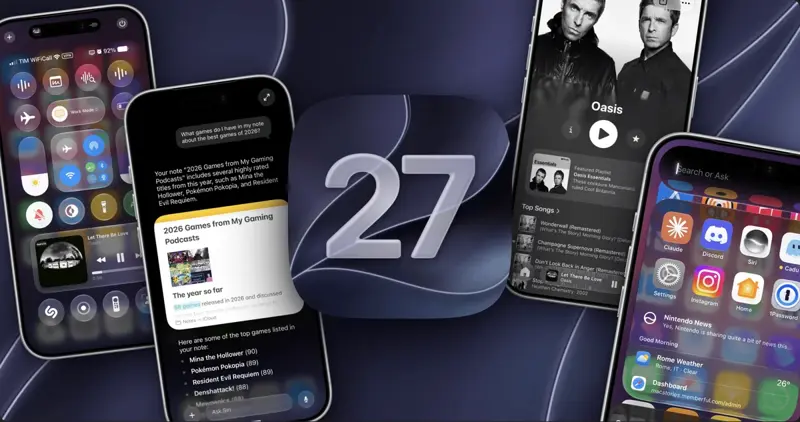
Worth saying plainly, since it’s the reason this launch got so much attention in the first place: the large language model doing the heavy lifting behind Siri’s new conversational ability is Google’s Gemini, running under a reported multi-year licensing deal Apple struck after its own in-house model repeatedly missed internal quality bars. That’s a genuinely strange sentence to write about a company that has spent a decade selling “we build our own everything.” It’s also why the stock reaction on launch day was mixed instead of triumphant — a record open, then a slide once the Siri AI demo aired and people started asking exactly the kind of question this post answers: fine, it’s smarter, but smarter at what, precisely?
The honest framing: Siri AI is Apple’s interface and Apple’s App Intents plumbing, wrapped around a borrowed brain. The plumbing is what decides whether Gmail or WhatsApp shows up in that conversation at all — and the plumbing, not Gemini, is the actual subject of this piece.
Here’s the part that got buried under launch-day noise: Siri AI’s ability to act inside an app — draft an email, send a message, pull up a note — was never something Apple built app-by-app. It’s a framework. Apple calls it App Intents, and the specific piece that matters here is something called App Schema. Third-party developers adopt these schemas to tell Siri “here’s how to open me, here’s how to search me, here’s how to create things inside me.” No adoption, no access. Not “limited access” — no access. Siri literally doesn’t know the app exists as anything more than an icon it can launch.
That single fact explains almost everything the NYT and PYMNTS reported back on September 8, and almost everything the GA reviews confirmed on September 14. It’s not a bug. It’s not Apple being slow to negotiate deals. It’s a wall every third-party developer has to climb over themselves, and as of this week, Gmail, WhatsApp, and (as far as anyone can find) Outlook and OneDrive haven’t started climbing.
What Is App Intents, actually?
Skip this if you already know — but if “App Intents” is new to you, here’s the 40-second version. It’s Apple’s framework for exposing what an app can do to the rest of the system: Spotlight, Shortcuts, widgets, and now Siri AI. A developer wraps specific actions — “send a message,” “create a note,” “search my library” — in code Apple calls an AppIntent. Once wrapped, the system can invoke that action without opening the app or faking a tap.
App Schema is the layer on top of that. Instead of Apple guessing what your custom SendMessageIntent means, you conform it to a system-defined schema — say, messages.send — and the system instantly understands it’s equivalent to what Apple Messages does. Adopt the schema, Siri treats your app like a first-class citizen. Skip it, and your app is a black box with an icon.
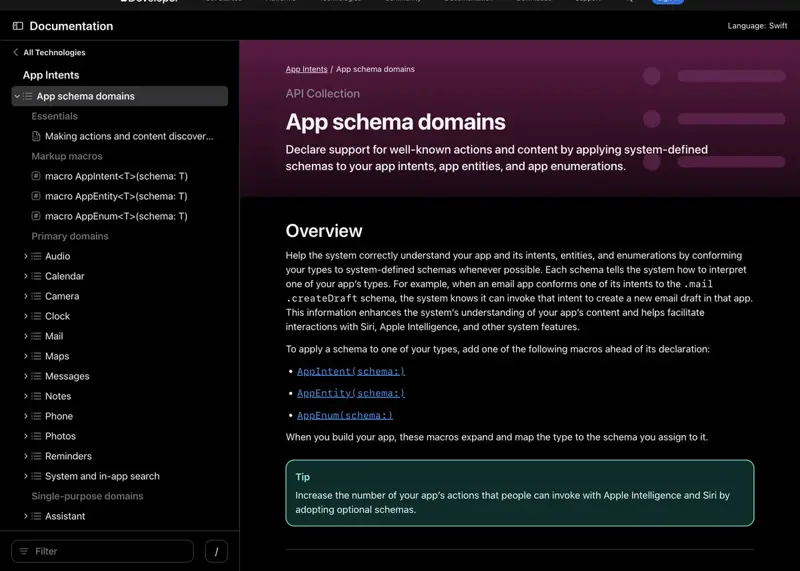
And here’s the detail that trips people up most: adoption isn’t partial. Per Apple’s own developer documentation, a domain group requires the full schema before any of it lights up. A developer can’t wire up “let Siri read my inbox” and skip “let Siri send from it” — if Gmail wants Siri to search messages, it has to implement search, drafting, sending, and whatever else the Mail domain defines, all at once, or none of it activates. That’s a real engineering lift on Google’s side, not a checkbox. It’s also exactly why “Gmail doesn’t support Siri AI yet” isn’t a controversial claim — it’s the expected state of any app that hasn’t shipped that work.
The walkthrough: what actually happens when you ask Siri to touch your email
Let’s make this concrete instead of abstract, because “schemas” and “domains” don’t mean much until you watch the same request behave two completely different ways depending on which app is open. We’re going to carry one real example — pulled directly from Federico Viticci’s GA review, not a hypothetical — across four steps, changing exactly one variable each time: which app Siri is being asked to touch.
Step 1 — the request that works
Federico Viticci, who runs MacStories and has reviewed every iOS release since 2011, gave Siri AI a genuinely mundane task in his GA review: archive a pile of old Google Search Console notification emails sitting in Apple Mail. Not a demo task — an actual inbox-cleanup chore he’d been putting off.
The prompt: “Archive all the emails from Google Search Console.” Expected result: Siri identifies the sender pattern, locates matching messages, archives them without opening each one manually. What happened: Siri archived roughly 40 matching emails in under 10 seconds. Viticci’s own words: “Mail’s integration with Siri AI is surprisingly great.” As a bonus, the same update fixed an 11-year-old bug in Mail’s search that had annoyed him since the app’s early years.
That’s the App Schema working as designed. Apple Mail ships with full domain conformance because Apple wrote both sides of the integration. Siri knows what “archive,” “sender,” and “email” mean inside Mail because Mail told it, in code, exactly what those words map to.
Step 2 — the same kind of request, extended with on-screen context
Viticci’s second example is the one worth remembering, because it shows what Siri AI does that old Siri never could: read the screen you’re looking at and act on it.
Setup: He’s looking at a Calendar event for a meeting he’s running late to. The prompt: “Email the participants that I’ll be 10 minutes late.” Expected result: Siri pulls the attendee list from the visible event, drafts an email addressed to them, and hands it off in Mail for review. What happened: Exactly that. Siri auto-drafted the email in Mail, addressed to the real participants, referencing the real event — no manual copy-paste, no re-typing names.
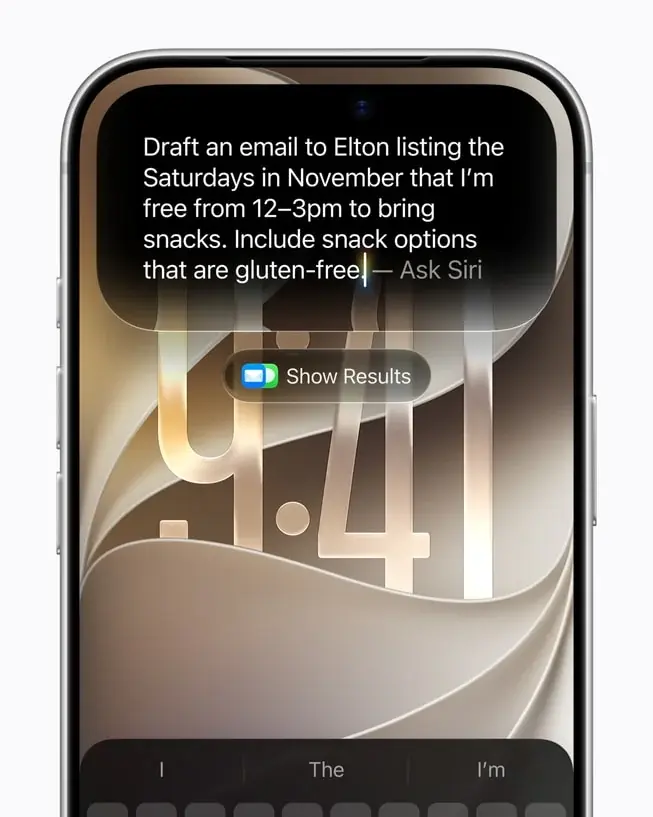
This is “on-screen awareness,” and it’s genuinely the headline feature of the release — but it only works because Calendar and Mail both ship view-annotation entities that tell Siri what’s on-screen and how it connects to other apps. Two first-party apps, talking to a first-party assistant, through a schema Apple controls end to end.
Step 3 — the same request, with a third-party app in the loop
Now swap one variable. Same intent — “look at what’s on my screen, draft something related, take action” — but the app in view is Gmail instead of Apple Mail, or the meeting invite came through Outlook instead of Calendar.
Expected result, if third-party support existed: Siri reads the visible Gmail thread or the on-screen Outlook invite, pulls the same kind of context, and either drafts the follow-up or offers to. What actually happens (as of September 15, 2026): Nothing equivalent. Siri either fails to recognize the request’s target, falls back to a generic web-style answer with no personal context, or silently substitutes Apple’s own Mail app if you have an account configured there too. It does not read Gmail’s or Outlook’s on-screen content, because neither app has published the view-annotation entities that make step 2 possible — the same missing piece the NYT and PYMNTS both flagged before launch, and the same piece no reviewer has found evidence of shipping as of GA.
That substitution behavior — silently falling back to Mail instead of the app you’re actually looking at — isn’t hypothetical. MacStories documented the identical pattern with a different third-party app entirely, which we’ll cover in the edge cases section, because it’s the single most useful thing to understand before you trust Siri with a third-party workflow.
Step 4 — the one third-party path that does work today
There’s a real, working alternative for AI assistance beyond Apple’s own apps, and it ships in iOS 27 unchanged from how it worked in iOS 18.2: extension handoff. Tap into Siri’s search interface, select “Ask,” and choose ChatGPT (or another connected assistant) from the list. It hands your query to that assistant’s extension instead of Siri’s own model.
What this is not: deep OS integration, on-screen awareness inside Gmail, or anything resembling App Schema conformance. It’s a routing mechanism — Siri recognizes “this request should go to a different brain” and forwards it. It’s useful, and Viticci’s review calls it a solid workaround for specific tasks. But it’s a different category of feature entirely from what people mean when they ask “does Siri work with Gmail now.”
What actually works vs. what doesn’t (the honest comparison table)
No invented numbers here — every row is pulled directly from the GA reviews, Apple’s own developer documentation, and the pre-launch reporting. Where nobody has confirmed either way, it says so.
| App / Surface | Integration Type | Siri AI Status (Sept 15, 2026) | What Works | What’s Missing |
|---|---|---|---|---|
| Apple Mail | First-party, full App Schema | ✅ Full | Archive, search, draft, proofread, send — all via natural language | Nothing reviewers flagged |
| Apple Messages | First-party, full App Schema | ✅ Full | Send, search threads, summarize | Full domain required for any of it — already shipped |
| Apple Calendar | First-party, full App Schema | ✅ Full | On-screen awareness feeds other apps (e.g., drafting follow-up emails) | — |
| Apple Notes | First-party, full App Schema | ✅ Full | Search, summarize, on-screen awareness | — |
| Apple Photos | First-party, full App Schema | ✅ Full | Search by content, on-screen awareness | — |
| Gmail | Third-party, App Schema not confirmed adopted | ❌ Not working | Opens as a regular app via Spotlight | Draft/send/search via Siri, on-screen awareness, personal-context recall — all unconfirmed as of GA per MacStories/Macworld |
| Third-party, App Schema not confirmed adopted | ❌ Not working | Regular app launch | Read/send via Siri; NYT/PYMNTS flagged this specifically pre-launch, no fix confirmed since | |
| Outlook | Third-party, no dedicated reviewer coverage found | ❓ Unconfirmed — treat as “no” | Regular app launch | No reviewer, no official statement either way as of Sept 15 |
| OneDrive | Third-party, no dedicated reviewer coverage found | ❓ Unconfirmed — treat as “no” | Regular app launch | Same as Outlook |
| Spark (third-party mail client) | Third-party, workaround only | ⚠️ Fallback, not real support | If you also have an Apple Mail account configured, Siri silently answers from Mail instead | Doesn’t actually read Spark; breaks the moment your accounts aren’t mirrored in both apps |
| ChatGPT (extension handoff) | Third-party, different mechanism (routing, not App Schema) | ✅ Works | Manual handoff via “Ask” — same as iOS 18.2 | Not on-screen-aware, not automatic |
| Claude (Model Delegation entitlement) | Third-party, private/reverse-engineered | ⚠️ Works for developers who use the entitlement | Full assistant swap — Siri’s “brain” becomes Claude | Not a public API; unsupported, could be revoked without notice |
The pattern across every row: Apple’s own apps work because Apple wrote both halves of the handshake. Everything else depends on a developer somewhere else doing real, non-optional engineering work — and as of one day after GA, none of the big three messaging/mail apps outside Apple’s ecosystem show any public evidence of having done it.
What this means for you
If you’re an iPhone-only household who already lives in Apple Mail and Messages. You’re the intended audience and you’ll feel it immediately. Try the exact “email the participants I’ll be late” trick from a real Calendar event this week — it’s the fastest way to feel what on-screen awareness actually buys you.
If Gmail is your primary inbox and you were hoping Siri would finally manage it. Don’t hold your breath, and don’t blame your settings. Every fix here has to come from Google shipping App Schema conformance — nothing you toggle on your phone changes that. Keep using Gmail’s own app-level assistant tools in the meantime; Siri isn’t going to bridge that gap this month.
If you run WhatsApp as your main messaging app for work or family. Same story as Gmail, arguably more frustrating because Messages (Apple’s own app) got full integration on day one. If you need AI-assisted message drafting today, do it inside WhatsApp’s own composer tools or lean on the ChatGPT extension handoff for anything that doesn’t need on-screen awareness.
If you’re on Outlook for work email and were about to test Siri AI on a work device. Treat it as unsupported until you personally verify otherwise — nobody has published a confirmed test either way. Try one low-stakes on-screen-awareness request (something like the Calendar-to-email trick, but starting from an Outlook invite) before you build any workflow around it.
If you’re a small business owner managing customer email across Gmail and a CRM. The honest move here is patience plus a fallback plan. Use Siri for anything that touches Apple Mail, Calendar, or Notes — draft your follow-up templates there if you can — and don’t restructure your Gmail-based workflow expecting Siri support to land soon; there’s no signal on a timeline.
If you’re a developer evaluating whether to build for Siri AI. Read the App Schema domain docs for Mail and Messages specifically (linked in Sources below) before scoping anything — the “adopt everything or adopt nothing” rule inside a domain group is the detail most teams underestimate on a first pass, and it changes the engineering estimate significantly.
If you’re deciding whether to update to iOS 27 at all this week. The app-compatibility gap alone isn’t a reason to wait — Apple’s own apps got meaningfully better, and that’s most of what people actually use daily anyway. Update if you’re on a supported iPhone 15 Pro or newer, then spend your first ten minutes testing the two or three third-party apps you personally rely on before assuming anything about how they’ll behave.
If you were more curious about the Claude/ChatGPT swap story than the Gmail gap. You’re not alone — more on that in a second, because it turns out you’re in the majority, and the data backs you up.
Edge cases and troubleshooting
These are the real snags people hit in the first two days, pulled from reviewer accounts and the pattern of what didn’t circulate versus what did.
“I asked Siri about my last email and it answered from the wrong app.” This is the Spark fallback pattern MacStories documented directly: ask Siri for your last email while a third-party mail client is open, and if you also have an Apple Mail account configured, Siri silently answers using Mail instead of the app you were actually in. It’s not a crash — it’s a quiet substitution, which is arguably worse because it can look like it worked. MacStories called it bluntly: “a useful workaround, but it’s still a workaround.” Fix: don’t trust Siri’s answer as coming from the app you were looking at unless you’ve verified it explicitly names that app.
“Siri drafted an email but addressed it to the wrong person.” This shows up when on-screen awareness pulls from a stale or ambiguous context — for example, a Calendar event with an outdated attendee list. Fix: always review the draft before sending; Siri hands off to Mail for review by design, it doesn’t auto-send.
“I have both a personal and work Apple ID and Siri keeps mixing contexts.” Not unique to this release, but on-screen awareness makes it more visible because Siri is now pulling live context instead of static contacts. Fix: check which account is active in Settings before running a cross-app request.
“Gmail app just doesn’t respond to Siri requests at all — is my phone broken?” No — this is expected behavior, not a bug on your end. Gmail hasn’t published App Schema conformance as of this week, so Siri has no way to interpret intents targeting it. Confirm by testing the identical request against Apple Mail; if that works and Gmail doesn’t, it’s the schema gap, not your device.
“WhatsApp messages aren’t showing up when I ask Siri to summarize my day.” Same root cause. Siri’s daily-summary features only pull from apps with schema conformance for the relevant domain (Messages). WhatsApp isn’t one of them yet.
“The ChatGPT handoff doesn’t seem ‘smart’ about what’s on my screen.” Correct expectation to have, and worth setting explicitly: extension handoff is a routing mechanism, not on-screen awareness. It forwards your typed or spoken query to ChatGPT; it doesn’t hand ChatGPT the context of whatever app you were just looking at. Don’t expect Calendar-style context-carrying from it.
“I found a way to run Claude as my default Siri assistant and I’m not sure if I should.” This is real — a private, undocumented entitlement (com.apple.developer.model-delegation) surfaced in the iOS 27 code that lets a Siri Extension effectively take over as the assistant’s backing model. It’s not a public, supported API. If you’re not a developer deliberately experimenting with it, don’t chase this — it could change or disappear in any future update with zero warning, because Apple never documented it as a feature in the first place.
“Siri feels slower or drops requests entirely on day one.” Widely reported across GA reviews as a rollout hiccup, not an app-compatibility issue — a separate, more general complaint about response latency in the first 24–48 hours. Give it a few days; server-side rollout issues on launch day are common and typically settle within the first week.
“I use a work-issued iPhone and IT hasn’t said anything about Siri AI and our Microsoft 365 setup.” Treat this as your employer’s call, not just yours. If Outlook and OneDrive compatibility is genuinely unconfirmed (and it is, as of this week), a work device with sensitive mail is exactly the wrong place to assume Siri is reading your calendar and inbox correctly just because it answered something that sounded plausible. Ask IT before you build any habit around it, and don’t paste anything confidential into a Siri request as a workaround for a feature that isn’t there yet.
“Siri asked to confirm an action I didn’t expect, or asked nothing at all before sending.” On-screen awareness requests that lead to a draft (like the Calendar-to-email example above) are designed to stop at “hand off to Mail for review,” not to auto-send. If you ever see Siri skip that confirmation step for anything on the sending/deleting side, treat it as a bug worth reporting through Feedback Assistant rather than a feature — that’s not the documented behavior in any reviewer’s testing.
What Siri AI still can’t do
Being straight about the limits here, because the hype cycle around this launch has been intense enough that the honest gaps matter more than usual.
It can’t touch third-party apps that haven’t adopted App Schema — full stop. This isn’t a “limited support” situation for Gmail, WhatsApp, Outlook, or OneDrive. It’s zero support, and it stays zero until those companies ship the engineering work on their end. Apple can’t unlock this unilaterally.
It can’t partially adopt a domain. Even once a developer starts the work, Apple’s all-or-nothing rule within a domain group means there’s no gradual rollout path — no “search works but drafting doesn’t yet” middle state visible to users. It’s binary: fully there, or not there.
It can’t extend on-screen awareness to apps without view-annotation support. The Calendar-to-Mail trick that impressed reviewers depends on both apps exposing what’s visible on-screen in a format Siri understands. An app that hasn’t done that work is invisible to on-screen awareness regardless of how simple the request seems.
It can’t guarantee consistent fallback behavior. The Spark-to-Mail substitution MacStories found is useful in isolated cases, but it’s not documented, predictable behavior you can build a workflow around — it depends on account configuration matching across both apps.
It doesn’t run outside English or outside the U.S./most non-EU, non-China markets at launch. Not related to the App Intents gap directly, but worth repeating here because it compounds the same theme: coverage is narrower than the keynote framing suggested, in more than one dimension.
The story everyone actually cared about (and it wasn’t Gmail)
Here’s the part of this week that surprised us more than the compatibility gap itself. We went looking for the outrage — the “Siri still can’t read my email” pile-on you’d expect after a New York Times piece with that exact framing. It barely exists. Four low-engagement retweets referencing the NYT/PYMNTS story, the highest topping out at two likes. That’s it.
What actually blew up — 2,990 likes, 961,000 views on a single post — was the Model Delegation entitlement: the discovery that Siri can, under the right (unsupported, private) conditions, run on Claude instead of Apple’s own model. That’s the story people wanted, and it makes sense once you sit with it for a second. “Siri can’t read Gmail yet” is a feature-gap story. “Siri’s brain might not even be Apple’s” is an identity story — a much bigger question about what Siri even is going forward. One is a missing checkbox. The other rewrites the premise of the product.
If you only have bandwidth to follow one Siri story this week, the community’s answer is clear about which one that is — and for once, we think they’re right.
FAQ
Does the new Siri work with Gmail yet? No, not as of September 15, 2026, one day after global GA. No reviewer or official source has confirmed Gmail shipped App Schema conformance for Siri AI. It opens as a regular app but doesn’t respond to Siri-driven actions like drafting, searching, or summarizing.
Will Siri AI ever support Gmail and WhatsApp? Almost certainly eventually — the framework (App Intents / App Schema) exists specifically so third parties can plug in. But the timeline depends entirely on Google and Meta, not Apple, and neither has announced a date.
Does Siri AI work with Outlook? Unconfirmed. No major reviewer covered Outlook specifically in their GA testing, and no official statement exists either way as of this writing. Treat it as unsupported until you test it yourself or an update confirms otherwise.
What’s the difference between the ChatGPT handoff and real Siri integration? The ChatGPT handoff is a manual routing feature — you tap “Ask” and pick ChatGPT, and it answers your query using its own model. It’s been in iOS since 18.2. Real App Schema integration is automatic, on-screen-aware, and works without you choosing a different assistant first. They solve different problems.
Is the Claude “Model Delegation” thing something I can turn on myself? Not through any supported settings menu. It surfaced as a private entitlement in iOS 27’s code, used by developers building Siri Extensions. It’s not a documented consumer feature, and Apple hasn’t announced it as one.
Why does Apple Mail work so well but Gmail doesn’t, if they’re both email apps? Because “email app” isn’t what Siri checks for. Siri checks for App Schema conformance to the Mail domain specifically. Apple wrote that conformance into its own Mail app by default; Gmail has to write it separately, adopting the entire domain’s schema, not just the pieces it wants to support.
Does iPhone model or region affect whether third-party apps work with Siri? No — the app-compatibility gap is the same regardless of your iPhone model or region, as long as you’re on a supported device (iPhone 15 Pro or newer) in a supported market. The Gmail/WhatsApp gap is about those apps’ own code, not your hardware or location.
Is this an iOS 27 bug that a future update will patch? No. This isn’t a bug Apple can patch on its own — it’s the expected state of any third-party app that hasn’t adopted App Schema. A future iOS update could ship supporting infrastructure changes, but the actual fix has to come from Google, Meta, and Microsoft shipping their own code.
What should I do if a workflow I rely on needs Gmail or WhatsApp integration right now? Keep using those apps’ native tools for now, and route anything you specifically want AI-drafted through Apple Mail or Messages if you can, since those have full support today. Revisit once you see a specific announcement from Google or Meta about App Intents adoption.
Does Siri AI running on Gemini mean Google already has an advantage in getting Gmail supported? Not automatically. The Gemini licensing deal covers the language model answering your questions — it has nothing to do with whether the Gmail app has written App Schema conformance code. Those are two completely separate relationships between Apple and Google, and reviewers haven’t found any evidence the model partnership is accelerating the app-integration side.
How is this different from the story about Siri running on Claude? Different mechanism entirely. The Gemini partnership is a public, supported, Apple-negotiated deal that powers Siri’s core model for everyone. The Claude/ChatGPT swap is a private, undocumented entitlement developers found in the iOS 27 code — not something Apple has confirmed, marketed, or made available through any consumer setting.
The bottom line
The App Intents framework is genuinely well-designed — an all-or-nothing schema requirement is a defensible, if strict, way to guarantee Siri never half-understands an app and gives you a broken result. But “well-designed” and “ready” are different claims, and one day after global GA, the apps most people actually live inside for email and messaging outside Apple’s own ecosystem simply aren’t there yet. That’s not a scandal. It’s a predictable consequence of a framework that shipped on Apple’s calendar, not Google’s or Meta’s.
If you want to actually understand what’s happening under the hood here — how AI assistants like Siri, ChatGPT, and Claude decide what they can and can’t touch, and how to get real, dependable output out of any of them regardless of which apps they’re wired into — that’s exactly the kind of practical AI fluency our AI Fundamentals course is built to teach, no engineering background required.
Sources
- The New York Times — “Apple’s Siri, Reboots With A.I., but Some Apps Aren’t Ready,” Sept 8, 2026
- PYMNTS — “Early Apple Siri AI Can’t Read Gmail or WhatsApp Messages”
- Apple Developer Documentation — App Intents
- Apple Developer Documentation — Apple Intelligence and Siri AI
- Apple Developer Documentation — App Schema Domain: Mail
- Apple Developer Documentation — App Schema Domain: Messages
- Apple Developer Documentation — Making Actions and Content Discoverable by Apple Intelligence
- MacStories — “iOS and iPadOS 27: The Review”
- Macworld — “iOS 27 Features & Compatibility: Siri AI Updates”
- MacRumors — “Apple’s Siri AI Can Be Swapped Out for Claude, ChatGPT, Code Shows”
- AppleInsider — “Siri AI Is Built to Be Replaceable by Claude or ChatGPT”
- Apple Newsroom — “Siri AI, a Profoundly More Capable and Personal Assistant, Is Here”