If you edit for a living, you know the worst part of the job isn’t the editing — it’s the comment round. A returned draft with 60 comments from four stakeholders, half of them contradicting each other, a dozen resolved-but-not-marked-resolved, and three that quietly contain the only feedback that matters. Working through that thread-by-thread is an afternoon.
On July 28, Google started rolling out Gemini-powered comment workflows in Google Docs — the AI reads the whole comment layer, summarizes what reviewers are asking, drafts replies, and proposes the actual edits for you to accept or reject. It’s the first AI feature aimed squarely at the feedback stage of editing rather than the drafting stage. Here’s what it does, who gets it, and — for professional editors and proofreaders — an honest read on whether this is a tool or a threat.
What just changed
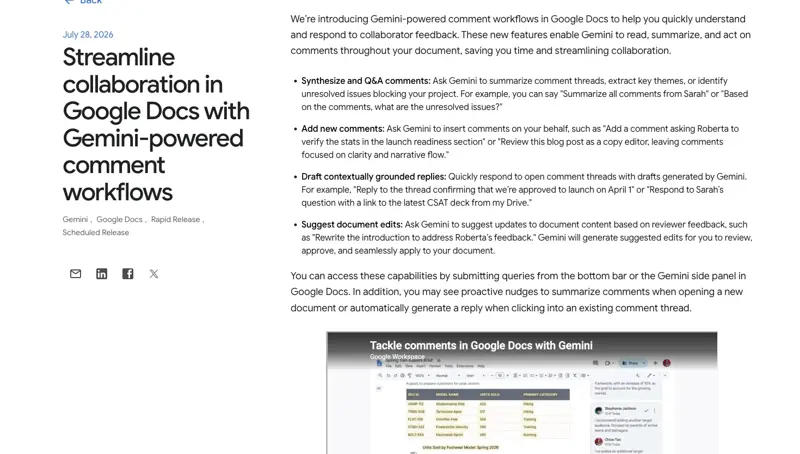
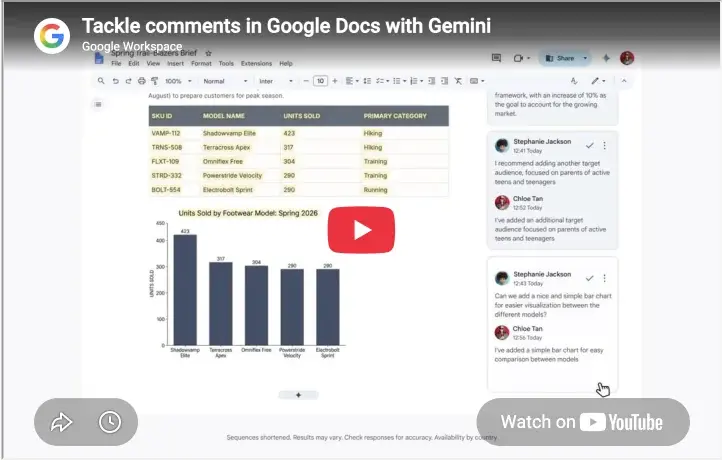
Four new Gemini abilities landed inside Docs, all operating on comments:
- Summarize the comment layer. Ask Gemini to distill the threads into themes, list unresolved issues, or pull out one reviewer’s feedback specifically (“what is Maria still waiting on?”).
- Draft replies. Context-aware responses to individual threads, in your tone, for you to edit and post.
- Add comments for you. Prompt it to leave review comments — “flag every paragraph that makes a claim without a source.”
- Suggest edits from feedback. The big one: Gemini reads a comment like “this section is too long and buries the recommendation,” proposes the revision, and you approve or reject it before anything changes.
Who gets it: paid tiers only — Workspace Business/Enterprise Standard and Plus, Education Plus, and Google AI Pro/Ultra subscribers. You also need edit access to the document; comment-only collaborators don’t see it. The rollout is gradual (up to 15 days from July 28), so if your Docs doesn’t show it yet, that’s normal.
The default-on detail worth knowing: the feature arrives automatically wherever the admin-level “Gemini for Workspace in Drive” setting is already enabled. There’s no separate per-feature switch documented — which means if you edit inside client workspaces, their admin settings decide whether Gemini can read the comment layer on their documents. More on why that matters below.
The editor’s walkthrough
Say you’re a freelance editor and a client returns your structural edit with 40+ comments from three stakeholders.
Pass 1 — triage (2 minutes). Ask Gemini: “Summarize the unresolved comments in this document, grouped by theme. Flag any comments that contradict each other.” That last part is the sleeper feature — stakeholder contradictions are the thing you’d otherwise discover on comment 37, after making the change comment 12 asked for.
Pass 2 — the mechanical accepts (10 minutes). For comments that are unambiguous (“typo,” “spell out this acronym,” “our style is en-dash”), let Gemini suggest the edits and approve them in a batch. This is the work that was never editing — it was transcription.
Pass 3 — the judgment calls (your actual job). For anything touching voice, structure, argument, or a stakeholder disagreement, work the thread yourself. Use the draft-reply feature for the diplomatic scaffolding if you like (“Thanks — we considered that, and here’s why the section stays”), but the decision and the phrasing that carries your relationship with the client should be yours.
The honest math: the comment round on a heavily-reviewed doc drops from an afternoon to about an hour — and the hour that remains is the judgment work you actually bill for.
What this means for you
If you’re a freelance editor: this is leverage, not replacement — but only if you’re explicit about it. Add an AI clause to your engagement terms now: whether you use AI assistance for mechanical passes, whether the client’s Workspace has Gemini enabled, and what never goes through it. Clients are starting to ask, and the editors who have an answer look more professional, not less.
If you’re a proofreader: the honest news is harder. Platform data since ChatGPT’s arrival shows proofreaders’ monthly contracts down about 2% and earnings down about 5% — and this feature automates another slice of the mechanical layer. The durable move is up-market: fact-checking, source verification, consistency at the structural level, and final-accountability work. Professional-body guidance (CIEP, ACES) keeps landing on the same point: AI finds; humans verify and answer for it.
If you’re an in-house marketing or comms editor: the summarize-by-reviewer feature is quietly a stakeholder-management tool. “What did Legal ask for that we haven’t resolved?” before the sign-off meeting is worth the license by itself.
If you edit confidential or unpublished manuscripts: stop and check the admin question first. Publishing contracts increasingly restrict putting unpublished text into AI systems, and this feature is on by default wherever Gemini-for-Drive is on. If you handle embargoed or sensitive manuscripts in Docs, the conversation with your client about their Workspace settings needs to happen before the next comment round, not after.
If you’re a writer receiving edits: the same tools work in reverse — summarize what your editor actually asked for, then respond thread by thread. Just don’t let Gemini draft-reply your way through feedback you disagree with; that conversation is the relationship.
What it can’t do
- It can’t rank feedback by who signs the check. Gemini treats all reviewers roughly equally; you know the CEO’s one comment outweighs eleven others. Triage still needs a human org chart.
- It will happily implement bad feedback. “Make it punchier” produces punchier — whether or not punchier is right for the piece. The suggest-edit flow executes; it doesn’t push back.
- It can’t hold voice across a manuscript. Batch-accepting AI edits on a voice-heavy text flattens it in exactly the way editors are paid to prevent. Mechanical comments only.
- It’s not on the free tier, and not in your control. Paid plans only, and default-on status is decided by the Workspace admin — which, for freelancers, means your client, not you.
- It doesn’t remove your accountability. If an AI-suggested edit introduces an error and it ships, that’s your name on the invoice. Every professional-body guideline published so far says the same thing: the human remains responsible for the final text.
The bottom line
The comment round was always the least-loved, least-billable part of editorial work, and Gemini just automated the mechanical half of it. The editors who come out ahead will be the ones who pocket the time savings, move their positioning up the judgment ladder, and get their AI policy into their contracts before clients ask.
If you’re building that up-market skill set, our AI for Writers course covers the editorial-AI workflow end to end, and the Freelancers course gets into pricing and positioning when AI is compressing the commodity tier of your market.
Sources
- Google Workspace Updates — Streamline collaboration in Google Docs with Gemini-powered comment workflows (July 28, 2026)
- Google Workspace Blog — July 2026 Workspace feature drop
- Digital Trends — Gemini can now summarize the messiest comment threads in Google Docs
- Editorial Freelancers Association — Editorial rates
- CIEP — The future of AI and the editing profession
