Every headline about AI medical scribes right now is about hospitals: Abridge rolling out across major health systems, Microsoft’s Dragon Copilot going org-wide, Heidi going live system-wide at Beth Israel Lahey. If you’re a nurse practitioner in independent practice, a private-practice therapist, or a solo telehealth clinician, none of that helps you — nobody installs anything for you, your personal Google or ChatGPT account can’t legally touch patient data, and the enterprise sales reps aren’t calling a one-person practice.
But there is a real, free, legitimately usable answer for exactly your situation, and almost nobody has written it down plainly. This is that guide: which free AI scribe you can actually sign up for today, exactly what “free” does and doesn’t include, and the compliance line — the one your employer would normally handle for you — that decides whether you can legally use any of this at all.
The recurring theme in independent healthcare technology right now isn’t access — free and low-cost AI tools are genuinely available. It’s judgment: knowing which tool is actually built for your license type, knowing what “HIPAA compliant” does and doesn’t guarantee on a given account tier, and knowing that the review step is the job, not busywork around the job. That’s the gap this guide closes.
Why the hospital coverage doesn’t apply to you
The AI-scribe wave dominating healthcare press is almost entirely an enterprise story. A hospital system signs a contract, its legal and compliance teams negotiate a Business Associate Agreement (BAA) with the vendor, IT deploys the software across every provider’s workstation, and a bedside nurse or attending physician just… uses it. The compliance work happened upstream, invisibly, before anyone touched the product.
If you’re independent, that upstream work doesn’t exist — you are the compliance department. There’s no IT team vetting the vendor’s security posture, no legal team reviewing the contract, no employer whose name is on the BAA. Every decision that a hospital’s back office makes for its clinicians, you have to make for yourself, once, correctly, before you record a single real patient visit.
That’s a genuinely different problem than “which AI scribe is best,” and it’s the problem this guide actually solves.
The free option that’s actually built for you: Doximity Scribe
Here’s the finding that doesn’t show up in most AI-scribe roundups: Doximity Scribe is free, with no paid tier at all, for every verified U.S. physician, nurse practitioner, physician assistant, and CRNA — funded entirely by Doximity’s existing business model as a member benefit, not a freemium upsell. If you already have a Doximity account (the professional network most U.S. clinicians already use for messaging and CME), you’re very likely eligible today.
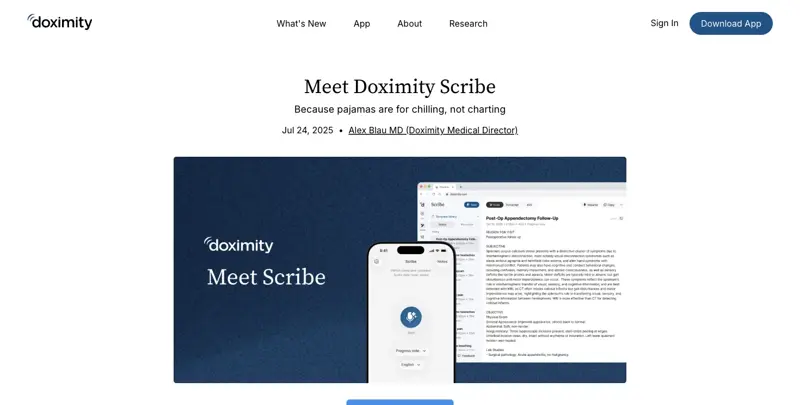
Here’s how it actually works, step by step:
- Confirm eligibility. You need a verified Doximity account as a U.S. physician, NP, PA, CRNA, or specified student/resident category. If you’re already on Doximity for messaging or CME credits, you’re already verified.
- Open Doximity Scribe from the app (desktop, via Doximity Desktop, or mobile) or through Doximity Dialer/Dialer Video if you’re documenting a telehealth call.
- Get consent from your patient first — more on this below; it’s not optional and it’s not automatic.
- Start the recording at the beginning of the visit. Doximity’s ambient listening captures the conversation.
- Doximity generates a structured note — SOAP, H&P, consult note, or a customizable template — after the visit, and securely discards the original audio recording rather than storing it indefinitely.
- Read the entire note before you sign it. This step is the one every clinician skeptical of AI scribes on social media flags as the one people skip under time pressure — don’t skip it.
The practical limits: recordings are capped at 75 minutes per session, and generated transcripts/notes are retained for 14 days before deletion, with audio transcribed and discarded in real time rather than stored. Doximity states Scribe is HIPAA-compliant, encrypts data in transit and at rest, and has a BAA arrangement covering Doximity users — but per Doximity’s own support documentation, you should confirm the currently applicable agreement in your account records before you process any real patient visit, not just take the marketing claim at face value.
The one real gap: private-practice therapists and counselors are not in Doximity’s stated eligible-clinician list — Scribe is built around physicians, NPs, PAs, and CRNAs specifically. If you’re a therapist or counselor, the next section is for you instead.
If you’re a therapist or counselor: Heidi Health, with a caveat
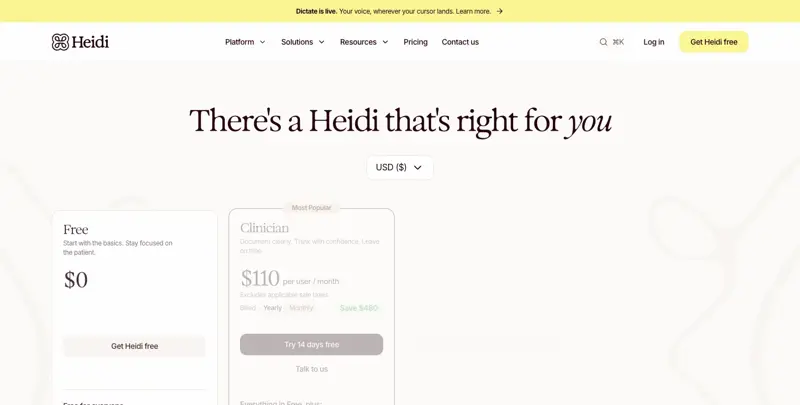
Heidi Health is the broader option — it markets itself across 200+ specialties, which in practice covers therapists and counselors far better than Doximity’s physician-and-NP-centric eligibility. It offers a genuinely free account, no credit card required, with unlimited transcription, standard note templates, and basic task management on the free tier.
The caveat, and it’s an important one: Heidi’s own public pricing and legal materials do not clearly establish that a self-serve free U.S. account automatically comes with a signed BAA. Heidi’s clinic agreement identifies Heidi as a “subcontractor business associate” when PHI is handled, and the company states it operates under HIPAA — but the free tier’s BAA status specifically isn’t spelled out the way it is on paid Clinician-tier contracts. Heidi’s paid Clinician plan (which does include clearer BAA terms) currently runs $110/user/month on annual billing — a meaningful jump from independent-practice pocket change, and worth knowing before you assume “free Heidi” and “compliant Heidi” are the same thing.
What this means practically: if you’re a therapist signing up for Heidi’s free tier specifically to use with real client data, don’t assume the free account is covered. Contact Heidi directly, request written confirmation of BAA coverage for your specific account tier, and keep that confirmation on file — the same rule that applies to every other tool in this guide.
The compliance line: three things you cannot skip
This is the section that matters more than which product you pick. Skipping any of these three isn’t a minor technicality — each one is the difference between a legitimate documentation tool and a HIPAA violation with real financial and licensing consequences.
1. Get patient consent, every time
Recording a clinical encounter — even to generate your own notes — requires informing the patient and, in many states, obtaining explicit consent before you start. This isn’t uniform across the U.S.: some states require only one party (you) to consent to a recording, while others require all-party consent, meaning the patient must explicitly agree. A simple verbal disclosure at the start of the visit (“I use an AI tool to help write up notes from our session — is that okay with you?”) covers the ethical baseline in most contexts, but check your specific state’s recording-consent law, not just HIPAA, before you rely on verbal consent alone.
Understanding one-party vs. all-party consent, in plain terms: U.S. recording-consent law splits states into two broad categories. In a “one-party consent” state, only one person in the conversation needs to agree to a recording — and since you’re a party to the conversation, your own consent technically satisfies the legal minimum. In an “all-party consent” (sometimes called “two-party consent”) state, every participant — meaning your patient too — must agree before a recording is legal. The practical takeaway: don’t try to determine this from memory or assumption. A single, current search of your specific state’s law (state bar associations and state health-department sites are reliable sources) takes a few minutes and removes any ambiguity. And regardless of which category your state falls into, disclosing and asking is simply better clinical practice — patients who feel informed trust the process more, and an all-party-consent habit protects you even if you occasionally see patients while physically in a different state via telehealth.
2. Have a signed BAA in force before any real PHI touches the tool
Under HIPAA, an AI scribe that creates, receives, maintains, or transmits Protected Health Information on behalf of your practice is a “business associate,” full stop — and the law requires a written BAA between you and that vendor before real PHI is processed, not after. Per HHS’s own guidance, a vendor’s marketing claim of being “HIPAA compliant” is not a substitute for an actual signed agreement specific to your account. No AI software is “HIPAA certified” — certification isn’t a real category HIPAA recognizes — so the BAA itself, not a badge on a pricing page, is what actually matters. Get it in writing, confirm what tier of your account it covers, and keep a copy.
3. Read the note before you sign it — every single time
This is the step real-world data says clinicians skip most often under time pressure, and it’s the one with the clearest evidence of consequences. A large real-world study of AI-generated clinical notes found that when physicians reviewed a sample against the AI output, roughly 1 in 20 notes carried an error rated as serious or posing imminent risk if left uncorrected, nearly 1 in 5 had an omission, and more than 1 in 10 contained a hallucinated detail — and that was with clinicians grading their own notes, likely an optimistic ceiling on real accuracy. Separately, a 2026 government audit of AI scribes approved for use in Ontario, Canada, found that 60% of tested systems recorded a different medication than what was actually prescribed during testing, and nearly half fabricated information outright. As one cardiologist put it plainly in a widely-shared post: if the AI writes something wrong and you sign without reviewing it, “that note is still yours” — human-in-the-loop review isn’t optional, it’s the entire safety mechanism.
The four-point check before you sign any AI-generated note
Real-world error data — serious errors in roughly 1 in 20 notes, omissions in nearly 1 in 5 — means “read it before you sign it” needs to be a specific process, not a vague intention. Here’s the concrete four-point check worth building into muscle memory:
- Medications and dosages, word for word. This is where audits have found the sharpest error rates — the Ontario government audit that found 60% of tested AI scribes recorded the wrong medication was specifically about drug names and doses, the single highest-stakes category of error. Read every medication name and number against your own notes or memory, every time, no exceptions.
- Negation and polarity. “Patient denies chest pain” and “patient reports chest pain” differ by one word with opposite clinical meaning. AI transcription and summarization can flip these under ambient noise or overlapping speech — scan specifically for every “denies,” “reports,” “no,” and “positive for” in the note.
- Omissions, not just errors. An AI note that leaves something out looks clean and complete — that’s exactly what makes omissions the hardest error type to catch. Cross-check the note against your own mental list of what you discussed, not just against what’s on the page.
- Anything that sounds too neatly worded. If a patient’s rambling, informal description of symptoms comes back in the note as suspiciously clean clinical language, that’s sometimes the AI inferring or extrapolating rather than transcribing — verify that inferred-sounding language actually reflects what was said, not what a textbook case would say.
None of this takes more than a minute or two once it’s a habit — the point isn’t to slow you down significantly, it’s to make sure the minute you do spend is aimed at the parts most likely to actually be wrong.
A worked example: your first week with a free AI scribe
Say you’re a nurse practitioner in independent practice, seeing patients Monday through Thursday. Here’s what a realistic first week looks like:
Before your first patient: Confirm your Doximity account is verified for Scribe access (takes minutes if you already have an account; a short verification process if you don’t). Check your state’s consent-recording requirement — a quick search of “[your state] one-party vs two-party consent recording” gets you the answer. Draft a one-sentence consent script you’re comfortable saying out loud.
First visit: Before you start, say your consent line. Start the recording. Conduct the visit normally — don’t perform for the microphone, just talk to your patient the way you always would. End the recording when the visit ends.
After the visit: Doximity generates a structured note within a few minutes. Read it fully against your own memory of the visit — check that medications are listed correctly, that nothing was fabricated, that nothing important was omitted. Make corrections directly. Sign only once you’re confident it’s accurate.
By end of week one: You’ll have a real sense of where the AI is reliably strong (structuring a rambling conversation into clean SOAP format, catching details you’d have summarized more vaguely yourself) and where it needs the most scrutiny (medication names and dosages, anything with a negative finding — “patient denies chest pain” vs. “patient reports chest pain” is a one-word difference the AI must get exactly right, every time).
Doximity Scribe vs. Heidi Health vs. paid alternatives
| Doximity Scribe | Heidi Health (Free) | Heidi Health (Clinician) | Typical enterprise tool (Abridge, Dragon Copilot) | |
|---|---|---|---|---|
| Price | $0 — no paid tier exists | $0 | $110/user/mo (annual billing) | Enterprise contract, not individually available |
| Who’s eligible | Verified U.S. physicians, NPs, PAs, CRNAs, some students | Any clinician, broad specialty coverage | Same as free | Health-system employees only |
| Therapists/counselors covered | No | Yes | Yes | Rarely, and only if employed by a system offering it |
| Session length limit | 75 minutes | Not clearly published | Higher / less restrictive | Not applicable (unlimited enterprise use) |
| Data retention | Notes/transcripts 14 days; audio discarded in real time | Not clearly published for free tier | Governed by clinic agreement | Governed by enterprise contract |
| BAA on this tier | Doximity states BAA coverage applies; confirm in your account | Not clearly confirmed — verify directly with Heidi | Yes, per clinic agreement terms | Yes, negotiated by the health system |
| Best fit | NPs, PAs, physicians wanting the cleanest free option | Therapists/counselors, broader specialty needs | Solo practices wanting confirmed BAA coverage | Employed clinicians only |
What this means for you
If you’re a nurse practitioner or PA in independent practice: Doximity Scribe is the highest-certainty free option — check your Doximity verification status today, since this is likely a five-minute setup if you already have an account.
If you’re a private-practice therapist or counselor: Heidi’s free tier is your realistic starting point, but treat the BAA question as unresolved until you get written confirmation directly from Heidi covering your specific account. Don’t process real client PHI on an assumption.
If you’re a physician who left a health system to go independent: You’ve likely lost access to whatever enterprise scribe your former employer provided. Doximity Scribe is the closest free replacement, and if you were already using Doximity for messaging or CME, the transition is close to seamless.
If you’re on a tight budget and considering Heidi’s paid Clinician tier: At $110/month on annual billing, run the math against your actual documentation time saved before committing — for a very low-volume solo practice, that’s a real monthly cost that needs to pencil out against billable hours recovered.
If you’re telehealth-only: Doximity Scribe’s integration with Doximity Dialer and Dialer Video means you can generate notes during the call itself without switching platforms — worth weighing if most of your practice is virtual.
If you handle any behavioral health, substance use, or other specially-protected records: Standard HIPAA BAA coverage isn’t automatically sufficient — records protected under 42 CFR Part 2 (substance use disorder treatment records) carry additional confidentiality rules beyond general HIPAA. Verify with the vendor specifically, not just generally.
If you’re a home-health or telehealth clinician documenting from variable locations: Confirm your connectivity before you rely on either tool mid-visit — neither works offline, and a dropped connection mid-recording is a worse problem than typing your own notes that day. Have a manual fallback process you’re comfortable falling back to without disrupting the visit.
If you prescribe controlled substances as part of your practice: Be especially rigorous about the medication-accuracy check described below — an AI transcription error involving a controlled substance isn’t just a documentation problem, it can create a discrepancy between your note and your prescribing record that’s genuinely serious to have on file incorrectly. Treat every controlled-substance mention in an AI-generated note as needing a second, deliberate read.
If you’re deeply skeptical of AI touching clinical notes at all: That skepticism is reasonable and shared by plenty of practicing clinicians — one therapist’s blunt reaction on social media, “AI doesn’t know what I did in my sessions, I’m not using that,” reflects a real and defensible position. Nothing here requires you to adopt this workflow; the guide exists for clinicians who’ve decided they want to try it and need the compliance groundwork done right.
Edge cases and troubleshooting
My Doximity account isn’t verified yet. Verification typically requires confirming your license/NPI information; it can take longer than same-day if Doximity needs to manually confirm credentials. Start this before you need Scribe, not the week you plan to start using it.
A patient declines to be recorded. Respect that immediately — document the visit manually as you always would. Never record without consent regardless of your state’s legal minimum; the ethical bar is higher than the legal floor.
The AI note says something that didn’t happen in the visit (a hallucination). This is documented as a real, non-rare failure mode — correct it before signing, and consider reporting the specific error to the vendor. Never sign a note you haven’t fully verified against your memory of the encounter.
I can’t tell if my Heidi free account has a BAA or not. Don’t guess. Email Heidi’s support directly, ask explicitly whether your specific account tier has a Business Associate Agreement in force, and save the written response. If you don’t get clear confirmation, don’t use it with real PHI until you do.
My session ran longer than Doximity’s 75-minute cap. Plan ahead for intake sessions or longer visits — either split the recording or document the excess portion manually. Don’t assume the tool silently keeps recording past its stated limit.
I’m billing insurance and need documentation that satisfies specific payer requirements. AI-generated notes are a drafting aid, not a guarantee of coding or billing compliance — review against your usual documentation standards for the payers you work with, the same way you’d review a human scribe’s work.
My malpractice carrier has questions about AI-assisted documentation. Some carriers have started asking about AI tool usage during renewal. Keep your BAA, your consent process documentation, and your note-review workflow on hand — being able to describe a real compliance process (not just “the app says it’s HIPAA compliant”) is what carriers are actually looking for.
I work across two states with different consent laws. Use the stricter of the two as your default — if either state requires all-party consent, get explicit consent every time, regardless of where the visit is technically taking place.
My practice partner or covering colleague wants to use my Doximity Scribe account too. Don’t share individual clinician accounts — Doximity’s eligibility and BAA coverage are tied to the verified individual, not a practice as a whole. Each clinician who wants to use it needs their own verified account.
I switched from Heidi’s free tier to the paid Clinician tier mid-month. Confirm the new BAA terms explicitly before continuing to use the tool with real patient data — a tier change can mean a different or newly-effective agreement, and you want that transition documented, not assumed.
What these tools still can’t do
- They can’t make the compliance decision for you. No amount of vendor marketing substitutes for you personally confirming a BAA is in force before you process real PHI.
- They can’t guarantee accuracy. Real-world error rates — serious errors in roughly 1 in 20 notes, omissions in nearly 1 in 5 — mean review isn’t a formality, it’s the core safety step.
- They can’t replace your clinical judgment about what belongs in the record. An AI scribe drafts; you decide what’s actually clinically relevant and accurate.
- They don’t work well (or at all) without a stable internet connection — none of these tools function offline, which matters if you do home visits or work in areas with unreliable connectivity.
- They can’t resolve state-by-state consent law for you. That’s a legal question specific to your practice location, not something the software determines.
Frequently asked questions
Is Doximity Scribe really free, with no hidden paid tier? Yes — Doximity funds it as a member benefit of the existing free Doximity platform, not a freemium upsell. There’s no paid Scribe tier to upgrade into.
Can therapists and counselors use Doximity Scribe? Not currently — Doximity’s stated eligible-clinician list covers physicians, nurse practitioners, physician assistants, CRNAs, and certain students, not therapists or counselors. Heidi Health is the more realistic option for that group.
Do I need a BAA if I’m just using an AI scribe for my own personal notes, not sharing them anywhere? Yes. If the tool processes any Protected Health Information — which patient visit content almost always is — a BAA requirement applies regardless of whether you separately share the output. The processing itself is what triggers the requirement.
What’s the actual error rate of AI medical scribes? Published real-world data varies by study and vendor, but one widely-cited analysis found roughly 1 in 20 AI-generated notes contained an error rated serious or posing imminent risk if uncorrected, with omissions and hallucinations more common still. Treat every AI note as a draft requiring full review, not a finished product.
Is it legal to record a therapy or medical session without telling the patient? Generally no, and it varies by state whether one-party or all-party consent is legally required — but disclosing and getting agreement is the ethical and professional standard regardless of your state’s legal minimum.
What happens to the audio recording after Doximity generates my note? Doximity states that audio is transcribed and securely discarded in real time rather than stored, with the resulting transcript and note retained for 14 days.
Can I use ChatGPT or a personal Gemini account instead, since I already pay for those? Not for real patient data. A personal consumer AI subscription does not come with a BAA, and using it to process PHI without one is a HIPAA violation regardless of how good the output is. This is exactly the gap free clinical-specific scribes like Doximity Scribe and Heidi are built to close.
How much does Heidi’s paid tier actually cost now? Heidi’s Clinician plan currently runs $110/user/month on annual billing — check the live pricing page for your account’s currency and any regional variation, since published third-party reviews can lag actual current pricing.
If a hospital already gave me access to Abridge or Dragon Copilot at my old job, can I keep using it independently? No — enterprise scribe access is tied to your former employer’s contract and BAA, and it does not transfer with you when you leave. You’ll need a separate, independently-arranged tool like the ones in this guide.
Does using an AI scribe change what I need to disclose to patients beyond consent to record? Best practice is disclosing that AI is involved in generating the written note, not just that the visit is being recorded — patients reasonably want to know both. A short line covers both at once.
What if I’m a new grad NP just starting an independent practice — should this be one of the first tools I set up? It’s a reasonable early priority specifically because documentation time is one of the biggest early-practice time sinks, and getting the compliance groundwork (consent script, confirmed BAA) right from day one is easier than retrofitting it later once you have an established patient panel and established (possibly non-compliant) habits.
Does an AI scribe replace the need for an EHR? No — it drafts the note content, but you still need a proper Electronic Health Record system to store, secure, and manage patient records long-term. Some tools offer EHR integration or export; check whether your chosen scribe exports cleanly into whatever EHR you already use.
The bottom line
The enterprise AI-scribe wave made headlines, but it was never built for the independent clinician — and until now, nobody had clearly written down what actually is. Doximity Scribe is a genuinely free, no-catch option if you’re a physician, NP, PA, or CRNA. Heidi Health is the more realistic free starting point if you’re a therapist or counselor, with one BAA question you need to personally resolve before real client data touches it. Either way, the tool is the easy part — the consent line, the signed BAA, and reading every note before you sign it are the actual job, and they’re yours alone to do right.
Want a structured way to build this into your practice, not just a one-off setup? Our Therapists & Counselors course walks through AI tools for clinical work step by step, built specifically for independent practice — not hospital IT departments.
Sources
- Doximity Support — Doximity Scribe
- Doximity Blog — Meet Doximity Scribe
- HHS.gov — Business Associates FAQ
- HHS.gov — Sample Business Associate Agreement Provisions
- HHS.gov — Summary of the HIPAA Privacy Rule
- HHS.gov — Understanding Confidentiality of Substance Use Disorder (Part 2) Records
- Heidi Health — Pricing: Free, Evidence, Clinician & Enterprise Plans
- Heidi Health — Clinic Agreement Standard T&C
- Heidi Health — Free HIPAA-Compliant Dictation Software
- SOAP Note Buddy — Heidi Health Review: Pricing, Features & Comparison (2026)
- FierceHealthcare — Beth Israel Lahey Health rolls out Heidi AI scribe system-wide
- PatientSquare — HIPAA and AI Medical Scribes: BAAs, Consent, and What to Verify