There’s a free AI tutor sitting inside the Gemini app right now, and most people scrolling past the chat box have no idea it’s there. It’s called study notebooks, Google shipped it on June 25 with barely any fanfare, and it does something a plain chatbot doesn’t: it figures out what you don’t know before it teaches you anything.
Upload your notes, name your goal, take a short diagnostic quiz — and Gemini builds a personal study plan around your actual gaps, then keeps adjusting it as you practice. If you (or your kid, or the version of you that’s been putting off a certification exam) have ever asked “what should I even study next?”, this feature exists to kill that question.
What it actually is
Study notebooks are a dedicated learning space inside the Gemini app — separate from regular chat. The loop works like this:
- You set a goal (“pass my A&P final,” “PMP exam in October,” “actually understand statistics”).
- You upload your materials — lecture notes, slides, PDFs, a syllabus, the official study guide.
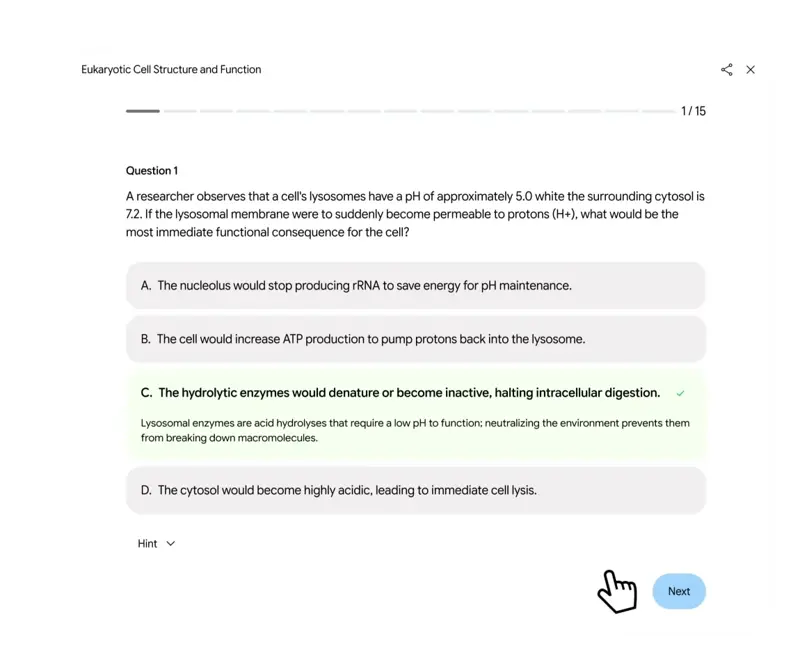
- Gemini runs a diagnostic quiz built from those materials to map what you already know.
- It builds a lesson plan around your gaps — short lessons and practice quizzes, not a wall of text.
- A progress dashboard tracks it all, breaking your goal into as many as 100+ objectives, each labeled a strength, a focus area, or not started, updating as you take more quizzes.
That last part is the real difference from chatting with any AI about your homework. A chatbot answers what you ask; a study notebook decides what you should be asked. It’s the difference between a smart friend and an actual tutor.
Two more details worth knowing: for standardized tests, Google partnered with The Princeton Review for practice items (SAT at launch, more exams rolling in), and study notebooks share sources with Gemini Notebook (the tool formerly known as NotebookLM) — so the same uploaded materials can power flashcards and audio overviews there, and adaptive quizzing here. We’ve covered that rename and what Gemini Notebook does separately.
Set it up in 5 minutes
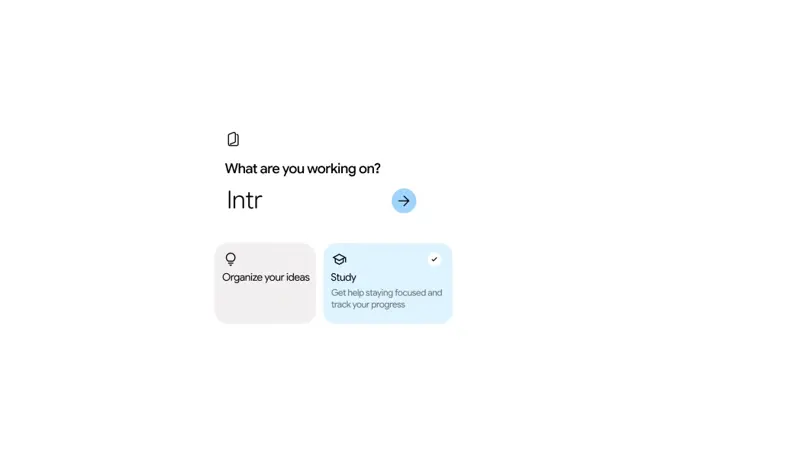
- Go to gemini.google.com on a computer (web first — more on that below) and sign in with a personal Google account.
- In the left sidebar, click New notebook.
- Choose the Study option.
- Type what you want to learn and your goal — be specific: “Pass the NCLEX in September; strongest on peds, weakest on pharm” beats “nursing.”
- Upload your materials — the more your actual course content, the better the quizzes.
- Take the diagnostic quiz honestly. Rushing it or guessing gives you a study plan for a student who doesn’t exist.
- Open the progress dashboard, look at your “focus areas,” and do the first suggested lesson.
That’s the whole setup. It’s free — no subscription required for the core feature.
Why the quiz-first design matters (the science bit)
This isn’t just a product gimmick — it’s the most evidence-backed idea in learning science. Retrieval practice (being quizzed on material rather than rereading it) is one of the best-replicated effects in education research: a systematic review of 50 classroom experiments covering 5,374 students found most showed medium-to-large benefits over restudying, and a meta-analysis of 159 testing-effect studies found roughly 81% showed positive results, especially when feedback comes immediately.
Rereading your notes feels productive and mostly isn’t. Being quizzed on the exact things you got wrong, again and again with feedback, is the thing that works — and that’s the loop this feature automates.
What this means for you
If you’re a college student: this plus your actual lecture notes beats a generic study app that’s never seen your course. Build one notebook per exam, not one giant notebook per semester — reviewers note very large uploads (a whole textbook) can choke it.
If you’re studying for a certification (NCLEX, PMP, CPA, IT certs): you’re the audience this quietly fits best. Upload the official exam guide and your prep materials, tell it your exam date, and let the diagnostic tell you the truth about your weak domains. Early adopters are already using it for professional exams — Japanese users posting about tax-law prep were among the loudest fans in July.
If you’re a parent of a school-age kid: at launch this needs a personal 18+ account on the web; school-issued and under-18 accounts are promised “later this summer,” with Google Classroom integration signals for teachers. For now, the honest setup is: it’s your account, and you sit alongside for homework-adjacent practice.
If you’re an adult self-learner: the “100+ objectives” breakdown is the antidote to the “I want to learn X but where do I start” paralysis. One early reviewer described it as removing the deciding so you can spend the energy on the learning. Pair it with our guide on how to learn AI in 2026 if AI itself is the topic.
What it can’t do
- It’s web-only right now. No native mobile app support at launch (rolling out later this summer). If your studying happens on the bus, this isn’t there yet.
- Mastery signals run thin. The most detailed independent hands-on (Android Police, a week of testing) found the dashboard can mark an objective “mastered” off a handful of correct answers, and adaptation gets shallow on adjacent topics. Treat the dashboard as a good map, not a guarantee.
- It can still be wrong. Benchmark work on AI teaching tasks puts average model accuracy well below perfect — and no model avoids hallucinations entirely. For anything high-stakes, cross-check surprising claims against your textbook. The AI is the drill coach, not the answer key.
- The diagnostic is only as honest as you are. Guess your way through the quiz and you get a plan for someone else.
- It won’t replace doing the hard problems. One education professor’s early caution: tools that decide your learning order are efficient for exams but can weaken the muscle of forming your own questions. Use it to close gaps, not to outsource curiosity.
The bottom line
Free, already inside an app a billion people have access to, and built on the one study technique research keeps validating — study notebooks are the most quietly useful thing Google has shipped for learners in a long time. Set one up before the back-to-school crunch, while your evenings are still calm.
And if you want to get better at using AI itself — prompting, workflows, the skills employers are actually asking for — our Google Gemini course starts free, and AI Fundamentals is the zero-to-confident on-ramp. For the ChatGPT side of studying, we’ve also covered how to study with ChatGPT.
Sources
- Google — 5 ways to learn with study notebooks in the Gemini app (Jun 25, 2026)
- Google — How to make Gemini study notebooks for any subject (Jul 10, 2026)
- Google Help — Create and use notebooks in Gemini Apps
- Android Police — I found Google’s best new study tool (hands-on test)
- Agarwal et al. — Retrieval practice in classroom settings: a systematic review (Educational Psychology Review)
- HEPI — Student Generative AI Survey 2026
