The new Google Home Speaker is a genuinely good little speaker. It’s $99, it has Gemini built in, and every reviewer who’s touched it agrees the AI is a real step up from the old Google Assistant. Then you get to the fine print.
The features Google put in the ads — the ones that make it feel futuristic — mostly sit behind a Google Home Speaker subscription that costs $10 a month after a six-month trial runs out.
So the real question isn’t “is it good.” It’s “do I have to keep paying to get the good part?” Here’s the honest answer, and a simple way to decide.
The $99 you see isn’t the whole price
Quick catch-up. The Google Home Speaker launched on June 25, 2026, at $99. It replaces the old Nest speakers as Google’s main smart speaker, and the headline is that Gemini — the same AI in the Gemini app — now runs the thing instead of the old command-and-response Assistant. You can talk to it more like a person. Ask a follow-up without repeating yourself. Give it a messy two-part request and it keeps up.
That part’s real. The catch is that Google split the speaker into two tiers, and the line between them is where most of the “wow” lives.
The subscription is called Google Home Premium (it’s the rebrand of what used to be Nest Aware). It’s $10 a month for the Standard plan, or $20 a month for Advanced. Every speaker comes with six months free — so the bill doesn’t hit until you’ve had it half a year, which is exactly long enough to forget it’s coming.
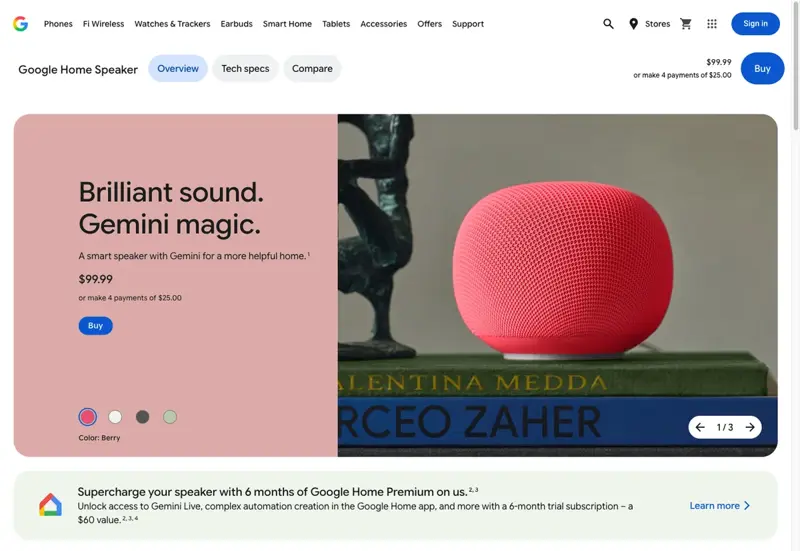
The Google Home Speaker on the Google Store — $99 up front, with six months of Google Home Premium included. Source: Google Store.
What’s free, and what costs $10 a month
Let’s split it down the middle, because Google doesn’t make this obvious.
Everything you’d expect a speaker to do is free, forever, with no subscription. Smart-home control (lights, plugs, thermostats). Timers and alarms. Music. Questions and answers. Weather. And the upgraded Gemini voice — the natural, conversational, multi-step stuff — works free for these everyday tasks. If all you want is a smarter speaker that actually understands you, the $99 is the whole cost.
The subscription unlocks the AI showpieces:
- Gemini Live — the free-flowing back-and-forth mode, where you can brainstorm, interrupt, and change topics mid-sentence like a real conversation. (You kick it off with “Hey Google, let’s chat.”)
- Camera History Search — ask your speaker what your Nest cameras saw. “Did a package come today?” “Was the back gate open?” It answers in plain language.
- Home Briefs — a daily AI-written summary of what happened around the house while you were out.
- Smarter camera alerts — instead of “motion detected,” you get “someone left a box by the front door,” with a zoomed-in preview.
- Saved camera video — 30 days of event history on Standard, 60 days plus some around-the-clock recording on Advanced.
Notice the pattern? Almost everything behind the paywall involves cameras or the deepest AI chat. The speaker’s core job stays free. Google is charging for the home-security brain and the show-off conversation mode — not for the timers.
One thing worth knowing before the trial ends: if you don’t subscribe, those premium features simply switch off. Google’s own support page lists what you lose — camera history, intelligent alerts, Home Briefs, the works. Your speaker keeps working as a speaker. It just stops doing the camera-and-briefing tricks. And if you do subscribe before the six months are up, billing quietly starts the day the trial ends.
A dead-simple way to decide
Forget the feature list for a second. Answer one question: do you have Nest cameras, or plan to?
That’s the whole decision, honestly.
No cameras? Then most of what the $10 unlocks is stuff you can’t use anyway — Camera History Search, camera alerts, saved video. The one non-camera perk is Gemini Live, the deep chat mode. Nice, but not $120-a-year nice for most people. Skip the subscription. Enjoy the free speaker.
Have cameras (or buying some)? Now the math flips. Camera History Search and smart alerts are the genuinely useful part — “show me who was at the door” beats scrubbing through footage. If you were already paying for Nest Aware, you’re basically already paying for this; it’s the same subscription with a new name. Keep it.
Everything else is a personality question: do you want the fancy conversational AI badly enough to rent it monthly? For a few people, yes. For most, the free voice is already the upgrade they wanted.
What this means for you
If you just want timers, music, and a smarter voice: Buy the $99 speaker, use the free six months to see what the fuss is about, and let the subscription lapse when it ends. You lose nothing you were using. You’ve got a better speaker than the old Nest for a hundred bucks, full stop.
If you’re a smart-home enthusiast with cameras everywhere: This is who the subscription is built for. Camera History Search and AI alerts turn a pile of cameras into something you can actually ask questions. Pay the $10 — it’s the cheapest part of your setup and the one that finally makes the cameras feel smart.
If you’re buying it as a gift: Lovely gift, and the six free months mean they won’t hit a paywall on day one. Just tell them the bill’s coming, or they’ll be confused in December when the camera tricks stop. A cheap heads-up saves a “why did my speaker get dumber” text.
If you already own a Nest speaker: Don’t rush. Your old speaker is getting a lot of the same Gemini smarts in a software update, and it might sound better than the new one for music. We broke down whether it’s worth swapping in Google Home Speaker vs. your old Nest — read that before you spend anything.
What it can’t do (the honest limits)
The sound isn’t a big leap. It’s fine — punchy for its size — but Google itself says it lands between the older Nest Mini and Nest Audio, not above them. If music quality is your top priority, this isn’t the speaker that fixes it.
The best AI is rented, not owned. Gemini Live, the camera smarts, the daily briefs — none of it is a one-time purchase. Stop paying and they stop working. You’re renting the intelligence.
Gemini for Home is still a work in progress. Reviewers are split. CNET called it “one of the best at $100” but “a work in progress”; Gizmodo was blunter, calling the AI side “still deflating.” It’s better than the old Assistant, not flawless.
It leans on the Google ecosystem. The camera features only matter if you’re in the Nest/Google world. Bring an Apple or Amazon setup and half the paywalled value evaporates.
The bottom line
The Google Home Speaker is an easy $99 recommendation and a much harder $10-a-month one. The speaker itself — timers, music, the smarter Gemini voice — is free for good. The subscription is really a camera-and-conversation upgrade, and it’s only worth it if you’ve got cameras or you truly love the deep-chat mode. No cameras, no reason to pay. It’s that clean.
If you want to actually get your money’s worth out of Gemini — on this speaker, in the app, at your desk — that’s a skill you can learn. Our Google Gemini course shows you how to talk to it so it’s genuinely useful, and Gemini: Personal Intelligence at Work turns it into a real assistant for your day, subscription or not.
Sources
- Google — Meet the new Google Home Speaker, built for Gemini
- Google Store — Google Home Speaker
- Google Help — Manage your Google Home Premium subscription
- WIRED — The Best Google Home Speaker (2026) review
- CNET — I tried Google’s new smart speaker: one of the best at $100
- Digital Trends — Google Home Speaker (2026) review: smarter and punchier, with a subscription pinch
- 9to5Google — Google Home Speaker available June 25 for $99
- Gizmodo — Google Home Speaker review
