

On May 5, OpenAI quietly swapped the default model behind ChatGPT. The badge in the picker still says “Instant,” but underneath it’s now GPT-5.5 Instant — a model that, per OpenAI’s own numbers, makes 52.5% fewer hallucinated claims on high-stakes prompts (medicine, law, finance) and writes 30.2% fewer words to say the same thing.
If you’ve been on ChatGPT for a while, you’ll feel the shift the first day. Shorter answers. Fewer emoji. Almost no “would you like me to also…?” tail. The follow-up-question loop that everyone complained about for the past nine months is mostly gone.
The catch: a lot of prompts that worked beautifully on 5.3 now produce worse output on 5.5. Not because 5.5 is dumber. Because 5.5 is taking your instructions more literally and shorter, and your old prompts were padded for a chattier model.
This is a cheatsheet. Twelve prompts most people I know send to ChatGPT every week, rewritten for the new default, with a one-line note on what changed and why.
What actually changed (the short version)
You can read OpenAI’s full announcement and TechCrunch’s coverage for the deep version. Here’s the part that matters for prompting:
- Tone defaults to terse. Old prompts that begged the model to “be concise” are now redundant. The model is already concise. If you wrote “answer in bullet points, no introduction,” that’s overspecified — strip it.
- No more padded reasoning preamble. GPT-5.3 used to start half its answers with “Great question! Let me think through this step by step…” The new model just goes. If your prompt forces it to “think step by step out loud,” you’re paying for tokens you don’t need.
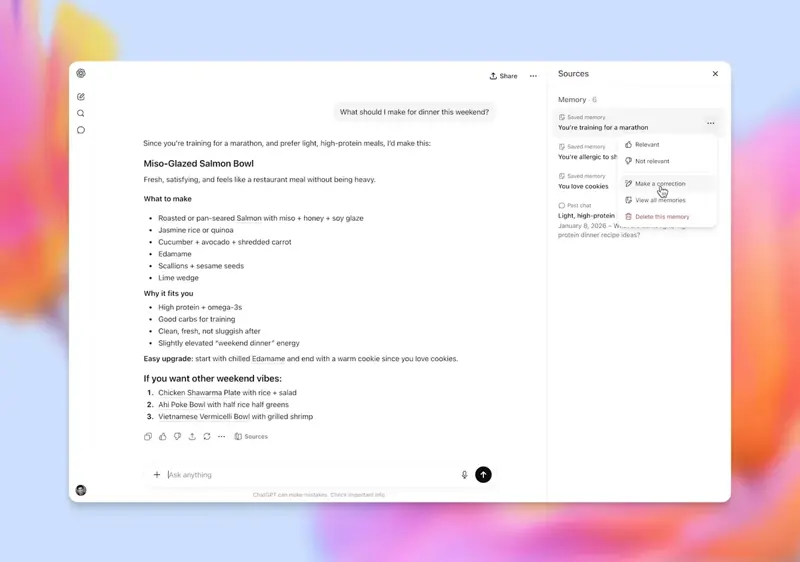
- Memory Sources panel is new. When ChatGPT uses a saved memory, a past chat, or a connected app (Gmail, Drive) to answer you, there’s now a small “i” icon that shows you which sources fed the response. VentureBeat caught that it shows some sources but not all — so if you’ve been writing prompts that depend on the model “knowing what you told it yesterday,” check the panel; it’s a good audit.
- Less compliance with verbose persona prompts. “You are a world-class senior partner at McKinsey with 25 years of experience…” still works, but the model strips that off mentally and just answers the question. Long roleplay framing is mostly wasted tokens now.
- Higher penalty for vague. With the shorter-response default, vague prompts produce vague short answers — worse than the old vague-prompt-into-padded-answer outcome that at least gave you something to edit.
The principle the rewrites are built around: state the outcome you want, not the process to get there.
The 12 rewrites
1. The “explain this concept” prompt
Old (5.3-friendly):
“Can you explain quantum entanglement to me like I’m a curious adult with no physics background? Please use analogies, avoid jargon, and walk me through it step by step. Make it engaging.”
New (5.5-friendly):
“Explain quantum entanglement for a non-physicist. One analogy, then the rule it teaches. 200 words.”
What changed: removed “engaging” (5.5 doesn’t pad), removed “step by step” (it’ll structure naturally), added a word count (5.5 honors length caps cleanly).
2. The “summarize this article” prompt
Old:
“Please read the article below and give me a thorough summary. Include the main argument, supporting points, and any counterarguments. Use bullet points and be comprehensive.”
New:
“Summarize this article in 5 bullets: thesis, top 3 supporting points, strongest objection it doesn’t address. [paste]”
What changed: “thorough” and “comprehensive” used to expand the response; now they just slow it down. Specifying the bullet structure inline gets a cleaner output.
3. The “rewrite this email” prompt
Old:
“I’m going to paste an email below. Can you rewrite it to sound more professional but still warm? Make it concise but not too short. Adjust the tone so it doesn’t sound like AI wrote it. Keep all the important details.”
New:
“Rewrite this email. Professional, warm, no AI tells. Keep all numbers and dates. [paste]”
What changed: every adjective in the old prompt was a hedge. The new model takes hedges as noise. “Don’t sound like AI” works as a direct instruction now.
4. The “give me feedback” prompt
Old:
“Here’s my draft. Can you give me honest, constructive feedback on the structure, clarity, and persuasiveness? Don’t just praise it — point out what’s not working. Be specific.”
New:
“Critique this draft. Three things working, three things not working. Be blunt. [paste]”
What changed: 5.5 will actually be blunt when told. 5.3 needed three sentences of permission. This is the single biggest improvement for writers.
5. The “compare X and Y” prompt
Old:
“Can you give me a detailed comparison of Notion and Obsidian for personal note-taking? Cover pricing, features, ease of use, and which one is better for different types of users. Use a table if it helps.”
New:
“Notion vs Obsidian for personal notes. Comparison table: pricing, features, ease of use. Then your recommendation in one sentence.”
What changed: 5.5 defaults to a table when one is appropriate, so you don’t have to suggest it. The one-sentence verdict at the end forces a recommendation instead of hedging.
6. The “help me brainstorm” prompt
Old:
“I need help brainstorming ideas for a podcast about ethical fashion. Can you generate a wide range of ideas — different formats, angles, target audiences? Aim for at least 20 ideas, and don’t filter — quantity over quality.”
New:
“20 podcast ideas about ethical fashion. Mix formats (interview/solo/narrative). Tag each with target audience. No throat-clearing.”
What changed: “no throat-clearing” became my favorite migration phrase. 5.5 understands it.
7. The “act as X” prompt
Old:
“I want you to act as a senior product manager with 15 years of experience at a top tech company. You’re reviewing my product roadmap. Be critical, ask hard questions, and don’t pull punches. Here’s the roadmap: [paste]”
New:
“Stress-test this product roadmap. Three weakest assumptions, two missing risks, one bet that’s actually contrarian. [paste]”
What changed: the persona prompt is now overhead. The new model performs the role implicitly when you give it role-shaped tasks (stress-test, critique, audit) — you skip straight to the output structure.
8. The “extract data from text” prompt
Old:
“Please carefully extract the following information from the text below: company names, dollar amounts, dates, and any quoted statistics. Format the output as a clean list, and make sure you don’t miss anything. Here’s the text: [paste]”
New:
“Extract from text: company names, dollar amounts, dates, quoted stats. JSON. If a field is missing, write null — don’t infer. [paste]”
What changed: 5.5 is much better at structured output. Specify JSON and it gives clean JSON. Adding “don’t infer” closes the hallucination door on missing fields.
9. The “plan something” prompt
Old:
“Help me plan a 5-day trip to Lisbon for a couple in their early 30s who like food, design, and quiet neighborhoods. We don’t want a packed schedule — leave room for wandering. Give me day-by-day with morning/afternoon/evening blocks.”
New:
“5-day Lisbon itinerary for a 30s couple. Interests: food, design, quiet streets. Style: unhurried. Day-by-day, morning/afternoon/evening. One restaurant booking suggestion per day.”
What changed: replaced soft constraints (“we don’t want a packed schedule”) with style labels (“Style: unhurried”). The new model parses labeled constraints faster than full-sentence ones.
10. The “debug my code” prompt
Old:
“Here’s my Python script. It’s supposed to fetch data from an API and write it to a CSV, but I’m getting an error. Can you take a careful look, walk me through what might be wrong, and suggest a fix?”
New:
“Debug this. Goal: fetch API → CSV. Error: [paste error]. Code: [paste code]. Give me: root cause, line to change, fixed snippet.”
What changed: declaring the goal up front, the error before the code, and the output structure produces a single clean answer instead of an interactive back-and-forth.
11. The “research a topic” prompt
Old:
“Can you research the current state of carbon offset markets for me? I want to know who the major players are, recent controversies, regulatory developments, and where the field is heading. Be thorough but accessible.”
New:
“Carbon offset markets, current state. Cover: 5 major players (with one-line each), 2 recent controversies, 1 regulatory shift, 1 prediction. Cite sources where you can.”
What changed: forcing counts on each section (5 / 2 / 1 / 1) gives you something editable. “Thorough but accessible” used to produce 1,500 words; the new prompt produces a 400-word skim you can drill into.
12. The “creative writing” prompt
Old:
“Write a short story about a librarian who discovers a book that writes itself. Make it atmospheric, literary, around 800 words. Use vivid sensory detail and an unexpected ending.”
New:
“Short story, 800 words. Premise: librarian finds a self-writing book. Tone: literary, atmospheric. Hard rule: the ending must subvert the obvious twist.”
What changed: “unexpected ending” used to produce the obvious twist. “Subvert the obvious twist” — phrased as a hard rule — actually gets you somewhere weirder. Use “Hard rule:” anywhere you want a constraint to stick.
The pattern, if you only remember one thing
Old prompts were instruction-heavy and outcome-light. They told the model how to think, how to format, how to behave. New prompts should be outcome-heavy and instruction-light. State what you want the response to be, not how the model should get there.
The format is roughly:
[task verb] [object]. [structural constraint]. [tone or scope]. [any hard rules].
That’s it. Four short phrases instead of a paragraph.
What deeper research adds (the numbers nobody is putting in the headline)
OpenAI’s “52.5% fewer hallucinations” number is real but narrow. Pulling independent sources together changes the picture:
- Artificial Analysis’s AA-Omniscience benchmark scored GPT-5.5 with 57% factual accuracy — the highest ever recorded for any model — but an 86% hallucination rate when the model doesn’t know the answer. For comparison, Claude Opus 4.7 sits at 36% and Gemini 3.1 Pro at 50%. The takeaway: GPT-5.5 is more confident when it shouldn’t be. The hallucination drop OpenAI reported is on prompted high-stakes scenarios; outside that lane, the model fabricates more often than rivals when it hits a knowledge gap.
- The scale of this rollout is bigger than most people realize. ChatGPT crossed 900 million weekly active users in February 2026 — double the 400 million reported a year prior. A single default-model switch instantly affects hundreds of millions of workflows. That’s why a “small” UX change like Memory Sources is genuinely consequential.
- API users actually pay 2× more. GPT-5.3 Instant is priced at $1.75/M input + $14/M output tokens. GPT-5.5 (the general API endpoint) is $5/M input + $30/M output. Token efficiency offsets some of the gap — the ~30% shorter responses pull effective per-task cost back to a roughly 20% premium — but the headline price doubled.
- The Memory Sources panel has a real attack surface. In early 2026, Check Point researchers disclosed a DNS-based side channel allowing silent exfiltration of ChatGPT conversation data; OpenAI patched it on February 20, 2026, but Check Point’s head of research said it bluntly: “Native security controls are no longer sufficient on their own.” Plus/Pro users with Gmail integration enabled have introduced a new prompt-injection vector against email — which is why major banks and government agencies are pre-emptively restricting ChatGPT use internally.
- Memory Sources isn’t just UX — it’s a longitudinal-profiling tool. Privacy researchers at PIA describe it as “far beyond session memory”: past conversations, files, and connected Gmail all feed a persistent profile of beliefs, work, and relationships. OpenAI’s privacy policy permits using content “to improve services,” so memory data sits in an unclear legal space between “user preference” and “training input.”
The practical migration advice: treat Memory Sources as opt-in for sensitive workflows, audit stored memories weekly via the Memory panel, and use Temporary Chat for any session involving confidential client or proprietary data.
What it can’t do (the honest limits)
A migration cheatsheet isn’t a personality transplant. Some things you should know:
- Long-form creative work still benefits from richer setup. A 2,000-word essay or a novel chapter still wants more context. The “short prompt” rule is for the everyday queries — emails, summaries, debugging, comparisons. Not for sustained writing.
- Memory Sources hides some context. Per VentureBeat’s writeup, the panel shows you what was used but not always what was considered. If a memory you didn’t expect to be there is influencing answers, the panel may not catch it. Check your saved memories settings directly.
- The “lazy” complaint is real. Some users report 5.5 cutting off mid-task or refusing to elaborate when pressed. If it happens, the fix is usually re-prompting with the missing constraint (“expand step 3 with a code example”), not arguing with the model.
- Custom instructions still matter. If you have custom instructions set in ChatGPT (the system-level “About me” and “Response style” fields), those interact with the new default. If your custom instructions said “be detailed and thorough,” you’ll get longer answers than the new baseline implies. Audit them.
- API users on
gpt-5-3-instantare unaffected. This rollout is the ChatGPT consumer surface only. Developers calling the API by model name keep the old behavior unless they switch.
What this means for you
If you’re a casual user who writes a few prompts a day: you don’t need to migrate anything. Just notice when an old prompt feels clunky, and try the rewrite pattern above.
If you write prompts for a living (operators, marketers, ops people): rewrite your saved prompts library this week. Cut every instruction that tells the model how to behave; keep the outcome and the structural constraints.
If you maintain a prompt library for your team: publish a one-page internal style guide based on the rewrites above. The biggest team-wide regression in prompt quality after a default-model swap is people copying each other’s old prompts. Get ahead of it.
If you’re a developer using the API: this doesn’t affect you yet, but the same brevity-default is likely coming to gpt-5-5-instant API access. Start writing prompts the new way so you’re not migrating twice.
If you teach AI to non-technical people: the new model is genuinely easier to teach with. Students who used to get scared off by ChatGPT’s wall-of-text answers now get tight, scannable ones by default. Less unlearning to do.
The bottom line
The model got smarter, terser, and slightly grumpier. Your prompts should match. Strip the politeness padding, the process instructions, and the personality framing — leave the outcome and the structure. The result is faster answers, fewer regenerations, and (worth saying) about 30% less token spend on the consumer side that you don’t even pay for but the planet does.
If you want a deeper dive on building a personal prompt library that survives model changes like this, our GPT-5.4 for ChatGPT Users course walks through the durable patterns — the parts of prompting that haven’t changed across the last four default-model swaps.
Sources
- OpenAI — GPT-5.5 Instant announcement
- TechCrunch — OpenAI releases GPT-5.5 Instant
- Tom’s Guide — I tested GPT-5.5 Instant
- 9to5Mac — GPT-5.5 Instant makes ChatGPT more accurate
- TechRadar — ChatGPT just got a major personality overhaul
- Axios — OpenAI updates ChatGPT Instant with GPT-5.5
- SiliconAngle — Concise and reliable responses
- OpenAI — GPT-5.5 Instant System Card