If you’re an IT admin at a Microsoft 365 shop, your inbox got busy on May 1. Microsoft Agent 365 hit general availability, your account rep probably already pinged you about it, and the official documentation reads like — well, official documentation. Twelve product pages, three SKU diagrams, and a recurring sense that everyone is using the word “agent” to mean something slightly different.
This is the plain-English version. What Agent 365 actually is, what it isn’t, what it costs, and what you need to decide this quarter.
The one-sentence definition
Agent 365 is the control plane for AI agents in your tenant — the place where you see them, license them, audit them, and shut them off. It is not the place where you build them. It is not the place where they run.
That’s the entire mental model. If you internalize that one distinction, the rest of the documentation makes sense.
What “control plane” actually means here
Borrowing from the Microsoft Security Blog announcement, Agent 365 gives you four things you didn’t have before:
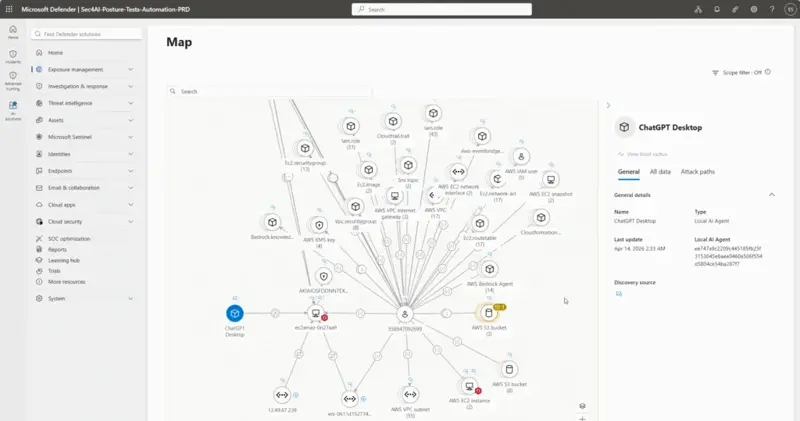
- An agent registry. Every agent in your tenant — whether it was built in Copilot Studio, in Microsoft Foundry, by a developer in code, or installed from a third party like ServiceNow or Workday — shows up in one list. With identity, owner, last-run time, permissions, and runtime cost.
- Entra identities for agents. Each agent gets a real identity in your directory, just like a user or a service principal. You assign it permissions, you scope it, you revoke it. The era of “well, the agent runs as whoever created it” is over.
- Purview and Defender enforcement. The same data-loss-prevention policies you wrote for humans now apply to agents. The agent that wants to read a finance folder gets the same DLP gate a finance contractor would.
- The Microsoft 365 admin center dashboard. Total registered agents, active users, growth trends, runtime hours, risk signals — one screen. This is the “I just got handed this and need to know what’s running” panel.
What it is not: a place to build agents. A place to host agents. A natural-language designer. A no-code studio. A chat interface.
Agent 365 vs Copilot Studio — the one-sentence difference
I see this confusion in Reddit threads daily, so let’s nail it:
Copilot Studio is where you build agents (and historically run them too). Agent 365 is where you see, govern, and shut off every agent in your tenant — regardless of where it was built or where it runs.
From Microsoft’s own framing: “Copilot Studio serves as a governed foundation for building agents, while Agent 365 becomes the operational control plane for observing, restricting, and investigating those agents once they are in production.” (Windows Forum coverage)
If you’ve ever managed an Azure tenant: Agent 365 is to agents what Entra ID is to users. The fact that Entra doesn’t build users for you isn’t a flaw; it’s the point. Same here.
What it costs
The pricing has three doors:
- Standalone Agent 365 — $15 per user per month. Per SAMexpert, this is the cleanest entry point for tenants that want governance without re-licensing the whole org.
- Bundled in Microsoft 365 E7 — $99 per user per month. Includes Agent 365 plus everything in E5 plus the new “Frontier” tooling. Per-user math: if you already have E5 at $57/user, the upgrade is roughly $42/user, of which Agent 365 is one piece.
- Hidden line: runtime is extra. Agent 365 governs agents; it doesn’t run them. Whatever agent activity your team uses still draws from Copilot Studio messages, Foundry consumption, or whatever your runtime is. The TeamsFox writeup calls this out explicitly: consumption billing is separate.
The number that’s interesting: AB-900 (“Microsoft 365 Certified: Copilot and Agent Administration Fundamentals”), the new certification tied to Agent 365 admin work, has a KD of 7 in keyword tools — meaning if you’re an admin who passes it, you’ll show up in basically any search query about Agent 365 admin work for the next two years. That’s the kind of timing that doesn’t repeat.
What you, the admin, actually have to do this quarter
If your CTO walked into your office today and said “we need Agent 365 enabled by end of quarter,” here is the actual list. Not the marketing list — the admin list.
Step 1: Decide whether you have agents to govern
Run a quick inventory. Open Copilot Studio in your tenant. Open Microsoft 365 admin center → Apps → Agents. Open your security alerts and grep for “agent.” If the answer is “we have three agents that one person built and they don’t touch sensitive data,” skip Agent 365 for now and revisit at renewal.
If the answer is “we have 40 agents across six departments and finance is asking about an agent that pulls from SharePoint,” you need Agent 365 yesterday.
Step 2: Pick the licensing door
- Less than ~30% of your users will interact with agents: Standalone $15/user only for those users. Cheaper.
- Most of your org will use agents and you’re already at E5: evaluate E7. The bundle math gets favorable around 60%+ agent-user share.
- You’re at E3 and skipping E5: Agent 365 standalone is the only sensible path; don’t let the rep upsell you into E7 unless the E5 features are also on your roadmap.
Step 3: Wire up the registry
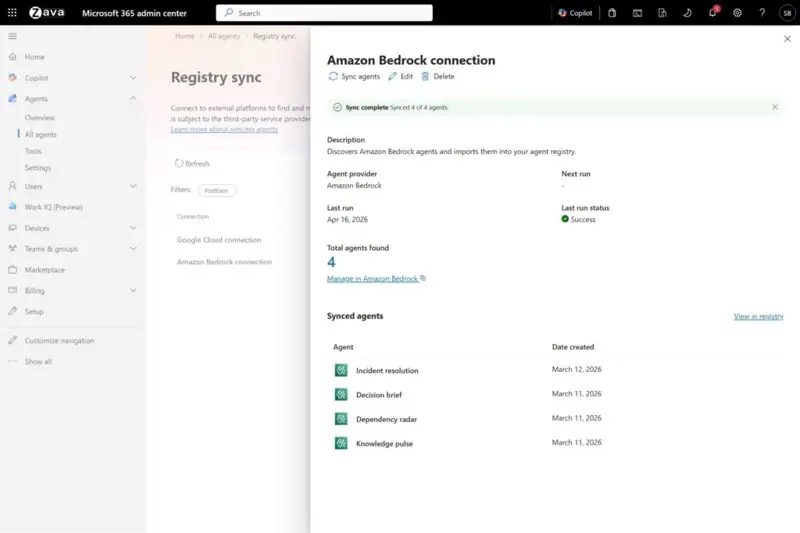
Once licensed, the registry isn’t automatically populated for third-party agents. You connect platform-by-platform — AWS Bedrock, Google Cloud, ServiceNow, SAP, Workday. Microsoft’s agent registry sync is in public preview for AWS and Google Cloud as of May 2026; the rest you have to inventory manually for now.
Step 4: Set up your three guardrails
- A Purview DLP policy that applies to agents the same way it applies to users (most orgs that already had DLP for users will copy the existing policy and scope it to agent identities).
- An Entra Conditional Access policy for agents — most commonly: agents cannot run outside business hours, cannot access certain sensitive sites, must use managed identities only.
- A Defender for Cloud Apps policy for the runtime alerts — “tell me if an agent suddenly spikes runtime by 10x” is the canonical one.
Step 5: Build your “kill switch” runbook
This is the one nobody writes until they need it. Write the runbook now: who has the right to disable an agent at 2am, what the disable command is (it’s a single toggle in admin center, but new admins won’t know), and what notifications go out when one is killed. Include the rollback if it turns out to be a false alarm.
What the data says about why Agent 365 exists now
Microsoft hasn’t published tenant counts, but the surrounding numbers explain the urgency:
- 42% of large organizations had deployed AI agents by September 2025, up from 11% two quarters earlier — per KPMG’s enterprise AI survey. 76% of leaders expect employees to be actively managing agents within two to three years, and 78% are already concerned about the cybersecurity risk those agents introduce. That’s the demand curve Microsoft is selling into.
- Gartner projects AI governance spending of $492M in 2026, growing past $1B by 2030 — a 36% CAGR through 2033. Agent 365 sits squarely in that category. The total AI agents market hits an estimated $10.9–12.06B in 2026 at a 44–46% CAGR.
- Gartner’s blunt warning: more than 40% of agentic AI projects are at risk of cancellation by 2027 due to governance and ROI gaps. That’s the number that turns Agent 365 from a “nice to have” into a “we need to be able to point at this in the steering committee.”
The gotchas independent analysts are flagging that Microsoft isn’t
- The “Microsoft Agent 365 Frontier” license gotcha. A Microsoft Q&A thread documents the canonical first-week symptom: an agent shows up in Teams, but new users can’t add or use it. Root cause: the Frontier license isn’t enabled tenant-wide or correctly mapped at per-user level. You need to line up tenant-level service enablement, per-user licensing, and app permission policies before anyone exercises agents — not after the rollout.
- The browser blind spot is real. Browser-security vendor LayerX measured that 71.6% of enterprise access to GenAI tools happens through non-corporate accounts, and 77% of employees paste data into GenAI prompts — half of which includes corporate data. Agent 365 governs identities and endpoints; it does not see what an employee pastes into a personal ChatGPT session in their browser. Treat it as a complement to a browser-DLP layer, not a replacement.
- Agent 365’s threat model is around behavior, not control-plane bugs. No CVE-style disclosures are public against Agent 365 itself yet. The relevant security research is on adjacent attack classes — Aim Security’s EchoLeak zero-click Copilot attack (June 2025), where a crafted email could pull and exfiltrate sensitive M365 data, and the recurring pattern of Copilot Studio agents over-privileged via embedded credentials. Defender baselines flag some of this; configuration hygiene is your job.
- Recent Entra Agent ID vulnerability. A Microsoft security expert disclosed on LinkedIn an Entra Agent ID issue patched shortly after the AI Tour event that heavily featured Agent 365. Details are limited, but the signal is that the identity substrate under Agent 365 is already drawing focused red-teaming.
What it can’t do (the honest limits)
- It doesn’t stop a badly-built agent from being badly built. A registered, governed agent that hallucinates pricing data still hallucinates pricing data. Agent 365 logs that it did, but the fix is at the Copilot Studio / Foundry layer, not here.
- Registry sync is partial. AWS Bedrock and Google Cloud are in public preview as of GA. Lifecycle actions (start/stop/delete) across those clouds are “coming soon.” If your agents live entirely outside Azure, Agent 365’s value drops significantly for the first half of this year.
- It doesn’t include the Researcher Agent that uses Claude. That feature, hinted at in Microsoft Learn pages backdated to May 4, is separate Copilot functionality. Don’t expect Anthropic models inside Agent 365 governance dashboards.
- Pricing for high-runtime tenants gets messy fast. $15/user is the floor. If your 5,000-user tenant has agents that run 24/7 across many connections, your real cost is the $15 plus a Foundry or Copilot Studio runtime bill that scales with agent activity. The TeamsFox writeup linked above has the breakdown — read it before you sign.
- It assumes you already have Entra, Purview, and Defender configured. If your tenant is a “we use 365 for email” deployment without the security stack, Agent 365 will feel hollow. You’ll see the dashboard, but the enforcement layer is missing.
What this means for you
If you’re an IT admin at a mid-market org (200–2,000 employees): Agent 365 standalone is probably the right starting point. Pilot with the team that’s already building agents, before rolling tenant-wide.
If you’re at a large enterprise on E5: the E7 math is worth running this quarter. Bundle pricing is usually a single-digit-percent discount for the package vs buying parts; the real value of E7 is the lifecycle simplification.
If you’re a Microsoft partner or consultancy: there’s a real first-mover advantage in offering an “Agent 365 deployment package” right now. The SERP is empty for “Agent 365 implementation guide” and the keyword “what is microsoft agent 365” has KD 14 — both will fill up by Q3.
If you’re an admin studying for AB-900: start now. The exam is new (KD 7 on “ab-900 microsoft 365 copilot and agent administration fundamentals” — Google considers it a free-money keyword). Cert holders who pass before September will be the de-facto experts.
If you’re at a small business (<100 seats): sit this out for a quarter. The governance overhead exceeds the agent risk for tenants this size, and the integration cost isn’t worth it until you have at least a dozen agents to herd.
The bottom line
Agent 365 is what every IT department asked for the day after the first Copilot agent got installed without anyone’s permission. It’s not the agent itself. It’s the layer between you and the chaos of your tenant suddenly having seventeen agents with vague ownership and unclear permissions.
If you’re not at the seventeen-agents-with-vague-ownership stage yet, you don’t need it. If you are, you needed it last year.
For admins who want a structured way to think about deploying Copilot and agents across an org, our Microsoft Copilot course covers the deployment patterns most teams stumble through — the parts that show up before Agent 365’s dashboard ever does.
Sources
- Microsoft Security Blog — Agent 365 now generally available
- Microsoft Tech Community — What’s New in Agent 365: May 2026
- SAMexpert — Agent 365 Licensing: What It Covers and Costs
- TeamsFox — Microsoft Agent 365 Pricing: Hidden Costs IT Teams Miss
- Windows Forum — Copilot Studio Governance & Agent 365 Control Plane
- Microsoft Learn — Agent 365 overview
- WinBuzzer — Agent 365 hits general availability
- Nerova — Standalone vs Microsoft 365 E7 costs
