Three days after WWDC, every headline is still about the new Siri. Fair enough — it’s the comeback story of the year. But while everyone argues about whether Siri is finally good, Apple quietly shipped seven other AI features in iOS 27 that you’ll probably use more often than the assistant itself. Nobody’s writing about them, and a few of them solve problems you’ve had for a decade.
The one that made beta testers do a double take: your iPhone can now visit a website on its own, log in, and change your compromised password for you. One tap. We’ll get to that.
What just changed
At the June 8 keynote, Apple split its AI story in two. Siri AI got the stage time — the new voice, the dedicated app, the waitlist everyone’s stuck on. The rest of Apple Intelligence got about six minutes total, spread across Safari, Passwords, Mail, and the Phone app.
That six minutes is where the daily-use stuff lives. These features don’t wait for you to summon them. They reorganize your tabs while you browse, fix your grammar while you type, and pull up your flight confirmation while you’re on hold with the airline. The developer beta is out now, the public beta lands in July, and the full release comes this fall.
One catch before you get excited: all of this requires Apple Intelligence, which means an iPhone 15 Pro or any iPhone 16 or newer. An iPhone 11 through 15 will run iOS 27 just fine — but with zero AI features. More on that below.
The 7 features nobody’s talking about
1. Safari organizes your tab chaos automatically
If you’re a 40-tab person, this is the headline feature Apple buried. Safari now groups your open tabs into topics on its own — no folders to make, no dragging. Apple’s own example: “if a user is planning a weekend trip, Safari can bring together all of their travel-planning tabs into one topic.” New tabs slot into existing topics as you browse, and you can save any auto-built group as a permanent Tab Group.
Early beta testers call it the most underrated upgrade of the release. It’s opt-in, so flip it on under Safari’s tab settings once you’re on the beta.

2. One-tap password fixing — your phone does the work
This is the boldest one. The Passwords app has warned you about weak and compromised passwords for years. Now it fixes them. Apple’s exact words: “Using Apple Intelligence and Safari to agentically take action on a user’s behalf, Passwords securely navigates through websites to sign in and upgrade their accounts to strong passwords.”
In practice: you open the Security tab in Passwords, tap Fix Passwords, and watch a Live Activity tick through “Signing in” → “Saving strong password” → “Security upgraded” while your phone quietly does the chore you’ve postponed since 2019. You can cancel mid-run anytime.
The fine print matters here — it only works on “eligible” websites, and Apple hasn’t published the list. We cover the bigger catch (two-factor accounts) in the limits section.
3. Auto-proofread everywhere you type
Writing Tools used to wait for you to select text and ask. In iOS 27, proofreading happens as you type — spelling and grammar suggestions surface across the system, including in most third-party apps. Slack, WhatsApp, your CRM’s notes field: same treatment. You accept, reject, or skip each suggestion individually, so it never silently rewrites you.
If you’ve ever sent “Let’s meet at 3pm tomorrow” when you meant Thursday, this is the feature that catches it before your boss does.
4. Smart Reply that sounds like you — per person
Mail and Messages suggestions now learn how you talk to each specific contact. Apple says Smart Reply “can now draw on a user’s personalized writing style” — meaning if you send your manager tight bullet points and your best friend lowercase chaos, the drafts match each register. It’s the difference between AI suggestions you delete and ones you actually send.
Caveat: English only at launch.
5. Safari watches pages for you (“Notify Me”)
Tell Safari, in plain English, what you’re waiting for — “when these sneakers are back in stock,” “when registration opens” — and it monitors the page and pings you when it happens. You set how often it checks. Macworld’s hands-on called it “a safe agentic AI approach” because it only notifies; it never buys anything or fills forms behind your back.
This quietly replaces a whole category of price-tracker and restock-alert services you used to need a browser extension for.

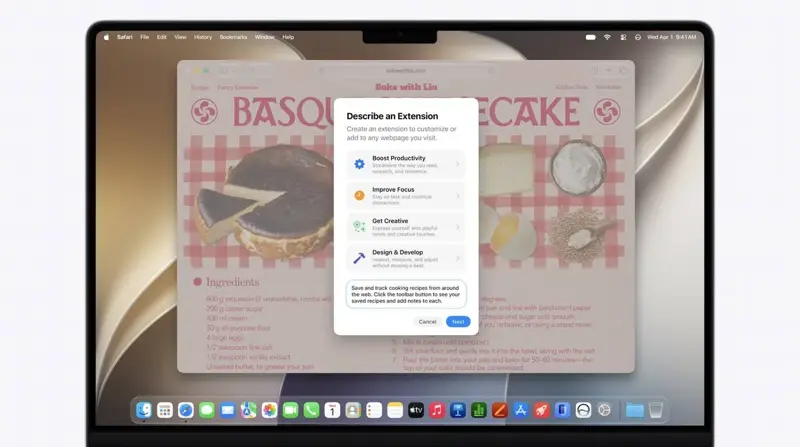
6. Describe a Safari extension, get a Safari extension
The sleeper feature for tinkerers: describe what you want in plain English, and Safari builds a working extension for it, right in the toolbar. Apple’s example is “adding a button to save and rate recipes a user has tried.” Until now this required a developer. Now it requires a sentence.
Nobody outside Apple has torn down the generated extensions yet — the beta is days old — but if it works as demoed, it’s the most quietly radical thing in iOS 27.
7. Call Context: your confirmation code, before you’re asked
Call an airline to change a flight, and the Phone app automatically surfaces your confirmation number from Mail — before the agent asks for it. Apple is specific about the privacy mechanics: “Call Context looks at who the user is calling, not what they’re saying… it runs entirely on device, so nothing is shared with Apple or anyone else.”
It’s a small feature that removes the exact 45 seconds of frantic inbox-scrolling everyone knows.
What this means for you
If you have an iPhone 15 Pro or any iPhone 16/17: You get everything this fall — or now, if you’re comfortable on a beta. The tab organization and auto-proofread alone justify the update day-one.
If you’re on an iPhone 11 through 15 (non-Pro): You’ll get iOS 27, but none of these AI features — the hardware floor is real, not marketing. If these features matter to you, they’re honestly a better upgrade reason than Siri is.
If you live in the EU: Apple has only confirmed that Siri AI is blocked on iPhone and iPad under the DMA dispute. Whether these non-Siri features ship in the EU is still officially unclear — Apple’s track record says don’t assume. Mac users in the EU get everything.
If you’re in China: Apple says plainly that Siri AI and the new Apple Intelligence features are unavailable while it “works through regulatory requirements.” No timeline.
If you handle sensitive work email on your phone: The on-device architecture matters to you. Proofread, Call Context, and the semantic index run locally; heavier tasks go to Apple’s Private Cloud Compute, which is stateless and independently auditable. Worth knowing before your IT department asks.
What this can’t do
The password agent hasn’t answered the 2FA question. If your account has two-factor authentication — and your important ones should — Apple hasn’t documented what happens when the site asks for a code mid-flow. Security researchers flagged this within hours of the keynote, and as of today there’s no official answer. Expect friction on exactly the accounts that matter most.
“Eligible websites” is doing a lot of work. The password fixer only handles sites whose login flows Safari can navigate. No public list exists. CAPTCHA-heavy and unusual login pages will likely fail quietly.
Some features are metered. Apple confirmed certain Apple Intelligence features have daily usage limits tied to iCloud+ plans — and hasn’t said which ones. If your tab organization stops organizing some evening, that may be why.
English-only, for now. The tone-matching Smart Reply, Call Context, and file-naming suggestions launch in English. Other languages come “over the course of the next year,” which from Apple can mean anything.
It’s still a beta. Everything above is based on the developer beta and Apple’s own demos. Features get pulled or delayed between June and September often enough that none of this is guaranteed to ship exactly as shown.
The bottom line
Siri will keep the spotlight, but these seven features are the actual texture of iOS 27 — the AI you’ll touch fifty times a day without ever saying a wake word. If your iPhone qualifies, turn on tab organization and auto-proofread the day you update, run the password fixer on a low-stakes account first, and set one Notify Me watch to see how it feels.
And if you want to actually understand the AI underneath these features — what’s running on your phone versus in the cloud, and what that means for your data — our AI Fundamentals course covers it in plain English, no engineering degree required.
Sources
- Apple Newsroom — Apple introduces Siri AI
- MacRumors — Apple brings AI tab organization and AI-generated extensions to Safari
- gHacks — Apple adds AI tab organization, password fixing, custom extensions, and page monitoring to Safari
- TechRadar — 7 new iPhone features coming in iOS 27
- TechCabal — All Apple Intelligence features coming to iOS 27
- The Register — Apple’s agentic password updates
- Apple Security Research — Private Cloud Compute expansion
