Notion launched its Developer Platform — version 3.5 — on May 13, 2026. The headline feature is buried under a marketing line that’s easy to gloss past: “Bring your favorite agents into Notion with the External Agents API. We’ve partnered with Claude, Codex, Decagon, Cursor, Warp, Cognition, Flora, Amplitude, Console, and Serval so they work out of the box.”
Translation: Claude Code can now operate as a first-class agent inside a Notion workspace. Not “Notion has its own Claude integration.” Not “MCP server in a sidebar.” Claude Code itself can chat in Notion pages, get assigned work from Notion databases, route handoffs to Codex or Decagon, and write results back as Notion content — all orchestrated by Notion as the coordination layer.
This is the integration tutorial that doesn’t exist yet on Google. The waitlist gate is real (External Agents API is in alpha), but the architecture is documented, the Workers half is in open beta, and you can build most of the agent-tool layer today. Here’s the full walkthrough — what’s available now, what’s behind the waitlist, what to budget for the August 11 credits transition, and a clean five-step setup for the path that works today.
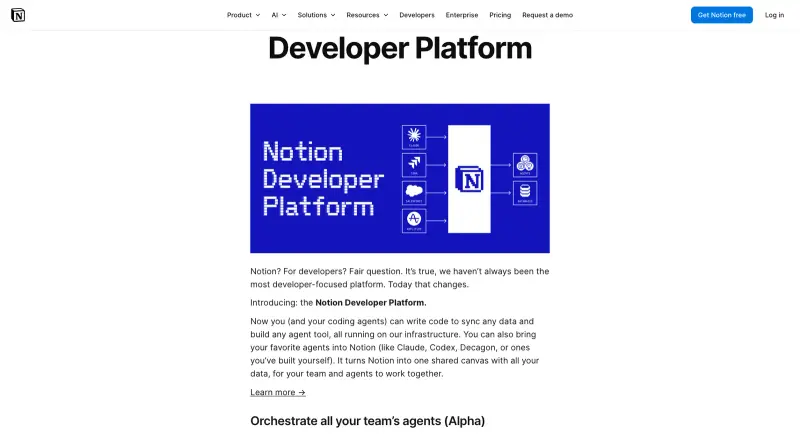
ntn CLI, webhook triggers, database sync, and an updated REST API as a single bundle.
What Notion 3.5 Actually Shipped
Five primitives launched together. Worth understanding the relationship before you start wiring anything.
- External Agents API — alpha, waitlist required. Lets third-party AI agents (Claude Code, Codex, Cursor, Decagon, etc.) operate inside a Notion workspace as first-class participants. The agent shows up in
@mentions, can be assigned to database items, can chat in pages, and can be orchestrated alongside Notion’s own native agents. - Notion Workers — beta, open. A hosted runtime for custom JavaScript/TypeScript code that runs on Notion’s infrastructure. You write a Worker, deploy it via the CLI, and it can be called as a tool by any agent — Notion’s native agents, your External Agents, or invoked directly via webhook.
- Notion CLI (
ntn) — open, all plans. Install withcurl -fsSL https://ntn.dev | bash. Lets you (or your coding agent) authenticate, manage databases, build and deploy Workers, and inspect tokens from the terminal. - Updated REST API + Markdown API — generally available. The API now reads and writes pages as Markdown directly, which is the format agents reason in best. The Notion MCP server (separate from the Developer Platform but updated in the same release) is 91% more token-efficient on database create/update operations.
- Webhook triggers — generally available. Webhooks are now bidirectional. Notion can trigger external apps as before, but now external apps can trigger Notion via a Worker that receives the webhook and acts on the workspace.
The architecture matters because the External Agents API doesn’t stand alone. An agent without tools is a chat surface; an agent with Workers + webhooks + REST API access is something that can actually do work. The five primitives are designed to be assembled.
The Auth Layer — Three Connection Types
Before any of this works, you need authentication. Notion’s auth model has three connection types, each fit for a different scenario:
- Public connections — for agents distributed to many users. Authenticate via OAuth 2.0. During the OAuth flow, the user picks which pages to grant access to via a page picker — page-level scoping, not workspace-wide. This is what Claude Code uses out of the box once the External Agents waitlist opens for you.
- Internal connections — for team-owned automations. Static API token, scoped to a single workspace. Owner-granted access. Best for tools you build yourself for your own team.
- Personal Access Tokens (PATs) — for trusted user-scoped scripts and CLI workflows. Static bearer token, uses the token creator’s existing Notion permissions. No separate page sharing needed; the token inherits what the user can already see. Best for Workers you’re deploying, local agent experimentation, and anything you’d run from your shell.
For the Claude Code integration specifically, you’ll use PATs for the prep phase (CLI setup, Worker development) and OAuth when the External Agent itself is fully wired up. Internal connections aren’t typically used for AI agents — they’re for traditional team automations.
One change worth knowing: as of 3.5, any workspace member can create connections, not just Workspace Owners. That’s a meaningful unlock for individual contributors who couldn’t previously build integrations without admin help.
Five-Step Setup — The Path That Works Today
The External Agents API itself is waitlist-only as of May 18, 2026, so here’s the realistic five-step setup that gets you 80% of the value today, with a sixth step to add when the waitlist opens for you. Total time is about 45 minutes if you’ve never touched Notion’s API before, 15 minutes if you have.
Step 1: Install the Notion CLI
In your terminal:
curl -fsSL https://ntn.dev | bash
This installs the ntn binary. Verify with ntn --version. The installer works on macOS and Linux. Windows support is “coming soon” as of mid-May — use WSL in the interim if you’re on Windows. The CLI requires no Notion plan upgrade; it’s available to all users including free.
If the install fails with a curl-permission or path issue (a few users on Mac reported this in week 1), check that ~/.local/bin or wherever the installer writes to is on your PATH. Run ntn --help to confirm the subcommand surface (api, files, workers, tokens, login).
Step 2: Create a Personal Access Token
Open Notion in your browser. Navigate to Settings → Connections → Develop or manage integrations, or directly to app.notion.com/developers (the new Developer Portal hub). Create an integration. When prompted for capabilities, check what Claude Code actually needs:
- Read content
- Update content
- Insert content
- Read comments (if you want Claude to surface threaded discussions)
- Read user information without email (for
@mentionresolution)
Generate the integration’s Internal Integration Token (this is the PAT — it starts with ntn_). Copy it. Store it in your shell as NOTION_API_TOKEN:
export NOTION_API_TOKEN="ntn_..."
echo 'export NOTION_API_TOKEN="ntn_..."' >> ~/.zshrc
Then share the specific Notion pages and databases you want Claude Code to touch with this integration — from each page’s top-right menu, “Connections → Add connections → [your integration name]”. This is page-by-page sharing, not workspace-wide. Be deliberate about which pages get added.
Step 3: Sign in to the CLI with the token
The ntn CLI uses two auth flows:
ntn login— session auth (cookie-based) forntn workersandntn tokenssubcommandsNOTION_API_TOKENenvironment variable — forntn apiandntn filessubcommands
Run ntn login once in your shell to authenticate the session for Workers. The environment variable from step 2 handles everything else.
Test it works: ntn api GET /v1/users/me should return your Notion user object. If it doesn’t, check the token (PATs from older “internal integrations” are also valid) and that you ran ntn login.
Step 4: Scaffold a Worker
This is where Claude Code earns its keep. Workers are deterministic custom code that agents can call as tools — much more reliable than asking an LLM to chain API calls correctly. From your project directory:
ntn workers new claude-code-helper
cd claude-code-helper
The scaffold gives you a TypeScript project structure. Open src/index.ts in your editor. A minimal Worker that lets Claude Code query a Notion database looks like this:
import { Client } from "@notionhq/client";

export async function searchDatabase({ databaseId, query }: { databaseId: string; query: string }) {
  const notion = new Client({ auth: process.env.NOTION_API_TOKEN });
  const response = await notion.databases.query({
    database_id: databaseId,
    filter: {
      property: "Name",
      title: { contains: query }
    }
  });
  return response.results.map(r => ({
    id: r.id,
    url: ('url' in r) ? r.url : null,
    props: ('properties' in r) ? r.properties : {}
  }));
}
Now point Claude Code at this Worker. In your ~/.claude.json or via claude mcp add, register the Notion MCP server (separate from but compatible with the Developer Platform):
{
  "mcpServers": {
    "notion": {
      "command": "npx",
      "args": ["-y", "@notionhq/notion-mcp-server"],
      "env": { "NOTION_API_TOKEN": "ntn_..." }
    }
  }
}
Claude Code can now call Notion operations as native tools — search pages, create entries, update databases — without you writing per-call code. The Worker layer kicks in for anything that needs custom logic the MCP server doesn’t cover.
Step 5: Deploy the Worker
ntn workers deploy
The Worker uploads to Notion’s hosted runtime. Get a callable endpoint. Test it with ntn workers exec claude-code-helper '{"databaseId": "...", "query": "..."}'. List your deployed Workers with ntn workers ls. They run in a secure sandbox on Notion’s infrastructure and are deterministic — the Notion docs explicitly call this out as a benefit over LLM-only tools: “Workers cost a fraction of the token cost compared to purely LLM-based tools.”
Workers are free during beta (May 13 to August 11, 2026). That’s the window to experiment, build muscle memory, and figure out which Workers you actually want before the metering starts.
Step 6 (when the waitlist opens): Register Claude Code as a First-Class External Agent
The External Agents API is in alpha. Join the waitlist at notion.com/product/dev. When you get access, the flow is:
- Claude Code (the agent) presents an OAuth 2.0 flow to Notion
- You as the workspace member grant page-level access via the page picker
- Claude Code shows up in your workspace as an
@-mentionable agent - You can assign Claude Code to database items, chat with it in pages, and orchestrate handoffs (e.g., Decagon support ticket → Codex coding fix → human approval — all in Notion as the coordination layer)
The first-class agent integration unlocks orchestration. Until then, the MCP + Workers path covers the actual workflow — Claude Code can read and write your Notion workspace from the terminal today.
The August 11 Credits Trap
The most important pricing detail in the release: Workers are free through August 11, 2026. Starting August 11, Workers will run on Notion credits.
Community reports this week (notably from developers tracking the small-print pricing) put the post-August 11 rate at $10 per 1,000 credits, though Notion has not officially published a credit-to-Worker-invocation conversion rate. The safe assumption is that any production Worker workflow needs a cost model before August 11.
The trap: it’s tempting to build a Worker-heavy automation now while it’s free, ship it to your team, and discover in mid-August that your monthly Notion bill jumped because every Worker invocation now meters credits. The defensive habit is to log Worker invocations from day one — even a simple console.log + Notion database row counting “this Worker ran N times today” gives you the data to project August costs.
Practical recommendation: build Workers liberally during the beta to learn the runtime, but treat any Worker you intend to keep in production as a soon-to-be-metered service. Prefer Workers that bundle multiple agent actions into one invocation (one Worker call doing five Notion operations beats five Worker calls doing one each).
What This Means for You
If you’re a solo developer using Claude Code. Skip the External Agents waitlist for now. Install the CLI, set up a PAT, register the Notion MCP server, and you have Claude Code reading and writing your Notion workspace from the terminal today. The orchestration flair (Claude Code visible as a Notion @-mention) is nice-to-have, not essential for the core workflow.
If you’re on a team using Notion as the project hub. This is where the integration earns its keep. Build a few Workers that codify your team’s repeatable workflows — closing a task when a PR merges, syncing a CRM record when a deal closes, generating a brief when a new ticket comes in. Those Workers become tools Claude Code (and any other agent) can call. The compounding value isn’t from one big agent automation; it’s from a library of small reliable Workers any agent can use.
If you’re in a regulated environment. The waitlist gate is doing real work. External Agents API hasn’t gone through Notion’s security review for everyone yet. Internal connections (workspace-scoped, owner-managed) are the safer path for sensitive content until the External Agents API is generally available. Don’t grant page-level OAuth access to a Claude Code instance running on a developer’s personal laptop if your data classification doesn’t allow it.
If you’re an Enterprise plan customer. Check with your Notion admin before connecting any agent. Enterprise data scopes, SCIM provisioning, and SAML SSO are handled separately from the Developer Platform’s connection types, and your admin may have managed-settings policies that restrict which agents can connect.
What the Integration Can’t Do (Yet)
Honest limits worth knowing.
- It can’t bring Notion data into Claude Code’s training. Conversations through the External Agents API are agent-routed, but Notion’s own privacy controls still apply. Notion does not train on your workspace content; Claude Code’s conversations with Notion content still flow through Anthropic’s model with whatever training policy you’ve set on Anthropic’s side.
- It can’t trigger Notion from arbitrary external sources without a Worker in the middle. Bidirectional webhooks are documented in the release, but the cryptographic signature scheme for verifying incoming webhooks wasn’t published in the May 13 notes — check
developers.notion.comfor the HMAC details before you ship anything that takes action on a webhook. - It can’t handle large file uploads through the External Agent flow. The Markdown API is the agent’s preferred read/write format; for large attachments, use the existing Files API directly via PAT.
- It can’t replace Notion’s native agents inside the workspace. External agents complement Notion’s built-in agents, they don’t supersede them. The orchestration model routes work across both; Claude Code is one participant in a larger automation graph, not a replacement for everything Notion does.
- The credits cost isn’t fully knowable yet. Plan for it, don’t predict it precisely. Notion hasn’t published the credit-per-Worker-invocation rate publicly.
The Bottom Line
The External Agents API is the integration developers have wanted for two years, but the path that works today is the CLI + PAT + MCP + Workers path. Set up the CLI tonight. Generate a PAT, share three or four Notion pages with your integration. Register the Notion MCP server in Claude Code. You’re 80% of the way to the workflow the headline promises, and you’re not stuck on the waitlist.
When the External Agents waitlist opens for you, the OAuth flow drops Claude Code in as an @-mentionable agent in your workspace and the orchestration layer comes online. By then you’ll have a library of Workers and a clear sense of which workflows actually benefit from agent orchestration vs. which are better as plain CLI scripts.
If parallel agent management is becoming a bigger part of your workflow — Claude Code coordinating with Notion, Workers, and other tools — our Claude Code Routines Mastery course walks through how to design durable multi-step automations that don’t break when one component fails. For the foundation, Claude Code Mastery covers the CLI commands, MCP setup, and authentication patterns end to end.
Sources
- 3.5: Notion Developer Platform release notes — May 13, 2026
- Introducing Notion’s Developer Platform — Notion Blog
- Notion just turned its workspace into a hub for AI agents — TechCrunch
- Notion Developers Documentation
- Notion Workers: Dev Day 2026 Complete Guide — Matthias Frank
- Notion Developer Platform with AI Agents — MindStudio
- Build with Notion’s Developer Platform — notion.com/product/dev
