

Every tax preparer knows the August call. A client opens an envelope from the IRS, sees “CP2000” and a proposed amount due, and phones you in a panic — convinced they’re being audited. What follows is the same 45 minutes you spent last notice season: no, it’s not an audit; no, it’s not a bill; yes, we can respond; here’s what a 1099 mismatch means. Multiply by every client with a brokerage account, and notice season eats your fall.
CP2000s land primarily August through November, the wave is starting now, and this year there’s a twist: the IRS workforce is down sharply, but the Automated Underreporter program that generates these notices is a computer — so the letters keep coming, with fewer humans answering the phone behind them. The explainer burden lands on you.
Here’s a 15-minute AI workflow that turns a client’s CP2000 into a calm one-page explanation plus a structured response draft — and, just as important, the data rules that keep it legal.
What a CP2000 actually is (the 45-second version you’ll reuse)
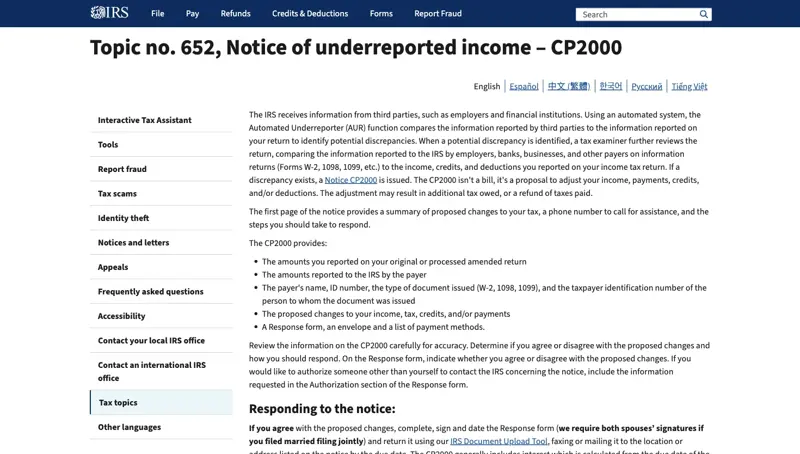
A CP2000 comes from the IRS Automated Underreporter (AUR) program. Its computers matched the W-2s, 1099s, and brokerage statements third parties filed against what your client reported, found a gap, and generated a proposed change. Three things clients consistently get wrong:
- It’s not an audit. It’s a document-matching proposal, produced by software.
- It’s not a bill. Nothing is assessed yet. The client can agree, disagree with documentation, or — the option almost nobody knows — partially agree, accepting the items that are right and contesting the ones that aren’t.
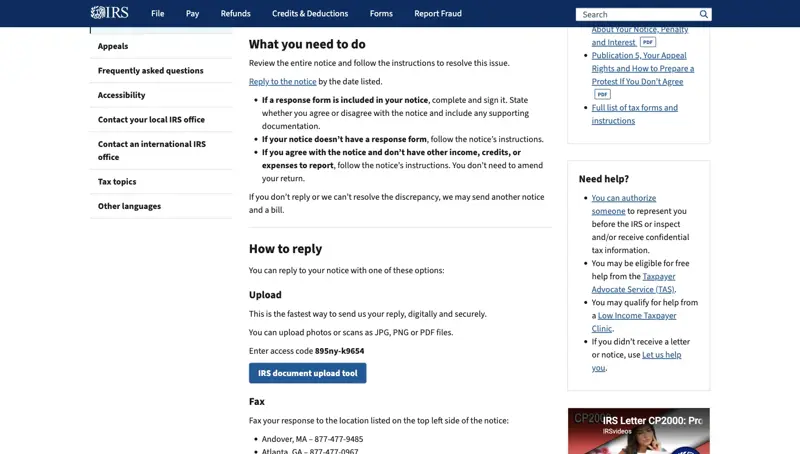
- The clock is real. The response window is 30 days from the notice date (60 if abroad) — the date printed on the letter, not the day they opened it. Ignore it and the IRS issues a CP3219A Statutory Notice of Deficiency, and now you’re on the Tax Court petition clock.
Responses go back through the IRS Document Upload Tool, fax, or mail. And the IRS’s own matching is frequently incomplete — it doesn’t know cost basis, rollovers, or corrected forms, which is why “just pay it” is often the wrong move.
Step 0: De-identify. This is the whole ballgame.
Before any AI workflow, the rule that makes it defensible: client return information never goes into a public AI tool with identifiers attached. This isn’t a style preference — it’s IRC Section 7216 territory, and the IRS Office of Professional Responsibility said this year that Circular 230’s existing duties (competence, diligence, confidentiality) apply in full to generative AI. No new rules — which is worse, because it means you’re already covered by the old ones.
Two details practitioners keep getting wrong, straight from this summer’s TaxTwitter debates:
- “The vendor doesn’t train on my data” is not a defense. The 7216 issue is the disclosure itself — transferring client return information to a third party that can access it or be subpoenaed — not what the vendor does with it afterward.
- Dependents leak too. A scanned return or notice carries the client’s SSN, spouse’s SSN, and the kids’. Redact all of them.
The safe pattern for a CP2000: strip name, SSN, address, and notice ID. What’s left — “taxpayer reported $X in proceeds, 1099-B shows $Y, difference is $Z from a brokerage account” — is a math problem, not client data. That’s what the AI sees. (If your firm has an enterprise AI tool with a signed data-processing agreement, your risk calculus is different — but the de-identify habit still costs you nothing.)
The 15-minute workflow
Minutes 1–3: Strip and summarize
Pull the three numbers off the notice: what the client reported, what the third party reported, and the proposed change (tax + any accuracy penalty + interest). Note the form type behind the mismatch — 1099-B, 1099-NEC, 1099-R, SSA-1099. No identifiers.
Minutes 4–7: The plain-English explainer
Prompt pattern:
A client received an IRS CP2000. De-identified facts: return reported $41,200 in securities proceeds; a 1099-B from a brokerage shows $67,800; the notice proposes $6,400 additional tax plus a $1,280 accuracy penalty. Likely cause: missing cost basis on non-covered shares. Write a calm, plain-English explanation for the client (no jargon, under 300 words) covering: what a CP2000 is, why this one probably happened, why the proposed amount is likely overstated, and what we’ll do next. Do not tell the client to pay.
You’ll get a client-ready explanation in one pass — the 45-minute call becomes a 5-minute email plus a short reassurance conversation. Edit for your voice and your engagement’s specifics.
Minutes 8–12: The response skeleton
Now draft the outline of a CP2000 disagree response for the same facts: a one-page cover letter structure (notice date placeholder, tax year, statement of partial disagreement), the list of documents to attach (broker statements showing basis, Form 8949 recalculation), and one paragraph explaining that reported proceeds omitted cost basis. Formal tone, addressed to the IRS AUR unit. Leave all identifying fields as placeholders.
Note what the AI is doing here: formatting and structure. What it is not doing is deciding the tax position — whether the client actually agrees or disagrees, what the basis really was, whether the penalty has a reasonable-cause argument. That’s your license, not the model’s.
Minutes 13–15: Verify and personalize
Check every number against the actual notice. Confirm the response deadline. Re-insert the identifiers into your own document — locally, not in the chat. Attach the real substantiation. Sign it as the professional who owns the position.
What this means for you
If you’re a solo preparer or EA: build the two prompts above into saved templates now, before the September wave. The preparers who systematized this last season report notice responses in a fraction of the old time — consistent with the ~32% per-task time savings tax pros using GenAI reported this year.
If you run a small firm: this is a training-week exercise. Thomson Reuters’ 2026 data says 34% of tax firms already use generative AI and another 47% are planning to — but the differentiator is a written workflow (de-identify → explain → draft → verify) rather than staff improvising with ChatGPT. Put it in your WISP and your onboarding.
If you’re a bookkeeper who fields “IRS letter” panic: the explainer half of this workflow is yours; the response half goes to the client’s preparer. Knowing the difference between a CP2000 (proposal), CP2501 (an earlier “explain this mismatch” contact), and CP14 (an actual balance-due notice with a 21-day window) makes you the calmest person in the email thread.
If a client tries to handle it with AI alone: they’ll get something confident and possibly wrong — public models routinely miss cost basis, rollovers, and corrected forms because the client doesn’t know to mention them. That’s your talking point, not a threat to your work: the notice is automated; the judgment isn’t.
What it can’t do
- It can’t decide the position. Agree, disagree, partial — that call requires the return, the source documents, and a professional. AI drafts the wrapper around your conclusion.
- It can’t see the notice. Never upload the notice image itself to a public tool — it’s covered in identifiers. The de-identified summary is the input.
- It hallucinates tax law. Ask it to structure and explain, not to cite. Every authority citation gets checked against the actual source before it leaves your office.
- It doesn’t know this year’s rules. Threshold amounts, penalty rates, and procedure change; models lag. Numbers come from the notice and current IRS pages, not model memory.
- It won’t protect you from 7216. The workflow is only as defensible as your de-identification habit and your firm’s documented AI policy. The tool never takes the liability; you do.
The bottom line
The CP2000 wave is the most predictable stressor in a tax practice — it arrives every August like weather. This season, the mechanical halves of it (the client explainer, the response formatting) can be genuinely delegated to AI in about 15 minutes per notice, as long as the identifiers stay out and the judgment stays in.
If you want the full toolkit — safe workflows for returns, planning letters, and client comms — our AI for Tax Preparation course goes through it step by step, and AI for Accountants & Finance covers the wider practice. Notice season is a lot friendlier when the explainer writes itself.