A shopper opens the Amazon app, types “what’s the best insulated bottle for a long hike, under $30,” and gets a conversational answer with two or three products named. Yours isn’t one of them. Nobody told you why, because there is no report in Seller Central that shows you. The only thing you can do is work out whether your listing can actually answer the question that shopper asked.
That’s what this guide is for. It’s a free, repeatable audit you can run in ChatGPT’s free tier with nothing but your own public listing text. It finds the places where your page fails to answer a buyer’s question, which is the one thing Amazon has said, in writing, that sellers should fix. It doesn’t promise you’ll be recommended, because nobody can promise that, and I’ll show you why the people who do are guessing.
A note on method. I haven’t run this audit on a live seller account, and I’m not going to pretend I’ve watched it move anyone’s rankings. This article rests on Amazon’s own announcements and seller documentation (checked October 12, 2026), Amazon’s published research, a research pass across several dozen sources, and a sweep of what sellers and agencies are posting on Reddit and X. The sample listing in the worked example is a fictional fixture I made up so I could show every step. I flag it where it appears. Amazon’s features differ by country (Alexa for Shopping is a US launch), and its menus change, so check each step against your own Seller Central.
What just changed (and what didn’t)
Amazon renamed its shopping assistant. On May 13, 2026, it announced Alexa for Shopping, which brings together Rufus’s “product expertise and Amazon shopping history” with the personalized knowledge of Alexa+. It’s available to US customers in the Amazon Shopping app, on the website and on Echo Show devices, free when signed in, with no Prime membership required. Amazon says Rufus “helped over 300 million customers in 2025 research, compare, and buy.” Sellers and shoppers still mostly say “Rufus,” so I’ll use both names.
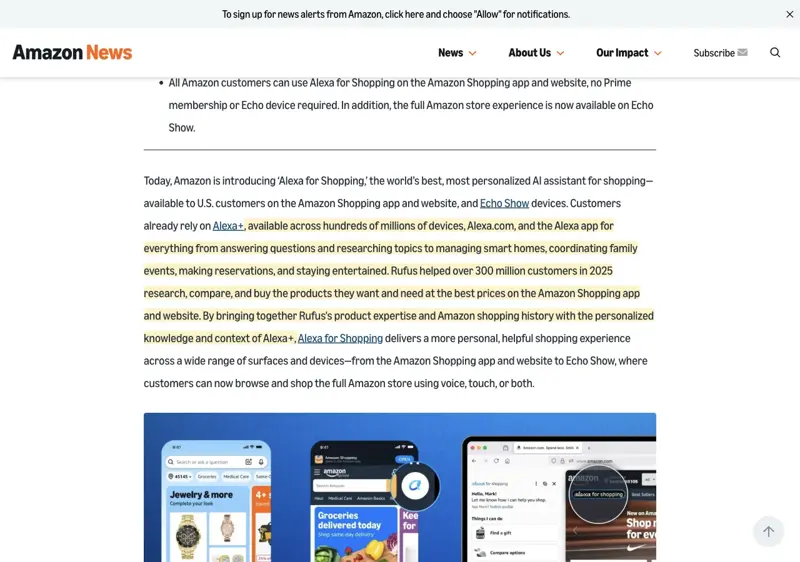
What happened in the weeks since matters more for sellers:
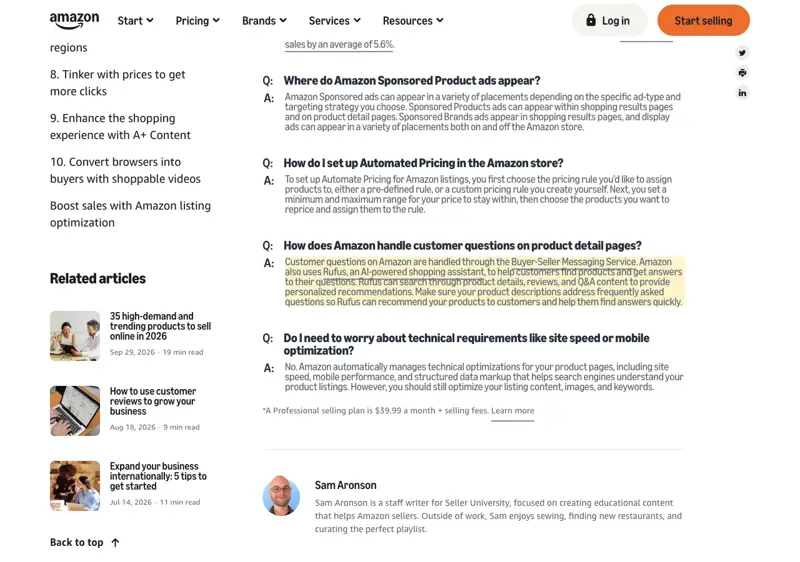
- April 29, 2026: Amazon’s Seller University published “How to boost Amazon listings to drive more sales: 10 tactics.” Tucked into its FAQ is the closest thing to official guidance that exists: “Rufus can search through product details, reviews, and Q&A content to provide personalized recommendations. Make sure your product descriptions address frequently asked questions so Rufus can recommend your products to customers and help them find answers quickly.”
- March 25, 2026: Sponsored Products and Sponsored Brands prompts became generally available in the US. Those are paid placements, so they’re a separate lever from organic recommendations.
- September 29, 2026: Amazon announced Branded Conversations, multi-turn sponsored conversations inside Alexa for Shopping, with a US launch scheduled for January 2027. It hasn’t launched, so don’t plan around it yet.
- October 6 to 7, 2026: screenshots of Amazon’s “About You” profile page went viral. That story is about what Amazon infers about shoppers, not about sellers. If you want it, we covered it in our About You guide.
And what didn’t change: Amazon has not published a ranking formula, a list of factors with weights, an optimization playbook for the assistant, or a Seller Central report that attributes organic traffic to it. Everything below that sounds like a rule is either Amazon’s own short guidance or a seller-community inference, and I’ll label which is which.
What Amazon has actually said, versus what’s being sold to you
If you search for “Rufus optimization” right now, almost every result is from a seller-software company or an agency. That’s not a conspiracy; they’re explaining a new thing with the tools they have. But it’s worth separating the layers.
| Claim you’ll see | What the evidence shows | How to treat it |
|---|---|---|
| Rufus draws on product details, reviews and Q&A | Amazon’s own seller FAQ says so; Amazon’s 2024 explanation named listing details, reviews and community Q&As; the 2026 announcement adds information from across the web | Documented. Fix what’s on your page. |
| “Make descriptions answer frequently asked questions” | Amazon’s April 29, 2026 seller article says it, nearly word for word | Documented advice. This is the core of the audit below. |
| Titles should be 80 characters or fewer | The same article: the title limit is 200 characters, “we recommend 80 characters or fewer” | Documented recommendation, but a general listing guideline, not a Rufus rule. |
| Fill in every attribute, because Rufus uses structured data | Seller Central tells sellers to correct the detail page when answers rely on wrong attributes; Amazon’s own AI listing tools generate attributes. No source says attributes outweigh visible copy | Reasonable, not proven as the top factor. |
| “Listings with 15+ answered Q&As get recommended 3.2 times more often” | I could trace it to no primary study. A secondary investigation also couldn’t | Unverified. Don’t repeat it. |
| “Seed 30 to 50 Q&As yourself; Amazon allows it” | No official authorization found. Amazon’s seller guidance describes answering customer questions, and its Seller Code requires accurate information and prohibits misuse of Amazon features | Don’t. Put FAQs in your listing content instead. |
| “A Rufus rewrite will lift conversion” | I found no independent controlled study. The closest non-agency work, a software vendor’s observational study of 1,300-plus recommended listings, describes traits of recommended products; it doesn’t show rewrites cause recommendations | Unproven. |
| “Seller Central shows your Rufus traffic” | I found no primary Amazon documentation of an organic assistant report. Sponsored-prompt reports exist for paid prompts | Not verified. |
That table is the most useful thing in this article. If an agency is selling you a “Rufus score,” a guaranteed recommendation or a specific Q&A count, hold it against the right-hand column.
There’s one other number worth knowing, because it keeps being misread: Amazon says its AI listing tools “generate more than 70% of required product attributes” and give “a 40% increase in overall listing quality.” Amazon’s own footnotes attribute those to internal data about listing completeness and quality scores. They are not a measurement of how often the assistant recommends anything, and they’re not a sales uplift.
What it actually is: the one-line version
The assistant reads your page the way a careful shopper would, then answers someone else’s question with it. If the question is “will this fit a 20-inch carry-on?” and your page never states the dimensions, it has nothing to say, and it can say something about your competitor instead. That’s the whole mechanism sellers keep describing, including a June 2026 r/AmazonFBA post, as reported in my community research pass, in which a seller asked the assistant basic fit questions about their own product, got vague answers, and watched it offer competitors.
I can’t tell you how Amazon’s system ranks candidates internally. Amazon’s published research on its COSMO knowledge system describes learning relationships between products and shopper intentions from behavior, and that supports the general idea that Amazon models “what is this product for.” But it doesn’t document how listing edits flow into the assistant, or how fast. Treat anyone who tells you otherwise as selling something.
The walkthrough
Step 0: Set the guardrails before you paste anything
Here’s the rule I’d tape to the monitor: paste only your public listing text and your own product facts. That’s the title, bullets, description, A+ text and the specifications you’d put on a spec sheet anyway.
Do not paste:
- customer names, addresses, order numbers or buyer messages
- anything from your Seller Central reports (sales, advertising, search-term reports, account health)
- supplier pricing, contract terms, or margin data
- competitor listings you don’t want to quote verbatim in a free tool
Amazon’s seller rules restrict using customer information for anything beyond fulfilling orders and handling support, according to a seller-software company’s summary of Amazon’s Buyer-Seller Messaging and selling policies. I couldn’t pull Amazon’s own text for that rule in this research pass, so check it yourself in Seller Central. The practical answer is the same either way: keep the audit to public text and you never get near the problem.
Step 1: Build a one-page “facts sheet”
Before the AI touches anything, write down what’s true about your product. This is the document that keeps the audit honest, because the AI will happily invent a certification or a dimension to fill a gap. If you only give it facts you can prove, it can only work with facts you can prove.
A facts sheet has these lines, filled in from your spec sheet, packaging, supplier documentation and testing reports:
- exact dimensions and weight (with units)
- materials, and what’s not in it
- compatibility (what it works with, and what it doesn’t)
- what’s in the box
- care and cleaning instructions
- certifications you actually hold, with the certificate name or number
- who it’s for, and who it’s not for
- known limitations
Leave a line blank if you don’t know. A blank is useful: it’s a question you need to answer before you can write anything.
Step 2: Get a list of real buyer questions
The shopper’s question is the unit of work, so start there. Good sources, all of which you already have:
- the “negative” and “3 star” review text on your listing and on two close competitors
- your returns reasons
- your customer messages (read them, but don’t paste them; summarize the topics)
- the questions on competitor listings’ Q&A sections
Then, in a fresh ChatGPT chat, use this prompt. Replace the bracketed parts.
You are helping me understand what shoppers ask before buying a product.
Product category: [e.g., insulated water bottle, 32 oz, for hiking and commuting]

Here are topics I've seen in my own reviews and returns (summarized, no customer names):
- [topic 1]
- [topic 2]
- [topic 3]

Write the 25 questions a cautious first-time buyer would ask an AI shopping
assistant before buying this kind of product. Write them the way a person
would type or say them, in plain language. Group them under: Fit and size,
Materials and safety, Use cases, Care, Compatibility, What's included,
Comparison with alternatives. Do not answer them.
Expected result: 20 to 25 realistic questions. Delete any that don’t apply to your product, and add any from your own reviews that the AI missed. Keep the final list; you’ll reuse it.
Step 3: The gap audit (the most important step)
This prompt does the one thing that matters: it makes the AI answer only from your page and say “not stated” when the page doesn’t say. A “not stated” is a gap a shopping assistant would hit too.
Below is the public text of my Amazon listing, followed by a list of buyer
questions.

For each question, answer using ONLY information stated in the listing text.
Do not use outside knowledge, do not guess, and do not assume.
Mark each question with one of:
- ANSWERED (quote the exact words from the listing that answer it)
- PARTIAL (say what's missing)
- NOT STATED

Then give me a table: question | status | quote or missing detail.
At the end, list the five NOT STATED or PARTIAL items that a buyer would most
likely care about, in priority order.

LISTING TITLE:
[paste]

BULLETS:
[paste]

DESCRIPTION / A+ TEXT:
[paste]

BUYER QUESTIONS:
[paste your list]
Read the result skeptically. If the AI marks something ANSWERED, check that the quote is really in your listing. Models occasionally quote words that aren’t there, and a fabricated “ANSWERED” hides exactly the gap you’re hunting.
Step 4: Check the real assistant, as a shopper
The AI audit is a proxy. The real test is asking Amazon’s own assistant. In the Amazon Shopping app or on amazon.com, signed in on a US account, open the assistant and ask the questions that your audit flagged, framed the way a shopper would, for example “What’s the best [category] for [use], under [price]?” and then, on your product page, questions about it specifically.
Two cautions. First, answers vary by shopper and context, since Alexa for Shopping uses shopping history and preferences, so one test is an anecdote, not a measurement. Run the same question a few times, and from a second account if you can. Second, do your testing as a shopper would: don’t set up fake accounts or automate it. Just look.
What you’re looking for is the same thing as in Step 3: where does the assistant say something vague, wrong, or “I don’t see that detail” about your product? Write down the exact wording of any answer that’s wrong, because there’s a proper channel for that (Step 8).
Step 5: Fill the gaps with true facts, and with your own judgment
Now fix the “NOT STATED” items. Amazon’s own advice is to treat descriptions “as short buying guides”: who the product is for, what problem it solves and the key benefits, not just features. Its example is a water bottle: if customers ask for the best bottle for hiking, say in the listing that it’s suited to hiking so shopping tools can connect the two.
Use the facts sheet. For each gap, write one plain sentence that states the fact.
| Gap the audit found | Weak fix | Strong fix |
|---|---|---|
| “Will it fit a standard cup holder?” is NOT STATED | “Fits most cup holders!” | “Base diameter 2.9 in (7.4 cm); fits standard US cup holders. It will not fit narrow bike-bottle cages.” |
| “Is it dishwasher safe?” is PARTIAL | “Easy to clean” | “Body is top-rack dishwasher safe. Hand-wash the lid; the silicone seal can warp in high heat.” |
| “Is it BPA free?” is NOT STATED | “Safe, non-toxic materials” | State it only if you have documentation. If you don’t, leave it out and get the test report first. |
| “How long does it keep drinks cold?” is NOT STATED | “Keeps drinks cold all day!” | Only a tested figure: “In our test, ice stayed through 18 hours at 70°F room temperature.” If you haven’t tested, test, or don’t claim it. |
Notice the pattern in the right-hand column: every fix is a checkable fact. That’s partly because it’s better for buyers, and partly because Amazon’s policy on misleading and prohibited claims requires truthful, verifiable claims supported by evidence. A shopper question is not permission to invent an answer.
If you’re tempted to use Amazon’s own generative-AI listing tools (Add Products and A+ Content Manager both have optional AI features, and Enhance My Listing gives recommendations on existing titles, attributes and descriptions), know the rule that comes with them. Amazon’s text is that if you use AI-proposed content, you agree that you’ve reviewed it and that it’s accurate, complete and compliant with applicable laws and Amazon policies. Amazon also says that where information is missing, the AI “will aim to fill in the blanks,” with battery requirements as one example. In other words, you’re still the one who certifies it.
Step 6: Rewrite only where the facts support it
For the bullets that need rewriting, hand the AI your facts sheet and the gap list, and give it hard constraints. This prompt is built to stop the most common failure, which is the AI adding adjectives and claims.
Rewrite my Amazon bullet points so they answer the gaps listed below.

Rules:
1. Use ONLY the facts in my facts sheet. If a fact isn't there, don't state it.
2. No superlatives or unproven claims ("best," "#1," "premium," "perfect").
3. No medical, safety, or environmental claims unless my facts sheet includes
   documentation for them. If a gap needs one, write "[NEEDS DOCUMENTATION]"
   instead of writing the claim.
4. Each bullet: lead with the specific feature or answer, then one concrete
   detail (a number, a material, a limit). Plain sentences, no keyword lists.
5. Keep each bullet under about 200 characters.
6. Tell me anything in your rewrite that is NOT in the facts sheet.

FACTS SHEET:
[paste]

GAPS TO CLOSE:
[paste the five priorities from Step 3]

CURRENT BULLETS:
[paste]
Then do the check that matters: go through the output line by line and delete or fix anything you can’t prove. The prompt’s rule 6 makes the AI flag its own additions, which makes that review faster.
Step 7: Check consistency across the page
A last pass catches contradictions, the kind that confuse buyers and, if sellers’ reports are right, assistants. Paste the title, bullets, description and your attribute values (from the Seller Central listing editor) and ask:
Check these listing fields for contradictions or mismatches: pack size,
dimensions, materials, color names, compatibility, quantity, and any claim
that appears in one field but conflicts with another. List each mismatch with
the two conflicting quotes. Do not suggest fixes yet.
Common finds: the title says “3-Pack” while the attribute says one unit; the bullets say stainless steel while the description says “metal”; the image shows a lid color not listed in the variations. One seller-software vendor claims mismatches like these can cause a listing to be suppressed in assistant answers. That’s a single unverified claim, but fixing contradictions helps human buyers regardless.
Step 8: Test, measure and report errors the proper way
Measure with the tools Amazon documents. Amazon’s April article points sellers to Manage Your Experiments to compare two versions of content, such as title variations or photo options. Use that for A+ and listing-content tests, and watch conversion and sessions in your ordinary reports. Don’t assume a Search Query Performance line is “Rufus traffic”; Amazon doesn’t say it is.
Report wrong answers through the proper channel. If the assistant states something false about your product, Seller Central’s current instructions are to verify your detail page is current, then submit a help-center ticket with the ASIN, a screenshot of the question and response, the issue and the expected answer, along with verification such as listing screenshots, manuals or manufacturer information. That’s an error-reporting process, not a performance report, but it’s the one real lever Amazon documents for wrong assistant answers.
A worked example, start to finish
Here’s the audit on a fictional listing, so every step is visible. The product, brand and numbers are made up for the demonstration; none of this is a real product or real data.
The fixture: “Cedar Ridge” 32 oz stainless-steel insulated water bottle.
Before (the bullets as the seller wrote them):
- PREMIUM QUALITY - Built to last with durable stainless steel
- KEEPS DRINKS COLD - Perfect for hiking, camping, gym and travel
- LEAK PROOF LID - No spills, ever
- EASY TO CLEAN - Wide mouth for ice cubes and cleaning
- GREAT GIFT - Comes in 6 colors
Step 2 produced 25 questions. A few: Does it fit a standard cup holder? Is it dishwasher safe? How heavy is it when full? Will the lid leak in a backpack? Is it BPA free? Does it fit a 2-liter hydration-pack sleeve? What’s the opening diameter for ice?
Step 3, the gap audit. Say the AI answers from the page only and returns 25 rows. Tallying that table for this fixture would look like this (again, illustrative, since the fixture isn’t a real listing):
- ANSWERED: 4 (it’s stainless steel; it has a wide mouth; it has a lid; it comes in 6 colors)
- PARTIAL: 6 (e.g., “keeps drinks cold” with no duration; “leak proof” with no conditions)
- NOT STATED: 15 (cup-holder fit, dishwasher safety, weight, opening diameter, BPA status, and so on)
That’s 4 of 25 answered from the page, which means that a shopper asking an assistant most of these questions would get “the listing doesn’t say” for the product. (The counts are for this fixture only. Yours will differ, and the method matters more than the tally.)
Step 5 and 6, the fixes. Looking at the facts sheet the seller assembled (also fictional): base diameter 2.9 in; empty weight 14.2 oz; opening 2.0 in; top-rack dishwasher safe for the body, hand-wash the lid; BPA-free lid and body, with a supplier test report on file; cold retention tested by the seller at 18 hours (ice still present) at 70°F; lid is leak-resistant when closed, not designed to be leak-proof when upside down or pressurized.
The audit flagged “LEAK PROOF LID - No spills, ever” as a risk. A shopper asking “will it leak in my backpack” wants a condition, and “no spills, ever” is an absolute claim the seller can’t support when the lid is leak-resistant rather than fully sealed. The rewrite:
- STAINLESS STEEL BODY, 32 oz - Double-wall insulated; empty weight 14.2 oz. Body is top-rack dishwasher safe; hand-wash the lid.
- COLD FOR HOURS, TESTED - In our test at 70°F room temperature, ice remained after 18 hours. Results vary with ice amount and ambient heat.
- LEAK-RESISTANT LID - Stays closed upright and when carried at an angle in a bag. It is not designed to be leak-proof if inverted or pressurized; carry it upright in a backpack.
- WIDE 2.0 IN OPENING - Fits standard ice cubes and most bottle brushes; base is 2.9 in across and fits standard US cup holders, but not narrow bike-bottle cages.
- BPA-FREE LID AND BODY - Supplier test report available on request. Comes in 6 colors.
Step 7, the consistency check. It caught that the title said “32 oz” while the size attribute in the listing editor said “1 liter” (a 32 oz bottle is about 0.95 liters). The seller made the attribute match the label, 32 ounces.
Step 4 again, a week later. The seller asks Amazon’s assistant the cup-holder and dishwasher questions as a shopper. Whether the answers are now right is the real test, and whether they influence recommendations is something neither of us can promise. The seller then runs the old and new bullets through Manage Your Experiments and watches conversion.
Look at what the rewrite did and didn’t do. It added eight checkable facts, replaced two absolute claims with honest conditions and fixed one attribute mismatch. It didn’t add a keyword, a superlative or a claim without evidence. That restraint is the point.
Which fixes are worth doing first
Not every fix costs the same. Here’s how I’d rank them by effort and by how well the evidence supports them.
| Fix | Effort | Risk if done badly | Evidence level |
|---|---|---|---|
| Answer top buyer questions in the description and bullets | Low | Low, if facts-only | Amazon’s own guidance |
| Correct attribute errors and contradictions | Low to medium | Low | Reasonable; Amazon says to fix wrong attributes |
| Remove absolute claims you can’t prove (“no spills, ever”) | Low | Low; reduces policy risk | Amazon’s misleading-claims policy |
| Add a tested number (hours, dimensions, capacity) | Medium (needs a real test) | Medium if the test is sloppy | Consistent with Amazon’s “verifiable claims” standard |
| Rebuild A+ Content as informational modules (comparison chart, use-case sections) | Medium to high | Medium: don’t lose conversion | Amazon recommends A+; says it can lift sales on average by 5.6% (Amazon internal data). Assistant impact unproven |
| Run Manage Your Experiments on the new copy | Medium | Low | Amazon’s own testing tool |
| Seed community Q&A yourself | n/a | High (policy risk) | No authorization found |
| Pay for a “Rufus optimization” service with a guaranteed outcome | High | High | No documented basis for any guarantee |
What this means for you
- If you’re a solo seller with one to ten products: Start with your single best seller. First action: write its facts sheet, then run Steps 2 and 3. Don’t touch your other listings until you see what the gaps look like on one.
- If you sell a product with a regulated claim (supplements, kids’ items, anything food-contact or electrical): Your risk is the AI filling a gap with a claim you can’t back. First action: put “[NEEDS DOCUMENTATION]” in your prompt rules (as in Step 6) and have someone who knows your regulatory obligations review every health, safety or certification sentence before it goes live.
- If you’re an Etsy or Shopify seller who also lists on Amazon: Your Etsy descriptions are probably richer than your Amazon bullets. First action: use your Etsy text as source material for the facts sheet, checking each fact still applies.
- If you run a small brand with an agency or freelancer: Ask them to show the evidence for any “Rufus ranking” promise. First action: forward them the table in this guide and ask which row their claim falls in.
- If you manage 50 or more listings: Don’t audit all of them. First action: sort by revenue, audit the top five, record the gap patterns, and write one reusable facts-sheet template for your category.
- If you’re a private-label seller sourcing from a factory: You may not have the test data a good listing needs. First action: ask your supplier for the specification sheet and any test reports now, because the audit will surface questions you can’t answer without them.
- If you’re skeptical this matters: The honest position is that nobody outside Amazon can measure the assistant’s effect on your sales. First action: the audit costs you an afternoon of facts-gathering, and every fix it produces also helps a human shopper reading your page. That’s a good deal even if the assistant never mentions you.
Edge cases and troubleshooting
- ChatGPT says ANSWERED but the quote isn’t in your listing. It fabricated the quote. Re-run Step 3 and tell it to quote exactly, or check each quote yourself with find-in-page.
- The assistant’s answer about your product is simply wrong. Check your detail page first (the wrong answer may reflect a wrong attribute), then use the help-center ticket route in Step 8 with the ASIN and screenshots.
- The assistant recommends a competitor even after you fix the gaps. That can happen for reasons outside your page: reviews, price, availability, the shopper’s history, or information from elsewhere on the web. Amazon says the assistant draws on product information, reviews, community Q&A and web information, and sellers control only part of that.
- You don’t have the facts the audit asks for. That’s the most common outcome for private-label sellers. Get the spec sheet or run a simple test. Don’t let the AI estimate for you.
- Your rewrite hurts conversion. Over-correcting is a real risk. One agency’s observation, surfaced in my community research pass and not verified by me, describes natural-language rewrites that ignored traditional keyword indexing and saw conversion drop 12 to 18 percent over 60 days. Treat it as a warning, not a measurement. Run changes through Manage Your Experiments instead of replacing everything at once, and keep the keywords that already earn you traffic.
- Your product has fewer than 4 stars. Several agency guides claim assistant recommendations skip low-rated listings. Amazon hasn’t documented a threshold. If your rating is low, the listing text isn’t your main problem; read your 1 and 2 star reviews first.
- A tool promises to “score” your listing for Rufus. Fine as a to-do list, but there’s no official score to compare against. Ask what data the score is based on.
- You sell outside the US. Alexa for Shopping is a US launch. Your marketplace may have a different assistant or none. Check Amazon’s announcements for your country before assuming any of this applies.
What this can’t fix
- It can’t guarantee a recommendation. Amazon hasn’t published how recommendations are chosen, and answers vary by shopper.
- It can’t change your reviews. Reviews are named as a source, and Amazon’s policies strictly limit what sellers may do about them. Don’t solicit only positive reviews, pay for reviews or ask for changes. Amazon’s authorized routes are the Request a Review button and Vine.
- It can’t tell you your assistant traffic. There’s no organic report. Sponsored prompts have reporting, but that’s paid.
- It can’t fix a weak product or a weak price. If the answer to “is this worth it?” is no, better bullets won’t change it.
- It can’t make AI-written content compliant for you. By Amazon’s terms, you’re certifying it.
FAQ
Is Rufus the same thing as Alexa for Shopping? Mostly. Amazon announced Alexa for Shopping on May 13, 2026, combining Rufus’s product expertise and shopping history with Alexa+’s personalization. It’s available to US customers in the Amazon Shopping app, on the website and on Echo Show. Sellers and shoppers still say “Rufus.”
What has Amazon told sellers to do about it? In an April 29, 2026 Seller University article, Amazon said Rufus can search product details, reviews and Q&A content, and advised: “Make sure your product descriptions address frequently asked questions so Rufus can recommend your products to customers and help them find answers quickly.” It hasn’t published a detailed optimization guide beyond that.
Does having 15 or more Q&As make Rufus recommend my product more? That claim circulates widely (usually as “3.2 times more”), but I couldn’t trace it to a primary study, and neither could a secondary investigation. Don’t rely on it, and don’t seed your own questions.
Can I ask friends to post questions on my listing? I found no Amazon policy authorizing seeded Q&A, and Amazon’s Seller Code requires accurate information and prohibits misuse of its features. Putting the answers in your listing content is the documented route.
Is it OK to use ChatGPT on my listing? Using an AI tool on your own public listing text is a common practice, and Amazon has its own generative-AI listing tools, so AI itself isn’t prohibited. Your responsibility is accuracy and policy compliance, and you shouldn’t paste customer data or confidential business data into a tool. If you use Amazon’s AI-generated content, Amazon’s terms say you’ve reviewed it and it’s accurate and compliant.
Does Seller Central show how often Rufus recommends my product? I found no primary Amazon documentation of an organic assistant report. Sponsored Products and Sponsored Brands prompts have campaign reporting, but those cover paid prompts.
What are Branded Conversations? Amazon announced them on September 29, 2026 as multi-turn, brand-informed sponsored conversations inside Alexa for Shopping, with a US launch scheduled for January 2027. They’re advertising, and not yet live.
Should I rewrite all my bullets as conversational sentences? No. Amazon’s guidance is to answer shopper questions clearly and organize information, and it still recommends relevant keywords and testing. Some sellers report conversion drops after aggressive rewrites. Change the weakest listings first and test.
What if I just want a quick check? Run Steps 2 and 3 on one listing. If your listing answers fewer than half the questions, you’ve found your first job.
The bottom line
Amazon’s guidance is shorter than the industry around it. It says: write descriptions that answer real shopper questions so Rufus can recommend you, keep information accurate and clearly organized, and test what you change. The audit in this guide is a practical way to follow that advice: find what your page fails to answer, fill the gaps with facts you can prove, check the assistant as a shopper would, and measure the result with Amazon’s own tools. It won’t promise a recommendation, and neither should anyone selling you one.
If you want to go deeper, the AI for E-commerce Operations course covers listing work and product content with AI, and the AI for Etsy Sellers course is a good companion if you sell across marketplaces. For the term itself, our Amazon Rufus explainer has the background, and the consumer side of the same assistant is in our About You guide and our guide to letting AI check out for you.
Sources
- Alexa for Shopping announcement (Amazon News, May 2026)
- How to boost Amazon listings to drive more sales: 10 tactics (Amazon Seller University, April 29, 2026)
- Amazon generative AI listing tools (Amazon Seller University)
- Amazon Rufus explained (Amazon News, July 2024)
- Amazon generative AI for sellers and shopping (Amazon News)
- Amazon Rufus launch announcement (Amazon News, February 2024)
- Amazon Ads: Sponsored prompts for Sponsored Products and Sponsored Brands
- Amazon Ads: Branded Conversations (September 2026)
- Amazon Seller Central: misleading and prohibited claims policy
- Amazon Science: COSMO commonsense knowledge system
- Amazon Science: building commonsense knowledge graphs to aid product recommendation
- Alexa for Shopping (Amazon Rufus): the complete guide for brands and sellers (Perpetua)
- What Amazon Rufus actually does and how it reads your listings (Seller Labs)
- Amazon Rufus guide: 15 key insights for product visibility (Amalytix)
