On October 5, TikTok announced an AI shopping assistant and a one-click “Buy Direct” checkout. Amazon’s shopping assistant can already buy things from other stores’ websites for you. Perplexity and Google have their own checkout buttons. And in the middle of all that, ChatGPT quietly backed away from letting you buy inside the chat.
If you’ve been using AI to compare products, the next question is a different one: should you let it take your card? Most explainers answer “what is an AI shopping assistant.” This one answers the shopper’s question. What can each one actually do with your money, what happens when it gets it wrong, and which settings are worth checking before you try one?
A quick note on how this is sourced. I read each company’s own announcement or help page where one was available, and I’m flagging where I could only find secondary reporting. I didn’t test every assistant on a live account, so when I say “documented,” I mean it’s what the company says it does. Features also differ by country and by account, and a lot of this is still in limited testing.
What just changed
Three different things happened in the same few weeks, and they’re easy to blur together.
TikTok announced two tools on October 5 at Advertising Week New York. Buy Direct is a one-click checkout from the For You feed that uses stored payment details and saved addresses, with in-app order tracking. The brand stays the merchant of record. The Shopping Assistant is a chat window on a merchant’s product page inside TikTok’s in-app browser that answers questions using information the merchant supplies. Both run on the Universal Commerce Protocol (UCP), an open standard for AI-to-merchant checkout, and TikTok says it’s building with Salesforce, Shopify, Shoplazza and Stripe, according to TechRepublic and Unite.AI. It’s in eligibility-based testing in the US, arranged through advertisers’ TikTok sales partners. You probably can’t use it yet, and no fees or consumer terms have been published.
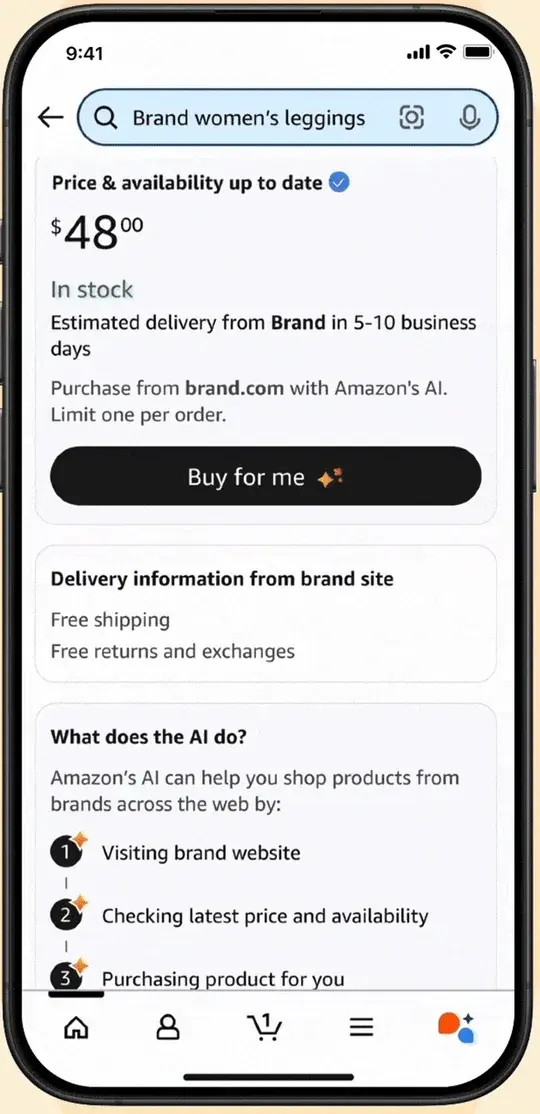
Amazon’s assistant can buy in two ways. Amazon renamed Rufus “Alexa for Shopping” in May 2026. Its Auto Buy feature purchases an item when it hits a target price, using your default payment method. Its Buy for Me feature, in beta for a subset of US customers in the Amazon Shopping app, completes checkout on another brand’s own website. We’ll look at both closely below.
ChatGPT went the other way. OpenAI launched Instant Checkout in September 2025, letting eligible users buy inside the chat. By March 2026, CNBC and others reported it was shifting to retailer-run apps and sending shoppers to the merchant’s own checkout, and as of early October coverage says OpenAI’s merchant guidance describes “moving away from a standalone Instant Checkout experience.” So “ChatGPT can buy things for me” is now mostly “ChatGPT can help me find the thing, then I check out on the store’s site.”
That’s the news. The more useful thing is a way to sort what all these products do.
Three kinds of “AI checkout”
Almost every product in this space fits one of three levels. Knowing which one you’re using tells you most of what you need to know about the risk.
Level 1, recommends. Most conversations with ChatGPT, Gemini or Perplexity about what to buy end here. The AI suggests, links, compares. You do the buying. The risk is a bad recommendation, not a bad charge.
Level 2, buys after you approve. Amazon’s Buy for Me, Perplexity’s Instant Buy, Google’s checkout flows and TikTok’s Buy Direct sit here. The AI does the form-filling and the clicking, but you press the final button. This is where most of the new features live.
Level 3, buys later, on a rule. Amazon’s Auto Buy is the clearest example. You approve a condition once, like “buy this when it’s $15 or less,” and the purchase happens later without another prompt. This is a different kind of trust, because the approval and the charge are separated in time.
I’m not aware of a mainstream consumer product that documents a general fourth level, where the AI decides what to buy on its own. That’s the thing people picture when they hear “agentic commerce,” and it isn’t what’s on offer right now.
What each one actually does
Here’s the comparison I couldn’t find anywhere when I went looking, built from each company’s documentation and flagged where I’m relying on secondary reports. “Merchant of record” means the business legally responsible for the sale, which is usually who handles your return.
| What it can do | Do you confirm? | Who sells and handles returns | Who can use it | |
|---|---|---|---|---|
| Amazon, Auto Buy | Buys an Amazon item when it reaches your target price, on your default payment method | You approve the condition once; no new prompt when it triggers. A 24-hour cancel window is reported by multiple outlets | The seller of that Amazon listing; Amazon’s normal returns apply | Reported as Prime-only and limited to Amazon-fulfilled items (Amazon’s page doesn’t say) |
| Amazon, Buy for Me | Completes checkout on another brand’s website for you | Yes. You confirm address, taxes, shipping and payment on an Amazon screen | The brand: “Delivery, returns and exchanges, and customer service are managed by the brand store” | Beta, a subset of US customers, iOS and Android app, select brands |
| ChatGPT | Finds and compares products; checkout happens on the merchant’s site or app | You complete the merchant’s own checkout | The merchant | Shopping is live for US users |
| Perplexity, Instant Buy | Completes purchases in chat for eligible products, paid through PayPal | You select Instant Buy and finish checkout | The retailer is the merchant of record | Per Perplexity’s help documentation, US users; compatible merchants only |
| Google, AI Mode and Gemini | Price-tracking that offers to buy via Google Pay; checkout inside AI Mode for eligible retailers | Google says it asks permission and buys only after you confirm | The retailer | Eligible US retailers, with expansions announced |
| Walmart, Sparky | Search, compare, build lists; supports “discovery through checkout” | Shopper-controlled checkout | Walmart (or a Marketplace seller, for third-party items) | Signed-in US customers in the Walmart app |
| TikTok, Buy Direct | One-click buy from the feed with stored payment details | You tap to buy; no separate second confirmation is documented | The brand is merchant of record; dispute handling isn’t spelled out | Eligibility-based testing for US brands |
Two details in that table are worth slowing down on, because they’re the places where the marketing and the fine print drift apart.
The Amazon confirmation screen says more than you’d expect
Amazon’s own Buy for Me announcement includes sample screens. They’re fixture data, not a real shopper’s order, but they show the exact wording you’d be agreeing to. Here’s the product page:
And here’s the screen right before you tap Place order:
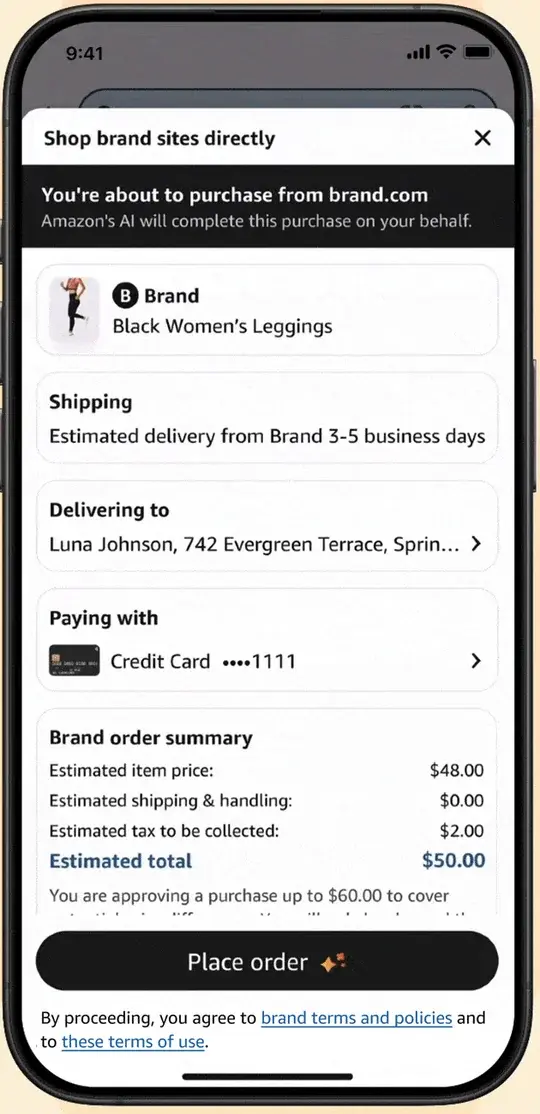
Read the last line of that second screen. The estimated total is $50.00. The sentence under it says “You are approving a purchase up to $60.00 to cover” — and the text is cut off in Amazon’s sample, so I can’t tell you exactly what it says next. A natural reading is that it covers a price, tax or shipping change between the estimate and the actual checkout on the brand’s site. Amazon’s help page also warns that brand-site information “may have been updated” since Amazon last refreshed it.
The takeaway isn’t that this is sneaky. It’s a reasonable buffer for a price that can move. But it means what you approve is a ceiling, not the number you see. Here, the ceiling is $10 above the estimate, or 20%. On a $50 item that’s a shrug. On a $500 item, the same percentage is $100, and it’s worth knowing before you tap.
Auto Buy separates “yes” from “now”
Amazon’s own page describes Auto Buy this way: you can say something like “Purchase this t-shirt when it’s $15 or less,” and Alexa for Shopping will regularly check prices and complete the purchase using your default payment method. Amazon’s page doesn’t spell out whether you’re prompted again when the price hits. Reporting from PCWorld and Techlicious says you aren’t, that there’s a 24-hour window to cancel after the purchase, and that it needs Prime and Amazon-fulfilled items. Since Amazon’s page doesn’t confirm those details, I’d check the current terms in the app before relying on them.
Here’s why that matters in practice. Say you set up a back-to-school list with six rules, one per item, with target prices of $15, $25, $40, $60, $35 and $80. That’s a total of $255 sitting on your default card, waiting for each price to drop. Maybe they all trigger the same week. Maybe one triggers while you’re traveling and your card is already near its limit. None of it is a bug. It’s what you asked for, which is exactly why Level 3 deserves more caution than Level 2.
What happens when it buys the wrong thing
Let’s keep three failures apart, because they’re treated differently.
- The merchant sends something different from what you ordered. That’s a normal merchant error, and your ordinary return and dispute rights apply.
- The agent orders the wrong product, and the merchant ships exactly that. The agent made the mistake, the store did its job. This is the murky one.
- A purchase happens without valid authorization, or after you revoked permission. That’s closer to a classic unauthorized charge.
Existing rules are strongest for the first and third and weakest for the second. This is general information, not legal advice for your situation, but here’s what the primary sources say.
Under US payment rules, “I didn’t want that” is not the same as “unauthorized.” Regulation E, which covers debit cards and other electronic transfers, defines an unauthorized transfer as one initiated by someone other than you, without actual authority, that gives you no benefit. There’s an exception for someone you gave your card or access device to. According to the CFPB’s published commentary, if you give someone access and they exceed their authority, you can be fully liable until you notify the bank. Regulation Z, which covers credit cards, has a similar delegated-user issue in its commentary. The rules don’t mention AI agents, and the research summary I pulled together from those primary texts concluded it’s unresolved how they’d apply to a shopping assistant that spends more than you told it to. The Consumer Bankers Association raised the same questions in a January 2026 white paper, which is an industry position and not a regulator’s ruling.
Credit card billing-error rights are broader than “unauthorized.” Regulation Z’s billing-error rules cover goods not delivered as agreed, including the wrong item or the wrong quantity, and generally require you to notify the card issuer in writing within 60 days of the first statement showing the error. Debit-card error rules have their own 60-day notice period. Neither automatically covers “my agent picked the wrong shirt and the store sent that shirt.”
No US regulator has published an agent-specific rule. The most careful research summary I could find says it didn’t locate an FTC or CFPB statement resolving who pays when a shopping agent buys beyond your instructions. That’s a search limitation, not proof none exists, but it matches what industry commentary says: liability is being worked out company by company.
Card networks are building programs, but they’re not blanket refunds.
| Program | What it is | What it isn’t |
|---|---|---|
| American Express, Agent Purchase Protection | Announced April 14, 2026; aims to protect against charges from agent error for eligible customers when a registered agent sends authenticated purchase intent | Amex’s release describes terms still to apply. Don’t assume it covers every AI purchase on your card |
| Visa, Intelligent Commerce / Trusted Agent Protocol | Agent-specific tokens and authenticated instructions that give disputes better evidence | Not a published guarantee for every wrong-item choice; Visa says features are still being deployed |
| Mastercard, Agent Pay / Verifiable Intent | A tamper-resistant record linking your instructions to the purchase | Not an automatic refund policy for agent mistakes |
The practical read: the paper trail for disputes is improving faster than the guarantee. Until the guarantee catches up, the cheapest protection is the one you control, which is how much you let the agent do without asking.
What shoppers say they want
You aren’t alone if all this makes you cautious. Surveys this year point the same way, though they measure different things.
| Survey | Who and when | What it found |
|---|---|---|
| Spreedly / Talker Research | 2,000 US adults, online, Sept 3–8, 2026 | 64% would not let an AI shopping assistant spend without approval; 16% would allow small purchases only; 20% would allow it without approval |
| Attentive / Rep Data | 3,054 US adults who’d recently shopped, Aug 12–14, 2026 | Among AI-assisted shoppers, 83% comfortable with product recommendations, about 56% with completing a purchase after final approval, 48% with buying automatically within set limits |
| ACI Worldwide / YouGov | 3,328 adults, 1,156 US and 2,172 UK, June 2026 | Among fashion shoppers, 53% uncomfortable letting AI purchase on their behalf; 7% would permit autonomous purchasing under predefined conditions. Pooled US and UK, so not a US-only number |
A caution on reading these. The Spreedly release’s headline says 36% would let AI spend, but that adds the 20% who’d allow it freely to the 16% who’d allow small purchases only. It’s not 36% comfortable with unlimited spending. The survey also found 63% would or might let AI choose brands if it consistently saved them 20%, and 43% would still want to set how much to spend. These are commissioned, self-reported surveys, not observed behavior.
The pattern is consistent anyway: people are fine with AI helping them decide and uneasy about AI spending without a final yes. The products at Level 2 match that. The ones at Level 3 are asking for a bigger leap than most shoppers say they’re ready for.
The part nobody puts on the checkout screen: whose side is the AI on?
There’s a separate question from “will it buy the wrong thing.” It’s “will it steer me?” A shopping assistant that’s paid, directly or indirectly, to surface certain products isn’t neutral, and the evidence that people can’t tell is stronger than you’d hope.
A preprint titled Commercial Persuasion in AI-Mediated Conversations, submitted in April 2026 and not peer-reviewed, ran preregistered experiments with 2,012 participants choosing an eBook from a large catalog. About a fifth of the products were randomly designated as sponsored. Participants picked a sponsored product 61.2% of the time when a conversational AI pushed it, against 22.4% under traditional sponsored-search placement. Explicit “Sponsored” labels didn’t significantly reduce the effect. That’s one experiment about eBooks, not proof that any specific shopping assistant is biased. But it’s a good reason to treat the AI’s “best option” as a suggestion to verify.
Separately, research on one-click checkout suggests friction matters. A 2023 Management Science study of 977 customers at one large Asian retailer found that after registering for one-click checkout, average spending rose 28.5% over the following 15 months, purchase frequency rose 43%, and items bought rose 36%, according to Cornell’s summary. That’s one company, and more spending isn’t the same as regretted spending. But it’s a reminder that removing the pause is a design choice with a measurable effect.
If any of this feels familiar, it’s because it rhymes with a story from this week. Amazon’s “About You” profile went viral for showing how much an assistant infers from your shopping. We wrote a guide to finding and editing your own. An assistant that knows a lot about you and can spend your money is a combination worth being deliberate about.
A checklist before you let any AI check out
You don’t need to avoid these tools. You need to choose a level and set it on purpose.
- Stay at Level 2 for anything over a small amount. Approve each purchase yourself. If a feature offers a “buy automatically” option, treat it as a separate decision.
- Read the ceiling, not the price. On any confirmation screen, find the line that says what you’re actually approving, like Amazon’s “up to $60.00.” That’s the number that can hit your card.
- Pay with a credit card, not a debit card, when you can. Under the rules above, credit-card billing-error rights are the clearer path if something goes wrong, and a charge on a credit card doesn’t pull cash out of your account first. If your bank offers virtual or single-use card numbers, an AI checkout is a good place to use one.
- Check the return policy before you tap. In Buy for Me, Perplexity and Google’s flows, the brand or retailer handles returns, not the AI company. Amazon’s page says returns and customer service are managed by the brand store, so Amazon’s usual return process may not apply. Open the brand’s return policy first.
- Cap standing rules. If you use Auto Buy, count your rules. Add up the target prices and ask whether you’d be comfortable with that total landing on your card in one week.
- Turn on purchase alerts from your bank or card. A text for every charge is the fastest way to notice something you didn’t expect, and the dispute windows are measured in days.
- Screenshot the confirmation screen. If a dispute happens, “this is what I approved” is evidence, and the screens carry the wording we’ve been reading.
- Check your statement within a week. The formal dispute windows run 60 days from the statement, but small problems are easier to fix when they’re fresh.
- Treat “best option” as a lead. Open a second source before buying anything expensive, especially if the AI’s recommendation arrived with an urgent-sounding reason.
What this means for you
If you’re a busy parent doing the household shopping. Level 2 will save you the most time with the least risk. Use Buy for Me or Google’s checkout for one-off items you’ve already researched. Your first action: pick one reorder you do every month and try it with the confirmation screen on, reading the ceiling line each time.
If you’re a bargain hunter with Prime. Auto Buy is built for you, and it’s also the feature most likely to surprise you. Your first action: set at most two rules, on items you’d happily buy at that price, and put a card alert on.
If you’re on a tight budget. The risk for you is overspending, not fraud. Skip standing rules entirely and use price history to decide when to buy, then buy it yourself. Your first action: set a monthly spending alert at your bank so a surprise charge can’t hide.
If you’re buying gifts. Wrong size and wrong variant are the realistic failures, and returns on another brand’s site can be slower than Amazon’s. Your first action: before tapping Buy for Me, find the brand’s return window and write it on your calendar.
If you’re helping an older relative. The danger here is confusion, not features. Look-alike messages and checkout prompts are a bigger risk than the AI itself. Your first action: keep their assistant at Level 1, recommendations only, and turn off one-click purchasing.
If you’re a TikTok scroller. Buy Direct puts a checkout button inside the feed, which is exactly the “fewer clicks, more purchases” condition the one-click research describes. It’s also not widely available yet. Your first action: if it reaches your account, decide your own rule first, like “nothing over $30 without waiting a day.”
If you care about privacy. Assistants that act for you need your address and payment details, and the more they remember, the more there is to expose. Your first action: read our privacy and trust guide and check what your assistant remembers.
Edge cases and troubleshooting
“The price at checkout was higher than what I saw.” That’s what the approval ceiling is for. Amazon’s help page says brand-site information can change after Amazon last refreshed it. Check the final total before you confirm, and cancel if it’s more than you accept.
“It picked the wrong size or color.” This is the “agent picks wrong, merchant ships exactly that” failure. Contact the brand’s customer service first, not the AI company. Return rules are the brand’s, so keep the order confirmation email the brand sends.
“I bought through Buy for Me and Amazon says it can’t help with the return.” For Buy for Me, the brand is the seller. Amazon’s page says delivery, returns and exchanges, and customer service are managed by the brand store, and your order’s status and the brand’s contact link are under Your Orders, then the Buy for Me Orders tab.
“Auto Buy bought something and I don’t want it.” Reporting says there’s a 24-hour window to cancel after the purchase. Cancel from Your Orders right away. After that window, you’re in normal return territory.
“I don’t see Buy Direct, Buy for Me, or Instant Buy.” Many of these are in beta or limited testing. TikTok’s tools are eligibility-based and advertiser-arranged. Amazon’s Buy for Me is for a subset of US customers. Not seeing it is normal.
“A charge showed up and I don’t recognize the seller.” Open the order history in the app you used and match the amount. For Buy for Me, the charge comes from the brand’s checkout. If it doesn’t match anything, contact your card issuer within the dispute window and say you don’t recognize it.
“The assistant keeps pushing a product I didn’t ask about.” That may be sponsored placement or just a bad match. Ask it directly whether a result is sponsored, then check a second source. The preprint above suggests labels alone don’t fix this.
“I want it to forget my preferences.” Memory controls vary. Amazon’s profile page, which we cover in our About You guide, lets you view, correct and remove entries, though Amazon documents no master off-switch.
What this can’t fix
It can’t make a purchase risk-free. Even with confirmation screens, you can approve something you misread. The protection comes from the checklist, not from the label.
It can’t tell you the law will cover you. Existing payment rules weren’t written with AI agents in mind, and there’s no agent-specific US rule. Whether your bank treats an agent’s mistake as a dispute you win depends on the facts and the bank.
It can’t promise a lower price. The surveys show many people would trade control for a guaranteed saving, but no assistant here guarantees the lowest price. Amazon’s sample shows an estimate that can move.
It can’t remove commercial influence. Sponsored placement, merchant-supplied information and the AI company’s own incentives all shape what you see. TikTok’s assistant, for example, draws its answers from information the merchant supplies.
It can’t replace the return policy. The brand’s rules decide your return. An AI that completes the order doesn’t change them.
FAQ
Can an AI really buy things for me right now? Yes, in limited ways. Amazon’s Buy for Me and Auto Buy, Perplexity’s Instant Buy and Google’s checkout flows complete purchases. Most need you to approve a checkout screen. Auto Buy acts later on a rule you set. Availability varies by account and country.
Is TikTok’s Buy Direct available to everyone? No. It’s in eligibility-based testing for US brands, arranged through TikTok sales partners, and no fees or consumer terms have been published. The brand is the merchant of record.
Did ChatGPT stop letting you buy things? Standalone Instant Checkout was scaled back in March 2026, and OpenAI’s merchant guidance now describes moving toward merchant-owned checkout. ChatGPT still helps you find products, and you finish checkout on the store’s site or app.
Who do I contact if Buy for Me sends the wrong item? The brand. Amazon says the brand store manages delivery, returns, exchanges and customer service for those orders. Your order confirmation email comes from the brand.
Should I use a credit card or a debit card? A credit card is generally the cleaner choice for AI purchases because its billing-error rules and the way a charge works give you a clearer dispute path. Debit-card rules exist too, but the money leaves your account first. This isn’t legal advice, so check your own card agreement.
Does my card cover AI mistakes? Not automatically. Existing rules cover unauthorized charges and merchant errors, but an agent buying the wrong item that the store ships correctly is a gray area. American Express announced agent-error protection in April 2026 with terms still to apply. Visa and Mastercard are building agent programs that improve dispute evidence, not guaranteed refunds.
Is it safe to give an AI my payment details? Safer if the checkout uses tokens or your saved wallet rather than raw card numbers, and if you keep confirmation on. The bigger risks are overspending, wrong items and look-alike scams, not the AI itself.
What’s the difference between agentic commerce and a shopping chatbot? A chatbot recommends. An agentic system takes actions, like filling in a checkout or placing an order. The term is new, and most real products today sit between the two.
Are AI shopping recommendations biased toward sponsors? It can happen. One 2026 preprint found people chose sponsored eBooks 61.2% of the time when a conversational AI pushed them, versus 22.4% under search-style placement, and labels didn’t reduce it. It’s one experiment, but it’s a reason to verify.
Do I need any of this? No. Comparing products with AI and then buying yourself is still the lowest-risk way to use these tools.
The bottom line
AI that can check out for you is real, small and mostly still in testing. The version that exists today is a helpful form-filler that asks for a final yes, plus a few features that act later on a rule you set. The safest way to use it is to know which level you’re at, read the ceiling on the confirmation screen, pay with a credit card, check the return policy first, and keep standing rules few and small.
If you want to go deeper on how assistants treat your data, our AI Privacy 101 course walks through memory, profiles and settings across the major assistants, and AI Fundamentals covers how these tools work. For a related story, our guide to Amazon’s About You profile shows what the assistant has inferred about you, and the surveillance pricing guide covers how your data can affect the price you see.
Sources
- Amazon: “Buy for Me” button on the Amazon Shopping app
- Amazon: How to use Alexa for Shopping
- Amazon Customer Service: Shop brands directly
- TechRepublic: TikTok unveils One-Click Checkout and AI Shopping Assistant
- Unite.AI: TikTok unveils Buy Direct checkout and AI shopping assistant
- The Next Web: TikTok adds an AI shopping assistant and one-click checkout
- CNBC: OpenAI’s first crack at online shopping stumbled (March 20, 2026)
- Spreedly / Talker Research survey release (PR Newswire, Sept 30, 2026)
- CFPB: Regulation E, 12 CFR 1005.2 and 1005.11
- CFPB: Regulation Z, 12 CFR 1026.12 and 1026.13
- CFPB: Electronic fund transfers FAQs
- Consumer Bankers Association: Agentic commerce symposium white paper (January 2026)
- Attentive / Rep Data: State of AI in Retail 2026
- ACI Worldwide / YouGov survey release (Sept 16, 2026)
- Salvi et al.: Commercial Persuasion in AI-Mediated Conversations (arXiv preprint, April 2026)
- Unal and Park: Fewer Clicks, More Purchases, via Cornell Chronicle
- Tang et al.: Ads that Talk Back (FTC-hosted presentation)
- The Financial Brand: When AI agents make incorrect purchases, who’s responsible? Amex offers a partial answer
- Fortune: AI shopping agents are coming. No one is ready for them (June 12, 2026)
