You opened a Temporary Chat in ChatGPT the way you always have — clicked the pill-shaped button, typed your question, assumed it would vanish the second you closed the tab. Except now there are two new buttons sitting right where that simple assumption used to live: “Personalize” and “Save.” Neither one existed a week ago. Both change what “temporary” actually means, and neither Google’s AI Overview nor most of the articles ranking for this topic explain it clearly yet.
What just changed
On August 27, 2026, OpenAI shipped an update called “More controls in temporary chat,” documented on ChatGPT’s official Release Notes page. Before this, Temporary Chat had exactly one behavior: no memory, no chat history, no model training, gone when the session ended — full stop. It was ChatGPT’s version of a browser’s incognito window, and everyone who used it understood the deal in one sentence.
That one-sentence deal is now two decisions.
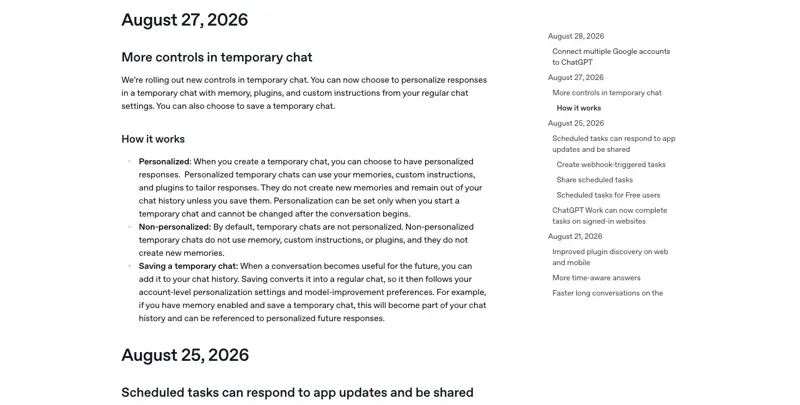
Source: OpenAI Help Center — ChatGPT Release Notes
Here’s the plain-language version of what OpenAI’s own release notes say happened. Before you type your first message in a new Temporary Chat, you now pick one of two modes:
- Non-personalized (the default, and the old behavior): the chat ignores your saved memories, custom instructions, and any connected plugins. Nothing new gets remembered either. This is the “clean slate” version people always assumed Temporary Chat meant.
- Personalized: the chat can read your existing memories, custom instructions, and plugins to give you better-tailored answers — but it still doesn’t create or update any new memories while it stays temporary, and it still doesn’t show up in your sidebar unless you save it.
And separately, there’s now a Save (also called “Add to History”) action. If a conversation you started as temporary turns out to be worth keeping, you can convert it into a regular chat after the fact. Once you do, it drops into your normal chat history and starts following your account’s standing settings — including whatever you have set for model-improvement / training.
Why this matters: the old mental model was “Temporary Chat = one bucket, four properties bundled together (no history, no memory, no training, disappears).” The new UI splits that bucket into two independent choices — what the chat can read going in, and what happens to it after the fact — and that split is exactly the kind of nuance that gets lost in a quick skim of the settings menu. A Reddit user asked for almost exactly this feature back in December 2024 (“Sometimes I start a temporary chat and want to keep it permanent. Is there a way to do this?”) — it took roughly 20 months to ship, and now that it has, the framing everyone had memorized is technically out of date.
We ran this through Google right after the rollout, and the search results tell their own story about how fast information catches up. The AI Overview for “chatgpt temporary chat” has already absorbed the surface facts — it now mentions choosing “a clean slate or personalized responses” — but it stops short of explaining what personalizing actually reads versus writes, what happens to a saved chat’s training status, or why the 30-day retention window exists no matter what you pick. Scroll one inch further and you’ll find a Reddit thread from over a year ago, still ranking, describing an entirely different (and now outdated) complaint about temporary chat “remembering everything.” That’s the gap this post exists to close.
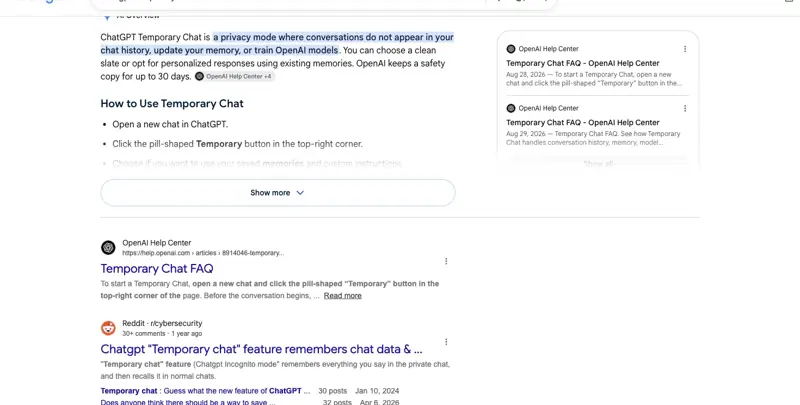
Source: Google Search, “chatgpt temporary chat” (live SERP, August 2026)
Why this shipped now, and how people are actually reacting
This wasn’t a surprise if you’d been watching ChatGPT’s beta builds closely. A leaker tracking the Android app spotted an internal “Sunspot” refresh on August 19, 2026 — a week before the public rollout — describing “a per-chat personalization toggle for memory and custom instructions” plus a “save to history” option, matching almost exactly what shipped a week later. OpenAI itself had reportedly tested an early version of this idea as far back as January 2026. Coverage of the official launch described it as built by OpenAI’s Personalization team and rolling out as part of a broader push that’s reached roughly a billion users over the summer.
The reaction once it actually shipped has been almost entirely positive, which is a little unusual for a ChatGPT change. Across the posts we reviewed from the days immediately after launch, the dominant tone wasn’t confusion or privacy alarm — it was people saying, in effect, “finally.” Multiple users described the exact same recurring frustration: starting a chat as disposable, having it turn into something genuinely useful twenty minutes later, and previously having no way to keep it except copy-pasting the whole thing somewhere else or taking screenshots. One widely echoed comparison summed up the trade-off well: a temporary chat you can personalize and save is really just a normal chat that starts out unsaved — the guarantee shifts from “this can’t be kept” to “this isn’t kept unless you press a button.” That’s a meaningfully weaker promise on paper, and a genuinely more useful product in practice, and multiple independent commenters converged on that same framing within hours of the announcement.
What we did not find, at least as of this writing, is a large wave of people specifically confused about whether Personalize secretly enables training, or whether “temporary” is now a lie. The closest thing to organized skepticism came from a handful of analysts and one detailed German-language writeup, not from a viral backlash thread. That’s worth noting because it’s the opposite of what you might expect from a change that touches privacy language — the confusion this post exists to prevent hasn’t fully materialized publicly yet, but the ingredients for it are all there in the UI, waiting for someone to hit them.
The walkthrough: finding, personalizing, and saving a Temporary Chat
Step 1 — Start a Temporary Chat (if you’ve never used it)
Open a new chat in ChatGPT on web, desktop, or the mobile app. In the top-right corner of an empty chat window, you’ll see a pill-shaped button labeled Temporary. Tap or click it. This works the same way it always has — it’s the entry point that hasn’t changed.
Step 2 — Choose Personalized or Non-personalized, before you type anything
This is the new part. The moment you activate Temporary Chat, a small menu appears letting you choose between the two modes described above. OpenAI’s Temporary Chat FAQ is explicit that this choice locks in immediately: “You choose whether the chat is personalized when you start it. This setting cannot be changed after the conversation begins.” There’s no toggle mid-conversation — decide up front.
If you pick Non-personalized (the default if you don’t touch anything), the chat behaves exactly like the old Temporary Chat: no memory access, no custom instructions, no plugins, and nothing new gets remembered.
If you pick Personalized, the chat can use whatever ChatGPT already knows about you — your saved memories, your custom instructions, any plugins you’ve connected — the same way a regular chat would. The critical distinction, straight from OpenAI’s FAQ: “A personalized temporary chat can reference your existing memories, but it will not create or update memories while the chat remains temporary.” It’s read access, not read-write. Nothing you say in a personalized-but-unsaved Temporary Chat gets added to what ChatGPT remembers about you going forward.
Two smaller mechanics worth knowing here. First, plugins follow the same read-only logic as memory: the FAQ notes “Plugins are available in personalized temporary chats. They are not available in non-personalized temporary chats” — so if you rely on a connected plugin (a calendar lookup, a specific integration) mid-conversation, you need Personalized mode active for it to work at all, non-personalized won’t even attempt it. Second, this per-chat toggle is separate from your account-wide personalization settings, which now live under Settings → Personalization alongside your personality selection, custom instructions, and memory management. The per-chat Personalize switch decides whether this one conversation taps into those account-wide settings — it doesn’t change the account-wide settings themselves.
Step 3 — Have your conversation
From here it works like any chat. If you’re in Non-personalized mode, ChatGPT genuinely won’t know your name, your job, your writing preferences, or anything else it might normally recall — you’re talking to a version of the model with no context about you at all. If you’re in Personalized mode, it responds the way your regular chats do, using what it already knows, but the conversation itself still isn’t being saved anywhere.
Step 4 — Decide whether to save it
This is the other new piece. At any point — usually via the chat’s menu options — you can choose Save (shown in some builds as “Add to History”). OpenAI’s release notes describe exactly what this does: “Saving converts it into a regular chat, so it then follows your account-level personalization settings and model-improvement preferences.” Concretely: the conversation appears in your chat sidebar from now on, and if you have memory enabled on your account, ChatGPT can start referencing this saved conversation the same way it references any other chat. If your account has “Improve the model for everyone” turned on, a chat you save can now be used for that too — the FAQ is direct about this: “A Temporary Chat won’t be used to improve our models while it remains temporary. If you save it, it becomes a regular chat and follows your account-level data controls, including your model-improvement preference.”
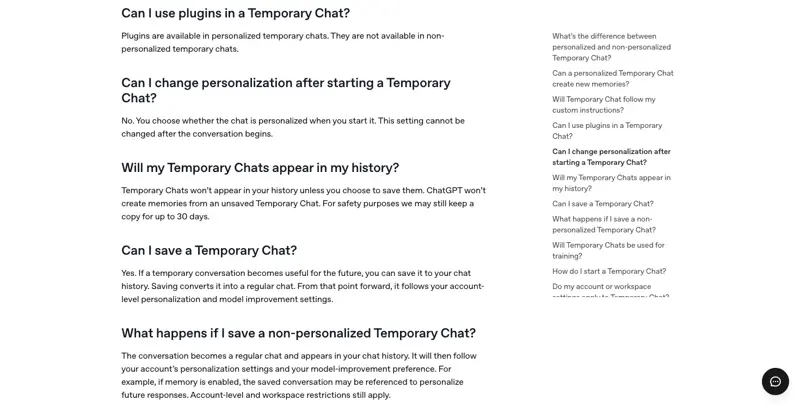
Source: OpenAI Help Center — Temporary Chat FAQ
Worked example, start to finish
Say you’re job-hunting quietly while still employed. You open a Temporary Chat, choose Non-personalized (you don’t want your employer’s name — which lives in your custom instructions — leaking into the conversation by accident), and ask ChatGPT to help you rewrite a résumé bullet point. Twenty minutes in, the conversation has turned into a genuinely good back-and-forth about how to frame a career gap, and you realize you want to reference this exact phrasing again next week.
Here’s the problem: you chose Non-personalized at the start, and that choice is locked for this conversation — you can’t retroactively turn personalization on. But saving is still available regardless of which mode you picked. You open the chat’s options menu and select Save. The conversation now appears in your sidebar like any regular chat. From this point forward, if your account has memory enabled, ChatGPT can draw on this saved career-gap conversation in future chats — which is a real trade-off worth pausing on, since the entire reason you’d started it as Non-personalized in the first place was to keep your job search compartmentalized. If that trade-off doesn’t sit right, the better move is to copy the specific text you want to keep into a note somewhere else, and let the original conversation age out with the rest of your temporary chats instead of saving it.
Regular Chat vs. Temporary Chat: what’s remembered, saved, and retained
| Regular chat | Temp Chat — Non-personalized | Temp Chat — Personalized (unsaved) | Temp Chat — Saved (either mode) | |
|---|---|---|---|---|
| Appears in your sidebar/history | Yes | No | No, unless saved | Yes, from the moment you save it |
| Reads existing memory/custom instructions/plugins | Yes | No | Yes (read-only) | Follows account settings going forward |
| Creates new memories | Yes, if memory is on | No | No | Yes, if account memory is on |
| Used for model training | Per your account setting | No | No | Per your account setting, from save onward |
| Server-side retention if you take no action | Until you delete it | Deleted within ~30 days | Deleted within ~30 days | Follows your account’s normal retention |
| Safety-team access for abuse/legal review | Standard policy | Up to 30 days, regardless of personalization | Up to 30 days, regardless of personalization | Standard policy, same as any regular chat |
The line worth reading twice: the 30-day safety-copy retention applies to every Temporary Chat, personalized or not, saved or not — right up until you save it and it becomes a permanent chat under your account’s normal rules. OpenAI’s Data Controls FAQ states it plainly: “Temporary Chats are deleted from our systems after 30 days. These chats: Aren’t used to train our models; May be reviewed only to monitor for abuse; Don’t get saved in your history and don’t create memories.” Turning personalization on or off doesn’t touch that window at all — it only controls what the chat can read while it’s still temporary.
How this stacks up against Gemini and Claude
If you use more than one AI assistant, it’s worth knowing that “temporary chat” doesn’t mean the same thing everywhere, and this update actually makes ChatGPT the odd one out in an interesting way. Google’s Gemini Temporary Chats, launched in August 2025, keep a hard wall in both directions — a Gemini Temporary Chat cannot read your “Personal Context” memory at all, and it cannot write to it either, no exceptions, no toggle. In exchange, Google uses a much shorter retention window: roughly 72 hours “to respond to you and to process any feedback,” versus ChatGPT’s 30 days. There’s also no save-to-history conversion path documented in Google’s own materials — once a Gemini Temporary Chat ends, it’s simply gone.
Anthropic’s Claude Incognito chats sit at a third point entirely. They’re the strictest of the three on convertibility: Claude’s own support documentation is blunt about it — “Can I convert an incognito chat to a regular chat? No, once you start an incognito chat, it cannot be converted to a regular chat or saved to your history.” There’s no equivalent of ChatGPT’s Save button, full stop. But Claude’s incognito mode is also, oddly, the least locked-down on reading existing data: it can still access your standing profile information and style preferences even while incognito, which ChatGPT’s non-personalized mode and Gemini’s Temporary Chats both block entirely. Claude’s retention window matches ChatGPT’s 30-day default, and Anthropic states explicitly that incognito conversations are never used for training, “even if global ‘Help improve Claude’ training toggle is on” — a stronger, unconditional guarantee than ChatGPT’s saved-chat-follows-your-setting model.
Put simply: OpenAI’s August 2026 update is the only one of the three that offers a formal, user-initiated “read what I already know, but keep it unsaved until I decide otherwise” workflow. Google keeps the wall total in both directions with a shorter clock. Anthropic keeps the wall against ever becoming permanent, while still quietly peeking at your style preferences the whole time. None of these are strictly “more private” than the others across every dimension — they’re different bets on which trade-off matters most, and if you regularly hop between tools, that’s the part worth remembering rather than any single number.
What this means for you
If you’re privacy-conscious by default. Keep using Non-personalized Temporary Chat exactly as you always have, and don’t save the chat afterward. Nothing about this update forces you into the new behavior — it’s opt-in on both axes. Your first action: the next time you open a Temporary Chat, actually look at which mode is selected before you type, since it’s now a real choice rather than an assumption.
If you’re job-hunting and don’t want AI usage traceable in your account. Use Non-personalized mode so custom instructions (which often contain your current employer or title) can’t leak in, and resist the urge to save anything useful — copy the specific text you need into a separate note instead. Your first action: audit your custom instructions right now for anything that would be awkward to have read back to you mid-résumé-rewrite.
If you’re asking a sensitive health or legal question. Non-personalized mode is still your best option, and remember the 30-day safety-copy caveat applies regardless — this isn’t full anonymity, it’s “not saved to your account, not used for training, not remembered,” with a narrow safety exception. Your first action: if the question is genuinely sensitive enough that even a 30-day safety copy is unacceptable, don’t put it in any consumer AI tool at all.
If you share a device with family or roommates. Personalized Temporary Chat is actually a useful middle ground here — you get your own tailored answers using your memory and instructions, without the conversation cluttering the shared account’s visible chat history for anyone else browsing it later. Your first action: try one Personalized Temporary Chat this week specifically for something you’d normally hesitate to type knowing someone else might scroll past your history.
If you’re a power user who wants memory on all the time. This update barely changes anything for you — just use regular chats. The whole point of Temporary Chat’s new modes is for the exceptions to your normal workflow, not a replacement for it. Your first action: skip this feature entirely unless you hit a specific one-off case where you want a clean or unlisted conversation.
If you occasionally want an “unbiased” second opinion from ChatGPT. One of the sharper reactions we found from real users pointed at exactly this: sometimes you don’t want Temporary Chat because you want privacy, you want it because you want ChatGPT to answer without your accumulated context nudging the response. Non-personalized mode is built for that. Your first action: next time you want a gut-check answer uncolored by your history, use Non-personalized rather than a regular chat.
If you’re a manager or team lead who set expectations about “temporary chat = fully anonymous” for your team. That framing needs a one-line update now that saving exists as an option. Your first action: send a two-sentence note to your team clarifying that Temporary Chat still defaults to the old private behavior, but a teammate can now choose to save one if they want to — so “temporary” isn’t an absolute guarantee they should rely on for anything truly sensitive being shared in a shared workspace.
Edge cases and troubleshooting
“I turned on Personalize and now I’m not sure if it’s really temporary.” It still is, in the specific sense that matters most: it won’t create new memories, won’t train the model, and won’t show up in your history unless you separately choose to save it. What changed is that it can now read your existing memory and instructions. If that distinction feels too subtle to trust in the moment, default to Non-personalized — you lose the tailored responses but remove any ambiguity.
“I can’t find the Personalize option — I only see the old Temporary button.” The rollout is staged, and OpenAI’s own release notes describe it as gradual across platforms. If you’re on an older app version or a region that hasn’t received it yet, you’ll still get the classic Temporary Chat behavior with no new options. Update your app and check again in a few days if it matters to you.
“I saved a chat and now it’s referencing things I said in it, in unrelated conversations.” That’s expected behavior if your account has memory enabled — saving converts the chat to a regular one, and regular chats can feed your standing memory. If you didn’t want that, the chat shouldn’t have been saved in the first place; you can still delete it from your history after the fact, though anything already folded into memory needs to be removed separately via your memory settings.
“Does turning on Personalize mean this chat gets used to train the model?” No — not while it stays temporary. OpenAI’s FAQ is direct: personalization and training are separate settings. Personalize governs what the chat can read. Training only kicks in if you save the chat and your account has “Improve the model for everyone” turned on. Personalize ≠ training. Save can equal training, but only if that separate toggle is already on.
“I looked for a Reddit thread about this exact change and found nothing current.” That matches what we found too — at the time of writing, there’s no significant r/ChatGPT or r/OpenAI thread specifically about the August 27 Personalize/Save rollout. Most of the online reaction so far is scattered praise on X and a handful of analyst posts, not a big community discussion yet. The clearest community-sourced confirmation that people wanted this is an older (December 2024) Reddit post asking for exactly this feature — which is a good sign it was solving a real, previously unmet need rather than adding complexity nobody asked for.
“I want to convert a chat to permanent, but I don’t see a Save button.” Location varies by platform during the staged rollout — check the chat’s menu (usually three dots or a similar icon) rather than looking for a persistent button in the main chat view. If it’s genuinely not there yet, the update hasn’t reached your account or platform.
“What happens if I save a Non-personalized chat — does it retroactively pull in my memory?” No. Saving changes what happens going forward, not retroactively. The content that’s already in the conversation doesn’t get personalized after the fact; it just becomes a normal, visible chat that can be referenced by future conversations if your memory setting is on.
“Is this the same as the separate ’locked chats’ feature I’ve heard about?” No — they’re different things being rolled out around the same period. Locked chats (which sit under Projects in some builds) are about hiding a conversation from your own sidebar and search without deleting it; they don’t change what’s remembered or trained on. Temporary Chat’s Personalize/Save controls are specifically about memory access and permanence. Easy to conflate since both touch “how visible is this conversation,” but they solve different problems.
“I’m on the free tier — do I get Personalize and Save too?” OpenAI’s release notes describe this as a broad rollout without carving out a specific paid-plan requirement the way some features do, and independent coverage of the launch didn’t flag a tier restriction either. If you don’t see it yet, the more likely explanation is the staged rollout timing, not your plan level — but confirm inside your own account’s Temporary Chat menu rather than assuming either way.
“A German-language article described this differently than the English help-center pages — which one is right?” They’re describing the same mechanics, just at different levels of plain-language translation. The clearest non-English coverage we found (Notebookcheck’s German writeup) actually captured the nuance well, including the detail that many readers overlook: the 30-day safety-copy notice sits directly under the input field and “many people scroll past it,” and that sentence applies “independent of the selection in the top-right corner” — matching OpenAI’s own English-language FAQ word for word in substance. If a secondary source ever seems to contradict OpenAI’s own help-center pages, treat the help center as the tiebreaker.
What this can’t fix
It’s not full anonymity, and it never was. Even in the most locked-down Non-personalized mode, OpenAI can retain a safety copy for up to 30 days for abuse and legal-compliance monitoring. That’s not new to this update — it’s the same caveat Temporary Chat has always carried — but the new options make it worth restating clearly, since “temporary” invites an assumption of “gone immediately” that has never actually been accurate.
Turning off personalization doesn’t disable safety-relevant access in rare situations. OpenAI’s FAQ specifically notes that safety systems may still use limited context “in rare, high-risk situations” regardless of your memory and personalization settings. This is a narrow carve-out (crisis intervention, abuse prevention, that kind of thing), not a backdoor into your everyday conversations, but it means no setting in this feature gets you to absolute zero data access under every circumstance.
It doesn’t retroactively fix a chat you already saved by mistake. If you save something and then regret it, you can delete it from your history — but if your account had memory enabled at the time, anything the model already inferred and stored needs to be found and removed separately through your memory settings, not just by deleting the chat itself.
It doesn’t protect you from what you type into it in the first place. No privacy mode changes the fact that whatever you paste into ChatGPT — personalized, non-personalized, saved, or not — has been transmitted to OpenAI’s servers at least once. “Not stored long-term” and “never transmitted” are different guarantees, and this update only ever touches the first one.
It doesn’t standardize how competitors handle the same idea. Google Gemini’s Temporary Chats and Anthropic Claude’s Incognito chats both solve a similar problem with meaningfully different rules — different retention windows, different conversion options, different defaults on reading existing profile data. If you regularly switch between tools, don’t assume the mental model you just learned for ChatGPT transfers directly to the others.
Frequently asked questions
Is ChatGPT’s Temporary Chat actually private? It’s private in the specific sense that it stays out of your chat history, doesn’t create memories, and isn’t used to train models — as long as you leave it temporary and don’t save it. It is not fully anonymous: OpenAI keeps a safety copy for up to 30 days regardless of your settings, for abuse and legal-compliance monitoring only.
Does OpenAI still see my temporary chats? Yes, in the same limited sense it can review any chat for safety and policy enforcement. The distinction Temporary Chat provides is that the conversation doesn’t get folded into your visible history, your memory, or model training data — not that it’s invisible to OpenAI’s systems entirely.
What does turning on Personalize actually do? It lets that specific temporary conversation read your existing memories, custom instructions, and connected plugins, so responses are tailored the way a regular chat would be. It does not create or update any new memories while the chat stays temporary, and the choice locks in the moment you start the conversation — you can’t turn it on or off partway through.
Does Personalize mean the chat is used to train ChatGPT? No. Personalization is about what the chat can read, not whether it’s used for training. A Temporary Chat — personalized or not — is never used to improve OpenAI’s models unless you separately save it, and even then, only if your account’s “Improve the model for everyone” setting is turned on.
How do I save a temporary chat in ChatGPT? Look for a Save (sometimes labeled “Add to History”) option in the chat’s menu. Selecting it converts the conversation into a regular chat: it appears in your sidebar from that point forward and starts following your account’s standard personalization and model-improvement settings.
Can I turn Personalize on or off after I’ve already started a Temporary Chat? No. OpenAI’s FAQ is explicit that this setting is locked in the moment the conversation begins and cannot be changed afterward. If you want different behavior, you need to start a new Temporary Chat with the other setting selected.
If I save a Temporary Chat, does it use my old memory settings or new ones going forward? Going forward. Once saved, the conversation follows your account’s current personalization and model-improvement preferences — the same rules that apply to every other regular chat in your account — not whatever setting you had when the conversation started.
Is ChatGPT’s Temporary Chat the same as Gemini’s Temporary Chats or Claude’s Incognito mode? Similar goal, different mechanics. Gemini’s Temporary Chats keep a hard wall against its “Personal Context” memory system in both directions and use a shorter roughly 72-hour retention window. Claude’s Incognito chats can never be converted to a permanent chat once started, retain data for 30 days by default, and — unlike ChatGPT’s default Temporary Chat — can still see your standing profile and style preferences even while incognito. None of the three works identically, so don’t assume settings transfer across tools.
Why did OpenAI make this change now? The pattern in the public reaction and the earlier community requests both point the same direction: people kept starting Temporary Chats for reasons other than pure secrecy — wanting an unbiased answer, avoiding sidebar clutter, testing something quickly — and then regretting it when the conversation turned out to be genuinely useful and there was no way to keep it. A specific Reddit request for this exact capability dates back to December 2024. This update is OpenAI closing that gap almost two years later.
Does this change anything for ChatGPT Enterprise or Team accounts? Workspace and account-level restrictions still apply on top of whatever a user picks — OpenAI’s FAQ notes explicitly that organizational settings can override individual personalization choices. If you’re on a managed account, check with your workspace admin before assuming your personal settings fully control the behavior.
If I save a Temporary Chat, does ChatGPT go back and use everything I said in it to build a profile immediately? Not immediately and not automatically beyond your existing settings. Saving converts the chat into a regular one and makes it eligible to be referenced by memory and training going forward, the same way any other regular chat is — it doesn’t trigger an instant retroactive analysis pass. Whether anything from it actually gets folded into memory follows the same account-level memory behavior as your other saved conversations.
Can a workspace admin turn off the Personalize option for everyone on a Team or Enterprise account? OpenAI’s documentation confirms that account-level and workspace restrictions still apply on top of individual choices, which implies admins retain override control, though the specific UI for disabling per-chat personalization organization-wide wasn’t detailed in what we found publicly. If this matters for your organization’s compliance posture, the workspace admin console — not a personal account’s settings — is where to verify it, and it’s worth confirming directly with OpenAI’s enterprise support if your policy depends on it.
Bottom line
“Temporary” used to mean one thing: nothing kept, nothing remembered, nothing trained on, gone. As of August 27, 2026, it means two separate choices — what the conversation can read on the way in, and whether you keep it on the way out — and the difference matters most for exactly the situations where you reached for Temporary Chat in the first place. The core privacy behavior you’re used to is still there by default. You just need to actually notice the new menu instead of assuming the old rules still apply automatically.
If you want the fuller picture — what ChatGPT and Claude each actually do with your data, how to verify your training settings are really off, and how to build a personal privacy baseline you don’t have to re-derive every time a feature changes — the AI Privacy 101 course walks through it in a dedicated lesson on Temporary Chat and incognito modes, free to start, no signup required for the first two lessons.
Sources
- OpenAI Help Center — ChatGPT Release Notes (“More controls in temporary chat,” Aug 27, 2026)
- OpenAI Help Center — Temporary Chat FAQ
- OpenAI Help Center — Data Controls FAQ
- OpenAI Help Center — Chat and File Retention Policies in ChatGPT
- OpenAI — How we’re responding to The New York Times’ data demands in order to protect user privacy
- The Verge — “ChatGPT now lets you save your temporary chats”
- Notebookcheck — “ChatGPT: Der temporäre Chat darf sich jetzt an dich erinnern”
- Mozilla Foundation — “Can My Boss Read My ChatGPT Queries?”
- arXiv — “Position: Privacy is not just memorization!”
- Anthropic Support — Use incognito chats
- Google — Gemini adds Temporary Chats and new personalization controls
- Google Workspace Admin Help — Control temporary chats and chat deletion in the Gemini App
- @ChatGPT on X — official announcement (Aug 27, 2026)
