

If you run your own Google Ads, and you start a new Search campaign today, one box is already ticked for you. It says AI Max. Behind it sit three automatic settings that can add searches you never chose, write headlines you never wrote, and send clicks to pages you never picked.
Black Friday is 27 November 2026, and a campaign built in a rush before a sale is where a pre-ticked box is easiest to miss. Most of us click through setup screens the way we click through any setup screens. Fast.
This guide is for the person who owns the account and also owns the business: the plumber, the dentist, the Etsy seller, the real-estate agent who set up one campaign once and checks it on Sundays. It tells you what changed, what each switch does in plain words, where to find each one, what the evidence says about whether AI Max earns its keep on a small budget (there’s less independent evidence than you’d hope, and we’ll show you what exists), and a checkup you can run on any campaign before it spends your money.
TL;DR. New Search campaigns come with AI Max, text customization and Final URL expansion switched on. Each can be switched off on its own in the campaign’s settings (search term matching can also be set per ad group), though turning off text customization also turns off Final URL expansion. We found no independent, controlled test showing AI Max pays off for tiny budgets. So decide on purpose: keep what you understand, switch off what you can’t check, and compare against a version with AI Max off.
What just changed
Google Ads Editor got version 2.14. Search Engine Roundtable reported the release on 12 November 2026, and Google’s release notes don’t show a release day. The line that matters, as PPC Land quoted it from Google’s notes:
AI Max, text asset automation, and Final URL expansion are now activated by default when creating new Search campaigns.
Three things to know before you panic.
First, the notes are about new campaigns. They don’t say that installing Editor 2.14 flips anything on in a campaign you already have.
Second, they leave some questions open. As PPC Land reads them, the notes don’t say whether the default also applies in the web interface or the API, to spreadsheet imports, or to accounts that have never used AI Max.
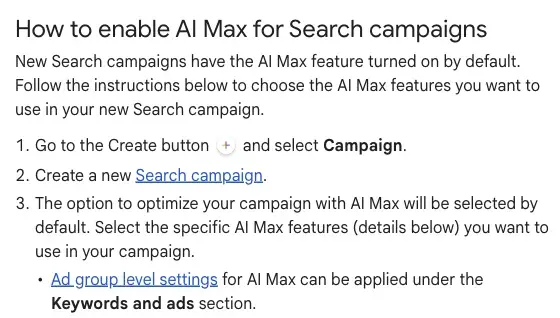
Third, Google’s web help page already says the same thing: “New Search campaigns have the AI Max feature turned on by default.” The page doesn’t date itself, so we can’t tell you which came first.
Here’s the part of that help page that does the work. Look at the sentence under “How to enable AI Max for Search campaigns.”
What AI Max is, in plain words
Google describes AI Max as “an optimization layer within existing Search campaigns,” not a new kind of campaign. You don’t create an “AI Max campaign.” You create a normal Search campaign, and the layer sits on top.
The layer has three parts. Each has its own on-off switch in your campaign settings.
| Switch on screen | What Google does | What it can mean for you |
|---|---|---|
| Search term matching | Google describes it as expanding your keywords “to find untapped, performant queries with broad match,” and cites “keywordless technology” | Your ad can show for searches you never typed in as keywords |
| Text customization | Writes extra headlines and descriptions from your site, ads and keywords | Wording you didn’t write can appear in your ad |
| Final URL expansion | Sends the click to the page on your site Google thinks fits the search | The click can land somewhere other than your ad’s landing page |
Two details worth keeping in your head.
Final URL expansion needs text customization. Google’s pages say it plainly: switching text customization off switches Final URL expansion off too. The reverse isn’t true. You can keep text customization and turn off only the URL switch.
Text customization draws on your own pages. Google says generated assets are based on “your domain, landing page, existing ads, and keywords in your ad group,” with a “light-touch” approach that uses snippets from your landing page’s titles, descriptions and meta tags plus generative AI grounded in the page. Its example: text customization “will not create headlines about makeup, if the landing page is only about shampoos.” That’s reassuring, and it also means the ad starts from your site. Google’s own warning, which we quote below, is to make sure that content is accurate. Google says assets are “refreshed within 48 hours” when your landing page changes.
Not the same as the September plan
If you read AI Max news over the autumn, you might be mixing up two different things. This is the part where most people lose the thread, so here it is in one table.
Google’s developer blog of 12 August 2026 describes a separate migration. As Google wrote it on 12 August, starting 1 September 2026, Search campaigns that used campaign-level broad match, or standalone “automatically created assets” (the old name for text customization), would be upgraded to AI Max, rolling out progressively during September. We didn’t find a page reporting how far that rollout got. Creating new campaigns with those legacy settings had been blocked since 3 August 2026.
What Google’s table says the upgrade would switch on:
| Setting | New Search campaign (default) | Migrated from campaign-level broad match | Migrated from standalone automatically created assets |
|---|---|---|---|
| Search term matching | On | On | On |
| Text customization | On | Off | On |
| Final URL expansion | On | Off | Off |
The first column comes from the help page and Editor notes above, the other two from Google’s August developer post. So, going by Google’s pages as we read them on 17 November 2026, a new campaign starts with all three on, while a campaign upgraded under the September plan was to start with Final URL expansion off.
Dynamic Search Ads are on a different clock. Google’s reporting help page says that “starting in February 2027, campaigns using Dynamic Search Ads (DSA) will automatically be upgraded to AI Max.” Google’s developer post gives the window as 1 to 28 February 2027.
What if you’re not sure which of your campaigns was migrated? You don’t have to remember. Open the campaign’s settings and look at the AI Max panel. The panel shows you the state it’s in today, and that’s the one that counts.
Does AI Max pay off on a small budget?
We found no clean answer. That’s the honest report, and it’s more useful than it sounds.
Here’s everything we found, with its base and its limits.
| Source | What it says | What it can’t tell you |
|---|---|---|
| Google, launch post, 6 May 2025 | Advertisers “will typically see 14% more conversions or conversion value at a similar CPA/ROAS”; 27% for campaigns that were mostly exact and phrase keywords | Based on Google’s internal 2025 data, for non-Retail advertisers, with more than 70% of conversions from exact or phrase match in the footnoted group. No sample size, no spend breakdown, no small-budget result |
| Smarter Ecommerce (smec), Mike Ryan, 23 March 2026 | 250+ AI Max Search campaigns: median 13% more conversion value than the rest of the campaign’s revenue, conversions at about 16% higher cost per conversion, median ROAS about the same | Compares AI Max conversions with the rest of each campaign, not with a switched-off version; the author says the data “clearly suggests that AI Max cannibalizes existing keywords instead of finding new ones” |
| Ezra Sackett, Monks, reported by PPC Land, 17 August 2025 | In about 30,000 search terms that matched AI Max features, from “a few clients,” 99% of impressions had no conversions | An informal LinkedIn analysis; the number of accounts and the time period aren’t given, and the article’s own wording on the 99% base is ambiguous |
| Advertiser stories (L’Oréal Chile, MyConnect) | 2X conversion rate at 31% lower cost per conversion; 16% more leads at 13% lower cost per action | Advertiser-reported, no baselines or time periods; MyConnect already used target ROAS bidding and broad match |
Read that table slowly. The headline gains (14% and 27%) come from the company that sells the product, and the independent numbers aren’t broken out for small budgets: smec looked at 250+ campaigns, Monks at “a few clients.” smec’s analysis did find ugly cases, though. In one client account, AI Max accounted for effectively all the expansion into competitor traffic and captured 69% of that account’s Search impressions. In another example, half of 500,000 monthly impressions went to Search Partners, converting at 0.07% against 3.04% on Google Search.
Those are single examples. They’re not a rate, and we won’t pretend it is. But it shows what the failure looks like: the automation finding cheap volume that doesn’t turn into customers.
Here’s our own opinion, flagged as one. The sensible reading isn’t “AI Max is bad.” It’s “AI Max is a test you should choose to run, not a default you should forget about.” Google itself offers a way to run that test, and we’ll get to it.
The checkup, step by step
You can run this on a brand-new campaign during setup, or on an existing one. We write the web interface paths from Google’s help page, which is the source we verified. Editor’s labels may differ a little, and Google’s Editor notes don’t give a step-by-step path, so check the AI Max section in Editor’s campaign settings instead of trusting our wording.
Step 1: Find the AI Max panel
In Google Ads, go to the Campaigns menu, open the Settings tab, tick the campaign (or campaigns) you want to edit, then select AI Max. For a new campaign, the choice appears during setup: the option to optimize with AI Max is preselected, and you choose the specific AI Max features you want.
Expected result: you see three things you can control, search term matching, and the asset optimization panel with text customization and Final URL expansion.
Here’s what Google’s page says about switching things off. It lists how to opt out of all AI Max settings at once, and how to adjust search term matching and asset optimization one by one.
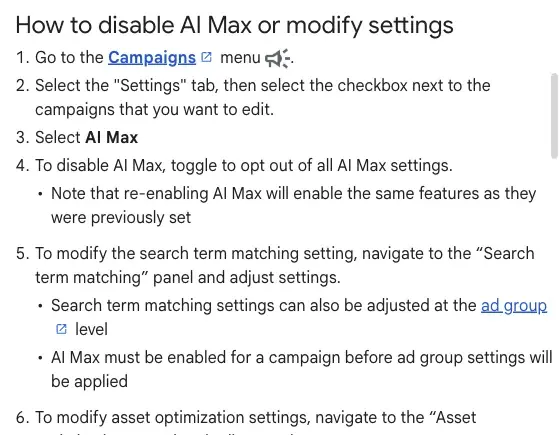
One handy detail from that page: re-enabling AI Max “will enable the same features as they were previously set.” So switching it off isn’t a one-way door.
Step 2: Decide about Final URL expansion first
Start here, because it’s the switch with the most visible side effect. In the Asset optimization panel, Final URL expansion lets Google replace the page your ad points to. Google says it “will only send traffic to URLs that are query relevant and themed to your ad group,” and also that Google “may replace your Final URL with a more relevant landing page.”
For a one-service business with one landing page you spent real effort on, that’s a trade. Maybe Google picks a better page. Maybe it picks your careers page.
Keep it on if your site is tidy and every page is one you’d happily pay to send a stranger to. Switch it off if you have pages that shouldn’t get paid clicks, such as a jobs page, an old promo or a thin page. Two more notes from Google’s page. If you want fixed pinned headlines to always show, turn Final URL expansion off (and URL inclusions too), because “pinned Responsive search ad assets aren’t used if a more relevant URL is chosen.” And if you want to keep expansion but fence off pages, add URL exclusions: campaign Settings, AI Max, then “Add URL exclusions” under Final URL expansion.
Expected result: you can say in one sentence which pages your ads are allowed to land on.
Step 3: Decide about text customization
Text customization writes extra headlines and descriptions. You can see and judge them: Google says you can “monitor your ad content for accuracy in the ad-level asset report for responsive search ads.”
What to watch for isn’t gibberish. It’s a plausible line that stopped being true for your business: an old sale, a service you stopped offering, a promise your lawyer wouldn’t sign. Google’s own line is blunt: “Ensure your website content is accurate, not misleading, and not in violation of Google Ads policies or applicable laws.”
To switch it off: Campaigns, Settings, select the campaign, AI Max, Asset optimization, untick Text customization, save. Assets it generated “will no longer serve in ads,” and Final URL expansion goes off with it. Google also lets you remove a single generated asset from the Ads page, but warns that removal is permanent. (That’s worth a pause. Look before you click remove.)
If you want to keep it but steer it, Google has a pilot called text guidelines that “allows you to exclude specific terms, define your tone of voice, and avoid specific concepts in your ads.”
Expected result: either the generated headlines stop, or you’ve read the ones that are live and you’d stand behind every one.
Step 4: Decide about search term matching
This is the switch that decides which searches can trigger your ad. Google sets it at the campaign level, and you can then turn it on or off for individual ad groups: Ad groups, select the group, Search term matching. Google adds that AI Max must be enabled for a campaign before ad group settings will be applied.
Think about it as a pressure valve. For a plumber with an emergency-repair ad group and a “bathroom remodel” ad group, you might want expansion in one and a tight keyword list in the other. The setting lets you say so.
Brand controls are part of AI Max too: Google lists brand exclusions at the campaign level and brand inclusions at the campaign or ad group level.
Expected result: for each ad group, you’ve chosen on or off for expansion, deliberately.
Step 5: Load your negative keywords before you launch
Negative keywords are your own list of searches you never want to pay for. Google’s own “AI Max myths” page says they still work: “Negative keywords are still respected,” and they “continue to function, allowing advertisers to maintain control over any unwanted traffic.”
So build the list first. Think “free,” “jobs,” “salary,” “DIY,” “how to fix it yourself,” a competitor’s name, the neighbouring service you don’t offer. A starter prompt for ChatGPT, Claude or Gemini (we haven’t tested this one, so treat it as a first draft and read every line it gives you):
I run a [type of business] in [city]. My paid Google Ads Search campaign promotes [list of your services].
List 40 search phrases that sound close to my services but come from people who will never hire me, like job seekers, DIY searchers, students and people looking for a different service.
Group them under headings and mark any that could also be a real customer so I can check them by hand.
The last line matters. A negative keyword that blocks real customers costs you more than one that lets in a few bad clicks.
Expected result: a list you paste into the campaign before it spends a dollar.
Step 6: Check that the machine has something to learn from
Google’s setup page says AI Max features “require conversion-based Smart Bidding strategies” to work effectively. Its FAQ adds one that’s easy to skip: “AI Max won’t be effective if campaigns are limited by budget.”
For a small account, that means two honest questions. Does your account record the thing you actually want (a call, a booked job, a form), and not just clicks? And is your daily budget high enough that the campaign doesn’t run out by lunchtime? We didn’t find a minimum budget in the Google pages we read, so be wary of any figure you can’t trace to Google.
Expected result: you know what “a conversion” means in your account, and what the campaign does when the budget runs dry.
Step 7: Give it two weeks, then read the search terms
Google’s reporting page says: “you should wait at least 2 weeks after enabling AI Max for a new or existing Search campaign before making changes.” So don’t tinker on day three.
When you do look, there are a few places to check. The search terms report has a “Match type” column that “tells you how closely the search terms that triggered your ads on Google are related to the actual keywords.” The “Search terms and ad combinations” view “shows the headlines, landing pages, campaigns, and ad groups that made up the full customer ad journey.” And a “Selected by” column will tell you if the landing page was chosen by AI Max. You’ll find these reports from the Campaigns menu.
One limit to know: Google’s search terms report leaves some searches out. In Google’s words, “Some search terms that don’t have enough query activity are omitted from the search terms report in order to keep with our standards on data privacy.” So you can’t always see, and negate, every paid search.
Expected result: a short list of search terms to add as negatives, and a view of which pages got the clicks.
Step 8: Test it against a version with AI Max off
Google built a tool for this. Go to the Campaigns menu, then Experiments, click the plus button, choose Campaign features and settings, pick AI Max for Search campaigns, select the campaign, and create the experiment. The control arm is your existing Search campaign with AI Max off, the trial arm is the same campaign with AI Max on, and Google’s page says “The test automatically starts.”
Google’s page doesn’t say how long to run it or what the default split is. We’d choose a window that covers enough real jobs or leads to mean something, and judge by qualified leads or booked work, not raw form fills. That’s our advice, not Google’s.
Expected result: two numbers side by side, from the same campaign.
A worked example: a made-up plumber
This one is made up, written by us to show the shape of the checkup. It isn’t a real account and it has no results, because we don’t have one to show you.
Say a plumbing company builds a new Search campaign on 18 November for emergency repairs in one city. The setup screen has AI Max preselected. The owner works through the list.
Final URL expansion: the site has an emergency-repair page, a bathroom-remodel page, a careers page and a blog. Paid clicks should reach the first page only. The owner adds the careers page and blog as URL exclusions, or just switches expansion off for this campaign.
Text customization: the owner opens the generated headlines in the asset report after launch, finds one that promises a service the business stopped offering, and removes that asset (knowing removal is permanent).
Search term matching: left on for the emergency-repair ad group, turned off for a second ad group that targets one specific water-heater brand.
Negative keywords: “jobs,” “apprenticeship,” “DIY,” “how to fix,” “salary,” and the names of two competitors, pasted in before launch.
Bidding and budget: conversion tracking counts booked calls, bidding is conversion-based, and the budget is set so the campaign doesn’t stop mid-morning.
Review: two weeks later, the owner reads the search terms report, adds new negatives, and checks the “Selected by” column to see which pages the clicks landed on.
That’s the whole job. Notice what it isn’t: it isn’t “turn it all off.” Some of those choices keep AI Max features on.
What this means for you
Here are seven readers and a first move for each.
If you run ads for a local service business (plumber, electrician, HVAC): your biggest risk is paying for searches that aren’t buyers. Build the negative list first, then decide on expansion ad group by ad group. First action: write your twenty worst imaginary searches, and see if they would match your keywords.
If you’re a dentist, lawyer or other regulated professional: read every generated headline. Google’s wording is that you must make sure your website content is accurate, not misleading and doesn’t break its policies or applicable laws. First action: switch text customization off until you’ve read what it would say, or use text guidelines to exclude terms.
If you sell products (Etsy, Shopify, a local shop): the ugly cases in smec’s analysis are about competitor searches and Search Partners, and its firm is an ecommerce one. First action: check your search terms report for competitor names and add the ones you don’t want. Our guide for Small Business Saturday prompts covers the free-chatbot side of the same week.
If you’re a real-estate agent or independent consultant: your site probably has a few strong pages and a lot of filler. First action: decide which pages are allowed to get paid clicks, then switch Final URL expansion on or off accordingly.
If you hire a freelancer or agency: you don’t need to learn the interface. You need three answers in writing. Which AI Max switches are on, why, and how they’re being compared against a version with them off. First action: send those three questions today.
If you build campaigns in bulk in Editor: the default applies when you create new Search campaigns, so every campaign you build starts with it, and the notes leave open whether imports are affected. First action: build one test campaign, open its AI Max settings, and look at what’s ticked before you create the rest.
If you only run a campaign now and then: you’re the kind of advertiser most likely to miss it. First action: open the campaign you last launched and look at the AI Max panel.
Edge cases and troubleshooting
“I turned off text customization and my URL setting vanished too.” That’s by design: Final URL expansion needs text customization, so turning one off turns off the other. To keep URL expansion, leave text customization on.
“My pinned headline isn’t showing.” Google’s page says pinned assets aren’t used if Final URL expansion picks a more relevant URL, and also when URL inclusions are enabled. To always use pinned assets, turn off Final URL expansion and URL inclusions.
“An ad shows words I never wrote.” Open the ad-level asset report for responsive search ads and review the generated assets. You can remove a single asset, but Google warns the removal is permanent. If it’s a pattern, turn text customization off.
“My URL exclusions don’t seem to work.” Google says URL exclusions require text customization and Final URL expansion to be on, and AI Max to be enabled. If you turned one off, the exclusions have nothing to act on.
“I can’t find the search term that cost me money.” Some low-volume searches aren’t in the report, by Google’s own privacy rule. Use the match type, the “Search terms and ad combinations” view and the landing page columns to see patterns instead of every query.
“I switched AI Max off and want it back.” Google says re-enabling gives you the same features as they were set before.
“I changed things after three days and the numbers jumped around.” Google’s guidance is to wait at least two weeks after enabling before making changes. You’re comparing the system to itself while it’s still settling.
“My campaign used campaign-level broad match or automatically created assets, and I never touched it.” Google’s 12 August post planned an upgrade of those campaigns from 1 September; see the table above. Check the AI Max panel today rather than relying on memory.
What this guide can’t fix
It can’t tell you AI Max will pay off for you. We found no published, controlled test of tiny, owner-run budgets.
It can’t replace conversion tracking. Google says the AI Max features need conversion-based Smart Bidding to work effectively. If your account counts clicks and not customers, none of these switches will help.
It can’t make a weak website strong. Text customization starts from your own pages. A confusing site makes confusing ads.
It can’t promise a setting stays as you left it. Google keeps changing AI Max. The September migration, the February 2027 Dynamic Search Ads upgrade and the Editor 2.14 default are three dated examples. Re-check after any big Google Ads announcement.
It can’t give you legal advice. If your profession has advertising rules, the rules live with your regulator and your lawyer, not in a settings guide.
FAQ
Is AI Max on by default in Google Ads?
For new Search campaigns, yes. Google’s help page says “New Search campaigns have the AI Max feature turned on by default,” and Editor 2.14’s release notes say AI Max, text asset automation and Final URL expansion are activated by default when you create new Search campaigns. Existing campaigns are a separate question: the Editor notes don’t say they change, and Google’s 12 August developer post set out a separate September upgrade plan for campaigns with certain legacy settings.
Did Google switch AI Max on in my existing campaigns?
Not through the Editor 2.14 default, as far as its notes say. But Google’s developer post of 12 August 2026 said that from 1 September 2026 it would start upgrading Search campaigns that used campaign-level broad match or standalone automatically created assets to AI Max, rolling out progressively during September. If you had either, open the AI Max panel and look.
How do I turn off AI Max in Google Ads?
Campaigns menu, Settings tab, tick the campaigns, select AI Max, then toggle to opt out of all AI Max settings and save. To turn off a single piece, use the Search term matching panel or the Asset optimization panel.
Does turning off text customization also turn off Final URL expansion?
Yes. Google’s pages say Final URL expansion requires text customization, so disabling text customization disables Final URL expansion as well.
Does AI Max respect my negative keywords?
Google’s AI Max myths page says yes: “Negative keywords are still respected.” Build your list before launch anyway, because you can’t see every search in the report.
How long should I wait before judging AI Max?
Google’s reporting guidance is to wait at least two weeks after enabling it before making changes. How long to run a test beyond that depends on how many real leads or jobs your account gets, and Google doesn’t give a number.
Can I test AI Max against my old setup?
Yes. In the Campaigns menu, go to Experiments, click the plus button, choose Campaign features and settings, then AI Max for Search campaigns. The control keeps AI Max off, the trial turns it on, and the test starts on its own.
Is AI Max safe for dentists, lawyers and other regulated advertisers?
We found no Google rule that bans AI Max for them. What Google does say is that you must make sure your website content is accurate, not misleading and compliant with its policies and applicable laws, and that you can monitor generated ad content in the ad-level asset report. Read the generated text before it runs.
What happens to my Dynamic Search Ads?
Google’s reporting page says campaigns using Dynamic Search Ads will automatically be upgraded to AI Max starting in February 2027. Google’s developer post gives 1 to 28 February 2027 for that automigration.
The bottom line
The default isn’t evil, and it isn’t proof that AI Max suits you. It’s a starting position chosen by the company that sells the ads. Your job is to treat it like any other thing someone else pre-filled on a form that moves your money: read it, decide it, and write down what you decided.
If you only have a few minutes this week, do two things. Open your newest Search campaign and look at the AI Max panel. Then decide Final URL expansion and text customization on purpose, because those two change what people see and where they land.
If you’d like help using AI on the rest of the job (writing ads you control, reading customer messages, planning the week’s marketing), AI for Small Business (first 2 lessons free) is a good place to begin. Running ads is a skill of its own, and the AI marketing playbook (first 2 lessons free) pairs well with it. If you’re curious about ads inside chatbots, the ChatGPT Ads $50 weekend test (first 2 lessons free) walks through a small, capped test.
Which switch will you check first?
Sources
- Google Ads Help: Set up AI Max for Search campaigns
- Google Ads Help: About Final URL expansion in Search
- Google Ads Help: Turn text customization on or off in Search campaigns
- Google Ads Help: About text customization in Search campaigns
- Google Ads Help: About reporting in AI Max for Search campaigns
- Google Ads Help: About AI Max experiments
- Google Ads Help: Optimize Google Ads with AI Max for Search campaigns (FAQ)
- Google Ads Developers blog, 12 August 2026: migrating campaign-level broad match and automatically created assets to AI Max
- Google Ads blog, 6 May 2025: Unlock next-level performance with AI Max for Search campaigns
- Google, AI Max myths (February 2026)
- PPC Land: Google Ads Editor 2.14 turns on AI Max by default for new Search campaigns
- Smarter Ecommerce: The Ultimate Guide to AI Max for Google Search (23 March 2026)
- PPC Land: Google’s AI Max for Search campaigns deliver meh results, industry tests reveal (17 August 2025)
- Google Ads Help: About the search terms report