
On November 13, 2026, Google announced that Google Wallet was rolling out to all Gemini app users in the US, so they can connect it to Gemini and get answers “informed by your spending habits.” If you go one step further and link your bank and credit card accounts to Wallet through a company called Plaid, Gemini can read the transactions in them. Google says the access is read-only: “Gemini can only read information from your accounts; it can’t move, manage, or invest your money.”
This guide is about the part that comes after the budgeting demo: where your data ends up once you connect, how to turn the connection off, and which parts of it do not disappear when you do. The answer is that there are several separate places, and turning off one does not clear the others.
Two honest notes. First, we have not connected an account of ours, so we describe what Google, Plaid and Google Wallet say, all read on November 16, 2026, and we do not describe what the screens look like. Second, Google’s wording and the press coverage differ in places. Where they do, we say so and quote the source.
One more thing to clear up early, because the search results mix it up: this is Google’s Gemini assistant. “Gemini” is also the name of a crypto exchange. A search for connecting Gemini to a bank account turns up the exchange’s pages, such as its July 2022 blog post about UK customers linking a bank account to the exchange through Plaid. Those have nothing to do with this feature.
If you use ChatGPT or Claude for the same job, we have separate guides: Connect Your Bank to ChatGPT Safely (5 Things to Do First) and Claude Personal Finance: Setup, Privacy and a Free Route.
What launched on November 13
Google’s announcement says users “can connect Google Wallet to get responses informed by your spending habits,” and that it is “Rolling out today for all Gemini app users in the U.S.” across web and mobile, on both Android and iOS. If you choose to connect, you do it “under Connected Apps in Personal Intelligence settings,” and then tag @Google Wallet in a Gemini chat. You can also “securely link your financial accounts from your credit cards and banks to Wallet via Plaid” for deeper insights.
Plaid’s own announcement of the same day says “People can choose to link their bank accounts, credit cards, loans and investment accounts,” and repeats the read-only line: “Gemini has read-only access: it cannot move, manage, or invest their money.”
The examples Google gives are the useful way to see what it is for:
- “can we review my spending from last quarter so I can save $1,000 over the next three months?”
- “what subscriptions am I still paying for, and did any of them go up in price this year?”
- “how much did I spend on gifts and travel last year? Use that to help me set a holiday budget for this year”
Google also says “Gemini finds recurring charges across your linked accounts and flags price increases.”
A date note, because the dates in press coverage are mixed. The Wallet connection to Gemini was reported in September: 9to5Google wrote on September 28, 2026 that Google Wallet was “the latest Gemini Connected App,” and that the Plaid integration “dates back to the Google Pay app and is only available for Google Wallet users in the US.” What happened on November 13 was the finance rollout to all Gemini app users in the US. And “rolling out” matters: as of November 16, Google’s Help page for the feature says “We’re gradually making this feature available, so it might not be available to you just yet.”
Who can use it
Google’s Gemini Apps Help page for the feature lists what you need. This is the table, from that page:
| Requirement | What Google says |
|---|---|
| Age and place | You must be 18 or older and based in the US |
| Account type | A personal Google Account; as of November 16, 2026, work or school accounts are not supported for now |
| Keep Activity | It must be on: “Gemini Apps can’t connect to Google Wallet when this setting is off.” |
| Language | English only |
| Where it works | Not in Gems or in Gemini Live |
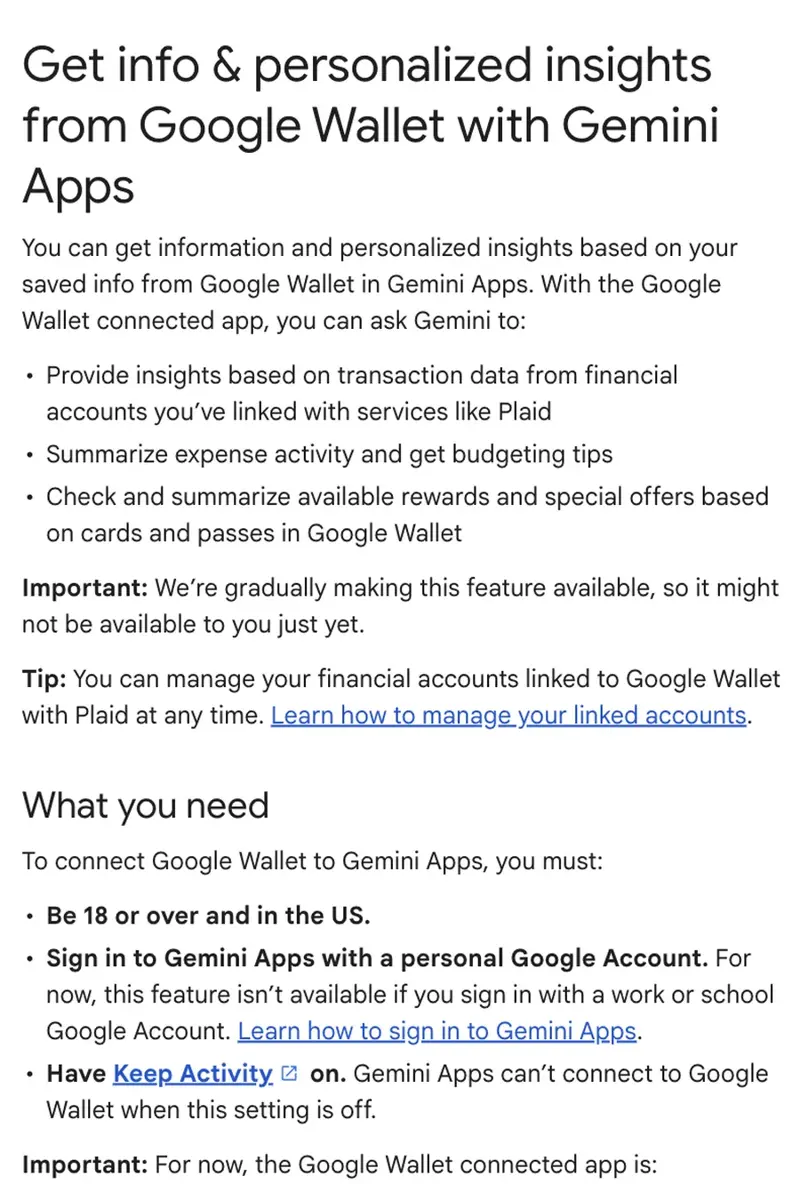
The Keep Activity row is the one with consequences, and a later section is about it.
What Gemini can and cannot do with it
According to Google’s Help page, with the Wallet connected app you can ask Gemini to provide insights “based on transaction data from financial accounts you’ve linked with services like Plaid,” to summarize expenses and offer budgeting tips, and to check rewards and special offers tied to the cards and passes in Wallet.
What it cannot do, per the same page: make purchases with the payment methods in your Wallet, and update or delete your linked financial accounts. Changes to those happen in Google Wallet’s settings.
“Read-only” is a narrow promise. It is a promise about what Gemini can do to your money. It says nothing about what is stored, who can see it, or how long it stays. That is the subject of the next section.
Where your information ends up
There are four places to think about. They are separate, and a switch in one does not clear the others.
Plaid and your bank
Google Wallet’s help page on Plaid-linked accounts says: “Google Wallet works with Plaid, a third-party service, to obtain transaction and balance info, so you can track your spending and account balances. To provide this service and to help create a secure connection to your financial institution, Plaid collects and uses your financial institution login info and accesses your account.”
Google Wallet
The same page lists what both companies keep while an account is linked: “Credit card or bank account number,” a bank routing number if applicable, “Account transaction history,” “Account balance,” and basic identity information, meaning name, address, phone number and email address. It says “Plaid and Google will store this information while your bank account is linked to Google Wallet.”
One caution about that page: it is a Google Wallet page and it does not mention Gemini. We use it because it is Google’s own description of Plaid-linked accounts in Wallet, and because Google’s Gemini Help page for the feature says you can unlink financial accounts “at any time in your Google Wallet settings.”
Gemini Apps Activity
Gemini keeps your chats in Gemini Apps Activity when Keep Activity is on. Google’s Connected Apps page includes Google Wallet among the apps, says the shared data can include “financial account info linked with services such as Plaid,” and says plainly: “Disconnecting an app or deleting data in a connected app doesn’t delete any data from Gemini Apps Activity.”
That one sentence is why this guide exists. A person can disconnect Wallet from Gemini, unlink every bank, and still have a Gemini chat history that contains what Gemini said about their spending. Those chats are a separate store, and they have their own delete button.
Human review and retention
The Gemini Apps Privacy Hub says “A subset of chats are reviewed by human reviewers,” that “Chats are disconnected from your account before being sent to service providers,” and that “Reviewed chats are retained for up to three years.” Google’s Connected Apps page adds a short sentence: “Human reviewers improve Google services, including generative AI.”
Google’s pages we read do not say whether a reviewed chat disappears when you delete your Activity. Its Activity page does not address it either. Treat what you type into Gemini as something that could be reviewed.
The Keep Activity trade-off
Wallet will not connect when Keep Activity is off. And on Keep Activity, Google’s privacy hub says that when it is on, “Your chats and what you share with Gemini” are saved to your Activity and Google uses that activity to develop its services, including “training generative AI models.” With it off, “Your future chats won’t appear in your Activity,” and Google does not use them to train its models unless you send feedback, though chats are kept with your account for up to 72 hours.
So the connection and the training setting are tied together. You cannot use the budgeting feature with Keep Activity off.
How this plays out for financial data is where reports differ. TokenPost, a news site that covered the launch on November 13, quotes the following: “Google does not train generative AI models directly on Google Wallet and payments data,” and “when Keep Activity is on, transaction summaries, excerpts and inferences may be used to train models.” We could not open the Google page TokenPost’s wording comes from, so we attribute it to TokenPost and do not present it as Google’s text. If it is accurate, it is the distinction to take seriously: the raw account data may not be what is used, but what Gemini wrote about your spending can be.
Google’s own pages say less: they say what Keep Activity does in general, and that Connected Apps data can be shared with Gemini. If your decision depends on this point, read the Connected Apps page on Google’s site yourself before you link anything.
How to turn it off, step by step
There are four steps. Each does a different thing. All steps are from Google’s and Plaid’s own pages, and we have not clicked through them.
Step 1: Stop Gemini from reading Wallet
In Gemini, open Personal Intelligence, then Connected Apps, and turn off Google Wallet. Google’s announcement says “you can turn the connection on or off at any time,” Plaid’s says “People can turn the Wallet connection on or off at any time in Personal Intelligence settings,” and the Help page says “You can disconnect Google Wallet from Gemini at any time in your Connected Apps settings.”
What this does: it stops future access. What it does not do: it does not unlink your bank from Wallet, and it does not delete a single chat.
Step 2: Unlink the bank in Google Wallet
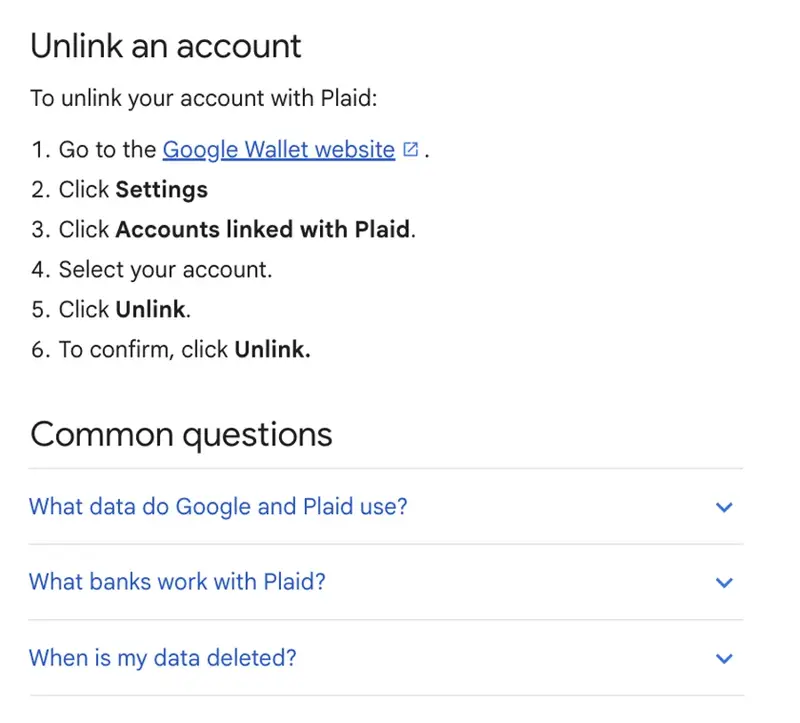
Google Wallet’s Help gives these steps: go to the Google Wallet website, click Settings, click Accounts linked with Plaid, select your account, click Unlink, and “To confirm, click Unlink.”
What this does: the page says “When you remove an account from Google Wallet, Google deletes the transaction history associated with that account.” What it does not do: it does not touch Gemini chats, and it does not touch Plaid’s own records if you linked the same bank to another service.
Step 3: Delete what Gemini saved
On a computer, go to gemini.google.com, click Settings & help, then Activity. You can also go to myactivity.google.com/product/gemini. Google’s Activity page lists the choices: click Delete, then “All time,” “Last hour,” “Last day,” or “Custom range,” or delete one conversation with “Delete activity item.”
Two details from that page. By default, activity older than 18 months is auto-deleted, and you can change this to 3 months or 36 months, or choose “Don’t auto-delete activity.” And if you turn Keep Activity off, “your conversations will be saved with your account for up to 72 hours,” and that activity does not appear in Gemini Apps Activity.
What this does: removes the chats from your Activity. What Google’s page does not say: whether chats already reviewed by humans are removed. Its own privacy hub says reviewed chats are kept for up to three years.
Step 4: Check Plaid
Plaid’s announcement says “People can also manage their Plaid connections with Plaid Portal.” Google Wallet’s Help says that if you have accounts linked through Plaid with a non-Google service, “Plaid continues to store your data,” and points to contacting Plaid and to deleting accounts from Plaid’s portal. We did not open Plaid’s portal. If you use other apps that connect to your bank through Plaid, this is where you would see and manage them.
What each step leaves behind
| What you want | Do this | What it does not touch |
|---|---|---|
| Stop Gemini from reading Wallet | Step 1: turn off the Wallet connected app | The bank link, and old chats |
| Remove the bank link and Wallet’s transaction history for it | Step 2: unlink in Google Wallet | Gemini chats; Plaid’s records for other services |
| Remove what Gemini saved from the chats | Step 3: delete Gemini Apps Activity | The Wallet link. Google’s pages do not say whether chats already reviewed by people are removed |
| Manage other apps that use Plaid | Step 4: Plaid Portal | Not covered by the pages we read: whether it changes Wallet’s or Gemini’s copies |
If you want to remove everything you can, do all four, and know that Google’s pages do not say whether chats already reviewed by people are removed. If you only change your mind about Gemini reading your accounts, Step 1 is enough, and you can turn the connection back on later.
Turning off Keep Activity is a different move. It stops future chats from being saved to your Activity, and Google’s Help page for the feature says Gemini Apps can’t connect to Google Wallet when the setting is off. It does not delete what is already there: Google’s Activity page lets you turn it off and delete existing activity together, and you have to choose that.
Before you connect: a careful way to try it
This part is our advice, not Google’s, and it is advice we have not tested because we have not connected an account.
- Link one account, not all of them. Plaid’s announcement says people can choose to link bank accounts, credit cards, loans and investment accounts, so more is optional. Start with the one account your everyday spending and subscriptions go through.
- Start with a question that does not need your life story. Google’s own subscriptions example is a good first test: “what subscriptions am I still paying for, and did any of them go up in price this year?”
- Check the answer against your statement. Open the statement and check the three biggest numbers Gemini quotes before you act on any advice.
- Do not type identifiers into the chat. Your account numbers, your employer, your address and the names of people you pay are not needed for a budget.
- Delete the chat when you are done. Step 3 above shows how. Do it the day you finish, not three months later.
- Put a reminder to review the connection. You can turn it off at any time. A connection you forgot about is the one that surprises you.
What this means for you
If you are a freelancer or run a one-person business. The feature works with a personal Google Account. Google’s page says work and school accounts are not supported, and the pages we read say nothing about business bank accounts. Your first action: link only a personal account you already use for your own spending, and keep business money in your bookkeeping tool.
If you share a household budget. Your first action: decide before you link whether the account is yours alone. A joint account’s transactions include another person’s spending. The pages we read say nothing about joint accounts.
If you already use ChatGPT or Claude for money. Your first action: compare what each one stores before adding a third. Our ChatGPT guide and Claude guide cover their sides; the questions in this post (where is it kept, and how do I delete it) apply to each.
If you are privacy-minded. Your first action: read the Connected Apps page, and decide whether you are willing to keep Keep Activity on. If not, the feature is not for you, and that is a fine answer.
If you do not live in the US. Your first action: nothing. Google says the feature is for people in the US, and in English.
If you are under 18. Your first action: nothing. Google’s page says you must be 18 or over.
If you have already connected. Your first action: run Steps 3 and 4 as a check. Open Gemini Apps Activity and see what is there. Then look at the list in Google Wallet’s Accounts linked with Plaid.
Edge cases and troubleshooting
The option does not appear. As of November 16, Google says it is being made available gradually. Check Settings, then Personal Intelligence, then Connected Apps. If Google Wallet is not listed, it may not have reached your account. Also check the requirements above, particularly Keep Activity and the account type.
Gemini says it cannot connect. Per Google, it cannot connect when Keep Activity is off. Turn it on, or skip the feature.
It does not work in a Gem or in Gemini Live. Google says the connected app does not work in either. Use a normal chat.
Your bank is not on the list. Google Wallet’s Help says “Most banks that work with Plaid are listed as options when you start the process to add your account. If your bank isn’t listed, it may still be compatible with Plaid. For more info, contact your bank.”
You get a notice to reconnect. Google Wallet’s Help lists the reasons: an interrupted connection (“Your bank interrupts the connection for security maintenance”), changed credentials, an account that was deleted or a linked card that expired, or multi-factor authentication “that we don’t currently support.” To reconnect, go to the Google Wallet website, then Settings, then Accounts linked with Plaid, and click Reconnect.
Transactions do not show up. Google’s Help says “It can take several minutes for your transactions to appear after linking an account.”
You disconnected and the chat history is still there. That is how it is designed: “Disconnecting an app or deleting data in a connected app doesn’t delete any data from Gemini Apps Activity.” Use Step 3.
You unlinked and Plaid still has your data. Google Wallet’s page says if you linked accounts through Plaid with a non-Google service, “Plaid continues to store your data.” Use Plaid’s portal and its privacy policy.
You searched and got a crypto exchange. You were looking at the wrong Gemini. This feature is in the Gemini assistant app and Google Wallet.
What it cannot do
- It cannot move money. Google and Plaid both say it is read-only.
- It is not a financial adviser. The sources describe insights, summaries and budgeting tips. They do not describe advice you can rely on for a decision about debt, tax or investing.
- It does not work outside the US, in other languages, in Gems or in Gemini Live. Google’s Help page lists each of these limits.
- It cannot clear its own history. Disconnecting the app does not delete Gemini Apps Activity. You do that yourself.
- It does not tell you everything about storage. Plaid’s announcement does not say what data is stored or for how long, and Google’s Gemini Help page for the feature does not say what Google or Plaid store. The Wallet Help page does, for linked accounts. Read all three if you want the full picture.
Questions people ask
Can Gemini move money out of my account? No, according to Google and Plaid: “Gemini can only read information from your accounts; it can’t move, manage, or invest your money.”
Is this the same as the Gemini crypto exchange? No. This is Google’s Gemini assistant, connected to Google Wallet. The exchange is a separate company that happens to share the name.
Do I have to link a bank to use the Wallet connection? Google’s announcement describes linking financial accounts through Plaid as something you can do for deeper insights, and the Help page lists the cards and passes in Wallet as a separate thing Gemini can read. We have not tested what you get without a bank link.
Does disconnecting Wallet delete my bank data? No. Disconnecting stops Gemini from reading it. To remove the bank link and Wallet’s transaction history for the account, unlink it in Google Wallet (Step 2). Google’s Help says doing so deletes “the transaction history associated with that account.”
Does unlinking delete my Gemini chats? No. Google says disconnecting an app or deleting its data “doesn’t delete any data from Gemini Apps Activity.”
How do I delete my Gemini chats? On a computer: gemini.google.com, Settings & help, then Activity, or myactivity.google.com/product/gemini. Then Delete, and choose All time, a custom range or a single item.
Will Google train its AI on my transactions? Google’s privacy hub says that with Keep Activity on, Google uses your activity to develop its services, including training generative AI models. TokenPost reports Google’s wording as: “Google does not train generative AI models directly on Google Wallet and payments data,” but that “transaction summaries, excerpts and inferences may be used to train models.” We could not verify that wording on Google’s page.
Can a person read my chats? Google says a subset of chats is reviewed by human reviewers, disconnected from your account first, and kept for up to three years.
Can I use it on a work account? No, per Google’s Help page: it is for personal accounts and not supported for work or school accounts for now.
What if I turn Keep Activity off after connecting? Google’s Help page lists Keep Activity on as a requirement and says Gemini Apps can’t connect to Google Wallet when the setting is off. It does not say what happens to an existing connection, so check Connected Apps after you change the setting.
The bottom line
The Wallet connection is a real convenience for a real problem, and Google and Plaid are clear that it is read-only. “Read-only” and “gone when I disconnect” are different promises. Your data sits in at least three separate places, each with its own switch, and Gemini Apps Activity is not cleared by disconnecting.
If you try it, try it small: one account, one question, a check against your statement, and a chat deleted the same day. If you do not want your chats saved, the answer is simply not to use it.
For the habits that apply to any AI tool you give personal data to, our course Gemini Personal Intelligence: The Privacy Playbook (first 2 lessons free) is about what Gemini’s personalization sees and how to use its off-switches, and AI Privacy 101 (first 2 lessons free) covers what happens to your chats with ChatGPT and Claude. If you want help turning the numbers into a plan, Master Your Money with AI (first 2 lessons free) is our personal finance course.
Before you connect anything today, open Gemini Apps Activity and look at what is already saved. It is a short check, and it tells you what you would be adding to.
Sources
- Google blog: Gemini finance insights with Google Wallet integration (November 13, 2026)
- Gemini Apps Help: Get info & personalized insights from Google Wallet with Gemini Apps
- Gemini Apps Help: About personalization with Connected Apps
- Gemini Apps Help: Manage & delete your Gemini Apps activity
- Gemini Apps Privacy Hub
- Google Wallet Help: Manage your accounts linked with Plaid (US only)
- Plaid: Plaid is powering personalized financial insights with Google Wallet in the Gemini app (November 13, 2026)
- 9to5Google: Google Wallet in the Gemini app (September 28, 2026)
- TokenPost: Google Starts U.S. Rollout of Read-Only Google Wallet Connection in Gemini (November 13, 2026)
- Gemini (the crypto exchange): Gemini UK customers can now use Plaid to connect their bank accounts (July 28, 2022), the other Gemini