
Small Business Saturday falls on November 28, 2026, the Saturday after Thanksgiving. If you run a shop, a salon, a café or an Etsy store, you need your offer, your emails and your posts ready before then, and probably not much time to write them.
A free AI chatbot can draft all of it. But if you give it no facts, nothing stops it putting a made-up “was $60” price or a customer who never wrote you a review into the copy. The first is what the FTC’s pricing guide warns about, and the second is what its reviews rule bans. This guide gives you a short set of prompts built around one habit: you give the chatbot the facts, it only writes the words, and you check the draft against your own facts before anything goes out.
We did not run these prompts as a campaign and we have no sales results to show you. The prompts are ours, the sample email in the middle is written by us to show the shape, and every number and rule comes from a page we read, linked at the end.
What Small Business Saturday is, and what shop owners say about AI this season
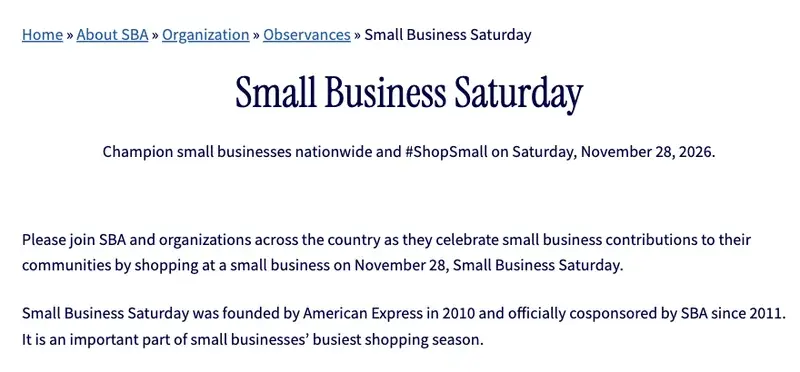
The Small Business Administration’s 2026 page says: “Champion small businesses nationwide and #ShopSmall on Saturday, November 28, 2026.” It also says the day was “founded by American Express in 2010 and officially cosponsored by SBA since 2011.”
Four 2026 surveys put numbers on how many small businesses use or plan to use AI. They count different things, so read them side by side, never averaged:
What the numbers do and do not say:
- American Express (Shop Small Impact Study, released November 12): 90% of owners “expect to use AI tools to support their businesses during the holiday season, including for marketing, operations and personalization.” The sample was 503 owners and managers of non-franchise businesses with 2 to 99 employees, surveyed September 11 to 21, and every business had to make sales in a physical location. An Etsy-only seller is not in that sample.
- Intuit QuickBooks (survey fielded August 2026): “76% now plan to use AI in their holiday operations, up from 74% last year.” The sample was 1,002 owners, managers and decision-makers at businesses with 0 to 99 employees.
- Constant Contact (November 3 release, more than 1,800 owners in the US, Canada, UK, Australia and New Zealand): more than 68% plan to use AI to streamline operations, and drafting marketing content is the first use it lists, at 33.6%. The release does not say what that 33.6% is a share of.
- The U.S. Chamber of Commerce (3,732 small businesses with under 250 employees, July 23 to August 6, 2026): 66% use AI today, and its chart of AI uses lists “Gen AI chatbot” at 41%. Among the businesses using AI, marketing and promotions is the most common use, at 41%. The report also says “Around 2 in 5 (41%) are using free AI tools.”
None of these surveys asks “do you use a free chatbot to write your holiday emails?”, and we found no study that does. So the honest summary is: most surveyed shops expect or plan to use AI this season, and writing marketing is one of the most common jobs. Whether it helps your sales is something none of the numbers can tell you.
A second set of numbers explains why the words matter more than the tool. In the same American Express study, the top ways shoppers choose a small business are recommendations from friends and family (65%), customer reviews (45%) and social media posts (39%). So wherever you can, use your real customers’ words.
The one habit: you supply the facts, the chatbot supplies the words
A prompt such as “write a Black Friday email for my shop” gives the chatbot no offer to work with. Any percentage, deadline or “limited stock” line in the reply has then come from the chatbot, not from you, and it will read smoothly even when it is wrong.
The fix is a short fact sheet that you write once and paste into every prompt. We call it the offer sheet. It holds only things that are true today and that you can check:
OFFER SHEET (every line must be true today)
Shop name and what we sell: [one line]
Who our customers are: [one line, for example "locals who buy gifts under $50"]
The offer for Small Business Saturday, Nov 28, 2026: [the exact offer, for example "free gift wrap on every order" or "a set of 3 candles for $54, regular price $60"]
Regular price and sale price, if there is a discount: [both numbers]
How long the regular price has been in place: [for example "since March"]
Dates and hours the offer is valid: [dates, opening hours, time zone]
What is excluded: [items, minimum spend, limits per customer]
Shipping cut-off for holiday orders: [date, or "we do not ship"]
How people get the offer: [in store, online code, both]
Our address and phone number: [as printed on the door]
Our voice: [three words, for example "warm, plain, a bit funny"]
Things we must never say: [for example "never promise delivery by Christmas"]
Fill in the brackets with your own facts, in your own words. If a line does not apply, write “none”. The sheet is the part of this guide that does the most work: the prompts below all refer to it.
Before you paste anything: the privacy setting that takes one minute
Each of these chatbots has a setting for whether your conversations are used to improve its models, and each company puts it somewhere different. Turning training off is not the same as deleting what you already sent: Claude says data already used in training stays, and Gemini keeps conversations for up to 72 hours even with Keep Activity off.
| Chatbot | Where the setting is | What the company’s help page says |
|---|---|---|
| ChatGPT | Settings, then Data controls: “Improve the model for everyone” | On personal workspaces with Free, Plus or Pro, data sharing is on by default, and you can turn it off and keep your chat history. A Temporary Chat is not used to improve models and may be kept up to 30 days for safety. |
| Claude | Settings, then Privacy: “Help Improve our AI models” | When off, new chats are not used for future model training. Data already used in training that has started stays, and chats flagged by safety classifiers may still be used for safety work. |
| Gemini | gemini.google.com, Settings and help, then Activity: Keep Activity | Keep Activity is on by default for adults. With it off, conversations are still saved with your account for up to 72 hours. |
Our rule for a shop: paste your offer sheet and public product facts, never a customer list. No names, phone numbers, addresses, order details or private complaints go into a free chatbot. If you want the longer version of this, our course AI Privacy 101 (first 2 lessons free) covers it.
The prompt set
Use whichever chatbot you already have. The prompts are plain text, so you can paste them into ChatGPT, Claude or Gemini. Paste your filled offer sheet first, then one prompt at a time. Each prompt below says what you should get back and what to check.
Prompt 1: Ask what is missing before it writes anything
This stops the chatbot from filling gaps with inventions.
Here is my offer sheet for Small Business Saturday on November 28, 2026.
Do not write any marketing yet.
First, list every line that is missing, vague or could be read two ways.
Then list any claim a customer might expect that the sheet does not cover, for example delivery dates, returns, or stock.
Ask me up to five questions, and wait for my answers.
What you should get: a short list of gaps, such as “Does the gift wrap offer apply to online orders?” Answer them and update the sheet. This takes two minutes and prevents most of the problems below.
Prompt 2: Four short emails on a calendar
This calendar is ours, with one job per email. Change the dates to fit your list:
You are helping a small local shop write four short emails for Small Business Saturday, November 28, 2026.
Use only the facts in my offer sheet.
Write them for this calendar:
Email 1, November 19: a heads-up that the weekend is coming.
Email 2, November 24: early access for subscribers.
Email 3, November 27 in the evening: practical details such as hours, parking and what is excluded.
Email 4, November 28 in the morning: "we're open".
For each email give three subject lines under 45 characters, a preview line, and a body under 120 words.
Write in the voice described in my sheet.
Rules: use prices, dates, hours and limits exactly as the sheet gives them.
Never invent a former price, a percentage saving, a countdown, a stock level, a customer quote or a product detail.
Use "last chance" only on the real last day of the offer.
Each email must include my shop address and a line telling people how to unsubscribe.
The last rule matters. Promotional email in the US falls under the CAN-SPAM Act, which we cover below.
Prompt 3: Social captions that sound like a person
Write six Instagram captions for Small Business Saturday, November 28, 2026, using only my offer sheet.
Each caption is under 40 words, in my voice, with at most two hashtags.
Make two of them about the offer, two about a product, and two about the shop itself.
For the product captions, I will give you a description of the photo in my next message.
Do not mention discounts the sheet does not state.
Then paste a plain description of a real photo you took: “the shop window with a red ribbon on the door” or “three candles on the counter next to the gift wrap.” A caption about a real photo does more than one about a generic scene.
Prompt 4: A gift guide, only from products you name
Here are the products I want in a gift guide, with real prices: [paste a list: name, price, one fact about each].
Write a gift guide with three price bands: under $25, $25 to $50, and over $50.
Put each product in the band its price belongs to and write one sentence for each, using only the fact I gave.
Do not add features, materials or claims that I did not list.
End with one line about the shipping cut-off from my offer sheet.
What to check: that every product sits in the right band and that no sentence says something you did not give it. A chatbot that adds “hand-poured in small batches” to a candle you did not describe that way has made a claim you now have to stand behind.
Prompt 5: A thank-you for people who already buy from you
Constant Contact’s November 3 research found that 53.4% of surveyed small businesses say more than a quarter of their holiday customers are repeat buyers, but only 39% plan follow-up emails for offers in the new year, and more than 70% do not plan to invite shoppers to their email list or loyalty program. A thank-you note is cheap, and so is an invitation to your list.
Write a short thank-you message, under 90 words, for people who shop with us again and again.
Say thank you for coming back, mention the Small Business Saturday offer from my sheet, and end with one line inviting them to join our email list at [how to join].
Warm and plain, no exclamation marks, no pressure.
You can write the same message twice, once for email and once for the counter card by the till.
Prompt 6: Read your own reviews for what people actually say
The American Express study ranks customer reviews as the second most common way shoppers pick a small business, at 45%. Your reviews already contain the words your customers use. This prompt asks a chatbot to list the themes across twenty of them, and you check the list against the reviews.
Below are 20 reviews of my shop, with names removed.
List the three things customers praise most, with the exact short phrases they used.
List one thing that comes up as a complaint, if any.
Do not invent anything. If a theme appears in only one review, say so.
Then suggest three holiday post headlines that use my customers' own words.
[paste reviews]
Two cautions. Remove names and any personal details before pasting. And check the terms of the platform where the reviews live: a marketplace may have rules about reusing its content, and we did not review those terms here.
Prompt 7: The fact-check pass
Run this on every draft before it goes out, in a fresh chat if you can. It is the step that catches the invented discount.
Here is my offer sheet and a draft [email or caption].
Read the draft line by line against the sheet.
List every claim in the draft that is not stated in the sheet: prices, dates, percentages, deadlines, stock, shipping promises, product features, quotes.
For each, say whether to delete it or ask me.
Then say whether the draft follows these rules: it names the real offer, it has no countdown that ends before the real deadline, and it never calls something "limited" unless the sheet says so.
A chatbot checking its own work is not a guarantee, so the last check is yours: read the draft aloud with the sheet next to you.
A worked example from start to finish
To show the shape, here is a made-up shop, “Pine & Wick”, a candle shop with one store and an online page. This is a sample written by us, not a model’s answer and not a real business.
The owner’s offer sheet says: set of three candles $54, regular price $60, regular price in place since March, offer valid Saturday November 28, 2026, 10 a.m. to 6 p.m., one set per customer, free gift wrap on every order that day, ships within 3 business days, no shipping promise for Christmas delivery. Voice: warm, plain.
The sample email 4 (the morning of the 28th) might read like this:
Sample, written by us to show the shape. Subject: We’re open until 6 today. Preview: Free gift wrap on everything. Body: Good morning! Pine & Wick is open today from 10 to 6 for Small Business Saturday. Our set of three candles is $54 today, down from $60, and we’ll wrap anything you buy for free. One set per customer, please. Ordering online? We ship within three business days, and we can’t promise Christmas delivery, so if it’s a gift for the 25th, come see us today. Thank you for shopping small. Pine & Wick, [street address]. To stop receiving these emails, [unsubscribe link].
Now the check. Against the sheet, every number matches: $54, $60, 10 to 6, one set, free gift wrap, three business days. The email says nothing about stock, “limited”, or a deadline that the sheet does not state, and it carries the address and unsubscribe line. If the chatbot had written “Only a few left!”, Prompt 7 would have flagged it, because the sheet has no stock line. If it had written “regularly $75”, the owner would have caught it, because the sheet says $60.
The rules that apply when AI writes your marketing
Most of these rules are not AI-specific: they apply to a marketing email or an ad you wrote yourself. The fake-review rule is the exception that names AI-generated reviews. AI makes it easy to break any of them without noticing. This is a US checklist, not legal advice, and it does not cover every state or platform.
| Task | What it says | Source |
|---|---|---|
| Reviews and testimonials | The FTC’s rule bans reviews that “misrepresent that they are by someone who does not exist, such as AI-generated fake reviews”, and it “prohibits businesses from creating or selling such reviews or testimonials.” It went into effect on October 21, 2024. | FTC press release, August 2024; FTC rule Q&A |
| Paying for reviews | Incentives for reviews are allowed “as long as there isn’t an express or implied requirement that the reviews have to express a particular sentiment.” | FTC rule Q&A |
| Sale prices | A “was” price should be “the actual, bona fide price at which the article was offered to the public on a regular basis”, for “a reasonably substantial period of time”. A price set up so a big reduction could be advertised makes the bargain false. | 16 CFR 233.1 |
| A bare “Sale” | The reduction must not be “so insignificant as to be meaningless”. | 16 CFR 233.1 |
| Promotional email | Accurate sender details, no deceptive subject line, say it is an ad, include a valid postal address, give a clear opt-out. | FTC CAN-SPAM guide |
| Unsubscribes | Opt-outs must be processable for at least 30 days after you send, and honored within 10 business days. | FTC CAN-SPAM guide |
Three consequences for the prompts:
- Never ask a chatbot for a customer quote. If you want a testimonial, use a real review, word for word, from a real customer.
- Never let it write a “regular price”. Only you know what the price was and for how long. This is why the offer sheet has a “how long” line.
- Always put your address and an unsubscribe line in every promotional email. The FTC guide lists a valid physical postal address and a clear opt-out as requirements, and says “Each separate email in violation of the CAN-SPAM Act is subject to penalties of up to $53,088.” Someone else sending on your behalf does not move the responsibility: the guide’s last requirement is “Monitor what others are doing on your behalf.”
We did not review the rules for promotional texts. If you send them, check with your text-message service before the 28th.
What this means for you
- If you run a one-person Etsy or Shopify shop: start with the offer sheet and Prompts 1, 2 and 7. Write the sheet around one offer you can honor at your real margins, not three. Your first action: write the sheet today and run Prompt 1.
- If you own a store with a physical location: use Prompt 2 and the day-of email, and put your opening hours and parking in the third email. Your first action: put the real hours into the sheet.
- If you run a salon or a service business: adapt Prompt 4 into a gift-card guide. Your first action: list your three most-given gift cards with prices and use that list as the products.
- If you run a café or restaurant: Prompt 3 with a real photo of the day’s special does more than a generic holiday caption. Your first action: take the photo before you open the chatbot.
- If you have a small email list: Prompt 5 is for you. Constant Contact found that more than 70% of surveyed shops did not plan to invite shoppers to their email list or loyalty program. Your first action: put a sign-up line on your counter card.
- If you are a marketer helping several small clients: keep one offer sheet per client, never mix their facts in one chat, and run Prompt 7 for every draft. Your first action: build a one-page sheet template your clients can fill.
- If you do not want to use AI at all: the offer sheet is still worth writing. A clear sheet is the most useful thing to hand to anyone who writes for you.
Edge cases and troubleshooting
- The draft reads as smooth but generic. Add a real detail the chatbot cannot know: the street you are on, the thing a regular always orders, the way you actually talk. Put it in the “voice” line, or paste two sentences you wrote yourself and say “write like this.”
- It invents a discount, a deadline or “while supplies last”. Prompt 7 catches these. Also repeat the rule in the prompt: “Never invent a former price, a percentage, a countdown or a stock level.”
- A date in the draft is wrong. Check every date against a calendar. This year Thanksgiving is Thursday, November 26, Black Friday is November 27 and Small Business Saturday is November 28. Put your own dates in the sheet.
- It writes in American English and you are not in the US. Say “UK spelling” or “Canadian English” in your voice line. The rules in this guide are US rules: check your own country’s advertising and email rules.
- A salon or spa draft promises a health result. Keep claims to what the service is and what it costs.
- The email lands in spam. That is a deliverability problem, not a writing problem. Check with your email service, and do not blame the draft.
- You paste something private. If you pasted names or order details by mistake, start a new chat and do not reuse the old one. Then change the privacy setting from the table above.
- The whole thing feels too slick. Cut it by a third and read it aloud. If you would not say it across the counter, change it.
What this can’t do
- It cannot give you a discount you can afford. The offer comes from your margins and your costs. A chatbot can help you explain the offer, but not pick one.
- It cannot promise results. We found no study that tests free-chatbot holiday marketing against hand-written marketing for a small shop, and the surveys above measure plans and use, not sales.
- It cannot check its own facts. Prompt 7 helps, but you are the last reader.
- It cannot make you compliant. The rules table is a starting point for US shops. Your state, your platform and your text-message service may add rules.
- It cannot replace a real relationship. Frank Vella, quoted in Constant Contact’s release, put it this way: “it’s the florist who knows a customer orders peonies every spring who makes that message land.” A chatbot drafts the email, and you supply the peonies.
Questions shop owners ask
Is Small Business Saturday still worth doing in 2026? The SBA’s 2026 page lists the day as Saturday, November 28, and American Express’s study released November 12 found 88% of surveyed consumers likely to shop at small businesses this holiday season. Neither tells you whether it will pay for your shop, so decide on your own margins.
Which chatbot should I use? The prompts are plain text, so you can paste them into whichever of ChatGPT, Claude or Gemini you already use. Use that chatbot’s data setting from the table above.
Do I have to tell customers an email was written with AI? We did not find a US rule in the pages we read that requires labeling every AI-assisted caption or email. You remain responsible for what it says, which is why every claim has to match your offer sheet.
Can I ask the chatbot to write a customer review for my website? No. The FTC’s rule bans reviews that misrepresent that they are by someone who does not exist, “such as AI-generated fake reviews”. Use real reviews, word for word.
Can I say “was $60, now $54”? Only if $60 was the price you actually charged regularly, for a reasonably substantial period of time. Otherwise write what is true: “$54 today.”
How long should a promotional email be? The prompts above use under 120 words, which is our choice, not a rule. Short emails are easier to check against your sheet.
Do I need an unsubscribe link in every email? For promotional email in the US, the FTC’s CAN-SPAM guide lists a clear opt-out and a valid postal address as requirements, and says opt-outs must be honored within 10 business days.
What if I only have a few customers’ emails? Start with Prompt 5 and the counter card. A small list you earned is better than a large one you bought.
Can I paste my customer list so it writes personal emails? We would not. Free chatbots keep conversations for different lengths of time, and a training opt-out is not the same as deletion. Keep customer details out of free chatbots.
Are the sample numbers in the Pine & Wick example real? No. The shop, the email and the prices are invented to show the shape.
The bottom line
The shops that get the most from AI this season will be the ones that treat it as a fast typist, not a copywriter with opinions about your prices. Write the offer sheet today, run the six prompts and the check, and read every draft against the sheet before it goes out.
If you want a structured path for your own shop, Claude for Small Business (first 2 lessons free) covers campaign workflows, and AI Gift-Discovery Audit for Small-Shop Sellers (first 2 lessons free) checks whether AI assistants recommend your shop when people ask for gift ideas. If you sell on Etsy, AI for Etsy Sellers (first 2 lessons free) is the closest match.
Your first step this week: open a blank note and write the offer sheet. Fill in the one line you have been avoiding, and the rest will be easy.
Sources
- SBA: Small Business Saturday (2026 date, American Express founding, cosponsorship)
- American Express: 2026 Shop Small Impact Study results
- U.S. Chamber of Commerce: Empowering Small Business, 2026 report (PDF)
- Intuit QuickBooks: 2026 holiday shopping survey
- Constant Contact: 2026 holiday research, November 3, 2026
- FTC: final rule banning fake reviews and testimonials, August 2024
- FTC: Consumer Reviews and Testimonials Rule, questions and answers
- FTC: CAN-SPAM Act compliance guide for business
- 16 CFR 233.1: Guides Against Deceptive Pricing, former price comparisons
- OpenAI: Data controls FAQ
- Claude Privacy Center: model improvement settings
- Google: Gemini Apps activity and Keep Activity