Shopify is deleting Stocky, its own free inventory app, on August 31, 2026 — the same week Google’s new Sheets canvas feature starts reaching most Workspace accounts. One of those events is forcing thousands of small sellers to rebuild their inventory process from scratch. The other might actually be a decent place to rebuild it.
That timing isn’t a coincidence anyone planned. It’s just two calendars colliding. But if you’re an Etsy seller who never touched Stocky, or a Shopify merchant scrambling to export purchase orders before the deadline, it’s worth five minutes to understand what Google just shipped — and whether it’s actually a fit for how you track stock, or just another spreadsheet gimmick with a nicer coat of paint.
What Just Changed
Sheets canvas is a new layer inside Google Sheets, powered by Gemini, that turns a spreadsheet into a working mini-app from a single sentence you type. Google announced it on its official Workspace blog on August 13, 2026, describing it as a way to “build mini-apps with Gemini in Google Sheets.” No formulas. No Apps Script. No hiring someone on Fiverr to build you a dashboard.
Here’s the plain version: a normal Google Sheet is a grid. Rows, columns, cell references. If you want to click a “reorder” button next to a low-stock item, or see your best-sellers as visual cards instead of a wall of numbers, you can’t — a spreadsheet just isn’t built for that. Sheets canvas adds a second view on top of the same data: a real interface with buttons, stat cards, filters, and color, generated from a prompt. Edit something in the canvas — mark an item reordered, adjust a stock count — and it writes back into your original spreadsheet. Edit the spreadsheet, and the canvas updates too. Google’s own material calls this a two-way sync, and in testing that’s exactly how it behaves: change a cell in the grid view, and the canvas reflects it within the same session.
For the reader who wants the technical framing: Sheets canvas is a read-write interface layer sitting on top of your existing Sheet, generated on demand from natural-language prompts, accessed through “Create canvas” in the Gemini side panel, Tools menu, or Insert menu. It’s the same underlying concept as Claude’s Artifacts or ChatGPT’s Canvas — a persistent, editable output surface instead of a wall of chat text — except this one is purpose-built to sit on spreadsheet data, with genuine bidirectional sync back to the source cells rather than a one-time export.
Two rollout dates matter here, and they explain why your menu might not look like the screenshots yet:
- Rapid Release — most personal Google accounts, and any business that opted into early feature access — started seeing it around August 10-13, 2026.
- Scheduled Release — the slower, more-tested track that a lot of small-business Workspace accounts default to — began a gradual rollout on August 31, 2026, and Google’s own documentation says it can take up to 15 days to reach every account on that track.
If you check your Sheets menu today and don’t see “Create canvas,” that’s the most likely reason. It’s not broken. It just hasn’t arrived yet.
Google’s own demo lineup leans on a wedding seating chart, a student study tracker, and a fantasy football dashboard. Buried in that fantasy football demo, though, is exactly the shape a small business needs: stat cards up top, a scrollable list of line items with status indicators and action buttons below, a spotlight panel for whatever needs attention right now. Swap “players” for “SKUs” and “start/bench” for “in stock/reorder,” and you’re most of the way to an inventory dashboard. Nobody at Google labeled it that way. But the bones are there.
Worth saying upfront: real seller adoption of this specific use case is still thin. Search X for “Sheets canvas” and most of what turns up is marketing-account hype — one post from an SEO influencer called it “$5,000 dashboard tools” made free overnight, which is the kind of claim that gets retweeted by nobody who’s actually tried it on a messy product list. What you don’t yet see much of is an actual Etsy or Shopify seller posting “I built my inventory dashboard in canvas and here’s how it went.” That’s not a red flag on the feature — it’s three weeks old. But it means the walkthrough below is closer to a blueprint than a well-worn path, and you should treat your first canvas as a pilot, not a production system you bet the holiday season on.
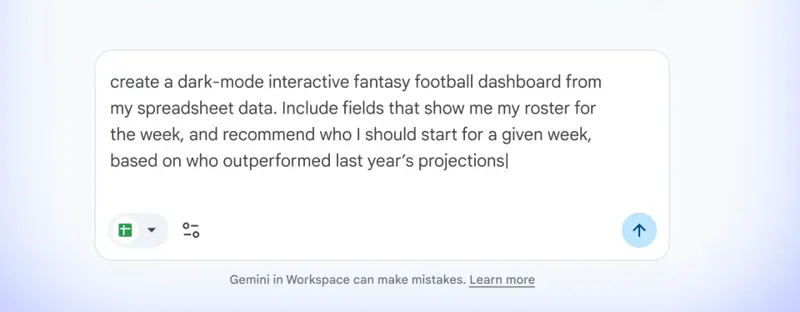
Source: Google — Google’s own demo video shows the exact prompt structure that generates a dashboard-style canvas: describe the data, the layout, and what you want surfaced.
Who Actually Has Access
This matters more than the feature itself, so it goes before the walkthrough, not after.
The short version: a solo Etsy seller on a free personal Gmail account does not get Sheets canvas by default. You need one of two things — a personal Google AI Pro subscription (roughly $19.99/month in the US), or a Google Workspace plan on Business Standard or higher.
Google’s own August 13, 2026 rollout announcement lists exactly who’s included: personal Google AI Pro and Ultra subscribers, and on the business side, Workspace Business Standard, Business Plus, Enterprise Standard, and Enterprise Plus. Notably absent from that list: Business Starter, the cheapest paid Workspace tier and the one a lot of one-person shops default to when they buy a custom email address. If you’re paying for Workspace but you’re on Starter, you don’t have Sheets canvas — and won’t, unless Google changes the eligibility list or you upgrade.
Here’s why that’s an odd gap for this specific audience. Etsy and Shopify sellers are exactly the kind of small operation that signs up for the cheapest Workspace tier for a professional email address and never looks at the plan comparison page again. If that’s you, check your billing page before you plan anything around this feature.
A few other access details worth knowing before you build anything:
- Web only, English only, at launch. No mobile app support, no other display languages yet.
- Admins must have Gemini in Sheets enabled on Workspace accounts, and end users need Workspace “smart features” turned on.
- Per-user usage limits exist for canvas creation and editing, though Google hasn’t published the exact numbers yet.
- Canvas only works on files that live natively in Google Drive — not local downloads, not certain third-party storage integrations.
The practical takeaway: if you’re already paying for Google AI Pro for other reasons (writing help, Gemini in Gmail, whatever), you already qualify — this is free upside. If you’re not, the math is simple: does a $19.99/month subscription replace something else you’re paying for, or is it a new cost for a feature you could get most of the value from with a $22-50/month automation tool or a one-time template? We’ll get to that comparison.
The Walkthrough: Building a Low-Stock and Reorder Dashboard
Let’s build this for a real kind of shop: a two-person candle and soap business — call it Willow & Wick — selling the same core line on both Etsy and a Shopify storefront, with inventory tracked by hand in a spreadsheet because that’s genuinely how most sellers at this size do it. (One qualitative study of 13 Shopify operators, published by inventory-forecasting company Forthcast in July 2026, found that 11 of them still plan and reorder by hand in spreadsheets, 9 described forecasting as outright guesswork, and 7 cited disconnected tools and manual re-keying between channels as a daily source of errors. This is normal, not a red flag.)
Etsy’s own Shop Manager doesn’t help much here, either. It lets you set listing quantities and per-variation stock counts, and that’s about it — it won’t track the raw materials behind a finished product, won’t alert you when something’s running low, won’t calculate your cost of goods, and won’t sync quantities with a second channel like Shopify. That’s not a knock on Etsy; it’s just not what Shop Manager was built for. It’s exactly the gap a spreadsheet — and now a canvas on top of that spreadsheet — is built to fill.
Step 1: Build the product list first
Open a Google Sheet, or convert your Etsy/Shopify product export into one (File → Save as Google Sheets if you’re starting from a downloaded CSV — canvas doesn’t work directly on .xlsx or .csv files). Set up one clean tab called Product Inventory with columns that give Gemini enough structure to work with:
| SKU | Product Name | Channel | Stock Level | Reorder Point | Unit Cost | Last Restocked | Weekly Units Sold |
|---|---|---|---|---|---|---|---|
| WW-CAN-001 | Amber Fig Candle, 8oz | Etsy + Shopify | 34 | 20 | $6.40 | 2026-08-10 | 12 |
| WW-CAN-002 | Sea Salt & Sage Candle, 8oz | Etsy + Shopify | 9 | 20 | $6.40 | 2026-07-28 | 18 |
| WW-SOAP-011 | Oat Milk Bar Soap | Etsy only | 62 | 30 | $2.10 | 2026-08-05 | 15 |
| WW-SOAP-014 | Charcoal Detox Bar | Shopify only | 4 | 15 | $2.30 | 2026-08-12 | 22 |
| WW-CAN-003 | Winter Pine Candle, 8oz (seasonal) | Etsy + Shopify | 0 | 25 | $6.40 | 2026-06-01 | 0 |
| WW-BUN-007 | Gift Bundle: 2 Candles + Soap | Etsy only | 17 | 10 | $9.80 | 2026-08-14 | 8 |
This is real data structure, not a toy example — SKU, current stock, the reorder point you’ve set for each item, what it costs you, when you last restocked, and how fast it’s moving. That last column matters more than people think: a reorder point is useless without knowing your sell-through rate, because “20 units left” means something completely different for an item selling 2 a week versus 18 a week.
Step 2: Open Gemini and start the canvas
In Google Sheets, click the Gemini sparkle icon in the side panel — or use the Tools menu, Insert menu, or the canvas control at the bottom of the screen. Google built three separate entry points to the same feature, so use whichever one you actually notice first. Select “Create canvas.”
Step 3: Write the dashboard prompt
Here’s the actual prompt structure — copy it and swap in your own columns:
“Using the data in the ‘Product Inventory’ tab, create an inventory dashboard canvas. Show stat cards at the top for: total SKUs below reorder point, total units sold this week, and number of out-of-stock items. Below that, show a list of all products with a progress bar comparing Stock Level to Reorder Point, color-coded red if Stock Level is below Reorder Point and green otherwise. Add a ‘Mark Reordered’ button on each low-stock row that updates a new ‘Reorder Status’ column. Add a filter toggle for ‘Low Stock Only’ and a separate view showing products ranked by Weekly Units Sold, highest first, as a best-sellers list.”
Gemini reads the sheet, builds the stat cards, applies the color logic to the progress bars, and wires the button to write back into a new column — all from that one prompt. In Google’s own demo of a comparable dashboard build (a fantasy football tracker, not inventory, but structurally identical), the assistant confirms with something like “I’ve successfully created your new canvas. Your edits now sync with your data in real time,” and the canvas opens next to the chat panel, ready to use.
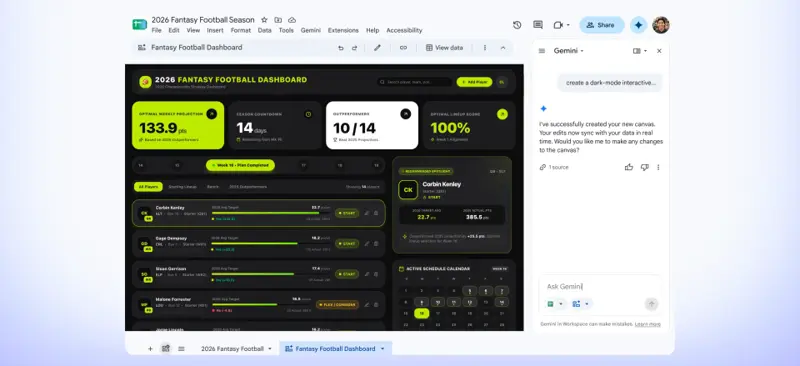
Source: Google — this is Google’s own fantasy football dashboard demo. The stat-card-plus-line-item-list pattern shown here is the same shape an inventory canvas produces: swap “players” for “SKUs,” “start/bench” for “in stock/reorder,” and the projection score for a stockout-risk score.
Step 4: Refine with follow-up prompts
You don’t need the first version to be perfect. Canvas is conversational — you keep talking to it the way you’d keep talking to a person building it for you.
“The Winter Pine Candle shows 0 stock because it’s seasonal and I haven’t restocked it since June. Add a ‘Seasonal — Hold’ tag option I can apply so it doesn’t show up in the main low-stock alert list, but still shows in a separate seasonal-items view.”
Gemini regenerates the relevant section in place, rather than handing you a fresh wall of text to reassemble yourself. That’s the actual difference between this and pasting your inventory into ChatGPT and asking for a summary — the output lives on top of your real, editable data instead of existing as a static block of text you have to manually translate back into your spreadsheet.
Step 5: Build a second canvas for best-sellers and margin
From the same Product Inventory tab, create a second, separate canvas:
“Create a second canvas called ‘Best Sellers & Margin’ from the ‘Product Inventory’ tab. Show each product as a card ranked by Weekly Units Sold, displaying Product Name, Weekly Units Sold, and a calculated profit-per-unit if I add a ‘Sale Price’ column. Add a toggle to filter by Channel (Etsy, Shopify, or both).”
This is where the “google sheets crm” instinct a lot of sellers eventually reach for actually gets satisfied without a separate tool: if Willow & Wick starts taking wholesale orders from boutiques, the same underlying sheet-plus-canvas pattern works for a lightweight buyer-and-order tracker — company name, last order date, standing reorder quantity, next follow-up date — without paying for a dedicated CRM built for sales teams ten times their size.
Step 6: Share it the way you’d share any Google Sheet
Canvas doesn’t have an independent permission system. Access to the canvas exactly matches access to the underlying spreadsheet. Click “Copy link” in the canvas view, and whoever you share it with gets whatever access level (view, comment, edit) they already have on the sheet. If you want a part-time packer to update stock counts but not touch pricing or margin data, that has to be solved with separate tabs and separate sharing permissions on the spreadsheet — canvas has no additional layer to fall back on.
Sheets Canvas vs. the Alternatives
You have real options here, and Sheets canvas isn’t automatically the right one for every seller.
Source: Shopify — the traditional starting point for sellers who want structure without a subscription: a template you fill in by hand, with no live dashboard layer on top.
| Option | Cost | Setup time | Live sync with your data | Multi-channel sync | Reorder alerts | Best for |
|---|---|---|---|---|---|---|
| Google Sheets canvas | Free if your plan qualifies (Google AI Pro ~$19.99/mo personal, or bundled in Business Standard+/Enterprise) | 10-20 min per canvas | Yes, bidirectional with the sheet | No — it only shows what’s already in your sheet, it doesn’t pull live data from Etsy or Shopify itself | Yes, if you prompt for it | Sellers already living in spreadsheets who want a visual, clickable layer without a new subscription |
| Static downloadable template (Coupler.io, Etsy-marketplace templates) | Free to ~$20 one-time | 5-10 min | No | No | Manual only | Zero-budget sellers who just want structure and don’t mind manual upkeep |
| Coefficient | Free (3 sources, manual refresh); Starter $49/mo; Pro $99/user/mo | 15-30 min | Yes, auto-refresh on paid tiers, pulled directly from Shopify/other platforms | Yes, if you connect each source | Configurable | Sellers who want Shopify (and other platform) data pulled into Sheets automatically, not just visualized |
| Sheetgo | Free tier; Automations Pro $35/mo billed annually ($50/mo billed monthly, per Sheetgo’s own pricing page); Workflows Business from roughly $79-119/mo | 15-30 min | Scheduled refresh on most tiers, not always real-time | Yes, via configured automations | Configurable | Sellers who need scheduled data consolidation across multiple files, not just a dashboard view |
| Full inventory system (Shopify’s native Admin/POS tools post-Stocky, or a dedicated app like Stockful, Sumtracker, Qoblex) | Free (native Shopify) to $19.99-99+/mo | 30-60+ min migration | Yes, purpose-built | Yes, purpose-built | Yes, purpose-built | Sellers who’ve outgrown spreadsheets and need audit trails, barcode counts, and real purchase-order workflows |
The honest read: Sheets canvas is the only option here that adds a genuinely interactive, editable interface on top of data you already control, for close to zero extra cost if you’re already paying for Google AI Pro or a qualifying Workspace plan. What it isn’t — and this trips people up — is a live sync engine. It doesn’t reach into Etsy or Shopify and pull real-time stock numbers on its own. You (or a connector tool like Coefficient) still have to get the numbers into the sheet. Canvas just makes what’s already there dramatically easier to look at and act on.
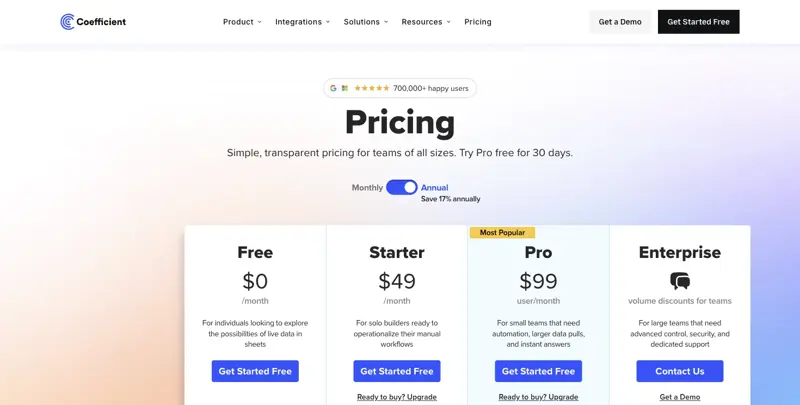
Source: Coefficient, accessed August 27, 2026
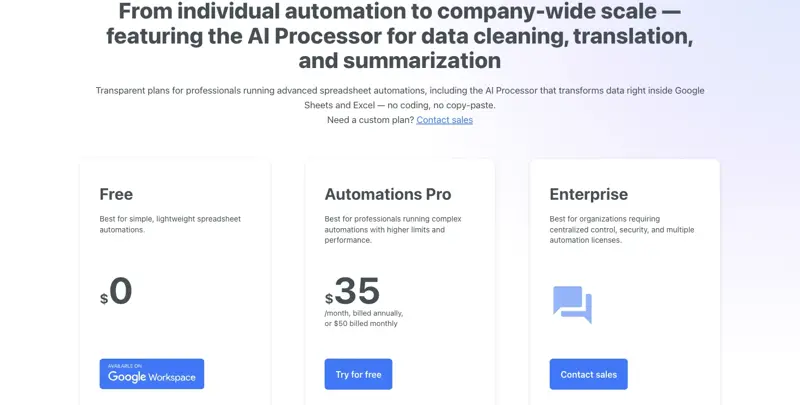
Source: Sheetgo, accessed August 27, 2026
That gap between “spreadsheet with the right numbers” and “spreadsheet automatically fed the right numbers” is exactly the itch a small wave of independent builders is scratching right now. One developer posted in mid-August about shipping a free tool called SheetSync specifically to sync inventory between Google Sheets and Shopify, framing it as a way to “reduce repetitive manual updates.” Another offered a prebuilt automation that tags Shopify orders and updates inventory counts automatically, pitched directly at sellers “still copying Shopify orders into Google Sheets every night.” Neither of those is Sheets canvas — they solve the data-in problem, not the display problem — but they point at the same underlying pain this whole guide is about: sellers already living in spreadsheets, just missing the plumbing to keep them current without manual re-entry.
The Stocky situation makes this timing sharper than it looks
If you’re a Shopify merchant, there’s a second clock running here. Shopify confirmed Stocky — its own free inventory app — stops working entirely on August 31, 2026, the exact week Sheets canvas starts its wider rollout. Stocky was pulled from the App Store back in February 2026, so if you’re not already using it, you can’t start now.
The migration isn’t gentle. Shopify’s own help documentation is blunt about what doesn’t carry over: historical purchase orders and stocktakes don’t automatically migrate, supplier records can’t be exported at all, and old POs can’t be imported into Shopify as historical purchase orders even if you export them manually. One merchant, describing the export process on X in late August, put it about as clearly as it gets: “The wildest part of the Stocky shutdown: there’s no bulk export for purchase orders. Every PO, opened one at a time, downloaded one at a time. 300 POs? That’s your Thursday night.” Shopify says read-only export access sticks around for at least 90 days after shutdown — but the sync APIs themselves stop working on the 31st regardless.
Shopify is steering merchants toward its own built-in Admin and POS inventory tools — transfers, purchase orders, receiving, barcode-assisted counts, low-stock alerts through Shopify Flow, and reorder suggestions through Sidekick — rather than naming one official Stocky replacement. If your needs go beyond that (multi-supplier purchasing logic, weighted-average costing, formal audit trails), Shopify itself points you toward a third-party app. None of this is where Sheets canvas fits in directly. But if you’re rebuilding your inventory process from scratch this week anyway because Stocky forced your hand, it’s worth deciding upfront whether you want to rebuild it inside Shopify’s native tools, a dedicated paid app, or a spreadsheet-plus-canvas setup you fully control.
What This Means for You
If you’re a solo Etsy seller with under 50 SKUs: This is close to the ideal use case. One product tab, one dashboard, updated by hand a few times a week — which, honestly, is probably already your routine. Start with the column structure above today, even before you know whether you have canvas access yet. You need clean product data either way.
If you run a Shopify store selling both wholesale and retail: Build two tabs — retail inventory and wholesale accounts — and consider a second canvas for the wholesale side using the lightweight CRM pattern from Step 5. Keep pricing and margin data on a separate tab with tighter sharing permissions if anyone outside your core team touches the sheet.
If you’re running inventory across Etsy, Shopify, and a third channel: Be honest with yourself about what canvas can’t do here. It won’t stop you from overselling the same item on two platforms at once — that requires an actual sync tool (Coefficient, a dedicated multi-channel app, or manual discipline updating both platforms every time you make a sale). Canvas is a display and data-entry layer, not a synchronization engine.
If you already use a paid inventory app and it’s working: Don’t rip it out for this. Sheets canvas is a good fit for sellers who are currently underserved by spreadsheets, not a reason to abandon a system you’ve already paid to set up and trained your team on.
If you’re on a free personal Google account, not Google AI Pro: You don’t have access today, and won’t until you either upgrade or your business adopts a qualifying Workspace plan. Weigh the $19.99/month against what you’d actually use it for — if it’s just this one dashboard, a $22-50/month automation tool or a free static template might get you 80% of the value without the subscription.
If you’re a department of one and everything lives in your head anyway: This is a genuinely low-stakes place to start experimenting with AI tools. You’re not asking Gemini to make a judgment call about your business — you’re asking it to visualize numbers you already control. If a prompt produces something wrong, you re-prompt it or fix the underlying cell. Nothing ships to a customer because of it.
If you’re still deciding what to do about the Stocky shutdown: Handle that first, separately, before you think about canvas at all. Export everything Stocky will let you export this week. Then decide whether your replacement is Shopify’s native tools, a dedicated app, or a spreadsheet system — and only then layer canvas on top if you go the spreadsheet route.
Edge Cases and Troubleshooting
“My canvas stopped syncing with my spreadsheet.” This usually happens after a large manual edit made outside the canvas view — a bulk paste, a column reorder, importing a fresh CSV export over the top of your existing data. Ask Gemini to “resync the canvas with the current Product Inventory data,” which regenerates the mapping without losing your layout.
“Two channels show different stock numbers for the same SKU.” That’s not a canvas bug — it’s the actual problem canvas can’t solve. If you sell the same item on Etsy and Shopify without a sync tool connecting the two, you have to manually update both after every sale, or accept the overselling risk. Canvas only reflects what’s in your sheet; it doesn’t reach out and check either platform.
“I want my part-time employee to update stock but not see cost or margin data.” Canvas permissions are entirely inherited from the spreadsheet. Split cost/margin data onto a separate tab, share only the stock-count tab with that employee at edit access, and keep the rest restricted at the sheet level.
“My prompt built something close but not quite what I described.” Be more literal than feels necessary. “Color-coded red if stock is below reorder point” works better than “highlight items that need attention” — canvas, like any AI output, does better with explicit rules than with vague intent it has to guess at.
“I built this from a Shopify or Etsy CSV export, and canvas won’t create a canvas from it.” Canvas doesn’t work directly on .csv or .xlsx files. Convert first — File → Save as Google Sheets in Drive — then build the canvas from the converted copy.
“It’s not showing up on my phone.” Canvas is a desktop web feature at launch. You can view the underlying spreadsheet on mobile, but you can’t build or interact with the canvas view itself from a phone or tablet yet.
“My reorder points feel wrong within a month of setting them.” Static reorder points don’t account for seasonal swings — a candle that sells 20 units a week in November might sell 4 a week in July. Revisit your Weekly Units Sold column monthly and adjust reorder points accordingly; canvas doesn’t forecast demand for you, it just displays whatever numbers you give it.
“I don’t see ‘Create canvas’ anywhere and I have a qualifying plan.” Check your release track. Scheduled Release didn’t start until August 31, 2026, and Google’s documentation says it can take up to 15 days to reach every account after that. Also confirm your Sheets interface language is set to English — canvas is English-only at launch regardless of your account’s display language.
What Sheets Canvas Can’t Do
It’s not a multi-channel inventory sync engine. It shows you what’s in your spreadsheet. It does not reach into Etsy or Shopify and pull live stock counts unless you separately connect a tool that does that job — Coefficient, a dedicated sync app, or your own manual updates.
No barcode scanning. If your restocking process involves scanning items into a system, canvas offers nothing there. That’s squarely in dedicated inventory app territory.
No POS integration. If you sell in person at markets or pop-ups alongside your online shops, canvas won’t reconcile in-person sales against your online stock automatically.
Usage limits exist and aren’t fully documented yet. Because this is a brand-new feature, Google hasn’t published exact caps on how many canvases you can create or edit per day. Treat it as something to pilot with one dashboard before building your whole operation around it.
It won’t catch a stockout you haven’t defined. If you never set a reorder point for an item, “Auto-flag low stock” has nothing to check against — the same limitation as any tool that only knows what you tell it.
FAQ
Is Google Sheets canvas free? Only if the Google plan you’re already on qualifies. It’s not a separate purchase on top of a qualifying plan — but if you’re on a free personal Google account or Workspace Business Starter, you don’t have access at any price until you upgrade.
Does this replace Shopify’s inventory tools, or Stocky? No. It’s a visualization and data-entry layer over your own spreadsheet. Shopify’s Admin and POS inventory tools (the ones replacing Stocky) are purpose-built inventory systems with purchase orders, transfers, and audit trails — canvas doesn’t attempt any of that.
Can it sync my Etsy and Shopify stock counts automatically? No. Canvas displays and edits whatever is already in your Google Sheet. Getting live data from Etsy or Shopify into that sheet in the first place requires either manual entry, a CSV export routine, or a connector tool like Coefficient.
What’s the actual cost if I don’t already have a qualifying plan? Personal Google AI Pro runs roughly $19.99/month in the US. On the business side, you’d need Workspace Business Standard or higher, which costs more than Business Starter — check Google’s current Workspace pricing page for your region before assuming the upgrade cost.
Will my reorder alerts update automatically as I make sales? Only if you (or a connected tool) update the Stock Level column when a sale happens. Canvas reflects your sheet in real time, but it doesn’t know about a sale until that number changes somewhere.
Can I build this from an Etsy or Shopify CSV export? Not directly. Convert the file to Google Sheets format first (File → Save as Google Sheets), then build the canvas from that converted copy.
Is there a simpler tool if I don’t want to write prompts at all? Yes — a static downloadable inventory template (from Coupler.io, Porter Metrics, or templates sold directly on Etsy’s own marketplace) requires zero prompting, just manual updates. You trade convenience of setup for losing the live, clickable dashboard layer.
What happens to my existing Stocky data if I’m a Shopify seller? Export everything you want to keep before August 31, 2026. Historical purchase orders and stocktakes don’t automatically migrate, and supplier records can’t be exported from Stocky at all — you’d need to recreate vendor relationships manually in whatever system replaces it.
Can I share the dashboard with a business partner or VA safely? Yes, but remember canvas access exactly mirrors spreadsheet access — there’s no separate permission layer. Structure sensitive data (cost, margin) on a separate tab with tighter sharing if you need different people to see different things.
When will my account actually get this if I qualify? Rapid Release accounts started seeing it around August 10-13, 2026. Scheduled Release — the more common default — began rolling out August 31, 2026, and can take up to 15 days after that to reach every eligible account.
The Bottom Line
Sheets canvas is a genuinely useful upgrade for the specific problem most small sellers already have: a spreadsheet full of the right numbers that’s painful to actually look at or act on day to day. If you already qualify — Google AI Pro or a Business Standard+ Workspace plan — it costs you nothing extra to build a low-stock dashboard this week, and the prompts above will get you there in under half an hour. If you don’t qualify yet, or you’re mid-scramble migrating off Stocky before August 31, handle the more urgent problem first and treat canvas as the next step, not the first one.
Either way, the deeper skill here — writing a clear, specific prompt that turns raw business data into something you can actually act on — is worth building regardless of which tool you’re pointing it at. Our Claude for Small Business course covers that same skill applied across the rest of your operations — cash flow, customer messages, and the tools you’re probably already paying for — starting with two free lessons before anything requires a Pro subscription. If you sell through AI shopping assistants as much as search engines these days, our Sell on ChatGPT course covers the discovery side of the same problem.
Sources
- Build mini-apps with Gemini in Google Sheets — Google
- Create a Sheets canvas — Google Docs Editors Help
- Google Workspace Updates: Use Sheets canvas to visualize data in custom, interactive mini-apps
- Migrating from Stocky to Shopify inventory management — Shopify Help Center
- Inventory Reporting Guide for Retail (2026) — Shopify
- Benefits of Multichannel Inventory Management — Shopify
- Inventory Template: Free Customizable Download + Guide — Shopify
- How to Manage Your Inventory on Etsy — Craftybase
- The Complete Guide to Inventory Planning for Shopify Merchants — Forthcast
- Pricing Plans — Coefficient
- Sheetgo Automations Pricing
- Google Sheets Canvas Launches: Turn Any Spreadsheet Into Live Airtable-Style Apps — TechTimes
- 29 Inventory Stock-out Rate Statistics for eCommerce Stores — Opensend
- Stocky Sunsetting: How & Where to Migrate — Prediko
