

When Anthropic shipped Claude Dreaming on May 6, the news cycle ran the obvious story — Claude can now dream, here’s what that means for AI consciousness. Most of the coverage stopped there. Almost nobody published the thing developers actually needed: a hands-on walk-through of how to request access, run a dream, watch it complete, and inspect the new memory store before you commit to swapping it in for your production agent.
This is that walk-through. We’ll go from “I have a Managed Agents API key” to “I just ran my first dream, here’s the diff in my memory store, and here’s the one-line change that puts the new store into production.”
Two notes before we start. Dreaming is in research preview, not GA — you must request access and the feature ships behind a beta header. Second, the official Anthropic docs are excellent but they assume you already know how Managed Agents are wired together. If you don’t, skim the Managed Agents overview and the Memory Stores section before continuing.
What dreaming actually is (60 seconds)
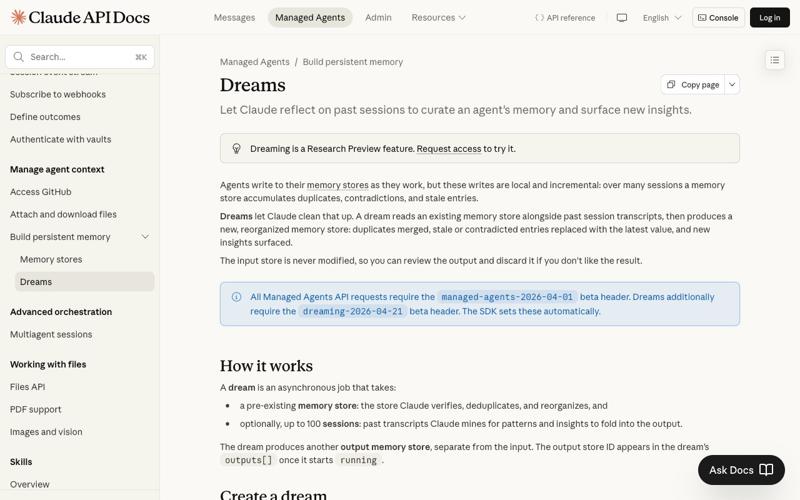
Claude Managed Agents have a memory store — a structured key-value notebook the agent writes to as it works. After many sessions, that store accumulates duplicates, contradictions, and stale entries (the “I prefer tabs” / “I prefer 2-space indentation” / “the user is now using 4 spaces” sediment).
A dream is an asynchronous job that reads the memory store and up to 100 past session transcripts, runs Claude (Opus 4.7 or Sonnet 4.6) over them, and outputs a new, separate memory store with duplicates merged, stale entries replaced with the latest values, and recurring patterns surfaced as compact notes. The original store is read-only during the dream. The output is opt-in — you can review it, then either swap it into production or discard it.
That’s it. It’s not a fine-tune. It’s not editing the model. It’s a memory consolidation pass, run by Claude on Claude’s own work, scheduled to happen when the agent isn’t doing live work.
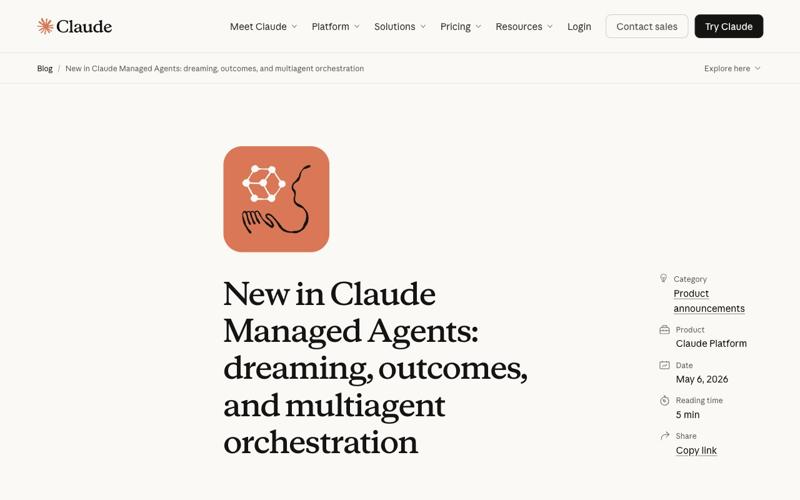
The early result that’s getting cited: Harvey (legal AI) reported task completion rates went up roughly 6× after enabling Dreaming, and Anthropic’s internal evaluations showed agents picked up about +10 percentage points on task success, +8.4% on document-generation quality, and +10.1% on presentation quality. Wisedocs (a separate Managed Agents customer) ships document QA agents that now run “50% faster” on the broader Managed Agents stack that Dreaming is built into. An indie engineer’s now-circulating “I Let Claude Dream for 4 Hours” experiment ran a single 4-hour-11-minute dream over 18 repeated Go-coding sessions, cost $1.84 in tokens, and produced a 5.4× completion-rate lift and 3.1× token-efficiency improvement on the next run. None of these are independently verified yet, but they’re the data points the dev community is comparing notes against.
Prerequisites
Before you write any code, you need three things.
- A Claude Managed Agents workspace. If you’re already using the Managed Agents beta, you have this. If you’re not, you’ll need to be in the broader Managed Agents private beta first; sign up at claude.com/managed-agents if that’s blocking.
- Research-preview access to Dreaming. Dreaming is gated separately from Managed Agents itself. Request access via the form at claude.com/form/claude-managed-agents. Wait time, as of mid-May 2026, has been a few days for most developers. Multiple people on X this week are still on the waitlist (@stbison, May 11) — you may want to request early even if you’re not ready to integrate.
- The two beta headers. Every dream API call needs
anthropic-beta: managed-agents-2026-04-01,dreaming-2026-04-21(the SDK sets both automatically if you upgrade to the dreaming-aware version).
You’ll also want a Python or TypeScript dev environment with the latest Anthropic SDK installed. The examples below use Python; the API shape is identical in TS, Go, Ruby, PHP, C#, and Java per the official docs.
Step 1: Identify the inputs
You need two things:
- The memory store ID of the store you want to consolidate.
- Up to 100 session IDs representing recent agent runs you want Claude to mine for patterns.
If you’ve been running a Managed Agent for any meaningful period, both are easy to find. The memory store ID is on the agent’s configuration (agent.memory_store_id). Session IDs come from the Sessions API or your own logging — the Sessions list endpoint returns them newest-first.
A pragmatic starting point: pick the last 20-50 sessions for your first dream. You want enough volume that the model has patterns to extract, but not so much that the dream takes 30 minutes and burns through tokens before you’ve validated the workflow.
import anthropic, os

client = anthropic.Anthropic()  # ANTHROPIC_API_KEY from env

# Find your memory store
agent_id = "agnt_01ABC..."
agent = client.beta.managed_agents.retrieve(agent_id)
store_id = agent.memory_store_id

# Pull the last 30 sessions for this agent
sessions = client.beta.sessions.list(agent=agent_id, limit=30)
session_ids = [s.id for s in sessions]

print(f"Store: {store_id}")
print(f"Sessions to mine: {len(session_ids)}")
If you don’t have an existing store yet but you do have a pile of past session transcripts you want to consolidate, the docs recommend creating an empty memory store first and passing it as the input — Dreaming will treat that as a blank slate and write everything from the sessions into the output store.
Step 2: Create the dream
This is the API call that kicks off the consolidation job. It returns immediately with a dream ID and status: "pending". The actual work happens in the background.
dream = client.beta.dreams.create(
    inputs=[
        {"type": "memory_store", "memory_store_id": store_id},
        {"type": "sessions", "session_ids": session_ids},
    ],
    model="claude-opus-4-7",  # or "claude-sonnet-4-6" for cheaper/faster
    instructions=(
        "Focus on coding-style preferences and tool-use patterns. "
        "Merge contradictory file-format rules in favor of the most "
        "recent session. Surface any error-recovery sequences that "
        "appeared in 3 or more sessions as named playbooks."
    ),
)

print(f"Dream queued: {dream.id} (status={dream.status})")
A few decisions you’re making in this call.
Model choice. Opus 4.7 produces higher-quality consolidation but costs roughly $5/M input tokens and $25/M output tokens (per the Anthropic pricing page). Sonnet 4.6 is $3/M input and $15/M output — about 40% cheaper end-to-end. For everyday curation passes, Sonnet is the sensible default. Switch to Opus when the agent works on legally or financially load-bearing decisions and the consolidation quality is worth the premium. Haiku is not supported for dreaming as of this writing.
Instructions. The instructions field caps at 4,096 characters. This is your knob for steering what the dream optimizes for. Vague instructions (“clean up the store”) produce vague results. Specific instructions (“merge entries where the user expressed a preference for pnpm over npm; demote stylistic preferences older than 30 sessions”) produce specific, useful consolidations. The Anthropic blog recommends treating this field like a system prompt for the consolidation job, not like a chat message.
Session count. The hard cap is 100 sessions per dream. If you have 500 sessions you want to incorporate, you have two options: summarize earlier batches into the store via your own preprocessing, or chain dreams (dream → use output as new input → dream again with the next batch of sessions). The second approach is more expensive but produces a cleaner consolidation.
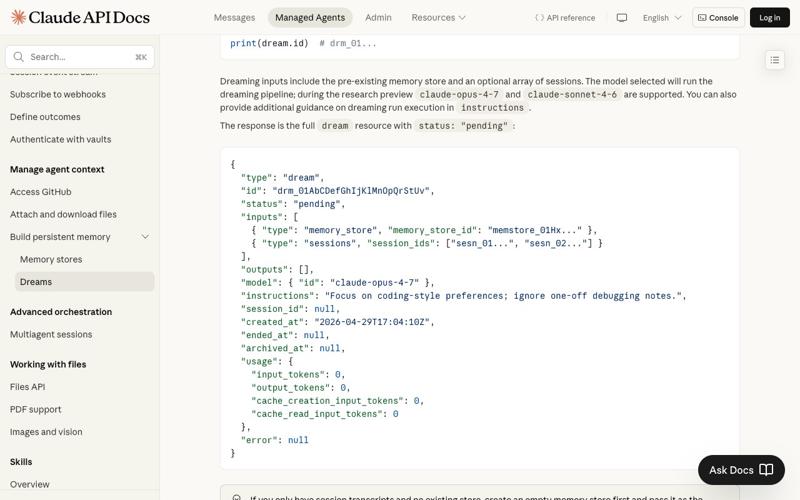
dreams.create snippets. Note how the instructions field is the steering knob for what the dream optimizes for.
Step 3: Poll until done
Dreams take “minutes to tens of minutes” depending on input size, per the official docs. A 30-session dream on Sonnet typically completes in around 5-10 minutes; a 100-session dream on Opus can stretch to 30+ minutes. Don’t put this in a synchronous request loop — it’ll time out.
import time

while dream.status in ("pending", "running"):
    time.sleep(15)
    dream = client.beta.dreams.retrieve(dream.id)
    print(
        f"status={dream.status} "
        f"input_tokens={dream.usage.input_tokens} "
        f"output_tokens={dream.usage.output_tokens}"
    )

print(f"Final: {dream.status}")
The five terminal states you might see:
| Status | What it means |
|---|---|
completed | Dream finished successfully. outputs[] contains your new memory store. |
failed | The pipeline errored. error.type tells you which failure mode. Check the error table. |
canceled | You (or your code) called dreams.cancel(...). The output store keeps whatever was written before the cancel. |
pending | Queued, not yet started. Should transition to running within a few minutes. |
running | Actively processing. usage updates live as the pipeline runs. |
There’s one extra trick the docs note: while a dream is running, its session_id field points at the underlying session executing the consolidation pipeline. You can stream that session’s events to watch what the dream is reading and writing in real time. For a first run, this is genuinely fun. For a 200th run, you’ll skip it.
Step 4: Inspect the output store
When status == "completed", the dream has a new memory store in outputs[]. It’s an ordinary store — same APIs, same UI in the Console — and your input store is untouched.
output_store_id = next(
    out.memory_store_id
    for out in dream.outputs
    if out.type == "memory_store"
)

# Read it the same way you'd read any memory store
output_store = client.beta.memory_stores.retrieve(output_store_id)

# Or list entries via the memory API
entries = client.beta.memory_stores.entries.list(output_store_id)
for e in entries:
    print(f"{e.path}: {e.value[:100]}...")
Diff this against your input store before you do anything else. The valuable comparisons:
- Entry count. A well-run dream usually reduces total entries by 20-60% — the duplicates are merged and the noise drops out. If it grew the store, the instructions probably didn’t push it hard enough toward consolidation.
- Recency consistency. Scan for contradictory entries that survived (e.g., two different stated preferences for the same setting). Those are the cases where the dream couldn’t tell which was authoritative.
- New “playbook” entries. Dreams often surface multi-step patterns as named playbooks (“recovery sequence when the API returns 429”). These are the most valuable output — they’re behaviors that emerged across sessions that no single session captured.
If the output looks bad, discard it. That’s a real option — your input store is unchanged, and you can archive or delete the output via the standard Memory Stores API. Then iterate on your instructions field and run another dream. This is much cheaper than blindly adopting a bad consolidation into production.
Step 5: Adopt the new store
Once you’ve reviewed and the output looks right, attaching it to your agent is one line: create a new session with the output store ID in resources.
session = client.beta.sessions.create(
    agent=agent_id,
    environment_id=environment_id,
    resources=[
        {"type": "memory_store", "memory_store_id": output_store_id},
    ],
)
The next time your agent runs, it loads the consolidated store, and it should behave with the deduplicated knowledge: fewer false starts, fewer re-asks of “what’s your preference for X?”, and (with luck) the kind of completion-rate jump Harvey reported.
In production, the pattern most teams converge on is:
- Nightly batch dream at off-peak hours.
- Automated quality gate — diff the new store against the old, flag if entry count dropped by more than 80% (likely a buggy dream) or stayed flat (likely a no-op dream), Slack the team in either case.
- Auto-adopt if the gates pass.
- Manual review if they don’t.
The Anthropic blog calls this “scheduled consolidation,” which is exactly the right framing — treat dreams as a recurring cron job, not as a one-time migration.
What this means for you
If you’re a solo dev building one agent, run a dream after every batch of 20-50 sessions. The cost is low (typically under $5 on Sonnet for a 30-session dream), the iteration loop is fast, and the agent improvement is most visible at small scale because you’re working with the same patterns repeatedly. Start with Sonnet, switch to Opus only if your consolidation quality is the bottleneck.
If you’re an applied-AI team in production, the playbook is: nightly dreams on Sonnet, automated diff gates, auto-adoption with on-call alert if the gate flags anything. You’ll spend more time on the diff-and-decide infrastructure than on the dream itself. The dream is the easy part.
If you’re running a fleet of agents with shared knowledge needs (multiple agents working on the same codebase, or a team of agents serving the same customer accounts), dreams become more valuable per dollar because you’re consolidating patterns across many more sessions. Consider running one “master dream” weekly that aggregates the consolidated stores from each agent into a shared library.
If you’re building consumer-facing agents where each user has a private memory store, Dreaming doesn’t generalize across users — and you probably don’t want it to (privacy and contamination risk). Run user-scoped dreams on the user’s own session history. The 100-session cap is usually more than enough at the per-user scale.
If you’re a CTO or VP-Eng evaluating whether to adopt Dreaming, the honest read is: it’s the missing “continual learning” primitive for agentic workflows. It is not magic and it is not free, but the cost is bounded and predictable (you’re paying for tokens you can measure), the governance story is cleaner than fine-tuning (plain-text playbooks anyone can audit), and the early production data (Harvey, Wisedocs, the Anthropic internal benchmarks) is plausible enough to justify a pilot. Start with one agent, one workflow, one nightly dream, and a 30-day evaluation window.
What it can’t do
A few honest limits to set expectations.
- It won’t fix a fundamentally bad agent. If your agent’s system prompt is wrong or its tools are misconfigured, Dreaming will faithfully consolidate that bad behavior. Get the agent working first, then consolidate.
- It’s not fine-tuning. Dreaming writes plain-text notes into the memory store. The model weights are unchanged. If your agent’s failure mode is “the underlying model doesn’t know this domain well enough,” Dreaming won’t help — you need RAG, fine-tuning, or a different model.
- It’s bounded by the 100-session cap and the memory-store size limit. You will hit
input_memory_store_too_largeif your store is a dumping ground for raw transcripts. Keep transcripts in your own datastore; keep the memory store compact (rules, preferences, playbooks). - It’s not free. A single Opus 4.7 dream over 100 long sessions can cost real money — the indie 4-hour experiment hit $1.84, but that was on 18 short sessions. Budget meaningful dollars per agent per month if you’re running daily.
- It’s still research preview. Limits, beta headers, and feature shape may change before GA. Don’t build production-critical paths on the assumption that the API is final.
The bottom line
The headline news was that Claude can dream. The actual news is that Anthropic shipped a clean, governable, plain-text answer to the long-standing question of how agents accumulate experience over time without fine-tuning. The API is small enough to wire up in an afternoon. The first dream is cheap enough to run on a $20 token budget. The early-adopter results are large enough to justify trying.
If your agent currently re-learns the same things every session, run your first dream this week. The worst case is you spend $5 on Sonnet, look at the diff, decide it’s not for you, and discard the output. The best case is the next time the agent runs, it behaves like the agent you’d been hoping for.
For more on building production-grade Managed Agents — including the design patterns that make dreams actually useful — our AI Agents Deep Dive course walks through the seven-stage build sequence Anthropic’s own customers are following, from first session to fleet-scale orchestration.
Sources
- Anthropic: Dreams documentation
- Anthropic blog: New in Claude Managed Agents — dreaming, outcomes, and multiagent orchestration
- Anthropic: Claude Managed Agents overview
- Anthropic: Memory stores API
- Anthropic: Sessions API
- VentureBeat: Anthropic introduces dreaming, a system that lets AI agents learn from their own mistakes
- Ars Technica: Anthropic’s Claude can now “dream” — sort of
- SiliconAngle: Anthropic is letting Claude agents ‘dream’ so they don’t sleep on the job
- Build Fast with AI: Claude Managed Agents Dreaming Explained (2026)
- Mem0 paper (arXiv): Building production-ready AI agents with long-term memory