If you opened Copilot this week and the icon looked different — or if your phone quietly swapped two Copilot apps for one sometime in August — you’re not imagining things. Microsoft just finished merging its consumer Copilot app and its Microsoft 365 Copilot app into a single app, and this week the merge is rolling out to every Windows and Mac desktop worldwide. Podcasts, Deep Research, and Group Chat didn’t survive the move.
What Just Changed
Here’s the short version. Microsoft used to run two separate Copilot apps that looked almost identical and confused everybody. There was the consumer Copilot app — free-ish, chatty, good for “help me write a birthday card” — and there was the Microsoft 365 Copilot app, the one your employer paid for, wired into Word, Excel, and Outlook. Same name, different icons, different feature sets, and until now, no way to use both without switching apps.
That’s over. Starting mid-August 2026, Microsoft began folding both apps into one — just called the Microsoft Copilot app — on mobile and web first. This week (mid-September), the same merge lands on Windows and Mac desktop apps worldwide. By late September, even the browser URL will finish its redirect. One app. One icon. Room for both your personal Microsoft account and your work account, side by side, with a switcher between them.
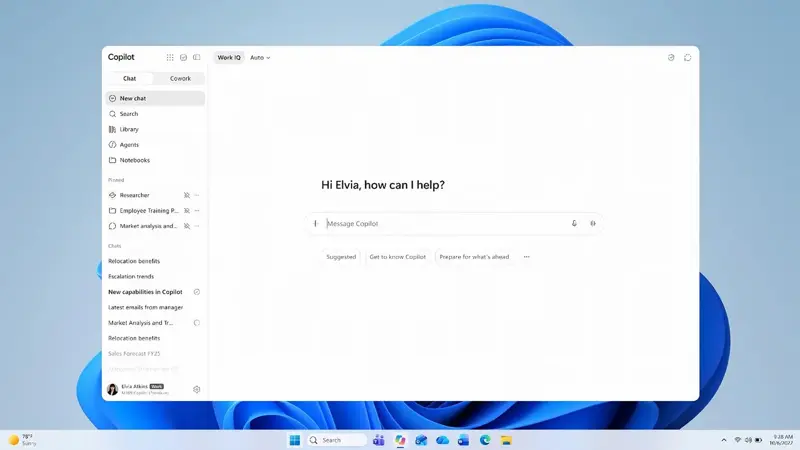
Windows Central broke the story back on August 13, and the framing from Zac Bowden was blunt: this is “the first real piece of the Copilot SuperApp” Microsoft CEO Satya Nadella had been teasing. On Microsoft’s July 29, 2026 earnings call, Nadella told investors the company would bring chat, Cowork, Autopilots, and Code together into one flagship experience — spanning both consumer and commercial customers — “this quarter.” That’s code for by the end of September 2026. This merge is step one of that plan, not the finished product.
But the merge came with a cost. On August 18, 2026, Microsoft retired three consumer features outright: Copilot Podcasts (the AI-generated audio recaps), Copilot Group Chat (multi-person chat threads with Copilot), and consumer Deep Research (the long-form research reports). Mico — the animated character Microsoft added to Copilot’s voice mode last year — got quietly retired too. TechCrunch’s framing of the cut list was the least generous, and probably the most honest: this wasn’t a tidy-up, it was Microsoft admitting some of its own features “had to earn the right to exist” and lost.
Why this matters if you’ve been burned by Copilot before
If you work at a company with more than 2,000 Microsoft 365 users, you might remember April 15, 2026 — the day Copilot Chat got pulled out of Word, Excel, PowerPoint, and OneNote for anyone without a paid license. We covered that one at the time. That was a licensing crackdown: Microsoft drawing a hard line between paid and free users inside Office apps specifically.
This is a different story. The September merge doesn’t touch that April licensing wall — if your org still requires a paid seat to use Copilot inside Word, that requirement hasn’t moved. What’s changed is the app you access Copilot through, not who’s allowed to use it inside Office. So if you’re wondering “wait, is Microsoft killing Copilot?” — no. If anything, Microsoft is doing the opposite: consolidating two confusing products into one, and using it as the launchpad for something bigger. The confusion this month is structural, not existential.
There’s actually a second, easy-to-miss rename tangled up in all this. Separately from the consumer-plus-M365-Copilot merge, Microsoft’s own support documentation confirms the Microsoft 365 (Office) app is also being renamed to the Microsoft Copilot app. If you had the old Office mobile app pinned to your home screen — the one that opened Word, Excel, and PowerPoint files without any AI branding at all — don’t be surprised if that icon changes name and appearance too, on a rollout schedule that may not line up exactly with the Copilot-app merge described above. Two renames, same season, same company, easy to conflate. If your Office app suddenly says “Copilot” on it, that’s this second change, not a sign you accidentally installed something new.
And one more data point worth flagging honestly: at least one independent Copilot-tracking newsletter (Big Hat Group’s “Copilot Weekly”) reported that alongside the app merge, Microsoft cut credit allowances for certain usage tiers by 37–44% and retired six underlying models on September 1, with new “Studio” billing starting around the same window. Microsoft hasn’t put that framing in its own consumer-facing support docs — it’s third-party tracking, not an official disclosure — but it lines up with the broader pattern here: the app got simpler, and the usage math got a little less generous at the same time.
The Walkthrough: What You’ll Actually See
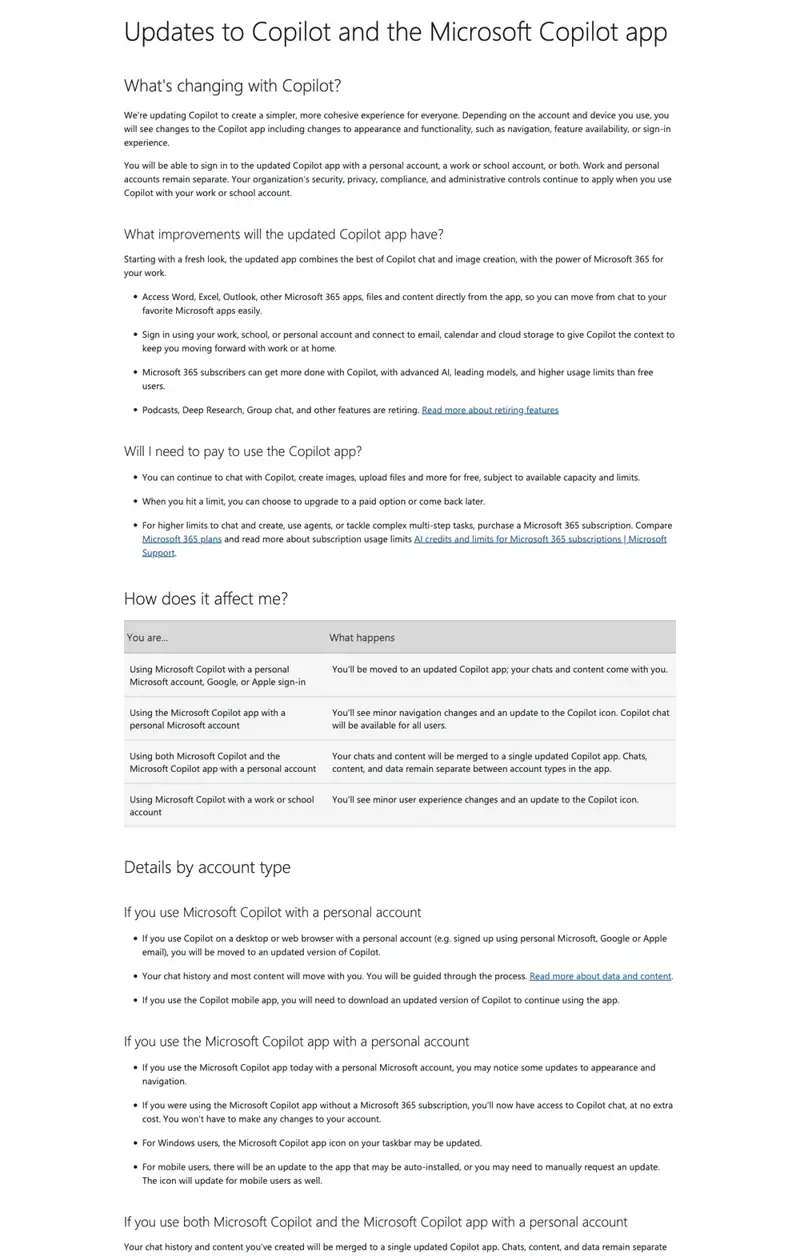
Let’s get concrete. Here’s what changes on your screen, step by step — and one full example of what using the merged app actually looks like.
Step 1: Figure out which Copilot you have right now
Before the merge, you had one of two apps:
- Consumer Copilot — a rounded, colorful icon, usually pinned to your taskbar or dock if you ever clicked “yes” to install it. No company branding anywhere.
- Microsoft 365 Copilot — a similar-but-not-identical icon, usually installed by your IT department, showing your company name or logo somewhere in the interface.
If you only ever had one of these, you might not have noticed the redundancy. But plenty of people — especially anyone who uses a personal Microsoft account and a work Microsoft 365 account on the same laptop — had both icons sitting next to each other on the taskbar. Office Watch called this out directly in its own coverage: “Those two confusingly similar Copilot icons on your taskbar are about to become one.”
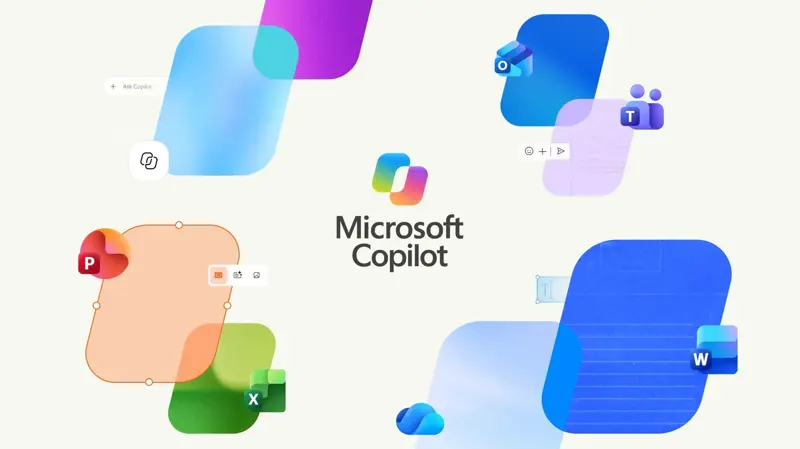
What you’ll see now: open your Start menu or dock and look for “Microsoft Copilot” — just that, no “365,” no “for Business.” The icon has a subtle refresh (Verge’s Tom Warren called it “a subtle change over the existing one,” not a dramatic redesign). If you still see two separate Copilot icons on Windows after this week, the merge hasn’t reached your device yet — Microsoft’s own rollout notes say Windows and Mac get it worldwide starting mid-September, but staggered rollouts mean not everyone flips the same day.
A wrinkle worth knowing: according to ali tajran’s breakdown of Microsoft’s own Message Center post (MC1454108), phone rollout and desktop rollout aren’t on the same clock. Mobile and web got the merge automatically starting mid-August. Windows and Mac apps needed an opt-in early-access window before the worldwide push this month. And critically — iPhone and Android users generally get updated automatically through their app stores, while some desktop users may need to manually check for updates if their IT policy delays automatic app updates.
Step 2: Find where your personal and work accounts live
This is the part that actually matters for how you use Copilot day to day. In the merged app, you’re not locked into one account. You can have your personal Microsoft account and your work (Microsoft Entra ID) account both signed in, and switch between them.
Here’s how Microsoft designed the visual cues, per its own support documentation and the Message Center post: the app uses a different background color depending on which account you’re in, and adds a “Work” label under your profile picture in the navigation pane when you’re in your Entra ID (work/school) session. If your organization already showed a green data-protection shield icon in the old Microsoft 365 Copilot app, that shield carries over — it’s your visual signal that you’re inside the compliance-protected work environment, not the personal one.
Microsoft’s stated design goal: work and personal data stay separated even though they live in the same app window. That’s the official claim. In practice, several IT-adjacent accounts on X have pointed out that “the app can now hold work and personal accounts” is exactly the kind of thing that makes copy-pasting a client email into the wrong chat window one click easier than before — more on that in the edge cases section below.
If your organization allows it, you can even sign into your personal Microsoft account inside the same app using your Apple or Google credentials — a small but real convenience if you’ve been juggling separate logins.
Step 3: Find what used to live in the old app
This is where the retirements bite. If you were a regular user of any of the three retired features, here’s where things stand and what to do instead:
Copilot Podcasts — fully gone as of August 18. If you generated any AI podcast episodes and shared links to them, those links are dead now; Microsoft did not offer a bulk-export tool before pulling the plug. If you need a similar “turn my notes into an audio recap” workflow, tools like NotebookLM (Google) or ElevenLabs’ reader tools cover similar ground, though the workflow won’t be identical.
Copilot Group Chat — also gone August 18, and this one stings more if you had active threads. Microsoft’s support notice (which one user on X flagged as going up only on August 10 — just eight days before the cutoff) confirmed there was no bulk export for Group Chat messages, images, or files. If you had anything worth keeping in a Group Chat thread, and you didn’t manually save it before August 18, it’s gone.
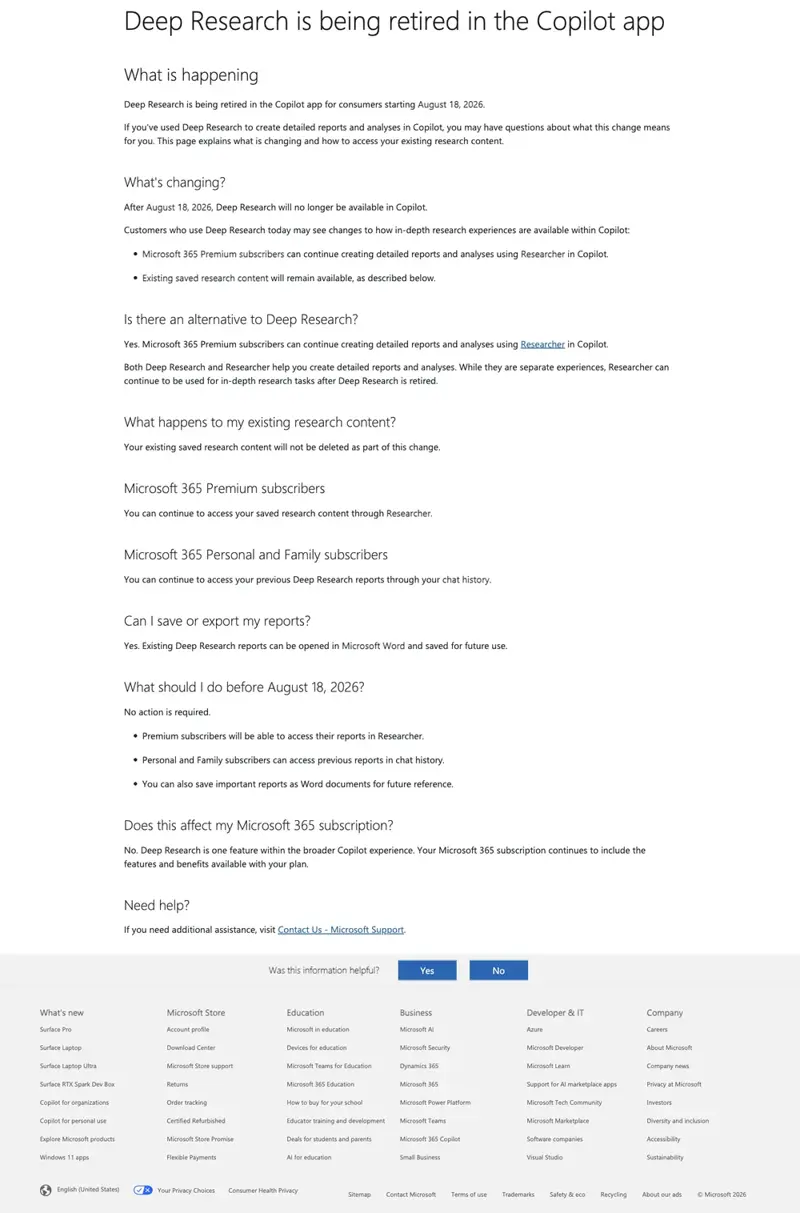
Consumer Deep Research — retired for free and Microsoft 365 Personal/Family users. The replacement is a new feature called Researcher, but it’s gated behind Microsoft 365 Premium — the highest consumer subscription tier. If you relied on free Deep Research for long-form research reports, you’ll either need to upgrade to Premium or find the report was one of the ones Microsoft says stays visible in your existing chat history (new reports just won’t generate).
Where to look for what’s left: open the merged app, click your chat history icon, and look for a “Create” option — that’s the rebranded image/banner/video generation tool, and it’s still there for both free and paid users, just with usage caps that scale by tier (see the table below).
A worked example: opening the app and jumping into Word
Let’s walk through what the actual “jump from chat to Word” workflow looks like now, since that’s the headline convenience Microsoft is selling with the merge.
Say you’re drafting a project update and want AI help, then need to drop the result into an actual Word document.
- Open the Microsoft Copilot app (same app, whichever account you’re in).
- Type your request — something like “draft a two-paragraph project status update for the Riverside account, tone: professional but not stiff.”
- Copilot generates the draft in the chat window, same as before.
- Click the Microsoft 365 app switcher inside the same window — this is the new part. Instead of copy-pasting the output into a separately-opened Word window, the merged app surfaces direct links into Word, Excel, Outlook, and your other Microsoft 365 apps and files.
- Select Word, and the app either opens a new document with your draft pre-loaded or lets you paste directly into an existing file you’re working on — without leaving the Copilot window first.
The mechanical time savings here are modest — you’re skipping maybe two or three clicks and one app-switch. The bigger shift is conceptual: Copilot is no longer “a chat window next to your work,” it’s positioned as the front door into your Microsoft 365 apps and files. Whether that’s actually faster for you depends on your workflow, and if you’re someone who keeps Word open in a pinned taskbar slot all day anyway, you may not notice much difference at all.
Free vs. Paid Inside the Merged App
This is the table people actually came here for. Based on Microsoft’s own support documentation, here’s what each tier gets inside the single merged app — and what it costs.
| Capability | Free (no subscription) | Microsoft 365 Personal/Family | Microsoft 365 Premium |
|---|---|---|---|
| Copilot chat | Included, subject to daily capacity/usage limits | Higher limits than free | “Extensive” usage |
| Image/video creation | Included, subject to limits | Higher limits than free | Extensive usage |
| Upload files to chat | Included, subject to limits | Included with subscription benefits | Included |
| Microsoft 365 app access (Word, Excel, Outlook) | Direct links available, but still governed by your underlying app license | Includes full Microsoft 365 apps + advanced Copilot chat | Includes Family-level benefits + premium AI entitlements |
| Agents & complex multi-step tasks | Not available at meaningful scale | Requires subscription for higher limits, agents | Full agentic AI features, including advanced research/analytics |
| In-depth research (post-Deep-Research) | None — feature retired | None — Researcher not included | Researcher included |
| Monthly price (US) | $0 | $9.99 (Personal) / $12.99 (Family, 1–6 people) | ~$19.99–22/mo (varies by region) |
A few things worth pulling out of that table. First, Microsoft’s own language is refreshingly direct about the free tier: you can “chat with Copilot, create images, upload files and more for free,” but it’s explicitly “subject to capacity and limits” — hit the ceiling, and you either wait or upgrade. Second, the entire Deep Research replacement — Researcher — is a Premium-only feature. Office Watch put it plainly: “Really a price rise disguised in a Copilot app merger.” That’s an opinion, not an official Microsoft framing, but it’s hard to argue the timing is a coincidence.
Third, on the business side: Microsoft’s own Q4 FY2026 earnings call (July 29, 2026) disclosed more than 30 million paid Microsoft 365 Copilot seats, with net seat additions “more than doubling” — a separate business subscription that starts around $30/user/month for organizations, unaffected by the consumer pricing above. If your employer pays for Microsoft 365 Copilot, you’re likely unaffected by the consumer tier questions in this table; you’re already on the business SKU.
“Copilot vs. Microsoft 365 Copilot” — does that comparison even matter anymore?
For most of 2025 and early 2026, “Copilot vs. Microsoft 365 Copilot” was a genuinely confusing search query, because they were different apps with different feature sets and different pricing logic. Post-merge, that framing is mostly obsolete — there’s one app now, and the real distinction is which account and subscription tier you’re using inside it, not which app you downloaded. If you’re still hunting for a full side-by-side of consumer Copilot tiers versus the business Microsoft 365 Copilot SKU (license cost, admin controls, data residency), that’s a deeper comparison than this piece covers — but the short answer is: the business tier still exists as a separate $30/user/month purchase for organizations, layered inside the same unified app experience.
What This Means for You
If you only ever used the free consumer Copilot app: Your day-to-day chat experience barely changes — you’ll get a new icon and possibly a slightly different app name, and you may hit usage limits a bit sooner if you were a heavy user, since Microsoft is now more explicit about capacity caps. First action: open the app once this week just to confirm your login and chat history carried over cleanly.
If you pay for Microsoft 365 Copilot at work: Nothing about your license or admin-managed controls changes. What changes is the icon, the app name, and — per Microsoft’s Message Center notice — new visual cues (background color, “Work” label) to help you tell which account context you’re in. First action: check with your IT team whether your organization has opted into early access yet, or if you’re on the standard mid-September timeline.
If you used Copilot Podcasts or Deep Research regularly: You lost something real, and there’s no seamless replacement unless you’re willing to pay for Microsoft 365 Premium (Researcher). First action: if you have any Deep Research reports you still need, check your chat history now — Microsoft says prior reports remain visible, but new ones won’t generate without Premium.
If you’re on Windows vs. Mac: Functionally identical rollout — both get the merge worldwide starting mid-September, per Microsoft’s own documentation, with an “updated architecture” on both platforms to support future features. First action: if you use both a personal and work account across two computers, expect the icon change to land on a slightly different schedule per device rather than all at once.
If you’re a solopreneur wondering whether Premium is worth it: The math depends entirely on whether you use in-depth research. If you never touched Deep Research, staying on free or Microsoft 365 Personal ($9.99/mo) is fine — you’re not losing meaningful capability. If Researcher-style long reports were core to your workflow, Premium is the only path back to that capability inside Copilot; otherwise, look at Claude or ChatGPT’s research modes as alternatives. One IT commentator on X put the broader ROI question well: Teams used to come bundled free with Office, but Copilot is priced per-user-per-month on top — meaning the “is this worth it” math has to clear a real bar, not just a convenience bar. First action: track how often you’d actually use Researcher over a two-week period before committing to the upgrade.
If you manage Copilot licenses for a small team: This merge doesn’t change your licensing math — Microsoft 365 Copilot business seats are still purchased and administered the same way, at roughly $30/user/month, and the 30-million-seat milestone Microsoft disclosed on its July earnings call suggests this pricing isn’t moving soon. First action: brief your team on the new unified icon before the desktop rollout hits, so nobody files a support ticket thinking Copilot vanished.
If you’re an IT admin worried about data separation: Microsoft’s public claim is that work and personal data remain separate inside the unified app, reinforced by visual cues (background color, account labels, the green Entra ID shield). But “same app window, separate data” is a genuinely new attack surface for accidental cross-pasting that didn’t exist when the apps were physically separate. First action: add a one-line reminder to your team’s AI-usage policy — check the account switcher before pasting anything client-confidential into a Copilot chat.
Edge Cases & Troubleshooting
“My chat history disappeared” (or looks incomplete). One user on X reported that after the update, Copilot stopped using their name in conversation and that their history looked wrong — despite never having signed up for Microsoft 365 Copilot in the first place. If this happens to you, check which account you’re currently signed into via the account switcher; history is tied to the specific account, and a default-account mix-up after an app update is a known early-rollout hiccup. Sign out and back into the correct account before assuming data loss.
“The app shows the wrong account, or defaulted to the wrong one.” Multiple early reports describe the app opening into an unexpected account context after the update. Fix: use the account switcher (now more visually distinct with the background-color change) to manually select the account you intend to use, every session, until the app’s default-account behavior stabilizes.
“I can’t tell if I’m in my work account or personal account before I paste something sensitive.” This is the single most-repeated piece of advice from IT-adjacent accounts covering the merge: check the account switcher before pasting a client email, a contract clause, or anything with confidential information into a Copilot chat. The visual cues exist (background color, “Work” label, green shield) — but they’re easy to miss if you’re moving fast.
“My Group Chat threads are just gone.” They are, and there’s no recovery path. Microsoft’s own retirement notice for Group Chat confirmed no bulk export was offered, and the notice reportedly went up only around August 10 — just over a week before the August 18 cutoff. If this happened to you, there’s nothing to restore; the only forward-looking fix is exporting anything similar manually going forward, since Microsoft hasn’t signaled Group Chat is coming back in any form.
“A podcast link I shared with someone doesn’t work anymore.” Correct — Copilot Podcasts and all shared links stopped resolving after August 18, 2026. There’s no official archive. If you need the content, you’d have to have saved a transcript or audio file locally before the cutoff.
“Two Copilot icons are still showing up on my Windows taskbar.” Per Microsoft’s own rollout notes, Windows and Mac desktop apps only started their worldwide push this week (mid-September) — and even within that, some organizations get early-access opt-in before the general rollout. If you’re still seeing two separate icons, the merge likely hasn’t reached your specific device or organization’s deployment ring yet. Check for app updates manually if you don’t see it within a week or two of this post.
“My organization’s admin console shows conflicting settings for a Copilot control (like camera/screen sharing).” At least one early tester on a trial tenant found that toggling one setting (e.g., “Screens: No users”) didn’t propagate to a related setting (“Cameras: All users”) the way expected. If you’re an IT admin and see mismatched toggle states in the Copilot admin console during this transition window, don’t assume the console’s displayed state is accurate — verify actual behavior with a test account rather than trusting the toggle display alone, and consider it a rollout-week bug rather than a documented feature.
“An app button auto-filled my info into Copilot without me expecting it.” At least one user reported that clicking a routine “update your account” button inside Outlook redirected into Copilot and auto-populated their name into a chat, running it automatically. If you notice unexpected auto-navigation into Copilot from other Microsoft 365 apps post-merge, it’s likely related to the new deep-linking between apps described in the walkthrough above — worth flagging to your IT team if it surprises you, since it’s a new behavior pattern that didn’t exist when the apps were separate.
“The free tier feels stingier than it used to, and I’m outside the US.” At least one user in Turkey publicly pushed back on X after hitting what they described as a new daily limit on the free tier, layered on top of frustration that regional pricing didn’t reflect local purchasing power — going as far as threatening to switch to a competing assistant. Microsoft hasn’t published region-by-region usage-limit details, so if your free-tier experience feels tighter post-merge, you’re not imagining it; capacity limits are explicitly part of the new free-tier design, and how tightly they’re enforced may vary by region and load.
What It Can’t Do (Yet)
It can’t replace paid Deep Research with a free equivalent. If you need long-form, cited research reports and you’re not on Microsoft 365 Premium, that capability is simply gone from the free and mid-tier plans. There’s no workaround inside Copilot itself.
It doesn’t yet deliver the full “Super App” Nadella described. The July 29 earnings-call vision — chat, Cowork, Autopilots, and Code unified in one flagship experience — is not what shipped this month. This merge is the structural first step (one app, one account switcher), not the finished bundle. Expect more consolidation before the end of September 2026, per Microsoft’s own stated timeline, but treat “Super App” as a plan in motion, not a delivered product. And it’s worth noting the skepticism this plan has already drawn: one commentator on X pointed out that OpenAI’s own attempt at an all-in-one super app was widely called “a mess” by its own users, and asked the obvious question — deep enterprise integration is a real advantage for Microsoft, but merging chat, coding, and collaboration tools into one product hasn’t been an easy win for anyone who’s tried it yet.
It can’t guarantee your Group Chat or Podcast content is recoverable. Both were retired without a bulk-export tool. If you didn’t manually save what you needed before August 18, 2026, there’s no official path to get it back.
It doesn’t eliminate the org-data-grounding gap for free users. Free and even mid-tier subscribers still don’t get the deeper “agents and complex multi-step tasks” capability Microsoft reserves for paid tiers — the merge changed the app, not the underlying tier-gating logic that’s been in place since Copilot’s earlier releases.
It can’t fully prevent account-mix-up risk just by existing in one app. Microsoft’s visual cues (background color, account labels) reduce but don’t eliminate the risk of pasting the wrong content into the wrong account context — that’s now a training and habit problem for users and IT teams, not something the software fully solves on its own.
FAQ
Is Microsoft phasing out Copilot? No — the opposite. Microsoft is consolidating two separate Copilot apps into one and using that consolidation as the foundation for an even bigger “Super App” push planned for later this year. The merge reduces app count; it doesn’t reduce Microsoft’s investment in Copilot.
Why is Copilot no longer available in Word/Excel for some users? That’s a separate, earlier change from April 15, 2026, when Microsoft removed Copilot Chat from Word, Excel, PowerPoint, and OneNote for unlicensed users at organizations with 2,000+ Microsoft 365 seats. This September’s app merge doesn’t reverse or change that licensing rule.
Is Microsoft Copilot free in 2026? Yes, a free tier still exists inside the merged app — chat, image creation, and file uploads are all available for free, subject to usage limits. Paid tiers (Microsoft 365 Personal, Family, or Premium) buy higher limits, agent capabilities, and, at the Premium tier, the new Researcher feature.
What happened to Copilot Deep Research? It was retired for free, Personal, and Family users on August 18, 2026. Its replacement, Researcher, is available only to Microsoft 365 Premium subscribers.
What is the Copilot Super App? It’s the bigger consolidation plan Satya Nadella described on Microsoft’s July 29, 2026 earnings call — unifying Copilot chat, Cowork, Autopilots, and Code into one flagship experience spanning consumer and business users. Nadella said it would ship “this quarter,” meaning by the end of September 2026. This month’s app merge is the first visible piece of that plan.
Can I have my personal Microsoft account and work account in the same Copilot app? Yes. The merged app supports both account types side by side, with a switcher between them, distinct background colors, and a “Work” label plus green shield icon when you’re in your Entra ID (work/school) session.
What happened to Copilot Group Chat? Retired on August 18, 2026, with no bulk-export option offered beforehand. Any existing Group Chat threads, messages, or generated images are gone.
Did Microsoft change Copilot’s pricing with this merge? Not directly — the listed consumer prices ($9.99 Personal, $12.99 Family, roughly $19.99–22 Premium depending on region) and the business Microsoft 365 Copilot seat price (around $30/user/month) haven’t officially moved. But moving Researcher behind Premium functions as a de facto price increase for anyone who wants that specific capability and previously got a version of it for free.
Will Windows and Mac get the same features at the same time? Yes, per Microsoft’s rollout documentation — both platforms are receiving the merge worldwide starting mid-September 2026, with an updated underlying architecture on both to support future feature additions.
What is Researcher in Microsoft Copilot? Researcher is the feature that replaces consumer Deep Research, built to gather, analyze, and summarize information from the web and your own work documents into an easy-to-read report. It’s included for Microsoft 365 Premium subscribers and for business users with Microsoft 365 Copilot licenses — it is not available on the free tier or on Microsoft 365 Personal/Family plans.
Is the Microsoft 365 (Office) app the same thing as this Copilot app merge? No, though they’re easy to confuse since both happened around the same time. The Microsoft 365 (Office) app — the one that opens Word, Excel, and PowerPoint files — is separately being renamed to the Microsoft Copilot app per Microsoft’s own documentation. That’s a related but distinct change from the consumer-Copilot-plus-Microsoft-365-Copilot merge covered in this piece.
The Bottom Line
Microsoft didn’t kill Copilot this month — it consolidated it, and used the consolidation as a staging ground for something bigger due before October. If you only ever used the free consumer app casually, this barely touches your day. If you relied on Deep Research, Podcasts, or Group Chat, you lost real functionality with no free path back. And if you’re juggling a personal and work account in the same window for the first time, the biggest practical risk isn’t losing a feature — it’s a momentary lapse where you paste the wrong thing into the wrong context.
If you want to actually get fluent in what Copilot can (and can’t) do inside Word, Excel, Outlook, and Teams — not just react to the next Microsoft announcement — our Microsoft Copilot for Microsoft 365 course walks through real workflows in the current app, free to start.
Sources
- Microsoft Support: Updates to Copilot and the Microsoft Copilot app
- Microsoft Support: Deep Research is being retired in the Copilot app
- Microsoft: Compare Microsoft 365 Plans & Pricing
- Microsoft: Q4 FY2026 Earnings Call (July 29, 2026)
- Windows Central: Microsoft begins unified Copilot app rollout
- GeekWire: Microsoft starts merging its Copilot consumer and business apps
- TechCrunch: Microsoft kills off unsuccessful AI features while merging its separate Copilot apps
- The Verge: Microsoft is combining its Copilot apps ahead of a ‘super app’
- The Register: Microsoft’s dueling Copilot apps have combined into a single entity
- gHacks: Microsoft Merges Its Two Copilot Apps Into One
- Unite.AI: Microsoft Merges Copilot and Microsoft 365 Copilot Into a Single App
- Office Watch: Copilot Apps Merge: What You Need to Know
- NotebookCheck: Microsoft Copilot: Deep Research ends, successor is paid only
- Campus Technology: Microsoft Merges Copilot Apps Into a Single User Experience
- Seeking Alpha: Microsoft Corporation (MSFT) Q4 2026 Earnings Call Transcript
